fuel Acura MDX 2009 User Guide
[x] Cancel search | Manufacturer: ACURA, Model Year: 2009, Model line: MDX, Model: Acura MDX 2009Pages: 489, PDF Size: 11.91 MB
Page 82 of 489
HandsFreeLink™You can receive or make phone calls
from your cell phone through your
vehicle's Bluetooth
®HandsFreeLink
®
(HFL) system without touching your
cell phone. To use the system, your cell phone
and the HFL system must be linked.
Not all cell phones are compatible
with this system. Refer to page278
for instructions on how to link your
cell phone to the HFL and how to
receive or make phone calls, or visit
the handsfreelink.com website.
Trip Computer
When the main menu displays
‘‘TRIP
COMPUTER ’’, pressing the SEL/
RESET button changes the display to
‘‘ AVERAGE FUEL A/RANGE ’’to
‘‘ AVERAGE FUEL B/RANGE ’’and
to ‘‘AVERAGE SPEED/ELAPSED
TIME ’’.
Multi-Information Display7808/06/06 16:58:07 09 ACURA MDX MMC North America Owner's M 50 31STX620 enu
2009 MDX
Page 83 of 489

AVERAGE FUEL A/BThis shows your vehicle's average
fuel economy in mpg (U.S. models)
or liter/100 km (Canadian models)
since you last reset the Trip A or Trip
B.
You can customize the Trip A and
AVERAGE FUEL A reset condition
on the multi-information display (see
page92).
RANGEThis shows the estimated distance
you can travel on the fuel remaining
in the fuel tank. This distance is
estimated from the fuel economy you
received over the last several miles
(U.S.) or kilometers (Canada), so it
will vary with changes in speed,
traffic, etc.AVERAGE SPEEDThis shows the average speed you
are traveling in miles per hour (mph)
for U.S. models or kilometers per
hour (km/h) for Canadian models.
To reset the AVERAGE SPEED you
have traveled, press and hold the
SEL/RESET button until the number
resets.
ELAPSED TIMEThis shows the time passed traveled
since you last reset it. When you turn
the ignition switch to the ON (II)
position, ELAPSED TIME is reset.
If you want to reset the ELAPSED
TIME manually, go to the trip
computer's ELAPSED TIME display,
and press and hold the SEL/RESET
button until the number resets.
You can customize the ELAPSED
TIME reset condition on the multi-
information display (see page94).
CONTINUED
Multi-Information Display
79
Inst rument s and Cont rols
08/06/06 16:58:07 09 ACURA MDX MMC North America Owner's M 50 31STX620 enu
2009 MDX
Page 88 of 489

Group SetupMenu Item DescriptionSetting OptionPage
METER SETUP
(P.89) LANGUAGE SELECTION Changes the language used in the display.
ENGLISH
ꭧ
90
FRENCH
SPANISH
ADJUST OUTSIDE
TEMP. DISPLAY Changes the outside temperature reading above or
below its current reading. -
5°F ~ꭗ0°F
ꭧ~5°F (U.S.)
91
- 3°C ~ꭗ0°Cꭧ~3°C
(Canada)
TRIP A & AVG. FUEL
RESET with REFUEL Causes trip meter A and the average fuel economy to
reset when you refuel. ON92
OFF
ꭧ
ADJUST
ALARM VOLUMEChanges the indicator alarm volumes into three levels. HIGH
93
MID
ꭧ
LOW
ELAPSED TIME RESET Resets the elapsed time of your current trip. MANUAL ONLY 94
IGN OFF
ꭧ
TRIP B
TRIP A
AUTO INTERIOR
ILLUMINATION Changes the interior light sensitivity to your liking. MAX LOW
95
HIGH MIN
MID
ꭧ
OFF
POSITION SETUP
(P.97) MEMORY POSITION LINK Changes the driver's seat, the steering wheel, and the
outside mirror positions to a stored setting. ON
ꭧ
98
OFF
AUTO TILT & TELESCOPE
STEERING WHEEL Moves the steering wheel fully in and up when the key
is removed. ON
ꭧ
99
OFF
ꭧ : Default setting
Multi-Information Display8408/06/06 16:58:07 09 ACURA MDX MMC North America Owner's M 50 31STX620 enu
2009 MDX
Page 93 of 489
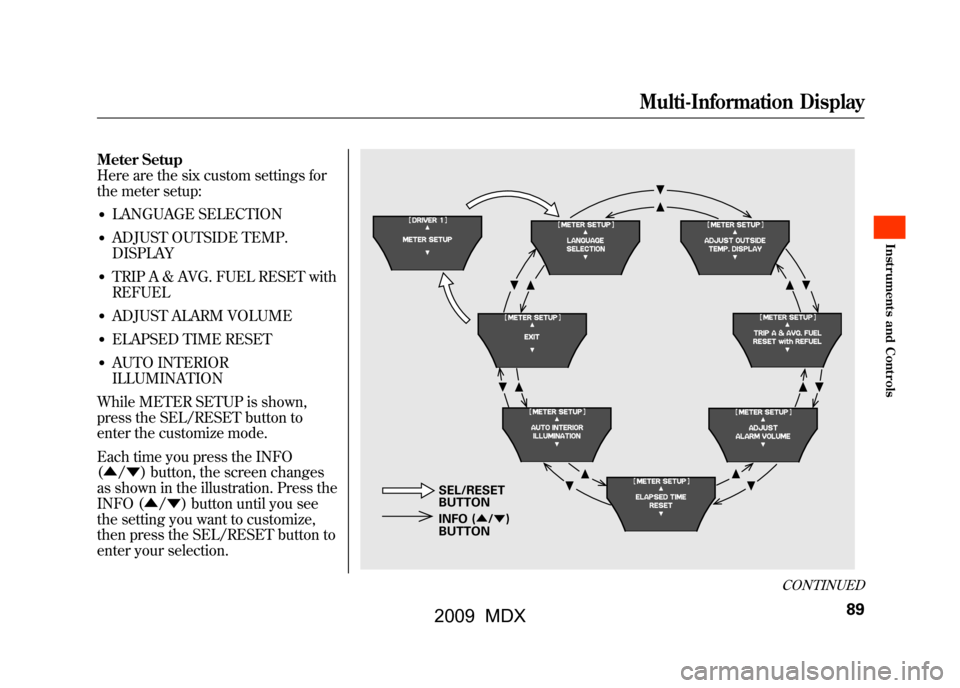
Meter Setup
Here are the six custom settings for
the meter setup:●LANGUAGE SELECTION●ADJUST OUTSIDE TEMP.
DISPLAY●TRIP A & AVG. FUEL RESET with
REFUEL●ADJUST ALARM VOLUME●ELAPSED TIME RESET●AUTO INTERIOR
ILLUMINATION
While METER SETUP is shown,
press the SEL/RESET button to
enter the customize mode.
Each time you press the INFO
(▲ /▼ ) button, the screen changes
as shown in the illustration. Press the
INFO (▲ /▼ ) button until you see
the setting you want to customize,
then press the SEL/RESET button to
enter your selection.
INFO ( ▲/▼ )
BUTTON SEL/RESET
BUTTON
CONTINUED
Multi-Information Display
89
Inst rument s and Cont rols
08/06/06 16:58:07 09 ACURA MDX MMC North America Owner's M 50 31STX620 enu
2009 MDX
Page 96 of 489

Trip A & Avg. Fuel Reset With RefuelTo cause Trip A and AVG. FUEL to
reset every time you refuel your
vehicle, follow these instructions:
You can choose this customize item
from‘‘METER SETUP ’’by pressing
the INFO (▲ /▼ ) button repeatedly.
Press the SEL/RESET button to see
the selections.
Select ON or OFF by pressing the
INFO (▲ /▼ ) button, then enter
your selection by pressing the SEL/
RESET button.
When your selection is successfully
completed, the display changes as
shown above, and then goes back to
the customize item screen.
If the ‘‘SETTING INCOMPLETE ’’
message appears, go back to ‘‘TRIP A
& AVG. FUEL RESET with
REFUEL ’’and repeat the procedure
again.
Multi-Information Display9208/06/06 16:58:07 09 ACURA MDX MMC North America Owner's M 50 31STX620 enu
2009 MDX
Page 119 of 489
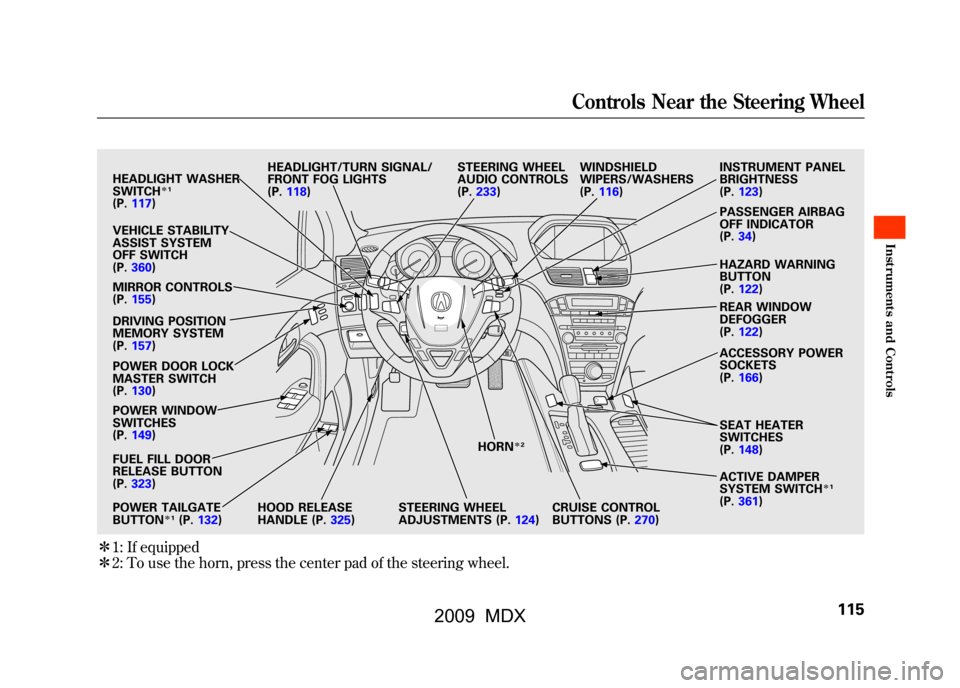
ꭧ1: If equipped
ꭧ 2: To use the horn, press the center pad of the steering wheel.
HEADLIGHT WASHER
SWITCH
ꭧ 1
(P. 117)
VEHICLE STABILITY
ASSIST SYSTEM
OFF SWITCH
(P. 360)
MIRROR CONTROLS
(P. 155)
DRIVING POSITION
MEMORY SYSTEM
(P. 157)
POWER DOOR LOCK
MASTER SWITCH
(P. 130)
POWER WINDOW
SWITCHES
(P. 149)
FUEL FILL DOOR
RELEASE BUTTON
(P. 323)
POWER TAILGATE
BUTTON
ꭧ 1(P. 132) HEADLIGHT/TURN SIGNAL/
FRONT FOG LIGHTS
(P.
118)
HOOD RELEASE
HANDLE (P. 325)STEERING WHEEL
ADJUSTMENTS (P.
124)CRUISE CONTROL
BUTTONS (P.
270)
STEERING WHEEL
AUDIO CONTROLS
(P.
233) WINDSHIELD
WIPERS/WASHERS
(P.
116) INSTRUMENT PANEL
BRIGHTNESS
(P.
123)
PASSENGER AIRBAG
OFF INDICATOR
(P. 34)
HAZARD WARNING
BUTTON
(P. 122)
REAR WINDOW
DEFOGGER
(P. 122)
ACCESSORY POWER
SOCKETS
(P. 166)
SEAT HEATER
SWITCHES
(P. 148)
ACTIVE DAMPER
SYSTEM SWITCH
ꭧ 1
(P. 361)
HORN
ꭧ
2
Controls Near the Steering Wheel
115
Inst rument s and Cont rols
08/06/06 16:58:07 09 ACURA MDX MMC North America Owner's M 50 31STX620 enu
2009 MDX
Page 132 of 489

The Immobilizer System protects
your vehicle from theft. If an
improperly coded key (or other
device) is used, the engine's fuel
system is disabled.
When you turn the ignition switch to
the ON (II) position, the immobilizer
system indicator should come on
briefly, then go off. If the indicator
starts to blink, it means the system
does not recognize the coding of the
key. Turn the ignition switch to the
LOCK (0) position, remove the key,
reinsert it, and turn the ignition
switch to the ON (II) position again.
The system may not recognize your
key's coding if another immobilizer
key or other metal object (i.e. key
fob) is near the ignition switch when
you insert the key.If the system repeatedly does not
recognize the coding of your key,
contact your dealer.
Do not attempt to alter this system or
add other devices to it. Electrical
problems could result that may make
your vehicle inoperable.
If you have lost your key and you
cannot start the engine, contact your
dealer.
Always take the ignition key with you
whenever you leave the vehicle alone.
As required by the FCC:
This device complies with Part 15 of theFCC rules. Operation is subject to the
following two conditions: (1) This devicemay not cause harmful interference, and(2) this device must accept any
interference received, includinginterference that may cause undesiredoperation.
Changes or modifications not expresslyapproved by the party responsible for
compliance could void the user'sauthority to operate the equipment.
This device complies with IndustryCanada Standard RSS-210.
Operation is subject to the following twoconditions: (1) this device may not causeinterference, and (2) this device must
accept any interference that may causeundesired operation of the device.
Immobilizer System12808/06/06 16:58:07 09 ACURA MDX MMC North America Owner's M 50 31STX620 enu
2009 MDX
Page 325 of 489

Before you begin driving your
vehicle, you should know what
gasoline to use and how to check the
levels of important fluids. You also
need to know how to properly store
luggage or packages. The
information in this section will help
you. If you plan to add any
accessories to your vehicle, please
read the information in this section
first.Break-in Period
...........................
322
Fuel Recommendation
................
322
Service Station Procedures
.........
323
Refueling
.................................
323
Tighten Fuel Cap Message
.....
324
Opening and Closing the
Hood
...................................
325
Oil Check
................................
326
Engine Coolant Check
............
326
Fuel Economy
.............................
327
Accessories and
Modifications
..........................
330
Carrying Cargo
...........................
332
Before Driving
321
Bef ore Driving
08/06/06 16:58:07 09 ACURA MDX MMC North America Owner's M 50 31STX620 enu
2009 MDX
Page 326 of 489

Break-in Period
Help assure your vehicle's future
reliability and performance by paying
extra attention to how you drive
during the first 600 miles (1,000 km).
During this period:●Avoid full-throttle starts and rapid
acceleration.●Avoid hard braking for the first 200
miles (300 km).●Do not change the oil until the
multi-information display indicates
it is needed.●Do not tow a trailer.
You should also follow these
recommendations with an
overhauled or exchanged engine, or
when the brakes are replaced. Fuel Recommendation
Your vehicle is designed to operate
on premium unleaded gasoline with
a pump octane of 91 or higher. If this
octane grade is unavailable, regular
unleaded gasoline with a pump
octane of 87 or higher may be used
temporarily. The use of regular
unleaded gasoline can cause metallic
knocking noises in the engine and
will result in decreased engine
performance. The long-term use of
regular-grade gasoline can lead to
engine damage.
We recommend quality gasolines
containing detergent additives that
help prevent fuel system and engine
deposits.
In addition, in order to maintain good
performance, fuel economy, and
emissions control, we strongly
recommend, in areas where it is
available, the use of gasoline that
does NOT contain manganese-based
fuel additives such as MMT.Use of gasoline with these additives
may adversely affect performance,
and cause the malfunction indicator
lamp on your instrument panel to
come on. If this happens, contact
your dealer for service.
Some gasoline today is blended with
oxygenates such as ethanol or
MTBE. Your vehicle is designed to
operate on oxygenated gasoline
containing up to 10% ethanol by
volume and up to 15% MTBE by
volume. Do not use gasoline
containing methanol.
If you notice any undesirable
operating symptoms, try another
service station or switch to another
brand of gasoline.
For further important fuel-related
information, please refer to your
Quick Start Guide.Break-in Period, Fuel Recommendation32208/06/06 16:58:07 09 ACURA MDX MMC North America Owner's M 50 31STX620 enu
2009 MDX
Page 327 of 489
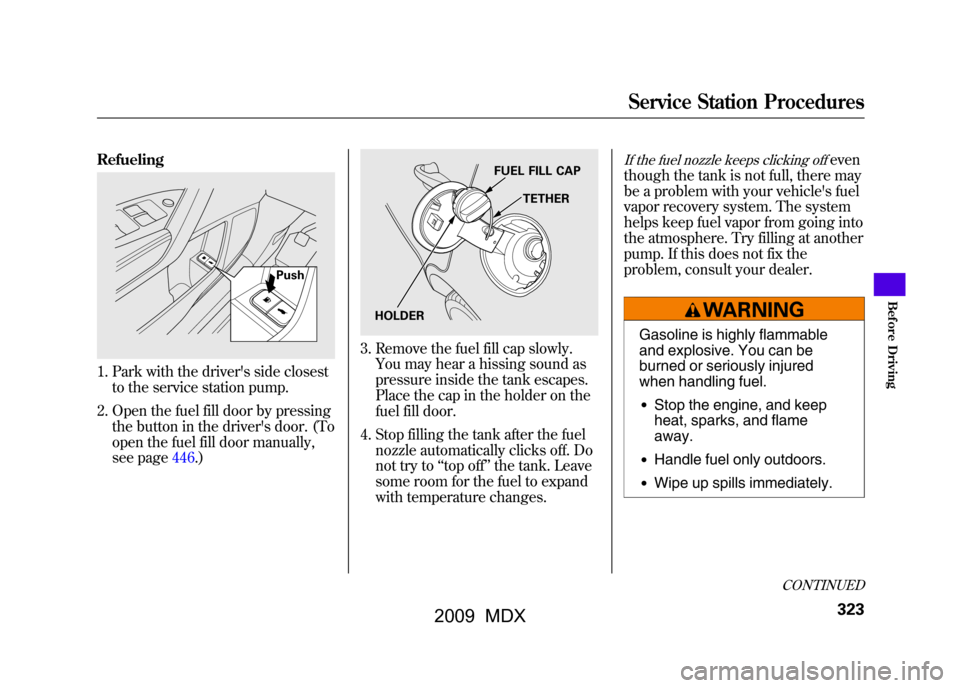
Refueling1. Park with the driver's side closestto the service station pump.
2. Open the fuel fill door by pressing the button in the driver's door. (To
open the fuel fill door manually,
see page446.)
3. Remove the fuel fill cap slowly.You may hear a hissing sound as
pressure inside the tank escapes.
Place the cap in the holder on the
fuel fill door.
4. Stop filling the tank after the fuel nozzle automatically clicks off. Do
not try to ‘‘top off ’’the tank. Leave
some room for the fuel to expand
with temperature changes.
If the fuel nozzle keeps clicking off
even
though the tank is not full, there may
be a problem with your vehicle's fuel
vapor recovery system. The system
helps keep fuel vapor from going into
the atmosphere. Try filling at another
pump. If this does not fix the
problem, consult your dealer.
Gasoline is highly flammable
and explosive. You can be
burned or seriously injured
when handling fuel.●Stop the engine, and keep
heat, sparks, and flame
away.●Handle fuel only outdoors.●Wipe up spills immediately.
Push
FUEL FILL CAP
TETHER
HOLDER
CONTINUED
Service Station Procedures
323
Bef ore Driving
08/06/06 16:58:07 09 ACURA MDX MMC North America Owner's M 50 31STX620 enu
2009 MDX