mirror Acura MDX 2009 User Guide
[x] Cancel search | Manufacturer: ACURA, Model Year: 2009, Model line: MDX, Model: Acura MDX 2009Pages: 489, PDF Size: 11.91 MB
Page 159 of 489

There is also a sensor on the back of
the mirror. Items hung on the mirror
may block this sensor and affect its
performance.Adjusting the Power Mirrors
1. Turn the ignition switch to the ON
(II) position.
2. Move the selector switch to L (driver's side) or R (passenger's
side). 3. Push the appropriate edge of the
adjustment switch to move the
mirror right, left, up, or down.
4. When you finish, move the selector switch to the center (off)
position. This turns the adjustment
switch off to keep your settings.SELECTOR
SWITCH
CONTINUED
Mirrors
155
Inst rument s and Cont rols
08/06/06 16:58:07 09 ACURA MDX MMC North America Owner's M 50 31STX620 enu
2009 MDX
Page 160 of 489
Reverse Tilt Door Mirror
Both outside door mirrors have a
reverse tilt feature. When in reverse,
the selected mirror will tilt down
slightly to improve your view as you
parallel park. Shifting out of reverse
will return the mirror to its their
original position.●To tilt the driver's mirror, place the
selector switch in the left position.●To tilt the passenger's mirror,
place the switch in the right
position.●To turn the feature off, place the
switch in the center position.
Outside mirror positions can be
stored in the driving position
memory system (see page157). Heated Mirrors
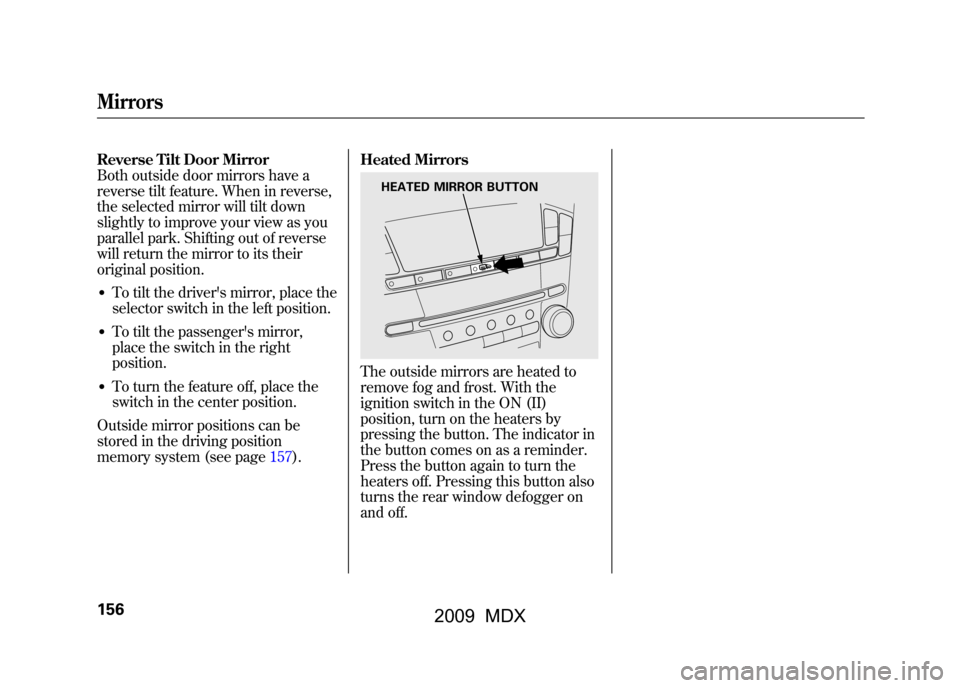
The outside mirrors are heated to
remove fog and frost. With the
ignition switch in the ON (II)
position, turn on the heaters by
pressing the button. The indicator in
the button comes on as a reminder.
Press the button again to turn the
heaters off. Pressing this button also
turns the rear window defogger on
and off.
HEATED MIRROR BUTTON
Mirrors15608/06/06 16:58:07 09 ACURA MDX MMC North America Owner's M 50 31STX620 enu
2009 MDX
Page 161 of 489
Your vehicle has a memory feature
for the steering wheel, driver's seat,
and outside mirror positions.
Seat, except for power lumbar,
steering wheel and outside mirror
positions can be stored in separate
memories. You select a memorized
position by pushing the appropriate
button or using the appropriate
remote transmitter (Driver 1 or
Driver 2). For more information see
page139.Storing a Driving Position in
Memory
Store a driving position only when
the vehicle is parked.
1. Turn the ignition switch to the ON
(II) position. You cannot add a new
driving position to the memory
unless the ignition switch is in the
ON (II) position. You can recall a
memorized position with the
ignition switch in any position.
2. Adjust the seat to a comfortable position (see page140).
Adjust the steering wheel to a
comfortable position (see page
124).
Adjust the outside mirrors for best
visibility (see page155).
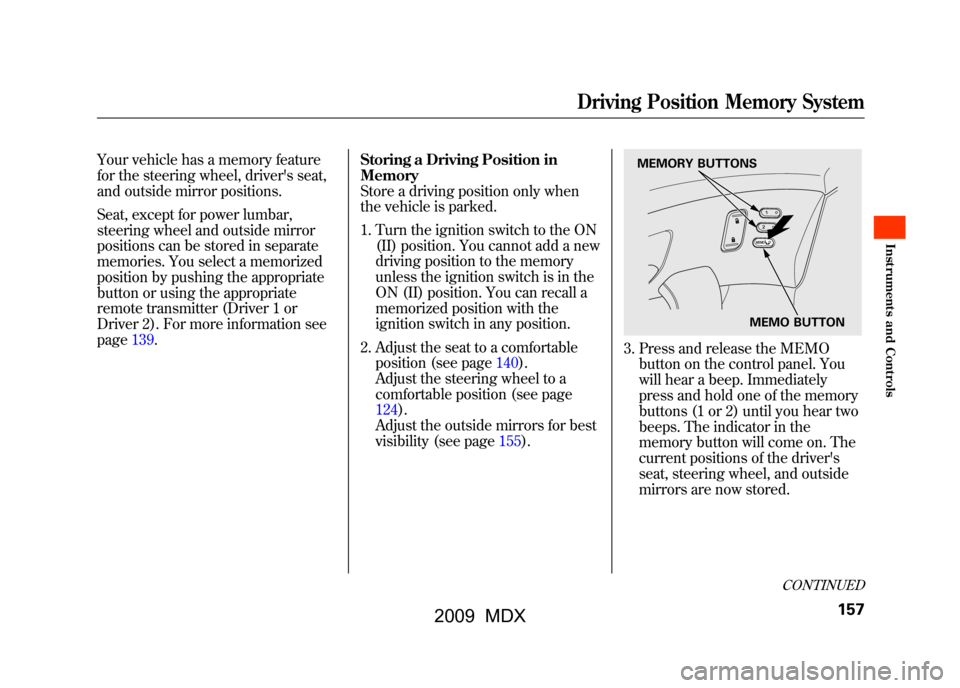
3. Press and release the MEMObutton on the control panel. You
will hear a beep. Immediately
press and hold one of the memory
buttons (1 or 2) until you hear two
beeps. The indicator in the
memory button will come on. The
current positions of the driver's
seat, steering wheel, and outside
mirrors are now stored.
MEMO BUTTON
MEMORY BUTTONS
CONTINUED
Driving Position Memory System
157
Inst rument s and Cont rols
08/06/06 16:58:07 09 ACURA MDX MMC North America Owner's M 50 31STX620 enu
2009 MDX
Page 162 of 489

Doing any of the following after
pressing the MEMO button will
cancel the storing procedure.●Not pressing a memory button
within 5 seconds.●Readjusting the seat position.●Readjusting the outside mirror
position.
Each memory button stores only one
driving position. Storing a new
position erases the previous setting
stored in that button's memory. If
you want to add a new position while
retaining the current one, use the
other memory button. Selecting a Memorized Position
To select a memorized position, do
this:
1. Make sure the vehicle is parked.
2. Press the desired memory button
(1 or 2) until you hear a beep, then
release the button.
The system will move the seat,
steering wheel, and outside mirrors
to the memorized positions. The
indicator in the selected memory
button will flash during movement.
When the adjustments are complete,
you will hear two beeps, and the
indicator will remain on.
To change the ‘‘MEMORY
POSITION LINK ’’setting, see page
98. To stop the system's automatic
adjustment, do any of these actions:
●Press any button on the control
panel: MEMO, 1, or 2.●Push any of the adjustment
switches for the seat.●Shift out of Park.●Adjust the outside mirrors.
If desired, you can use the
adjustment switches to change the
positions of the seat, steering wheel
or outside mirrors after they are in
their memorized position. If you
change the memorized position, the
indicator in the memory button will
go out. To keep this driving position
for later use, you must store it in the
driving position memory.
Driving Position Memory System15808/06/06 16:58:07 09 ACURA MDX MMC North America Owner's M 50 31STX620 enu
2009 MDX
Page 166 of 489

SUN VISORSUNGLASSES HOLDER
COAT HOOK
STORAGE COMPARTMENTS
VANITY MIRROR
GROCERY HOOK
GLOVE BOX
CENTER POCKET ACCESSORY
POWER SOCKET CONSOLE COMPARTMENT ARMREST/BEVERAGE HOLDER ACCESSORY POWER SOCKET BEVERAGE HOLDER
Interior Convenience Items16208/06/06 16:58:07 09 ACURA MDX MMC North America Owner's M 50 31STX620 enu
2009 MDX
Page 170 of 489
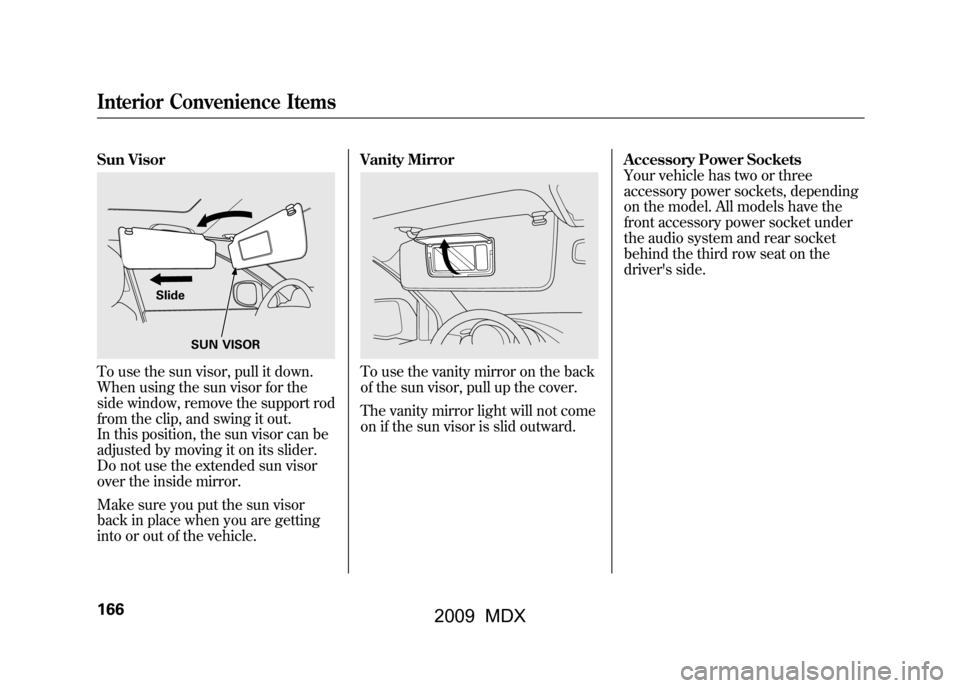
Sun VisorTo use the sun visor, pull it down.
When using the sun visor for the
side window, remove the support rod
from the clip, and swing it out.
In this position, the sun visor can be
adjusted by moving it on its slider.
Do not use the extended sun visor
over the inside mirror.
Make sure you put the sun visor
back in place when you are getting
into or out of the vehicle.Vanity Mirror
To use the vanity mirror on the back
of the sun visor, pull up the cover.
The vanity mirror light will not come
on if the sun visor is slid outward.
Accessory Power Sockets
Your vehicle has two or three
accessory power sockets, depending
on the model. All models have the
front accessory power socket under
the audio system and rear socket
behind the third row seat on the
driver's side.
SUN VISOR
Slide
Interior Convenience Items16608/06/06 16:58:07 09 ACURA MDX MMC North America Owner's M 50 31STX620 enu
2009 MDX
Page 174 of 489

FRONT CONTROL PANELDRIVER'S SIDE
TEMPERATURE
CONTROL
BUTTONS
DUAL BUTTON
REAR BUTTONWINDSHIELD DEFROSTER BUTTON RECIRCULATION BUTTON
REAR WINDOW DEFOGGER/HEATED MIRROR BUTTONREAR CONTROL PANELREAR PASSENGER
COMPARTMENT TEMPERATURE AUTO SYNC INDICATOR
FAN CONTROL BUTTONS
REAR PASSENGER
COMPARTMENT
TEMPERATURE
CONTROL BUTTONS
AUTO BUTTON OFF BUTTONMODE BUTTON
AUTO BUTTON
OFF BUTTON
DRIVER'S SIDE TEMPERATURE
AUTO INDICATOR FRONT PASSENGER'S SIDE TEMPERATURE
FAN CONTROL BUTTONS
FRONT PASSENGER'S
SIDE TEMPERATURE
CONTROL BUTTONSAIR CONDITIONING
BUTTON MODE BUTTON
Climate Control System17008/06/06 16:58:07 09 ACURA MDX MMC North America Owner's M 50 31STX620 enu
2009 MDX
Page 178 of 489
Switch to recirculation mode when
driving through dusty or smoky
conditions, then return to fresh air
mode.Rear Window Defogger ButtonThis button turns the rear window
defogger off and on (see page122).
Pushing this button also turns the
power mirror heaters on and off.Mode ControlUse the mode control button to
select the vents the air flows from.
Some air will flow from the
dashboard vents in all modes.
Air flows from the center and
corner vents in the dashboard.Airflow is divided between the
vents in the dashboard and the floor
vents.Air flows from the floor vents.
Airflow is divided between the
floor and corner vents and the
defroster vents at the base of the
windshield.
Windshield Defroster ButtonThis button directs the main airflow
to the windshield for faster
defrosting. It also overrides any
mode selection you may have made.
When you select
, the system
automatically switches to fresh air
mode and turns on the A/C. For
faster defrosting, manually set the
fan speed to high. You can also
increase airflow to the windshield by
closing the corner vents on the
dashboard. To close the vents, rotate
the wheel under each corner vent.
When you turn offby pressing
the button again, the system returns
to its former settings. For your safety, make sure you have
a clear view through all the windows
before driving.
When the indicator in the button is
on, the front passenger's and rear
passenger compartment
temperatures cannot be set
separately from the driver's.
Climate Control System17408/06/06 16:58:07 09 ACURA MDX MMC North America Owner's M 50 31STX620 enu
2009 MDX
Page 342 of 489

Driving Guidelines
Your vehicle has higher ground
clearance that allows you to travel
over bumps, obstacles, and rough
terrain. It also provides good
visibility so you can anticipate
problems earlier.
Because your vehicle rides higher off
the ground, it has a high center of
gravity that can cause it to roll over if
you make abrupt turns. Utility
vehicles have a significantly higher
roll over rate than other types of
vehicles.
To prevent rollovers or loss of
control:●Take corners at slower speeds
than you would with a passenger
vehicle.●Avoid sharp turns and abrupt
maneuvers whenever possible.
●Do not modify your vehicle in any
way that would raise the center of
gravity.●Do not carry heavy cargo on the
roof.Seepage 378for off-highway driving
guidelines.
Preparing to Drive
You should do the following checks
and adjustments before you drive
your vehicle.
1. Make sure all windows, mirrors, and outside lights are clean and
unobstructed. Remove frost, snow,
or ice.
2. Check that the hood is fully closed.
3. Visually check the tires. If a tire looks low, use a gauge to check its
pressure.
4. Check that any items you may be carrying are stored properly or
fastened down securely.
5. Check the seat adjustment (see page 140).
Driving Guidelines, Preparing to Drive33808/06/06 16:58:07 09 ACURA MDX MMC North America Owner's M 50 31STX620 enu
2009 MDX
Page 343 of 489

6. Check the adjustment of the insideand outside mirrors (see page
154).
7. Check the steering wheel adjustment (see page 124).
8. Make sure the doors and tailgate are securely closed and locked.
9. Fasten your seat belt. Check that your passengers have fastened
their seat belts (see page 15).
10. When you start the engine, check the gauges and indicators in the
instrument panel, and the
messages on the multi-information
display (see pages 63,72and 81). Starting the Engine
Your vehicle's starting system has an
auto control mode. When you turn
the ignition switch to the START (III)
position, this feature keeps the
engine's starter motor running until
the engine starts. Follow these
instructions to start the engine:
1. Apply the parking brake.
2. In cold weather, turn off all
electrical accessories to reduce the
drain on the battery.
3. Make sure the shift lever is in Park. Press on the brake pedal.
4. Without touching the accelerator pedal, turn the ignition switch to
the START (III) position, then
release the ignition switch. You do
not need to hold the ignition
switch in the START (III) position
to start the engine. Depending on
the outside temperature, the
starter motor runs for about 6 to 9
seconds until the engine starts. If you hold the ignition switch in
the START (III) position for more
than 7 seconds, the starter motor,
depending on the outside
temperature, runs for about 10 to
25 seconds until the engine starts.
If the engine does not start, wait at
least 10 seconds before trying
again.
The immobilizer system protects your
vehicle from theft. If an improperly-
coded key (or other device) is used, the
engine's fuel system is disabled. For
more information, see page
128.
CONTINUED
Preparing to Drive, Starting the Engine
339
Driving
08/06/06 16:58:07 09 ACURA MDX MMC North America Owner's M 50 31STX620 enu
2009 MDX