roof Acura MDX 2009 User Guide
[x] Cancel search | Manufacturer: ACURA, Model Year: 2009, Model line: MDX, Model: Acura MDX 2009Pages: 489, PDF Size: 11.91 MB
Page 192 of 489
‘‘NO SIGNAL ’’- The signal is
currently too weak. Move the vehicle
to an area away from tall buildings,
and with an unobstructed view of the
southern horizon.
‘‘
’’ - The selected channel
number does not exist, or is not part
of your subscription, or this channel
has no artist or title information at
this time.
‘‘ ANTENNA ’’- There is a problem
with the XM antenna. Please consult
your dealer.
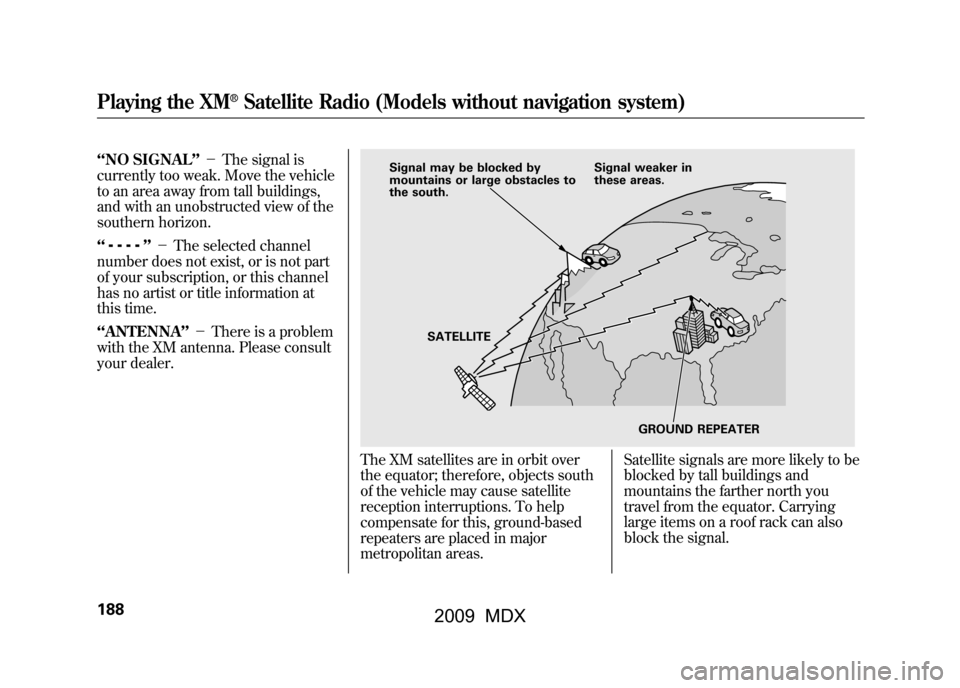
The XM satellites are in orbit over
the equator; therefore, objects south
of the vehicle may cause satellite
reception interruptions. To help
compensate for this, ground-based
repeaters are placed in major
metropolitan areas. Satellite signals are more likely to be
blocked by tall buildings and
mountains the farther north you
travel from the equator. Carrying
large items on a roof rack can also
block the signal.
Signal may be blocked by
mountains or large obstacles to
the south.
Signal weaker in
these areas.
SATELLITE GROUND REPEATER
Playing the XM
®Satellite Radio (Models without navigation system)
18808/06/06 16:58:07 09 ACURA MDX MMC North America Owner's M 50 31STX620 enu
2009 MDX
Page 193 of 489

Depending on where you drive, you
may experience reception problems.
Interference can be caused by any of
these conditions:●Driving on the north side of an
east/west mountain road.●Driving on the north side of a large
commercial truck on an east/west
road.●Driving in tunnels.●Driving on a road beside a vertical
wall, steep cliff, or hill to the south
of you.●Driving on the lower level of a
multi-tiered road.●Driving on a single lane road
alongside dense trees taller than
50 ft. (15 m) to the south of you.●Large items carried on a roof rack.
There may be other geographic
situations that could affect XM radio
reception.
As required by the FCC: Changes or modifications not expresslyapproved by the party responsible for
compliance could void the user'sauthority to operate the equipment.Receiving Satellite Radio ServiceIf your XM Radio service has expired or
you purchased your vehicle from a
previous owner, you can listen to a
sampling of the broadcasts available on
XM Satellite Radio. With the ignition
switch in the ACCESSORY (I) or the ON
(II) position, push the power/volume
knob to turn on the audio system, and
press the
button. A variety of
music types and styles will play.
If you decide to purchase XM satellite
radio service, contact XM Radio at
www.
xmradio.com,
or at 1-800-852-9696. In
Canada, contact XM Canada at
www.
xmradio.ca,
or at 1-877-438-9677. You
will need to give them your radio I.D.
number and your credit card number.
To get your radio I.D. number, turn the
TUNE knob until ‘‘0’’ appears in the
display. Your I.D. will appear in the
display. After you've registered with XM Radio,
keep your audio system in the Satellite
Radio mode while you wait for
activation. This should take about 30
minutes.
While waiting for activation, make sure
your vehicle remains in an open area
with good reception. Once your audio
system is activated,
‘‘CATEGORY’’ or
‘‘ CH ’’will appear in the display, and
you'll be able to listen to XM Radio
broadcasts. XM Radio will continue to
send an activation signal to your vehicle
for at least 12 hours from the activation
request. If the service has not been
activated after 36 hours, contact XM
Radio.
Playing the XM
®Satellite Radio (Models without navigation system)
189
Feat ures
08/06/06 16:58:07 09 ACURA MDX MMC North America Owner's M 50 31STX620 enu
2009 MDX
Page 277 of 489

Compass OperationCanadian MDX modelCompass operation can be affected
by driving near power lines or
stations, across bridges, through
tunnels, over railroad crossings, past
large vehicles, or driving near large
objects that can cause a magnetic
disturbance. It can also be affected
by accessories such as antennas and
roof racks that are mounted by
magnets.
Compass Calibration
If you see‘‘-- ’’in the compass
display and ‘‘CAL ’’and ‘‘
’’are
shown in the calendar display, the
compass is self-calibrating.
The compass may need to be
manually calibrated after exposure to
a strong magnetic field. If the
compass seems to be continually
showing the wrong direction and is
not self-calibrating, do the following.
1. Press and hold the SET button for
five seconds until the clock display
changes to ‘‘ZON ? N. ’’(Clock
adjustment mode will be started
after the first two seconds.)
2. Press the SET button. ‘‘CAL ? N ’’
will be displayed. At this point,
pressing the SET button will exit
calibration mode. 3. Press the
▼button. ‘‘CAL ? Y ’’will
be displayed.
4. Press the SET button. The compass display will change to
‘‘-- ’’and ‘‘CAL ’’and ‘‘
’’are
shown.
5. Drive the vehicle slowly in two complete circles.
COMPASS DISPLAY Press and
hold SET
Press SET
Press
▼
CONTINUEDCompass
273
Feat ures
08/06/06 16:58:07 09 ACURA MDX MMC North America Owner's M 50 31STX620 enu
2009 MDX
Page 286 of 489

Using Voice Control
Here are some guidelines for using
voice control:●To enter a command, press and
release the Talk button. Then,
after the beep, say your command
in a clear, natural tone.●Close the windows and the
moonroof.●When voice commands are used,
the fan speed will be automatically
adjusted to low. However, for
better voice recognition, lowering
the fan speed may be necessary.●Adjust the airflow from both the
dashboard and side vents so they
do not blow against the
microphone on the ceiling.
●Give a voice command in a clear
natural speaking voice without
pausing between words or
numbers. If the system cannot
recognize your command because
of the background noise, speak
louder.●If the microphone picks up voices
other than yours, the system may
not interpret your voice commands
correctly.●If the HFL does not recognize a
command, its response is,
‘‘Pardon. ’’If it doesn't recognize
the command a second time, its
response is, ‘‘Please repeat. ’’If it
doesn't recognize the command a
third time, it plays the Help
prompt.
●To hear a list of available options at
any time, press the Talk button,
wait for the beep, and say, ‘‘Hands
free link help.’’●Many commands can be spoken
together. For example, you can
say, ‘‘Dial 123-456-7891. ’’●To enter a string of numbers in a
Call or Dial command, you can say
them all at once, or you can
separate them in blocks of 3, 4, 7,
10, and 11.●To skip a voice prompt, press the
Talk button while the HFL is
speaking. The HFL will then begin
listening for your next command.
Bluetooth
®HandsFreeLink
®
28208/06/06 16:58:07 09 ACURA MDX MMC North America Owner's M 50 31STX620 enu
2009 MDX
Page 332 of 489

Fuel Economy Factors
The following factors can lower your
vehicle's fuel economy:●Aggressive driving (hard
acceleration and braking)●Excessive idling, accelerating and
braking in stop-and-go traffic●Cold engine operation (engines
are more efficient when warmed
up)●Driving with a heavy load or the air
conditioner running●Improperly inflated tiresImproving Fuel EconomyVehicle MaintenanceA properly maintained vehicle
maximizes fuel economy. Poor
maintenance can significantly reduce
fuel economy. Always maintain your
vehicle according to the maintenance
messages displayed on the information
display (seeOwner's Maintenance
Checks on page389).For example:
●Use the recommended viscosity
motor oil, displaying the API
Certification Seal (see page393).●Maintain proper tire inflation -
An under-inflated tire increases
‘‘ rolling resistance, ’’which reduces
fuel economy.●Avoid carrying excess weight in
your vehicle -It puts a heavier
load on the engine, increasing fuel
consumption.●Keep your vehicle clean -In
particular, a build-up of snow or mud
on your vehicle's underside adds
weight and rolling resistance.
Frequent cleaning helps your fuel
economy.Drive Efficiently●Drive moderately -Rapid
acceleration, abrupt cornering, and
hard braking increase fuel
consumption.
●Observe the speed limit -
Aerodynamic drag has a big effect
on fuel mileage at speeds above 45
mph (75 km/h). Reduce your
speed and you reduce the drag.
Trailers, car top carriers, roof
racks and bike racks are also big
contributors to increased drag.●Avoid excessive idling -Idling
results in 0 miles per gallon.
Fuel Economy32808/06/06 16:58:07 09 ACURA MDX MMC North America Owner's M 50 31STX620 enu
2009 MDX
Page 336 of 489

Your vehicle has several convenient
storage areas:●Glove box●Door and seat-back pockets●Rear cargo area, including the
second and third row seats when
folded flat●Console compartment●Storage compartment●Rear compartment●Roof-rack (if equipped)
However, carrying too much cargo,
or improperly storing it, can affect
your vehicle's handling, stability,
stopping distance, and tires, and
make it unsafe. Before carrying any
type of cargo, be sure to read the
following pages.
STORAGE COMPARTMENT SEAT-BACK POCKETS
CARGO AREA
REAR COMPARTMENT
DOOR POCKETS
CONSOLE COMPARTMENT
GLOVE BOX
Carrying Cargo33208/06/06 16:58:07 09 ACURA MDX MMC North America Owner's M 50 31STX620 enu
2009 MDX
Page 339 of 489

Carrying Cargo in the Passenger
Compartment●Store or secure all items that could
be thrown around and hurt
someone during a crash.●Be sure items placed on the floor
behind the front seats cannot roll
underneath and interfere with the
proper operation of the seats, the
sensors under the seats, or the
driver's ability to operate the
pedals.
Also, keep all cargo below the
bottom of the windows. If it is
higher, it could interfere with the
proper operation of the side
curtain airbags.●Keep the glove box closed while
driving. If it is open, a passenger
could injure their knees during a
crash or sudden stop.Carrying Cargo in the Cargo Area
or on a Roof Rack
●Distribute cargo evenly on the
floor of the cargo area, placing the
heaviest items on the bottom and
as far forward as possible. Tie
down items that could be thrown
about the vehicle during a crash or
sudden stop.●If you fold down the second or
third row seats, tie down items that
could be thrown about the vehicle
during a crash or sudden stop.
●If you carry large items that
prevent you from closing the
tailgate, exhaust gas can enter the
passenger area. To avoid the
possibility of
carbon monoxide
poisoning, follow the instructions
on page58.●If you carry any items on a roof
rack, be sure the total weight of
the rack and the items does not
exceed 165 lbs (75 kg).
If you use an accessory roof rack,
the roof rack weight limit may be
lower. Refer to the information that
came with your roof rack.
CONTINUED
Carrying Cargo
335
Bef ore Driving
08/06/06 16:58:07 09 ACURA MDX MMC North America Owner's M 50 31STX620 enu
2009 MDX
Page 342 of 489

Driving Guidelines
Your vehicle has higher ground
clearance that allows you to travel
over bumps, obstacles, and rough
terrain. It also provides good
visibility so you can anticipate
problems earlier.
Because your vehicle rides higher off
the ground, it has a high center of
gravity that can cause it to roll over if
you make abrupt turns. Utility
vehicles have a significantly higher
roll over rate than other types of
vehicles.
To prevent rollovers or loss of
control:●Take corners at slower speeds
than you would with a passenger
vehicle.●Avoid sharp turns and abrupt
maneuvers whenever possible.
●Do not modify your vehicle in any
way that would raise the center of
gravity.●Do not carry heavy cargo on the
roof.Seepage 378for off-highway driving
guidelines.
Preparing to Drive
You should do the following checks
and adjustments before you drive
your vehicle.
1. Make sure all windows, mirrors, and outside lights are clean and
unobstructed. Remove frost, snow,
or ice.
2. Check that the hood is fully closed.
3. Visually check the tires. If a tire looks low, use a gauge to check its
pressure.
4. Check that any items you may be carrying are stored properly or
fastened down securely.
5. Check the seat adjustment (see page 140).
Driving Guidelines, Preparing to Drive33808/06/06 16:58:07 09 ACURA MDX MMC North America Owner's M 50 31STX620 enu
2009 MDX
Page 354 of 489

Always use the parking brake when
you park your vehicle. Make sure the
parking brake is set firmly, or your
vehicle may roll if it is parked on an
incline.
Set the parking brake before you put
the transmission in Park. This keeps
the vehicle from moving and putting
pressure on the parking mechanism
in the transmission.Parking Tips
●Make sure the moonroof and the
windows are closed.●Turn off the lights.●Place any packages, valuables, etc.
in the cargo area or take them with
you.●Lock the doors and the tailgate.
●Never park over dry leaves, tall
grass, or other flammable
materials. The hot three way
catalytic converter could cause
these materials to catch on fire.●If the vehicle is facing uphill, turn
the front wheels away from the
curb.●If the vehicle is facing downhill,
turn the front wheels toward the
curb.●Check the indicator on the
instrument panel to verify that the
security system is set.●Make sure the parking brake is
fully released before driving away.
Driving with the parking brake
partially set can overheat or
damage the rear brakes.
Parking35008/06/06 16:58:07 09 ACURA MDX MMC North America Owner's M 50 31STX620 enu
2009 MDX
Page 392 of 489

Important Maintenance
Precautions
If you have the required service done
but do not reset the display, or reset
the display without doing the service,
the system will not show the proper
maintenance intervals. This can lead
to serious mechanical problems
because you will no longer have an
accurate record of when
maintenance is needed.Your authorized dealer knows your
vehicle best and can provide
competent, efficient service.
However, service at a dealer is not
mandatory to keep your warranties in
effect. Maintenance may be done by
any qualified service facility or
person who is skilled in this type of
automotive service. Keep all receipts
as proof of completion, and have the
person who does the work fill out
your Maintenance Journal or
Canadian Maintenance Log. Check
your warranty booklet for more
information.We recommend using Acura parts
and fluids whenever you have
maintenance done. These are
manufactured to the same high-
quality standards as the original
components, so you can be confident
of their performance and durability.Maintenance Minder38808/06/06 16:58:07 09 ACURA MDX MMC North America Owner's M 50 31STX620 enu
2009 MDX