ad blue Acura MDX 2009 Owner's Guide
[x] Cancel search | Manufacturer: ACURA, Model Year: 2009, Model line: MDX, Model: Acura MDX 2009Pages: 489, PDF Size: 11.91 MB
Page 308 of 489

Changing LanguageCanadian models onlyTo change from English to French, dothis:1. Press and release the Talk button. After the beep, say ‘‘Change
language. ’’The HFL response is
‘‘ English or French? ’’
2. Press and release the Talk button. After the beep, say ‘‘French. ’’The
HFL response is ‘‘Vous avez
selectionne Français. Les noms
enregistres en mode Anglais ne
seront pas accessible en mode
Français. Voulez-vous continuer?
You have selected French. Name
tags that were stored while in
English mode will not be
accessible in French mode. Would
you like to continue? ’’3. Press and release the Talk button.
After the beep, say ‘‘Oui ’’or ‘‘Yes. ’’
If there are no paired phones
without French name tags, the
HFL response is ‘‘Venillez attendre
que le systeme change de langue.
Please wait while the language is
changed. ’’ ‘‘La langue a ete
changee. Retour au menu
principal. ’’
NOTE: If there are paired phones
without French name tags, the
following prompts will continue.
If there are paired phones without
French name tags, the HFL response
is ‘‘Pour que le système identifie les
téléphones qui ont été jumelés dans
une autre langue, les noms des
téléphones doivent être ré-
enregistrés. ’’ 4. The HFL response is, for example,
‘‘Quel est le nom Français pour
< Paul's phone> ?’’Press and
release the Talk button. After the
beep, say ‘‘Téléphone de Paul. ’’
The HFL response is, ‘‘Quel est le
nom Français pour
< Pat's phone> ?’’Press and
release the Talk button. Say
‘‘ Téléphone de Pat. ’’After all
paired phones missing a French
name tag are re-recorded, the HFL
will prompt, ‘‘Retour au menu
principal. ’’Bluetooth
®HandsFreeLink
®
30408/06/06 16:58:07 09 ACURA MDX MMC North America Owner's M 50 31STX620 enu
2009 MDX
Page 309 of 489

To change from French to English, dothis:1. Press and release the Talk button. After the beep, say ‘‘Changer
Langue. ’’The HFL response is,
‘‘ Anglais ou Français?’’
2. Press and release the Talk button. After the beep, say ‘‘Anglais.’’ The
HFL response is, ‘‘You have
selected English. Name tags that
were stored while in French mode
will not be accessible in English
mode. Would you like to continue?
Vous avez selectionne Anglais. Les
noms enregistres en mode
Français ne seront pas accessible
en mode Anglais. Voulez-vous
contnuez? ’’ 3. Press and release the Talk button.
After the beep, say ‘‘Yes ’’or ‘‘Oui. ’’
If there are no paired phones
without English name tags, the
HFL response is ‘‘Please wait while
the language is changed. Venillez
attendre que le systeme change de
langue. ’’ ‘‘The language has been
changed. Returning to the main
menu.’’
NOTE: If there are paired phones
without English name tags, the
following prompts will continue.
If there are paired phones without
English name tags, the HFL
response is ‘‘The language has been
changed. For the system to identify
phones that were paired while in
another language, the phone names
need to be re-recorded. ’’4. The HFL says, for example,
‘‘What
is the English name for
< Téléphone de Paul >?’’ Press
and release the Talk button. After
the beep, say ‘‘Paul's phone. ’’The
HFL response is ‘‘What is the
English name for <Téléphone de
Pat >?’’ Press and release the Talk
button. After the beep, say ‘‘Pat's
phone. ’’After all paired phones
missing an English name tag are
re-recorded, the HFL will say
‘‘ Returning to the main menu. ’’
HFL Limitations
In addition, you cannot use the HFL
while using AcuraLink.
CONTINUED
Bluetooth
®HandsFreeLink
®
305
Feat ures
08/06/06 16:58:07 09 ACURA MDX MMC North America Owner's M 50 31STX620 enu
2009 MDX
Page 310 of 489

As required by the FCC:This device complies with Part 15 of theFCC rules. Operation is subject to the
following two conditions: (1) This devicemay not cause harmful interference, and(2) this device must accept any
interference received, includinginterference that may cause undesiredoperation.
Changes or modifications not expresslyapproved by the party responsible for
compliance could void the user'sauthority to operate the equipment.
This device complies with IndustryCanada Standard RSS-210.
Operation is subject to the following twoconditions: (1) this device may not causeinterference, and (2) this device must
accept any interference that may causeundesired operation of the device.Bluetooth
®HandsFreeLink
®
30608/06/06 16:58:07 09 ACURA MDX MMC North America Owner's M 50 31STX620 enu
2009 MDX
Page 311 of 489

U.S. Technology and Sport PackagesAcuraLink enhances your ownership
experience by providing a direct
communication link between your
vehicle and the Acura Server.
Working through the XM radio
satellite, AcuraLink works in
conjunction with the navigation
system, Bluetooth
®HandsFreeLink
®
(HFL), and audio system in your
vehicle. It displays and receives
several kinds of messages, including:●Operating tips and information on
your vehicle's features.●Important recall and safety
information.●Maintenance information to keep
your vehicle in top condition.●Diagnostic information to provide
information about any problems
with your vehicle.Interface Dial
Most AcuraLink functions are
controlled by the interface dial. The
interface dial has two parts, a knob
and a selector.
The knob turns left and right. Use it
to make selections or adjustments to
a list or menu on the screen.
The selector can be pushed left,
right, up, down, and in. Use the
selector to scroll through lists, to
select menus, and to highlight menu
items. When you make a selection,
push the center of the selector
(ENTER) to go to that selection.
KNOB
ENTER
SELECTOR
CONTINUED
AcuraLink
®(U.S. models only)
307
Feat ures
08/06/06 16:58:07 09 ACURA MDX MMC North America Owner's M 50 31STX620 enu
2009 MDX
Page 314 of 489

Delete-Select this button to delete
the current message.
Voice -Select this button to hear a
voice read the entire message. This
gives you more information than the
screen can display at one time. When
you select the Voice button, it
changes to a Stop Reading button.
Select the button again to stop the
voice.
Call -Select this button to call a
phone number embedded in the
message. When you select Call,the
Bluetooth
®HandsFreeLink
®(HFL)
dials the number for you.
To make a call, your
Bluetooth
®compatible phone must be
paired to the vehicle's
HandsFreeLink system, powered on,
and located within the vehicle (see
page278). Find Nearest Acura Dealer
-
Select this button to find the nearest
Acura dealer using the navigation
system.
Call Your Acura Dealer -Select
this button to call the Acura dealer
you purchased your vehicle from.
AcuraLink also directs you to this
dealer so you can schedule a
maintenance appointment or receive
information about a message. If your
assigned servicing dealer changes,
AcuraLink will reset to call that
dealer. Diagnostic Info
-Select this
button to get more information about
the current diagnostic message. To
use this option, your cellphone must
be paired with the HFL. In addition,
the paired phone must have a
compatible data service and be set up
with the AcuraLink system to make a
data connection. Access the
handsfreelink.com website to find
out which data services are currently
compatible with AcuraLink.
Message Preferences
To set your AcuraLink preferences
(the types of messages you want to
receive, if any), visit the My Acura
website at
www.owners.acura.com,
and
choose what you would like to
receive. If you do not have internet
access, call Acura Client Services at
(800) 382-2238; they can set your
message preferences for you.
AcuraLink
®(U.S. models only)
31008/06/06 16:58:07 09 ACURA MDX MMC North America Owner's M 50 31STX620 enu
2009 MDX
Page 321 of 489
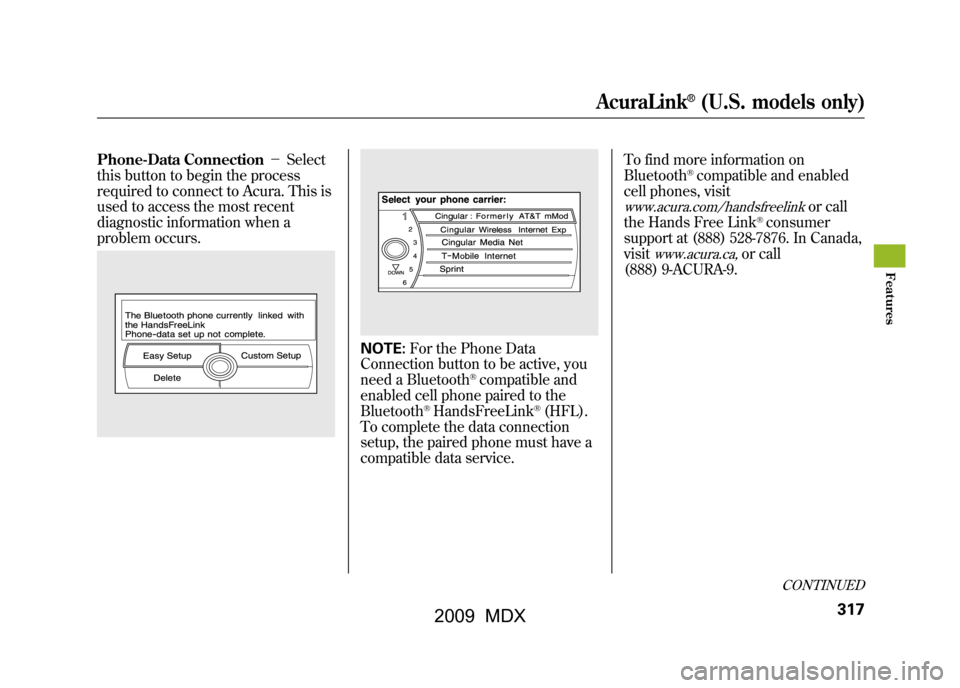
Phone-Data Connection-Select
this button to begin the process
required to connect to Acura. This is
used to access the most recent
diagnostic information when a
problem occurs.
NOTE: For the Phone Data
Connection button to be active, you
need a Bluetooth
®compatible and
enabled cell phone paired to the
Bluetooth
®HandsFreeLink
®(HFL).
To complete the data connection
setup, the paired phone must have a
compatible data service. To find more information on
Bluetooth
®compatible and enabled
cell phones, visit
www.acura.com/handsfreelink
or call
the Hands Free Link
®consumer
support at (888) 528-7876. In Canada,
visit
www.acura.ca,
or call
(888) 9-ACURA-9.
CONTINUED
AcuraLink
®(U.S. models only)
317
Feat ures
08/06/06 16:58:07 09 ACURA MDX MMC North America Owner's M 50 31STX620 enu
2009 MDX
Page 322 of 489

Connect to the Acura Server-
The default setting is prompt. When
a diagnostic info message appears,
and you select the Check Now
button, the system will prompt you
before connecting to the Acura
server. If you do not wish to connect
at that time, select No at the prompt,
and you will see the information from
the onboard database. The ‘‘Auto ’’
setting will remove the prompt when
you select the Check Now button
and will automatically connect to the
Acura server. This setting only
applies when you have a Bluetooth
®
enabled phone that is paired with the
HFL and you have completed the
Phone-Data Connection setup.
As required by the FCC:
This device complies with Part 15 of theFCC rules. Operation is subject to the
following two conditions: (1) This devicemay not cause harmful interference, and(2) this device must accept any
interference received, includinginterference that may cause undesiredoperation.
Changes or modifications not expresslyapproved by the party responsible for
compliance could void the user'sauthority to operate the equipment.
This device complies with IndustryCanada Standard RSS-210.
Operation is subject to the following twoconditions: (1) this device may not causeinterference, and (2) this device must
accept any interference that may causeundesired operation of the device.
AcuraLink
®(U.S. models only)
31808/06/06 16:58:07 09 ACURA MDX MMC North America Owner's M 50 31STX620 enu
2009 MDX
Page 375 of 489

Use this illustration to identify each
terminal in the trailer brake
controller connector.
Safety ChainsAlways use safety chains when you
tow a trailer. Make sure the chains
are secured to the trailer and hitch,
and that they cross under the tongue
and can catch the trailer if it becomes
unhitched. Leave enough slack to
allow the trailer to turn corners
easily, but do not let the chains drag
on the ground.Sway ControlThis device is recommended if your
trailer tends to sway. Your trailer
maker can tell you what kind of sway
control you need and how to install it.Trailer MirrorsMany states and provinces require
special exterior mirrors when towing
a trailer. Even if they don't, you
should install special mirrors if you
cannot clearly see behind you, or if
the trailer creates a blind spot.
Spare TiresWhen towing a trailer, we
recommend that you carry a full-size
spare wheel and tire for your vehicle
and trailer. See page419for proper
tire size, page425for how to store a
full size wheel and tire, and page425
for information on changing a flat
tire.
Remember to unhitch the trailer
before changing a flat. Ask your
trailer sales or rental agency where
and how to store the trailer's spare
tire.
BRAKE
(20A)
(BLUE)
ELECTRIC BRAKE
(YELLOW)
GROUND
(BLACK)
STOP
(LIGHT GREEN)
CONTINUED
Towing a Trailer
371
Driving
08/06/06 16:58:07 09 ACURA MDX MMC North America Owner's M 50 31STX620 enu
2009 MDX
Page 395 of 489
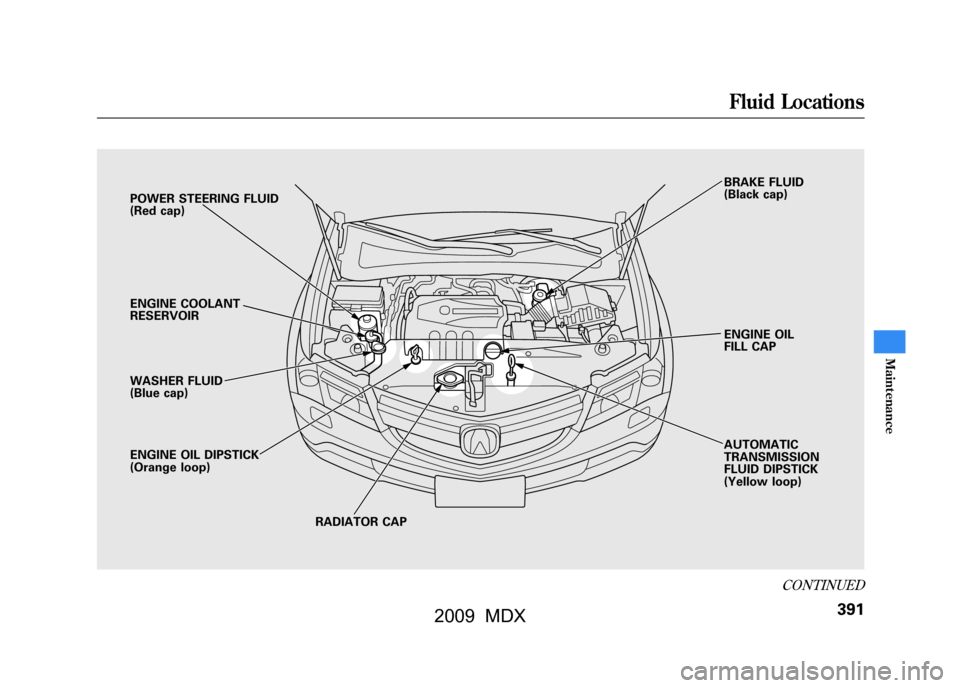
POWER STEERING FLUID
(Red cap)
ENGINE COOLANT
RESERVOIR
WASHER FLUID
(Blue cap)
ENGINE OIL DIPSTICK
(Orange loop)RADIATOR CAP AUTOMATIC
TRANSMISSION
FLUID DIPSTICK
(Yellow loop) ENGINE OIL
FILL CAP BRAKE FLUID
(Black cap)
CONTINUED
Fluid Locations
391
Maint enance
08/06/06 16:58:07 09 ACURA MDX MMC North America Owner's M 50 31STX620 enu
2009 MDX