navigation system Acura MDX 2012 Navigation Manual
[x] Cancel search | Manufacturer: ACURA, Model Year: 2012, Model line: MDX, Model: Acura MDX 2012Pages: 185, PDF Size: 23.67 MB
Page 52 of 185

Navigation System51
ACURA MDX KA 31STX850Entering a Destination
If desired, rotate the Interface Dial
knob to change the map scale. When
you have the crosshairs on the desired
icon, polygon, or road, push in on the
Interface Dial . The address of the
location you have selected will appear at
the top of the screen.
NOTE:
Information icons are displayed at
scales from 1 mile to 1/4 mile, POI icons
are displayed at 1/8 mile or less, and
roads are displayed at 1/4 mile or less.
If this is the desired address, push in on
the Interface Dial again. If not, use the
Interface Dial to reposition the
crosshairs, then push in on the
Interface Dial again to display the new
address.
If you selected a single icon or road
segment, select Set as Dest. to
calculate a route to the selected
destination. If you selected multiple
icons within the cursor radius, select an
item from the list. Then select OK to
calculate a route to the selected
destination.
By Go Home 1 or 2Selecting Go Home 1 or 2 from the
MENU screen ( Dest. MENU 1 or 2)
takes you to the address you have set as
“home.”
If a Go Home 1 or 2 PIN has been set,
the system prompts you to enter your
PIN.
Say or enter your PIN. The system will
then display the Calculate route to
screen (see Driving to Your Destination
on page 52).
If a Go Home 1 or 2 PIN has not been
set, the system displays the Calculate
route to screen after you select Go
Home 1 or 2 (see Driving to Your
Destination on page 52). NOTE:
To edit Home Address, see
Home
Address on page 99.
When no Home Address 1 or 2 has been set, the SETUP screen will be
displayed. For details, see Home
Address on page 99.
Prior to departure, you can set areas
to avoid. The system then includes
them in its calculations for the
destination you have entered. See
Edit Avoid Area on page 110.
PINs are optional. If you choose to use a PIN, make sure you remember
it. If you forget your PIN, your dealer
will have to reset it for you, and all
PINs will be cleared.
If a PIN is desired, enter it using the Personal preference PIN number
feature in SETUP. See page 100 for
information on entering your PIN
number.
00 ACURA MDX_KA.book 51 ページ 2011年7月27日 水曜日 午前11時6分
Page 53 of 185
52
Navigation System
ACURA MDX KA 31STX850
Driving to Your DestinationA route typically has three phases.
Initial route calculation (the Calculate route to screen) (see
page 52)
Change the route while en route (see page 74).
Resume the route when restarting the engine (see Continue Trip to Screen
on page 79).
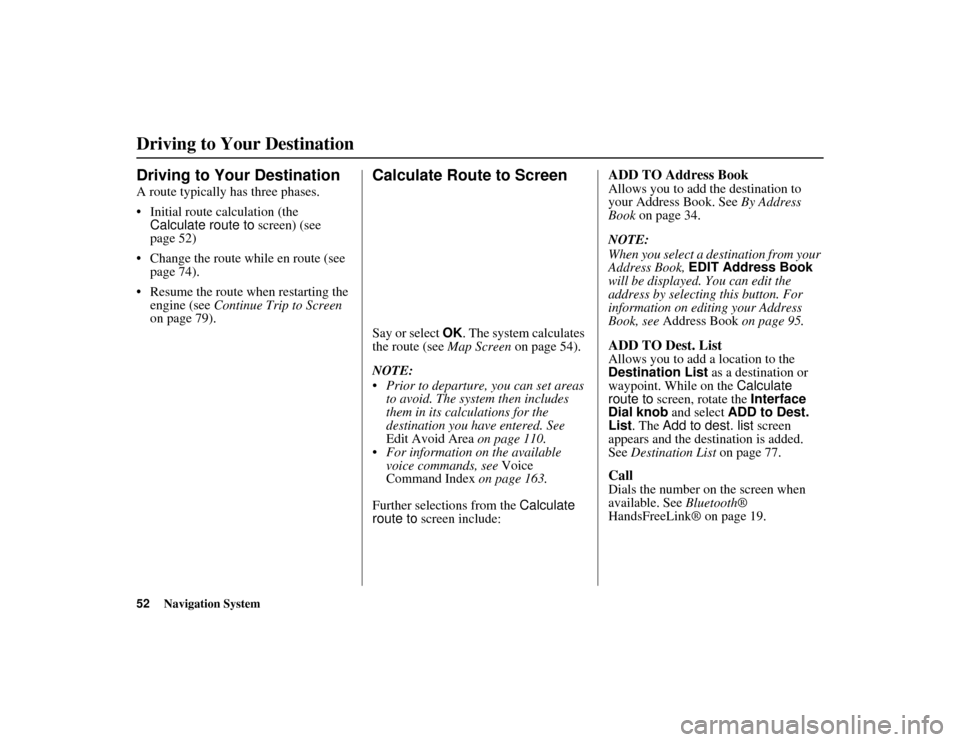
Calculate Route to ScreenSay or select OK. The system calculates
the route (see Map Screen on page 54).
NOTE:
Prior to departure, you can set areas to avoid. The system then includes
them in its calculations for the
destination you have entered. See
Edit Avoid Area on page 110.
For information on the available
voice commands, see Voice
Command Index on page 163.
Further selections from the Calculate
route to screen include:
ADD TO Address BookAllows you to add the destination to
your Address Book. See By Address
Book on page 34.
NOTE:
When you select a destination from your
Address Book, EDIT Address Book
will be displayed. You can edit the
address by selecting this button. For
information on editing your Address
Book, see Address Book on page 95.ADD TO Dest. ListAllows you to add a location to the
Destination List as a destination or
waypoint. While on the Calculate
route to screen, rotate the Interface
Dial knob and select ADD to Dest.
List . The Add to dest. list screen
appears and the destination is added.
See Destination List on page 77.CallDials the number on the screen when
available. See Bluetooth®
HandsFreeLink® on page 19.
Driving to Your Destination00 ACURA MDX_KA.book 52 ページ 2011年7月27日 水曜日 午前11時6分
Page 54 of 185

Navigation System53
ACURA MDX KA 31STX850
Driving to Your Destination
Changing the Route PreferenceThe system lets you select the way you
want to drive to your destination. Select
Route Pref. on the Calculate route to
screen by rotating the Interface Dial
knob.
You can choose MAX or MIN for
three settings: Freeways, Toll
Roads, and Ferries. The route
calculations for the current selection
will be displayed in the upper right-
hand corner of the screen.
The generated route may not be the
route you would choose. For safety
reasons, the system generally applies the
following rules to your route: Shortcuts through
residential areas
are avoided.
Right turns are favored over left turns or U-turns.
Restricted turns (turns that cannot be made during or at certain times of the
day) are not used.
Viewing the RoutesIf you select View Routes on the
Calculate route to screen, you can
view three possible routes to your
destination. You can also use the
Interface Dial to verify the areas
peripheral to the map. If you select
View Routes , the display changes to:
These different routes are shown and
calculated based on the setup options in
Route Pref. . You can select one of the three routes
(1-3) by rotating the
Interface Dial
knob. The system will calculate the
selected route and display the map
screen.
NOTE:
The driving distance and time estimated for the various routes is
displayed.
It is not unusual for the different methods to pick the same route. Voice
commands cannot be used while the
system is calculating.
Zoom IN/OUT to view route details
or traffic conditions is not available
on the View routes screen. After
moving the Interface Dial and
scrolling through th e map, you can
then zoom in or out on the map
screen to view your route in details.
00 ACURA MDX_KA.book 53 ページ 2011年7月27日 水曜日 午前11時6分
Page 55 of 185

54
Navigation System
ACURA MDX KA 31STX850
Driving to Your DestinationBased on the route data, you can change
the routing method by rotating the
Interface Dial knob.
Once you confirm your selection, say
the number of the desired routing
method or push in on the Interface
Dial.
The calculated route will be highlighted
as a blue line, and a voice prompt will
tell you how to proceed along the
highlighted route.
Push in on the Interface Dial and
select Voice to have the guidance
repeated.
Viewing the Destination MapIf you move the Interface Dial down
and select DESTINATION MAP on the
Calculate route to screen, a map of the
destination vicinity is displayed. Press
the CANCEL or BACK button, or
select Return to return to the previous
screen. You can view the destination
map anytime while en route by saying
“Display destination map.”
Map ScreenWhen you select OK on the Calculate
route to screen, the map screen
appears, showing your highlighted route
(blue line) in real time.Route LineWhen driving on unverified streets
(purple), the route line changes to either
a purple dotted “vector line” pointing to
your destination, or a blue-pink line. See
Unverified Area Routing on page 106
for a detailed explanation of how to
enable unverified routing, and the
related cautions and disclaimers.
NOTE:
You can always view the entire route by simply saying, “Display entire
route.”
When your route line uses streets that display traffic information, the route
line may consist of orange or red
segments. This is normal. See Traffic
Display Legend on page 22, and
Viewing Flow Data on page 24.
00 ACURA MDX_KA.book 54 ページ 2011年7月27日 水曜日 午前11時6分
Page 56 of 185

Navigation System55
ACURA MDX KA 31STX850
Driving to Your Destination
“Vector line” (unverified routing off)
Blue-pink unverified route line
(unverified routing on)
Voice Guidance PromptsAs you get near the guidance point, you
will hear a voice reminder and see a
pop-up window showing you the
guidance point. You will typically hear
three prompts:
The first is about 1/2 mile from the
guidance point.
The next is about 1/4 mile from the guidance point.
The final prompt is close to your actual turn.
If the distance between the next two
guidance points is very small, both of
them are displayed on the screen in a
single window, and the voice will
remind you of them at the same time. NOTE:
You can say “Voice” at any time, or
select Voice after pushing in on the
Interface Dial to be reminded of the
next guidance point.
Typically, a pop-up guidance window shows your next turn, and a voice
guidance is heard. The timing of
guidance varies depending on the
type of road you are on and the
distance to the next guidance point.
When the guidance in unverified areas,
the phrase “if possible” is inserted
before each guid ance prompts. See
Unverified Area Routing on page 106
for more detailed information on the
unverified routing.
00 ACURA MDX_KA.book 55 ページ 2011年7月27日 水曜日 午前11時6分
Page 57 of 185
56
Navigation System
ACURA MDX KA 31STX850
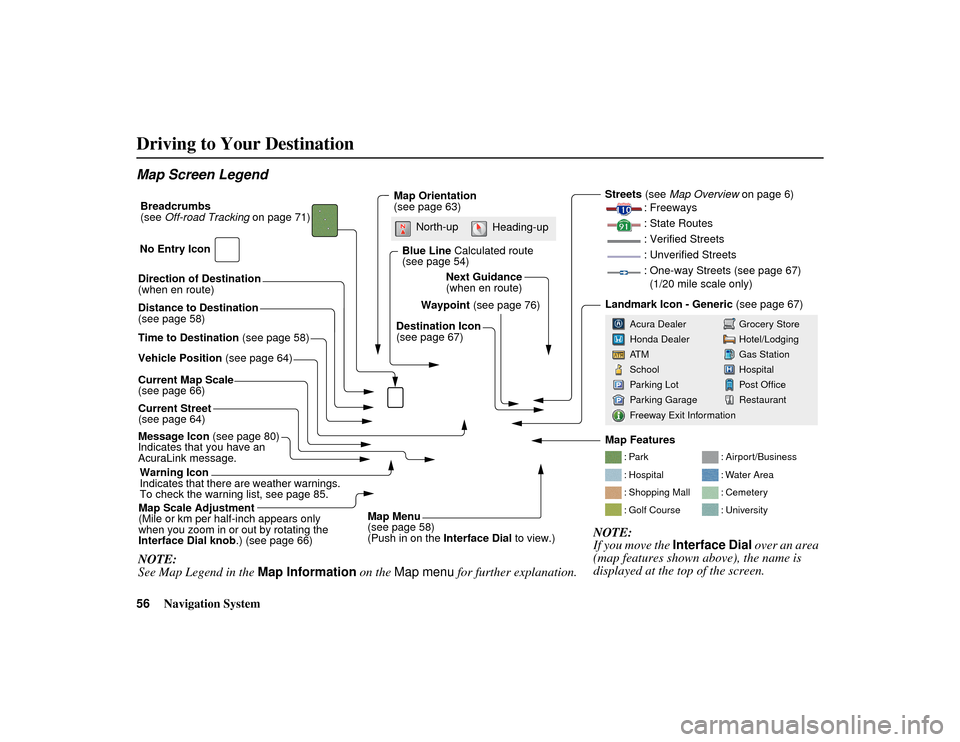
Driving to Your DestinationMap Screen LegendDirection of Destination
(when en route)
Vehicle Position (see page 64)
Current Map Scale
(see page 66)
Message Icon (see page 80)
Indicates that you have an
AcuraLink message.
Warning Icon
Indicates that there are weather warnings.
To check the warning list, see page 85.
Current Street
(see page 64)
Map Scale Adjustment
(Mile or km per half-inch appears only
when you zoom in or out by rotating the
Interface Dial knob .) (see page 66)NOTE:
See Map Legend in the Map Information on the Map menu for further explanation.
Waypoint (see page 76)
Map Orientation
(see page 63)
Breadcrumbs
(see
Off-road Tracking on page 71)
NOTE:
If you move the Interface Dial over an area
(map features shown above), the name is
displayed at the top of the screen.
Blue Line Calculated route
(see page 54)
Distance to Destination
(see page 58)
Time to Destination (see page 58) Destination Icon
(see page 67)Next Guidance
(when en route)
: Par k
: Hospital
: Shopping Mall
: Golf Course
: Airport/Business
: Water Area
: Cemetery
: University
Streets
(see Map Overview on page 6)
: Freeways
: State Routes
: Verified Streets
: Unverified Streets
: One-way Streets (see page 67) (1/20 mile scale only)Landmark Icon - Generic (see page 67)
Grocery Store
Hotel/Lodging
Gas Station
Hospital
Post Office
Restaurant
Acura Dealer
Honda Dealer
AT M
School
Parking Lot
Parking Garage
Freeway Exit Information
No Entry Icon
Map Menu
(see page 58)
(Push in on the
Interface Dial to view.)
North-up
Heading-up
Map Features
00 ACURA MDX_KA.book 56 ページ 2011年7月27日 水曜日 午前11時6分
Page 58 of 185

Navigation System57
ACURA MDX KA 31STX850
Driving to Your Destination
Guidance ScreenThe guidance screen offers an
alternative way to view your route
information. Many of the icons and
screen features are similar to those on
the map screen. While driving to your
destination, press the MAP/GUIDE
button to switch between the map and
guidance screens. The guidance
screen shows you:
Milestone to Destination - The position
of the small circular icon shows your
trip progress. As you get closer to your
destination, the indicator will approach .
NOTE:
The map and voice guidance in unverified areas differ from those in
verified areas.
Current guidance points and those within 1000 feet will show on the
Countdown bar, indicating the
distance until the next guidance
point.
Guidance Screen Legend
Direction of Destinatio n, “as the crow flies”
Milestone to Destination (see page 57)
Scroll: to view guidance points
(rotate Interface Dial knob) Street Name to Next
Driving guidance point
Distance of Next Driving
guidance point
Current Street (see page 6)
Time to Destination (see page 58)
Distance to Destination (see page 58) No Entry Icon
00 ACURA MDX_KA.book 57 ページ 2011年7月27日 水曜日 午前11時6分
Page 59 of 185
58
Navigation System
ACURA MDX KA 31STX850
Driving to Your DestinationDistance and Time to
DestinationWhen you select a destination, the
distance to the destination is the actual
road distance of the calculated route,
and not “as the crow flies.” When
viewing a list of destinations (points of
interest), such as restaurants, the
distance is “as the crow flies” (see Sort
by Distance to Travel on page 41).
The displayed time to the destination
may differ from the actual travel time
because the time is calculated based on
the posted road speed data and your
current speed.
NOTE:
If you are en route and the Interface
Dial is moved, the “Time to
Destination” an d “Distance to
Destination” indica tions are replaced
with an indicator showing distance from
the current vehicle location.
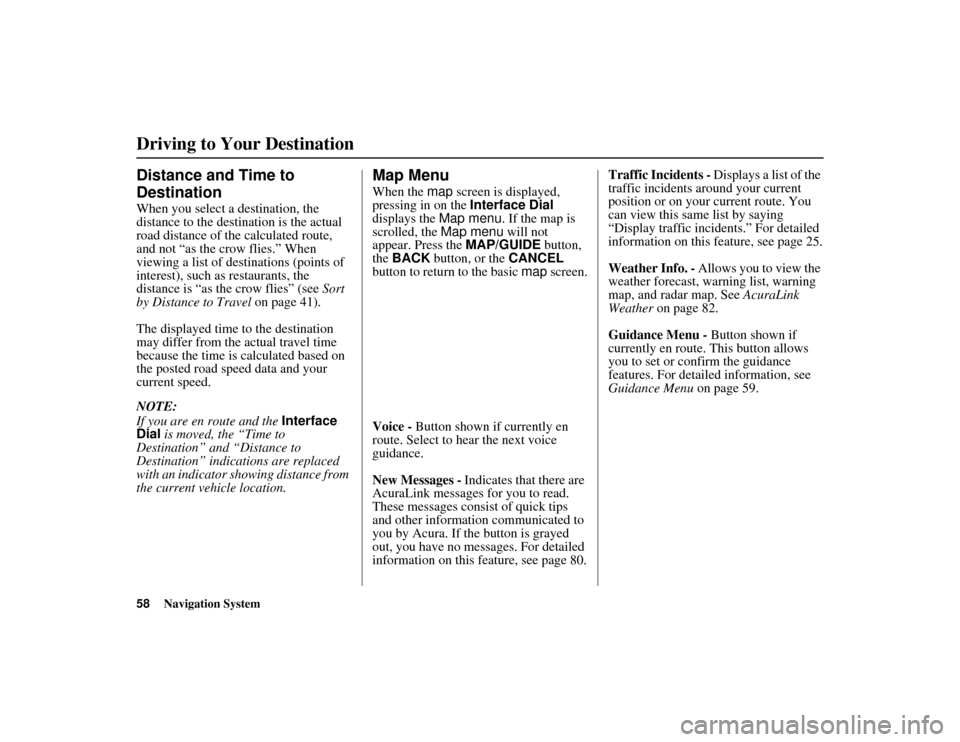
Map MenuWhen the map screen is displayed,
pressing in on the Interface Dial
displays the Map menu. If the map is
scrolled, the Map menu will not
appear. Press the MAP/GUIDE button,
the BACK button, or the CANCEL
button to return to the basic map screen.
Voice - Button shown if currently en
route. Select to hear the next voice
guidance.
New Messages - Indicates that there are
AcuraLink messages for you to read.
These messages consist of quick tips
and other information communicated to
you by Acura. If the button is grayed
out, you have no messages. For detailed
information on this feature, see page 80. Traffic Incidents -
Displays a list of the
traffic incidents around your current
position or on your current route. You
can view this same list by saying
“Display traffic incidents.” For detailed
information on this feature, see page 25.
Weather Info. - Allows you to view the
weather forecast, warning list, warning
map, and radar map. See AcuraLink
Weather on page 82.
Guidance Menu - Button shown if
currently en route. This button allows
you to set or confirm the guidance
features. For detailed information, see
Guidance Menu on page 59.
00 ACURA MDX_KA.book 58 ページ 2011年7月27日 水曜日 午前11時6分
Page 60 of 185
Navigation System59
ACURA MDX KA 31STX850
Driving to Your Destination
Find Nearest … - Selects a subcategory
from the list to search the nearest POI
from your current location. For detailed
information on this feature, see
Subcategories on page 38.
Map Information - Allows you to
confirm information on the map or
change the settings of displaying a map.
For detailed information on this feature,
see Map Information on page 61.
Cancel Route - Cancels your current
route. The map screen will display your
current position.
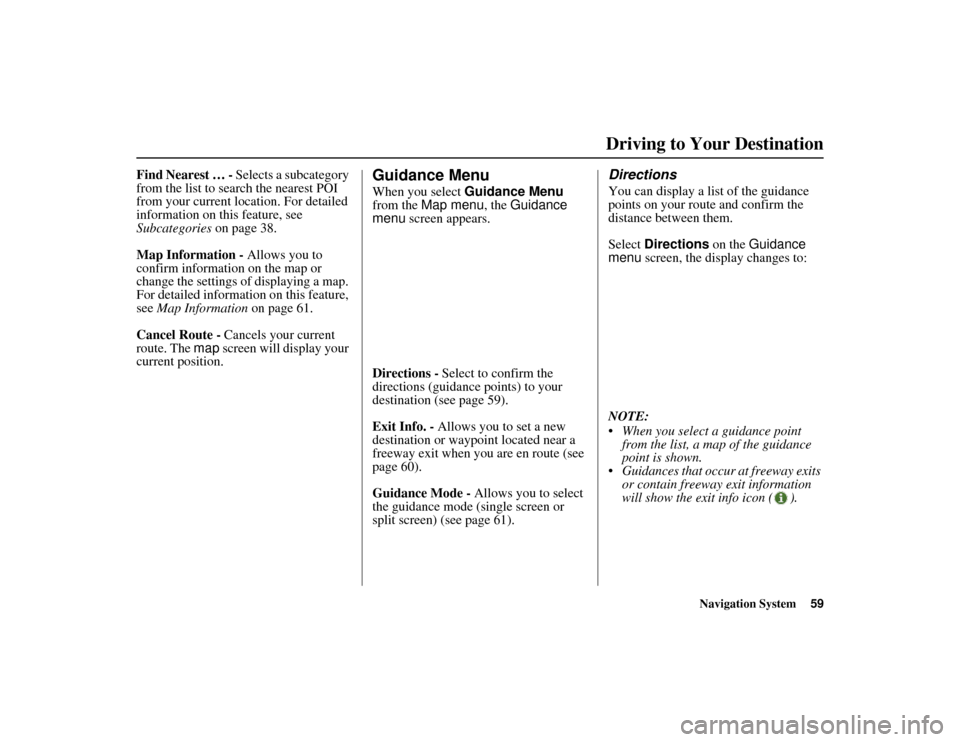
Guidance MenuWhen you select Guidance Menu
from the Map menu, the Guidance
menu screen appears.
Directions - Select to confirm the
directions (guidance points) to your
destination (see page 59).
Exit Info. - Allows you to set a new
destination or waypoint located near a
freeway exit when you are en route (see
page 60).
Guidance Mode - Allows you to select
the guidance mode (single screen or
split screen) (see page 61).
DirectionsYou can display a list of the guidance
points on your route and confirm the
distance between them.
Select Directions on the Guidance
menu screen, the display changes to:
NOTE:
When you select a guidance point from the list, a map of the guidance
point is shown.
Guidances that occur at freeway exits or contain freeway exit information
will show the exit info icon ( ).
00 ACURA MDX_KA.book 59 ページ 2011年7月27日 水曜日 午前11時6分
Page 61 of 185
60
Navigation System
ACURA MDX KA 31STX850
Driving to Your DestinationWhen you select Exit Info. by moving
the Interface Dial to the right, you can
display a list of the freeway exits en
route (see page 60).
Press the CANCEL button or the
BACK button, or move the Interface
Dial down to return to the previous
screen.
You can scroll one guidance point at a
time by rotating the Interface Dial
knob.
The route guidance display disappears
and guidance ends when you reach your
destination. Press the MENU button to
return to the MENU screen ( Dest.
MENU 1 or 2).
Exit Info. (Freeway Exit
Information)You can search freeway exit
information (gas stations, restaurants,
ATMs, etc.) and add new destinations or
waypoints to the calculated route. Select
Exit Info. on the Guidance menu
screen, and a list of freeway exits for the
route is displayed.
If you select the freeway exit you plan
on taking, a list of businesses in the area
will be displayed. You can choose a
listing to set as a new destination or
waypoint, and say or select OK. On the map
screen, you can display
Freeway Exit information using the
Interface Dial . The Exit Info icon will
only be displayed on the map screen if
there is any freeway exit information
available. Choose the 1/4, 1/2, or 1 mile
scale, then move the crosshairs to the
desired Exit Info icon and push in on the
Interface Dial . Choose a place from
the list and set it as a new destination or
waypoint.
NOTE:
To turn on “Freeway exit information”
on the map screen, display the icon bar
and select the icon (see page 62).
00 ACURA MDX_KA.book 60 ページ 2011年7月27日 水曜日 午前11時6分