audio Acura MDX 2012 Owner's Manual
[x] Cancel search | Manufacturer: ACURA, Model Year: 2012, Model line: MDX, Model: Acura MDX 2012Pages: 621, PDF Size: 11.15 MB
Page 409 of 621
AcuraLink
®(U.S. models only)
On models with navigation systemAcuraLink enhances your ownership
experience by providing a direct
communication link between your
vehicle and the Acura Server.
Working through the XM radio
satellite, AcuraLink works in
conjunction with the navigation
system,
Bluetooth
®HandsFreeLink
®
(HFL), and audio system in your
vehicle. It displays and receives
several kinds of messages, including:
●
Operating tips and information on
your vehicle's features.
●
Important recall and safety
information.
●
Maintenance information to keep
your vehicle in top condition.
●
Diagnostic information to provide
information about any problems
with your vehicle.
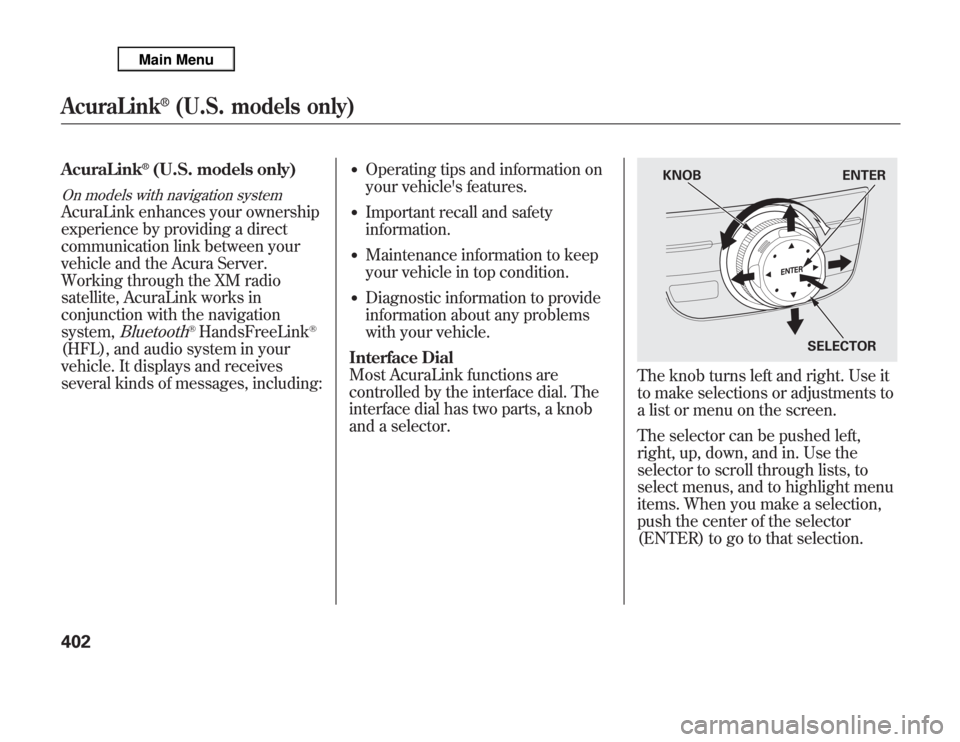
Interface Dial
Most AcuraLink functions are
controlled by the interface dial. The
interface dial has two parts, a knob
and a selector.
The knob turns left and right. Use it
to make selections or adjustments to
a list or menu on the screen.
The selector can be pushed left,
right, up, down, and in. Use the
selector to scroll through lists, to
select menus, and to highlight menu
items. When you make a selection,
push the center of the selector
(ENTER) to go to that selection.
KNOB ENTER
SELECTOR
AcuraLink
®
(U.S. models only)
402
Page 438 of 621

Modifying your vehicle, or installing
non-Acura accessories, may make
your vehicle unsafe. Before you
make any modifications or add any
accessories, be sure to read the
following information.
Accessories
Your dealer has Acura accessories
that allow you to personalize your
vehicle. These accessories have been
designed and approved for your
vehicle, and are covered by warranty.
Although non-Acura accessories may
fit on your vehicle, they may not
meet factory specifications, and could
adversely affect your vehicle's
handling, stability, and reliability.
Improper accessories or
modifications can affect your
vehicle's handling, stability, and
performance, and cause a
crash in which you can be hurt
or killed.
Follow all instructions in this
owner's manual regarding
accessories and modifications.
When properly installed, cellular
phones, alarms, two-way radios, and
low-powered audio systems should
not interfere with your vehicle's
computer controlled systems, such
as your airbags, anti-lock brakes, and
tire pressure monitoring system.Before installing any accessory:
●
Make sure the accessory does not
obscure any lights, or interfere
with proper vehicle operation or
performance.
●
Be sure electronic accessories do
not overload electrical circuits (see
page 566) or interfere with proper
operation of your vehicle.
●
Do not install accessories on the
side pillars or across the rear
windows. Accessories installed in
these areas may interfere with
proper operation of the side
curtain airbags.
●
Before installing any electronic
accessory, have the installer
contact your dealer for assistance.
If possible, have your dealer
inspect the final installation.
CONTINUED
Accessories and Modifications
431
Before Driving
Page 473 of 621

Distance between vehicles
CMBS
The radar sensor
detects a vehicleE-pretensionerAudio & Visual
WARNINGSBraking
Stage oneThere is a risk of a
collision with the
vehicle ahead of you.
—
‘‘BRAKE’’flashes
on the multi-
information
display.
—
A beep sounds
and‘‘BRAKE’’
flashes on the
multi-information
display. Stage twoThe risk of a collision
has increased, time to
respond is reduced.Retracts the driver's
seat belt gently a few
times, providing a
physical warning.
Lightly
applied
Stage three
ᤳ
The CMBS determines
that a collision is
unavoidable.Forcefully tightens
driver and front
passenger seat belts.
Forcefully
applied
ᤳ: Depending on the circumstances, CMBS may not go through all of the alert stages before initiating the last stage.
YOUR
VEHICLEVEHICLE
AHEAD
YOUR
VEHICLEVEHICLE
AHEAD
YOUR
VEHICLEVEHICLE
AHEAD
Collision Mitigation Braking System™(CMBS™)466
Page 554 of 621

The sensor on the negative terminal
monitors your vehicles battery
condition.
If there is a problem with the sensor,
you will see a‘‘CHECK BATTERY
SENSOR’’message on the
multiinformation display. Have the
vehicle checked by your dealer.
Check the terminals for corrosion (a
white or yellowish powder). To
remove it, cover the terminals with a
solution of baking soda and water. It
will bubble up and turn brown. When
this stops, wash it off with plain
water. Dry off the battery with a cloth
or paper towel. Coat the terminals
with grease to help prevent further
corrosion.If additional battery maintenance is
needed, see your dealer or a
qualified technician.
WARNING:Battery posts,
terminals, and related accessories
contain lead and lead compounds.
Wash your hands after handling.
If you need to connect the battery to
a charger, disconnect both cables to
prevent damaging your vehicle's
electrical system. Always disconnect
the negative (-) cable first, and
reconnect it last.
The battery gives off explosive
hydrogen gas during normal
operation.
A spark or flame can cause the
battery to explode with enough
force to kill or seriously hurt
you.
Wear protective clothing and a
face shield, or have a skilled
technician do the battery
maintenance.
If the radio fuse is removed, the
audio system will disable itself. The
next time you turn on the radio you
will see‘‘ENTER CODE’’in the
frequency display. Use the preset
buttons to enter the digit code (see
page 308).
Checking the Battery
547
Maintenance
Page 565 of 621

●
Are you using the proper starting
procedure? Refer toStarting the
Engineon page 442.
●
Do you have fuel? Check the fuel
gauge; the warning indicator may
not be working.
●
There may be an electrical
problem, such as no power to the
fuel pump. Check all the fuses (see
page 566).
If you find nothing wrong, you will
need a qualified technician to find the
problem. SeeEmergency Towingon
page 572.Jump Starting
Although this seems like a simple
procedure, you should take several
precautions.
A battery can explode if you do
not follow the correct
procedure, seriously injuring
anyone nearby.
Keep all sparks, open flames,
and smoking materials away
from the battery.
You cannot start your vehicle by
pushing or pulling it.
To Jump Start Your Vehicle:1. Open the hood, and check the
physical condition of the battery.
In very cold weather, check the
condition of the electrolyte. If it
seems slushy or frozen, do not try
jump starting until it thaws.If a battery sits in extreme cold, the
electrolyte inside can freeze. Attempting
to jump start with a frozen battery can
cause it to rupture.
2. Turn off all the electrical
accessories: heater, A/C, climate
control, audio system, lights, etc.
Put the transmission in neutral or
Park, and set the parking brake.
If the Engine Won't Start, Jump Starting558
Page 576 of 621

PRIMARY UNDER-HOOD FUSE BOX
No. Amps. Circuits Protected
1 120 A Main fuse
-Not Used
2-1 30 A ADS
ᤳ2
2-2 30 A SH-AWD
2-3 30 A Rear Blower Motor
2-4 40 A ABS VSA
2-5 40 A Trailer Main
2-6 40 A Power Seats, Driver's Position
Memory System, Subwoofer,
Telescopic Steering Wheel
2-7 40 A Front Heated Seat, TPMS,
Moonroof, Driver's Lumbar
Support
2-8--
3-1 60 A Fog Lights, Front Blower
Motor, Interior Light
3-2 40 A Headlights, Daytime Running
Lights
3-3 60 A Cooling Fan, Condenser Fan,
MG Clutch, Headlight
Washer
ᤳ1
3-4 50 A Ignition Switch Main
ᤳ1: Canadian model
ᤳ2: If equippedNo. Amps. Circuits Protected
3-5 50 A Power Window
3-6 60 A Power Tailgate Opener/Closer,
Rear ACC Socket, Interior
Light,
Rear Defroster
3-7 30 A ECU (PCM)
3-8 30 A TECH
4 40 A Audio, Door Lock, Interior
Lights, Front ACC Socket
5 30 A EPT-L
ᤳ2
6 30 A EPT-R
ᤳ2
7 30 A FI ECU
8 30 A Audio Amplifier
9 7.5 A Battery Sensor
10 15 A Hazard
11 15 A Horn, Stop
12 20 A ABS VSA
13 20 A Trailer (Brake)
14 20 A Rear Heated Seat
ᤳ2
15 20 A A/C Inverter
CONTINUED
Fuse Locations
569
Taking Care of the Unexpected
Page 578 of 621

INTERIOR FUSE BOXNo. Amps. Circuits Protected
1 7.5 A TPMS
2 10 A Driver's Lumbar Support
Motor
3 15 A Moonroof
4 20 A Front Heated Seats
5 10 A Audio
6 7.5 A Interior Light
7 10 A Back Up
8 20 A Door Lock
9 15 A ACC Socket
10 15 A IG Coil
11 30 A Windshield Wiper
12 10 A Subwoofer
13 20 A Passenger's Power ReclineNo. Amps. Circuits Protected
14 20 A Driver's Power Slide
15 20 A Telescopic Steering Wheel
16 20 A Driver's Power Recline
17 20 A Passenger's Power Slide
18 10 A Alternator
19 20 A Fuel Pump
20 10 A SH-AWD, ODS
21 7.5 A Gauges
22 10 A SRS
23-Not Used
24 20 A Left Rear Power Window
25 20 A Right Rear Power Window
26 30 A Passenger's Power Window
27 30 A Driver's Power Window
28 20 A Tilt Steering Wheel
29 10 A ABS VSA
30 10 A A/C
31 15 A Washer
32 10 A ACC
33-Not Used
Auxiliary (Holder1)No. Amps. Circuits Protected
1 7.5 A Starter DIAG
2 7.5 A SH-AWDAuxiliary (Holder2)No. Amps. Circuits Protected
1 7.5 A STS
2 7.5 A ODS
Auxiliary
(Holder1)Auxiliary
(Holder2)
Fuse Locations
571
Taking Care of the Unexpected
Page 606 of 621

A
Accessories and
Modifications
..........................
431
ACCESSORY (Ignition Key
Position)
.................................
139
Accessory Power Sockets
..........
177
AC Power Outlet
........................
178
Active Damper System
...............
484
Active Head Restraints
...............
152
AcuraLink
®(U.S. models
only)
.......................................
402
Adaptive Cruise Control
(ACC)
.....................................
348
Additives, Engine Oil
.................
518
Adjusting the Steering Wheel
....
134
Advanced Airbags
........................
31
Airbag (SRS)
..........................
10, 27
Air Conditioning System
............
182
Rear A/C Control
....................
187
Air Outlets (Vents)
.....................
189
Air Pressure, Tires
..............
540, 541
Alcohol in Gasoline
....................
422
Antifreeze
...................................
520Anti-lock Brakes (ABS)
Indicator
............................
70, 462
Operation
................................
461
Anti-theft, Audio System
.............
308
Anti-theft Steering Column
Lock
.......................................
139
Audio System
......................
192, 212
Automatic Climate Control
.........
183
Automatic Lighting Off
Feature
...................................
131
Automatic Seat Belt Tensioners...
23
Automatic Speed Control
...........
345
Automatic Transmission
............
443
Capacity, Fluid
........................
578
Checking Fluid Level
..............
523
Driving with the Paddle
Shifters
................................
447
Shifting
...................................
444
Shift Lever Position
Indicators
............................
443
Shift Lever Positions
...............
444
Shift Lock Release
...................
446
Auxiliary Input Jack
...................
307B
Battery
Charging System
Indicator
........................
69, 562
Jump Starting
..........................
558
Maintenance
...........................
547
Specifications
..........................
579
Before Driving
...........................
421
Belts, Seat
................................
9, 21
Beverage Holders
......................
174
Blind Spot Information System
(BSI)
......................................
476
Bluetooth
®Audio
.......................
298
Bluetooth
®HandsFreeLink
®
(Models with navigation
system)
...............................
383
Bluetooth
®HandsFreeLink
®
(Models without navigation
system)
...............................
365
Booster Seats
...............................
58
CONTINUED
Index
I
INDEX
Page 607 of 621
Brakes
Anti-lock Brakes (ABS)
...........
461
Break-in, New Linings
.............
422
Fluid
.......................................
525
Parking
...................................
164
System Design
........................
461
System Indicator
...............
69, 564
Wear Indicators
.......................
461
Braking System
..........................
460
Break-in, New Vehicle
................
422
Brightness Control,
Instruments
............................
133
Bulb Replacement
Back-up Lights
................
531, 532
Front Parking Lights
...............
529
Front Side Marker Lights
........
529
Headlights
..............................
527
High-mount Brake Light
.........
533
Rear Bulbs
..............................
531
Rear License Plate Lights
........
533
Specifications
..........................
579
Taillights
.................................
531
Bulbs, Halogen
..........................
527C
Capacities Chart
.........................
578
Carbon Monoxide Hazard
............
61
Cargo
.........................................
433
Cargo Hooks
..............................
437
Cargo, How to Carry
..................
433
Carrying Cargo
..........................
433
CAUTION, Explanation of
.............
iv
CD Care
.....................................
247
CD Error Messages
...................
246
CD Player
..................................
235
Certification Label
......................
576
Chains, Tires
..............................
546
Changing a Flat Tire
..................
551
Changing Oil
How to
....................................
518
When to
..................................
507
Charging System
Indicator
...........................
69, 562
Checklist, Before Driving
...........
441
Childproof Door Locks
...............
141
Child Safety
..................................
40
Booster Seats
...........................
58
Child Seats
....................
45, 46, 48Important Safety Reminders
.....
44
Infants
......................................
45
Larger Children
.......................
57
LATCH
.....................................
50
Risks with Airbags
...................
41
Small Children
.........................
46
Tethers
....................................
54
Warning Labels
........................
42
Where Should a Child Sit?
........
41
Child Seats
.............................
40, 48
LATCH Anchorage Points
........
50
Tether Anchorage Points
.........
54
Cleaning the Seat Belts
..............
534
Client Service Information
..........
594
Climate Control System
.............
182
Clock
..........................................
309
Code, Audio System
...................
308
CO in the Exhaust
................
61, 587
Cold Weather, Starting in
...........
442
Collision Mitigation Braking
System™(CMBS™)
...............
463
Compact Spare Tire
....................
550
Compass Operation
....................
342
Console Compartment
...............
175
Consumer Information
...............
594
Controls, Instruments and
............
65
IndexII
Page 613 of 621
Parking Brake and Brake System
Indicator
...........................
69, 564
Parking Lights
...........................
128
Parking Over Things that
Burn
................................
454, 589
Passenger Airbag Off Indicator
....
37
PGM-FI System
..........................
588
Playing a Disc
............................
235
Playing an iPod
®.........................
278
Playing a USB Flash Memory
Device
....................................
287
Playing Disc
...............................
203
Playing Hard Disc Drive (HDD)
Audio (Models with navigation
system)
...............................
250
Playing the AM/FM
Radio
...............................
193, 213
Playing the XM
®Radio
........
197, 226
Pollen Filter
...............................
534
Power Seat Adjustments
............
149
Power Socket Locations
.............
177
Power Steering Fluid
.................
526
Power Windows
.........................
160
Pregnancy, Using Seat Belts
........
19
Preparing to Drive
......................
441
Proper Seat Belt Usage
................
16Protecting Adults and Teens
........
12
Additional Safety Precautions
...
20
Advice for Pregnant Women
....
19
Protecting Children
......................
40
General Guidelines
..................
40
Protecting Infants
.....................
45
Protecting Larger Children
......
57
Protecting Small Children
........
46
Using Child Seats with
Tethers
.................................
54
Using LATCH
..........................
50
R
Radiator Overheating
.................
560
Radio/CD Sound System
...........
192
Radio/Disc Sound
System
............................
193, 213
Radio Theft Protection
...............
308
Readiness Codes
........................
590
Rear A/C Unit
............................
187
Rear Audio Control Panel
...........
315
Rear Entertainment System
.......
310
Rear Lights, Bulb
Replacement
...........................
531Rearview Mirror
.........................
165
Rearview Mirror with Rearview
Camera Display
......................
417
Rear Window Defogger
..............
132
Rear Window Wiper and
Washer
...................................
127
Recalling a Memorized Driving
Position
..................................
148
Reclining the Seat Backs
............
149
Reclining the Second Seats
........
153
Refueling
....................................
424
Reminder Indicators
.....................
68
Remote Audio Controls
..............
305
Remote Control (RES)
...............
334
Remote Transmitter
...................
145
Replacement Information
Dust and Pollen Filter
.............
534
Engine Oil and Filter
...............
518
Fuses
......................................
565
Schedule
.................................
514
Spark Plugs
.............................
579
Timing Belt
.............................
526
Tires
.......................................
544
Wiper Blades
..........................
536
Replacing Seat Belts After a
Crash
........................................
25
IndexVIII