buttons Acura MDX 2012 User Guide
[x] Cancel search | Manufacturer: ACURA, Model Year: 2012, Model line: MDX, Model: Acura MDX 2012Pages: 621, PDF Size: 11.15 MB
Page 189 of 621

FRONT CONTROL PANELDRIVER'S SIDE
TEMPERATURE
CONTROL
BUTTONS
DUAL BUTTONREAR BUTTONWINDSHIELD
DEFROSTER
BUTTON
RECIRCULATION BUTTON REAR WINDOW DEFOGGER/HEATED
MIRROR BUTTON
REAR CONTROL PANEL
REAR PASSENGER
COMPARTMENT
TEMPERATUREAUTO SYNC INDICATOR
FAN CONTROL BUTTONS REAR PASSENGER
COMPARTMENT
TEMPERATURE
CONTROL BUTTONS
AUTO BUTTONMODE BUTTON AUTO BUTTONON/OFF
BUTTON
DRIVER'S SIDE TEMPERATURE
AUTO INDICATORFRONT PASSENGER'S SIDE TEMPERATURE
FAN CONTROL
BUTTONSFRONT PASSENGER'S
SIDE TEMPERATURE
CONTROL BUTTONS
AIR CONDITIONING
BUTTON MODE
BUTTON
ON/OFF BUTTON
Climate Control System182
Page 190 of 621
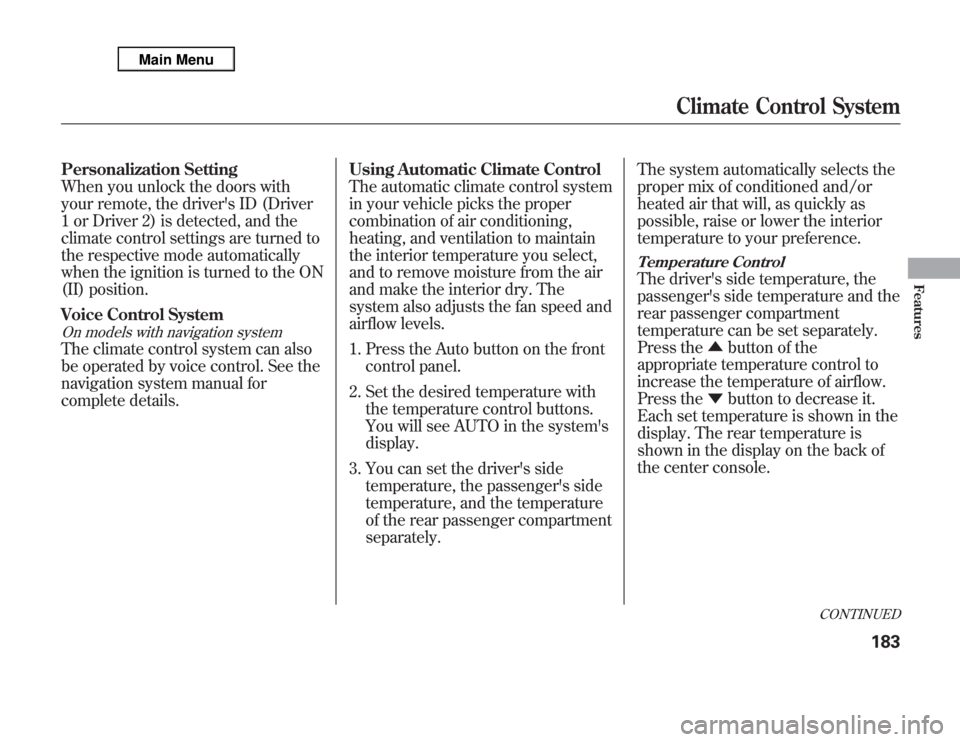
Personalization Setting
When you unlock the doors with
your remote, the driver's ID (Driver
1 or Driver 2) is detected, and the
climate control settings are turned to
the respective mode automatically
when the ignition is turned to the ON
(II) position.
Voice Control SystemOn models with navigation systemThe climate control system can also
be operated by voice control. See the
navigation system manual for
complete details.Using Automatic Climate Control
The automatic climate control system
in your vehicle picks the proper
combination of air conditioning,
heating, and ventilation to maintain
the interior temperature you select,
and to remove moisture from the air
and make the interior dry. The
system also adjusts the fan speed and
airflow levels.
1. Press the Auto button on the front
control panel.
2. Set the desired temperature with
the temperature control buttons.
You will see AUTO in the system's
display.
3. You can set the driver's side
temperature, the passenger's side
temperature, and the temperature
of the rear passenger compartment
separately.The system automatically selects the
proper mix of conditioned and/or
heated air that will, as quickly as
possible, raise or lower the interior
temperature to your preference.
Temperature ControlThe driver's side temperature, the
passenger's side temperature and the
rear passenger compartment
temperature can be set separately.
Press the▲button of the
appropriate temperature control to
increase the temperature of airflow.
Press the▼button to decrease it.
Each set temperature is shown in the
display. The rear temperature is
shown in the display on the back of
the center console.
CONTINUED
Climate Control System
183
Features
Page 192 of 621
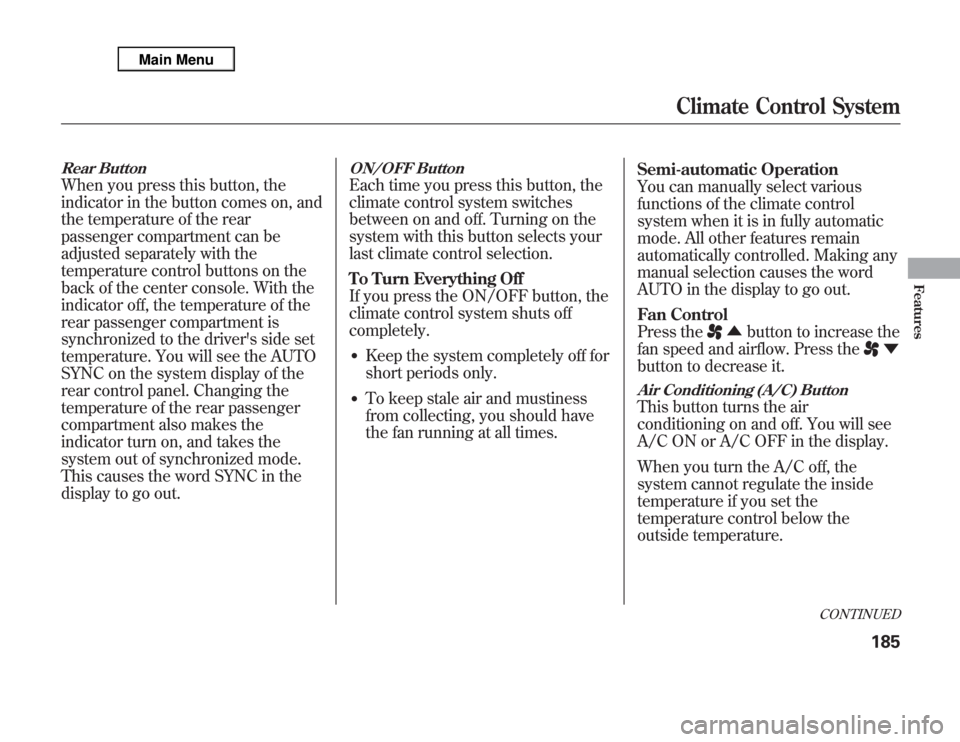
Rear ButtonWhen you press this button, the
indicator in the button comes on, and
the temperature of the rear
passenger compartment can be
adjusted separately with the
temperature control buttons on the
back of the center console. With the
indicator off, the temperature of the
rear passenger compartment is
synchronized to the driver's side set
temperature. You will see the AUTO
SYNC on the system display of the
rear control panel. Changing the
temperature of the rear passenger
compartment also makes the
indicator turn on, and takes the
system out of synchronized mode.
This causes the word SYNC in the
display to go out.
ON/OFF ButtonEach time you press this button, the
climate control system switches
between on and off. Turning on the
system with this button selects your
last climate control selection.
To Turn Everything Off
If you press the ON/OFF button, the
climate control system shuts off
completely.●
Keep the system completely off for
short periods only.
●
To keep stale air and mustiness
from collecting, you should have
the fan running at all times.Semi-automatic Operation
You can manually select various
functions of the climate control
system when it is in fully automatic
mode. All other features remain
automatically controlled. Making any
manual selection causes the word
AUTO in the display to go out.
Fan Control
Press the
▲button to increase the
fan speed and airflow. Press the
▼
button to decrease it.
Air Conditioning (A/C) ButtonThis button turns the air
conditioning on and off. You will see
A/C ON or A/C OFF in the display.
When you turn the A/C off, the
system cannot regulate the inside
temperature if you set the
temperature control below the
outside temperature.
CONTINUED
Climate Control System
185
Features
Page 194 of 621

Rear Climate ControlsRear ButtonWhen the indicator in this button is off,
the temperature of the rear passenger
compartment is synchronized to the
driver's side set temperature. If the AUTO
mode is selected on the front control
panel, you will see AUTO SYNC on the
rear system display. When the indicator in
this button is on, the temperature of the
rear passenger compartment can be
adjusted with the rear temperature control
buttons. A passenger can also adjust the
fan speed and airflow.
You can use the rear control panel
when the indicator in the REAR
button on the front control panel is
on. Pressing any control button on
the rear control panel turns on the
rear button indicator on the front
control panel.
REAR BUTTON
FAN
CONTROL
BUTTONS REAR CONTROL PANEL
REAR PASSENGER
COMPARTMENT TEMPERATURE
REAR PASSENGER
COMPARTMENT
TEMPERATURE
CONTROL BUTTONSAUTO BUTTONMODE BUTTON
ON/OFF BUTTON
CONTINUED
Climate Control System
187
Features
Page 196 of 621

Triple Zone Temperature Control
The temperatures of the driver's side
and the front passenger's side can be
controlled independently when the
indicator in the DUAL button is on.
When the indicator in the REAR
button is on, the temperature of the
rear passenger compartment can be
controlled independently.
To adjust each temperature, press
either of the temperature control
buttons (▲or▼) on the climate
control panel.
Driver's Side Passenger's Side
Rear Passenger Compartment
CONTINUED
Climate Control System
189
Features
Page 197 of 621
Push AUTO or
. The selected
temperatures appear in the display.
When the indicator in the DUAL
button is off, you can adjust both
sides to the same temperature by
adjusting the driver's temperature
control buttons.
To set the driver's side temperature
to a different value than the
passenger's side, press the DUAL
button, then press either of the
driver's temperature control button
(▲or▼). To set the passenger's side
to a different value than the driver's
side, press either of the front
passenger's temperature control
button (▲or▼). You can adjust the
passenger's side without pressing
the DUAL button first.When the indicator in the REAR
button is off, the temperature of the
rear passenger compartment is
synchronized to the driver's side set
temperature. You will see AUTO
SYNC on the system display of the
rear control panel.To set the temperature of the rear
passenger compartment to a different
value than the driver's side, press the
REAR button, then press either
temperature control buttons on the
back of the center console. The word
‘‘SYNC’’in the display goes out. You
can also adjust the rear temperature
without pressing the REAR button
first. Pressing either button causes
the indicator of the REAR button to
turn on.
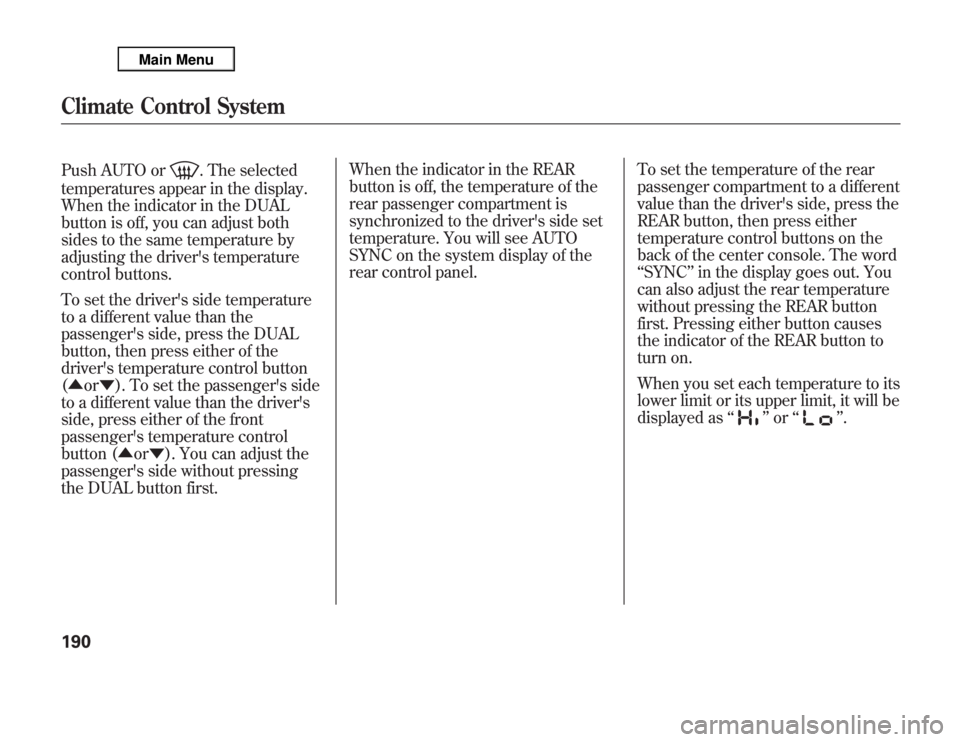
When you set each temperature to its
lower limit or its upper limit, it will be
displayed as‘‘
’’or‘‘
’’.
Climate Control System190
Page 200 of 621
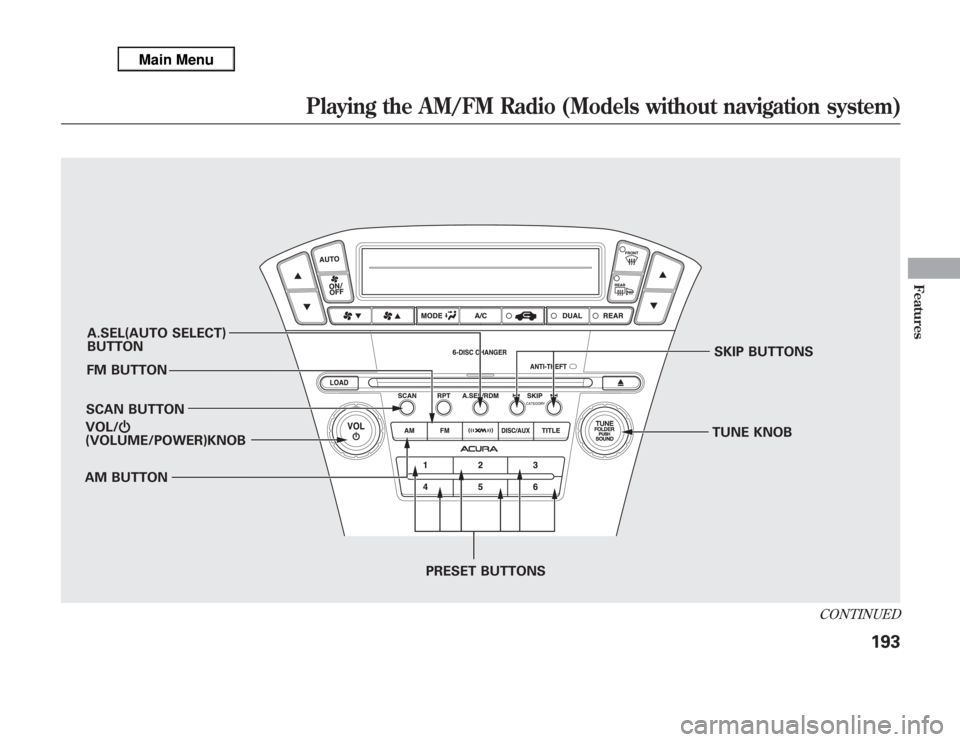
A.SEL(AUTO SELECT)
BUTTON
FM BUTTON
SCAN BUTTON
AM BUTTONSKIP BUTTONS
TUNE KNOB
PRESET BUTTONS VOL/Ⴛ
(VOLUME/POWER)KNOB
CONTINUED
Playing the AM/FM Radio (Models without navigation system)
193
Features
Page 201 of 621
To Play the Radio
The ignition switch must be in the
ACCESSORY (I) or ON (II) position.
Turn the system on by pushing the
VOL/
knob or the AM or FM
button. Adjust the volume by turning
the VOL/
knob.
The band and frequency that the
radio was last tuned to are displayed.
To change bands, press the AM or
FM button. On the FM band, ST will
be displayed if the station is
broadcasting in stereo. Stereo
reproduction in AM is not available.To Select a Station
You can use any of five methods to
find radio stations on the selected
band: tune, skip(seek), scan, the
preset buttons, and auto select.
TUNE-Use the TUNE knob to
tune the radio to a desired frequency.
Turn the knob right to tune to a
higher frequency, or left to tune to a
lower frequency.
SKIP(SEEK)-The skip(seek)
function searches up and down from
the current frequency to find a
station with a strong signal. To
activate it, press and hold the
or
side of the button, then release it.SCAN-The scan function samples
all stations with strong signals on the
selected band. To activate it, press
the SCAN button, then release it.
You will see SCAN in the display.
When the system finds a strong
signal, it will stop and play that
station for about 10 seconds.
If you do nothing, the system will
scan for the next strong station and
play it for 10 seconds. When it plays
a station that you want to listen to,
press the SCAN button again.
Playing the AM/FM Radio (Models without navigation system)194
Page 202 of 621
Preset-Each preset button can
store one frequency on AM and two
frequencies on FM.
1. Select the desired band, AM or
FM. FM1 and FM2 let you store
two frequencies with each preset
button.
2. Use the tune, skip(seek), or scan
function to tune the radio to a
desired station.
3. Pick a preset button, then press
and hold it until you hear a beep.
4. Repeat steps 1 through 3 to store a
total of six stations on AM and
twelve stations on FM.AUTO SELECT-If you are
traveling and can no longer receive
your preset stations, you can use the
auto select feature to find stations in
the local area.
Press the A.SEL button.‘‘A.SEL’’
flashes in the display, and the system
goes into scan mode for several
seconds. It stores the frequencies of
six AM and twelve FM stations in the
preset buttons.
You will see a‘‘0’’displayed after
pressing a preset button if auto select
cannot find a strong station for that
preset button.
If you do not like the stations auto
select has stored, you can store other
frequencies on the preset buttons as
previously described.
To turn off auto select,
press the A.SEL
(auto select) button. This restores
the presets you originally set.
The presets may be lost if your
vehicle's battery goes dead, is
disconnected, or the radio fuse is
removed.
For information on AM/FM radio
frequencies and reception, see page
303.
CONTINUED
Playing the AM/FM Radio (Models without navigation system)
195
Features
Page 203 of 621
Adjusting the Sound
Press the TUNE (SOUND) knob
repeatedly to display the BASS,
TREBLE, FADER, BALANCE,
SUBWOOFER, CENTER, and SVC
(speed-sensitive volume
compensation) settings.
BASS-Adjusts the bass.
TREBLE-Adjusts the treble.
FADER-Adjusts the front-to-back
strength of the sound.
BALANCE-Adjusts the side-to-
side strength of the sound.
SUBWOOFER-Adjusts the
strength of sound from the
subwoofer speaker.
CENTER-Adjusts the strength of
sound from the center speaker.SVC-Adjusts the volume level
based on the vehicle speed.
Each mode is shown in the display as
it changes. Turn the TUNE knob to
adjust the setting to your liking.
When the level reaches the center,
you will see‘‘C’’in the display.
The system will return to the audio
display about 5 seconds after you
stop adjusting a mode.
Speed-sensitive Volume
Compensation (SVC)The SVC mode controls the volume
based on vehicle speed. The faster
you go, the louder the audio volume
becomes. As you slow down, the
audio volume decreases.
The SVC has four modes: SVC OFF,
SVC LOW, SVC MID, and SVC
HIGH. Turn the TUNE knob to
adjust the setting to your liking. If
you feel the sound is too loud,
choose low. If you feel the sound is
too quiet, choose high.Audio System Lighting
You can use the instrument panel
brightness control buttons to adjust
the illumination of the audio system
(see page 133). The audio system
illuminates when the parking lights
are on, even if the radio is off.
Playing the AM/FM Radio (Models without navigation system)196