service Acura MDX 2012 User Guide
[x] Cancel search | Manufacturer: ACURA, Model Year: 2012, Model line: MDX, Model: Acura MDX 2012Pages: 621, PDF Size: 11.15 MB
Page 280 of 621
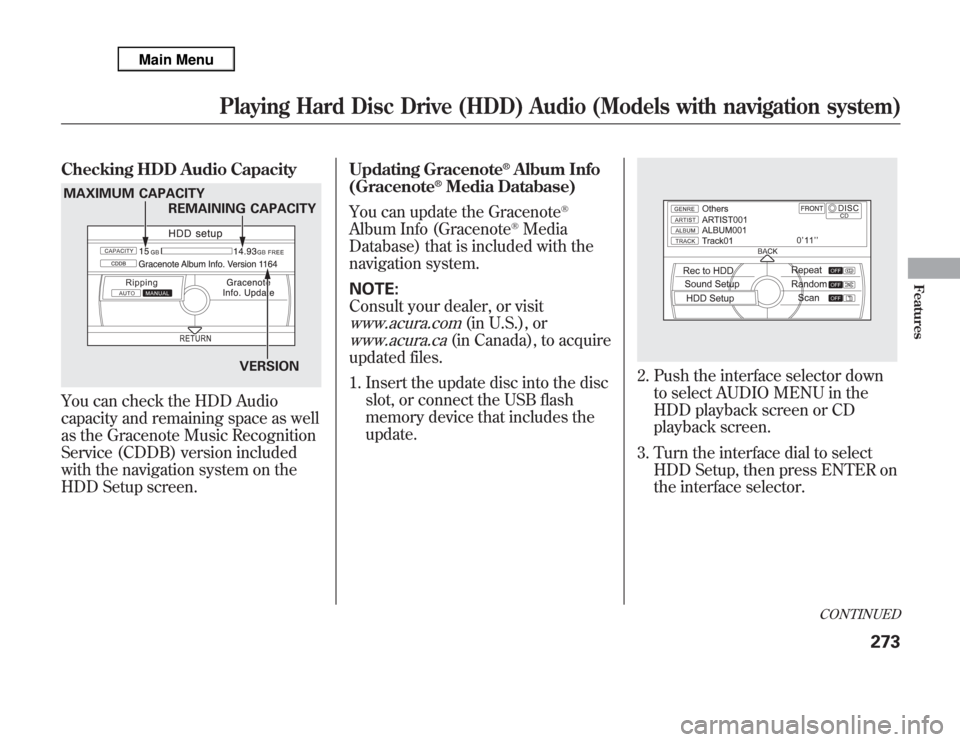
Checking HDD Audio CapacityYou can check the HDD Audio
capacity and remaining space as well
as the Gracenote Music Recognition
Service (CDDB) version included
with the navigation system on the
HDD Setup screen.Updating Gracenote
®Album Info
(Gracenote
®Media Database)
You can update the Gracenote
®
Album Info (Gracenote
®Media
Database) that is included with the
navigation system.
NOTE:
Consult your dealer, or visit
www.acura.com
(in U.S.), or
www.acura.ca
(in Canada), to acquire
updated files.
1. Insert the update disc into the disc
slot, or connect the USB flash
memory device that includes the
update.
2. Push the interface selector down
to select AUDIO MENU in the
HDD playback screen or CD
playback screen.
3. Turn the interface dial to select
HDD Setup, then press ENTER on
the interface selector.
MAXIMUM CAPACITY
REMAINING CAPACITY
VERSION
CONTINUED
Playing Hard Disc Drive (HDD) Audio (Models with navigation system)
273
Features
Page 282 of 621
Gracenote Music Recognition
Service (CDDB)
Music recognition technology and
related data are provided by
Gracenote
®. Gracenote is the
industry standard in music
recognition technology and related
content delivery. For more
information, please visit http://www.
gracenote.com/.
When music is recorded to the HDD
from a CD, information such as the
recording artist and track name are
retrieved from the Gracenote
Database and displayed (when
available). Gracenote may not
contain information for all albums.Gracenote is an internet-based music
recognition service that allows artist,
album, and track information from
CDs to display on the HDD.
Gracenote users are allowed 4 free
updates a year. More information
about Gracenote, its features, and
downloads are available at
www.acura.com
(in U.S.) or
www.acura.ca
(in Canada).
CD and music-related data from
Gracenote, Inc., copyright
©2000-
2010 Gracenote.Gracenote Software, copyright
©2000
-2010 Gracenote. This product and
service may practice one or more of
the following U.S. Patents:#
5,987,525;#6,061,680;#6,154,773,
#6,161,132,#6,230,192,#
6,230,207,#6,240,459,#6,330,593,
and other patents issued or pending.
Some services supplied under
license from Open Globe, Inc. for U.
S. Patent:#6,304,523.
Gracenote and CDDB are registered
trademarks of Gracenote. The
Gracenote logo and logotype, and the
‘‘Powered by Gracenote’’logo are
trademarks of Gracenote.
CONTINUED
Playing Hard Disc Drive (HDD) Audio (Models with navigation system)
275
Features
Page 283 of 621
Gracenote
®End User License
Agreement
Version 20061005
This application or device contains
software from Gracenote, Inc. of
Emeryville, California (‘‘Gracenote’’).
The software from Gracenote (the
‘‘Gracenote Software’’) enables this
application to perform disc and/or
file identification and obtain music-
related information, including name,
artist, track, and title information
(‘‘Gracenote Data’’) from online
servers or embedded databases
(collectively,‘‘Gracenote Servers’’)
and to perform other functions. You
may use Gracenote Data only by
means of the intended End-User
functions or this application or
device.
You agree that you will use
Gracenote Data, the Gracenote
Software, and Gracenote Servers for
your own personal non-commercial
use only.You agree not to assign, copy,
transfer or transmit the Gracenote
Software or any Gracenote Data to
any third party.
YOU AGREE NOT TO USE OR
EXPLOIT GRACENOTE DATA,
THE GRACENOTE SOFTWARE, OR
GRACENOTE SERVERS, EXCEPT
AS EXPRESSLY PERMITTED
HEREIN.
You agree that your non-exclusive
license to use the Gracenote Data,
the Gracenote Software, and
Gracenote Servers will terminate if
you violate these restrictions. If your
license terminates, you agree to
cease any and all use of the
Gracenote Data, the Gracenote
Software, and Gracenote Servers.Gracenote reserves all rights in
Gracenote Data, the Gracenote
Software, and the Gracenote Servers,
including all ownership rights. Under
no circumstances will Gracenote
become liable for any payment to you
for any information that you provide.
You agree that Gracenote, Inc. may
enforce its rights under this
Agreement against you directly in its
own name.
The Gracenote service uses a unique
identifier to track queries for
statistical purposes. The purpose of a
randomly assigned numeric identifier
is to allow the Gracenote service to
count queries without knowing
anything about who you are. For
more information, see the web page
for the Gracenote Privacy Policy for
the Gracenote service.
The Gracenote Software and each
item of Gracenote Data are licensed
to you‘‘AS IS.’’
Playing Hard Disc Drive (HDD) Audio (Models with navigation system)276
Page 284 of 621
Gracenote makes no representations
or warranties, express or implied,
regarding the accuracy of any
Gracenote Data from in the
Gracenote Servers. Gracenote
reserves the right to delete data from
the Gracenote Servers or to change
data categories for any cause that
Gracenote deems sufficient. No
warranty is made that the Gracenote
Software or Gracenote Servers are
error-free or that functioning of
Gracenote Software or Gracenote
Servers will be uninterrupted.
Gracenote is not obligated to provide
you with new enhanced or additional
data types or categories that
Gracenote may provide in the future
and is free to discontinue its services
at any time.GRACENOTE DISCLAIMS ALL
WARRANTIES EXPRESS OR
IMPLIED, INCLUDING, BUT NOT
LIMITED TO, IMPLIED
WARRANTIES OF
MERCHANTABILITY, FITNESS
FOR A PARTICULAR PURPOSE,
TITLE, AND
NONINFRINGEMENT.
GRACENOTE DOES NOT
WARRANT THE RESULTS THAT
WILL BE OBTAINED BY YOUR
USE OF THE GRACENOTE
SOFTWARE OR ANY GRACENOTE
SERVER. IN NO CASE WILL
GRACENOTE BE LIABLE FOR ANY
CONSEQUENTIAL OR
INCIDENTAL DAMAGES OR FOR
ANY LOST PROFITS OR LOST
REVENUES.
©Gracenote 2010
Playing Hard Disc Drive (HDD) Audio (Models with navigation system)
277
Features
Page 356 of 621

Overview
Adaptive cruise control (ACC) allows
you to maintain a set speed and keep
the vehicle ahead of you and your
vehicle at a safe distance without
having to use the accelerator pedal or
the brake pedal.
When the vehicle ahead of you slows
down or speeds up, ACC senses the
change in distance and compensates
by adjusting your vehicle speed
accordingly. The distance between
vehicles is based on your speed: the
faster you go, the longer the distance
will be; the slower you go, the
shorter it will be.If the vehicle ahead of you slows
down suddenly or another vehicle
cuts in front of your vehicle, ACC
alerts you by sounding a beeper and
displaying a message on the multi-
information display.
The ACC radar sensor in the front
grille can detect and monitor the
distance of a vehicle up to 328 feet
(100 meters) ahead of your vehicle.
For more information on the radar
sensor, see page 464.
Important Safety Precautions
As with any system, there are limits
to ACC. Inappropriate use of ACC
can result in a serious accident. Use
the brake pedal whenever necessary,
and always keep a safe distance
between your vehicle and other
vehicles.Do not use ACC under these
conditions:
●
In poor visibility.
●
In heavy traffic.
●
When you must slow down and
speed up repeatedly.
●
On winding roads.
●
When you enter a toll gate,
interchange, service area, parking
area, etc. In these areas, there is
no vehicle ahead of you, but ACC
would still try to accelerate to your
set speed.
●
In bad weather (rain, fog, snow,
etc.)
●
On a slippery road (for example a
road covered with ice or snow).
CONTINUED
Adaptive Cruise Control (ACC)
349
Features
Page 412 of 621
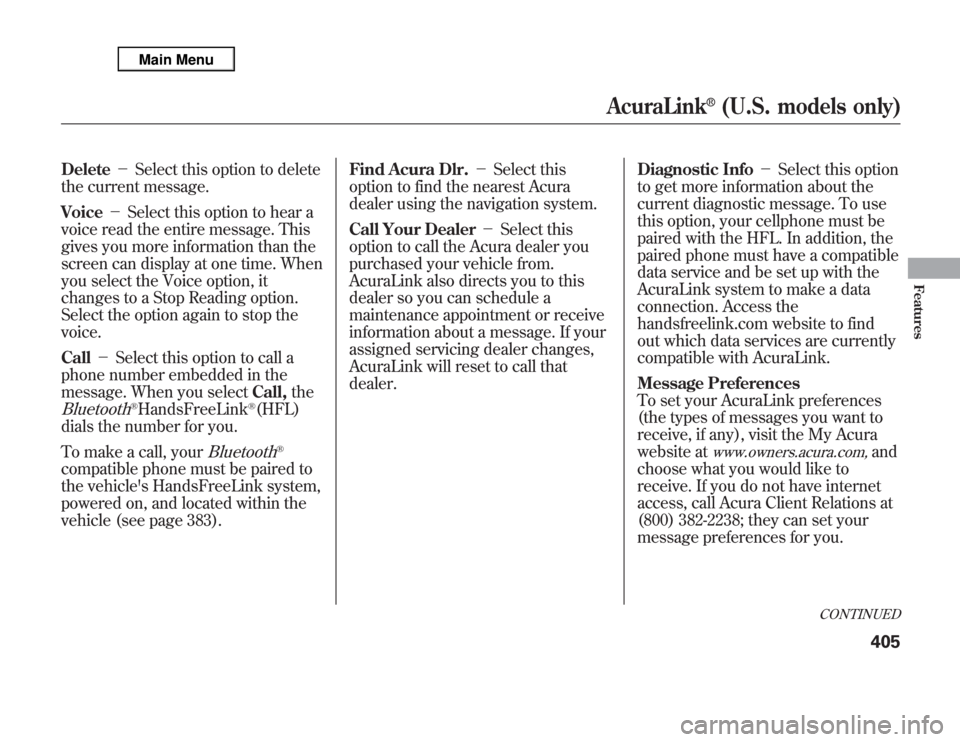
Delete-Select this option to delete
the current message.
Voice-Select this option to hear a
voice read the entire message. This
gives you more information than the
screen can display at one time. When
you select the Voice option, it
changes to a Stop Reading option.
Select the option again to stop the
voice.
Call-Select this option to call a
phone number embedded in the
message. When you selectCall,theBluetooth
®HandsFreeLink
®(HFL)
dials the number for you.
To make a call, your
Bluetooth
®
compatible phone must be paired to
the vehicle's HandsFreeLink system,
powered on, and located within the
vehicle (see page 383).Find Acura Dlr.-Select this
option to find the nearest Acura
dealer using the navigation system.
Call Your Dealer-Select this
option to call the Acura dealer you
purchased your vehicle from.
AcuraLink also directs you to this
dealer so you can schedule a
maintenance appointment or receive
information about a message. If your
assigned servicing dealer changes,
AcuraLink will reset to call that
dealer.Diagnostic Info-Select this option
to get more information about the
current diagnostic message. To use
this option, your cellphone must be
paired with the HFL. In addition, the
paired phone must have a compatible
data service and be set up with the
AcuraLink system to make a data
connection. Access the
handsfreelink.com website to find
out which data services are currently
compatible with AcuraLink.
Message Preferences
To set your AcuraLink preferences
(the types of messages you want to
receive, if any), visit the My Acura
website at
www.owners.acura.com,
and
choose what you would like to
receive. If you do not have internet
access, call Acura Client Relations at
(800) 382-2238; they can set your
message preferences for you.
CONTINUED
AcuraLink
®
(U.S. models only)
405
Features
Page 415 of 621
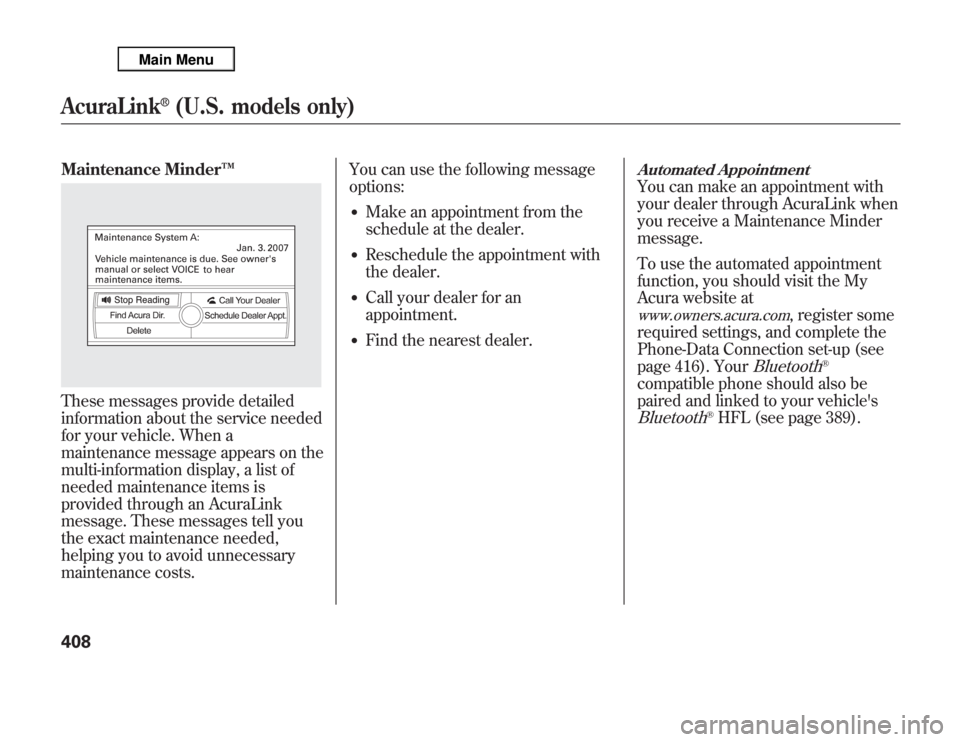
Maintenance Minder™These messages provide detailed
information about the service needed
for your vehicle. When a
maintenance message appears on the
multi-information display, a list of
needed maintenance items is
provided through an AcuraLink
message. These messages tell you
the exact maintenance needed,
helping you to avoid unnecessary
maintenance costs.You can use the following message
options:
●
Make an appointment from the
schedule at the dealer.
●
Reschedule the appointment with
the dealer.
●
Call your dealer for an
appointment.
●
Find the nearest dealer.
Automated AppointmentYou can make an appointment with
your dealer through AcuraLink when
you receive a Maintenance Minder
message.
To use the automated appointment
function, you should visit the My
Acura website atwww.owners.acura.com
, register some
required settings, and complete the
Phone-Data Connection set-up (see
page 416). Your
Bluetooth
®
compatible phone should also be
paired and linked to your vehicle'sBluetooth
®HFL (see page 389).
AcuraLink
®
(U.S. models only)
408
Page 421 of 621

When viewing a diagnostic info
message through the INFO menu,
you can select the Diagnostic Info
option to connect to the Acura server
and retrieve the latest information
regarding the problem.
NOTE:There may not be any
additional information, depending on
the time elapsed since the previous
time you retrieved the information
from the Acura server.Reminder Massage
When you make an appointment
through My Acura's online
Scheduling Service Appointment,
you can be reminded in advance
about that appointment through
AcuraLink.
If you need to reschedule or cancel
the appointment, see page 410.Turning the Automated Appointment
preference off will disable
appointment notifications in the
vehicle based on appointments
created or changed at My Acura's
online scheduling website.
Appointments can still be created,
rescheduled, and canceled from the
vehicle; however, the appointment
information stored in the vehicle will
not be updated. Any changes to
those appointments should be made
from the My Acura website.
AcuraLink
®
(U.S. models only)
414
Page 423 of 621

Phone-Data Connection-Select
this option to begin the process
required to connect to Acura. This is
used to access the most recent
diagnostic information when a
problem occurs.
NOTE:For the Phone Data
Connection button to be active, you
need a
Bluetooth
®compatible and
enabled cell phone paired to the
Bluetooth
®HandsFreeLink
®(HFL).
To complete the data connection
setup, the paired phone must have a
compatible data service.To find more information on
Bluetooth
®compatible and enabled
cell phones, visit
www.acura.com/handsfreelink
or call
the HandsFreeLink
®consumer
support at 1-888-528-7876.
AcuraLink
®
(U.S. models only)
416
Page 428 of 621

Before you begin driving your
vehicle, you should know what
gasoline to use and how to check the
levels of important fluids. You also
need to know how to properly store
luggage or packages. The
information in this section will help
you. If you plan to add any
accessories to your vehicle, please
read the information in this section
first.Break-in Period
...........................
422
Fuel Recommendation
................
422
Service Station Procedures
.........
424
Refueling
.................................
424
Tighten Fuel Cap Message
.....
425
Opening and Closing the
Hood
...................................
426
Oil Check
................................
427
Engine Coolant Check
............
427
Fuel Economy
.............................
428
Accessories and
Modifications
..........................
431
Carrying Cargo
...........................
433
Before Driving
421
Before Driving