door lock Acura MDX 2012 Owner's Guide
[x] Cancel search | Manufacturer: ACURA, Model Year: 2012, Model line: MDX, Model: Acura MDX 2012Pages: 621, PDF Size: 11.15 MB
Page 136 of 621

When the light switch is in either of
these positions, the lights on
indicator comes on as a reminder.
This indicator stays on if you leave
the lights on and turn the ignition
switch to the ACCESSORY (I) or
LOCK (0) position.
High Beams-To switch from low
beams to high beams, push the left
lever forward until you hear a click.
The blue high beam indicator will
come on (see page 74). Pull it back to
return to low beams. To flash the
high beams, pull the lever back
lightly, then release it. The high
beams stay on as long as you hold
the lever back.AUTO-The automatic lighting
feature turns on the headlights and
all other exterior lights, when it
senses low ambient light.
To turn on automatic lighting, turn
the light switch to AUTO at any time.
The lights will come on automatically
when the outside light level becomes
low (at dusk, for example). The
lights on indicator comes on as a
reminder. The lights and indicator
will turn off automatically when the
system senses high ambient light.
The lights will remain on when you
turn off the ignition switch. They will
turn off automatically when you
remove the key and open the driver's
door. To turn them on again, either
turn the ignition switch to the ON
(II) position or turn the light switch
to the
position.Even with the automatic lighting
feature turned on, we recommend
that you turn on the lights manually
when driving at night or in a dense
fog, or when you enter dark areas
such as long tunnels or parking
facilities.
To change the‘‘AUTO LIGHT
SENSITIVITY’’setting, see page 113.
Do not leave the light switch in
AUTO if you will not be driving the
vehicle for an extended period (a
week or more). You should also turn
off the lights if you plan to leave the
engine idling or off for a long time.
CONTINUED
Turn Signal and Headlights
129
Instruments and Controls
Page 138 of 621

If you see a‘‘CHECK DRL SYSTEM’’
message on the multi-information
display, there is a problem with the
daytime running light system. Take
your vehicle to a dealer to have it
checked.
When the multi-information display
shows a‘‘DRL OFF’’message, the
daytime running lights are off.
Follow the procedure in the left
column to turn them on.Automatic Lighting Off Feature
This feature turns off the headlights,
all other exterior lights, and the
instrument panel lights within 15
seconds after you remove the key
and close the driver's door.
To change the‘‘HEADLIGHT AUTO
OFF TIMER’’setting, see page 112.
The automatic lighting off feature
activates if you leave the headlight
switch in the‘‘
’’or‘‘
’’
position or if the lights are turned on
by setting the switch in the‘‘AUTO’’
position, and you remove the key,
then open and close the driver's
door.If you turn the ignition switch to the
LOCK (0) position with the headlight
switch on, but do not open the door
the lights turn off after 10 minutes (3
minutes, if the switch is in the
‘‘AUTO’’position).
The lights turn on again when you
unlock or open the driver's door.
If you unlock the door, but do not
open it within 15 seconds, the lights
go off. With the driver's door open,
you will hear a lights-on reminder
chime.
Turn Signal and Headlights
131
Instruments and Controls
Page 143 of 621
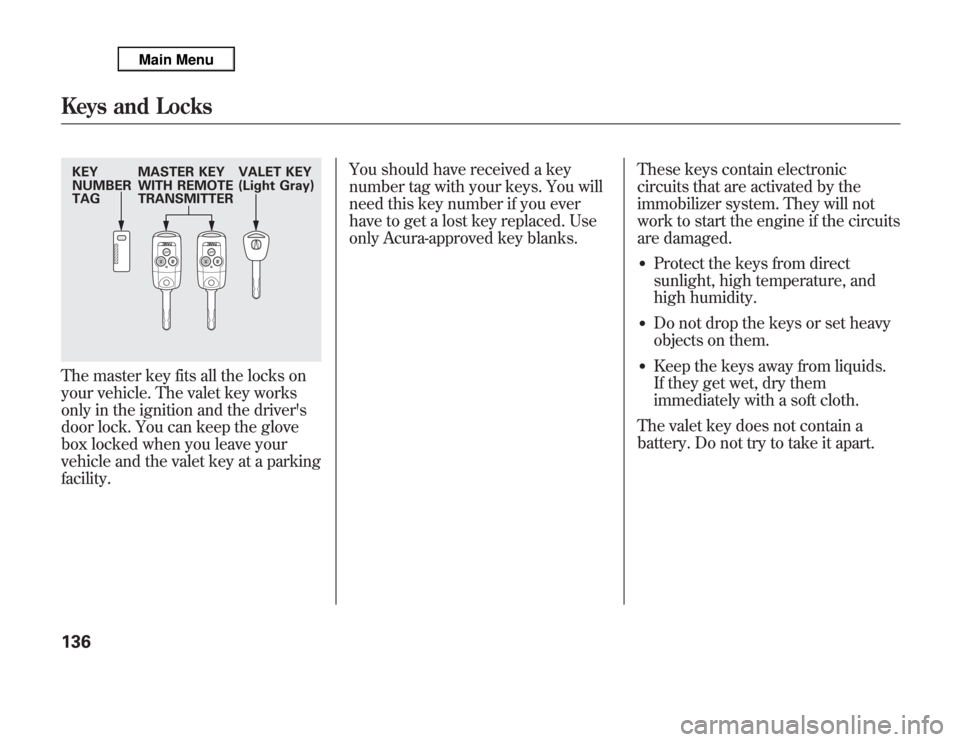
The master key fits all the locks on
your vehicle. The valet key works
only in the ignition and the driver's
door lock. You can keep the glove
box locked when you leave your
vehicle and the valet key at a parking
facility.You should have received a key
number tag with your keys. You will
need this key number if you ever
have to get a lost key replaced. Use
only Acura-approved key blanks.These keys contain electronic
circuits that are activated by the
immobilizer system. They will not
work to start the engine if the circuits
are damaged.
●
Protect the keys from direct
sunlight, high temperature, and
high humidity.
●
Do not drop the keys or set heavy
objects on them.
●
Keep the keys away from liquids.
If they get wet, dry them
immediately with a soft cloth.
The valet key does not contain a
battery. Do not try to take it apart.
KEY
NUMBER
TAGMASTER KEY
WITH REMOTE
TRANSMITTERVALET KEY
(Light Gray)Keys and Locks136
Page 146 of 621

The ignition switch has four positions:
LOCK (0), ACCESSORY (I), ON (II),
and START (III).
LOCK (0)-You can insert or remove
the key only in this position. To turn
the key to the LOCK (0) position, the
shift lever must be in Park, and you
must push the key in slightly.
If the front wheels are turned, the anti-
theft lock may make it difficult to turn
the key. Firmly turn the steering wheel
to the left or right as you turn the key.
ACCESSORY (I)-You can operate
the audio system and the accessory
power sockets in this position.
ON (II)-This is the normal key
position when driving. Several of the
indicators on the instrument panel
come on as a test when you turn the
ignition switch from the
ACCESSORY (I) to the ON (II)
position.
START (III)-Use this position
only to start the engine. The switch
returns to the ON (II) position when
you let go of the key.You will hear a reminder beeper if
you leave the key in the ignition
switch in the LOCK (0) or the
ACCESSORY (I) position and open
the driver's door. Remove the key to
turn off the beeper.
The shift lever must be in Park
before you can remove the key from
the ignition switch.
Ignition Switch
139
Instruments and Controls
Page 147 of 621

To lock all doors and the tailgate,
press the bottom of the master door
lock switch on either front door, pull
the lock tab above the driver's door
handle, or use the key on the outside
lock on the driver's door.
Pressing the top of either master
door lock switch will unlock all doors
and the tailgate.
The lock tab on any passenger's door
locks and unlocks that door.
All doors and the tailgate can be
locked from the outside by using the
key in the driver's door lock. To
unlock only the driver's door, insert
the key, turn the key, and release it.
The remaining doors and the tailgate
unlock when you turn the key a
second time within a few seconds.To change the‘‘KEY AND REMOTE
UNLOCK MODE’’setting, see page
119.
When the vehicle speed reaches
about 10 mph (about 16 km/h) or
more, all the doors lock
automatically.
To change the‘‘AUTO DOOR
LOCK’’setting, see page 116.
When you shift to P after driving, the
driver's door unlocks.
To change the‘‘AUTO DOOR
UNLOCK’’setting, see page 117.
UNLOCK
LOCK
LOCK
UNLOCK
Door Locks140
Page 148 of 621

Lockout PreventionWith any door and the tailgate open
and the key in the ignition, both
master door lock switches are
disabled. They are not disabled if all
the doors and the tailgate are closed.
If you try to lock an open driver's
door by pulling the lock tab rearward
the lock tab on the driver's door pops
out.Childproof Door Locks
The childproof door locks are
designed to prevent children seated
in the rear from accidentally opening
the rear doors. Each rear door has a
lock lever near the edge. With the
lever in the LOCK position (lever is
down), the door cannot be opened
from the inside regardless of the
position of the lock tab. To open the
door, push the lock tab forward and
use the outside door handle.Tailgate
To open the tailgate, push up inside
the handle, then lift up. To close the
tailgate, use the inner handle to pull
it down, then press down on the back
edge.
Keep the tailgate closed at all times
while driving to avoid damaging the
tailgate and to prevent exhaust gas
from getting into the interior. See
Carbon Monoxide Hazardon page
61.
LOCK
Door Locks, Tailgate
141
Instruments and Controls
Page 149 of 621

Power TailgateThe tailgate can be opened and closed
with the remote transmitter (see page
145) or the button in the driver's door
pocket when both front doors are
unlocked.
Press and hold the tailgate button on the
remote transmitter or the button for
about 1 second to open or close the
tailgate. Each time you press the button
on the remote transmitter or the button,
you will hear a beep, and some front and
rear lights will flash.
If you push the same button again
while the tailgate is opening or
closing, you will hear three beeps,
and the tailgate will stop moving,
reverse direction, and stop at the
fully opened or closed position.
The tailgate can also be closed by
pressing the button on the tailgate. If
you press the button again while the
tailgate is closing, you will hear three
beeps, and the tailgate will stop
moving, reverse direction, and stop
at the fully opened position.
POWER TAILGATE BUTTON
TAILGATE BUTTON
Tailgate142
Page 151 of 621

If you try to drive off with the tailgate
not closed completely, a beeper
sounds and a‘‘DOOR & TAILGATE
OPEN’’message is shown on the
multi-information display.
Keep the tailgate closed at all times
while driving to avoid damaging the
tailgate and to prevent exhaust gas
from getting into the interior. See
Carbon Monoxide Hazardon page
61.
If there is a problem in the power
tailgate system, you will see a
‘‘CHECK POWER TAILGATE’’
message on the multi-information
display. Have the system checked by
your dealer.
With this message shown on the
multi-information display, you can
still open or close the tailgate
manually.Unlocking the Tailgate
If the power door lock system cannot
unlock the tailgate, unlock it
manually.
Use a small flat-tip screwdriver to
remove the cover on the back of the
tailgate.
Push the release lever to the right as
shown.
If you need to unlock the tailgate
manually, it means there is a
problem with the tailgate. Have the
vehicle checked by your dealer.
Tailgate144
Page 152 of 621

LOCK-Press this button once to
lock all doors and the tailgate. Some
exterior lights will flash. When you
push LOCK twice within 5 seconds,
you will hear a beep to verify that the
doors and tailgate are locked and the
security system has set. This button
does not work if any door or tailgate
is not fully closed.
To change the‘‘KEYLESS LOCK
ACKNOWLEDGEMENT’’setting,
see page 120.UNLOCK-Press this button once
to unlock the driver's door. Push it
twice to unlock the other doors.
Some exterior lights will flash twice
when you push the button. If you do
not open any door or the tailgate
within 30 seconds, they will
automatically relock.
To change the‘‘KEY AND REMOTE
UNLOCK MODE’’setting, see page
119.
To change the‘‘SECURITY RELOCK
TIMER’’setting, see page 121.The door activated spotlights come
on when you press the UNLOCK
button if the door activated position
is selected by pressing the light
control button (DOOR). If you do not
open any door within 30 seconds (or
whatever setting of the interior light
dimming time is set to), the lights
will fade out. If you relock the doors
with the remote transmitter before 30
seconds have elapsed, the lights will
go off immediately.
TAILGATE-Press and hold the
TAILGATE button to open or close
the power tailgate. When the tailgate
begins to move, you will hear a beep,
and some front and rear lights will
flash.
UNLOCK
BUTTONLOCK
BUTTON
PANIC
BUTTON TAILGATE
BUTTON
CONTINUED
Remote Transmitter
145
Instruments and Controls
Page 153 of 621
If you push the same button again
while the tailgate is opening or
closing, three beeps sound, the
tailgate stops moving, reverses
direction and stops in the fully
opened or fully closed position.
PANIC-Press and hold this
button for about 1 second to attract
attention; the horn will sound, and
the exterior lights will flash for about
30 seconds. To cancel panic mode,
press any other button on the remote
transmitter, or turn the ignition
switch to the ON (II) position. Panic
mode does not work when the key is
in the ignition switch.
Remote Transmitter Care●
Avoid dropping or throwing the
transmitter.
●
Protect the transmitter from
extreme temperatures.
●
Do not immerse the transmitter in
any liquid.
●
If you lose a transmitter, the
replacement needs to be
reprogrammed by your dealer.
Replacing the Transmitter Battery
If it takes several pushes on the
button to lock or unlock the doors
and the tailgate, replace the battery
as soon as possible.
Battery type: CR1616
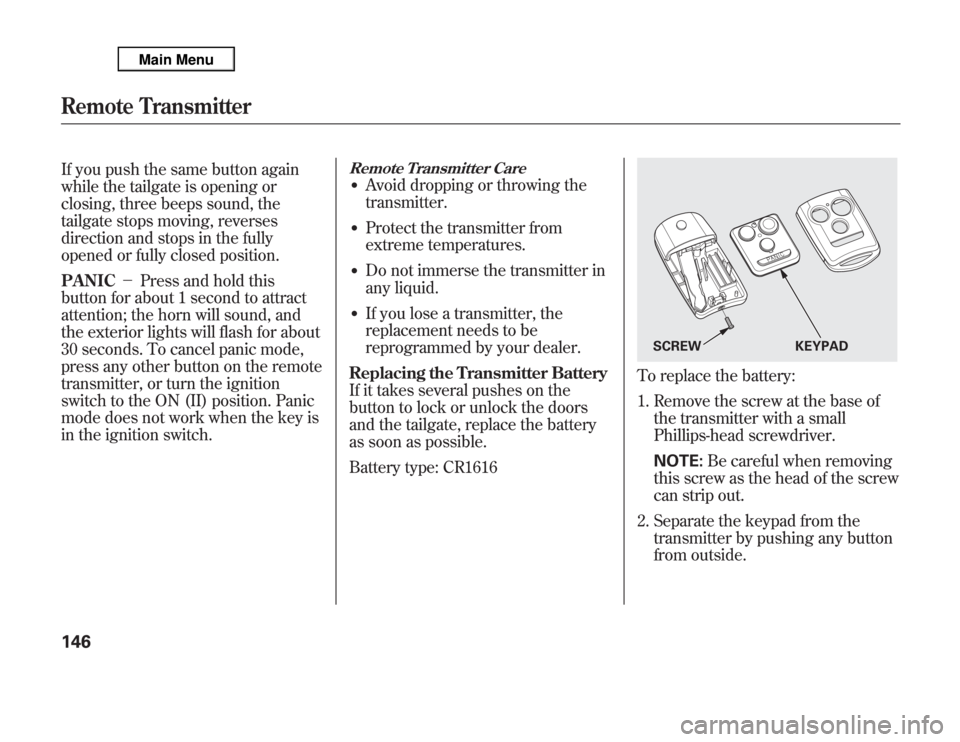
To replace the battery:
1. Remove the screw at the base of
the transmitter with a small
Phillips-head screwdriver.
NOTE:Be careful when removing
this screw as the head of the screw
can strip out.
2. Separate the keypad from the
transmitter by pushing any button
from outside.
SCREW KEYPAD
Remote Transmitter146