key battery Acura MDX 2012 Owner's Manual
[x] Cancel search | Manufacturer: ACURA, Model Year: 2012, Model line: MDX, Model: Acura MDX 2012Pages: 621, PDF Size: 11.15 MB
Page 142 of 621
When you remove the key from the
ignition switch, the steering wheel
automatically moves fully in and up.
To change the‘‘AUTO TILT &
TELESCOPE STEERING WHEEL’’
setting, see page 109.
The steering wheel then returns to
its original position when you insert
the key back in the ignition switch.
Steering wheel movement is also
controlled by the driving position
memory system (see page 168).If your vehicle's battery is
disconnected or goes dead, or the
fuse for the power tilt and telescopic
steering wheel is removed, the
power tilt and telescopic steering
wheel system needs to be reset when
you reconnect the battery or install
the fuse.
Insert the key into the ignition
switch, and remove it. The steering
wheel automatically moves fully in
and up to let you know the system is
reset.
Steering Wheel Adjustments
135
Instruments and Controls
Page 143 of 621
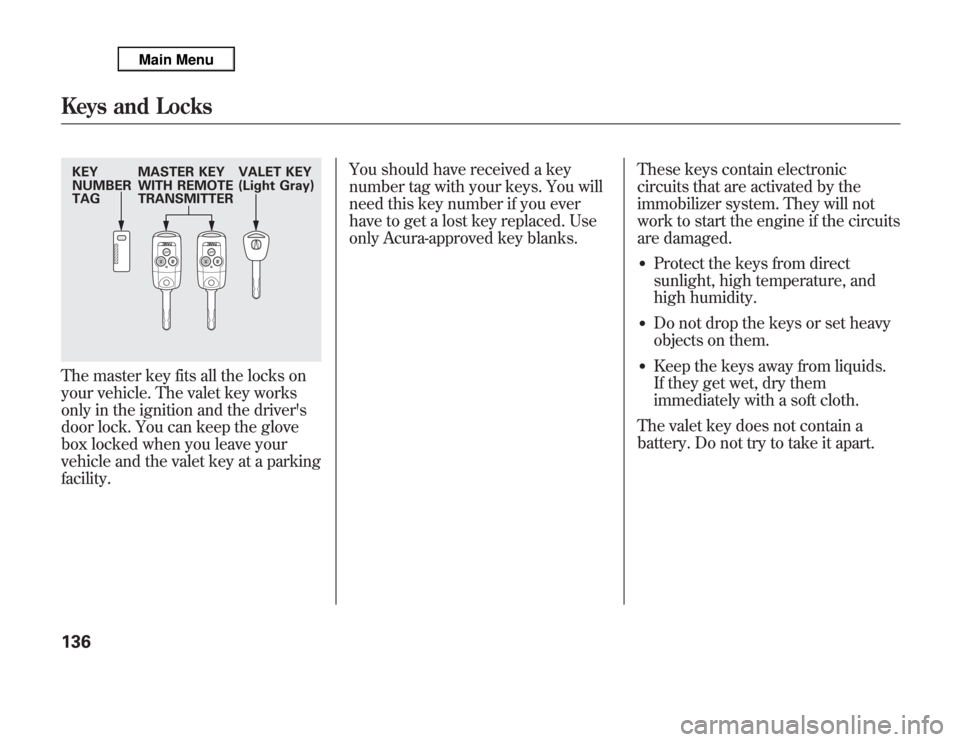
The master key fits all the locks on
your vehicle. The valet key works
only in the ignition and the driver's
door lock. You can keep the glove
box locked when you leave your
vehicle and the valet key at a parking
facility.You should have received a key
number tag with your keys. You will
need this key number if you ever
have to get a lost key replaced. Use
only Acura-approved key blanks.These keys contain electronic
circuits that are activated by the
immobilizer system. They will not
work to start the engine if the circuits
are damaged.
●
Protect the keys from direct
sunlight, high temperature, and
high humidity.
●
Do not drop the keys or set heavy
objects on them.
●
Keep the keys away from liquids.
If they get wet, dry them
immediately with a soft cloth.
The valet key does not contain a
battery. Do not try to take it apart.
KEY
NUMBER
TAGMASTER KEY
WITH REMOTE
TRANSMITTERVALET KEY
(Light Gray)Keys and Locks136
Page 153 of 621
If you push the same button again
while the tailgate is opening or
closing, three beeps sound, the
tailgate stops moving, reverses
direction and stops in the fully
opened or fully closed position.
PANIC-Press and hold this
button for about 1 second to attract
attention; the horn will sound, and
the exterior lights will flash for about
30 seconds. To cancel panic mode,
press any other button on the remote
transmitter, or turn the ignition
switch to the ON (II) position. Panic
mode does not work when the key is
in the ignition switch.
Remote Transmitter Care●
Avoid dropping or throwing the
transmitter.
●
Protect the transmitter from
extreme temperatures.
●
Do not immerse the transmitter in
any liquid.
●
If you lose a transmitter, the
replacement needs to be
reprogrammed by your dealer.
Replacing the Transmitter Battery
If it takes several pushes on the
button to lock or unlock the doors
and the tailgate, replace the battery
as soon as possible.
Battery type: CR1616
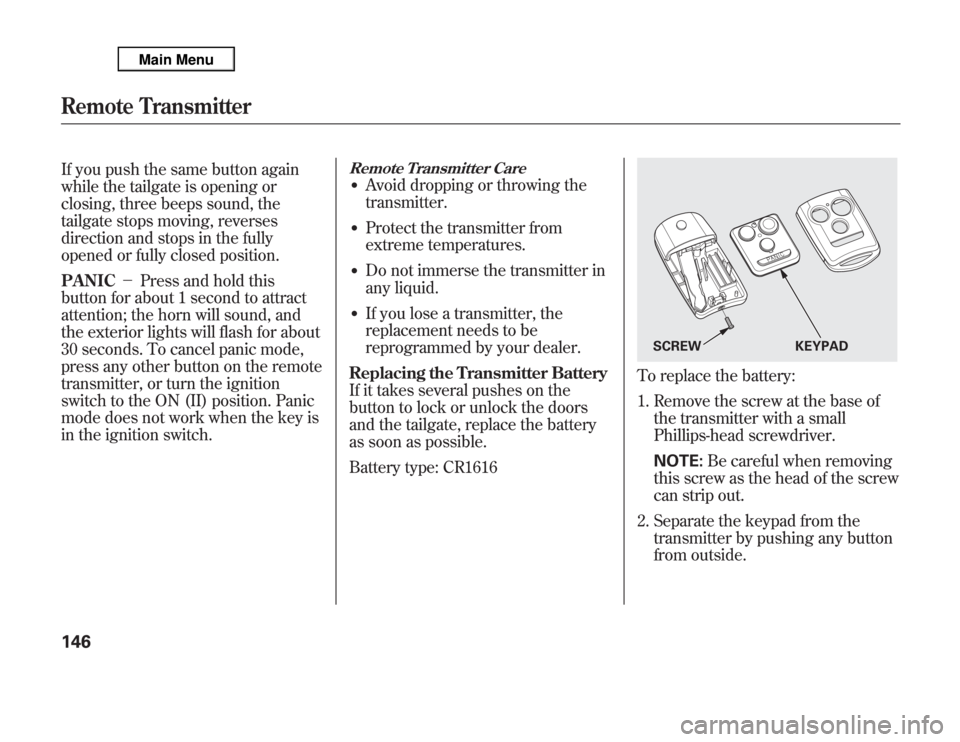
To replace the battery:
1. Remove the screw at the base of
the transmitter with a small
Phillips-head screwdriver.
NOTE:Be careful when removing
this screw as the head of the screw
can strip out.
2. Separate the keypad from the
transmitter by pushing any button
from outside.
SCREW KEYPAD
Remote Transmitter146
Page 154 of 621
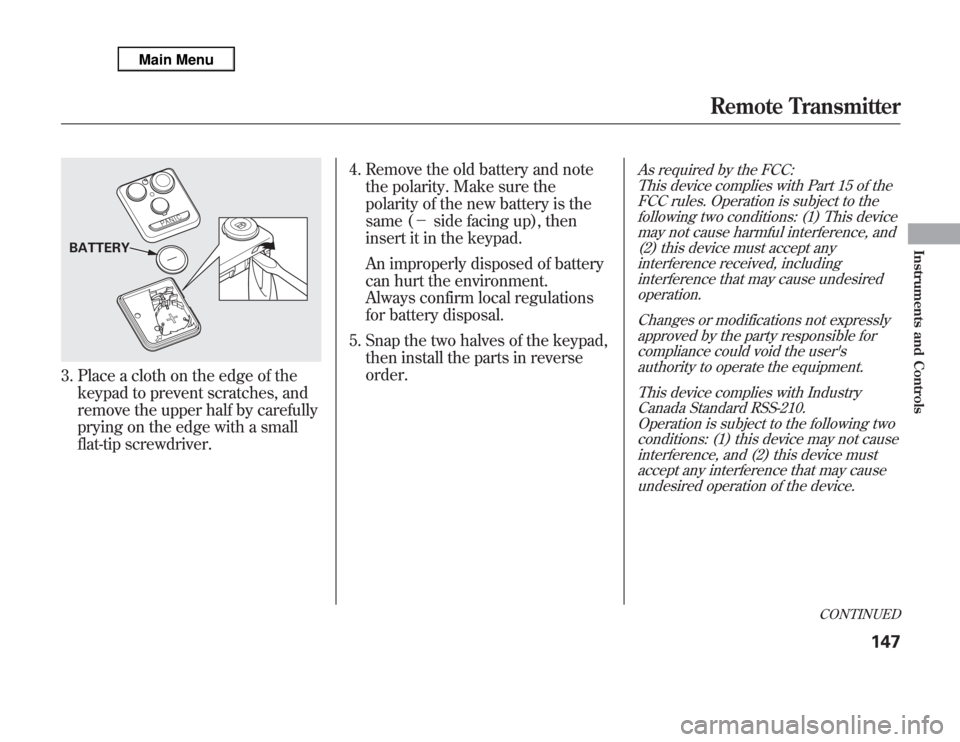
3. Place a cloth on the edge of the
keypad to prevent scratches, and
remove the upper half by carefully
prying on the edge with a small
flat-tip screwdriver.4. Remove the old battery and note
the polarity. Make sure the
polarity of the new battery is the
same (-side facing up), then
insert it in the keypad.
An improperly disposed of battery
can hurt the environment.
Always confirm local regulations
for battery disposal.
5. Snap the two halves of the keypad,
then install the parts in reverse
order.
As required by the FCC:
This device complies with Part 15 of the
FCC rules. Operation is subject to the
following two conditions: (1) This device
may not cause harmful interference, and
(2) this device must accept any
interference received, including
interference that may cause undesired
operation.
Changes or modifications not expressly
approved by the party responsible for
compliance could void the user's
authority to operate the equipment.
This device complies with Industry
Canada Standard RSS-210.
Operation is subject to the following two
conditions: (1) this device may not cause
interference, and (2) this device must
accept any interference that may cause
undesired operation of the device.
BATTERY
CONTINUED
Remote Transmitter
147
Instruments and Controls
Page 381 of 621
To change from the currently linked
phone to another paired phone:Press and release the HFL Talk
button before a command.
1. Say‘‘Phone setup.’’
2. Say‘‘Next phone’’after the
prompts.
3. HFL disconnects the linked phone
and searches for another paired
phone.
4. Once another phone is found, it is
linked to the system. HFL will
inform you which phone is now
linked.
If no other phones are found or
paired, HFL will inform you that the
original phone is linked again.
To change the pairing code setting:Press and release the HFL Talk
button before a command.
1. Say‘‘Phone setup.’’
2. Say‘‘Set pairing code’’after the
prompts.
3. If you want HFL to create a
random code each time you pair a
phone, say‘‘Random.’’If you want
to choose your own 4-digit code to
be used each time, say‘‘Fixed’’
and follow the HFL prompts.Making a Call
You can make calls using a name in
the HFL phonebook or any phone
number. You can also redial the last
number called.
HFL uses a Class 2 Bluetooth, which
means the maximum range between
your phone and vehicle is 30 feet (10
meters).
During a call, HFL allows you to talk
up to 30 minutes after you remove
the key from the ignition switch.
However, this may weaken the
vehicle's battery.
Bluetooth
®
HandsFreeLink
®
(Models without navigation system)
374
Page 397 of 621

Setup Bluetooth PhoneTo pair a cell phone:1. Select‘‘Setup Bluetooth Phone’’
from the Phone Setup screen.
2. Select‘‘Pair Phone.’’
3. HFL gives you a 4-digit pass-key
that you will need to input on your
phone.
4. Put your cell phone in‘‘Discovery’’
or‘‘Search’’mode, and search for a
Bluetooth device.
5. When your phone prompts you,
input the 4-digit pass-key.
6. You will receive a notification on
the screen and your phone if
pairing is successful.
Phone pairing tips:●
You cannot pair your phone while
the vehicle is moving.
●
Up to six phones can be paired.
●
Your phone's battery may drain
faster when it is paired to HFL.
Bluetooth
®
HandsFreeLink
®
(Models with navigation system)
390
Page 404 of 621
To delete a speed dial number:1. Select‘‘Edit Speed Dial’’from the
Phone Setup screen.
2. Select‘‘Delete Speed Dial.’’
3. Select the number you want to
delete, and select‘‘OK.’’
Delete Imported PhonebookThis option deletes the entire
phonebook of the currently linked
cell phone. Follow the confirmation
and notification screens.Making a Call
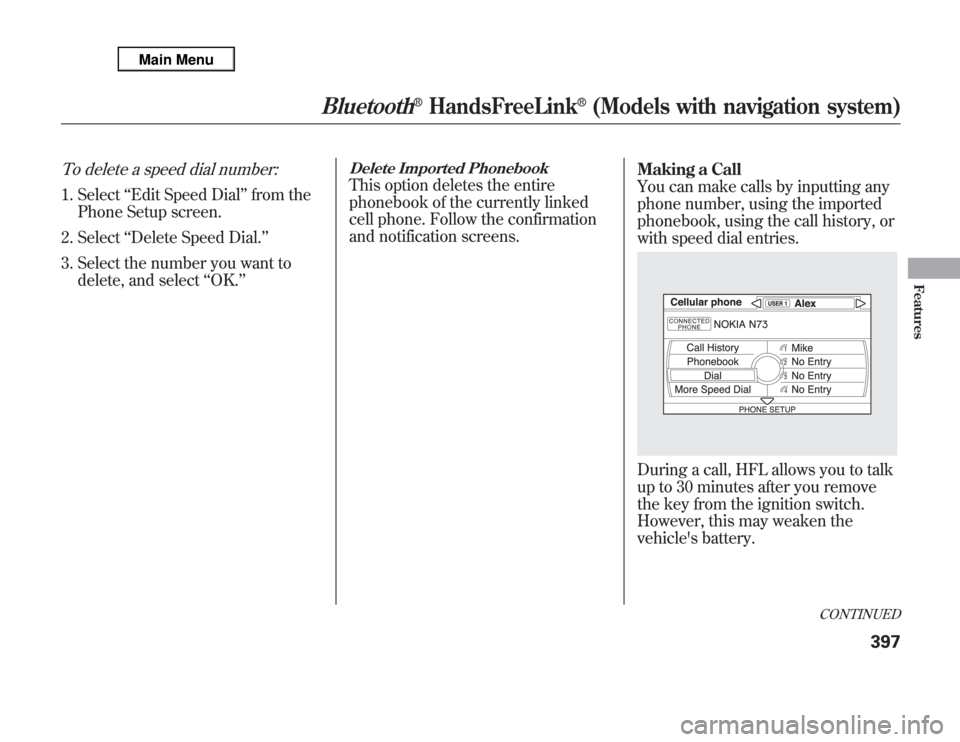
You can make calls by inputting any
phone number, using the imported
phonebook, using the call history, or
with speed dial entries.
During a call, HFL allows you to talk
up to 30 minutes after you remove
the key from the ignition switch.
However, this may weaken the
vehicle's battery.
CONTINUED
Bluetooth
®
HandsFreeLink
®
(Models with navigation system)
397
Features
Page 449 of 621

Your vehicle's starting system has an
auto control mode. When you turn
the ignition switch to the START (III)
position, this feature keeps the
engine's starter motor running until
the engine starts. Follow these
instructions to start the engine:
1. Apply the parking brake.
2. In cold weather, turn off all
electrical accessories to reduce the
drain on the battery.
3. Make sure the shift lever is in
Park. Press on the brake pedal.4. Without touching the accelerator
pedal, turn the ignition switch to
the START (III) position, then
release the ignition switch. You do
not need to hold the ignition
switch in the START (III) position
to start the engine. Depending on
the outside temperature, the
starter motor runs for about 6 to 9
seconds until the engine starts.
If you hold the ignition switch in
the START (III) position for more
than 7 seconds, the starter motor,
depending on the outside
temperature, runs for about 10 to
25 seconds until the engine starts.
If the engine does not start, wait at
least 10 seconds before trying
again.
The immobilizer system protects your
vehicle from theft. If an improperly-
coded key (or other device) is used, the
engine's fuel system is disabled. For
more information, see page 138.
The engine is harder to start in cold
weather. Also, the thinner air found at
altitudes above 8,000 feet (2,400
meters) adds to this problem.
Starting the Engine442
Page 564 of 621

Diagnosing why the engine won't
start falls into two areas, depending
on what you hear when you turn the
ignition switch to the START (III)
position:●
You hear nothing, or almost
nothing. The engine's starter
motor does not operate at all, or
operates very slowly.
●
You can hear the starter motor
operating normally, or the starter
motor sounds like it is spinning
faster than normal, but the engine
does not start up and run.
Nothing Happens or the Starter
Motor Operates Very Slowly
When you turn the ignition switch to
the START (III) position, you do not
hear the normal noise of the engine
trying to start. You may hear a
clicking sound, a series of clicks, or
nothing at all.Check these things:
●
Check the transmission interlock.
The transmission must be in Park
or neutral or the starter will not
operate.
●
Turn the ignition switch to the ON
(II) position. Turn on the
headlights, and check their
brightness. If the headlights are
very dim or do not come on at all,
the battery is discharged. See
Jump Startingon page 558.
●
Turn the ignition switch to the
START (III) position. If the
headlights do not dim, check the
condition of the fuses. If the fuses
are OK, there is probably
something wrong with the
electrical circuit for the ignition
switch or starter motor. You will
need a qualified technician to
determine the problem. See
Emergency Towingon page 572.If the headlights dim noticeably or
go out when you try to start the
engine, either the battery is
discharged or the connections are
corroded. Check the condition of
the battery and terminal
connections (see page 547). You
can then try jump starting the
vehicle from a booster battery (see
page 558).
The Starter Operates Normally
In this case, the starter motor's speed
sounds normal, or even faster than
normal, when you turn the ignition
switch to the START (III) position,
but the engine does not run.
●
Are you using a properly coded
key? An improperly coded key will
cause the immobilizer system
indicator in the instrument panel
to blink rapidly (see page 74).
CONTINUED
If the Engine Won't Start
557
Taking Care of the Unexpected
Page 606 of 621

A
Accessories and
Modifications
..........................
431
ACCESSORY (Ignition Key
Position)
.................................
139
Accessory Power Sockets
..........
177
AC Power Outlet
........................
178
Active Damper System
...............
484
Active Head Restraints
...............
152
AcuraLink
®(U.S. models
only)
.......................................
402
Adaptive Cruise Control
(ACC)
.....................................
348
Additives, Engine Oil
.................
518
Adjusting the Steering Wheel
....
134
Advanced Airbags
........................
31
Airbag (SRS)
..........................
10, 27
Air Conditioning System
............
182
Rear A/C Control
....................
187
Air Outlets (Vents)
.....................
189
Air Pressure, Tires
..............
540, 541
Alcohol in Gasoline
....................
422
Antifreeze
...................................
520Anti-lock Brakes (ABS)
Indicator
............................
70, 462
Operation
................................
461
Anti-theft, Audio System
.............
308
Anti-theft Steering Column
Lock
.......................................
139
Audio System
......................
192, 212
Automatic Climate Control
.........
183
Automatic Lighting Off
Feature
...................................
131
Automatic Seat Belt Tensioners...
23
Automatic Speed Control
...........
345
Automatic Transmission
............
443
Capacity, Fluid
........................
578
Checking Fluid Level
..............
523
Driving with the Paddle
Shifters
................................
447
Shifting
...................................
444
Shift Lever Position
Indicators
............................
443
Shift Lever Positions
...............
444
Shift Lock Release
...................
446
Auxiliary Input Jack
...................
307B
Battery
Charging System
Indicator
........................
69, 562
Jump Starting
..........................
558
Maintenance
...........................
547
Specifications
..........................
579
Before Driving
...........................
421
Belts, Seat
................................
9, 21
Beverage Holders
......................
174
Blind Spot Information System
(BSI)
......................................
476
Bluetooth
®Audio
.......................
298
Bluetooth
®HandsFreeLink
®
(Models with navigation
system)
...............................
383
Bluetooth
®HandsFreeLink
®
(Models without navigation
system)
...............................
365
Booster Seats
...............................
58
CONTINUED
Index
I
INDEX