power steering Acura MDX 2012 Owner's Manual
[x] Cancel search | Manufacturer: ACURA, Model Year: 2012, Model line: MDX, Model: Acura MDX 2012Pages: 621, PDF Size: 11.15 MB
Page 11 of 621
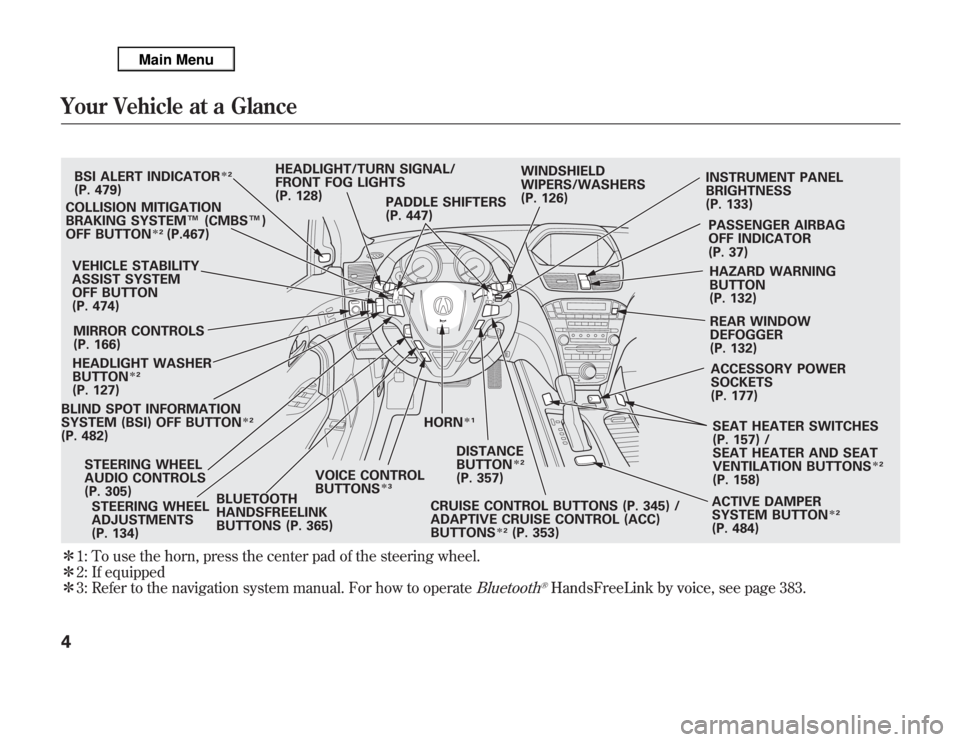
ᤳ1: To use the horn, press the center pad of the steering wheel.
ᤳ2: If equipped
ᤳ3: Refer to the navigation system manual. For how to operate
Bluetooth
®HandsFreeLink by voice, see page 383.
BLIND SPOT INFORMATION
SYSTEM (BSI) OFF BUTTON
ᤳ2
(P. 482)VEHICLE STABILITY
ASSIST SYSTEM
OFF BUTTON
(P. 474)
MIRROR CONTROLS
(P. 166)BSI ALERT INDICATOR
ᤳ2
(P. 479)
COLLISION MITIGATION
BRAKING SYSTEM™(CMBS™)
OFF BUTTON
ᤳ2
(P.467)
HEADLIGHT WASHER
BUTTON
ᤳ2
(P. 127)
HORN
ᤳ1
STEERING WHEEL
ADJUSTMENTS
(P. 134)HEADLIGHT/TURN SIGNAL/
FRONT FOG LIGHTS
(P. 128)
STEERING WHEEL
AUDIO CONTROLS
(P. 305)WINDSHIELD
WIPERS/WASHERS
(P. 126)INSTRUMENT PANEL
BRIGHTNESS
(P. 133)
PASSENGER AIRBAG
OFF INDICATOR
(P. 37)
HAZARD WARNING
BUTTON
(P. 132)
REAR WINDOW
DEFOGGER
(P. 132)
ACCESSORY POWER
SOCKETS
(P. 177)
SEAT HEATER SWITCHES
(P. 157) /
SEAT HEATER AND SEAT
VENTILATION BUTTONS
ᤳ2
(P. 158)
ACTIVE DAMPER
SYSTEM BUTTON
ᤳ2
(P. 484) CRUISE CONTROL BUTTONS (P. 345) /
ADAPTIVE CRUISE CONTROL (ACC)
BUTTONS
ᤳ2
(P. 353) PADDLE SHIFTERS
(P. 447)
DISTANCE
BUTTONᤳ2
(P. 357)
BLUETOOTH
HANDSFREELINK
BUTTONS (P. 365)VOICE CONTROL
BUTTONS
ᤳ3
Your Vehicle at a Glance4
Page 72 of 621
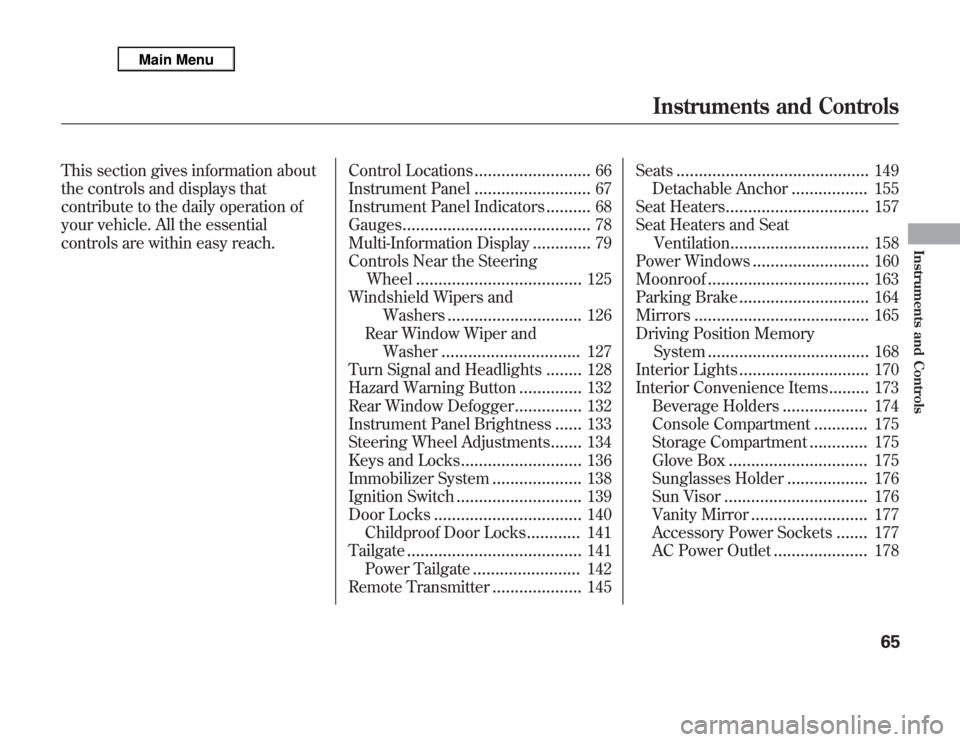
This section gives information about
the controls and displays that
contribute to the daily operation of
your vehicle. All the essential
controls are within easy reach.Control Locations
..........................
66
Instrument Panel
..........................
67
Instrument Panel Indicators
..........
68
Gauges
..........................................
78
Multi-Information Display
.............
79
Controls Near the Steering
Wheel
.....................................
125
Windshield Wipers and
Washers
..............................
126
Rear Window Wiper and
Washer
...............................
127
Turn Signal and Headlights
........
128
Hazard Warning Button
..............
132
Rear Window Defogger
...............
132
Instrument Panel Brightness
......
133
Steering Wheel Adjustments
.......
134
Keys and Locks
...........................
136
Immobilizer System
....................
138
Ignition Switch
............................
139
Door Locks
.................................
140
Childproof Door Locks
............
141
Tailgate
.......................................
141
Power Tailgate
........................
142
Remote Transmitter
....................
145Seats
...........................................
149
Detachable Anchor
.................
155
Seat Heaters
................................
157
Seat Heaters and Seat
Ventilation
...............................
158
Power Windows
..........................
160
Moonroof
....................................
163
Parking Brake
.............................
164
Mirrors
.......................................
165
Driving Position Memory
System
....................................
168
Interior Lights
.............................
170
Interior Convenience Items
.........
173
Beverage Holders
...................
174
Console Compartment
............
175
Storage Compartment
.............
175
Glove Box
...............................
175
Sunglasses Holder
..................
176
Sun Visor
................................
176
Vanity Mirror
..........................
177
Accessory Power Sockets
.......
177
AC Power Outlet
.....................
178
Instruments and Controls
65
Instruments and Controls
Page 132 of 621
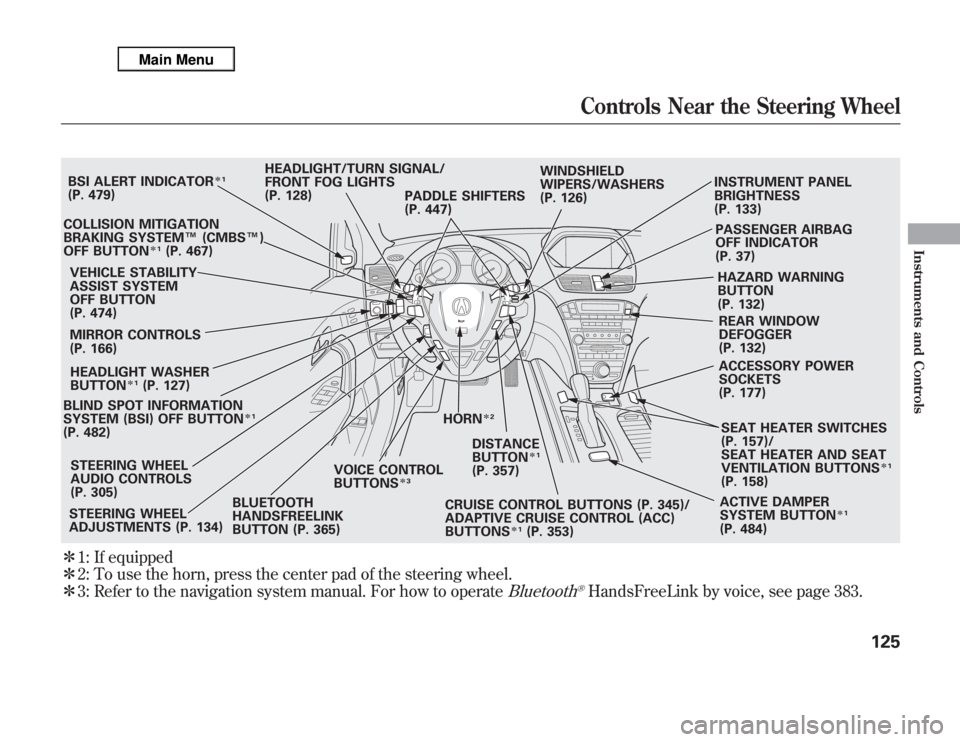
ᤳ1: If equipped
ᤳ2: To use the horn, press the center pad of the steering wheel.
ᤳ3: Refer to the navigation system manual. For how to operate
Bluetooth
®HandsFreeLink by voice, see page 383.
BLIND SPOT INFORMATION
SYSTEM (BSI) OFF BUTTON
ᤳ1
(P. 482)VEHICLE STABILITY
ASSIST SYSTEM
OFF BUTTON
(P. 474)
MIRROR CONTROLS
(P. 166)HEADLIGHT/TURN SIGNAL/
FRONT FOG LIGHTS
(P. 128)
STEERING WHEEL
ADJUSTMENTS (P. 134)CRUISE CONTROL BUTTONS (P. 345)/
ADAPTIVE CRUISE CONTROL (ACC)
BUTTONS
ᤳ1
(P. 353) STEERING WHEEL
AUDIO CONTROLS
(P. 305)WINDSHIELD
WIPERS/WASHERS
(P. 126)INSTRUMENT PANEL
BRIGHTNESS
(P. 133)
PASSENGER AIRBAG
OFF INDICATOR
(P. 37)
HAZARD WARNING
BUTTON
(P. 132)
REAR WINDOW
DEFOGGER
(P. 132)
ACCESSORY POWER
SOCKETS
(P. 177)
SEAT HEATER SWITCHES
(P. 157)/
SEAT HEATER AND SEAT
VENTILATION BUTTONS
ᤳ1
(P. 158)
ACTIVE DAMPER
SYSTEM BUTTON
ᤳ1
(P. 484) HORN
ᤳ2
BSI ALERT INDICATOR
ᤳ1
(P. 479)
COLLISION MITIGATION
BRAKING SYSTEM™(CMBS™)
OFF BUTTON
ᤳ1
(P. 467)
HEADLIGHT WASHER
BUTTON
ᤳ1
(P. 127)
DISTANCE
BUTTON
ᤳ1
(P. 357) PADDLE SHIFTERS
(P. 447)
BLUETOOTH
HANDSFREELINK
BUTTON (P. 365)VOICE CONTROL
BUTTONS
ᤳ3
Controls Near the Steering Wheel
125
Instruments and Controls
Page 142 of 621
When you remove the key from the
ignition switch, the steering wheel
automatically moves fully in and up.
To change the‘‘AUTO TILT &
TELESCOPE STEERING WHEEL’’
setting, see page 109.
The steering wheel then returns to
its original position when you insert
the key back in the ignition switch.
Steering wheel movement is also
controlled by the driving position
memory system (see page 168).If your vehicle's battery is
disconnected or goes dead, or the
fuse for the power tilt and telescopic
steering wheel is removed, the
power tilt and telescopic steering
wheel system needs to be reset when
you reconnect the battery or install
the fuse.
Insert the key into the ignition
switch, and remove it. The steering
wheel automatically moves fully in
and up to let you know the system is
reset.
Steering Wheel Adjustments
135
Instruments and Controls
Page 146 of 621

The ignition switch has four positions:
LOCK (0), ACCESSORY (I), ON (II),
and START (III).
LOCK (0)-You can insert or remove
the key only in this position. To turn
the key to the LOCK (0) position, the
shift lever must be in Park, and you
must push the key in slightly.
If the front wheels are turned, the anti-
theft lock may make it difficult to turn
the key. Firmly turn the steering wheel
to the left or right as you turn the key.
ACCESSORY (I)-You can operate
the audio system and the accessory
power sockets in this position.
ON (II)-This is the normal key
position when driving. Several of the
indicators on the instrument panel
come on as a test when you turn the
ignition switch from the
ACCESSORY (I) to the ON (II)
position.
START (III)-Use this position
only to start the engine. The switch
returns to the ON (II) position when
you let go of the key.You will hear a reminder beeper if
you leave the key in the ignition
switch in the LOCK (0) or the
ACCESSORY (I) position and open
the driver's door. Remove the key to
turn off the beeper.
The shift lever must be in Park
before you can remove the key from
the ignition switch.
Ignition Switch
139
Instruments and Controls
Page 155 of 621

Recalling a Memorized Driving
PositionWhen you unlock the driver's door
with your remote, each remote
activates the keyless memory
settings related to that remote. The
driver's ID (DRIVER 1 or DRIVER 2)
is shown on the back of each remote.Here are the settings activated with
the remote:
●
Customized settings
(see page 90).
●
Driving position memory
(see page 168).
●
Audio system settings
(see page 212).
●
Climate control settings
(see page 183).
When you unlock and open the
driver's door with the remote
transmitter, the driver's seat (except
the power lumbar feature) and
outside mirrors start to move to the
positions stored in memory. The
indicator in the related memory
button to the remote comes on.The steering wheel will move to the
stored position when you insert the
key into the ignition switch.
You will also see the‘‘WELCOME
DRIVER 1’’or‘‘WELCOME DRIVER
2’’message on the multi-information
display, depending on which linked
remote transmitter is used.
Remote Transmitter148
Page 175 of 621

Never drive your vehicle with the
outside mirrors folded.Driving Position Memory System
Your vehicle has a memory feature
for the steering wheel, driver's seat,
and outside mirror positions.
Seat, except for power lumbar,
steering wheel and outside mirror
positions can be stored in separate
memories. You select a memorized
position by pushing the appropriate
button or using the appropriate
remote transmitter (Driver 1 or
Driver 2). For more information see
page 148.Storing a Driving Position in
Memory
Store a driving position only when
the vehicle is parked.
1. Turn the ignition switch to the ON
(II) position. You cannot add a new
driving position to the memory
unless the ignition switch is in the
ON (II) position. You can recall a
memorized position with the
ignition switch in any position.
2. Adjust the seat to a comfortable
position (see page 149).
Adjust the steering wheel to a
comfortable position (see page
134).
Adjust the outside mirrors for best
visibility (see page 166).Mirrors, Driving Position Memory System168
Page 447 of 621
Your vehicle has higher ground
clearance that allows you to travel
over bumps, obstacles, and rough
terrain. It also provides good
visibility so you can anticipate
problems earlier.
Because your vehicle rides higher off
the ground, it has a high center of
gravity that can cause it to roll over if
you make abrupt turns. Utility
vehicles have a significantly higher
roll over rate than other types of
vehicles.To prevent rollovers or loss of
control:
●
Take corners at slower speeds
than you would with a passenger
vehicle.
●
Avoid sharp turns and abrupt
maneuvers whenever possible.
●
Do not modify your vehicle in any
way that would raise the center of
gravity.
●
Do not carry heavy cargo on the
roof.Your vehicle is equipped with a super
handling-all wheel drive (SH-AWD)
system. When the system senses a
loss of one or more wheel traction, it
automatically transfers some power
to the other wheels. This gives you
better traction and mobility.
You still need to exercise the same
care when accelerating, steering, and
braking that you would in a two-
wheel drive vehicle.
See page 500 for off-highway driving
guidelines.
Driving Guidelines440
Page 467 of 621
As required by the FCC:
This device complies with Part 15 of the
FCC rules. Operation is subject to the
following two conditions: (1) This device
may not cause harmful interference, and
(2) this device must accept any
interference received, including
interference that may cause undesired
operation.
Changes or modifications not expressly
approved by the party responsible for
compliance could void the user's
authority to operate the equipment.
This device complies with Industry
Canada Standard RSS-210.
Operation is subject to the following two
conditions: (1) this device may not cause
interference, and (2) this device must
accept any interference that may cause
undesired operation of the device.
Braking System
Your vehicle is equipped with disc
brakes at all four wheels. A power
assist helps reduce the effort needed
on the brake pedal. The emergency
brake assist system increases the
stopping force when you depress the
brake pedal hard in an emergency
situation. The anti-lock brake system
(ABS) helps you retain steering
control when braking very hard.
Resting your foot on the pedal keeps
the brakes applied lightly, builds up
heat, and reduces their effectiveness
and reduces brake pad life. In
addition, fuel economy can be
reduced. It also keeps your brake
lights on all the time, confusing
drivers behind you.Constant application of the brakes
when going down a long hill builds
up heat and reduces their
effectiveness. Use the engine to
assist the brakes by taking your foot
off the accelerator and downshifting
to a lower gear.
Check the brakes after driving
through deep water. Apply the
brakes moderately to see if they feel
normal. If not, apply them gently and
frequently until they do. Be extra
cautious in your driving.
Tire Pressure Monitoring System (TPMS), Braking System460
Page 512 of 621

This section explains why it is
important to keep your vehicle well
maintained and how to follow basic
maintenance safety precautions.
This section also includes
instructions on how to read the
Maintenance Minder messages on
the multi-information display, and
instructions for simple maintenance
tasks you may want to take care of
yourself.
If you have the skills and tools to
perform more complex maintenance
tasks on your vehicle, you may want
to purchase the service manual. See
page 597 for information on how to
obtain a copy, or see your dealer.U.S. Vehicles:
Maintenance, replacement, or
repair of emissions control
devices and systems may be done
by any automotive repair
establishment or individual using
parts that are‘‘certified’’to EPA
standards.Maintenance Safety
.....................
506
Maintenance Minder
TM
...............
507
Fluid Locations
...........................
515
Engine Compartment Cover
........
516
Adding Engine Oil
......................
517
Changing the Engine Oil and
Filter
.......................................
518
Engine Coolant
...........................
520
Windshield Washers
...................
522
Automatic Transmission Fluid
....
523
Brake Fluid
.................................
525
Power Steering Fluid
..................
526
Timing Belt
.................................
526
Lights
..........................................
527
Dust and Pollen Filter
.................
534
Cleaning the Seat Belts
...............
534
Floor Mats
..................................
535
Wiper Blades
..............................
536
Tires
...........................................
540
Checking the Battery
..................
547
Vehicle Storage
...........................
548
Maintenance
505
Maintenance