blind Acura MDX 2013 User Guide
[x] Cancel search | Manufacturer: ACURA, Model Year: 2013, Model line: MDX, Model: Acura MDX 2013Pages: 617, PDF Size: 10.82 MB
Page 487 of 617

BSI may be adversely affected under
the following circumstances:●When objects such as guard rails,
poles, trees, etc., are detected.●When an object that doesn't reflect
radio waves well, such as a
motorcycle, is in the alert zone.●A vehicle is behind or approaching
your vehicle while on a curved
road.●When towing a trailer.●A vehicle is moving from a far lane
to the adjacent lane.●The system picks up external
electrical interference.●The rear bumper has been
deformed, or improperly repaired.
●The orientation of the sensors has
been changed.●Bad weather conditions, such as
heavy rain, snow and fog.The system is for your convenience.
Even if an object is within the alert
zone, the system may not detect it,
depending on its shape.
Always look in your mirrors, to either
side of your vehicle, and behind you
for other vehicles before changing
lanes.EXAMPLES
MOTORCYCLEGUARD RAILPOLE or TREE
●: BSI Alert indicator is on
○: BSI Alert indicator is off
CONTINUED
Blind Spot Information System (BSI)
481
Driving
12/07/17 18:10:57 13 ACURA MDX MMC North America Owner's M 50 31STX660 enu
Page 488 of 617

BSI OFF ButtonTo turn the system off, press the BSI
OFF button when the ignition switch
is in the ON (II) position. The BSI
indicator on the instrument panel
glows amber, indicating that the
system is turned off. The multi-
information display indicates that the
system is off.
To turn the system on again, press
the same button. The BSI indicator
on the instrument panel turns off.
The multi-information display
indicates that the system is on.
When the ignition switch is turned to
the ON (II) position, the system will
be in the previously selected ON or
OFF setting.
U.S. Advance Package and
Advance Package with Entertainment
models
Canadian Technology Package
and Elite Package models
Blind Spot Information System (BSI)48212/07/17 18:10:57 13 ACURA MDX MMC North America Owner's M 50 31STX660 enu
Page 489 of 617

BSI Status Displays
System
StatusMulti-information
display messageBSI Indicator Description
ON-
When you push the BSI OFF button, a BSI ON or OFF message is displayed on the multi-information
display for about 5 seconds.
The BSI indicator will remain on while the system is off.
A chime sounds to indicate that the system has been turned ON or OFF.
OFF
ON/OFF
ᤳ
If while driving, mud, snow, or ice accumulates in the vicinity of sensor:●The system may shut down●The BSI indicator illuminates, a message is displayed on the multi-information display, and a chime
sounds.
The BSI indicator will turn off and the system will return to normal once the obstacle is removed, and
you begin to drive.
Always keep the area around the radar sensors clean. BSI may not operate properly if the sensors are
obstructed.
The BSI alert indicator:●May come on when a vehicle enters one of the alert zones, even if this message is displayed.●May not come on due to obstruction (splashes, etc.), even if this message is not displayed.
ᤳ: System status may remain on even when the BLIND SPOT NOT AVAILABLE message is
displayed.
OFFIf the system is faulty, the BSI indicator illuminates and a message is displayed on the multi-
information display.
Have your vehicle inspected by your Acura dealer.
CONTINUED
Blind Spot Information System (BSI)
483
Driving
12/07/17 18:10:57 13 ACURA MDX MMC North America Owner's M 50 31STX660 enu
Page 490 of 617
This device complies with the
appropriate requirements or the
required standards. See page 592 for
more information.Active Damper System
If equippedThe active damper system is always
on, constantly adjusting your
vehicle's dampers to the best settings
for current road conditions along
with vehicle speed and handling
inputs.The system uses electrically
controlled dampers to enhance
handling precision, vehicle
composure, tire to road adhesion and
rough road ride comfort isolation.
The system reacts to inputs from
various electronic sensors to give
exactly the right amount of
suspension damping to provide
optimal ride comfort and handling.
Blind Spot Information System (BSI), Active Damper System48412/07/17 18:10:57 13 ACURA MDX MMC North America Owner's M 50 31STX660 enu
Page 493 of 617

Your vehicle has been designed
primarily to carry passengers and
their cargo. You can also use it to tow
a trailer if you carefully observe the
load limits, use the proper
equipment, and follow the guidelines
in this section.
If your vehicle is equipped with the
blind spot information system (BSI),
do not use it when towing a trailer.
For more information see page 482.Break-In PeriodAvoid towing a trailer during your
vehicle's first 600 miles (1,000 km)
(see page 422).
Be sure to read theOff-Highway
Driving Guidelinessection on page
500 if you plan to tow off paved
surfaces.Your vehicle is equipped with a
trailer stability assist to help stabilize
the vehicle/trailer combination by
reducing the vehicle speed. For more
information, see page 498.
Exceeding any load limit or
improperly loading your vehicle
and trailer can cause a crash in
which you can be seriously hurt
or killed.
Check the loading of your
vehicle and trailer carefully
before starting to drive.Load Limit
Total Trailer WeightThe maximum allowable weight of
the trailer and everything in or on it
depends on the number of occupants
in your vehicle and the type of trailer
being towed (see page 490).
Towing a trailer that is too heavy can
seriously affect your vehicle's
handling and performance. It can
also damage the engine and
drivetrain.
CONTINUED
Towing a Trailer
487
Driving
12/07/17 18:10:57 13 ACURA MDX MMC North America Owner's M 50 31STX660 enu
Page 500 of 617
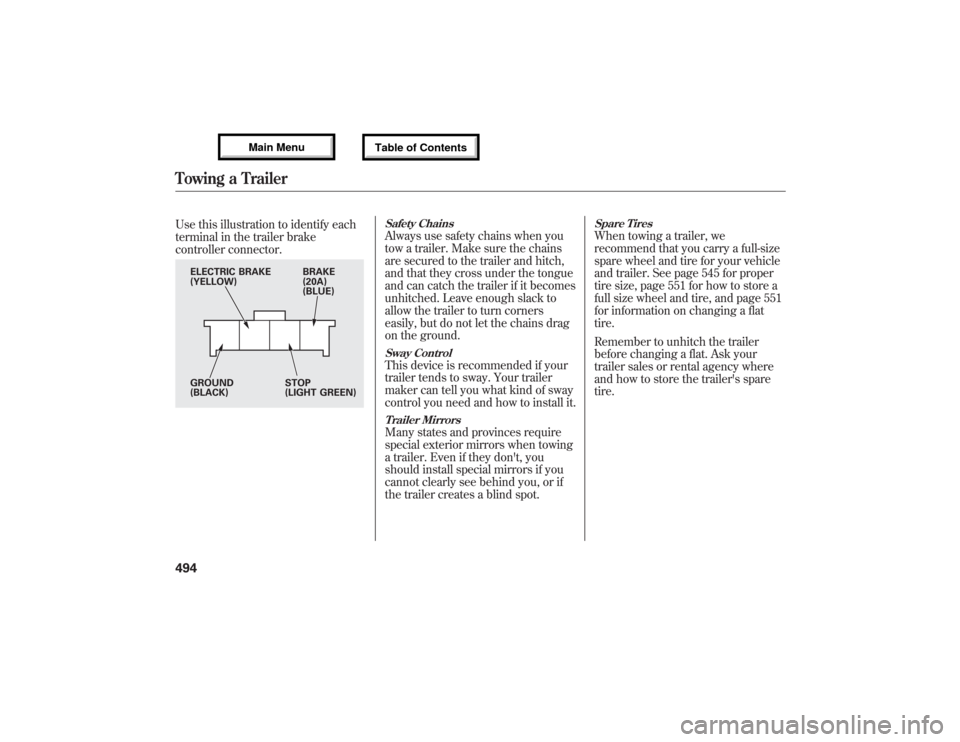
Use this illustration to identify each
terminal in the trailer brake
controller connector.
Safety ChainsAlways use safety chains when you
tow a trailer. Make sure the chains
are secured to the trailer and hitch,
and that they cross under the tongue
and can catch the trailer if it becomes
unhitched. Leave enough slack to
allow the trailer to turn corners
easily, but do not let the chains drag
on the ground.Sway ControlThis device is recommended if your
trailer tends to sway. Your trailer
maker can tell you what kind of sway
control you need and how to install it.Trailer MirrorsMany states and provinces require
special exterior mirrors when towing
a trailer. Even if they don't, you
should install special mirrors if you
cannot clearly see behind you, or if
the trailer creates a blind spot.
Spare TiresWhen towing a trailer, we
recommend that you carry a full-size
spare wheel and tire for your vehicle
and trailer. See page 545 for proper
tire size, page 551 for how to store a
full size wheel and tire, and page 551
for information on changing a flat
tire.
Remember to unhitch the trailer
before changing a flat. Ask your
trailer sales or rental agency where
and how to store the trailer's spare
tire.
BRAKE
(20A)
(BLUE) ELECTRIC BRAKE
(YELLOW)
GROUND
(BLACK)STOP
(LIGHT GREEN)
Towing a Trailer49412/07/17 18:10:57 13 ACURA MDX MMC North America Owner's M 50 31STX660 enu
Page 598 of 617
The following products and systems
on your vehicle emit radio waves
when in operation.●Audio System●Rear Entertainment System●Bluetooth
®Audio
●Bluetooth
®HandsFreeLink
®
●HomeLink
®Universal Transceiver
●AcuraLink
®
●Immobilizer System●Remote Transmitter●Tire Pressure Monitoring System
(TPMS)●Blind Spot Information System
(BSI)●Collision Mitigation Braking
System™(CMBS™)Each of the above complies with the
appropriate requirements or the
required standards of FCC (Federal
Communications Commission) and
Industry Canada Standard, described
as follows:
As required by the FCC:
This device complies with Part 15 of the
FCC rules. Operation is subject to the
following two conditions: (1) This device
may not cause harmful interference, and
(2) this device must accept any
interference received, including
interference that may cause undesired
operation.
Changes or modifications not expressly
approved by the party responsible for
compliance could void the user's
authority to operate the equipment.
This device complies with Industry
Canada Standard RSS-Gen/210/310.
Operation is subject to the following two
conditions: (1) this device may not cause
interference, and (2) this device must
accept any interference, including
interference that may cause undesired
operation of the device.
Devices that Emit Radio Waves59212/07/17 18:10:57 13 ACURA MDX MMC North America Owner's M 50 31STX660 enu
Page 605 of 617
A
Accessories and
Modifications
..........................
431
ACCESSORY (Ignition Key
Position)
.................................
139
Accessory Power Sockets
..........
177
AC Power Outlet
........................
178
Active Damper System
...............
484
Active Head Restraints
...............
152
AcuraLink
®(U.S. models
only)
.......................................
402
Adaptive Cruise Control
(ACC)
.....................................
348
Additives, Engine Oil
.................
518
Adjusting the Steering Wheel
....
134
Advanced Airbags
........................
31
Airbag (SRS)
..........................
10, 27
Air Conditioning System
............
182
Rear A/C Control
....................
187
Air Outlets (Vents)
.....................
189
Air Pressure, Tires
..............
540, 541
Alcohol in Gasoline
....................
422
Antifreeze
...................................
520Anti-lock Brakes (ABS)
Indicator
............................
70, 462
Operation
................................
461
Anti-theft, Audio System
.............
308
Anti-theft Steering Column
Lock
.......................................
139
Audio System
......................
192, 212
Automatic Climate Control.........
183
Automatic Lighting Off
Feature
...................................
131
Automatic Seat Belt Tensioners...
23
Automatic Speed Control
...........
345
Automatic Transmission
............
443
Capacity, Fluid
........................
578
Checking Fluid Level
..............
523
Driving with the Paddle
Shifters
................................
447
Shifting
...................................
444
Shift Lever Position
Indicators
............................
443
Shift Lever Positions
...............
444
Shift Lock Release
...................
446
Auxiliary Input Jack
...................
307B
Battery
Charging System
Indicator
........................
69, 562
Jump Starting
..........................
558
Maintenance
...........................
547
Specifications
..........................
579
Before Driving
...........................
421
Belts, Seat
................................
9, 21
Beverage Holders
......................
174
Blind Spot Information System
(BSI)
......................................
476
Bluetooth
®Audio
.......................
298
Bluetooth
®HandsFreeLink
®
(Models with navigation
system)
...............................
383
Bluetooth
®HandsFreeLink
®
(Models without navigation
system)
...............................
365
Booster Seats
...............................
58
CONTINUED
Index
I
INDEX
12/07/17 18:10:57 13 ACURA MDX MMC North America Owner's M 50 31STX660 enu
Page 610 of 617
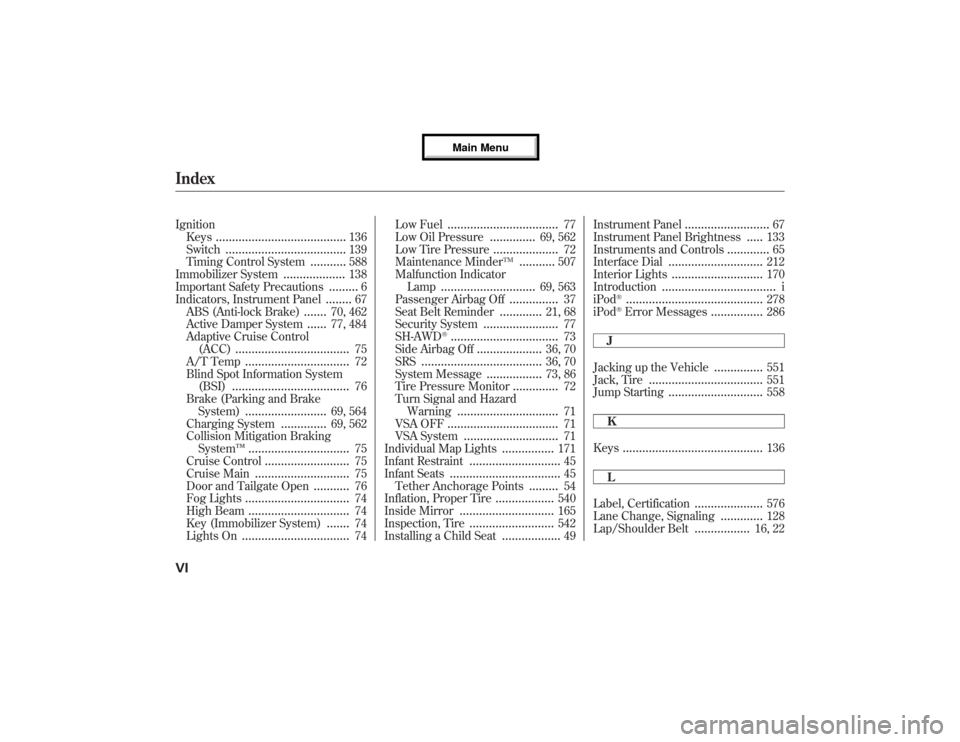
Ignition
Keys
........................................
136
Switch
.....................................
139
Timing Control System
...........
588
Immobilizer System
...................
138
Important Safety Precautions
.........
6
Indicators, Instrument Panel
........
67
ABS (Anti-lock Brake)
.......
70, 462
Active Damper System
......
77, 484
Adaptive Cruise Control
(ACC)
...................................
75
A/T Temp
................................
72
Blind Spot Information System
(BSI)
....................................
76
Brake (Parking and Brake
System)
.........................
69, 564
Charging System
..............
69, 562
Collision Mitigation Braking
System™
...............................
75
Cruise Control
..........................
75
Cruise Main
.............................
75
Door and Tailgate Open
...........
76
Fog Lights
................................
74
High Beam
...............................
74
Key (Immobilizer System)
.......
74
Lights On
.................................
74Low Fuel
..................................
77
Low Oil Pressure
..............
69, 562
Low Tire Pressure
....................
72
Maintenance Minder
TM
...........
507
Malfunction Indicator
Lamp
.............................
69, 563
Passenger Airbag Off
...............
37
Seat Belt Reminder
.............
21, 68
Security System
.......................
77
SH-AWD
®.................................
73
Side Airbag Off
....................
36, 70
SRS
.....................................
36, 70
System Message
.................
73, 86
Tire Pressure Monitor
..............
72
Turn Signal and Hazard
Warning
...............................
71
VSA OFF
..................................
71
VSA System
.............................
71
Individual Map Lights
................
171
Infant Restraint
............................
45
Infant Seats
..................................
45
Tether Anchorage Points
.........
54
Inflation, Proper Tire
..................
540
Inside Mirror
.............................
165
Inspection, Tire
..........................
542
Installing a Child Seat
..................
49Instrument Panel
..........................
67
Instrument Panel Brightness
.....
133
Instruments and Controls
.............
65
Interface Dial
.............................
212
Interior Lights
............................
170
Introduction
...................................
i
iPod
®..........................................
278
iPod
®Error Messages
................
286
J
Jacking up the Vehicle
...............
551
Jack, Tire
...................................
551
Jump Starting
.............................
558
K
Keys
...........................................
136
L
Label, Certification
.....................
576
Lane Change, Signaling
.............
128
Lap/Shoulder Belt
.................
16, 22
IndexVI12/07/17 18:10:57 13 ACURA MDX MMC North America Owner's M 50 31STX660 enu