brake Acura MDX 2013 User Guide
[x] Cancel search | Manufacturer: ACURA, Model Year: 2013, Model line: MDX, Model: Acura MDX 2013Pages: 617, PDF Size: 10.82 MB
Page 161 of 617
Reverse this procedure to return the
seat to the upright position. Make
sure the seat is locked securely
before driving. Reconnect the seat
belts to the detachable anchors.
Make sure all items in the cargo area
are secured. Loose items can fly
forward and cause injury if you have
to brake hard (SeeCarrying Cargo
on page 433).Detachable Anchor
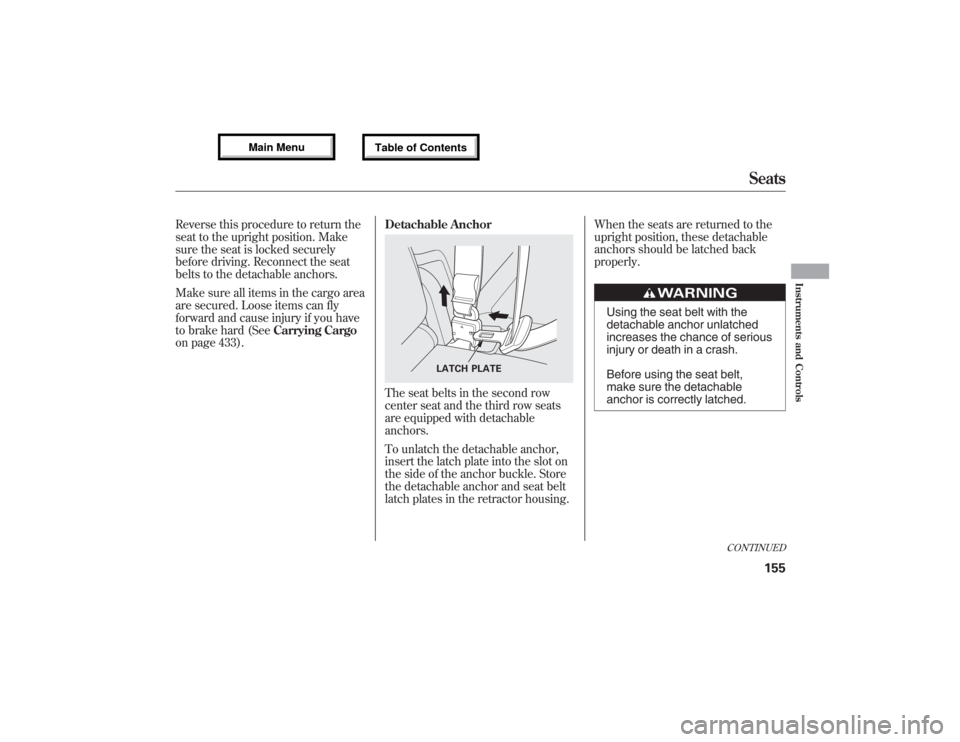
The seat belts in the second row
center seat and the third row seats
are equipped with detachable
anchors.
To unlatch the detachable anchor,
insert the latch plate into the slot on
the side of the anchor buckle. Store
the detachable anchor and seat belt
latch plates in the retractor housing.When the seats are returned to the
upright position, these detachable
anchors should be latched back
properly.
Using the seat belt with the
detachable anchor unlatched
increases the chance of serious
injury or death in a crash.
Before using the seat belt,
make sure the detachable
anchor is correctly latched.
LATCH PLATE
CONTINUED
Seats
155
Instruments and Controls
12/07/17 18:10:57 13 ACURA MDX MMC North America Owner's M 50 31STX660 enu
Page 170 of 617
You can open and close the
moonroof for up to 10 minutes after
you turn off the ignition switch.
Opening either front door cancels
this function.If you try to open the moonroof in
below-freezing temperatures, or when it
is covered with snow or ice, you can
damage the moonroof panel or its
motor.Parking Brake
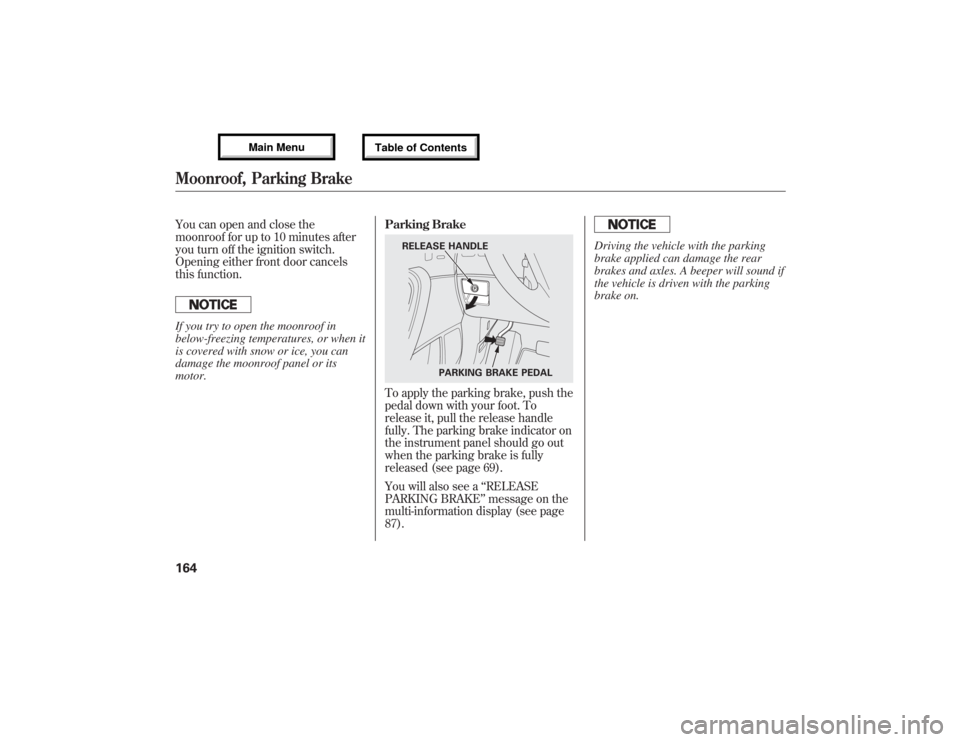
To apply the parking brake, push the
pedal down with your foot. To
release it, pull the release handle
fully. The parking brake indicator on
the instrument panel should go out
when the parking brake is fully
released (see page 69).
You will also see a‘‘RELEASE
PARKING BRAKE’’message on the
multi-information display (see page
87).
Driving the vehicle with the parking
brake applied can damage the rear
brakes and axles. A beeper will sound if
the vehicle is driven with the parking
brake on.
RELEASE HANDLE
PARKING BRAKE PEDAL
Moonroof, Parking Brake16412/07/17 18:10:57 13 ACURA MDX MMC North America Owner's M 50 31STX660 enu
Page 352 of 617
Cruise control may not hold the set
speed when you are going up and
down hills. If your vehicle speed
increases going down a hill, use the
brakes to slow down. This will cancel
the cruise control. On models with
adaptive cruise control (ACC), this
also causes the cruise control
indicator on the instrument panel to
go off and the cruise mode indicator
to come on. To resume the set speed,
press the RES/ACCEL button. The
CRUISE CONTROL indicator on the
instrument panel will come back on.Changing the Set Speed
You can increase the set cruising
speed in any of these ways:
●Press and hold the RES/ACCEL
button. When you reach the
desired cruising speed, release the
button.●Push on the accelerator pedal.
Accelerate to the desired cruising
speed, then press the SET/
DECEL button.●To increase the speed in very
small amounts, tap the RES/
ACCEL button. Each time you do
this, your vehicle will speed up
about 1 mph (1.6 km/h).You can decrease the set cruising
speed in any of these ways:
●Press and hold the SET/DECEL
button. Release the button when
you reach the desired speed.●To slow down in very small
amounts, tap the SET/DECEL
button. Each time you do this,
your vehicle will slow down about
1 mph (1.6 km/h).●Tap the brake pedal lightly with
your foot. The CRUISE CONTROL
indicator on the instrument panel
will go out. When the vehicle
slows to the desired speed, press
the SET/DECEL button.
Cruise Control34612/07/17 18:10:57 13 ACURA MDX MMC North America Owner's M 50 31STX660 enu
Page 353 of 617
Even with cruise control turned on,
you can still use the accelerator pedal
to speed up for passing. After
completing the pass, take your foot
off the accelerator pedal. The vehicle
will return to the set cruising speed.
Resting your foot on the brake pedal
causes cruise control to cancel.Canceling Cruise Control
You can cancel cruise control in any
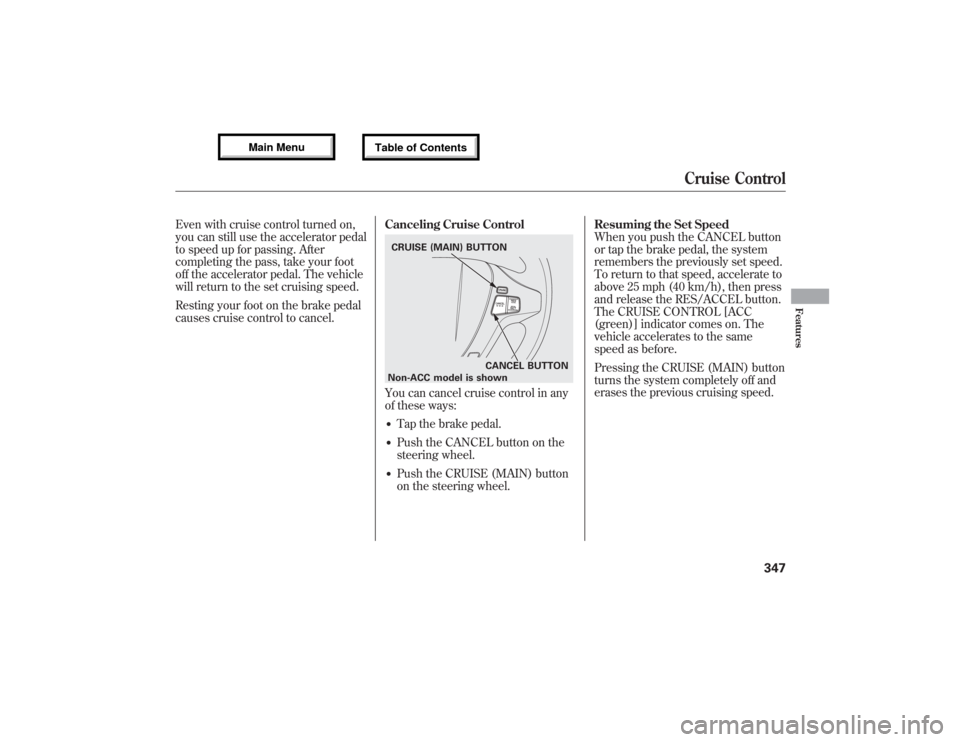
of these ways:●Tap the brake pedal.●Push the CANCEL button on the
steering wheel.●Push the CRUISE (MAIN) button
on the steering wheel.Resuming the Set Speed
When you push the CANCEL button
or tap the brake pedal, the system
remembers the previously set speed.
To return to that speed, accelerate to
above 25 mph (40 km/h), then press
and release the RES/ACCEL button.
The CRUISE CONTROL [ACC
(green)] indicator comes on. The
vehicle accelerates to the same
speed as before.
Pressing the CRUISE (MAIN) button
turns the system completely off and
erases the previous cruising speed.CRUISE (MAIN) BUTTON
CANCEL BUTTON
Non-ACC model is shown
Cruise Control
347
Features
12/07/17 18:10:57 13 ACURA MDX MMC North America Owner's M 50 31STX660 enu
Page 355 of 617

Overview
Adaptive cruise control (ACC) allows
you to maintain a set speed and keep
the vehicle ahead of you and your
vehicle at a safe distance without
having to use the accelerator pedal or
the brake pedal.
When the vehicle ahead of you slows
down or speeds up, ACC senses the
change in distance and compensates
by adjusting your vehicle speed
accordingly. The distance between
vehicles is based on your speed: the
faster you go, the longer the distance
will be; the slower you go, the
shorter it will be.If the vehicle ahead of you slows
down suddenly or another vehicle
cuts in front of your vehicle, ACC
alerts you by sounding a beeper and
displaying a message on the multi-
information display.
The ACC radar sensor in the front
grille can detect and monitor the
distance of a vehicle up to 328 feet
(100 meters) ahead of your vehicle.
For more information on the radar
sensor, see page 464.
Important Safety Precautions
As with any system, there are limits
to ACC. Inappropriate use of ACC
can result in a serious accident. Use
the brake pedal whenever necessary,
and always keep a safe distance
between your vehicle and other
vehicles.Do not use ACC under these
conditions:
●In poor visibility.●In heavy traffic.●When you must slow down and
speed up repeatedly.●On winding roads.●When you enter a toll gate,
interchange, service area, parking
area, etc. In these areas, there is
no vehicle ahead of you, but ACC
would still try to accelerate to your
set speed.●In bad weather (rain, fog, snow,
etc.)●On a slippery road (for example a
road covered with ice or snow).
CONTINUED
Adaptive Cruise Control (ACC)
349
Features
12/07/17 18:10:57 13 ACURA MDX MMC North America Owner's M 50 31STX660 enu
Page 357 of 617

If the vehicle ahead of you slows
down abruptly, or if another vehicle
cuts in front of you, a beeper sounds
and a message appears on the multi-
information display to warn you.
In this case, decelerate your vehicle
by pressing the brake pedal, and
keep an appropriate distance from
the vehicle ahead.
When a vehicle ahead is within ACC
range and going at a steady speedYour vehicle follows the vehicle
ahead of it, keeping a constant
distance. ACC will not keep your
vehicle at a constant distance if the
vehicle ahead of you goes out of
range of your set speed.
If the vehicle ahead of you slows
down and changes lanes, ACC no
longer tracks it. Your vehicle will
then return to your set speed.
CONTINUED
Adaptive Cruise Control (ACC)
351
Features
12/07/17 18:10:57 13 ACURA MDX MMC North America Owner's M 50 31STX660 enu
Page 358 of 617

Limitations●ACC does not work below 25 mph
(40 km/h). It cannot bring your
vehicle to a complete stop.●ACC will not sound a beeper or
display a message on the multi-
information display to warn you of
vehicles going slower than 13 mph
(20 km/h) or vehicles that are
parked. In these cases, it is up to
you to maintain a safe distance by
using the brake pedal.●ACC may not recognize
motorcycles or other small
vehicles ahead of your vehicle.
●ACC may react to vehicles beside
you or even a building beside you
by momentarily applying the
brakes or sounding a beeper
under conditions such as a sudden
curve or narrowing of the road, an
abrupt movement of the steering
wheel, or if you are in an unusual
position within your lane.
Adaptive Cruise Control (ACC)35212/07/17 18:10:57 13 ACURA MDX MMC North America Owner's M 50 31STX660 enu
Page 361 of 617

To increase your speed in small
amounts, tap the RES/ACCEL button
repeatedly. Each time you do this,
your vehicle will speed up about 1
mph (1 km/h).
While the vehicle accelerates to the
set speed, the set speed on the multi-
information display will flash.
If a vehicle ahead of you is driving at
a slower speed than the speed you
want to set, your vehicle will not
accelerate; it will keep some distance
between your vehicles.
To increase the set speed with the
accelerator pedal, do this:
Press the accelerator pedal to
increase to the speed you want, then
press the SET/DECEL button. The
set speed will be shown on the multi-
information display. If you do not
press the SET/DECEL button, your
vehicle will return to the previously
set speed.The ACC beeper will not sound while
you press the accelerator pedal, no
matter how close you get to the
vehicle ahead of you.Decreasing the Set Speed
The set speed can be decreased
using the SET/DECEL button or the
brake pedal.
To decrease the set speed with the
SET/DECEL button, do this:
Press and hold the SET/DECEL
button. Release the button when you
reach the speed you want.SET/DECEL BUTTON
CONTINUED
Adaptive Cruise Control (ACC)
355
Features
12/07/17 18:10:57 13 ACURA MDX MMC North America Owner's M 50 31STX660 enu
Page 362 of 617

To slow down in small amounts, tap
the SET/DECEL button repeatedly.
Each time you do this, your vehicle
slows down about 1 mph (1 km/h).
The set cruising speed will be shown
on the multi-information display.
On a steep downhill, the vehicle
speed may exceed the set cruising
speed.
To decrease the set speed with the
brake pedal, do this:
Tap the brake pedal. When the
vehicle slows down to the speed you
want, press the SET/DECEL button.
The set speed will be shown on the
multi-information display. If you use
the brake pedal to decrease speed,
and then press the RES/ACCEL
button, your vehicle will return to the
previously set speed.Detecting a Vehicle Ahead of You
When the system detects a vehicle
ahead of you, a beeper sounds once
and a solid-line vehicle icon appears
on the multi-information display.
When that vehicle changes lanes or
goes out of ACC range, a beeper
sounds once. If there is no vehicle
ahead of you within ACC range, a
dotted-line vehicle icon will be on the
multi-information display.
To set the ACC beeper on or off, see
page 97.
U.S.
CANADA
U.S.
CANADA
Adaptive Cruise Control (ACC)35612/07/17 18:10:57 13 ACURA MDX MMC North America Owner's M 50 31STX660 enu
Page 364 of 617

Canceling the ACCACC is canceled whenever you do
any of these actions:●Push the CANCEL button on the
steering wheel.●Tap the brake pedal.●Press the MAIN button. The ACC
indicator in the instrument panel
goes off.When you push the CANCEL button
or tap the brake pedal to cancel ACC,
the set cruising speed stays in
memory. When you turn on ACC
again, the speed is shown on the
multi-information display. To return
to that speed, accelerate to over 25
mph (40 km/h), then press the RES/
ACCEL button.
If you cancel ACC by pressing the
MAIN button, the previously set
cruising speed is erased from
memory.Automatic ACC Cancelation
When ACC is automatically canceled,
the beeper sounds for about 1
second, and the ACC OFF message
appears on the multi-information
display for 3 seconds.
Any of these conditions may cause
ACC to cancel:
●The vehicle speed decreases
below 22 mph (35 km/h).●Poor weather (rain, fog, snow, etc.)●When the radar sensor in the front
grille gets dirty.●The vehicle ahead of you cannot
be detected.●An abnormal tire condition is
detected, or the tires are skidding.
CANCEL BUTTONAdaptive Cruise Control (ACC)35812/07/17 18:10:57 13 ACURA MDX MMC North America Owner's M 50 31STX660 enu