mirror Acura MDX 2013 User Guide
[x] Cancel search | Manufacturer: ACURA, Model Year: 2013, Model line: MDX, Model: Acura MDX 2013Pages: 617, PDF Size: 10.82 MB
Page 174 of 617
Never drive your vehicle with the
outside mirrors folded.Driving Position Memory System
Your vehicle has a memory feature
for the steering wheel, driver's seat,
and outside mirror positions.
Seat, except for power lumbar,
steering wheel and outside mirror
positions can be stored in separate
memories. You select a memorized
position by pushing the appropriate
button or using the appropriate
remote transmitter (Driver 1 or
Driver 2). For more information see
page 148.Storing a Driving Position in
Memory
Store a driving position only when
the vehicle is parked.
1. Turn the ignition switch to the ON
(II) position. You cannot add a new
driving position to the memory
unless the ignition switch is in the
ON (II) position. You can recall a
memorized position with the
ignition switch in any position.
2. Adjust the seat to a comfortable
position (see page 149).
Adjust the steering wheel to a
comfortable position (see page
134).
Adjust the outside mirrors for best
visibility (see page 166).Mirrors, Driving Position Memory System16812/07/17 18:10:57 13 ACURA MDX MMC North America Owner's M 50 31STX660 enu
Page 175 of 617

3. Press and release the MEMO
button on the control panel. You
will hear a beep. Immediately
press and hold one of the memory
buttons (1 or 2) until you hear two
beeps. The indicator in the
memory button will come on. The
current positions of the driver's
seat, steering wheel, and outside
mirrors are now stored.Doing any of the following after
pressing the MEMO button will
cancel the storing procedure.
●Not pressing a memory button
within 5 seconds.●Readjusting the seat position.●Readjusting the outside mirror
position.
Each memory button stores only one
driving position. Storing a new
position erases the previous setting
stored in that button's memory. If
you want to add a new position while
retaining the current one, use the
other memory button.Selecting a Memorized Position
To select a memorized position, do
this:
1. Make sure the vehicle is parked.
2. Press the desired memory button
(1 or 2) until you hear a beep, then
release the button.
The system will move the seat,
steering wheel, and outside mirrors
to the memorized positions. The
indicator in the selected memory
button will flash during movement.
When the adjustments are complete,
you will hear two beeps, and the
indicator will remain on.
To change the‘‘MEMORY
POSITION LINK’’setting, see page
108.
MEMO BUTTON MEMORY BUTTONS
CONTINUED
Driving Position Memory System
169
Instruments and Controls
12/07/17 18:10:57 13 ACURA MDX MMC North America Owner's M 50 31STX660 enu
Page 176 of 617
To stop the system's automatic
adjustment, do any of these actions:●Press any button on the control
panel: MEMO, 1, or 2.●Push any of the adjustment
switches for the seat.●Shift out of Park.●Adjust the outside mirrors.
If desired, you can use the
adjustment switches to change the
positions of the seat, steering wheel
or outside mirrors after they are in
their memorized position. If you
change the memorized position, the
indicator in the memory button will
go out. To keep this driving position
for later use, you must store it in the
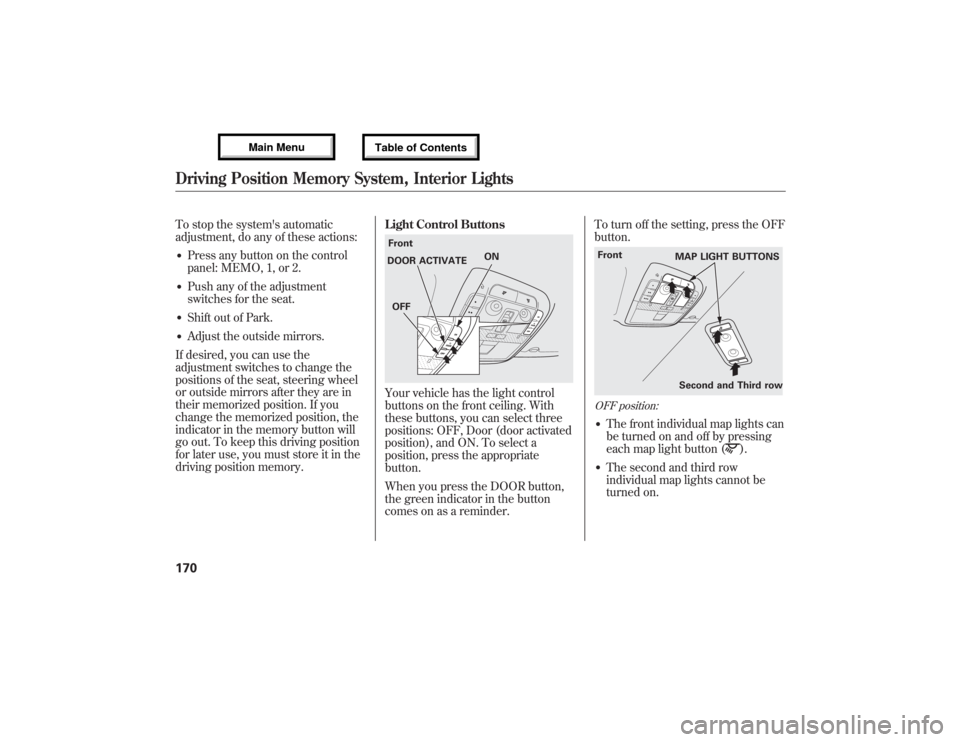
driving position memory.Light Control Buttons
Your vehicle has the light control
buttons on the front ceiling. With
these buttons, you can select three
positions: OFF, Door (door activated
position), and ON. To select a
position, press the appropriate
button.
When you press the DOOR button,
the green indicator in the button
comes on as a reminder.To turn off the setting, press the OFF
button.
OFF position:●The front individual map lights can
be turned on and off by pressing
each map light button (
).
●The second and third row
individual map lights cannot be
turned on.
Front
ON
DOOR ACTIVATE
OFF
Second and Third row Front
MAP LIGHT BUTTONS
Driving Position Memory System, Interior Lights17012/07/17 18:10:57 13 ACURA MDX MMC North America Owner's M 50 31STX660 enu
Page 179 of 617

SUN VISORSUNGLASSES HOLDER COAT HOOK
STORAGE COMPARTMENTS VANITY MIRROR
GROCERY HOOK
GLOVE BOX
CENTER POCKET
ACCESSORY
POWER SOCKET
CONSOLE COMPARTMENT
ARMREST/BEVERAGE HOLDER ACCESSORY POWER SOCKETBEVERAGE HOLDER
Interior Convenience Items
173
Instruments and Controls
12/07/17 18:10:57 13 ACURA MDX MMC North America Owner's M 50 31STX660 enu
Page 182 of 617
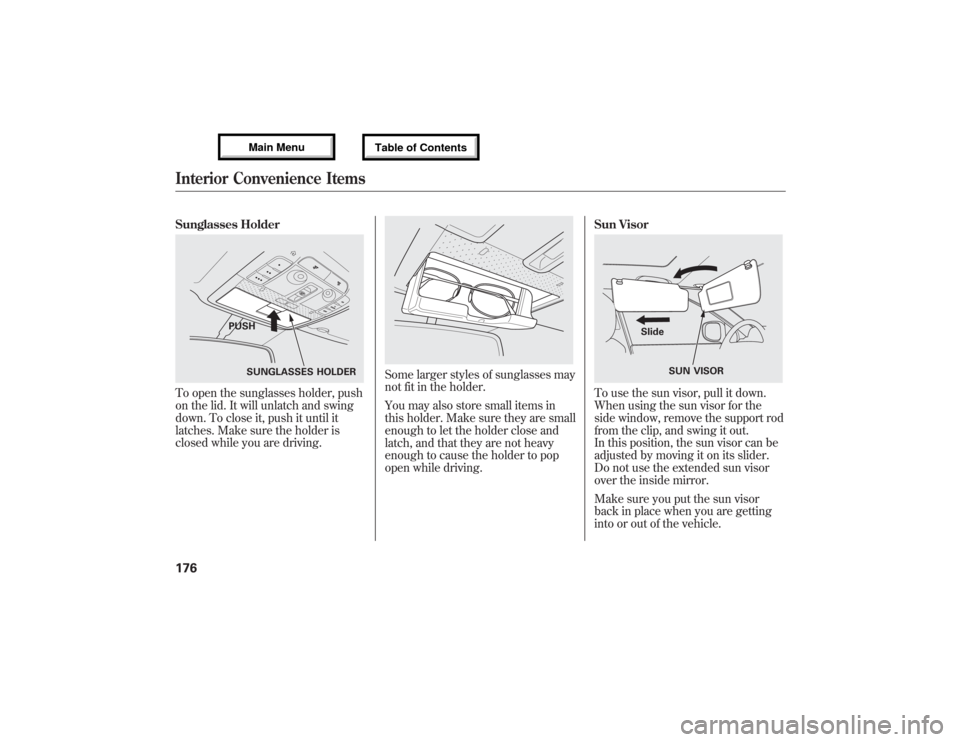
Sunglasses HolderTo open the sunglasses holder, push
on the lid. It will unlatch and swing
down. To close it, push it until it
latches. Make sure the holder is
closed while you are driving.
Some larger styles of sunglasses may
not fit in the holder.
You may also store small items in
this holder. Make sure they are small
enough to let the holder close and
latch, and that they are not heavy
enough to cause the holder to pop
open while driving.Sun Visor
To use the sun visor, pull it down.
When using the sun visor for the
side window, remove the support rod
from the clip, and swing it out.
In this position, the sun visor can be
adjusted by moving it on its slider.
Do not use the extended sun visor
over the inside mirror.
Make sure you put the sun visor
back in place when you are getting
into or out of the vehicle.
SUNGLASSES HOLDER PUSH
SUN VISOR Slide
Interior Convenience Items17612/07/17 18:10:57 13 ACURA MDX MMC North America Owner's M 50 31STX660 enu
Page 183 of 617

Vanity MirrorTo use the vanity mirror on the back
of the sun visor, pull up the cover.
The vanity mirror light will not come
on if the sun visor is slid outward.Accessory Power Sockets
Your vehicle has two or three
accessory power sockets, depending
on the model. All models have the
front accessory power socket under
the audio system and rear socket
behind the third row seat on the
driver's side.
On models without rear entertainment
systemThe accessory power socket is
located at the back of the front
console compartment.
To use an accessory power socket,
the ignition switch must be in the
ACCESSORY (I) or ON (II) position.
CONTINUED
Interior Convenience Items
177
Instruments and Controls
12/07/17 18:10:57 13 ACURA MDX MMC North America Owner's M 50 31STX660 enu
Page 187 of 617
The climate control system in your
vehicle provides a comfortable driving
environment in all weather conditions.
The standard audio system has many
features. This section describes those
features and how to use them.
Your vehicle has an anti-theft audio
system that requires a code number to
enable it.
The security system helps do
discourage vandalism and theft to your
vehicle.
Climate Control System
................
182
Rear Climate Controls
................
187
Audio System
...............................
192
Playing the AM/FM Radio (Models
without navigation system)
.......
193
Playing the XM
®Radio (Models
without navigation system)
.......
197
Playing Discs (Models without
navigation system)
...................
203Disc Changer Error Message
(Models without navigation
system)
................................
211
Audio System (Models with
navigation system)
...................
212
Playing the AM/FM Radio (Models
with navigation system)
............
213
Playing the XM
®Radio (Models
with navigation system)
............
226
Playing a Disc (Models with
navigation system)
...................
235
Disc Player Error Messages
(Models with navigation
system)
................................
246
Protecting Your Discs
...................
247
Playing Hard Disc Drive (HDD)
Audio (Models with navigation
system)
................................
250
Playing an iPod
®(Models with
navigation system)
...................
278
iPod
®Error Messages (Models
with navigation system)
............
286
Playing a USB Flash Memory
Device (Models with navigation
system)
................................
287USB Flash Memory Device Error
Messages (Models with
navigation system)
................
297
Bluetooth
®Audio System (Models
with navigation system)
............
298
AM/FM Radio Reception
..............
303
Remote Audio Controls
.................
305
Auxiliary Input Jack
......................
307
Radio Theft Protection
..................
308
Setting the Clock and Calendar
.....
309
Rear Entertainment System
...........
310
Security System
............................
341
Compass
......................................
342
Cruise Control
..............................
345
Adaptive Cruise Control (ACC)
.....
348
HomeLink
®Universal
Transceiver
..............................
363
Bluetooth
®HandsFreeLink
®
(Models without navigation
system)
................................
365
Bluetooth
®HandsFreeLink
®
(Models with navigation
system)
................................
383
AcuraLink
®(U.S. models only)
......
402
Rearview Mirror with Rearview
Camera Display
........................
417
Features
181
Features
12/07/17 18:10:57 13 ACURA MDX MMC North America Owner's M 50 31STX660 enu
Page 188 of 617
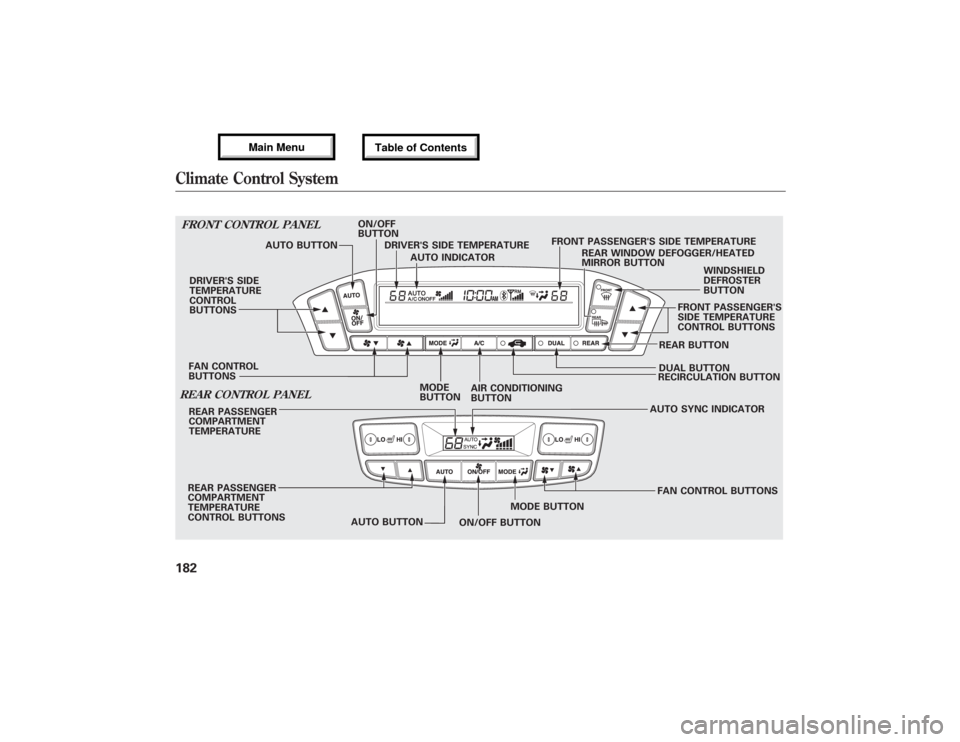
FRONT CONTROL PANELDRIVER'S SIDE
TEMPERATURE
CONTROL
BUTTONS
DUAL BUTTONREAR BUTTONWINDSHIELD
DEFROSTER
BUTTON
RECIRCULATION BUTTON REAR WINDOW DEFOGGER/HEATED
MIRROR BUTTONREAR CONTROL PANELREAR PASSENGER
COMPARTMENT
TEMPERATUREAUTO SYNC INDICATOR
FAN CONTROL BUTTONS REAR PASSENGER
COMPARTMENT
TEMPERATURE
CONTROL BUTTONS
AUTO BUTTONMODE BUTTON AUTO BUTTONON/OFF
BUTTON
DRIVER'S SIDE TEMPERATURE
AUTO INDICATORFRONT PASSENGER'S SIDE TEMPERATURE
FAN CONTROL
BUTTONSFRONT PASSENGER'S
SIDE TEMPERATURE
CONTROL BUTTONS
AIR CONDITIONING
BUTTON MODE
BUTTON
ON/OFF BUTTON
Climate Control System18212/07/17 18:10:57 13 ACURA MDX MMC North America Owner's M 50 31STX660 enu
Page 192 of 617

Recirculation ButtonWhen the indicator in the button is on,
air from the vehicle's interior is sent
throughout the system again. When the
indicator is off, air is brought in from the
outside of the vehicle (fresh air mode).
The outside air intakes for the climate
control system are at the base of the
windshield. Keep this area clear of leaves
and other debris.
The system should be left in fresh air
mode under almost all conditions.
Keeping the system in recirculation
mode, particularly with the A/C off, can
cause the windows to fog up.
Switch to recirculation mode when
driving through dusty or smoky
conditions, then return to fresh air mode.Rear Window Defogger ButtonThis button turns the rear window
defogger on and off (see page 132).
Pushing this button also turns the
power mirror heaters on and off.
Mode ControlUse the mode control button to
select the vents the air flows from.
Some air will flow from the
dashboard vents in all modes.
Air flows from the center and
corner vents in the dashboard.Airflow is divided between the
vents in the dashboard and the floor
vents.Air flows from the floor vents.Airflow is divided between the
floor and corner vents and the
defroster vents at the base of the
windshield.
Windshield Defroster ButtonThis button directs the main airflow
to the windshield for faster
defrosting. It also overrides any
mode selection you may have made.When you select
, the system
automatically switches to fresh air
mode and turns on the A/C. For
faster defrosting, manually set the
fan speed to high. You can also
increase airflow to the windshield by
closing the corner vents on the
dashboard. To close the vents, rotate
the wheel under each corner vent.
When you turn offby pressing
the button again, the system returns
to its former settings.
For your safety, make sure you have
a clear view through all the windows
before driving.
When the indicator in the button is
on, the front passenger's and rear
passenger compartment
temperatures cannot be set
separately from the driver's.
Climate Control System18612/07/17 18:10:57 13 ACURA MDX MMC North America Owner's M 50 31STX660 enu
Page 423 of 617
Connect to the Acura Server-
The default setting is prompt. When
a diagnostic info message appears,
and you select the Check Now
option, the system will prompt you
before connecting to the Acura
server. If you do not wish to connect
at that time, select No at the prompt,
and you will see the information from
the onboard database. The‘‘Auto’’
setting will remove the prompt when
you select the Check Now option and
will automatically connect to the
Acura server. This setting only
applies when you have a
Bluetooth
®
enabled phone that is paired with the
HFL and you have completed the
Phone-Data Connection setup.This device complies with the
appropriate requirements or the
required standards. See page 592 for
more information.Rearview Mirror with Rearview
Camera Display
On models with navigation systemRefer to the navigation system
manual for operation of the rearview
camera.
CONTINUED
AcuraLink
®(U.S. models only), Rearview Mirror with Rearview Camera Display
417
Features
12/07/17 18:10:57 13 ACURA MDX MMC North America Owner's M 50 31STX660 enu