phone Acura MDX 2013 User Guide
[x] Cancel search | Manufacturer: ACURA, Model Year: 2013, Model line: MDX, Model: Acura MDX 2013Pages: 617, PDF Size: 10.82 MB
Page 317 of 617

Pressing the REAR CTRL OFF
button disables rear control. The
indicator in the button comes on and
your passengers can no longer
operate the system with the rear
control panel. When the button is
pressed, the‘‘CTRL OFF’’message
appears in the overhead screen to let
your passengers know that the
control panel is disabled.
The rear system selects the source it
was last set to. If that source has
been removed (the DVD has been
ejected from the player, for example),
you will see‘‘No Disc’’in the display.
You should select another source or
insert a DVD.Rear Speakers
When you turn on the system, the
rear speakers are automatically
turned off if the rear system selects a
different entertainment source than
the front system. You will see the
Rear Speakers Off icon both in the
audio display and the overhead
screen. The sound for the rear
system is sent to the wireless
headphones.If you want to turn the rear speakers
on again, press and hold the REAR
PWR button until the Rear Speakers
Off icon goes off.
NOTE:The rear speakers are
connected to the front system, so
they will always play the source that
the front system is set to.
CONTINUED
Rear Entertainment System
311
Features
12/07/17 18:10:57 13 ACURA MDX MMC North America Owner's M 50 31STX660 enu
Page 344 of 617
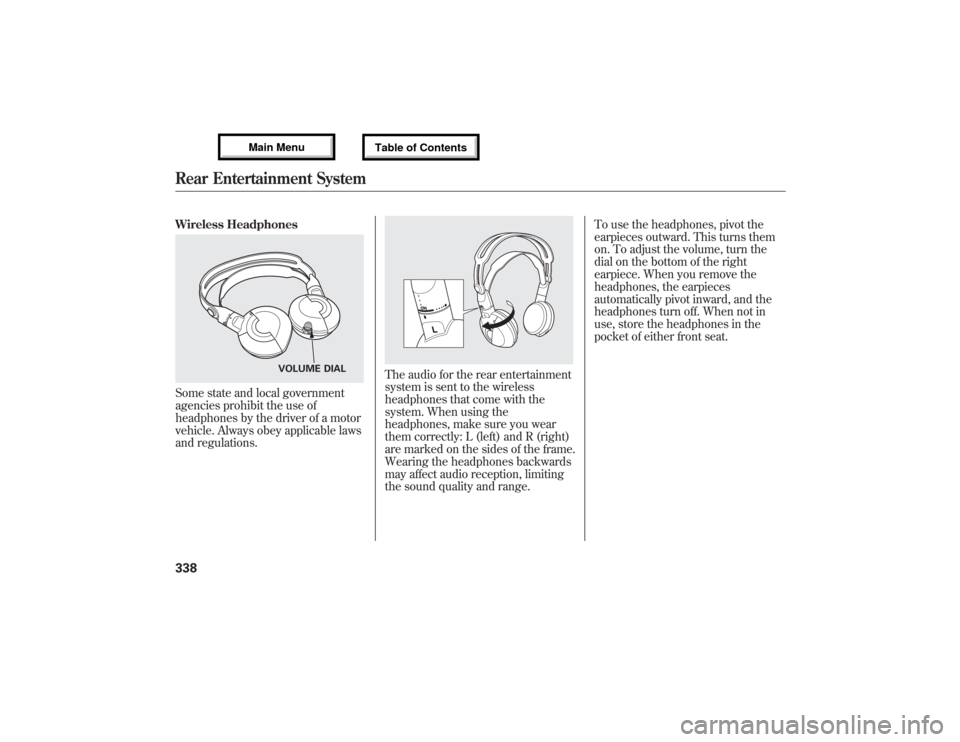
Wireless HeadphonesSome state and local government
agencies prohibit the use of
headphones by the driver of a motor
vehicle. Always obey applicable laws
and regulations.
The audio for the rear entertainment
system is sent to the wireless
headphones that come with the
system. When using the
headphones, make sure you wear
them correctly: L (left) and R (right)
are marked on the sides of the frame.
Wearing the headphones backwards
may affect audio reception, limiting
the sound quality and range.To use the headphones, pivot the
earpieces outward. This turns them
on. To adjust the volume, turn the
dial on the bottom of the right
earpiece. When you remove the
headphones, the earpieces
automatically pivot inward, and the
headphones turn off. When not in
use, store the headphones in the
pocket of either front seat.
VOLUME DIAL
Rear Entertainment System33812/07/17 18:10:57 13 ACURA MDX MMC North America Owner's M 50 31STX660 enu
Page 345 of 617
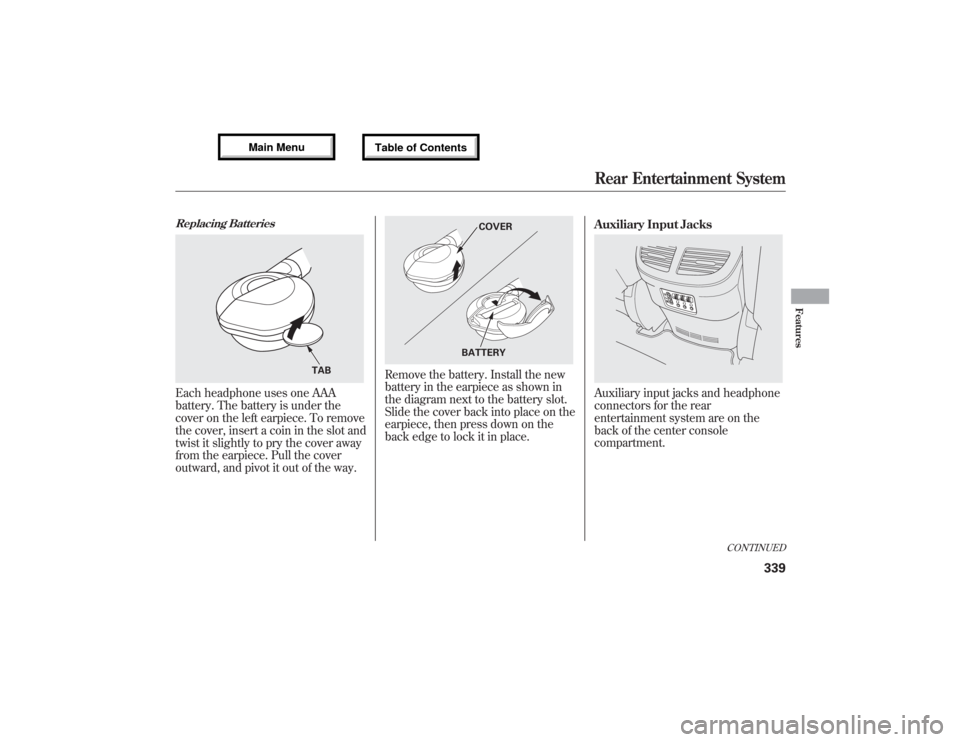
Replacing BatteriesEach headphone uses one AAA
battery. The battery is under the
cover on the left earpiece. To remove
the cover, insert a coin in the slot and
twist it slightly to pry the cover away
from the earpiece. Pull the cover
outward, and pivot it out of the way.
Remove the battery. Install the new
battery in the earpiece as shown in
the diagram next to the battery slot.
Slide the cover back into place on the
earpiece, then press down on the
back edge to lock it in place.Auxiliary Input Jacks
Auxiliary input jacks and headphone
connectors for the rear
entertainment system are on the
back of the center console
compartment.
TAB
COVER
BATTERY
CONTINUED
Rear Entertainment System
339
Features
12/07/17 18:10:57 13 ACURA MDX MMC North America Owner's M 50 31STX660 enu
Page 346 of 617
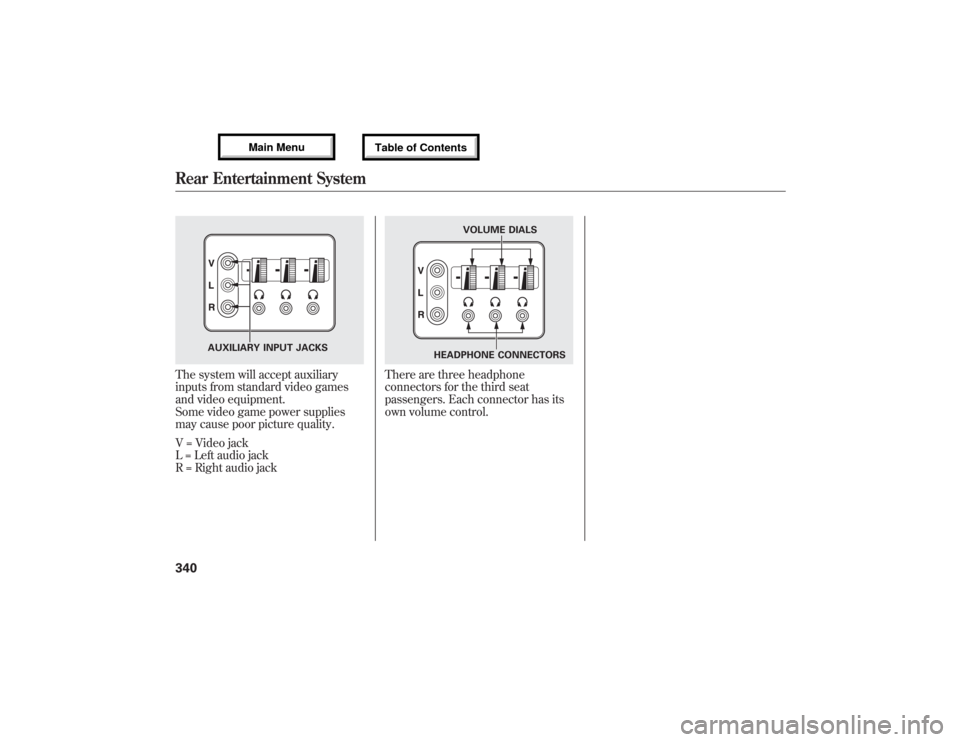
The system will accept auxiliary
inputs from standard video games
and video equipment.
Some video game power supplies
may cause poor picture quality.
V = Video jack
L = Left audio jack
R = Right audio jack
There are three headphone
connectors for the third seat
passengers. Each connector has its
own volume control.
AUXILIARY INPUT JACKS
VOLUME DIALS
HEADPHONE CONNECTORS
Rear Entertainment System34012/07/17 18:10:57 13 ACURA MDX MMC North America Owner's M 50 31STX660 enu
Page 371 of 617
HomeLink
®is a registered trademark
of Johnson Controls, Inc.This device complies with the
appropriate requirements or the
required standards. See 592 page for
more information.
Bluetooth
®HandsFreeLink
®
(Models without navigation
system)Bluetooth
®HandsFreeLink
®(HFL)
allows you to place and receive
phone calls using voice commands,
without handling your cell phone.
To use HFL, you need a Bluetooth-
compatible cell phone. For a list of
compatible phones, pairing
procedures, and special feature
capabilities:
In the U.S., visit
www.acura.com/
handsfreelink
, or call (888) 528-7876.
In Canada, visitwww.handsfreelink.
ca
, or call (888) 528-7876.
CONTINUED
HomeLink
®Universal Transceiver,
Bluetooth
®HandsFreeLink
®(Models without navigation system)
365
Features
12/07/17 18:10:57 13 ACURA MDX MMC North America Owner's M 50 31STX660 enu
Page 372 of 617

Using HFLHFL ButtonsHFL Talk button-Press and
release to give a command or answer
a call.
HFL Back button-Press and
release to end a call, go back to the
previous command, or cancel the
command.
Voice Control Tips●Air or wind noise from the
dashboard and side vents and all
windows may interfere with the
microphone. Adjust or close them
as necessary.
●Press and release the HFL Talk
button each time you want to make
a command. After the beep, speak
in a clear, natural tone.●Try to reduce all background
noise. If the microphone picks up
voices other than yours,
commands may be misinterpreted.●Many commands can be spoken
together. For example, you can say
‘‘Call 123-456-7890’’or‘‘Dial Peter.’’
HFL TALK BUTTON
HFL BACK BUTTON
MICROPHONE
Bluetooth
®HandsFreeLink
®(Models without navigation system)
36612/07/17 18:10:57 13 ACURA MDX MMC North America Owner's M 50 31STX660 enu
Page 373 of 617

●To change the volume level of
HFL, use the audio system volume
knob or the steering wheel volume
controls.
Help Features●To hear general HFL information,
including help on pairing a phone
or setting up the system, say
‘‘Tutorial.’’●For help at any time, including a
list of available commands, say
‘‘Hands free help.’’
Information DisplayAs an incoming call notification, you
will see the following display:SIGNAL
STRENGTHHFL
MODEBATTERY
LEVEL STATUS
PHONE DIALING ROAM STATUS
CONTINUED
Bluetooth
®HandsFreeLink
®(Models without navigation system)
367
Features
12/07/17 18:10:57 13 ACURA MDX MMC North America Owner's M 50 31STX660 enu
Page 374 of 617

Some phones may send battery,
signal strength, and roaming status
information to HFL.
You will see‘‘HANDSFREELINK’’
and the‘‘
’’indicator on the audio
display when you operate HFL.
Bluetooth
®HandsFreeLink
®(Models without navigation system)
36812/07/17 18:10:57 13 ACURA MDX MMC North America Owner's M 50 31STX660 enu
Page 375 of 617

How to Use HFLThe ignition switch must be in the ACCESSORY (I) or ON (II) position.
‘‘Phone Setup’’
‘‘Call’’or‘‘Dial’’ Press HFL
Talk button‘‘Pair’’
‘‘Edit’’
‘‘Delete’’
‘‘List’’
‘‘Status’’
‘‘Next Phone’’
‘‘Set Pairing
Code’’
‘‘123-555-####’’
‘‘Jim Smith’’Enter desired phone number (See page 374)
Once a phonebook entry is stored, you can say a name here.
(See page 374)Set the pairing code to a‘‘Fixed’’or‘‘Random’’number
(See page 374) Search for another previously paired phone to link to
(See page 374)Hear which paired phone is currently linked to the system
(See page 373)Hear a list of all phones paired to the system (See page 373) Delete a paired phone from the system (See page 373) E
Editthenameofapairedphone(Seepage372)Pair a phone to the system (See page 372)
Press and release the HFL Talk button each time you give a command.
CONTINUED
Bluetooth
®HandsFreeLink
®(Models without navigation system)
369
Features
12/07/17 18:10:57 13 ACURA MDX MMC North America Owner's M 50 31STX660 enu
Page 376 of 617

Press and release the HFL Talk button each time you give a command.‘‘Redial’’
‘‘List’’ Press HFL
Talk button‘‘Transfer’’
‘‘Mute’’
‘‘Send’’
‘‘Phonebook’’‘‘Store’’
‘‘Edit’’
‘‘Delete’’
‘‘Receive
Contact’’ Send numbers or names during a call (See page 376)
Hear a list of all stored phonebook entries (See page 378) If your phone supports this function, use this to transfer contacts
from your phone to HFL (See page 378) Delete a phonebook entry (See page 377) Edit the number of an existing phonebook entry (See page 377) Store a phonebook entry (See page 376) Mute your voice to the person at the other end of the call (See page 376)Transfer a call from HFL to your phone, or from your phone to HFL (See page 375)Redial the last number called (See page 375)
Bluetooth
®HandsFreeLink
®(Models without navigation system)
37012/07/17 18:10:57 13 ACURA MDX MMC North America Owner's M 50 31STX660 enu