wheel Acura MDX 2013 User Guide
[x] Cancel search | Manufacturer: ACURA, Model Year: 2013, Model line: MDX, Model: Acura MDX 2013Pages: 617, PDF Size: 10.82 MB
Page 89 of 617
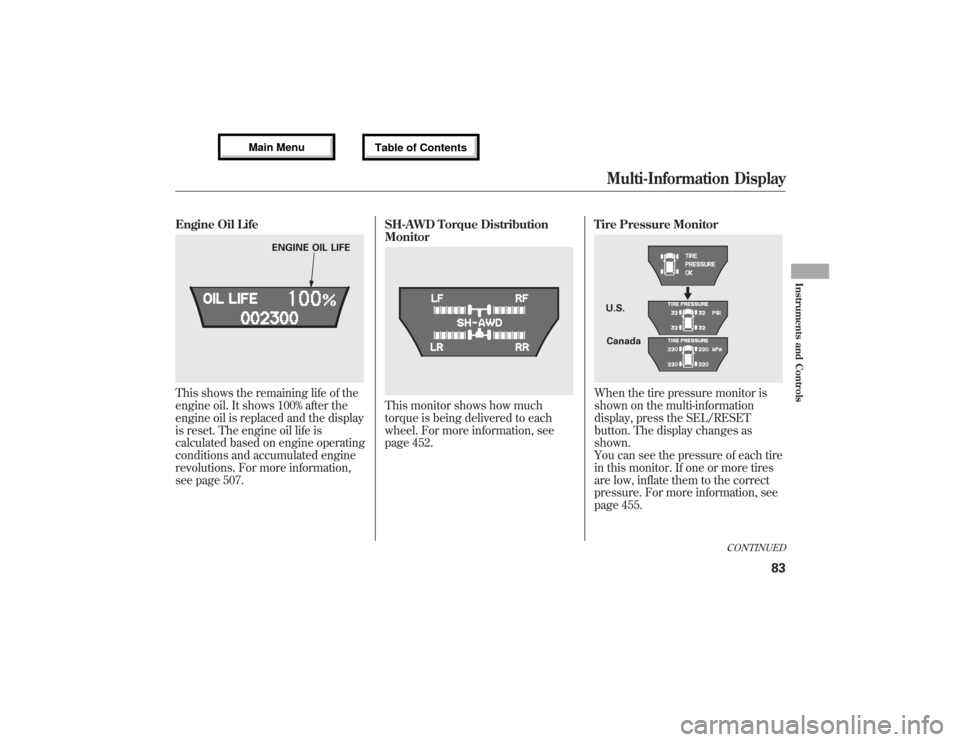
Engine Oil LifeThis shows the remaining life of the
engine oil. It shows 100% after the
engine oil is replaced and the display
is reset. The engine oil life is
calculated based on engine operating
conditions and accumulated engine
revolutions. For more information,
see page 507.SH-AWD Torque Distribution
Monitor
This monitor shows how much
torque is being delivered to each
wheel. For more information, see
page 452.Tire Pressure Monitor
When the tire pressure monitor is
shown on the multi-information
display, press the SEL/RESET
button. The display changes as
shown.
You can see the pressure of each tire
in this monitor. If one or more tires
are low, inflate them to the correct
pressure. For more information, see
page 455.
ENGINE OIL LIFE
U.S.
Canada
CONTINUED
Multi-Information Display
83
Instruments and Controls
12/07/17 18:10:57 13 ACURA MDX MMC North America Owner's M 50 31STX660 enu
Page 92 of 617

System MessagesIf there is a problem with your
vehicle, for example, the engine oil
level is low or a door is not fully
closed, the multi-information display
will show you the problem. It does
this by interrupting the current
display with one or more messages.The system message(s) triggers the
appropriate indicator(s) on the
instrument panel, including the
system message indicator, to come
on. The system message indicator
does not go off until the problem(s)
is corrected.
You will also hear a beep when the
system message comes on for the
first time.
Most of the messages are displayed
for about 5 seconds, and then the
normal display returns. If there are
several system messages to be
shown, the display switches these
messages every 5 seconds.To cancel the message(s) before 5
seconds have elapsed, press the
INFO (
/
) button on the steering
wheel.
Even if you press the INFO (
/
)
button, some messages stay on or
come on again at regular intervals
until the problem is corrected.
You can see the message(s) again by
pressing the INFO (
/
) button
repeatedly if the system message
indicator remains lit on the
instrument panel.
Here is a list of all messages:
SYSTEM MESSAGE INDICATOR
Multi-Information Display8612/07/17 18:10:57 13 ACURA MDX MMC North America Owner's M 50 31STX660 enu
Page 97 of 617

Group Setup Menu Item Description Setting Option Page
ACC SETUP
(P. 96)PRE-RUNNING CAR DETECT
BEEPCauses the system to beep when a vehicle ahead of
you gets too close.ON
ᤳ1
97
OFF
ACC DISPLAY SPEED UNIT Changes the ACC display speed unit. mph
ᤳ2
previous
setting98
km/h
ᤳ3
METER SETUP
(P. 99)LANGUAGE SELECTION Changes the language used in the display. ENGLISH
ᤳ1
100 FRENCH
SPANISH
ADJUST OUTSIDE
TEMP. DISPLAYChanges the outside temperature reading above or
below its current reading.-5°F~ᤣ0°F
ᤳ2~5°F
101
-3°C~ᤣ0°Cᤳ3~3°C
TRIP A & AVG. FUEL
RESET with REFUELCauses trip meter A and the average fuel economy to
reset when you refuel.ON 102
OFF
ᤳ1
ADJUST
ALARM VOLUMEChanges the indicator alarm volumes into three levels. HIGH
103 MID
ᤳ1
LOW
ELAPSED TIME RESET Resets the elapsed time of your current trip. MANUAL ONLY
104 IGN OFF
ᤳ1
TRIP B
TRIP A
AUTO INTERIOR
ILLUMINATIONChanges the interior light sensitivity to your liking. MAX LOW
105 HIGH MIN
MID
ᤳ1
OFF
POSITION SETUP
(P. 107)MEMORY POSITION LINK Changes the driver's seat, the steering wheel, and the
outside mirror positions to a stored setting.ON
ᤳ1
108
OFF
AUTO TILT & TELESCOPE
STEERING WHEELMoves the steering wheel fully in and up when the key
is removed.ON
ᤳ1
109
OFF
ᤳ1: Default setting
ᤳ2: Default setting for U.S. models
ᤳ3: Default setting for Canadian models
CONTINUED
Multi-Information Display
91
Instruments and Controls
12/07/17 18:10:57 13 ACURA MDX MMC North America Owner's M 50 31STX660 enu
Page 113 of 617

Position Setup
Here are the two custom settings for
the position setup:●MEMORY POSITION LINK●AUTO TILT & TELESCOPE
STEERING WHEEL
While‘‘POSITION SETUP’’is
shown, press the SEL/RESET button
to enter the customize mode.
Each time you press the INFO
(/
) button, the screen changes as
shown in the illustration. Press the
INFO (
/
) button until you see the
setting you want to customize, then
press the SEL/RESET button to
enter your selection.
SEL/RESET
BUTTON
INFO (▲or▼)
BUTTON
CONTINUED
Multi-Information Display
107
Instruments and Controls
12/07/17 18:10:57 13 ACURA MDX MMC North America Owner's M 50 31STX660 enu
Page 114 of 617

Memory Position LinkIf‘‘MEMORY POSITION LINK’’is
set to‘‘ON,’’the driver's seat, the
steering wheel, and outside mirror
positions move to the position stored
in the memory when you open the
driver's door, using the remote
transmitter.
You can choose this customizable
item from‘‘POSITION SETUP’’by
pressing the INFO (
/
) button
repeatedly.
Press the SEL/RESET button to see
the selections.
Select ON or OFF by pressing the
INFO (
/
) button, then enter your
selection by pressing the SEL/
RESET button.
When your selection is successfully
completed, the display changes as
shown above, and then goes back to
the customize item screen.
If the‘‘SETTING INCOMPLETE’’
message appears, go back to
‘‘MEMORY POSITION LINK’’and
repeat the procedure again.
Multi-Information Display10812/07/17 18:10:57 13 ACURA MDX MMC North America Owner's M 50 31STX660 enu
Page 115 of 617

Auto Tilt & Telescope Steering WheelWhen‘‘AUTO TILT & TELESCOPE
STEERING WHEEL’’is set to‘‘ON,’’
the steering wheel automatically
moves fully in and up when you turn
the ignition switch to the LOCK (0)
position and remove the key.
You can choose this customizable
item from‘‘POSITION SETUP’’by
pressing the INFO (
/
) button
repeatedly.
Press the SEL/RESET button to see
the selections.
Select ON or OFF by pressing the
INFO (
/
) button, then enter your
selection by pressing the SEL/
RESET button.
When your selection is successfully
completed, the display changes as
shown above, and then goes back to
the customize item screen.
If the‘‘SETTING INCOMPLETE’’
message appears, go back to‘‘AUTO
TILT & TELESCOPE STEERING
WHEEL’’and repeat the procedure
again.
CONTINUED
Multi-Information Display
109
Instruments and Controls
12/07/17 18:10:57 13 ACURA MDX MMC North America Owner's M 50 31STX660 enu
Page 131 of 617

ᤳ1: If equipped
ᤳ2: To use the horn, press the center pad of the steering wheel.
ᤳ3: Refer to the navigation system manual. For how to operate
Bluetooth
®HandsFreeLink by voice, see page 383.
ᤳ4: Switch location varies on models.
BLIND SPOT
INFORMATION SYSTEM
(BSI) OFF BUTTON
ᤳ1
(P. 482) VEHICLE STABILITY
ASSIST SYSTEM OFF
BUTTON (P. 474) MIRROR CONTROLS
(P. 166)HEADLIGHT/TURN SIGNAL/
FRONT FOG LIGHTS
(P. 128)
STEERING WHEEL
ADJUSTMENTS (P. 134)CRUISE CONTROL BUTTONS (P. 345)/
ADAPTIVE CRUISE CONTROL (ACC)
BUTTONS
ᤳ1(P. 353) STEERING WHEEL
AUDIO CONTROLS
(P. 305)WINDSHIELD
WIPERS/WASHERS
(P. 126)INSTRUMENT PANEL
BRIGHTNESS
(P. 133)
PASSENGER AIRBAG
OFF INDICATOR
(P. 37)
HAZARD WARNING
BUTTON
(P. 132)
REAR WINDOW
DEFOGGER
(P. 132)
ACCESSORY POWER
SOCKETS
(P. 177)
SEAT HEATER SWITCHES
(P. 157)/
SEAT HEATER AND SEAT
VENTILATION BUTTONS
ᤳ1
(P. 158)
ACTIVE DAMPER
SYSTEM BUTTON
ᤳ1
(P. 484) HORN
ᤳ2
BSI ALERT INDICATOR
ᤳ1
(P. 479)
COLLISION MITIGATION
BRAKING SYSTEM™(CMBS™)
OFF BUTTON
ᤳ1(P. 467)
HEADLIGHT WASHER
BUTTON
ᤳ1(P. 127)
DISTANCE
BUTTON
ᤳ1
(P. 357) PADDLE SHIFTERS
(P. 447)
BLUETOOTH
HANDSFREELINK
BUTTON (P. 365)VOICE CONTROL
BUTTONS
ᤳ3 ᤳ4
Controls Near the Steering Wheel
125
Instruments and Controls
12/07/18 16:12:02 13 ACURA MDX MMC North America Owner's M 50 31STX660 enu
Page 133 of 617

Headlight Washers
(On Canadian models)The headlight washers can be
operated at any time by pressing the
headlight washer button located next
to the steering wheel column. The
headlights must be turned on to use
this button. In addition, the headlight
washer operates without pressing the
button the first time you turn on the
windshield washers with the ignition
switch in the ON (II) position.
The headlight washers use the same
fluid reservoir as the windshield
washers.Rear Window Wiper and Washer
1. Rotate the switch clockwise to turn
the rear window wiper ON.
2. Hold past ON to turn the rear
window wiper on and to spray the
rear window washer.
MDX model
Technology Package and
Elite Package models
CONTINUED
Windshield Wipers and Washers
127
Instruments and Controls
12/07/17 18:10:57 13 ACURA MDX MMC North America Owner's M 50 31STX660 enu
Page 140 of 617
Make any steering wheel adjustment
before you start driving.
Adjusting the steering wheel
position while driving may
cause you to lose control of the
vehicle and be seriously injured
in a crash.
Adjust the steering wheel only
when the vehicle is stopped.
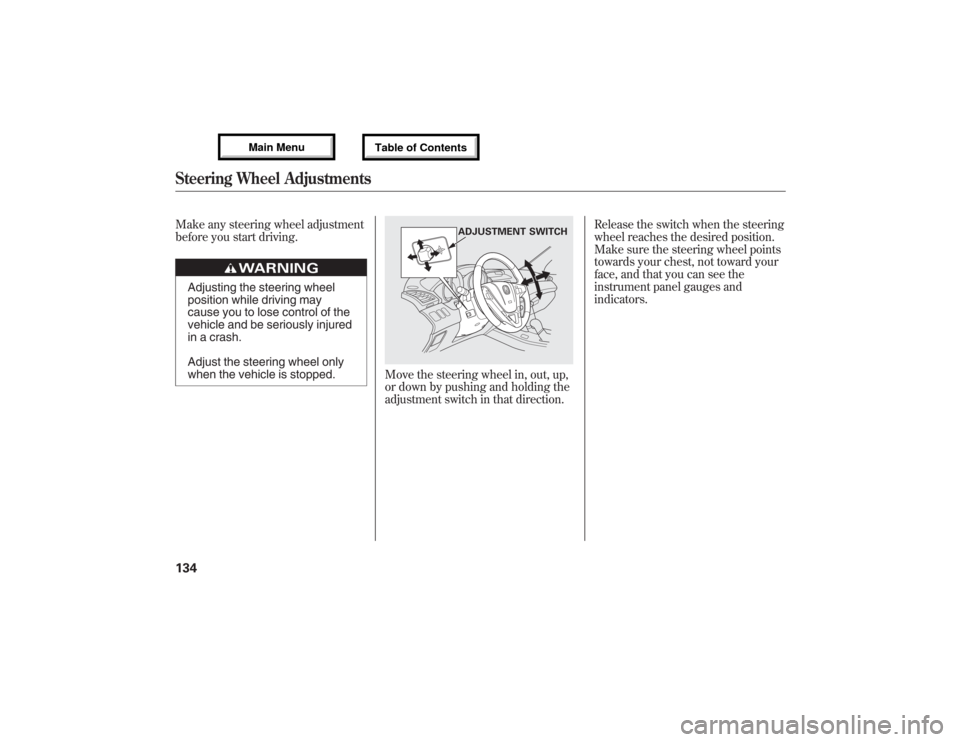
Move the steering wheel in, out, up,
or down by pushing and holding the
adjustment switch in that direction.Release the switch when the steering
wheel reaches the desired position.
Make sure the steering wheel points
towards your chest, not toward your
face, and that you can see the
instrument panel gauges and
indicators.
ADJUSTMENT SWITCH
Steering Wheel Adjustments13412/07/17 18:10:57 13 ACURA MDX MMC North America Owner's M 50 31STX660 enu
Page 141 of 617

When you remove the key from the
ignition switch, the steering wheel
automatically moves fully in and up.
To change the‘‘AUTO TILT &
TELESCOPE STEERING WHEEL’’
setting, see page 109.
The steering wheel then returns to
its original position when you insert
the key back in the ignition switch.
Steering wheel movement is also
controlled by the driving position
memory system (see page 168).If your vehicle's battery is
disconnected or goes dead, or the
fuse for the power tilt and telescopic
steering wheel is removed, the
power tilt and telescopic steering
wheel system needs to be reset when
you reconnect the battery or install
the fuse.
Insert the key into the ignition
switch, and remove it. The steering
wheel automatically moves fully in
and up to let you know the system is
reset.
Steering Wheel Adjustments
135
Instruments and Controls
12/07/17 18:10:57 13 ACURA MDX MMC North America Owner's M 50 31STX660 enu