change time Acura MDX 2013 Repair Manual
[x] Cancel search | Manufacturer: ACURA, Model Year: 2013, Model line: MDX, Model: Acura MDX 2013Pages: 617, PDF Size: 10.82 MB
Page 416 of 617

The confirmation message will be
displayed on the screen. Make sure
to confirm the appointment date,
time and dealer. If it is OK, press
ENTER.
If you want to change or reschedule
the appointment date, select
‘‘Cancel,’’then press ENTER.Scheduled Dealer Appointment
To reschedule the appointment:Press the INFO/PHONE button to
go to the information screen. Select
‘‘Messages,’’then select‘‘Scheduled
Dealer Appointment’’from the
message category list. Then press
ENTER.You will see the screen to reschedule
as shown. To make an appointment,
select‘‘Reschedule Appointment,’’
then press ENTER.
The system will automatically
connect to the Acura server, then
show you a new appointment date
and time on the navigation screen. If
you accept this appointment, select
‘‘Confirm Appointment,’’then press
ENTER.
AcuraLink
®(U.S. models only)
41012/07/17 18:10:57 13 ACURA MDX MMC North America Owner's M 50 31STX660 enu
Page 420 of 617

When viewing a diagnostic info
message through the INFO menu,
you can select the Diagnostic Info
option to connect to the Acura server
and retrieve the latest information
regarding the problem.
NOTE:There may not be any
additional information, depending on
the time elapsed since the previous
time you retrieved the information
from the Acura server.Reminder Massage
When you make an appointment
through My Acura's online
Scheduling Service Appointment,
you can be reminded in advance
about that appointment through
AcuraLink.
If you need to reschedule or cancel
the appointment, see page 410.Turning the Automated Appointment
preference off will disable
appointment notifications in the
vehicle based on appointments
created or changed at My Acura's
online scheduling website.
Appointments can still be created,
rescheduled, and canceled from the
vehicle; however, the appointment
information stored in the vehicle will
not be updated. Any changes to
those appointments should be made
from the My Acura website.
AcuraLink
®(U.S. models only)
41412/07/17 18:10:57 13 ACURA MDX MMC North America Owner's M 50 31STX660 enu
Page 458 of 617

The super handling-all wheel drive
(SH-AWD) system is a full time all-
wheel-drive system that
automatically controls and transfers
varying amounts of engine torque to
all wheels independently, according
to the driving conditions.
While the SH-AWD system helps to
enhance the vehicle's driving
stability in all situations, it is still
your responsibility to drive and
corner at reasonable speeds and to
leave a sufficient margin of safety.SH-AWD Torque Distribution
Monitor
The SH-AWD torque distribution
monitor on the multi-information
display shows you the amount of
torque being sent to the wheels.
Each wheel-right front (RF), left front
(LF), right rear (RR), and left rear
(LR)-has its own torque indicator.Each torque indicator is displayed as
a bar graph divided into 5 segments.
The number of segments represents
the amount of torque distributed to
each wheel.
When there is only a slight change in
torque distribution while driving,
such as cruising on level roads at the
same speed, the torque distribution
monitor may stop displaying the
amount of torque. This is not a
system problem. The monitor will
show the amount if the system
senses any change in torque
distribution.
TORQUE INDICATOR
TORQUE INDICATOR
Super Handling-All Wheel Drive™(SH-AWD
®) System
45212/07/17 18:10:57 13 ACURA MDX MMC North America Owner's M 50 31STX660 enu
Page 468 of 617
ABS Indicator
If this indicator comes on, the anti-
lock function of the braking system
has shut down. The brakes still work
like a conventional system, but
without anti-lock. You should have
your dealer inspect your vehicle as
soon as possible.
You will also see a‘‘CHECK ABS
SYSTEM’’message on the multi-
information display (see page 88).
If the indicator comes on while
driving, test the brakes as instructed
on page 564.If the ABS indicator and the brake
system indicator come on together,
and the parking brake is fully
released, the EBD system may also
be shut down.
Test your brakes as instructed on
page 564. If the brakes feel normal,
drive slowly and have your vehicle
repaired by your dealer as soon as
possible. Avoid sudden hard braking
which could cause the rear wheels to
lock up and possibly lead to a loss of
control.Important Safety Reminders
ABS does not reduce the time or
distance it takes to stop the
vehicle.It only helps with steering
control during braking.
ABS will not prevent a skid that
results from changing direction
abruptly,such as trying to take a
corner too fast or making a sudden
lane change. Always drive at a safe
speed for the road and weather
conditions.
ABS cannot prevent a loss of
stability.Always steer moderately
when you are braking hard. Severe
or sharp steering wheel movement
can still cause your vehicle to veer
into oncoming traffic or off the road.
A vehicle with ABS may require a
longer distance to stopon loose or
uneven surfaces, such as gravel or
snow, than a vehicle without anti-
lock.
Anti-lock Brakes (ABS)46212/07/17 18:10:57 13 ACURA MDX MMC North America Owner's M 50 31STX660 enu
Page 514 of 617
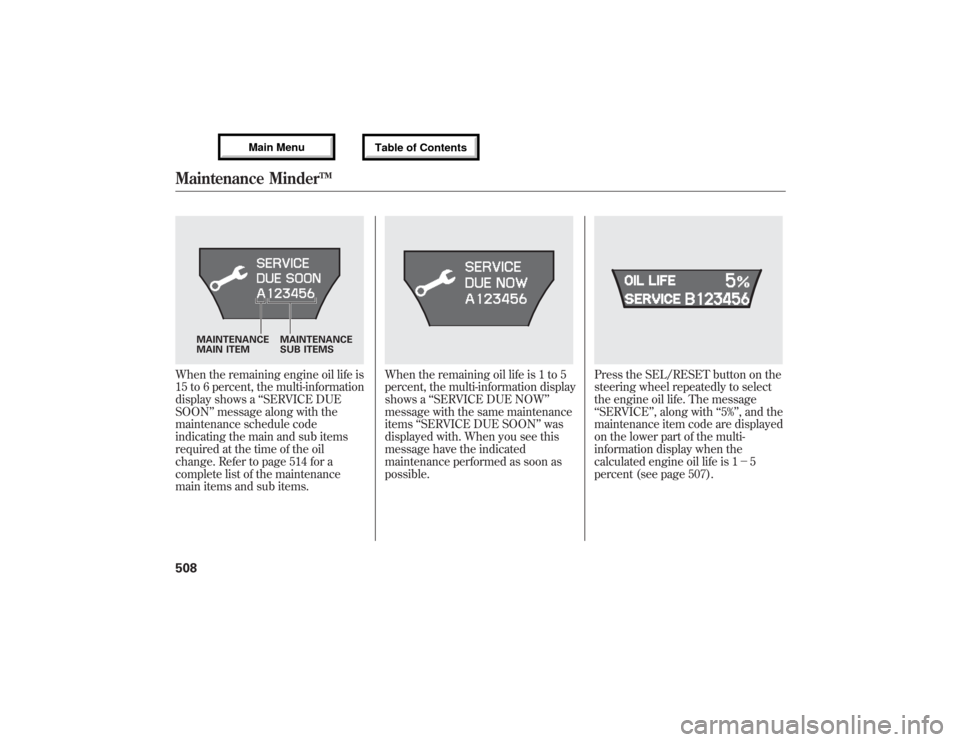
When the remaining engine oil life is
15 to 6 percent, the multi-information
display shows a‘‘SERVICE DUE
SOON’’message along with the
maintenance schedule code
indicating the main and sub items
required at the time of the oil
change. Refer to page 514 for a
complete list of the maintenance
main items and sub items.
When the remaining oil life is 1 to 5
percent, the multi-information display
shows a‘‘SERVICE DUE NOW’’
message with the same maintenance
items‘‘SERVICE DUE SOON’’was
displayed with. When you see this
message have the indicated
maintenance performed as soon as
possible.
Press the SEL/RESET button on the
steering wheel repeatedly to select
the engine oil life. The message
‘‘SERVICE’’, along with‘‘5%’’, and the
maintenance item code are displayed
on the lower part of the multi-
information display when the
calculated engine oil life is 1-5
percent (see page 507).
MAINTENANCE
MAIN ITEMMAINTENANCE
SUB ITEMS
Maintenance Minder
TM
50812/07/17 18:10:57 13 ACURA MDX MMC North America Owner's M 50 31STX660 enu
Page 536 of 617
Replacing Front Fog/Daytime
Running Light Bulbs
Your vehicle uses halogen light
bulbs. When replacing a bulb, handle
it by its plastic case, and protect the
glass from contact with your skin or
hard objects. If you touch the glass,
clean it with denatured alcohol and a
clean cloth.Halogen bulbs get very hot when lit.
Oil, perspiration, or a scratch on the
glass can cause the bulb to overheat
and shatter.
1. To change the bulb on the driver's
side, start the engine, turn the
steering wheel all the way to the
right, then turn off the engine. To
change the bulb on the
passenger's side, turn the steering
wheel to the left.
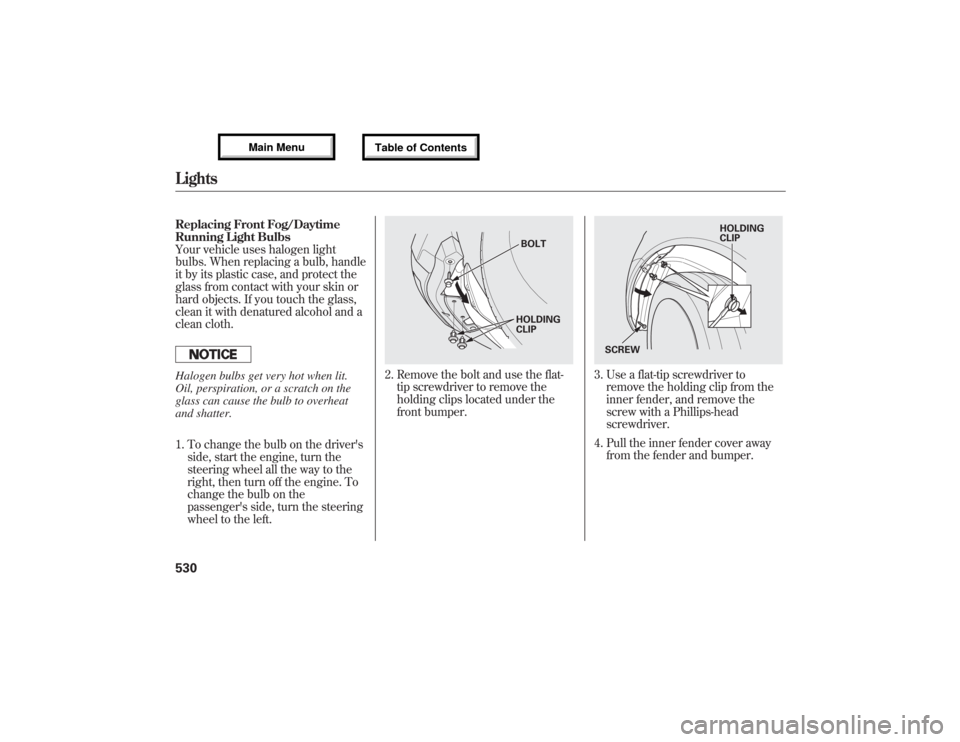
2. Remove the bolt and use the flat-
tip screwdriver to remove the
holding clips located under the
front bumper.
3. Use a flat-tip screwdriver to
remove the holding clip from the
inner fender, and remove the
screw with a Phillips-head
screwdriver.
4. Pull the inner fender cover away
from the fender and bumper.
BOLT
HOLDING
CLIP
HOLDING
CLIP
SCREW
Lights53012/07/17 18:10:57 13 ACURA MDX MMC North America Owner's M 50 31STX660 enu
Page 607 of 617
Coolant
Adding
....................................
520
Checking
................................
427
Proper Solution
.......................
520
Temperature Gauge
.................
78
Crankcase Emissions Control
System
...................................
587
Cruise Control Indicator
...............
75
Cruise Control Operation
...........
345
Cruise Main Indicator
..................
75
Cup Holders
...............................
174
Customize Settings
......................
90
D
DANGER, Explanation of
..............
iv
Dashboard
...............................
3, 66
Daytime Running Lights
............
130
Dead Battery
..............................
558
Defogger, Rear Window
.............
132
Defrosting the Windows
............
186
Devices that Emit Radio
Waves
.....................................
592
Dimensions
................................
578
Dimming the Headlights
............
128Dipstick
Automatic Transmission
.........
523
Engine Oil
...............................
427
Directional Signals
...............
71, 128
Disc Brake Wear Indicators.......
461
Disc Care
...................................
247
Disc Changer
.............................
203
Disc Changer Error
Messages
...............................
211
Disc Player
..........................
203, 235
Disc Player Error Messages......
246
Disposal of Used Oil
...................
519
Doors
Childproof Door Locks
............
141
Indicator
...................................
12
Locking and Unlocking
...........
140
Lockout Prevention
.................
141
DOT Tire Quality Grading (U.S.
Vehicles)
................................
581
Driver and Passenger Safety
..........
5
Driving
.......................................
439
Economy
.................................
428
Driving Guidelines
.....................
440
Driving Position Memory
System
...................................
168Driving with the Paddle
Shifters
...................................
447
Dust and Pollen Filter
................
534
DVD Player
................................
313
DVD Player Error Messages
......
337
E
Economy, Fuel
...........................
428
CONTINUED
Index
III
INDEX
12/07/17 18:10:57 13 ACURA MDX MMC North America Owner's M 50 31STX660 enu