service Acura MDX 2015 User Guide
[x] Cancel search | Manufacturer: ACURA, Model Year: 2015, Model line: MDX, Model: Acura MDX 2015Pages: 505, PDF Size: 18.62 MB
Page 262 of 505
261
uuCustomized Features u
Continued
Features
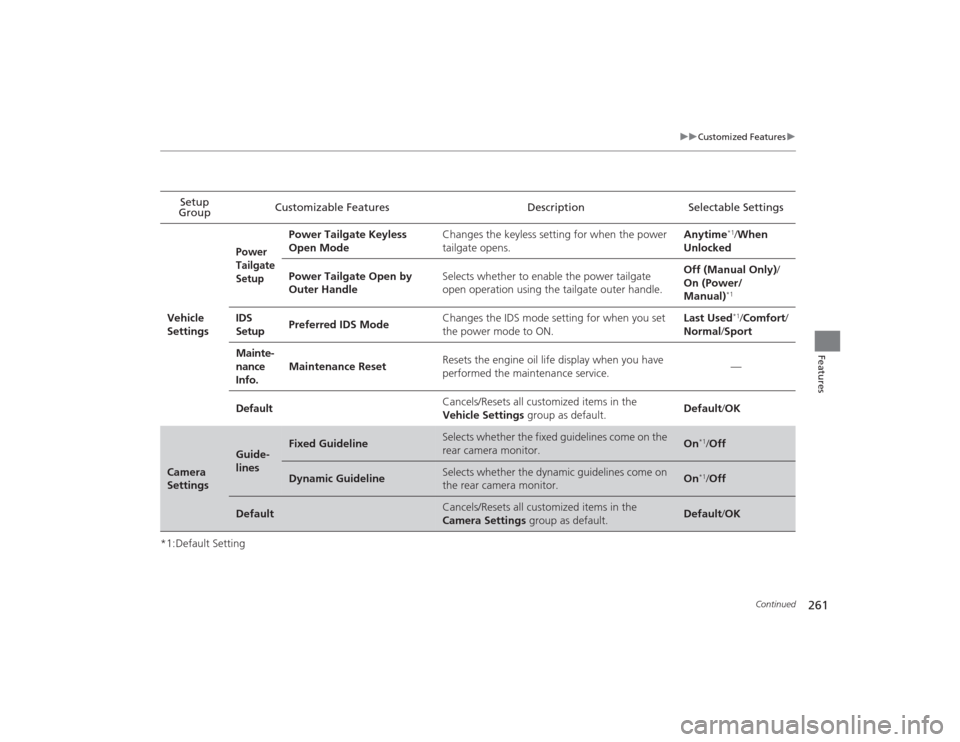
*1:Default SettingSetup
Group Customizable Features Description Selectable Settings
Vehicle
Settings
Power
Tailgate
Setup
Power Tailgate Keyless
Open Mode Changes the keyless setting for when the power
tailgate opens. Anytime
*1/
When
Unlocked
Power Tailgate Open by
Outer Handle Selects whether to enable the power tailgate
open operation using the tailgate outer handle. Off (Manual Only)
/
On (Power/
Manual)*1
IDS
Setup Preferred IDS Mode Changes the IDS mode setting for when you set
the power mode to ON. Last Used
*1/
Comfort/
Normal /Sport
Mainte-
nance
Info. Maintenance Reset
Resets the engine oil life display when you have
performed the maintenance service.
—
Default Cancels/Resets all customized items in the
Vehicle Settings
group as default. Default
/OK
Camera
Settings
Guide-
lines
Fixed Guideline
Selects whether the fixed guidelines come on the
rear camera monitor.
On
*1/Off
Dynamic Guideline
Selects whether the dynamic guidelines come on
the rear camera monitor.
On
*1/Off
Default
Cancels/Resets all customized items in the
Camera Settings group as default.
Default/OK
Page 321 of 505
320
uuTowing a Trailer uDriving Safely with a Trailer
Driving
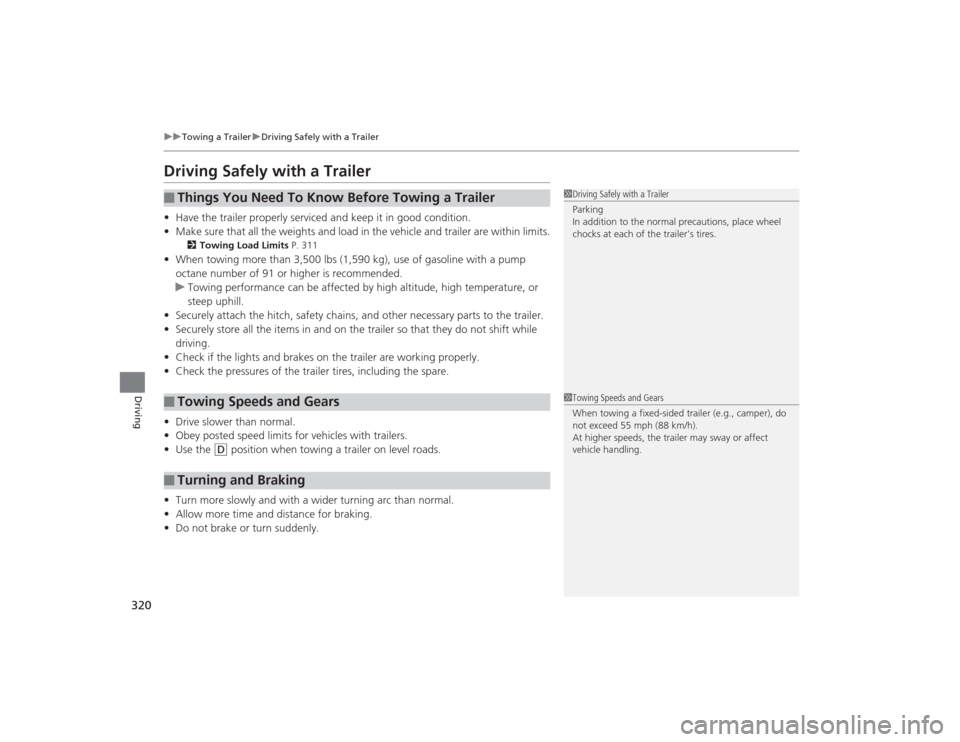
Driving Safely with a Trailer• Have the trailer properly serviced an d keep it in good condition.
• Make sure that all the weights and load in the vehicle and trailer are within limits.
2 Towing Load Limits P. 311
•When towing more than 3,500 lbs (1,590 kg), use of gasoline with a pump
octane number of 91 or higher is recommended.
u Towing performance can be affected by high altitude, high temperature, or
steep uphill.
• Securely attach the hitch, safety chains, and other necessary parts to the trailer.
• Securely store all the items in and on the trailer so that they do not shift while
driving.
• Check if the lights and brakes on the trailer are working properly.
• Check the pressures of the trailer tires, including the spare.
• Drive slower than normal.
• Obey posted speed limits for vehicles with trailers.
• Use the
(D
position when towing a trailer on level roads.
• Turn more slowly and with a wider turning arc than normal.
• Allow more time and distance for braking.
• Do not brake or turn suddenly.
■
Things You Need To Know Before Towing a Trailer
■
Towing Speeds and Gears
■
Turning and Braking
1Driving Safely with a Trailer
Parking
In addition to the normal precautions, place wheel
chocks at each of the trailer’s tires.1Towing Speeds and Gears
When towing a fixed-sided trailer (e.g., camper), do
not exceed 55 mph (88 km/h).
At higher speeds, the trailer ma y sway or affect
vehicle handling.
Page 342 of 505
Continued
341
uuWhen Driving uAdaptive Cruise Control (ACC) with Low Speed Follow (LSF)
*
Driving
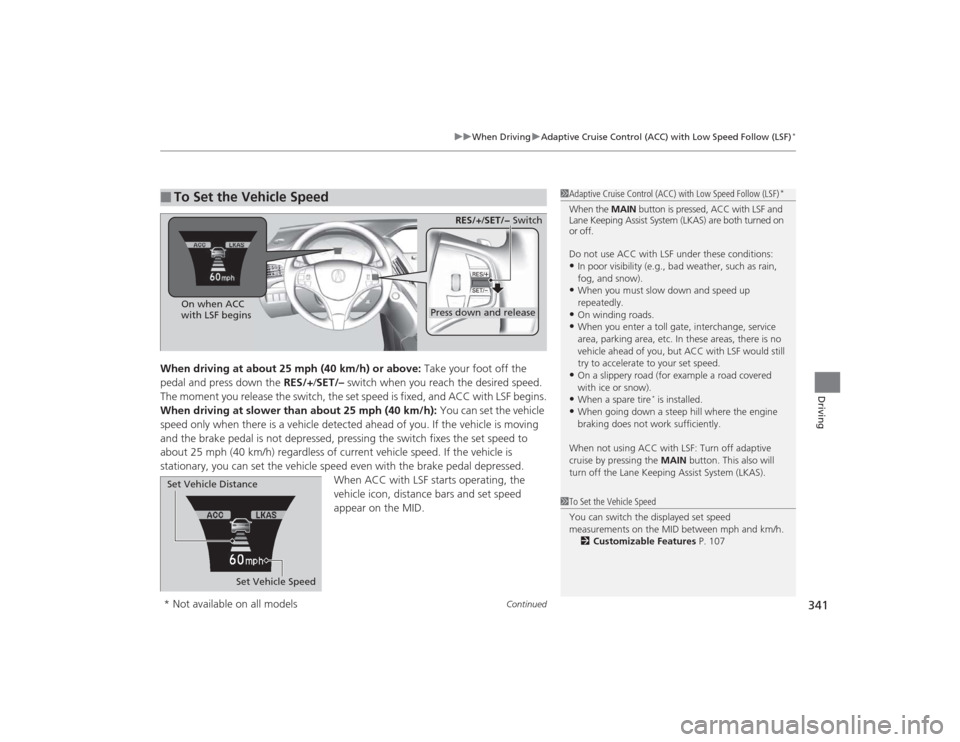
When driving at about 25 mph (40 km/h) or above: Take your foot off the
pedal and press down the RES/+/SET/– switch when you reach the desired speed.
The moment you release the switch, the set speed is fixed, and ACC with LSF begins.
When driving at slower than about 25 mph (40 km/h): You can set the vehicle
speed only when there is a vehicle detected ahead of you. If the vehicle is moving
and the brake pedal is not depressed, pressing the switch fixes the set speed to
about 25 mph (40 km/h) regardless of current vehicle speed. If the vehicle is
stationary, you can set the vehicle speed even with the brake pedal depressed. When ACC with LSF starts operating, the
vehicle icon, distance bars and set speed
appear on the MID. ■
To Set the Vehicle Speed
1Adaptive Cruise Control (ACC) with Low Speed Follow (LSF)
*
When the MAIN button is pressed, ACC with LSF and
Lane Keeping Assist System (LKAS) are both turned on
or off.
Do not use ACC with LSF under these conditions:•In poor visibility (e.g., bad weather, such as rain,
fog, and snow).•When you must slow down and speed up
repeatedly.•On winding roads.•When you enter a toll gate, interchange, service
area, parking area, etc. In these areas, there is no
vehicle ahead of you, but ACC with LSF would still
try to accelerate to your set speed.•On a slippery road (for example a road covered
with ice or snow).•When a spare tire
* is installed.
•When going down a steep hill where the engine
braking does not work sufficiently.
When not using ACC with LSF: Turn off adaptive
cruise by pressing the MAIN button. This also will
turn off the Lane Keeping Assist System (LKAS).
1 To Set the Vehicle Speed
You can switch the displayed set speed
measurements on the MID between mph and km/h.
2 Customizable Features P. 107
On when ACC
with LSF begins
Press down and release
RES/+/SET/− Switch
Set Vehicle Speed
Set Vehicle Distance
* Not available on all models
Page 388 of 505

387Driving
RefuelingFuel Information■Fuel recommendation
Use of lower octane gasoline can cause occasional metallic knocking noise in the
engine and will result in decreased engine performance.
Use of gasoline with a pump octane less than 87 can lead to engine damage.■Top tier detergent gasoline
Because the level of detergency and additives in gasoline vary in the market, Acura
endorses the use of “TOP TIER Detergent Gasoline” where available to help
maintain the performance and reliability of your vehicle. TOP TIER Detergent
Gasoline meets a new gasoline standard jointly established by leading automotive
manufacturers to meet the needs of today’s advanced engines.
Qualifying gasoline retailers will, in most cases, identify their gasoline as having met
“TOP TIER Detergent Gasoline” standards at the retail location. This fuel is
guaranteed to contain the proper level of detergent additives and be free of metallic
additives. The proper level of detergent additives, and absence of harmful metallic
additives in gasoline, help avoid build-up of deposits in your engine and emission
control system.
For further important fuel-related information for your vehicle, or on information on
gasoline that does not contain MMT, visit Acura Owners at owners.acura.com In
Canada, visit www.acura.ca for additional information on gasoline. For more
information on top tier gasoline, visit www.toptiergas.com.■Fuel tank capacity: 19.5 US gal (74 liters)Unleaded premium gasoline, pump octane number 91 or higher
1Fuel InformationNOTICEWe recommend quality gasoline containing
detergent additives that help prevent fuel system and
engine deposits. In addition, in order to maintain
good performance, fuel economy, and emissions
control, we strongly recommend the use of gasoline
that does NOT contain harmful manganese-based
fuel additives such as MMT, if such gasoline is
available.
Use of gasoline with these additives may adversely
affect performance, and cause the malfunction
indicator lamp on your instrument panel to come on.
If this happens, contact a dealer for service. Some
gasoline today is blended with oxygenates such as
ethanol. Your vehicle is designed to operate on
oxygenated gasoline containing up to 15% ethanol
by volume. Do not use gasoline containing methanol.
If you notice any undesirable operating symptoms, try
another service station or switch to another brand of
gasoline.
Page 389 of 505

388
uuRefueling uHow to Refuel
Driving
How to Refuel
1. Stop your vehicle with the service station
pump on the left side of the vehicle in the
rear.
2. Turn off the engine.
3. Press the fuel fill door release button.
u The fuel fill door opens.
4. Remove the fuel fill cap slowly. If you hear a
release of air, wait until this stops, then turn
the knob slowly to open the fuel fill cap.
5. Place the fuel fill cap in the holder.
6. Insert the filler nozzle fully.
u When the tank is full, the filler nozzle will
click off automatically. This leaves space
in the fuel tank in case the fuel expands
with a change in the temperature.
7. After filling, replace the fuel fill cap,
tightening it until you hear it click at least
once.
u Shut the fuel fill door by hand.
1How to Refuel
The filler nozzle automatically stops to leave space in
the fuel tank so that fuel does not overflow as a result
of changes in air temperature.
If the fuel filler nozzle keeps turning off when the
tank is not full, there may be a problem with the
pump’s fuel vapor recovery system. Try filling at
another pump. If this does not fix the problem,
consult a dealer.
Do not continue to add fuel af ter the nozzle has
automatically stopped. Additional fuel can exceed
the full tank capacity.
3
WARNING
Gasoline is highly flammable and explosive.
You can be burned or seriously injured
when handling fuel.
• Stop the engine, and keep heat, sparks,
and flame away.
• Handle fuel only outdoors.
• Wipe up spills immediately.
Press
Cap
Holder
Page 392 of 505
391
Maintenance
This chapter discusses basic maintenance.
Before Performing MaintenanceInspection and Maintenance ............ 392
Safety When Performing Maintenance ..393
Parts and Fluids Used in Maintenance Service ........................................... 394
Maintenance Minder
TM..................... 395
Maintenance Under the Hood Maintenance Items Under the Hood .. 399
Opening the Hood ........................... 400
Engine Compartment Cover ............. 401
Recommended Engine Oil ................ 402
Oil Check ......................................... 403
Adding Engine Oil ............................ 404 Changing the Engine Oil and Oil Filter... 405
Engine Coolant ................................ 407
Transmission Fluid ............................ 409
Brake Fluid ....................................... 410
Refilling Window Washer Fluid......... 410
Replacing Light Bulbs ....................... 411
Checking and Maintaining Wiper Blades
... 417
Checking and Maintaining Tires
Checking Tires ................................. 421
Tire and Loading Information Label .. 422
Tire Labeling .................................... 422DOT Tire Quality Grading (U.S. Vehicles).. 424Wear Indicators................................ 426 Tire Service Life ................................ 426
Tire and Wheel Replacement ........... 427
Tire Rotation .................................... 428
Winter Tires ..................................... 429
Battery ............................................... 430
Remote Transmitter Care
Replacing the Button Battery ........... 431
Remote Control and Wireless Headphone Care
*........................... 433
Climate Control System Maintenance
.. 435
Cleaning Interior Care .................................... 436
Exterior Care.................................... 438
* Not available on all models
Page 393 of 505
392Maintenance
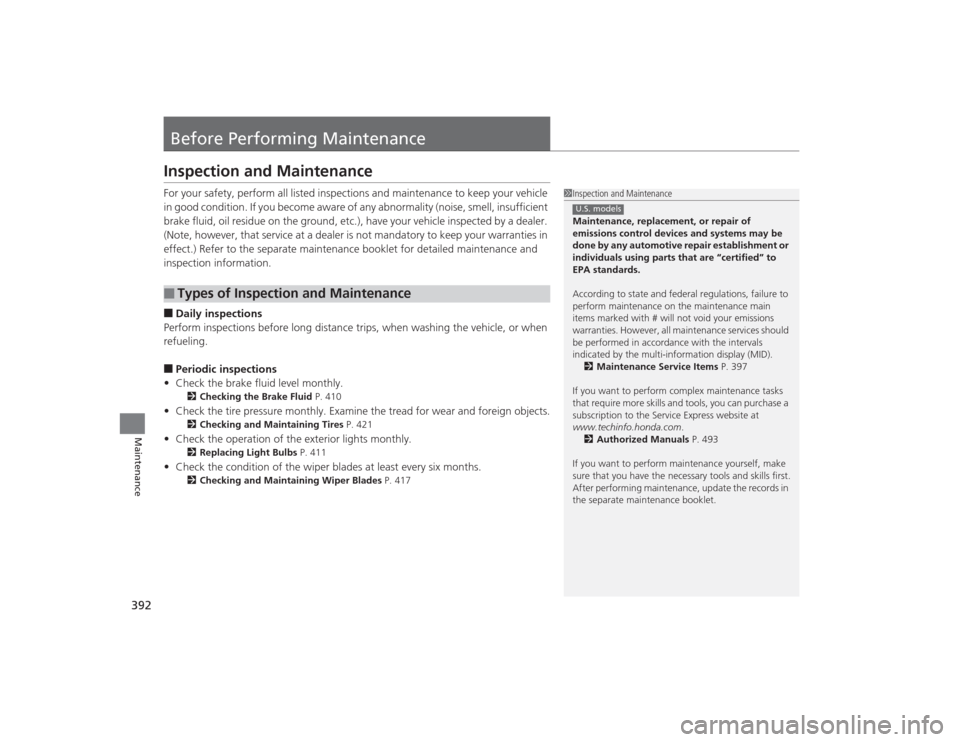
Before Performing MaintenanceInspection and MaintenanceFor your safety, perform all listed inspections and maintenance to keep your vehicle
in good condition. If you become aware of any abnormality (noise, smell, insufficient
brake fluid, oil residue on the ground, etc.), have your vehicle inspected by a dealer.
(Note, however, that service at a dealer is not mandatory to keep your \
warranties in
effect.) Refer to the separate maintenance booklet for detailed maintenance and
inspection information.■Daily inspections
Perform inspections before long distance trips, when washing the vehicle, or when
refueling.■Periodic inspections
• Check the brake fluid level monthly.2 Checking the Brake Fluid P. 410
•Check the tire pressure monthly. Examine the tread for wear and foreign objects.
2 Checking and Maintaining Tires P. 421
•Check the operation of the exterior lights monthly.
2 Replacing Light Bulbs P. 411
•Check the condition of the wiper blades at least every six months.
2Checking and Maintaining Wiper Blades P. 417
■
Types of Inspection and Maintenance
1Inspection and Maintenance
Maintenance, replacement, or repair of
emissions control devices and systems may be
done by any automotive repair establishment or
individuals using parts that are “certified” to
EPA standards.
According to state and federal regulations, failure to
perform maintenance on the maintenance main
items marked with # will not void your emissions
warranties. However, all maintenance services should
be performed in accordance with the intervals
indicated by the multi-information display (MID).
2 Maintenance Service Items P. 397
If you want to perform complex maintenance tasks
that require mor e skills and tools, you can purchase a
subscription to the Service Express website at
www.techinfo.honda.com .
2 Authorized Manuals P. 493
If you want to perform maintenance yourself, make
sure that you have the necessa ry tools and skills first.
After performing maintenance, update the records in
the separate maintenance booklet.U.S. models
Page 395 of 505
394
uuBefore Performing Maintenance uParts and Fluids Used in Maintenance Service
Maintenance
Parts and Fluids Used in Maintenance ServiceThe use of Acura genuine parts and fluids is recommended when maintaining and
servicing your vehicle. Acura genuine parts are manufactured according to the same
high quality standards used in Acura vehicles.
Page 396 of 505

395
Continued
Maintenance
Maintenance Minder
TM
Maintenance items, which should be serviced at the same time that you replace the
engine oil, appear on the MID.
You can view them on the engine oil life screen at any time.To Use Maintenance Minder
TM
1.Set the power mode to ON.
2. Roll the multi-function steering -wheel controls until the engine oil life appears on
the MID.■
Displaying the Engine Oil Life and Maintenance Items
1 Displaying the Engine Oil Life and Maintenance Items
Based on the engine operating conditions, the
remaining engine oil life is calculated and displayed
as a percentage.
There is a list of maintenance main and sub items you
can view on the MID.
2 Maintenance Service Items P. 397
Displayed Engine Oil
Life (%)
Calculated Engine Oil Life (%)
100 100 to 91
90
90 to 81
80 80 to 71
70
70 to 61
60 60 to 51
50
50 to 41
40 40 to 31
30
30 to 21
20 20 to 16
15
15 to 11
10 10 to 6
5
5 to 1
00
Remaining Engine Oil Life
Maintenance Service Items
Multi-function
Steering-wheel
Controls
Page 397 of 505

396
uuMaintenance Minder
TMuTo Use Maintenance Minder
TM
Maintenance
The system message indicator ( ) comes on along with the Maintenance Minder message.■
Maintenance Minder Messages on the Multi-Information
Display (MID)Maintenance Message
Oil Life Display
Explanation
Information
Maintenance Due Soon
15%
The remaining engine oil life is 15 to
6 percent. Once you switch the
display by rolling the multi-function
steering-wheel c ontrols, this
message will go off.
The engine oil is approaching the end
of its service life, and the maintenance
items should be inspected and serviced
soon.
Maintenance Due Now
5%
The remaining engine oil life is 5 to 1
percent. Roll the multi-function
steering-wheel controls to switch to
another display.
The engine oil has almost reached the
end of its service life, and the
maintenance items should be inspected
and serviced as soon as possible.
Maintenance Past Due
Negative Distance
The remaining engine oil life has
passed its service life, and a negative
distance appears after driving over
10 miles (U.S. models) or 10 km
(Canadian models). Roll the multi-
function steering wheel control to
switch to another display.
The engine oil life has passed.
The maintenance items must be
inspected and serviced immediately.
U.S.
Canada