charging Acura MDX 2015 Owner's Manual
[x] Cancel search | Manufacturer: ACURA, Model Year: 2015, Model line: MDX, Model: Acura MDX 2015Pages: 505, PDF Size: 18.62 MB
Page 11 of 505
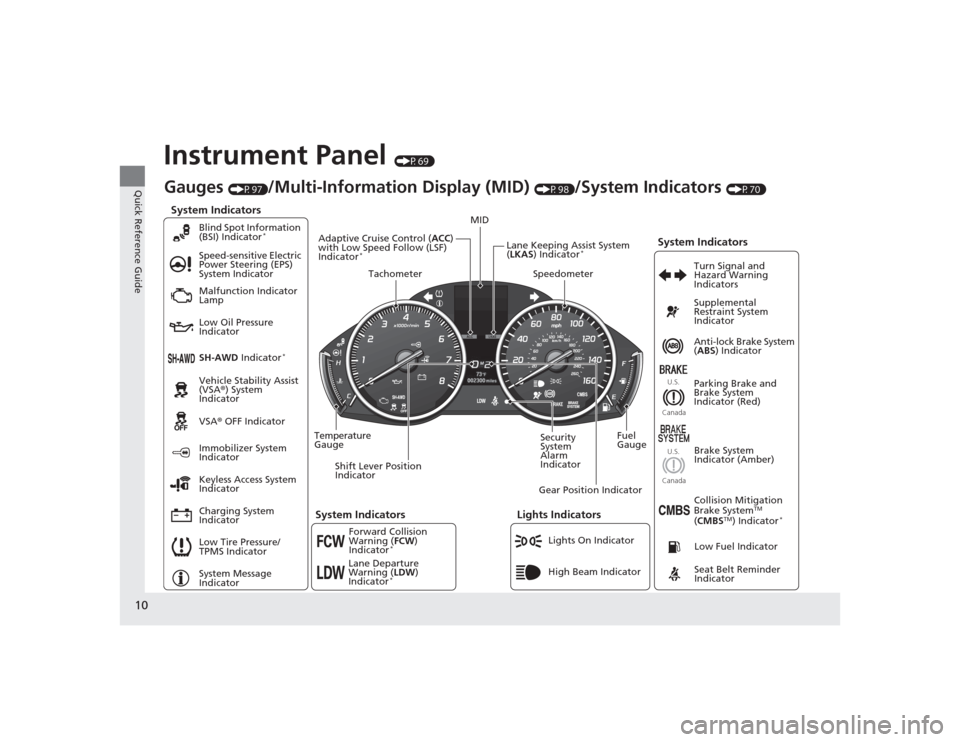
10Quick Reference Guide
Instrument Panel
(P69)
System Indicators
Malfunction Indicator
Lamp
Low Oil Pressure
Indicator
Charging System
IndicatorAnti-lock Brake System
(
ABS ) Indicator
Vehicle Stability Assist
(VSA ®) System
Indicator
VSA ® OFF Indicator
Speed-sensitive Electric
Power Steering (EPS)
System Indicator
Lights Indicators
Lights On Indicator
High Beam Indicator
Immobilizer System
Indicator
Seat Belt Reminder
Indicator
System Indicators
System Message
IndicatorParking Brake and
Brake System
Indicator (Red)
Supplemental
Restraint System
Indicator
Low Fuel Indicator
Gauges
(P97)
/Multi-Information Display (MID)
(P98)
/System Indicators
(P70)
Low Tire Pressure/
TPMS Indicator Turn Signal and
Hazard Warning
Indicators
Keyless Access System
Indicator
Temperature
Gauge Security
System
Alarm
IndicatorFuel
Gauge
Tachometer
MID
Speedometer
Shift Lever Position
IndicatorGear Position Indicator Brake System
Indicator (Amber)
SH-AWD
Indicator
*
Blind Spot Information
(BSI) Indicator
*
System Indicators
Collision Mitigation
Brake System
TM
( CMBS
TM) Indicator
*
Forward Collision
Warning ( FCW)
Indicator
*
Lane Departure
Warning ( LDW)
Indicator
*
Lane Keeping Assist System
( LKAS ) Indicator
*
Adaptive Cruise Control ( ACC)
with Low Speed Follow (LSF)
Indicator
*
U.S.
Canada U.S.
Canada
Page 72 of 505
71
uuIndicators u
Continued
Instrument Panel
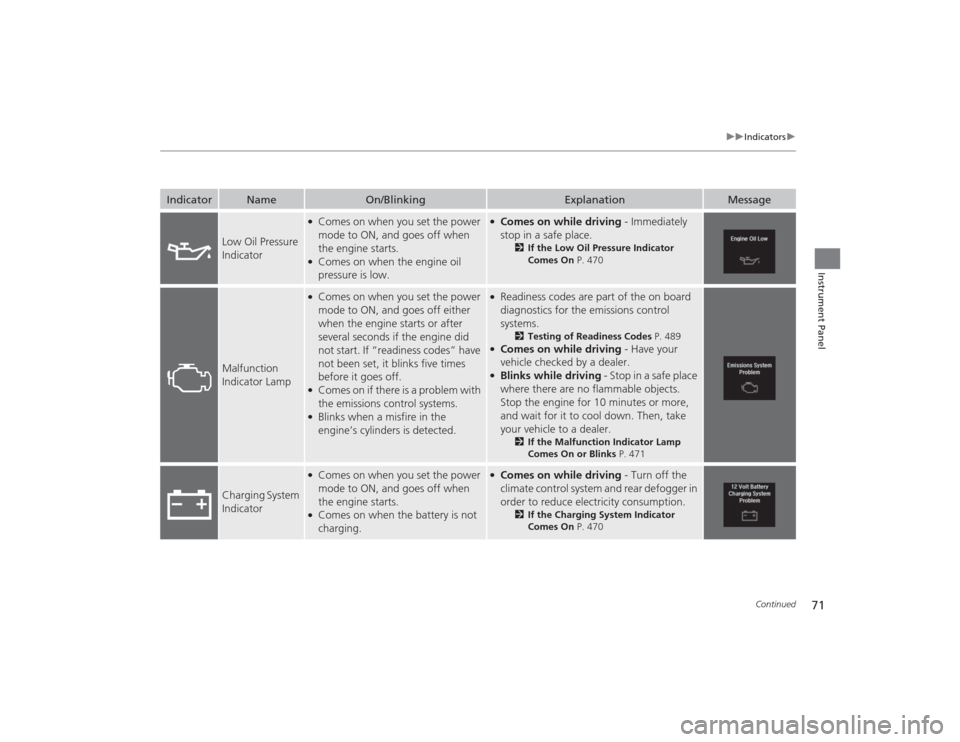
Indicator
Name
On/Blinking
Explanation
Message
Low Oil Pressure
Indicator
●Comes on when you set the power
mode to ON, and goes off when
the engine starts.●Comes on when the engine oil
pressure is low.
●Comes on while driving - Immediately
stop in a safe place.
2 If the Low Oil Pressure Indicator
Comes On P. 470
Malfunction
Indicator Lamp
●Comes on when you set the power
mode to ON, and goes off either
when the engine starts or after
several seconds if the engine did
not start. If “readiness codes” have
not been set, it blinks five times
before it goes off.●Comes on if there is a problem with
the emissions control systems.●Blinks when a misfire in the
engine’s cylinders is detected.
●Readiness codes are part of the on board
diagnostics for the emissions control
systems.
2Testing of Readiness Codes P. 489
●Comes on while driving - Have your
vehicle checked by a dealer.●Blinks while driving - Stop in a safe place
where there are no flammable objects.
Stop the engine for 10 minutes or more,
and wait for it to cool down. Then, take
your vehicle to a dealer.
2 If the Malfunction Indicator Lamp
Comes On or Blinks P. 471
Charging System
Indicator
●Comes on when you set the power
mode to ON, and goes off when
the engine starts.●Comes on when the battery is not
charging.
●Comes on while driving - Turn off the
climate control system and rear defogger in
order to reduce electricity consumption.
2 If the Charging System Indicator
Comes On P. 470
Page 86 of 505
85
uuIndicators uMulti-Information Display (MID) Warning and Information Messages
Continued
Instrument Panel
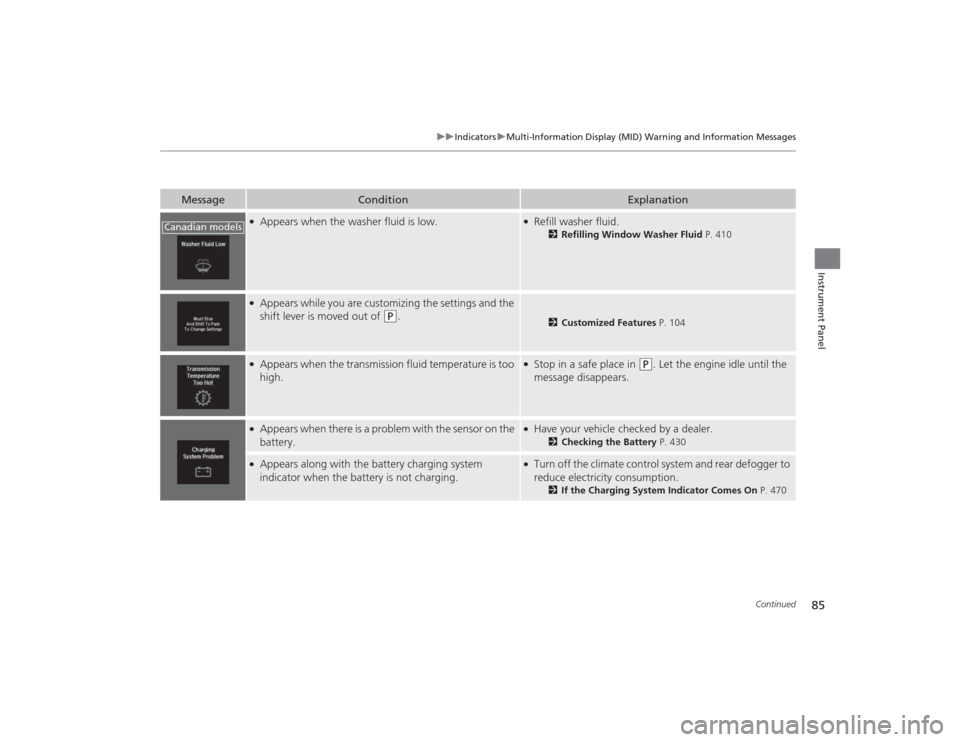
Message
Condition
Explanation
●Appears when the washer fluid is low.
●Refill washer fluid.
2 Refilling Window Washer Fluid P. 410
●Appears while you are customizing the settings and the
shift lever is moved out of
(P
.
2Customized Features P. 104
●Appears when the transmission fluid temperature is too
high.
●Stop in a safe place in
(P
. Let the engine idle until the
message disappears.
●Appears when there is a problem with the sensor on the
battery.
●Have your vehicle checked by a dealer.
2 Checking the Battery P. 430
●Appears along with the battery charging system
indicator when the battery is not charging.
●Turn off the climate control system and rear defogger to
reduce electricity consumption.
2If the Charging System Indicator Comes On P. 470
Canadian models
Page 431 of 505
430Maintenance
BatteryChecking the BatteryThe battery condition is being monitored by the sensor on the negative terminal.
If there is a problem with the sensor, the warning message on MID will let you know.
Have your vehicle checked by a dealer.
If your vehicle’s battery is disconnected or goes dead:
•The audio system is disabled.
2 Audio System Theft Protection P. 203
•The clock resets.
2 Clock P. 114
•The navigation system
* is disabled.
2 Refer to navigation system manual
Charging the BatteryDisconnect both battery cables to prevent damaging your vehicle’s electrical system.
Always disconnect the negative (–) ca ble first, and reconnect it last.
1BatteryWARNING: Battery post, terminals,
and related accessori es contain lead
and lead compounds.
Wash your hands after handling.When you find corrosion, clean the battery terminals
by applying a baking powder and water solution.
Clean the terminals with a damp towel. Cloth/towel
dry the battery. Coat the terminals with grease to
help prevent future corrosion.
When replacing the battery, the replacement must be
of the same specifications.
Please consult a dealer for more information.
3
WARNING
The battery gives off explosive hydrogen
gas during normal operation.
A spark or flame can cause the battery to
explode with enough force to kill or
seriously hurt you.
When conducting any battery
maintenance, wear protective clothing and
a face shield, or have a skilled technician do
it.
* Not available on all models
Page 442 of 505
441
Handling the Unexpected
This chapter explains how to handle unexpected troubles.
Tools
Types of Tools .................................. 442
If a Tire Goes Flat Changing a Flat Tire
*....................... 443
Temporarily Repairing a Flat Tire
*..... 450
Engine Does Not Start Checking the Engine ........................ 462
If the Keyless Access Remote Battery is Weak ............................................. 463
Emergency Engine Stop ................... 464
Jump Starting .................................... 465
Shift Lever Does Not Move .............. 467Overheating
How to Handle Overheating............. 468
Indicator, Coming On/Blinking
If the Low Oil Pressure Indicator Comes On ............................................. 470If the Charging System Indicator Comes
On ................................................. 470
If the Malfunction Indicator Lamp Comes On or Blinks ................................... 471If the Brake System Indicator (Red) Comes On .................................................... 472
If the Speed-Sensitive Electric Power Steering
(EPS) System Indicator Comes On ........... 472If the Low Tire Pressure/TPMS Indicator Comes On or Blinks ....................... 473
Fuses Fuse Locations ................................. 474
Inspecting and Changing Fuses ........ 479
Emergency Towing ........................... 480
When You Cannot Unlock the Fuel Fill Door ................................................. 481When You Cannot Open the Tailgate
.. 482
* Not available on all models
Page 466 of 505

465
Continued
Handling the Unexpected
Jump StartingTurn off the power to electric devices, such as audio and lights. Turn off the engine,
then open the hood. 1.Pull up on the engine cover, remove it from
the pins.
2. Connect the first jumper cable to your
vehicle’s battery + terminal.
3. Connect the other end of the first jumper
cable to the booster battery + terminal.
u Use a 12-volt booster battery only.
u When using an automotive battery
charger to boost your 12-volt battery,
select a lower charging voltage than 15-
volt. Check the charger manual for the
proper setting.
4. Connect the second jumper cable to the
booster battery - terminal.■
Jump Starting Procedure
1Jump Starting
Securely attach the jumper cables clips so that they
do not come off when the engine vibrates. Also be
careful not to tangle the jumper cables or allow the
cable ends to touch each other while attaching or
detaching the jumper cables.
Battery performance degrades in cold conditions and
may prevent the engine from starting.
3
WARNING
A battery can explode if you do not follow
the correct procedure, seriously injuring
anyone nearby.
Keep all sparks, open flames, and smoking
materials away from the battery.
Engine Cover
Pin
Booster Battery
Page 471 of 505

470Handling the Unexpected
Indicator, Coming On/BlinkingIf the Low Oil Pressure Indicator Comes On
■Reasons for the indicator to come on
Comes on when the engine oil pressure is low.■What to do as soon as the indicator comes on
1. Immediately park the vehicle on level ground in a safe place.
2. If necessary, turn the hazard warning lights on.■What to do after parking the vehicle
1. Stop the engine and let it sit for about three minutes.
2. Open the hood and check the oil level.2 Oil Check P. 403
3.Start the engine and check the low oil pressure indicator.
u The indicator goes off: Start driving again.
u The indicator does not go off within 10 seconds: Stop the engine
and contact a dealer for repairs immediately.
If the Charging System Indicator Comes On
■Reasons for the indicator to come on
Comes on when the battery is not being charged.■What to do when the indicator comes on
Turn off the climate control system, rear defogger, and other electrical
systems, and immediately contact a dealer for repairs.
1 If the Low Oil Pressure Indicator Comes OnNOTICERunning the engine with low oil pressure can cause
serious mechanical damage almost immediately.1If the Charging System Indicator Comes On
If you need to stop temporarily, do not turn off the
engine. Restarting the engine may rapidly discharge
the battery.
Page 497 of 505

496Index
BBack-Up Light............................................ 415
Battery ....................................................... 430
Charging System Indicator ................. 71, 470
Jump Starting .......................................... 465
Maintenance (Checking the Battery) ........ 430
Belts (Seat) .................................................. 31
Beverage Holders ...................................... 177
Blind Spot Information (BSI) System ........ 365
Indicator .................................................... 83
Bluetooth ® Audio ..................................... 238
Bluetooth ® HandsFreeLink ®..................... 269
Booster Seats (For Children) ....................... 65
Brake System ............................................. 371
Anti-lock Brake System (ABS) ................... 373
Brake Assist System ................................. 374
Brake System Indicator............................... 70
Fluid ........................................................ 410
Foot Brake ............................................... 372
Indicator ............................................ 70, 472
Parking Brake .......................................... 371
Brightness Control (Instrument Panel) .... 153
BSI (Blind Spot Information) System ........ 365
Bulb Replacement ..................................... 411
Back-Up Light .......................................... 415
Brake Light and Turn Signal Light............. 413
Daytime Running Light ............................ 148
Front Turn Signal/Front Side Marker/
Parking Light.......................................... 412
Headlights ............................................... 411
High-Mount Brake Light .......................... 416 LED Puddle Light ..................................... 416
Rear License Plate Light ........................... 416
Side Turn Signal/Emergency Indicator
Light...................................................... 412
Taillight and Rear Side Marker Light ........ 414
Bulb Specifications ................................... 484
CCarbon Monoxide Gas ............................... 66
Carrying Cargo ................................. 307, 309
CD Player ................................................... 225
Center Pocket ........................................... 176
Certification Label .................................... 486
Changing Bulbs ........................................ 411
Charging System Indicator ................. 71, 470
Child Safety ................................................. 54
Childproof Door Locks............................. 126
Child Seat .................................................... 54
Booster Seats ............................................ 65
Child Seat for Infants................................. 56
Child Seat for Small Children ..................... 57
Installing a Child Seat with a Lap/Shoulder Seat Belt .................................................. 61
Larger Children ......................................... 64
Rear-facing Child Seat ............................... 56
Selecting a Child Seat ................................ 58
Childproof Door Locks ............................. 126
Cleaning the Exterior ............................... 438
Cleaning the Interior ................................ 436
Client Service Information ....................... 494Climate Control System
........................... 185
Changing the Mode................................ 188
Defrosting the Windshield and Windows .............................................. 192
Dust and Pollen Filter .............................. 435
Rear Climate Control System................... 193
Recirculation/Fresh Air Mode................... 190
Sensors ................................................... 197
Synchronized Mode ................................ 189
Using Automatic Climate Control............ 185
Clock ......................................................... 114
CMBS
TM (Collision Mitigation Braking
SystemTM) ................................................ 375
Coat Hook ................................................ 180
Collision Mitigation Braking System
TM
(CMBS
TM) ................................................. 375
Indicator ................................................... 83
Compact Spare Tire .......................... 443, 485
Compass .................................................... 302
Console Compartment ............................. 175
Controls .................................................... 113
Coolant (Engine) ...................................... 407
Adding to the Radiator ........................... 408
Adding to the Reserve Tank .................... 407
Overheating ............................................ 468
Creeping (Automatic Transmission) ........ 330
Cruise Control .......................................... 336
Indicator ................................................... 78
Cup Holders .............................................. 177
Customized Features ....................... 104, 249
Page 499 of 505
498Index
Fuel...................................................... 18, 387
Economy ................................................. 389
Gauge ....................................................... 97
Instant Fuel Economy ............................... 101
Low Fuel Indicator ..................................... 73
Range ...................................................... 101
Recommendation .................................... 387
Refueling ................................................. 387
Fuel Economy ............................................ 389
Fuel Fill Cap ......................................... 18, 388
Message .................................................. 471
Fuel Fill Door ....................................... 18, 388
Unable to Unlock ..................................... 481
Fuses .......................................................... 474
Inspecting and Changing ......................... 479
Locations ......................... 474, 476, 477, 478GGasoline (Fuel) Economy ................................................. 389
Gauge ....................................................... 97
Information ............................................. 387
Low Fuel Indicator ..................................... 73
Refueling ................................................. 387
Gauges ......................................................... 97
Gear Shift Lever Positions
Automatic Transmission ........................... 331
Glass (care) ................................................ 439
Glove Box .................................................. 174
HHandling the Unexpected ........................ 441
HandsFreeLink ® (HFL) ............................... 269
Auto Answer ........................................... 283
Automatic Import of Cellular Phonebook
and Call History ..................................... 285
Automatic Transferring............................ 283
Displaying Messages................................ 298
Editing User Name................................... 282
HFL Buttons............................................. 269
HFL Menus .............................................. 271
HFL Status Display ................................... 270
Limitations for Manual Operation ............ 270
Making a Call .......................................... 289
Options During a Call .............................. 295
Phone Setup............................................ 275
Receiving a Call ....................................... 294
Receiving a Text Message/e-mail.............. 296
Ring Tone................................................ 284
Selecting a Mail Account ......................... 297
Speed Dial ............................................... 286
To Create a Security PIN .......................... 281
To Set Up a Text/e-mail message Options ................................................. 280
Use Contact Photo .................................. 284
Hazard Warning Button .............................. 4
HDMI Jack ..................................................... 7
Head Restraints ........................ 164, 165, 166
Headlight Washers ................................... 152
Headlights ................................................. 145
Aiming .................................................... 411 Automatic Operation .............................. 146
Dimming......................................... 145, 148
Operating ............................................... 145
Heated Door Mirrors ............................... 154
Heated Steering Wheel ........................... 181
Heated Windshield Button ...................... 154
Heater (Steering Wheel) .......................... 181
Heaters (Seat) ................................... 182, 183
HFL (HandsFreeLink ®) .............................. 269
High Beam Indicator .................................. 76
Hill Start Assist System ............................. 328
HomeLink ® Universal Transceiver ........... 267
IIdentification Numbers ............................ 486
Engine and Transmission ......................... 486
Vehicle Identification............................... 486
IDS (Integrated Dynamics System) .......... 335
IDS Button ................................................ 335
Illumination Control ................................ 153
Button .................................................... 153
Immobilizer System .................................. 135
Indicator ................................................... 77
Indicators .................................................... 70
Adaptive Cruise Control (ACC) with Low Speed Follow (LSF) ................... 82, 339
Anti-lock Brake System (ABS) .................... 74
Blind Spot Information (BSI) .............. 83, 366
Brake System ............................................ 70
Charging System............................... 71, 470