Ds mode Acura MDX 2016 Owner's Manual
[x] Cancel search | Manufacturer: ACURA, Model Year: 2016, Model line: MDX, Model: Acura MDX 2016Pages: 557, PDF Size: 31.09 MB
Page 330 of 557

329
uuTowing a Trailer uTowing Preparation
Continued
Driving
■To estimate the tongue load
Excessive tongue load reduces front tire traction and steering control. Too little
tongue load can make the trailer unstable and cause it to sway.
You can estimate the tongue load by m easuring the trailer hitch height from the
ground in the following steps:
1. Park the vehicle on level ground.
2. Measure the distance between the grou nd and the bottom of the trailer hitch.
3. Connect the fully loaded trailer to the hitch.
4. Measure the distance between the grou nd and the bottom of the trailer hitch
again.
5. Subtract the second measurement from the first measurement, then refer to the
following table.
If the difference becomes more than indica ted in the table, distribute the load or
remove cargo as needed.
If the difference is4WD models2WD models
1 inches (2.5 cm)150 lbs (68 kg)
1 1/2 inches (3.8 cm)250 lbs (114 kg)
2 inches (5.1 cm)350 lbs (159 kg)
2 3/8 inches (6.0 cm)450 lbs (205 kg)—
2 5/8 inches (6.7 cm)500 lbs (227 kg)—
16 ACURA MDX-31TZ56200.book 329 ページ 2015年3月4日 水曜日 午後2時59分
Page 331 of 557

uuTowing a Trailer uTowing Preparation
330
Driving
■How to weigh the trailer loads using the public scale
Check each weight in the order indicated as shown.
Refer to the table on the right for each we ight’s limit except for the tongue load.
2Tongue load P. 328
•If you cannot weigh the rear axle, subtract 1 from 2.
• The maximum gross combined weight (4) decreases by 2% for every 1,000 feet
(305 meters) of elevation.
• To calculate the tongue load, subtract 5 from 6.
• Refer to the trailer owner’s manu al for additional information.
1How to weigh the trailer loads using the public scale
Fully load the vehicle and trailer. An attendant who
watches the scale is needed as all occupants should
stay in the vehicle.
If a public scale is not available, add the estimated
weight of your cargo load to the weight of your
trailer (as quoted by the manufacturer), and then
measure the tongue load with an appropriate scale or
tongue gauge or estima te it based on cargo
distribution. Weight limit for 2WD models 4WD models
Front gross axle2,811 lbs
(1,275 kg)2,910 lbs
(1,320 kg)
Gross vehicle 5,368 lbs
(2,435 kg) 5,677 lbs
(2,575 kg)
Rear gross axle2,734 lbs
(1,240 kg)2,965 lbs
(1,345 kg)
Gross combined 8,036 lbs
(3,645 kg) 9,833 lbs
(4,460 kg)
1. Front gross axle weight.
2. Gross vehicle weight.4. Gross combined weight.
3. Rear gross axle weight. 5. Hitched trailer weight.
6. Unhitched trailer weight.
16 ACURA MDX-31TZ56200.book 330 ページ 2015年3月4日 水曜日 午後2時59分
Page 335 of 557
334
uuTowing a Trailer uTowing Preparation
Driving
■Safety chains
Always use safety chains when you tow a trailer. Leave enough slack to allow the
trailer to turn corners easily, but do not allow the chains to drag on the ground.
■Sway control
This device can be used if your trailer te nds to sway. Your trailer maker can tell you
what kind of sway control you need and how to install it. Improper installation could
degrade the handling and stability of your vehicle.
■Trailer mirrors
Many states, provinces and te rritories require special exterior mirrors when towing a
trailer. Install special mirrors whenever you cannot clearly see behind you, or if the
trailer creates a blind spot.
■Front Towing Grille
An Accessory Front Towing Grille is requir ed whenever a trailer is towed. You can
get the accessory grille at a dealer.
■Automatic transmission cooler
An additional ATF (automatic transmission fluid) cooler is required to keep the
transmission from overheating when towing more than 3,500 lbs (1,588 kg). You
can get the additional ATF cooler at a dealer.
4WD models
16 ACURA MDX-31TZ56200.book 334 ページ 2015年3月4日 水曜日 午後2時59分
Page 336 of 557
335
uuTowing a Trailer uTrailer Stability Assist*
Driving
Trailer Stability Assist*
Helps to stabilize the vehicle and tra iler when the trailer severely sways.
■How trailer stability assist works
When the vehicle and trailer become unstable while driving, trailer stability assist
determines the cause. If the trailer oscilla tion is detected as the cause, and the
swaying increases, the system applies the brakes or controls engine output to reduce
vehicle speed.
Both the vehicle and trailer brake lights co me on automatically if you brake to
reduce vehicle speed.
1 Trailer Stability Assist*
Trailer stability assist is not a function that prevents
the vehicle and trailer from swaying. Avoid high
speeds, abrupt steering, improper trailer load, and
sudden braking to keep the trailer from swaying.
When swayed too severely, the system becomes
ineffective, and you may loose control of your
vehicle, causing the trailer to roll over or get
damaged.
2 Driving Safely with a Trailer P. 336
Trailer towing sway is caused by:
•Crosswinds
•Improper towbar down load•Excessive Speed
The VSA ® system indicator blinks during the trailer
stability assist operation.
2 VSA ® Operation P. 402
* Not available on all models
16 ACURA MDX-31TZ56200.book 335 ページ 2015年3月4日 水曜日 午後2時59分
Page 338 of 557

337
uuTowing a Trailer uTowing Your Vehicle
Driving
• Monitor your temperature gauge. If it nears the red (Hot) mark, turn off the
climate control system and redu ce speed. Pull to the side of the road safely to cool
down the engine if necessary.
• Change the gear position to
(S position if the transmission shifts frequently.
If the vehicle tires slip when retrieving a boat from the water, keep the transmission
in
(D and do not use the sequential shift mode in (S. This prevents damage to the
transmission.
Towing Your Vehicle
Your vehicle is not designed to be towed behind a motor home. If your vehicle needs
to be towed in an emergency, refer to the emergency towing information.
2Emergency Towing P. 531
■Driving in Hilly Terrain
■Retrieving a Boat
16 ACURA MDX-31TZ56200.book 337 ページ 2015年3月4日 水曜日 午後2時59分
Page 343 of 557

uuWhen Driving uStarting the Engine
342
Driving
You can remotely start the engine using the two-way keyless access remote from
extended distances.
■To start the engine
The engine runs for up to 10 minu tes without you starting the vehicle.
To extend the run time for another 10 minutes during the first run, press the
button, then press and hold the button. u The amber LED blinks, then the green LED comes back on if a 10-minute
extension request was tra nsmitted successfully.
After pressing the (lock) button, wait for th e green LED to blink. This indicates that
the all the doors and the tailgate are locked.
■Remote Engine Start with Vehicle Feedback*1 Remote Engine Start with Vehicle Feedback*
If there are buildings an d obstacles between your
vehicle and the remote, th e range will be reduced.
This distance may vary by external electrical
interference.
The engine may not start by the remote engine start
if:
•You have disabled a remo te engine start setting
using the multi-information display (MID).
•The power mode is not in VEHICLE OFF (LOCK).
•The gear is in a position other than ( P.
•The hood is open, or any door or the tailgate is
unlocked.
•You have already used the remote twice to start
the engine.
•Another registered keyless access remote is in the
vehicle.
•There is any antenna failure.•Door is unlocked with the built-in key.
3WARNING
Engine exhaust contains toxic carbon
monoxide.
Breathing carbon monoxide can kill you or
cause unconsciousness.
Never use the remote engine starter when
the vehicle is parked in a garage or other
area with limited ventilation.
With the doors locked, Press the button,
then press and hold the button.
Amber LED: Blinks when any button is pressed.
Continues to blink
during a vehicle
self check until the
engine starts. Go within the range,
and try again.
Green LED: Comes on while
the engine is running. Red LED: Blinks when the
remote is out of the keyless
access system range.
* Not available on all models
16 ACURA MDX-31TZ56200.book 342 ページ 2015年3月4日 水曜日 午後2時59分
Page 344 of 557
Continued343
uuWhen Driving uStarting the Engine
Driving
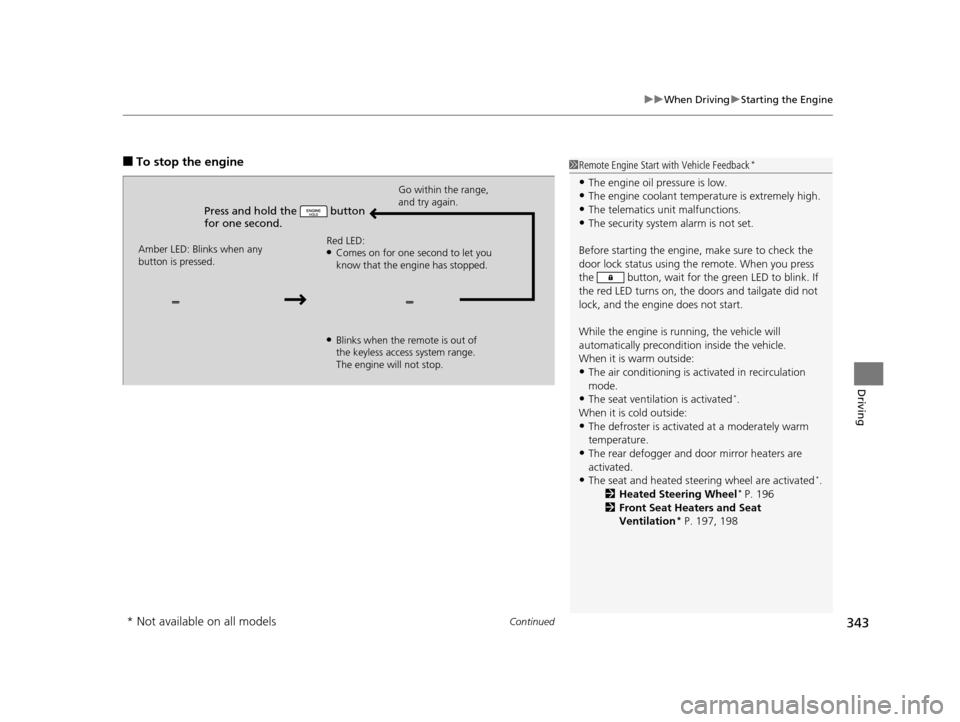
■To stop the engine
Press and hold the button
for one second.
Go within the range,
and try again.
Amber LED: Blinks when any
button is pressed. Red LED:
●Comes on for one second to let you
know that the engine has stopped.
●Blinks when the remote is out of
the keyless access system range.
The engine will not stop.
1
Remote Engine Start with Vehicle Feedback*
•The engine oil pressure is low.•The engine coolant temper ature is extremely high.
•The telematics unit malfunctions.
•The security system alarm is not set.
Before starting the engine, make sure to check the
door lock status using the remote. When you press
the button, wait for the green LED to blink. If
the red LED turns on, the doors and tailgate did not
lock, and the engine does not start.
While the engine is running, the vehicle will
automatically preconditi on inside the vehicle.
When it is warm outside:
•The air conditioning is acti vated in recirculation
mode.
•The seat ventilat ion is activated*.
When it is cold outside:
•The defroster is activated at a moderately warm
temperature.
•The rear defogger and door mirror heaters are
activated.
•The seat and heated steering wheel are activated*.
2 Heated Steering Wheel* P. 196
2 Front Seat Heaters and Seat
Ventilation
* P. 197, 198
* Not available on all models
16 ACURA MDX-31TZ56200.book 343 ページ 2015年3月4日 水曜日 午後2時59分
Page 345 of 557
uuWhen Driving uStarting the Engine
344
Driving
1. Depress the brake pedal and press the ENGINE START/STOP button
simultaneously.
2. Keeping your right foot on the brake peda l, release the parking brake. Check that
the parking brake indicator has gone off.
2 Parking Brake P. 412
3.Change the gear position to (D. Select (R when reversing.
4. Gradually release the brake pedal and gently depress the accelerator pedal to pull
away.
■Hill start assist system
Hill start assist keeps the brake engaged br iefly to help prevent the vehicle from
rolling on inclines as you move your fo ot from the brake pedal to the accelerator.
Change the gear position to
(D or (S when facing uphill, or (R when facing
downhill, then release the brake pedal.
The brakes remain engaged briefly as you release the brake pedal.
■Starting to Drive1 Starting to Drive
The engine stops when the gear position is changed
from
( P before the ENGINE START/STOP button is
pressed. Follow the step 1 when starting to drive.
When the engine was started using the two-way keyless
access remote*When the engine was started using the two-way keyless access remote*
When the engine was started in any case
1 Hill start assist system
Hill start assist may not prevent the vehicle from
rolling downhill on a very steep or slippe ry slope, and
will not operate on small inclines.
Hill start assist is not a replacement for the parking
brake.
* Not available on all models
16 ACURA MDX-31TZ56200.book 344 ページ 2015年3月4日 水曜日 午後2時59分
Page 346 of 557
345
uuWhen Driving uPrecautions While Driving
Driving
Precautions While Driving
Utility vehicles have a significantly higher rollover rate than other types of vehicles.
To prevent rollovers or loss of control:
• Take corners at slower speeds than yo u would with a passenger vehicle.
• Avoid sharp turns and abrupt maneuvers whenever possible.
• Do not modify your vehicle in any way th at you would raise the center of gravity.
• Do not carry heavy cargo on the roof.
Never carry more than 165 lbs (75 kg) of ca rgo on the roof rack (Acura accessory).
Avoid driving in deep water and on flooded roads. This can damage the engine,
driveline, or cause electrical component failure.
If there is a strong impact with something under the vehicle, stop in a safe location.
Check the underside of the vehicle for damage or any fluid leaks.
■Driving Guidelines for Your Utility Vehicle
■In Rain
■Other Precautions
1 Precautions While Driving
NOTICE
Do not change the gear position while pressing the
accelerator pedal. You could damage the
transmission.
NOTICE
If you repeatedly turn the steering wheel at an
extremely low speed, or hold the steering wheel on
the full left or right position for a while, the system
heats up. The system goes into a protective mode,
and limits its performa nce. The steering wheel
becomes harder and harder to operate. Once the
system cools down, the EPS system is restored.
Repeated operation under these conditions can
eventually damage the system.
If the power mode is set to ACCESSORY or VEHICLE
OFF (LOCK) while driving, the engine will shut down
and all steering and brake pow er assist functions will
stop, making it difficult to control the vehicle.
Do not change the gear position to
( N, as you will
lose engine braking (and acceleration) performance.
During the first 600 miles (1,000 km) of operation,
avoid sudden acceleration or full throttle operation so
as not to damage the engine or powertrain.
Avoid hard braking for the first 200 miles (300 km).
You should also follow this when the brake pads are
replaced.
16 ACURA MDX-31TZ56200.book 345 ページ 2015年3月4日 水曜日 午後2時59分
Page 348 of 557

347
uuWhen Driving uShifting
Continued
Driving
Shifting
Change the gear position in accordance with your driving needs.
■Shift button positions
1Shifting
To prevent malfunc tion and unintended
engagement:
•Do not spill any liquids on or around shift buttons.
•Do not place or drop any objects on or around shift
buttons.
•Do not let passengers or ch ildren operate the shift
buttons.
The beeper sounds when you depress the accelerator
pedal with the gear position in
( N.
Change the gear position to
( D or (R with the brake
pedal depressed.
When shifting gears in extremely low temperatures
(−22°F/−30°C), there may be a short delay before the
shift is indicated in the di splay. Always confirm you
are in the correct gear before driving.
3WARNING
The vehicle can roll aw ay if left unattended
without confirming th at Park is engaged.
Always keep your foot on the brake pedal
until you have confirmed that
( P is shown
on the gear position Indicator.
Park
Used when parking or starting the engine
Reverse
Used when reversing
Neutral
Used when idling
Drive
Used for:
●Normal driving (gears change between 1st
and 9th automatically)
●Temporarily driving in the sequential
mode
Drive (S)
Used for:
●Automatically changing gears between 1st
and 7th (7th gear is used only at high
speed)
●Driving in the sequential mode
16 ACURA MDX-31TZ56200.book 347 ページ 2015年3月4日 水曜日 午後2時59分