light Acura MDX 2016 User Guide
[x] Cancel search | Manufacturer: ACURA, Model Year: 2016, Model line: MDX, Model: Acura MDX 2016Pages: 557, PDF Size: 31.09 MB
Page 36 of 557
35
uuSeat Belts uAbout Your Seat Belts
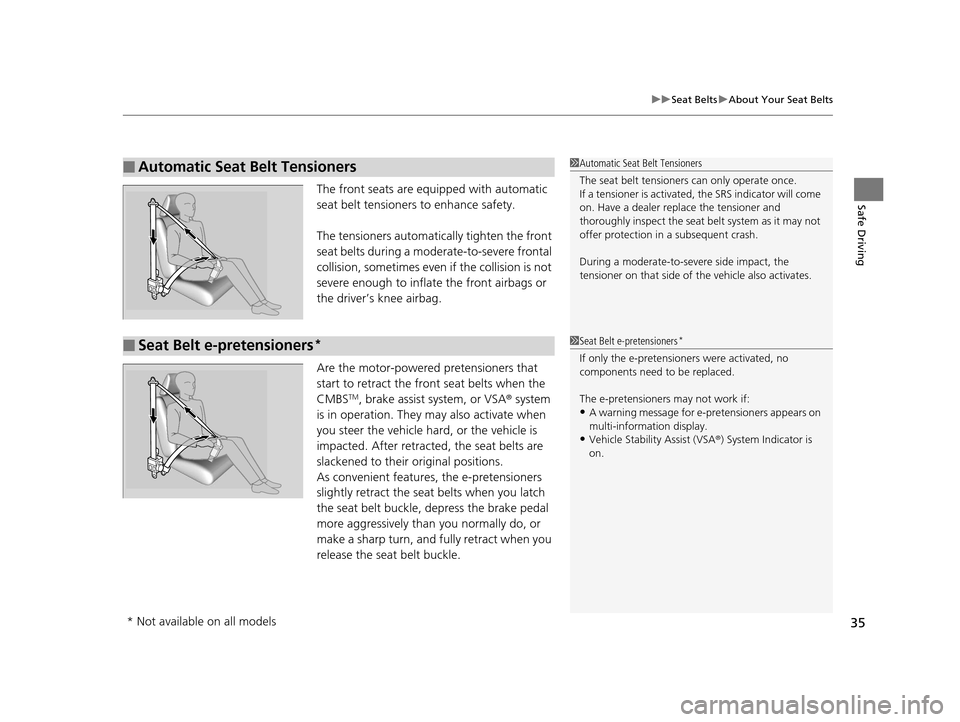
Safe DrivingThe front seats are equi pped with automatic
seat belt tensioners to enhance safety.
The tensioners automatically tighten the front
seat belts during a moderate-to-severe frontal
collision, sometimes even if the collision is not
severe enough to inflate the front airbags or
the driver’s knee airbag.
Are the motor-powered pretensioners that
start to retract the front seat belts when the
CMBS
TM, brake assist system, or VSA ® system
is in operation. They may also activate when
you steer the vehicle hard, or the vehicle is
impacted. After retracted, the seat belts are
slackened to their original positions.
As convenient features, the e-pretensioners
slightly retract the seat belts when you latch
the seat belt buckle, depress the brake pedal
more aggressively than you normally do, or
make a sharp turn, and fu lly retract when you
release the seat belt buckle.
■Automatic Seat Belt Tensioners1 Automatic Seat Belt Tensioners
The seat belt tensioners can only operate once.
If a tensioner is activated, the SRS indicator will come
on. Have a dealer replace the tensioner and
thoroughly inspect the seat belt system as it may not
offer protection in a subsequent crash.
During a moderate-to-severe side impact, the
tensioner on that side of the vehicle also activates.
■Seat Belt e-pretensioners*1Seat Belt e-pretensioners*
If only the e-pretensione rs were activated, no
components need to be replaced.
The e-pretensioners may not work if:
•A warning message for e- pretensioners appears on
multi-information display.
•Vehicle Stability Assist (VSA® ) System Indicator is
on.
* Not available on all models
16 ACURA MDX-31TZ56200.book 35 ページ 2015年3月4日 水曜日 午後2時59分
Page 54 of 557
Continued53
uuAirbags uAirbag System Indicators
Safe Driving
■When side curtain airbags deploy in a frontal collision
One or both side curtain airb ags may inflate in a moderate-to-severe angled frontal
collision.
In this case, the side curtain airbags will deploy slightly after the front airbags.
Airbag System Indicators
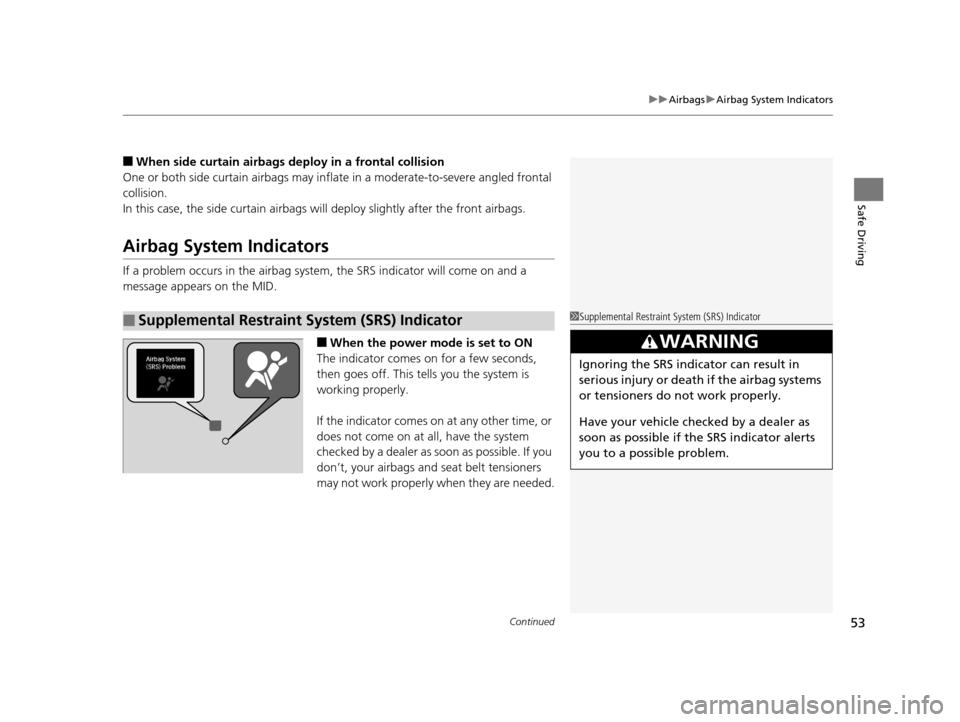
If a problem occurs in the airbag system , the SRS indicator will come on and a
message appears on the MID.
■When the power mode is set to ON
The indicator comes on for a few seconds,
then goes off. This te lls you the system is
working properly.
If the indicator comes on at any other time, or
does not come on at all, have the system
checked by a dealer as s oon as possible. If you
don’t, your airbags and seat belt tensioners
may not work properly when they are needed.
■Supplemental Restraint System (SRS) Indicator1 Supplemental Restraint Sy stem (SRS) Indicator
3WARNING
Ignoring the SRS indicator can result in
serious injury or death if the airbag systems
or tensioners do not work properly.
Have your vehicle checked by a dealer as
soon as possible if th e SRS indicator alerts
you to a possible problem.
16 ACURA MDX-31TZ56200.book 53 ページ 2015年3月4日 水曜日 午後2時59分
Page 76 of 557
75
uuIndicators u
Continued
Instrument Panel
IndicatorNameOn/BlinkingExplanationMessage
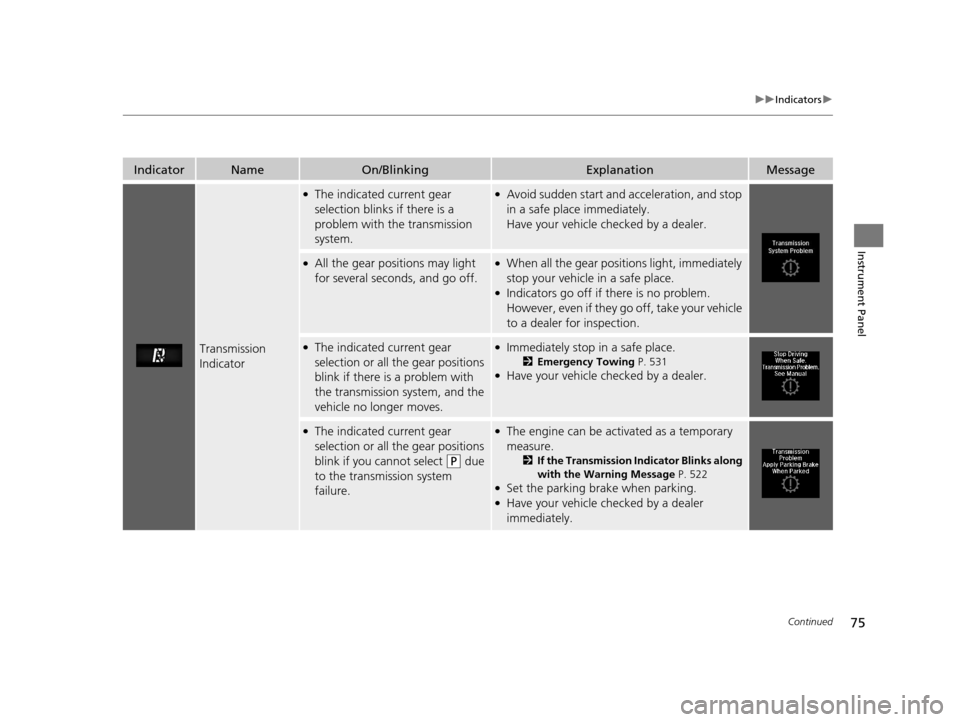
Transmission
Indicator
●The indicated current gear
selection blinks if there is a
problem with the transmission
system.●Avoid sudden start and acceleration, and stop
in a safe place immediately.
Have your vehicle checked by a dealer.
●All the gear positions may light
for several seconds, and go off.●When all the gear positions light, immediately
stop your vehicle in a safe place.
●Indicators go off if there is no problem.
However, even if they go off, take your vehicle
to a dealer for inspection.
●The indicated current gear
selection or all the gear positions
blink if there is a problem with
the transmission system, and the
vehicle no longer moves.●Immediately stop in a safe place.
2Emergency Towing P. 531●Have your vehicle checked by a dealer.
●The indicated current gear
selection or all the gear positions
blink if you cannot select
(P due
to the transmission system
failure.
●The engine can be activated as a temporary
measure.
2 If the Transmission Indicator Blinks along
with the Warning Message P. 522
●Set the parking brake when parking.●Have your vehicle checked by a dealer
immediately.
16 ACURA MDX-31TZ56200.book 75 ページ 2015年3月4日 水曜日 午後2時59分
Page 79 of 557

78
uuIndicators u
Instrument Panel
IndicatorNameOn/BlinkingExplanationMessage
Vehicle Stability
Assist (VSA ®)
System Indicator
●Comes on for a few seconds
when you set the power mode to
ON, then goes off.
●Blinks when VSA ®, or trailer
stability assist is active.
●Comes on if there is a problem
with the VSA ®, hill start assist,
trailer stability assist or brake
lighting system.
●Stays on constantly - Have your vehicle
checked by a dealer.
2 Vehicle Stability Assist (VSA ®), aka
Electronic Stability Control (ESC), System
P. 402
2 Trailer Stability Assist
* P. 335
2 Hill start assist system P. 344
●When Trailer Stability Assist Problem is
displayed on the MID, the VSA ® does not
activate.
VSA ® OFF
Indicator
●Comes on for a few seconds
when you set the power mode to
ON, then goes off.
●Comes on when you deactivate
VSA ®.
2 VSA ® On and Off P. 403—
* Not available on all models
16 ACURA MDX-31TZ56200.book 78 ページ 2015年3月4日 水曜日 午後2時59分
Page 80 of 557
79
uuIndicators u
Continued
Instrument Panel
IndicatorNameOn/BlinkingExplanationMessage
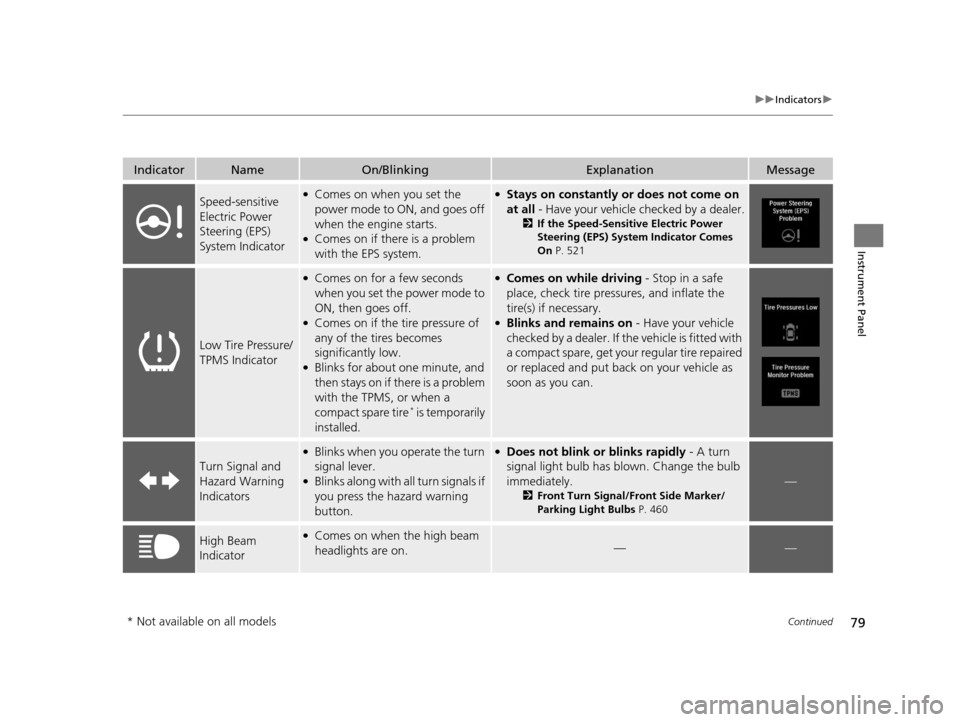
Speed-sensitive
Electric Power
Steering (EPS)
System Indicator●Comes on when you set the
power mode to ON, and goes off
when the engine starts.
●Comes on if there is a problem
with the EPS system.
●Stays on constantly or does not come on
at all - Have your vehicle checked by a dealer.
2If the Speed-Sensitive Electric Power
Steering (EPS) System Indicator Comes
On P. 521
Low Tire Pressure/
TPMS Indicator
●Comes on for a few seconds
when you set the power mode to
ON, then goes off.
●Comes on if the tire pressure of
any of the tires becomes
significantly low.
●Blinks for about one minute, and
then stays on if there is a problem
with the TPMS, or when a
compact spare tire
* is temporarily
installed.
●Comes on while driving - Stop in a safe
place, check tire pressures, and inflate the
tire(s) if necessary.
●Blinks and remains on - Have your vehicle
checked by a dealer. If th e vehicle is fitted with
a compact spare, get your regular tire repaired
or replaced and put back on your vehicle as
soon as you can.
Turn Signal and
Hazard Warning
Indicators
●Blinks when you operate the turn
signal lever.
●Blinks along with all turn signals if
you press the hazard warning
button.
●Does not blink or blinks rapidly - A turn
signal light bulb has blown. Change the bulb
immediately.
2 Front Turn Signal/Front Side Marker/
Parking Light Bulbs P. 460
—
High Beam
Indicator●Comes on when the high beam
headlights are on.——
* Not available on all models
16 ACURA MDX-31TZ56200.book 79 ページ 2015年3月4日 水曜日 午後2時59分
Page 81 of 557
80
uuIndicators u
Instrument Panel
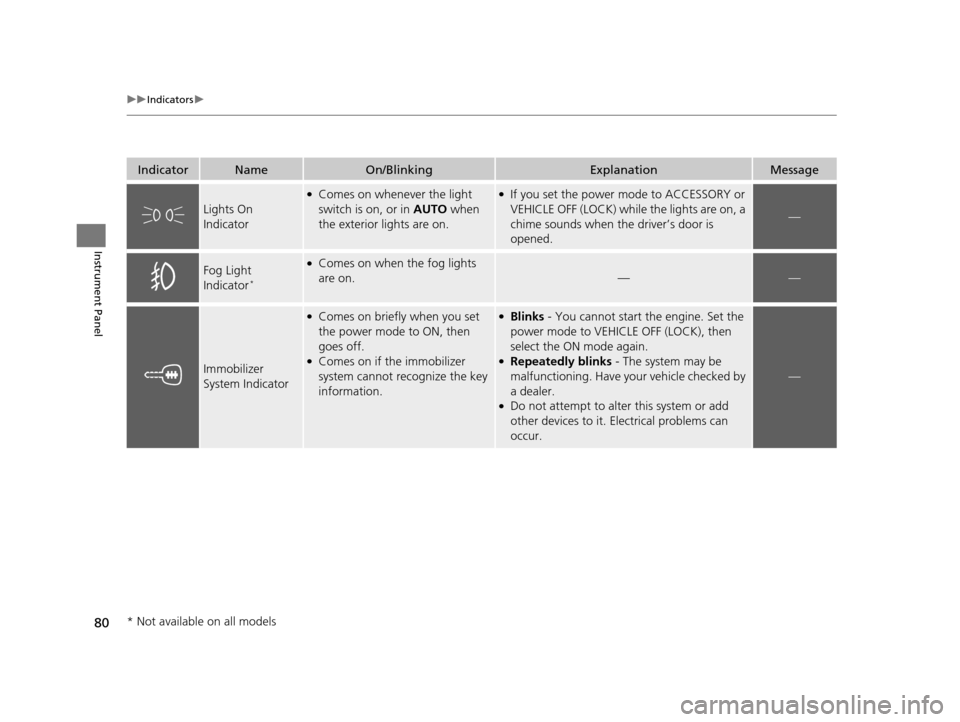
IndicatorNameOn/BlinkingExplanationMessage
Lights On
Indicator
●Comes on whenever the light
switch is on, or in AUTO when
the exterior lights are on.●If you set the power mode to ACCESSORY or
VEHICLE OFF (LOCK) while the lights are on, a
chime sounds when the driver’s door is
opened.
—
Fog Light
Indicator*
●Comes on when the fog lights
are on.
——
Immobilizer
System Indicator
●Comes on briefly when you set
the power mode to ON, then
goes off.
●Comes on if the immobilizer
system cannot recognize the key
information.
●Blinks - You cannot start the engine. Set the
power mode to VEHICLE OFF (LOCK), then
select the ON mode again.
●Repeatedly blinks - The system may be
malfunctioning. Have your vehicle checked by
a dealer.
●Do not attempt to alter this system or add
other devices to it. Electrical problems can
occur.
—
* Not available on all models
16 ACURA MDX-31TZ56200.book 80 ページ 2015年3月4日 水曜日 午後2時59分
Page 100 of 557
99
uuIndicators uMulti-Information Display (MID) Warning and Information Messages
Continued
Instrument Panel
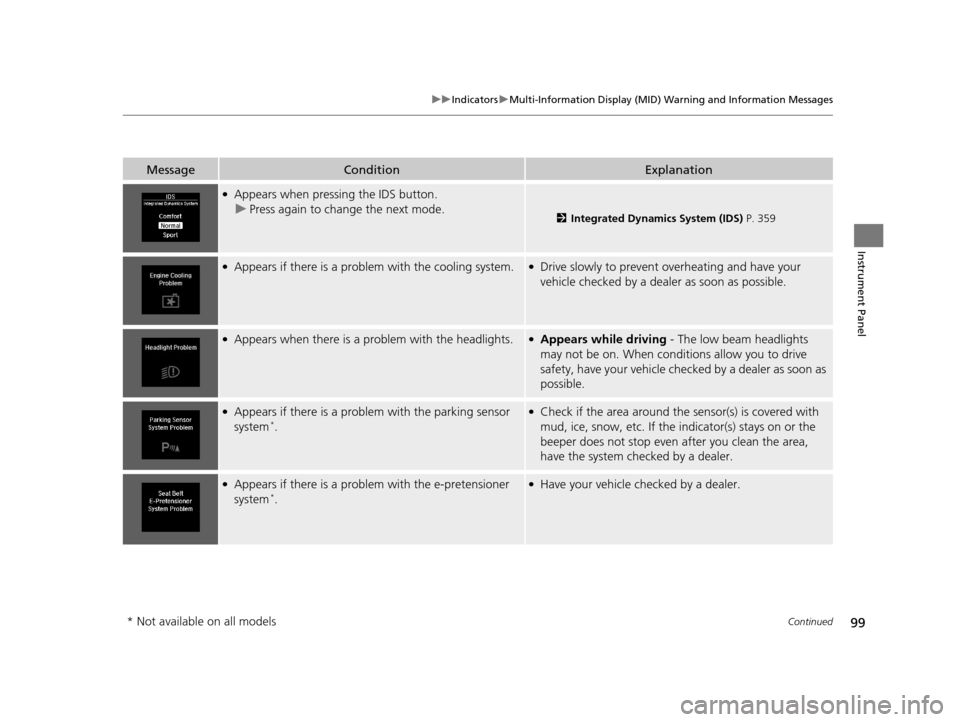
MessageConditionExplanation
●Appears when pressing the IDS button.
u Press again to change the next mode.
2 Integrated Dynamics System (IDS) P. 359
●Appears if there is a problem with the cooling system.●Drive slowly to prevent overheating and have your
vehicle checked by a dealer as soon as possible.
●Appears when there is a problem with the headlights.●Appears while driving - The low beam headlights
may not be on. When conditions allow you to drive
safety, have your vehicle chec ked by a dealer as soon as
possible.
●Appears if there is a problem with the parking sensor
system*.
●Check if the area around the sensor(s) is covered with
mud, ice, snow, etc. If the indicator(s) stays on or the
beeper does not stop even after you clean the area,
have the system checked by a dealer.
●Appears if there is a probl em with the e-pretensioner
system*.
●Have your vehicle checked by a dealer.
* Not available on all models
16 ACURA MDX-31TZ56200.book 99 ページ 2015年3月4日 水曜日 午後2時59分
Page 119 of 557
118
uuGauges and Multi-Information Display (MID) uMID
Instrument Panel
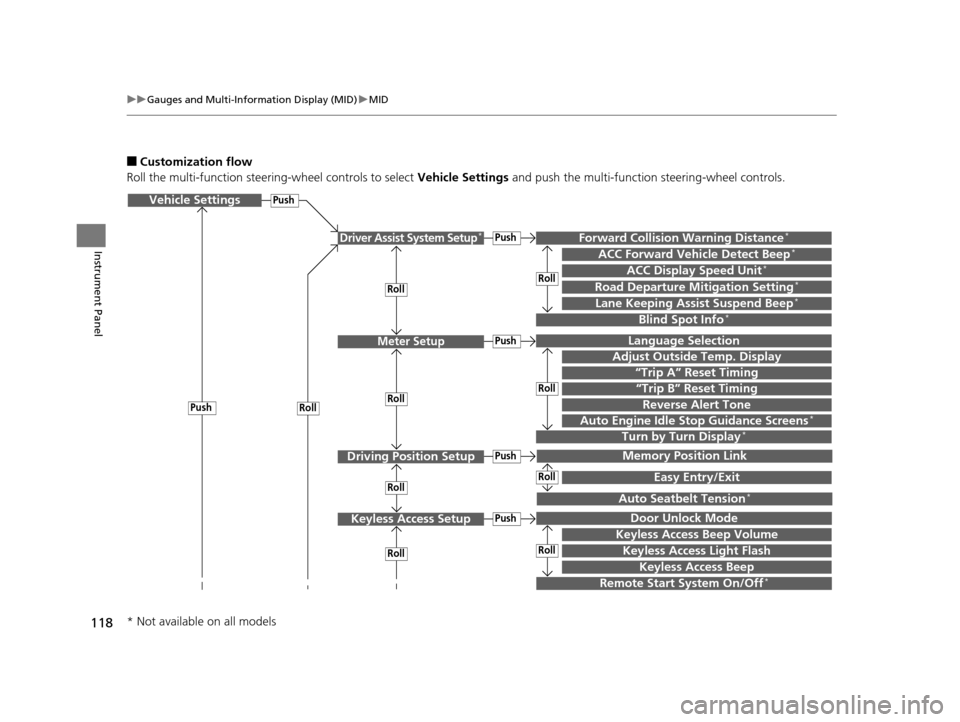
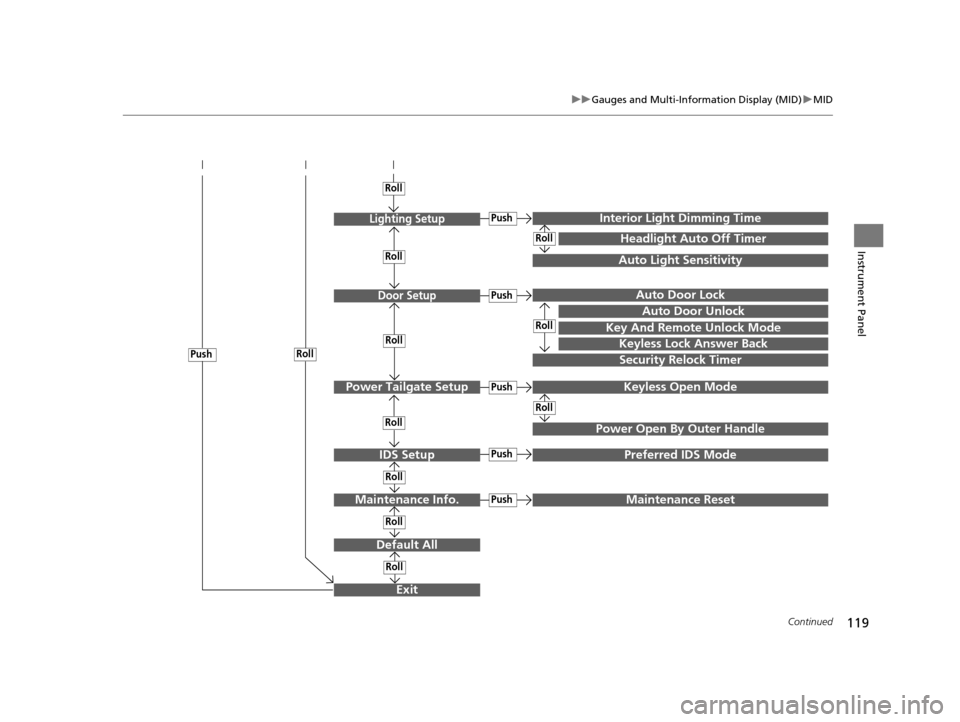
■Customization flow
Roll the multi-function steering-wheel controls to select Vehicle Settings and push the multi-function steering-wheel controls.
Vehicle Settings
“Trip A” Reset Timing
Language Selection
Adjust Outside Temp. Display
Memory Position Link
Door Unlock Mode
Keyless Access Beep
Driver Assist System Setup*
Meter Setup
Driving Position Setup
Keyless Access Setup
“Trip B” Reset Timing
Forward Collision Warning Distance*
ACC Forward Vehicle Detect Beep*
ACC Display Speed Unit*
Roll
Push
Roll
Lane Keeping Assist Suspend Beep*
Blind Spot Info*
Easy Entry/Exit
Auto Seatbelt Tension*
Roll
Roll
Remote Start System On/Off*
RollPush
Keyless Access Light Flash
Roll
Roll
Roll
Roll
Keyless Access Beep Volume
Turn by Turn Display*Auto Engine Idle Stop Guidance Screens*
Road Departure Mitigation Setting*
Push
Push
Push
Push
Reverse Alert Tone
* Not available on all models
16 ACURA MDX-31TZ56200.book 118 ページ 2015年3月4日 水曜日 午後2時59分
Page 120 of 557
119
uuGauges and Multi-Info rmation Display (MID)uMID
Continued
Instrument Panel
Exit
Door Setup
IDS Setup
Default All
Lighting Setup
Key And Remote Unlock Mode
Auto Door Lock
Auto Door Unlock
Keyless Lock Answer Back
Security Relock Timer
Interior Ligh t Dimming Time
Headlight Auto Off Timer
Auto Light Sensitivity
Roll
Push
Push
Roll
Roll
Roll
Roll
Roll
Roll
Power Tailgate SetupPush
Power Open By Outer Handle
Keyless Open Mode
Push
Maintenance Info.
Roll
PushPreferred IDS Mode
Roll
Roll
Roll
PushMaintenance Reset
16 ACURA MDX-31TZ56200.book 119 ページ 2015年3月4日 水曜日 午後2時59分
Page 123 of 557
122
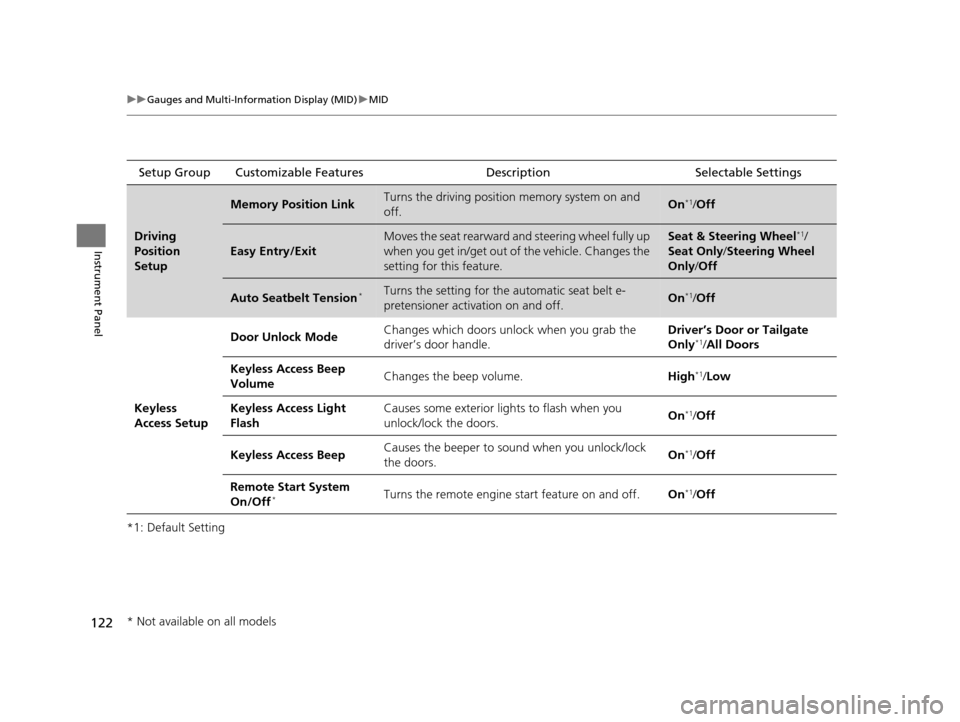
uuGauges and Multi-Information Display (MID) uMID
Instrument Panel
*1: Default SettingSetup Group Customizable Features
Description Selectable Settings
Driving
Position
Setup
Memory Position LinkTurns the driving position memory system on and
off.On*1/Off
Easy Entry/Exit
Moves the seat rearward and steering wheel fully up
when you get in/get out of the vehicle. Changes the
setting for this feature.Seat & Steering Wheel*1/
Seat Only/ Steering Wheel
Only /Off
Auto Seatbelt Tension*Turns the setting for the automatic seat belt e-
pretensioner activation on and off.On*1/ Off
Keyless
Access Setup Door Unlock Mode
Changes which doors unlock when you grab the
driver’s door handle. Driver’s Door or Tailgate
Only
*1/
All Doors
Keyless Access Beep
Volume Changes the beep volume.
High
*1/Low
Keyless Access Light
Flash Causes some exterior lig
hts to flash when you
unlock/lock the doors. On
*1/
Off
Keyless Access Beep Causes the beeper to sound when you unlock/lock
the doors. On
*1/
Off
Remote Start System
On/Off
*Turns the remote engine start feature on and off. On*1/Off
* Not available on all models
16 ACURA MDX-31TZ56200.book 122 ページ 2015年3月4日 水曜日 午後2時59分