mount Acura MDX 2016 Owner's Guide
[x] Cancel search | Manufacturer: ACURA, Model Year: 2016, Model line: MDX, Model: Acura MDX 2016Pages: 557, PDF Size: 31.09 MB
Page 467 of 557

466
uuChecking and Maintaining Wiper Blades uChanging the Front Wiper Blade Rubber
Maintenance
4. Slide the wiper blade out from its holder by
pulling the tabbed end out.
5. Remove the retainers from the rubber blade
that has been removed, and mount to a
new rubber blade.
u Correctly align the rubber protrusion and
the retainer grooves.
6. Slide the new wiper blade onto the holder
from the bottom end.
u The tab on the holder should fit in the
indent of the wiper blade.
7. Slide the wiper blade onto the wiper arm,
then push down the lock tab.
8. Lower the passenger side wiper arm first,
then the driver side.
Blade
Retainer Blade
16 ACURA MDX-31TZ56200.book 466 ページ 2015年3月4日 水曜日 午後2時59分
Page 468 of 557
467
uuChecking and Maintaining Wiper Blades uChanging the Rear Wiper Blade Rubber
Continued
Maintenance
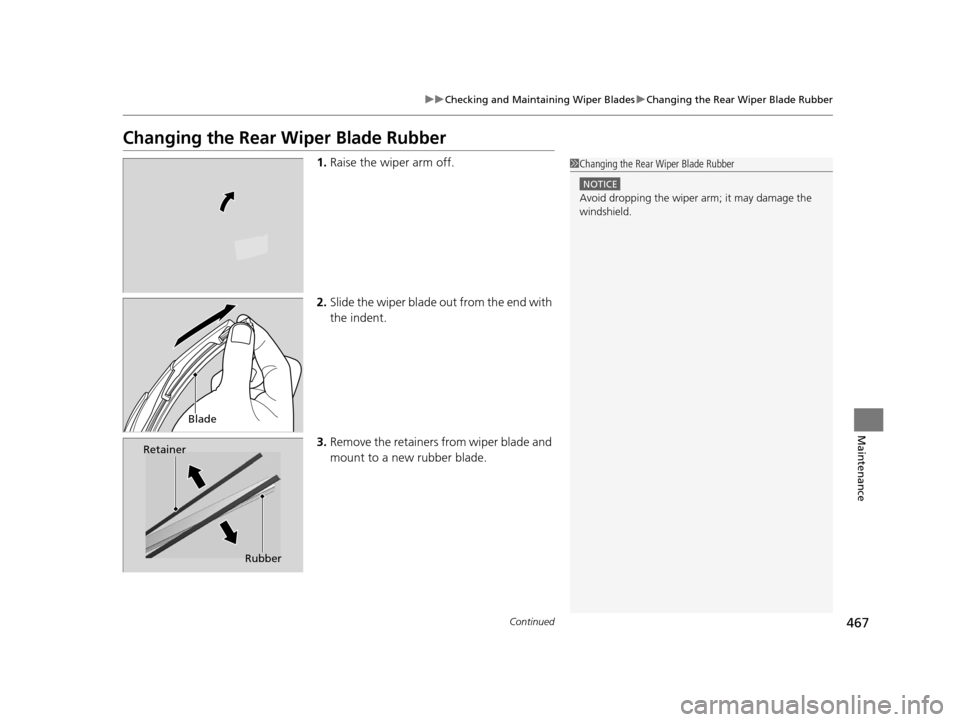
Changing the Rear Wiper Blade Rubber
1.Raise the wiper arm off.
2. Slide the wiper blade out from the end with
the indent.
3. Remove the retainers from wiper blade and
mount to a new rubber blade.1Changing the Rear Wiper Blade Rubber
NOTICE
Avoid dropping the wiper ar m; it may damage the
windshield.
Blade
Retainer
Rubber
16 ACURA MDX-31TZ56200.book 467 ページ 2015年3月4日 水曜日 午後2時59分
Page 477 of 557

476
uuChecking and Maintaining Tires uTire Rotation
Maintenance
Tire Rotation
Rotating tires according to the maintenance messages on the MID helps to distribute
wear more evenly and increase tire life.
■Tires without rotation marks Rotate the tires as shown here.
■Tires with rotation marksRotate the tires as shown here.
1Tire Rotation
Tires with directional trea d patterns should only be
rotated front to back (not fr om one side to the other).
Directional tires should be mounted with the rotation
indication mark facing forward, as shown below.
Front
Rotation MarkFront
Front
16 ACURA MDX-31TZ56200.book 476 ページ 2015年3月4日 水曜日 午後2時59分
Page 478 of 557

477
uuChecking and Maintaining Tires uWinter Tires
Maintenance
Winter Tires
If driving on snowy or frozen roads, mount all season marked “M+S” tires, snow
tires, or tire chains; reduce speed; and main tain sufficient distance between vehicles
when driving.
Be particularly careful wh en operating the steering wheel or brakes to prevent
skidding.
Use tire chains, snow tires, or all season tires when necessary or according to the law.
When mounting, refer to the following points.
For winter tires:
• Select the size and load ranges that are the same as the original tires.
• Mount the tires to all four wheels.
For tire chains:
• Install them on the front tires only.
• Because your vehicle has limited tire clea rance, we strongly recommend using the
chains listed below:
• Follow the chain manufactur er’s instruction when installing. Mount them as
tightly as you can.
• Check that the chains do not touch the brake lines or suspension.
• Drive slowly.
Cable-type: SCC Cable Chain ZT735
1Winter Tires
NOTICE
Traction devices that are th e wrong size or improperly
installed can damage your vehicle’s brake lines,
suspension, body, and wheels. Stop driving if they are
hitting any part of the vehicle.
When tire chains are mounted, follow the chain
manufacturer’s instructi ons regarding vehicle
operational limits.
If your vehicle is equipped with summer tires, be
aware that these tires are not designed for winter
driving conditions. For more information, contact a
dealer.
3WARNING
Using the wrong chains, or not properly
installing chains, can damage the brake
lines and cause a crash in which you can be
seriously injured or killed.
Follow all instruction s in this owner’s
manual regarding the selection and use of
tire chains.
16 ACURA MDX-31TZ56200.book 477 ページ 2015年3月4日 水曜日 午後2時59分
Page 486 of 557
485Continued
Maintenance
Cleaning
Interior Care
Use a damp cloth with a mixture of mild detergent and warm water to remove dirt.
Use a clean cloth to remove detergent residue.
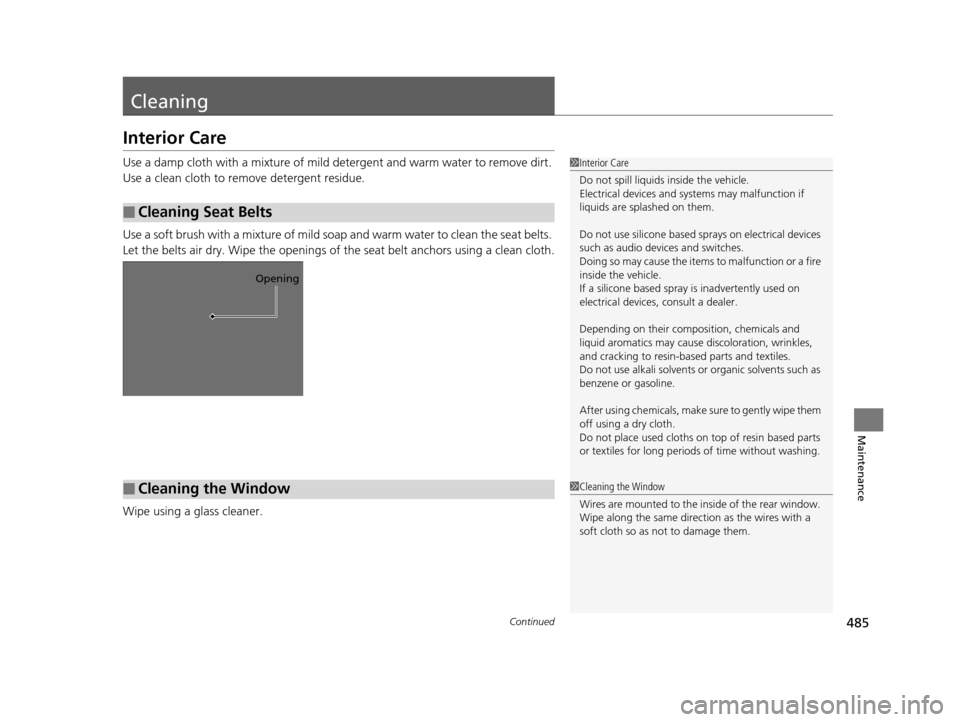
Use a soft brush with a mixture of mild soap and warm water to clean the seat belts.
Let the belts air dry. Wipe the openings of the seat belt anchors using a clean cloth.
Wipe using a glass cleaner.
■Cleaning Seat Belts
1 Interior Care
Do not spill liquids inside the vehicle.
Electrical devices and systems may malfunction if
liquids are splashed on them.
Do not use silicone based sp rays on electrical devices
such as audio devices and switches.
Doing so may cause the items to malfunction or a fire
inside the vehicle.
If a silicone based spray is inadvertently used on
electrical devices, consult a dealer.
Depending on their compos ition, chemicals and
liquid aromatics may cause discoloration, wrinkles,
and cracking to resin-ba sed parts and textiles.
Do not use alkali solvents or organic solvents such as
benzene or gasoline.
After using chemical s, make sure to gently wipe them
off using a dry cloth.
Do not place used cloths on top of resin based parts
or textiles for long periods of time without washing.
Opening
■Cleaning the Window1Cleaning the Window
Wires are mounted to the in side of the rear window.
Wipe along the same direct ion as the wires with a
soft cloth so as not to damage them.
16 ACURA MDX-31TZ56200.book 485 ページ 2015年3月4日 水曜日 午後2時59分
Page 490 of 557

489
uuCleaning uExterior Care
Maintenance
The inside lenses of exterior lights (headlights, brake light s, etc.) may fog temporarily
if you have driven in the rain, or after the vehicle has been run through a car wash.
Dew condensation also may build up inside the lenses when there is a significant
enough difference between the ambient and inside lens temperatures (similar to
vehicle windows fogging up in rainy conditions). These conditions are natural
processes, not structural design problems in the exterior lights.
Lens design characteristics ma y result in moisture developing on the light lens frame
surfaces. This also is not a malfunction.
However, if you see large amounts wate r accumulation, or large water drops
building up inside the lenses, have your vehicle inspected by a dealer.
■Fogged Exterior Light Lenses
16 ACURA MDX-31TZ56200.book 489 ページ 2015年3月4日 水曜日 午後2時59分
Page 494 of 557

493Continued
Handling the Unexpected
If a Tire Goes Flat
Changing a Flat Tire*
If a tire goes flat while driving, grasp the steering wheel firmly, and brake gradually
to reduce speed. Then, stop in a safe plac e. Replace the flat tire with a compact
spare tire. Go to a dealer as soon as possib le to have the full-size tire repaired or
replaced.
1. Park the vehicle on firm, level, non-slip pery surface and apply the parking brake.
2. Change the gear position to
(P.
3. Turn on the hazard warning lights an d set the power mode to VEHICLE OFF
(LOCK).
1 Changing a Flat Tire*
Periodically check the tire pressure of the compact
spare. It should be set to the specified pressure.
Specified Pressure: 60 psi (420 kPa, 4.2 kgf/cm
2)
When driving with the compact spare tire, keep the
vehicle speed under 50 mph (80 km/h). Replace with
a full-size tire as soon as possible.
The compact spare tire and wheel in your vehicle are
specifically for this model. Do not use them with
another vehicle. Do not us e another type of compact
spare tire or wheel with your vehicle.
Do not mount tire chains on a compact spare tire.
If a chain-mounted front tire goes flat, remove one of
the full-size rear tires and replace it with the compact
spare tire. Remove the flat front tire and replace it
with the full-size tire that was removed from the rear.
Mount the tire chains on the front tire.
Do not use a puncture-repairi ng agent on a flat tire,
as it can damage the tire pressure sensor.
* Not available on all models
16 ACURA MDX-31TZ56200.book 493 ページ 2015年3月4日 水曜日 午後2時59分
Page 499 of 557

uuIf a Tire Goes Flat uChanging a Flat Tire*
498
Handling the Unexpected
1. Remove the wheel nuts and flat tire.
2. Wipe the mounting surfaces of the wheel
with a clean cloth.
3. Mount the compact spare tire.
4. Screw the wheel nuts until they touch the
lips around the mounting holes, then stop
rotating.
5. Lower the vehicle and remove the jack.
Tighten the wheel nuts in the order
indicated in the image. Go around,
tightening the nuts, two to three times in
this order.
Wheel nut torque:
80 lbf∙ft (108 N∙m, 11 kgf∙m)
■Replacing the Flat Tire1Replacing the Flat Tire
Do not over tighten the wheel nuts by applying extra
torque using your foot or a pipe.
16 ACURA MDX-31TZ56200.book 498 ページ 2015年3月4日 水曜日 午後2時59分
Page 500 of 557
499
uuIf a Tire Goes Flat uChanging a Flat Tire*
Handling the Unexpected
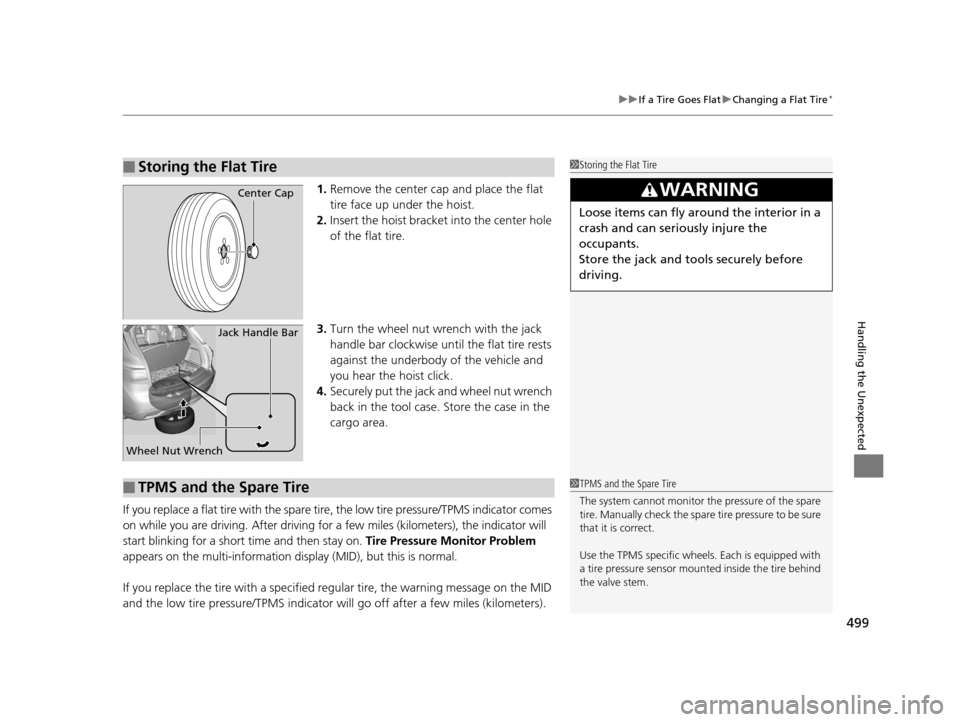
1. Remove the center cap and place the flat
tire face up under the hoist.
2. Insert the hoist bracke t into the center hole
of the flat tire.
3. Turn the wheel nut wrench with the jack
handle bar clockwise until the flat tire rests
against the underbody of the vehicle and
you hear the hoist click.
4. Securely put the jack and wheel nut wrench
back in the tool case. Store the case in the
cargo area.
If you replace a flat tire wi th the spare tire, the low tire pressure/TPMS indicator comes
on while you are driving. After driving for a few miles (kilometers), the indicator will
start blinking for a short time and then stay on. Tire Pressure Monitor Problem
appears on the multi-information display (MID), but this is normal.
If you replace the tire with a specified regular tire, the warning message on the MID
and the low tire pressure/TPMS indicator will go off after a few miles (kilometers).
■Storing the Flat Tire1Storing the Flat Tire
3WARNING
Loose items can fly around the interior in a
crash and can seriously injure the
occupants.
Store the jack and tools securely before
driving.
Center Cap
Wheel Nut Wrench Jack Handle Bar
■TPMS and the Spare Tire1
TPMS and the Spare Tire
The system cannot monitor th e pressure of the spare
tire. Manually check the spare tire pressure to be sure
that it is correct.
Use the TPMS specific wheels. Each is equipped with
a tire pressure sensor mount ed inside the tire behind
the valve stem.
16 ACURA MDX-31TZ56200.book 499 ページ 2015年3月4日 水曜日 午後2時59分
Page 537 of 557

536
Information
Specifications
■Vehicle Specifications
*1: 2WD models
*2: AWD models
ModelAcura MDX
No. of Passengers:
Front 2
Rear 2nd Row 3 3rd Row 2
Total 7
Weights:Gross Vehicle
Weight RatingU.S.:5,368 lbs (2,435 kg)*1
5,677 lbs (2,575 kg)*2
Canada:2,575 kgGross Axle Weight
Rating (Front)U.S.:2,811 lbs (1,275 kg)*1
2,910 lbs (1,320 kg)*2
Canada:1,320 kgGross Axle Weight
Rating (Rear)U.S.:2,734 lbs (1,240 kg)*1
2,965 lbs (1,345 kg)*2
Canada:1,345 kg
Gross Combined Weight
Rating U.S.: 8,036 lbs (3,645 kg)*1
9,833 lbs (4,460 kg)*2
Canada:4,460 kgAir Conditioning:Refrigerant TypeHFC-134a (R-134a)Charge Quantity23.8 – 25.6 oz (675 – 725 g)Lubricant TypePAG RL897
■
Engine Specifications
■ Fuel
■ Washer Fluid
Displacement211.8 cu-in (3,471 cm3)
Spark Plugs NGK DILZKR7B11G
TypeUnleaded premium gasoline, Pump octane
number of 91 or higher
Fuel Tank Capacity 19.5 US gal (73.8 ℓ)
Tank CapacityU.S.: 4 US qt (3.8 ℓ)
Canada: 5.6 US qt (5.3 ℓ)
■ Light Bulbs
■ Brake Fluid
Headlights (High/Low Beam)LED
Fog Lights*LEDFront Turn Signal/Side Marker/
Parking Lights28/8 W (Amber)
Daytime Running Lights LED
Side Turn Signal Lights (on Door
Mirrors)LED
Brake Lights 21 W
Rear Side Marker LightsLED
Taillights LED
Back-Up Lights21 W
Rear Turn Signal Lights 21 W
High-Mount Brake LightLED
Rear License Plate Light LED
Puddle Lights*LED
Interior Lights Front, Second Row and Third
Row Lights LED
Front and Rear Ambient Lights LED
Vanity Mirror Lights 1.4 W
Door Courtesy Lights 3.4 W
Door Inner Handle Lights LED
Console Compartment Light 1.4 W
Glove Box Light 1.4 W
Foot Lights 5 W
Cargo Area Lights 5 W
SpecifiedAcura Heavy Duty Brake Fluid DOT 3
* Not available on all models
16 ACURA MDX-31TZ56200.book 536 ページ 2015年3月4日 水曜日 午後2時59分