audio Acura MDX 2016 Repair Manual
[x] Cancel search | Manufacturer: ACURA, Model Year: 2016, Model line: MDX, Model: Acura MDX 2016Pages: 557, PDF Size: 31.09 MB
Page 261 of 557
260
uuGeneral Information on the Audio System uRecommended CDs
Features
Recommended CDs
• Use only high-quality CD-R or CD-RW discs labeled for audio use.
• Use only CD-R or CD-RW discs on which the recordings are closed.
• Play only standard round-shaped CDs.
• Some software files may not allow for audio play or text data display.
• Some versions of MP3, WMA or AAC formats may be unsupported.1Recommended CDs
A Dual-disc cannot play on th is audio unit. If recorded
under certain conditions, a CD-R or CD-RW may not
play either.
■CDs with MP3, WMA or AAC files
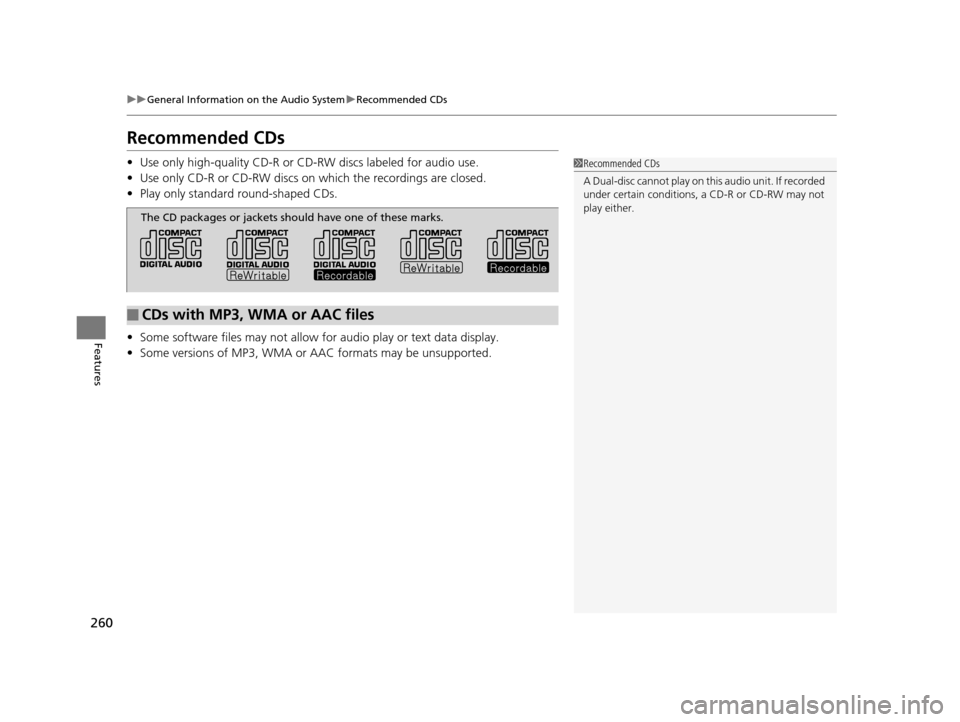
The CD packages or jackets should have one of these marks.
16 ACURA MDX-31TZ56200.book 260 ページ 2015年3月4日 水曜日 午後2時59分
Page 262 of 557
261
uuGeneral Information on the Audio System uRecommended CDs
Features
■Protecting CDs
Follow these precautions when handling or storing CDs:
• Store a CD in its case when it is not being played.
• When wiping a CD, use a soft clean cloth from the center to the outside edge.
• Handle a CD by its edge. Never touch either surface.
• Never insert foreign obje cts into the CD player.
• Keep CDs out of direct sunlight and extreme heat.
• Do not place stabilizer rings or labels on the CD.
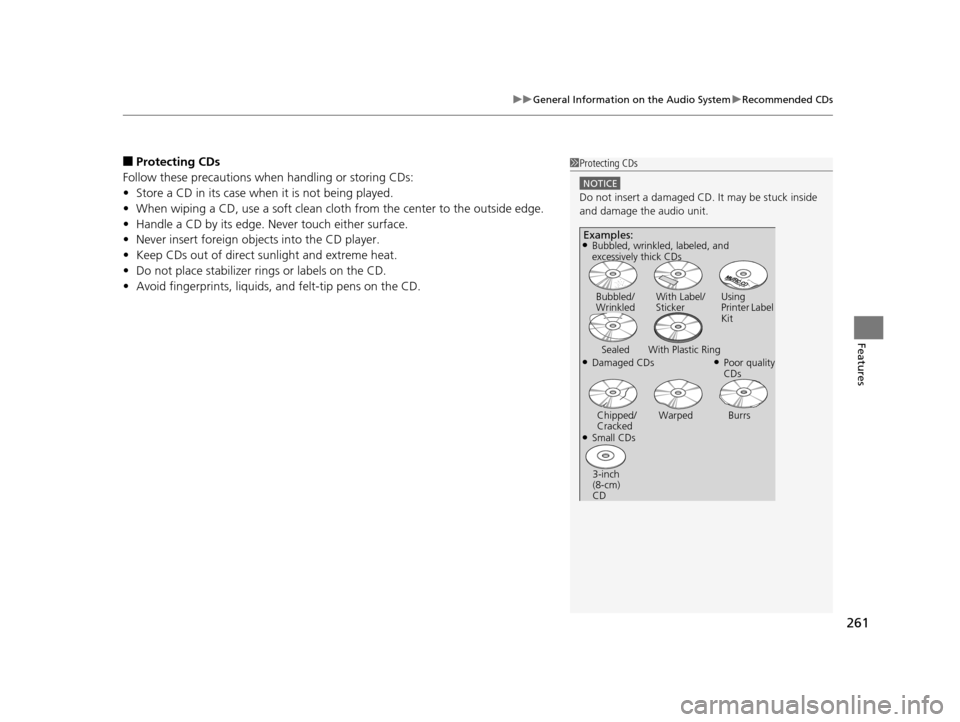
• Avoid fingerprints, liquids, and felt-tip pens on the CD.1Protecting CDs
NOTICE
Do not insert a damaged CD. It may be stuck inside
and damage the audio unit.
Examples:
●Damaged CDs Bubbled/
Wrinkled
With Label/
Sticker Using
Printer Label
Kit
Sealed With Plastic Ring●Poor quality
CDs
Chipped/
Cracked Warped Burrs
●Small CDs
3-inch
(8-cm)
CD
●Bubbled, wrinkled, labeled, and
excessively thick CDs
16 ACURA MDX-31TZ56200.book 261 ページ 2015年3月4日 水曜日 午後2時59分
Page 263 of 557
262
uuGeneral Information on the Audio System uCompatible iPod, iPhone, and USB Flash Drives
Features
Compatible iPod, iPhone, and USB Flash Drives
• Use a recommended USB flash drive of 256 MB or higher.
• Some digital audio players may not be compatible.
• Some USB flash drives (e.g., a device with security lockout) may not work.
• Some software files may not allow for audio play or text data display.
• Some versions of MP3, WMA, or AAC formats may be unsupported.
■iPod and iPhone Model Compatibility
Model
iPod (5th generation)
iPod classic 80GB/160GB (launch in 2007)
iPod classic 120GB (launch in 2008)
iPod classic 160GB (launch in 2009)
iPod nano (1st to 6th generation) launch in 2010
iPod touch (1st to 4th generation) launch in 2010
iPhone 3G/iPhone 3GS/iPhone 4/iPhone 4s /iPhone 5/iPhone 5c/iPhone 5s/iPhone 6/
iPhone 6 Plus
■USB Flash Drives
1 iPod and iPhone Model Compatibility
This system may not work with all software versions
of these devices.
1USB Flash Drives
Files on the USB flash drive are played in their stored
order. This order may be different from the order
displayed on your PC or device.
16 ACURA MDX-31TZ56200.book 262 ページ 2015年3月4日 水曜日 午後2時59分
Page 264 of 557
263Continued
Features
Customized Features
See the Navigation System Manual for the customized features except for the
Vehicle Settings .
Use the audio/information screen to customize certain features.
■How to customize
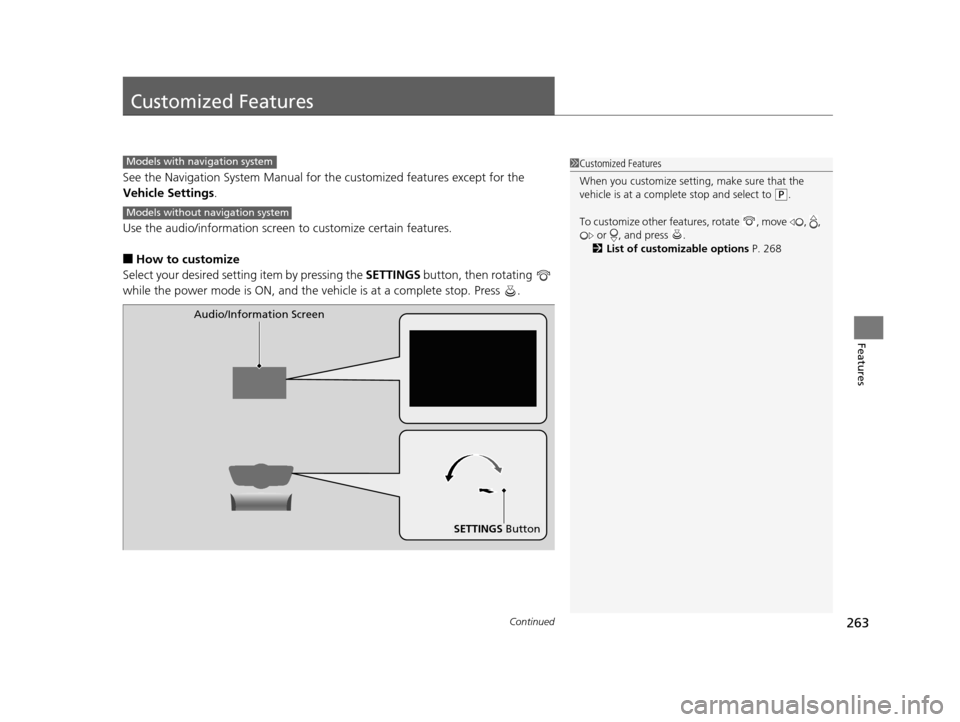
Select your desired setting item by pressing the SETTINGS button, then rotating
while the power mode is ON, and the ve hicle is at a complete stop. Press .
1Customized Features
When you customize setting, make sure that the
vehicle is at a complete stop and select to
(P.
To customize other featur es, rotate , move , ,
or , and press .
2 List of customizable options P. 268
Models with navigation system
Models without navigation system
SETTINGS Button
Audio/Information Screen
16 ACURA MDX-31TZ56200.book 263 ページ 2015年3月4日 水曜日 午後2時59分
Page 267 of 557
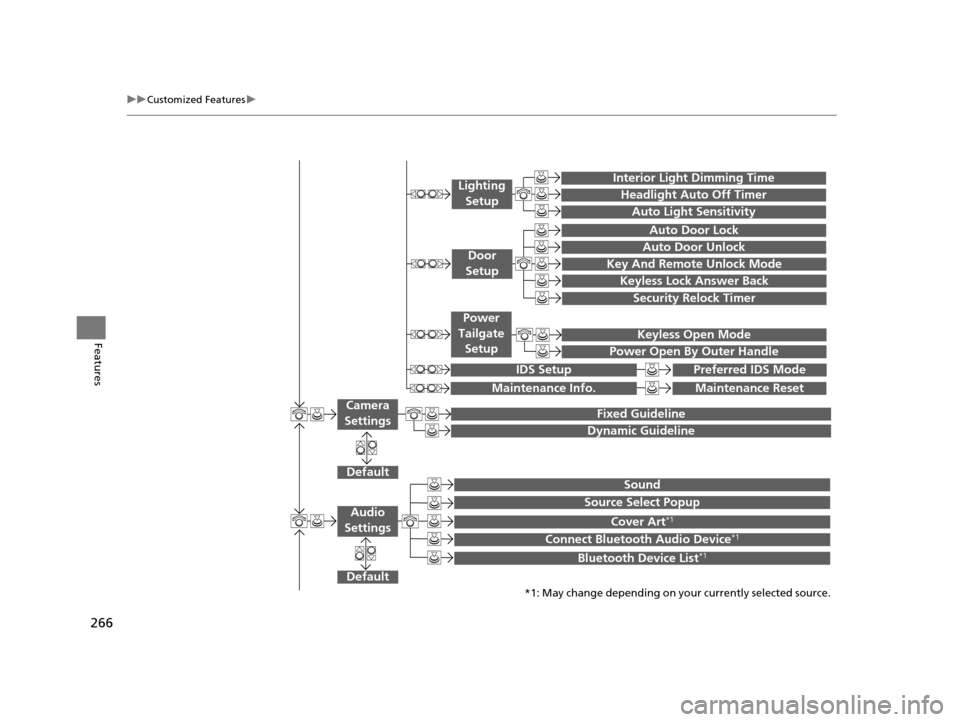
266
uuCustomized Features u
Features
Default
Fixed Guideline
Dynamic Guideline
DefaultSound
Source Select Popup
Cover Art*1
Connect Bluetooth Audio Device*1
Bluetooth Device List*1
Audio
Settings
Maintenance ResetMaintenance Info.
Keyless Open Mode
Power Open By Outer Handle
Power
Tailgate Setup
Camera
Settings
Preferred IDS ModeIDS Setup
Key And Remote Unlock Mode
Keyless Lock Answer Back
Security Relock Timer
Auto Door Lock
Auto Door Unlock
Door
Setup
*1: May change depending on your currently selected source.
Interior Light Dimming Time
Headlight Auto Off Timer
Auto Light Sensitivity
Lighting
Setup
16 ACURA MDX-31TZ56200.book 266 ページ 2015年3月4日 水曜日 午後2時59分
Page 269 of 557
268
uuCustomized Features u
Features
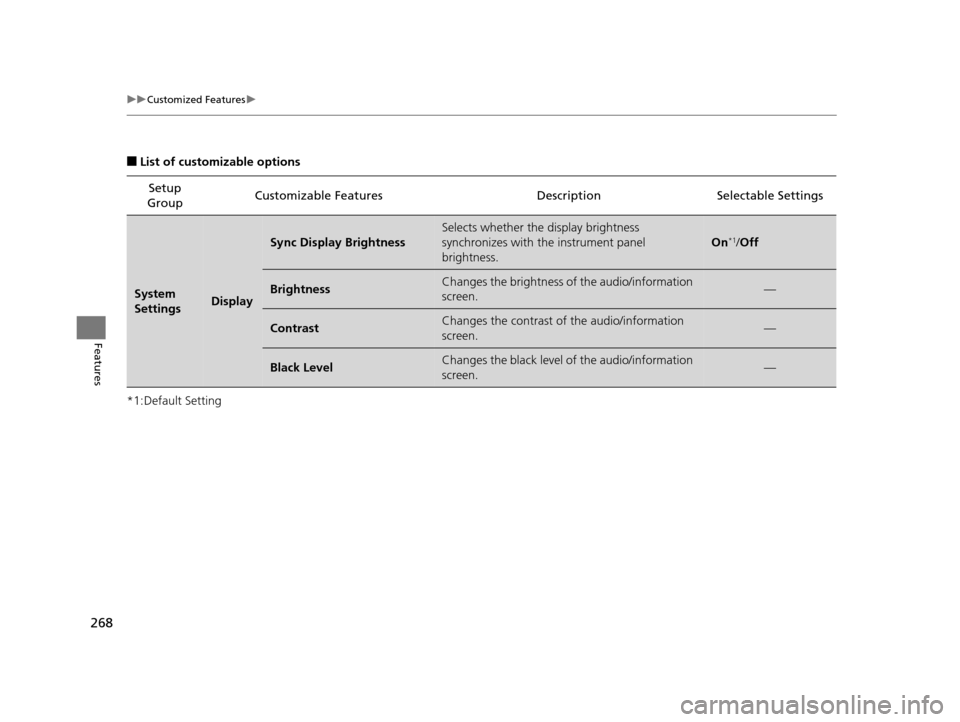
■List of customizable options
*1:Default Setting Setup
Group Customizable Features Descri
ption Selectable Settings
System
SettingsDisplay
Sync Display Brightness
Selects whether the display brightness
synchronizes with the instrument panel
brightness.
On*1/Off
BrightnessChanges the brightness of the audio/information
screen.—
ContrastChanges the contrast of the audio/information
screen.—
Black LevelChanges the black level of the audio/information
screen.—
16 ACURA MDX-31TZ56200.book 268 ページ 2015年3月4日 水曜日 午後2時59分
Page 271 of 557
270
uuCustomized Features u
Features
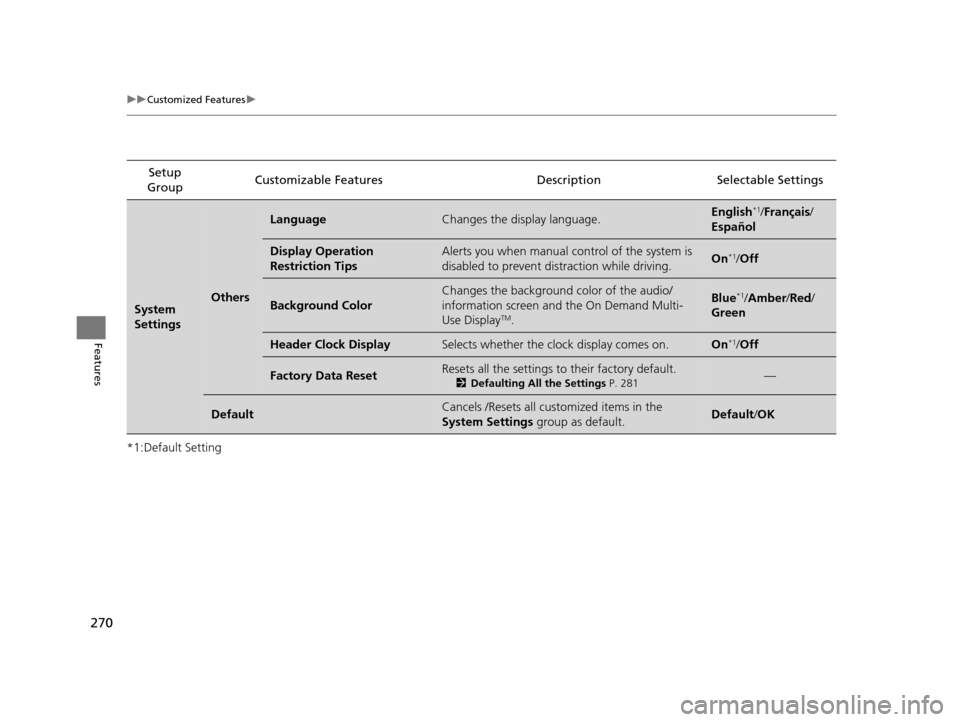
*1:Default SettingSetup
Group Customizable Features Descri
ption Selectable Settings
System
SettingsOthers
LanguageChanges the display language.English*1/Français /
Español
Display Operation
Restriction TipsAlerts you when manual control of the system is
disabled to prevent distraction while driving.On*1/ Off
Background Color
Changes the background color of the audio/
information screen and the On Demand Multi-
Use Display
TM.
Blue*1/Amber /Red/
Green
Header Clock DisplaySelects whether the clock display comes on.On*1/ Off
Factory Data ResetResets all the settings to their factory default.
2 Defaulting All the Settings P. 281—
DefaultCancels /Resets all customized items in the
System Settings group as default.Default/OK
16 ACURA MDX-31TZ56200.book 270 ページ 2015年3月4日 水曜日 午後2時59分
Page 278 of 557
277
uuCustomized Features u
Continued
Features
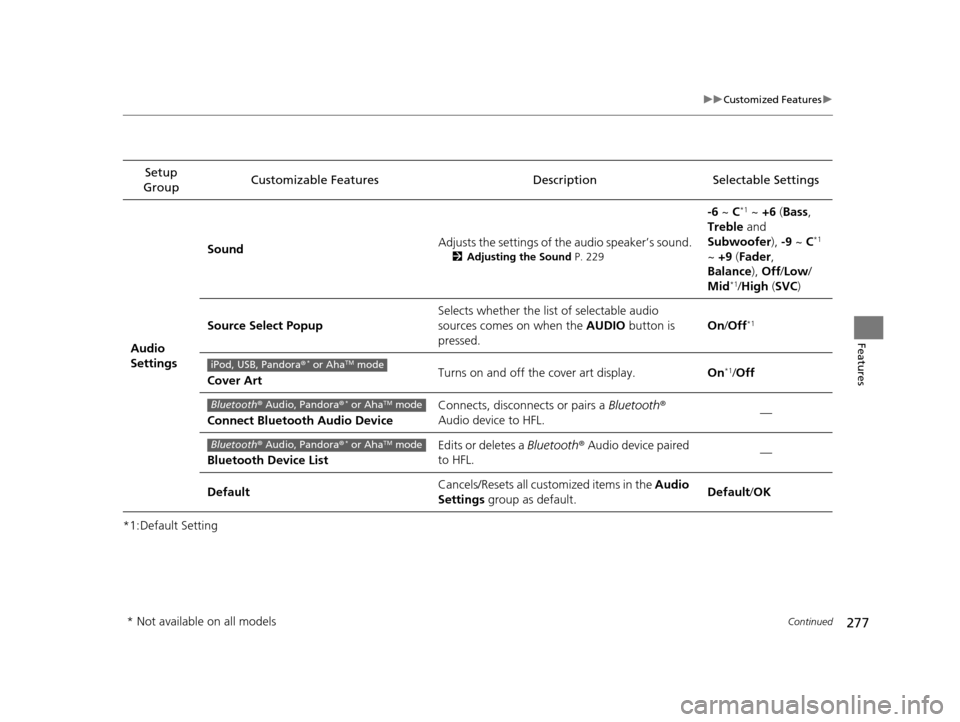
*1:Default SettingSetup
Group Customizable Features Description Selectable Settings
Audio
Settings Sound
Adjusts the settings of th
e audio speaker’s sound.
2Adjusting the Sound P. 229
-6 ~ C*1 ~ +6 (Bass ,
Treble and
Subwoofer ), -9 ~ C
*1
~ +9 (Fader ,
Balance ), Off/Low/
Mid
*1/ High (SVC )
Source Select Popup Selects whether the list of selectable audio
sources comes on when the
AUDIO button is
pressed. On
/Off
*1
Cover Art Turns on and off the cover art display.
On*1/Off
Connect Bluetooth Audio Device Connects, disconnects or pairs a
Bluetooth®
Audio device to HFL. —
Bluetooth Device List Edits or deletes a
Bluetooth® Audio device paired
to HFL. —
Default Cancels/Resets all customized items in the
Audio
Settings group as default. Default/
OKiPod, USB, Pandora ®* or AhaTM mode
Bluetooth® Audio, Pandora ®* or AhaTM mode
Bluetooth® Audio, Pandora ®* or AhaTM mode
* Not available on all models
16 ACURA MDX-31TZ56200.book 277 ページ 2015年3月4日 水曜日 午後2時59分
Page 285 of 557
284
Features
Bluetooth® HandsFreeLink ®
See Navigation System Manual for how to operate Bluetooth® HandsFreeLink ®.
Bluetooth ® HandsFreeLink ® (HFL) allows you to place and receive phone calls using
your vehicle’s audio system, without handling your cell phone.
Using HFL
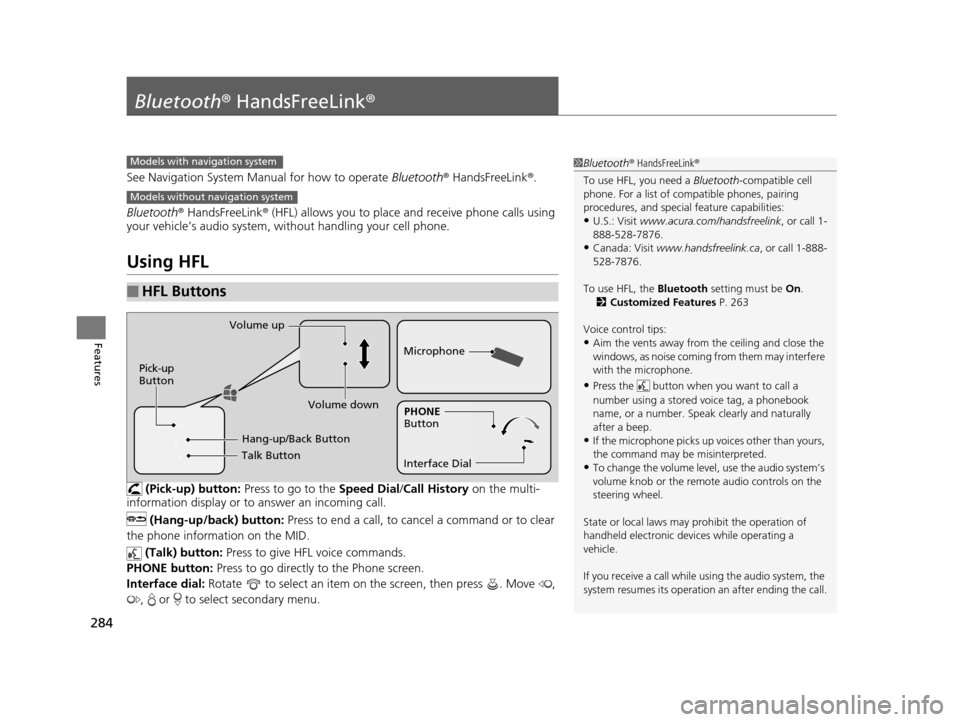
(Pick-up) button: Press to go to the Speed Dial/Call History on the multi-
information display or to answer an incoming call.
(Hang-up/back) button: Press to end a call, to cancel a command or to clear
the phone information on the MID.
(Talk) button: Press to give HFL voice commands.
PHONE button: Press to go directly to the Phone screen.
Interface dial: Rotate to select an item on the screen, then press . Move ,
, or to select secondary menu.
■HFL Buttons
1 Bluetooth ® HandsFreeLink ®
To use HFL, you need a Bluetooth-compatible cell
phone. For a list of compatible phones, pairing
procedures, and special feature capabilities:
•U.S.: Visit www.acura.com/handsfreelink , or call 1-
888-528-7876.
•Canada: Visit www.handsfreelink.ca , or call 1-888-
528-7876.
To use HFL, the Bluetooth setting must be On.
2 Customized Features P. 263
Voice control tips:
•Aim the vents away from the ceiling and close the
windows, as noise coming fr om them may interfere
with the microphone.
•Press the button when you want to call a
number using a stored voice tag, a phonebook
name, or a number. Spe ak clearly and naturally
after a beep.
•If the microphone picks up vo ices other than yours,
the command may be misinterpreted.
•To change the volume level, use the audio system’s
volume knob or the remote audio controls on the
steering wheel.
State or local laws may pr ohibit the operation of
handheld electronic devi ces while operating a
vehicle.
If you receive a call while using the audio system, the
system resumes its operation an after ending the call.
Models with navigation system
Models without navigation system
Talk Button
Volume up
Microphone
Hang-up/Back Button
Pick-up
Button
Volume down
Interface DialPHONE
Button
16 ACURA MDX-31TZ56200.book 284 ページ 2015年3月4日 水曜日 午後2時59分
Page 286 of 557
285
uuBluetooth ® HandsFreeLink ®u Using HFL
Features
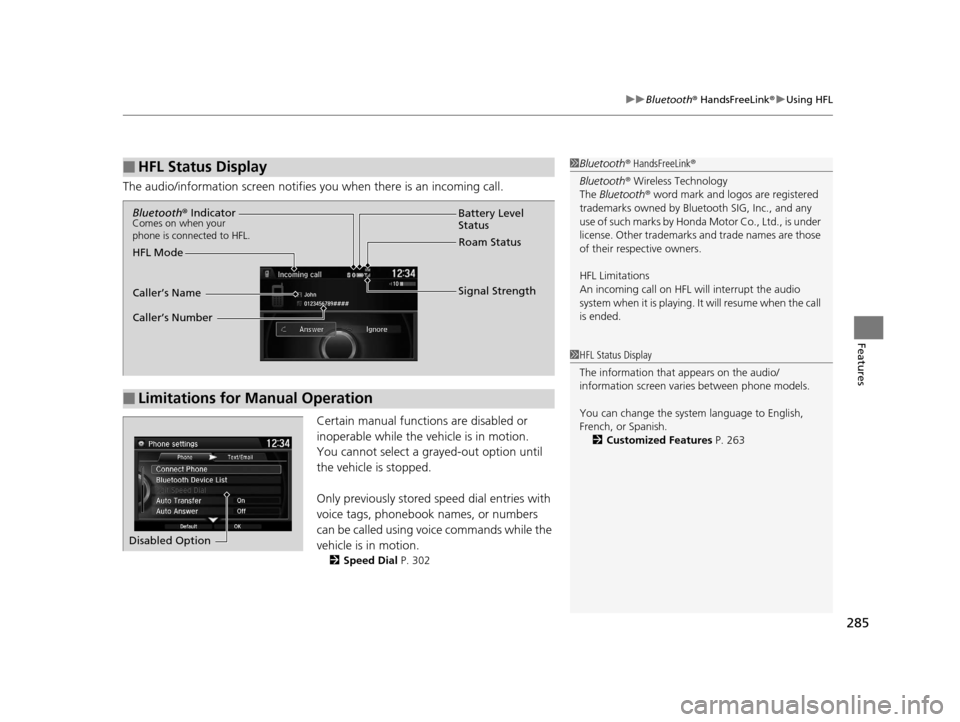
The audio/information scr een notifies you when there is an incoming call.
Certain manual functions are disabled or
inoperable while the ve hicle is in motion.
You cannot select a grayed-out option until
the vehicle is stopped.
Only previously stored speed dial entries with
voice tags, phonebook names, or numbers
can be called using voice commands while the
vehicle is in motion.
2 Speed Dial P. 302
■HFL Status Display1Bluetooth ® HandsFreeLink ®
Bluetooth ® Wireless Technology
The Bluetooth ® word mark and logos are registered
trademarks owned by Blue tooth SIG, Inc., and any
use of such marks by Honda Motor Co., Ltd., is under
license. Other trademarks and trade names are those
of their respective owners.
HFL Limitations
An incoming call on HFL will interrupt the audio
system when it is playing. It will resume when the call
is ended.
1 HFL Status Display
The information that appears on the audio/
information screen vari es between phone models.
You can change the system language to English,
French, or Spanish. 2 Customized Features P. 263
■Limitations for Manual Operation
Bluetooth® IndicatorComes on when your
phone is connected to HFL.
Signal Strength
HFL Mode Battery Level
Status
Roam Status
Caller’s Name
Caller’s Number
Disabled Option
16 ACURA MDX-31TZ56200.book 285 ページ 2015年3月4日 水曜日 午後2時59分