Blind spot Acura MDX 2016 Owner's Manual
[x] Cancel search | Manufacturer: ACURA, Model Year: 2016, Model line: MDX, Model: Acura MDX 2016Pages: 557, PDF Size: 31.09 MB
Page 12 of 557
11
Quick Reference Guide
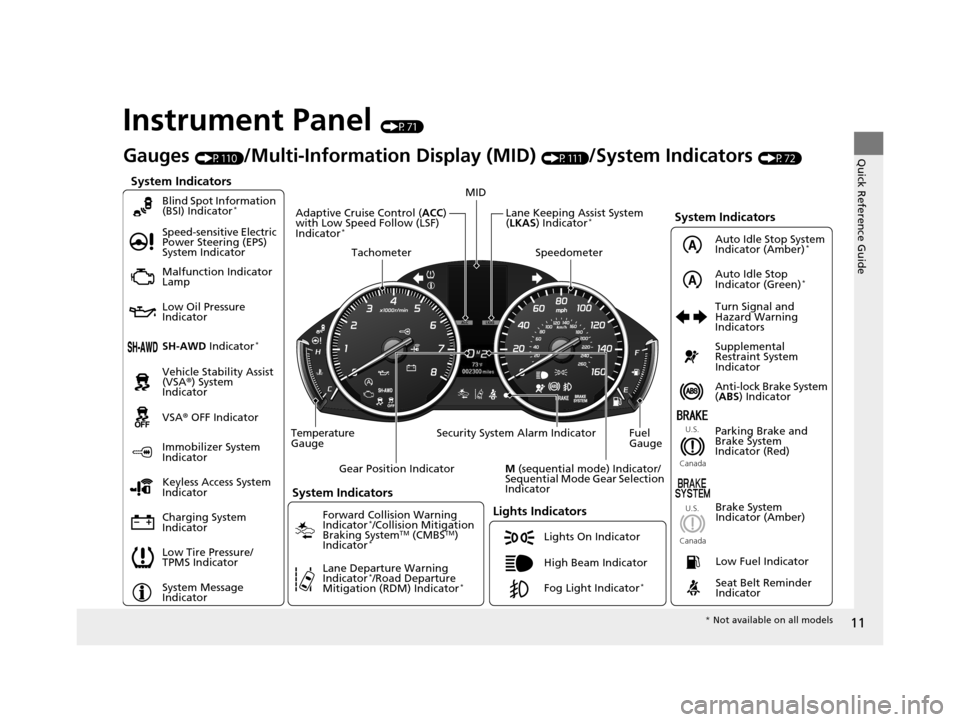
Instrument Panel (P71)
System Indicators
Malfunction Indicator
Lamp
Low Oil Pressure
Indicator
Charging System
IndicatorAnti-lock Brake System
(
ABS ) Indicator
Vehicle Stability Assist
(VSA®
) System
Indicator
VSA ® OFF Indicator
Speed-sensitive Electric
Power Steering (EPS)
System Indicator
Lights Indicators
Lights On Indicator
High Beam Indicator
Immobilizer System
Indicator
Seat Belt Reminder
Indicator
System Indicators
System Message
IndicatorParking Brake and
Brake System
Indicator (Red)
Supplemental
Restraint System
Indicator
Low Fuel Indicator
Gauges (P110)/Multi-Information Display (MID) (P111)/System Indicators (P72)
Low Tire Pressure/
TPMS Indicator Turn Signal and
Hazard Warning
Indicators
Keyless Access System
Indicator
Temperature
Gauge Security System Alarm Indicator Fuel
Gauge
Tachometer
MID
Speedometer
Gear Position Indicator
M (sequential mode) Indicator/
Sequential Mode Gear Selection
Indicator
Brake System
Indicator (Amber)
SH-AWD Indicator*
Blind Spot Information
(BSI) Indicator*
System Indicators
Forward Collision Warning
Indicator*/Collision Mitigation
Braking SystemTM (CMBSTM)
Indicator*
Lane Departure Warning
Indicator*/Road Departure
Mitigation (RDM) Indicator*
Lane Keeping Assist System
( LKAS ) Indicator*Adaptive Cruise Control ( ACC)
with Low Speed Follow (LSF)
Indicator
*
U.S.
Canada U.S.
Canada
Fog Light Indicator*
Auto Idle Stop System
Indicator (Amber)*
Auto Idle Stop
Indicator (Green)*
* Not available on all models
16 ACURA MDX-31TZ56200.book 11 ページ 2015年3月4日 水曜日 午後2時59分
Page 91 of 557

90
uuIndicators u
Instrument Panel
IndicatorNameOn/BlinkingExplanationMessage
Blind Spot
Information (BSI)
Indicator
*
●Comes on for a few seconds
when you set the power mode to
ON, then goes off.
●Stays on while BS I is turned off.
—
●Comes on when mud, snow, or
ice accumulates in the vicinity of
sensor.●Comes on while driving - Remove the
obstacle in the vicinity of sensor.
2 Blind Spot Information (BSI) System*
P. 405
●Comes on if there is a problem
with the system.●Comes on while driving - Have your vehicle
checked by a dealer.
IndicatorNameOn/BlinkingExplanationMessage
Collision
Mitigation Braking
System
TM
(CMBSTM)
Indicator*
●Comes on for a few seconds
when you change the power
mode to ON, then goes off.
●Comes on when you deactivate
the CMBSTM. A multi-information
display message appears for five
seconds.
●Comes on if there is a problem
with the CMBSTM.
●Stays on constantly without the CMBSTM
off - Have your vehicle checked by a dealer.
2Collision Mitigation Braking SystemTM
(CMBSTM)* P. 416
Models with CMBSTM
* Not available on all models
16 ACURA MDX-31TZ56200.book 90 ページ 2015年3月4日 水曜日 午後2時59分
Page 119 of 557
118
uuGauges and Multi-Information Display (MID) uMID
Instrument Panel
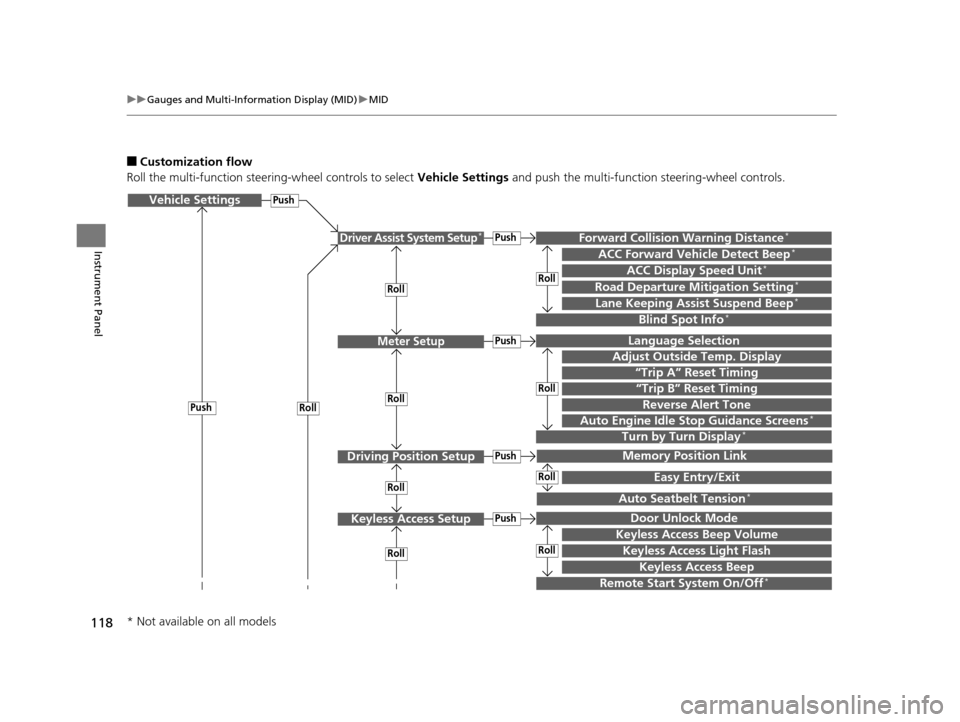
■Customization flow
Roll the multi-function steering-wheel controls to select Vehicle Settings and push the multi-function steering-wheel controls.
Vehicle Settings
“Trip A” Reset Timing
Language Selection
Adjust Outside Temp. Display
Memory Position Link
Door Unlock Mode
Keyless Access Beep
Driver Assist System Setup*
Meter Setup
Driving Position Setup
Keyless Access Setup
“Trip B” Reset Timing
Forward Collision Warning Distance*
ACC Forward Vehicle Detect Beep*
ACC Display Speed Unit*
Roll
Push
Roll
Lane Keeping Assist Suspend Beep*
Blind Spot Info*
Easy Entry/Exit
Auto Seatbelt Tension*
Roll
Roll
Remote Start System On/Off*
RollPush
Keyless Access Light Flash
Roll
Roll
Roll
Roll
Keyless Access Beep Volume
Turn by Turn Display*Auto Engine Idle Stop Guidance Screens*
Road Departure Mitigation Setting*
Push
Push
Push
Push
Reverse Alert Tone
* Not available on all models
16 ACURA MDX-31TZ56200.book 118 ページ 2015年3月4日 水曜日 午後2時59分
Page 121 of 557

120
uuGauges and Multi-Information Display (MID) uMID
Instrument Panel
■List of customizable options
*1:Default Setting Setup Group Customizable Features
Description Selectable Settings
Driver Assist
System
Setup
*
Forward Collision
Warning Distance*Changes at which distance FCW* or CMBSTM * alerts,
or turns FCW* on and off.Long /Normal*1/Short /Off
ACC Forward Vehicle
Detect Beep*
Causes the system to beep when the system detects
a vehicle, or when the vehicle goes out of the ACC
with LSF range.
On /Off*1
ACC Display Speed Unit*Changes the speed unit for ACC with LSF on the
MID.mph*1/km/h (U.S.)
mph /km/h*1 (Canada)
Road Departure
Mitigation Setting*Changes the setting for the road departure
mitigation system.Normal*1/ Wide /Warning
Only
Lane Keeping Assist
Suspend Beep*Causes the system to beep when the LKAS is
suspended.On /Off*1
Blind Spot Info*Changes the setting for the blind spot information.Audible And Visual Alert*1/
Visual Alert /Off
* Not available on all models
16 ACURA MDX-31TZ56200.book 120 ページ 2015年3月4日 水曜日 午後2時59分
Page 266 of 557
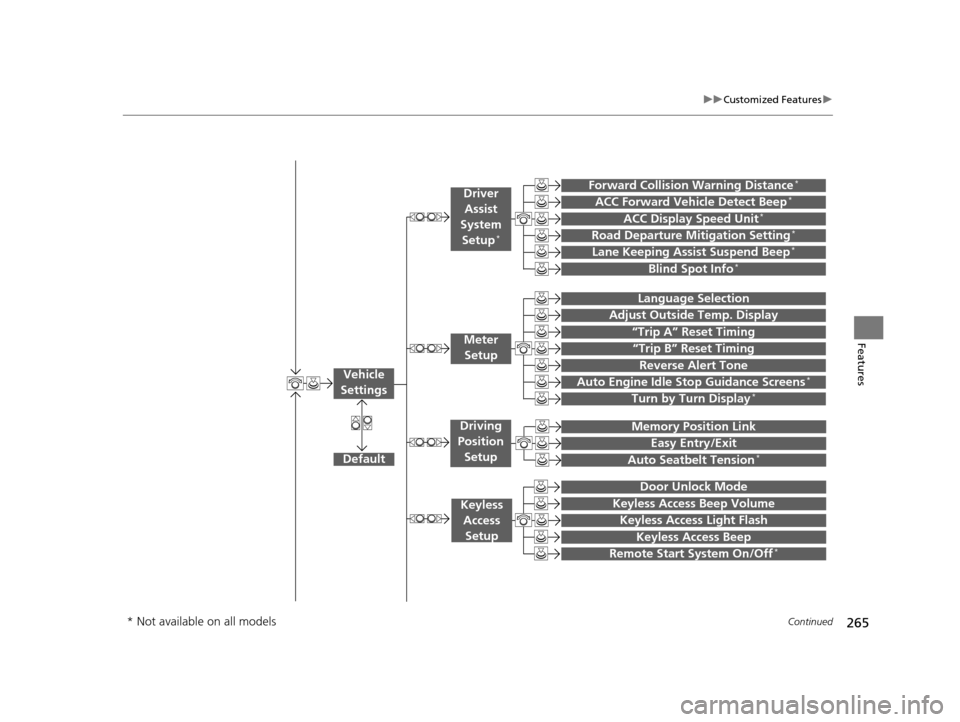
265
uuCustomized Features u
Continued
Features“Trip B” Reset Timing
Turn by Turn Display*
Adjust Outside Temp. Display
“Trip A” Reset Timing
Default
Memory Position Link
Keyless Access Light Flash
Keyless Access Beep
Meter
Setup
Keyless Access Setup
Remote Start System On/Off*
Easy Entry/Exit
Driving
Position Setup
Door Unlock Mode
Lane Keeping Assist Suspend Beep*
Blind Spot Info*
ACC Forward Vehicle Detect Beep*
ACC Display Speed Unit*
Driver
Assist
System Setup
*
Forward Collision Warning Distance*
Language Selection
Auto Seatbelt Tension*
Keyless Access Beep Volume
Reverse Alert Tone
Auto Engine Idle Stop Guidance Screens*
Road Departure Mitigation Setting*
Vehicle
Settings
* Not available on all models
16 ACURA MDX-31TZ56200.book 265 ページ 2015年3月4日 水曜日 午後2時59分
Page 272 of 557

271
uuCustomized Features u
Continued
Features
*1:Default SettingSetup
Group Customizable Features Description Selectable Settings
Vehicle
Settings Driver
Assist
System
Setup
*
Forward Collision Warning
Distance*Changes at which distance FCW* or CMBSTM *
alerts, or turns FCW* on and off. Long
/Normal
*1/
Short/ Off
ACC Forward Vehicle
Detect Beep
*
Causes the system to beep when the system
detects a vehicle, or when the vehicle goes out of
the ACC with LSF range. On
/Off*1
ACC Display Speed Unit*Changes the speed unit for ACC with LSF on the
multi-information display (MID). mph*1/
km/h (U.S.)
mph /km/h*1 (Canada)
Road Departure Mitigation
Setting
*Changes the setting for the road departure
mitigation system. Normal*1/
Wide /
Warning Only
Lane Keeping Assist
Suspend Beep
*Causes the system to be ep when the LKAS is
suspended. On
/Off*1
Blind Spot Info*Changes the setting for the blind spot
information. Audible And Visual
Alert*1/
Visual Alert /
Off
* Not available on all models
16 ACURA MDX-31TZ56200.book 271 ページ 2015年3月4日 水曜日 午後2時59分
Page 322 of 557
321
Driving
This chapter discusses driving, refueling, and information on items such as accessories.
Before Driving................................... 322
Towing a Trailer ................................ 327
Off-Highway Driving Guidelines ..... 338
When Driving Starting the Engine .......................... 340
Automatic Transmission ................... 346
Shifting ............................................ 347
Auto Idle Stop
*................................ 355
Integrated Dynamics System (IDS)..... 359
Cruise Control
*................................ 360
Front Sensor Camera*...................... 363Adaptive Cruise Control (ACC) with Low
Speed Follow (LSF)*............................ 365Forward Collision Warning (FCW) with Pedestrian Detection*.................... 379 Lane Departure Warning (LDW)
*..... 385Road Departure Mitigation (RDM)
System*..................................... 389Lane Keeping Assist System (LKAS)*.. 394Vehicle Stability Assist (VSA ®), aka Electronic
Stability Control (ESC), System ............. 402
Agile Handling Assist System............ 404
Blind Spot Information (BSI) System*... 405
Super Handling-All Wheel DriveTM (SH-
AWD® )*......................................... 407Tire Pressure Monitoring System (TPMS) ... 408Tire Pressure Monitoring System (TPMS) -
Required Federal Explanation ......... 410
Braking Brake System ................................... 412 Anti-lock Brake System (ABS) ........... 414
Brake Assist System ......................... 415
Collision Mitigation Braking System
TM
(CMBSTM)*..................................... 416
Parking Your Vehicle When Stopped ................................ 425
Parking Sensor System
*................... 426
Cross Traffic Monitor*..................... 430
Multi-View Rear Camera*................ 434
Refueling Fuel Information .............................. 435
How to Refuel ................................. 436
Fuel Economy .................................... 437
Accessories and Modifications ........ 438
* Not available on all models
16 ACURA MDX-31TZ56200.book 321 ページ 2015年3月4日 水曜日 午後2時59分
Page 323 of 557
322
Driving
Before Driving
Driving Preparation
Check the following items before you start driving.
• Make sure there are no obstructions on th e windows, door mirrors, exterior
lights, or other parts of the vehicle.
u Remove any frost, snow, or ice.
u Remove any snow on the roof, as this can slip down and obstruct your field of
vision while driving. If frozen solid , remove ice once it has softened.
u When removing ice from around the wheel s, be sure not to damage the wheel
or wheel components.
• Make sure the hood is securely closed.
u If the hood opens while driving, your front view will be blocked.
• Make sure the tires are in good condition.
u Check air pressure, check for damage and excessive wear.
2 Checking and Maintaining Tires P. 469
•Make sure there are no people or ob jects behind or around the vehicle.
u There are blind spots from the inside.
■Exterior Checks1Exterior Checks
NOTICE
When doors are frozen s hut, use warm water around
the door edges to melt any ice. Do not try to force
them open, as this can damage the rubber trim
around the doors. When done, wipe dry to avoid
further freezing.
Do not pour warm water into the key cylinder.
You will be unable to insert the key if the water
freezes in the hole.
Heat from the engine and exhaust can ignite
flammable material s left under the hood, causing a
fire. If you’ve parked y our vehicle for an extended
period, inspect and remove any debris that may have
collected, such as dried grass and leaves that have
fallen or have been carried in for use as a nest by a
small animal.
Also check under the hood fo r leftover flammable
materials after you or so meone else has performed
maintenance on your vehicle.
16 ACURA MDX-31TZ56200.book 322 ページ 2015年3月4日 水曜日 午後2時59分
Page 335 of 557
334
uuTowing a Trailer uTowing Preparation
Driving
■Safety chains
Always use safety chains when you tow a trailer. Leave enough slack to allow the
trailer to turn corners easily, but do not allow the chains to drag on the ground.
■Sway control
This device can be used if your trailer te nds to sway. Your trailer maker can tell you
what kind of sway control you need and how to install it. Improper installation could
degrade the handling and stability of your vehicle.
■Trailer mirrors
Many states, provinces and te rritories require special exterior mirrors when towing a
trailer. Install special mirrors whenever you cannot clearly see behind you, or if the
trailer creates a blind spot.
■Front Towing Grille
An Accessory Front Towing Grille is requir ed whenever a trailer is towed. You can
get the accessory grille at a dealer.
■Automatic transmission cooler
An additional ATF (automatic transmission fluid) cooler is required to keep the
transmission from overheating when towing more than 3,500 lbs (1,588 kg). You
can get the additional ATF cooler at a dealer.
4WD models
16 ACURA MDX-31TZ56200.book 334 ページ 2015年3月4日 水曜日 午後2時59分
Page 406 of 557
405
uuWhen Driving uBlind Spot Information (BSI) System*
Continued
Driving
Blind Spot Information (BSI) System*
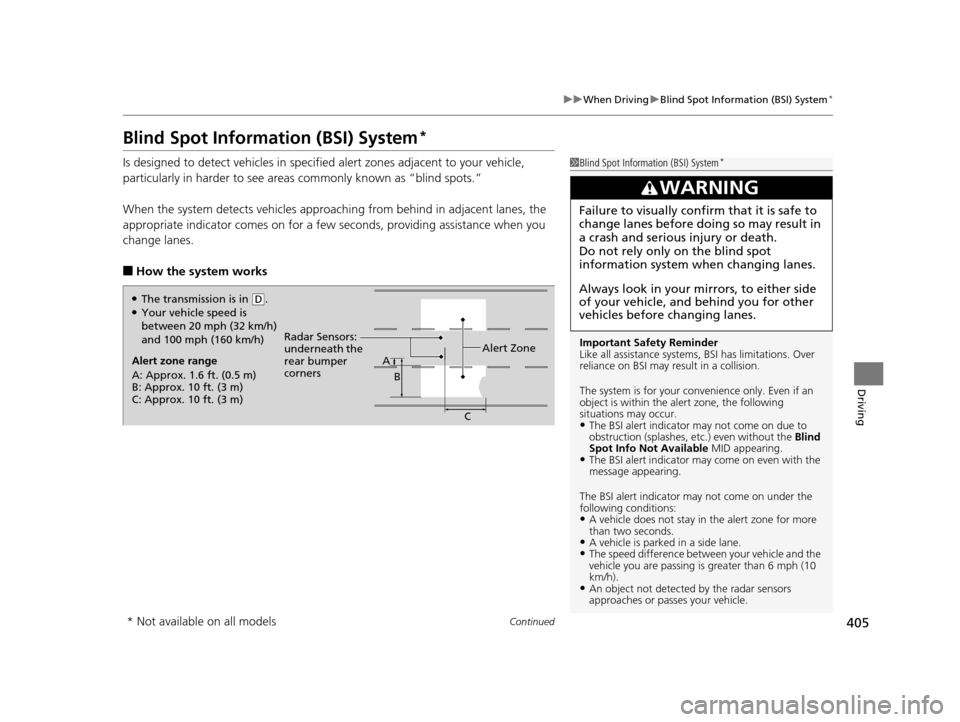
Is designed to detect vehicles in specified alert zones adjacent to your vehicle,
particularly in harder to see areas commonly known as “blind spots.”
When the system detects vehicles approach ing from behind in adjacent lanes, the
appropriate indicator comes on for a few seconds, providing assistance when you
change lanes.
■How the system works
1 Blind Spot Inform ation (BSI) System*
Important Safety Reminder
Like all assistance systems, BSI has limitations. Over
reliance on BSI may re sult in a collision.
The system is for your convenience only. Even if an
object is within the alert zone, the following
situations may occur.
•The BSI alert indicator may not come on due to
obstruction (splashes, et c.) even without the Blind
Spot Info Not Available MID appearing.
•The BSI alert indicator may come on even with the
message appearing.
The BSI alert i ndicator may not come on under the
following conditions:
•A vehicle does not stay in the alert zone for more
than two seconds.
•A vehicle is parked in a side lane.•The speed difference betw een your vehicle and the
vehicle you are passing is greater than 6 mph (10
km/h).
•An object not detected by the radar sensors
approaches or passes your vehicle.
3WARNING
Failure to visually confirm that it is safe to
change lanes before doing so may result in
a crash and serious injury or death.
Do not rely only on the blind spot
information system wh en changing lanes.
Always look in your mirrors, to either side
of your vehicle, and behind you for other
vehicles before changing lanes.
Alert zone range
A: Approx. 1.6 ft. (0.5 m)
B: Approx. 10 ft. (3 m)
C: Approx. 10 ft. (3 m) Radar Sensors:
underneath the
rear bumper
corners
Alert ZoneA
B
C
●The transmission is in (D.●Your vehicle speed is
between 20 mph (32 km/h)
and 100 mph (160 km/h)
* Not available on all models
16 ACURA MDX-31TZ56200.book 405 ページ 2015年3月4日 水曜日 午後2時59分