Surround Acura MDX 2016 Owner's Manual
[x] Cancel search | Manufacturer: ACURA, Model Year: 2016, Model line: MDX, Model: Acura MDX 2016Pages: 557, PDF Size: 31.09 MB
Page 5 of 557
4
Quick Reference Guide
Quick Reference Guide
Visual Index
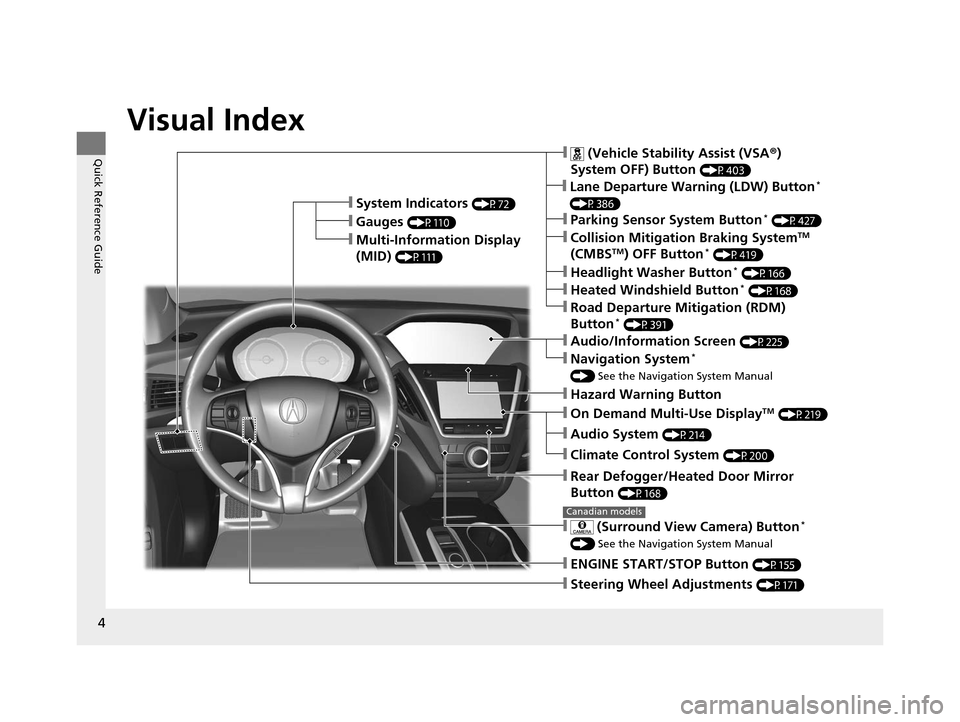
❙Steering Wheel Adjustments (P171)
❙ENGINE START/STOP Button (P155)
❙Navigation System*
() See the Navigation System Manual
❙Audio/Information Screen (P225)
❙Hazard Warning Button
❙On Demand Multi-Use DisplayTM (P219)
❙Audio System (P214)
❙System Indicators (P72)
❙Gauges (P110)
❙Multi-Information Display
(MID)
(P111)
❙Climate Control System (P200)
❙Rear Defogger/Heated Door Mirror
Button
(P168)
❙ (Vehicle Stability Assist (VSA ®)
System OFF) Button
(P403)
❙Parking Sensor System Button* (P427)
❙Collision Mitigation Braking SystemTM
(CMBSTM) OFF Button* (P419)
❙Headlight Washer Button* (P166)
❙ (Surround View Camera) Button*
() See the Navigation System Manual
Canadian models
❙Heated Windshield Button* (P168)
❙Road Departure Mitigation (RDM)
Button* (P391)
❙Lane Departure Warning (LDW) Button*
(P386)
16 ACURA MDX-31TZ56200.book 4 ページ 2015年3月4日 水曜日 午後2時59分
Page 132 of 557
131
uuLocking and Unlocking the Doors uLocking/Unlocking the Doors from the Outside
Continued
Controls
Locking/Unlocking the Doors from the Outside
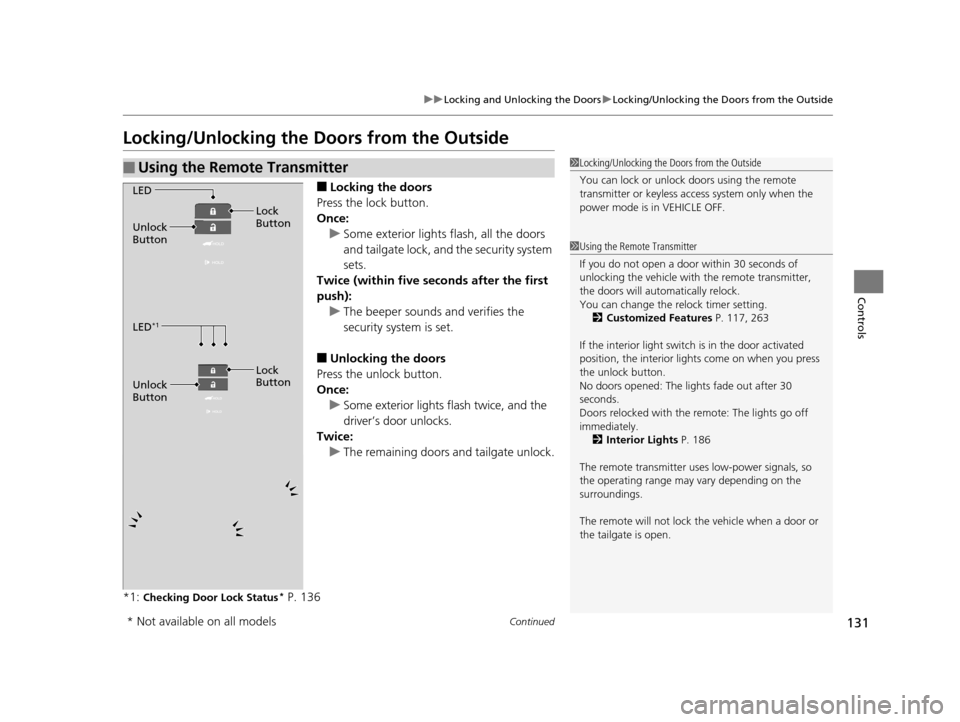
■Locking the doors
Press the lock button.
Once: u Some exterior lights flash, all the doors
and tailgate lock, and the security system
sets.
Twice (within five se conds after the first
push): u The beeper sounds and verifies the
security system is set.
■Unlocking the doors
Press the unlock button.
Once: u Some exterior lights flash twice, and the
driver’s door unlocks.
Twice: u The remaining doors and tailgate unlock.
*1:
Checking Door Lock Status* P. 136
■Using the Remote Transmitter1 Locking/Unlocking the Doors from the Outside
You can lock or unlock doors using the remote
transmitter or keyless access system only when the
power mode is in VEHICLE OFF.
1Using the Remote Transmitter
If you do not open a door within 30 seconds of
unlocking the vehicle with the remote transmitter,
the doors will auto matically relock.
You can change the relock timer setting.
2 Customized Features P. 117, 263
If the interior light switch is in the door activated
position, the interior light s come on when you press
the unlock button.
No doors opened: The li ghts fade out after 30
seconds.
Doors relocked with the remote: The lights go off
immediately. 2 Interior Lights P. 186
The remote transmitter us es low-power signals, so
the operating range may vary depending on the
surroundings.
The remote will not lock th e vehicle when a door or
the tailgate is open.
LED
Unlock
Button Lock
Button
LED
*1
Unlock
Button Lock
Button
* Not available on all models
16 ACURA MDX-31TZ56200.book 131 ページ 2015年3月4日 水曜日 午後2時59分
Page 385 of 557
384
uuWhen Driving uForward Collision Warning (FCW ) with Pedestrian Detection*
Driving
■Detection limitations
• A vehicle or pedestrian suddenly crosses in front of you.
• The distance between your vehicle and the vehicle or pedestrian ahead of you is
too short.
• A vehicle cuts in front of you at a slow speed, and it brakes suddenly.
• When you accelerate rapidly and approach the vehicle or pedestrian ahead of you
at high speed.
• The vehicle ahead of you is a motorcycle, bicycle, mobility scooter or other small
vehicle.
• When there are animals in front of your vehicle.
• When you drive on a curved winding or undulating road th at makes it difficult for
the sensor to properly detect a vehicle in front of you.
• The speed difference between your vehicl e and a vehicle in front of you is
significantly large.
■Limitations pedestrians only
• When there is a group of people in front of your vehicle walking together side by
side.
• Surrounding conditions or belongings of the pedestrian alter the pedestrian’s
shape, preventing the system from recogn izing that the person is a pedestrian.
• When the pedestrian is squatting.
• When the pedestrian is shorter than about 3.3 feet (1 meter) or taller than about
6.6 feet (2 meters) in height.
16 ACURA MDX-31TZ56200.book 384 ページ 2015年3月4日 水曜日 午後2時59分
Page 433 of 557

uuParking Your Vehicle uCross Traffic Monitor*
432
Driving
An arrow icon appears on the side a vehicle is approaching on the audio/information
screen.
■When the System Detects a Vehicle1When the System Detects a Vehicle
If the on the lower right changes to when the
transmission is in
(R, mud snow or ice may have
accumulated in the vicinity of the sensor. Check the
bumper corners for any obs tructions, and thoroughly
clean the area if necessary.
If the comes on when the transmission is in
( R,
there may be a problem with the Cross Traffic
Monitor system. Do not use the system and have your
vehicle checked by a dealer.
Wide View
Normal View Arrow Icon
Models with multi-view rear camera system
Top Down View
Rear Normal View
Rear Wide View
Rear Ground View Arrow Icon
Models with surround view camera system
16 ACURA MDX-31TZ56200.book 432 ページ 2015年3月4日 水曜日 午後2時59分