transmission Acura MDX 2016 Owner's Manual
[x] Cancel search | Manufacturer: ACURA, Model Year: 2016, Model line: MDX, Model: Acura MDX 2016Pages: 557, PDF Size: 31.09 MB
Page 10 of 557
9
Quick Reference Guide
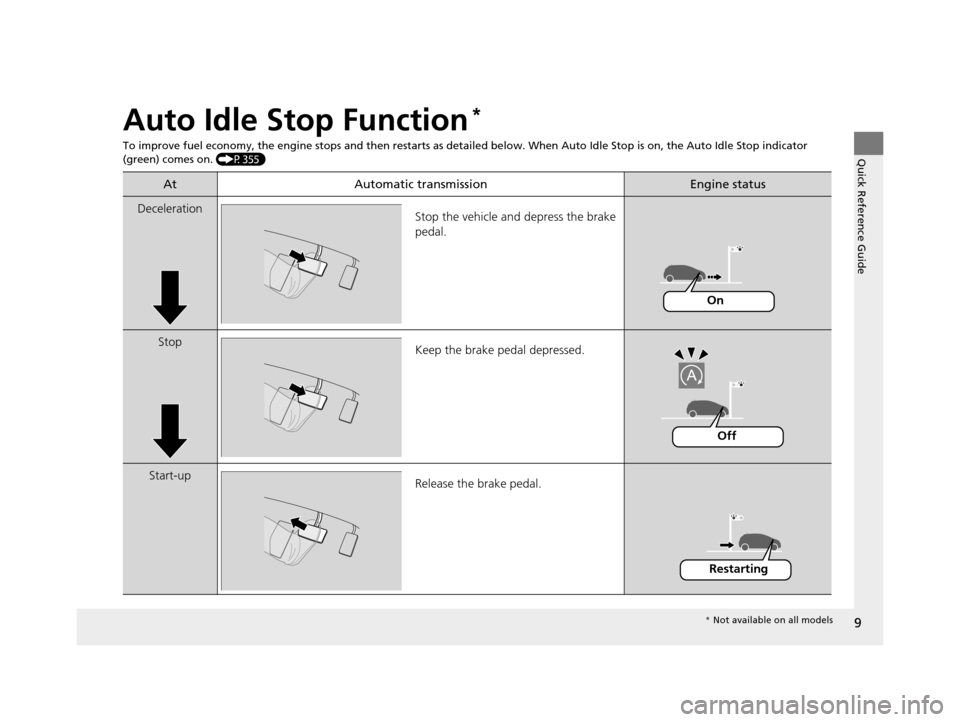
Auto Idle Stop Function*
To improve fuel economy, the engine stops and then restarts as detailed below. When Auto Idle Stop is on, the Auto Idle Stop in dicator
(green) comes on. (P355)
At Automatic transmissionEngine status
Deceleration
Stop the vehicle and depress the brake
pedal.
StopKeep the brake pedal depressed.
Start-up Release the brake pedal.
On
Off
Restarting
* Not available on all models
16 ACURA MDX-31TZ56200.book 9 ページ 2015年3月4日 水曜日 午後2時59分
Page 19 of 557
18
Quick Reference Guide
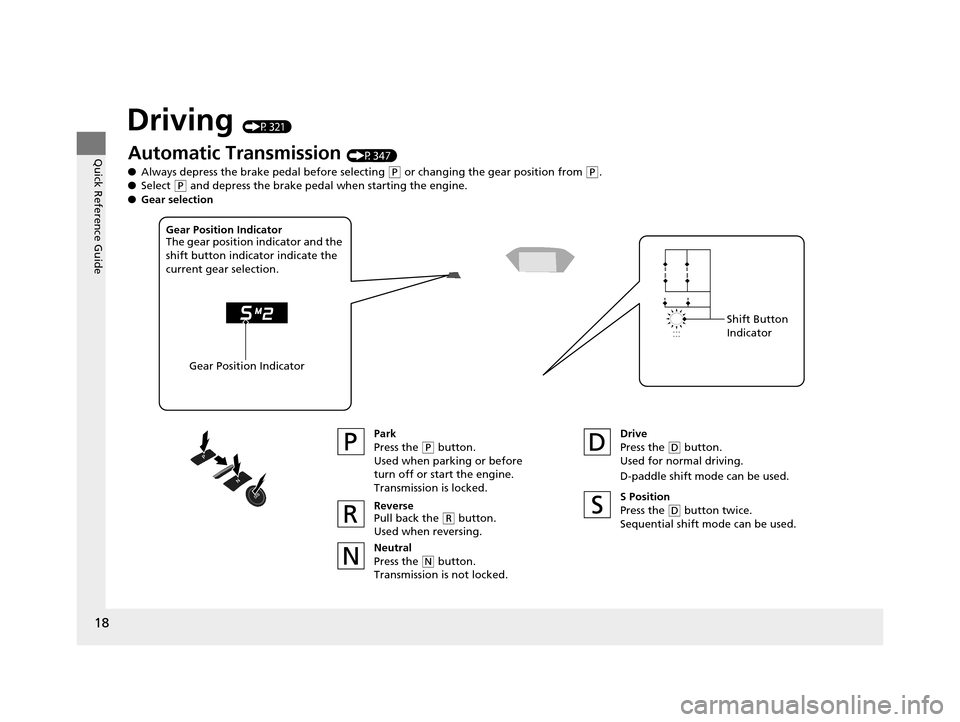
Driving (P321)
Automatic Transmission (P347)
● Always depress the brake pedal before selecting
(P or changing the gear position from (P.
● Select
(P and depress the brake pedal when starting the engine.
Park
Press the
(P button.
Used when parking or before
turn off or start the engine.
Transmission is locked.
Reverse
Pull back the
( R button.
Used when reversing.
Neutral
Press the
( N button.
Transmission is not locked. Drive
Press the
(
D button.
Used for normal driving.
D-paddle shift mode can be used.
Gear Position Indicator
The gear position indicator and the
shift button indicator indicate the
current gear selection.
Gear Position Indicator Shift Button
Indicator
●
Gear selection
S Position
Press the (D button twice.
Sequential shift mode can be used.
16 ACURA MDX-31TZ56200.book 18 ページ 2015年3月4日 水曜日 午後2時59分
Page 20 of 557
19
Quick Reference Guide
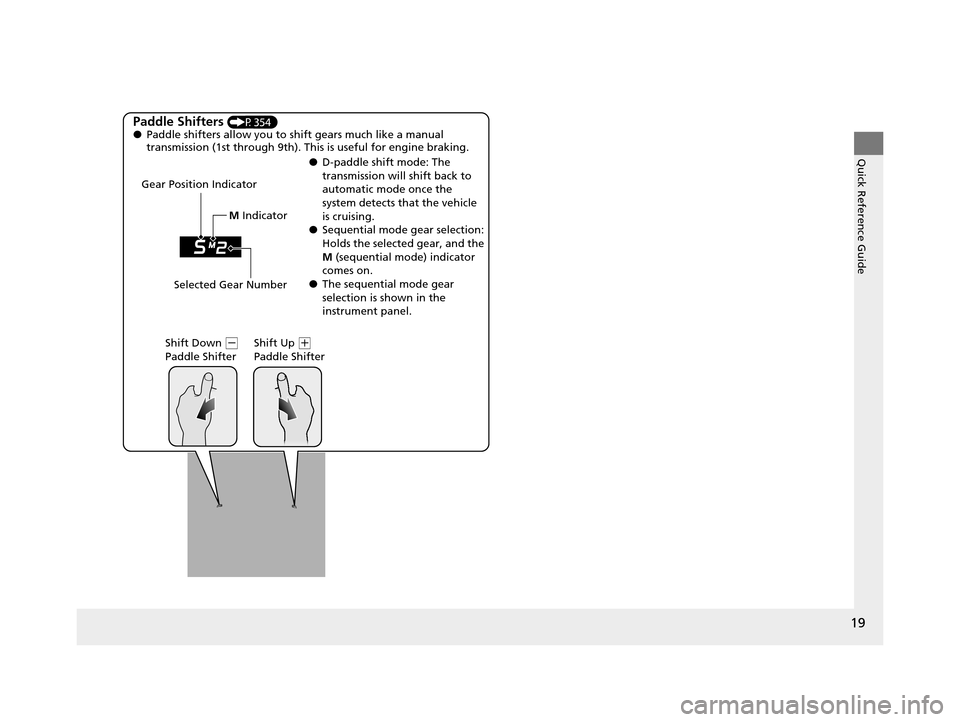
Paddle Shifters (P354)
● Paddle shifters allow you to shift gears much like a manual
transmission (1st through 9th). This is useful for engine braking.
● D-paddle shift mode: The
transmission will shift back to
automatic mode once the
system detects that the vehicle
is cruising.
● Sequential mode gear selection:
Holds the selected gear, and the
M (sequential mode) indicator
comes on.
● The sequential mode gear
selection is shown in the
instrument panel.
Gear Position Indicator
Shift Down
(-
Paddle Shifter Shift Up (
+
Paddle Shifter
Selected Gear Number M
Indicator
16 ACURA MDX-31TZ56200.book 19 ページ 2015年3月4日 水曜日 午後2時59分
Page 76 of 557
75
uuIndicators u
Continued
Instrument Panel
IndicatorNameOn/BlinkingExplanationMessage
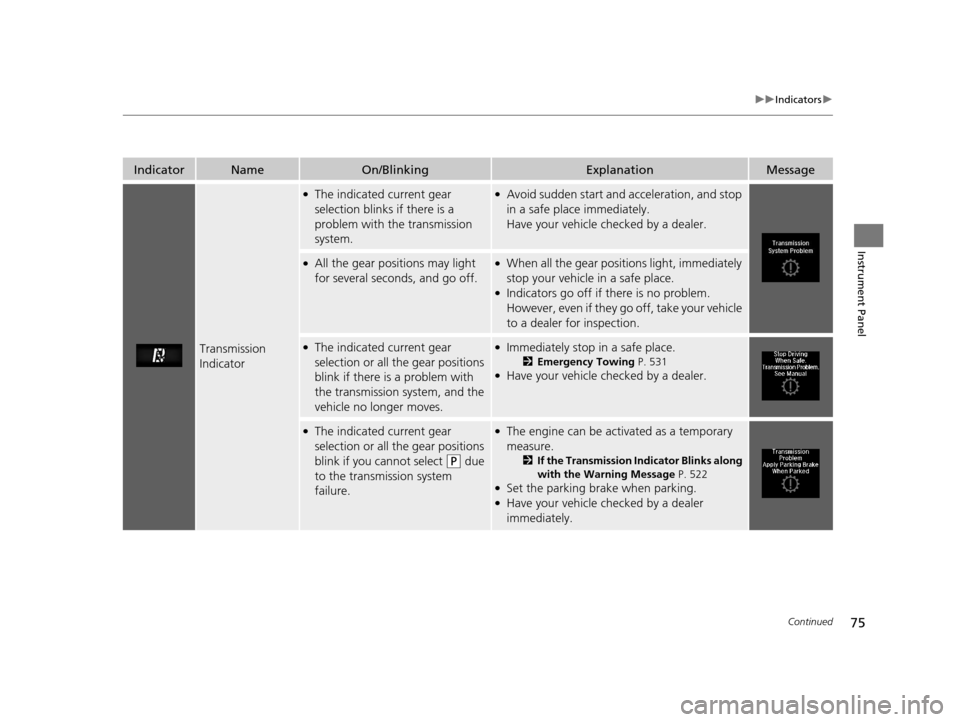
Transmission
Indicator
●The indicated current gear
selection blinks if there is a
problem with the transmission
system.●Avoid sudden start and acceleration, and stop
in a safe place immediately.
Have your vehicle checked by a dealer.
●All the gear positions may light
for several seconds, and go off.●When all the gear positions light, immediately
stop your vehicle in a safe place.
●Indicators go off if there is no problem.
However, even if they go off, take your vehicle
to a dealer for inspection.
●The indicated current gear
selection or all the gear positions
blink if there is a problem with
the transmission system, and the
vehicle no longer moves.●Immediately stop in a safe place.
2Emergency Towing P. 531●Have your vehicle checked by a dealer.
●The indicated current gear
selection or all the gear positions
blink if you cannot select
(P due
to the transmission system
failure.
●The engine can be activated as a temporary
measure.
2 If the Transmission Indicator Blinks along
with the Warning Message P. 522
●Set the parking brake when parking.●Have your vehicle checked by a dealer
immediately.
16 ACURA MDX-31TZ56200.book 75 ページ 2015年3月4日 水曜日 午後2時59分
Page 94 of 557

93
uuIndicators uMulti-Information Display (MID) Warning and Information Messages
Continued
Instrument Panel
MessageConditionExplanation
●Appears when the wa sher fluid is low.●Refill washer fluid.
2Refilling Window Washer Fluid P. 458
●Appears while you are customizing the settings and the
transmission is in other than
(P.2 Customized Features P. 117
●Appears when the transmission system temperature is
too high.●Stop in a safe place in (P.●Let the engine idle until the message disappears.
●Appears when the transmission system temperature is
too high. The vehicle does not operate properly.●You may find it difficult to accelerate, or to start the
vehicle on uphill.
●Immediately stop in a safe place in (P.●Let the engine idle until the message disappears.
●Appears when there is a problem with the sensor on the
battery.●Have your vehicle checked by a dealer.
2Checking the Battery P. 478
●Appears along with the battery charging system
indicator when the batte ry is not charging.●Turn off the climate control system and rear defogger to
reduce electricity consumption.
2If the Charging System Indicator Comes On P. 519
16 ACURA MDX-31TZ56200.book 93 ページ 2015年3月4日 水曜日 午後2時59分
Page 98 of 557
97
uuIndicators uMulti-Information Display (MID) Warning and Information Messages
Continued
Instrument Panel
MessageConditionExplanation
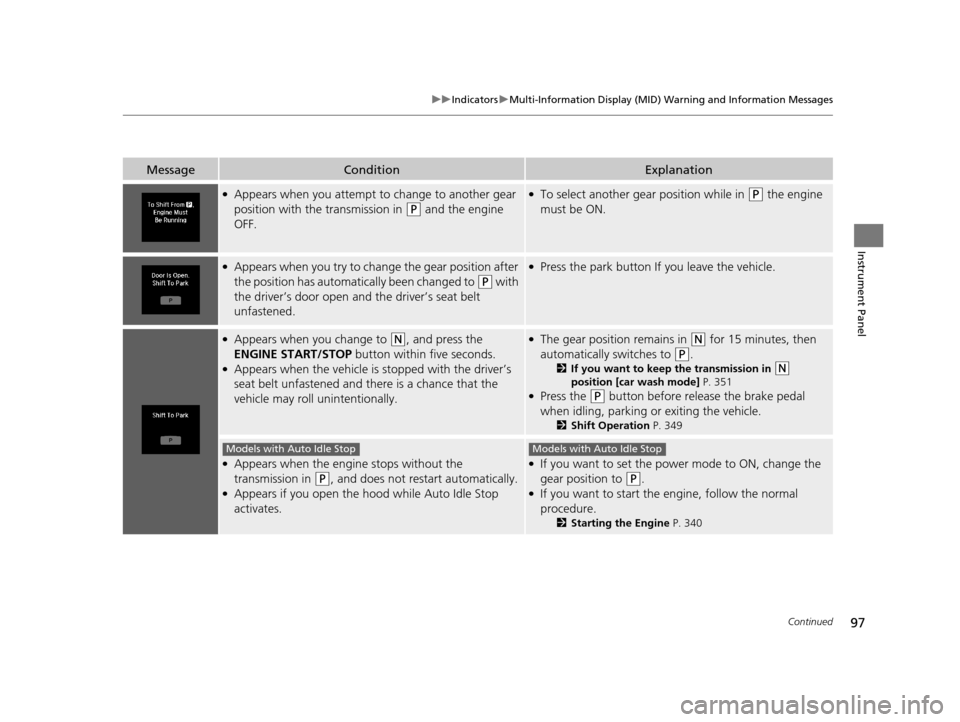
●Appears when you attempt to change to another gear
position with the transmission in
(P and the engine
OFF.
●To select another gear position while in (P the engine
must be ON.
●Appears when you try to change the gear position after
the position has automatically been changed to
(P with
the driver’s door open and the driver’s seat belt
unfastened.
●Press the park button If you leave the vehicle.
●Appears when you change to (N, and press the
ENGINE START/STOP button within five seconds.
●Appears when the vehicle is stopped with the driver’s
seat belt unfastened and there is a chance that the
vehicle may roll unintentionally.
●The gear position remains in (N for 15 minutes, then
automatically switches to
(P.
2 If you want to keep the transmission in (N
position [car wash mode] P. 351
●Press the (P button before release the brake pedal
when idling, parking or exiting the vehicle.
2 Shift Operation P. 349
●Appears when the engine stops without the
transmission in
(P, and does not restart automatically.●Appears if you open the hood while Auto Idle Stop
activates.
●If you want to set the power mode to ON, change the
gear position to
(P.●If you want to start the engine, follow the normal
procedure.
2Starting the Engine P. 340
Models with Auto Idle StopModels with Auto Idle Stop
16 ACURA MDX-31TZ56200.book 97 ページ 2015年3月4日 水曜日 午後2時59分
Page 103 of 557
102
uuIndicators uMulti-Information Display (MID) Warning and Information Messages
Instrument Panel
MessageConditionExplanation
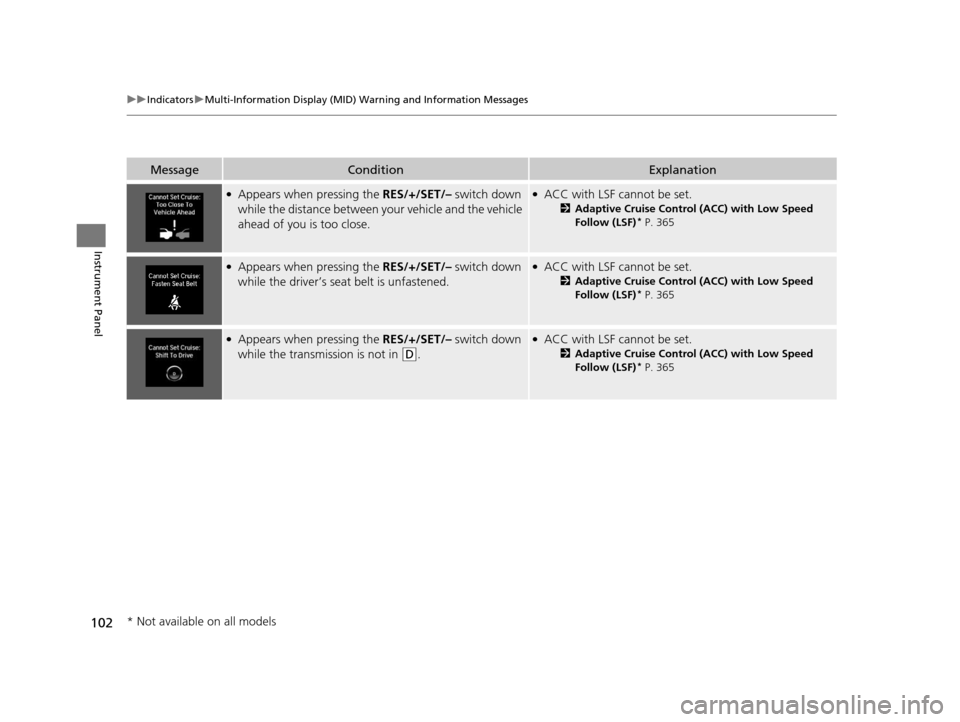
●Appears when pressing the RES/+/SET/– switch down
while the distance between y our vehicle and the vehicle
ahead of you is too close.●ACC with LSF cannot be set.
2 Adaptive Cruise Control (ACC) with Low Speed
Follow (LSF)* P. 365
●Appears when pressing the RES/+/SET/– switch down
while the driver’s seat belt is unfastened.●ACC with LSF cannot be set.
2 Adaptive Cruise Control (ACC) with Low Speed
Follow (LSF)* P. 365
●Appears when pressing the RES/+/SET/– switch down
while the transmission is not in
(D.
●ACC with LSF cannot be set.
2 Adaptive Cruise Control (ACC) with Low Speed
Follow (LSF)* P. 365
* Not available on all models
16 ACURA MDX-31TZ56200.book 102 ページ 2015年3月4日 水曜日 午後2時59分
Page 145 of 557
144
uuOpening and Closing the Tailgate uOpening/Closing the Power Tailgate
Controls
Opening/Closing the Power Tailgate
The power tailgate can be operated by pressing the power tailgate button on the
remote transmitter or driver's door, or pr essing the outer handle or button on the
tailgate.
■The power tailgate can be opened when:
• The tailgate is fully closed.
• The transmission is in
(P.
• Press and hold the tailgat e button on the remote transmitter for about one
second when the power mode is in VEHICLE OFF (LOCK).
u If you have changed the Keyless Open Mode setting to When Unlocked ,
you need to unlock the tailgate before you press the tailgate button to open it.
2Customized Features P. 117
■The power tailgate can be closed when:
• The tailgate is fully open.
• The transmission is in
(P.
• Press and hold the tailgat e button on the remote transmitter for about one
second when the power mode is in VEHICLE OFF (LOCK).
1Opening/Closing the Power Tailgate
NOTICE
Do not push or pull on the power tailgate when it is
being automatically opened or closed.
Forcibly opening or closing the power tailgate while
in operation can deform the tailgate frame.
The power tailgate may not open or close under the
following conditions:
•The vehicle is park ed on a steep hill.
•The vehicle is swayed in a strong wind.•The tailgate or the roof is covered with snow or ice.
If you close the power tail gate when all the doors are
locked, the power tailgate locks automatically.
If you replace the battery or the power tailgate fuse
while the tailgate is open, the power tailgate may be
disabled. The power tail gate resumes once you
manually close the tailgate.
Installing aftermarket com ponents other than Acura
genuine accessories on the power tailgate may
prevent it from fully opening or closing.
Make sure the power tailgate is fully open before you
get your luggage in and out.
Make sure the power tailgat e is fully closed before
you start the vehicle.
16 ACURA MDX-31TZ56200.book 144 ページ 2015年3月4日 水曜日 午後2時59分
Page 157 of 557
156
uuOperating the Switches Around the Steering Wheel uENGINE START/STOP Button
Controls
If you leave the vehicle for 30 to 60 minutes with the transmission in (P and the
power mode in ACCESSORY, the vehicle automa tically goes into the mode similar to
VEHICLE OFF (LOCK) to avoid the battery drain.
When in this mode:
The steering wheel does not lock.
You cannot lock or unlock doors with th e remote transmitter or the keyless access
system.
Press the ENGINE START/STOP button to switch the mode to VEHICLE OFF (LOCK).
If you open the driver’s doo r when the power mode is set to ACCESSORY, a warning
buzzer sounds.
■Automatic Power Off
■Power Mode Reminder
Canadian models
16 ACURA MDX-31TZ56200.book 156 ページ 2015年3月4日 水曜日 午後2時59分
Page 160 of 557
159
uuOperating the Switches Around the Steering Wheel uLight Switches
Continued
Controls
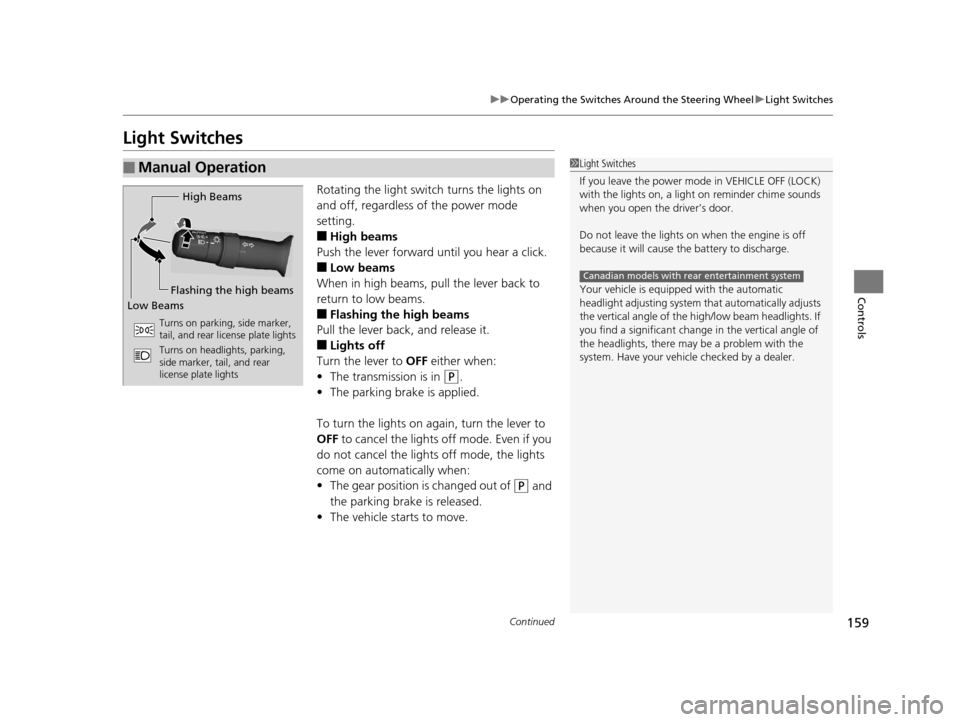
Light Switches
Rotating the light switch turns the lights on
and off, regardless of the power mode
setting.
■High beams
Push the lever forward until you hear a click.
■Low beams
When in high beams, pull the lever back to
return to low beams.
■Flashing the high beams
Pull the lever back, and release it.
■Lights off
Turn the lever to OFF either when:
• The transmission is in
(P.
• The parking brake is applied.
To turn the light s on again, turn the lever to
OFF to cancel the lights off mode. Even if you
do not cancel the lights off mode, the lights
come on automatically when:
• The gear position is changed out of
(P and
the parking brake is released.
• The vehicle starts to move.
■Manual Operation1Light Switches
If you leave the power mode in VEHICLE OFF (LOCK)
with the lights on, a light on reminder chime sounds
when you open the driver’s door.
Do not leave the lights on when the engine is off
because it will cause the battery to discharge.
Your vehicle is equipped with the automatic
headlight adjusting system that automatically adjusts
the vertical angle of the high/low beam headlights. If
you find a significant change in the vertical angle of
the headlights, there may be a problem with the
system. Have your vehicle checked by a dealer.
Canadian models with rear entertainment system
High Beams
Flashing the high beams
Low Beams
Turns on parking, side marker,
tail, and rear license plate lights
Turns on headlights, parking,
side marker, tail, and rear
license plate lights
16 ACURA MDX-31TZ56200.book 159 ページ 2015年3月4日 水曜日 午後2時59分