dvd Acura MDX 2017 Navigation Manual
[x] Cancel search | Manufacturer: ACURA, Model Year: 2017, Model line: MDX, Model: Acura MDX 2017Pages: 369, PDF Size: 29.59 MB
Page 16 of 369
15
Quick Reference GuideRear Entertainment System (P277)
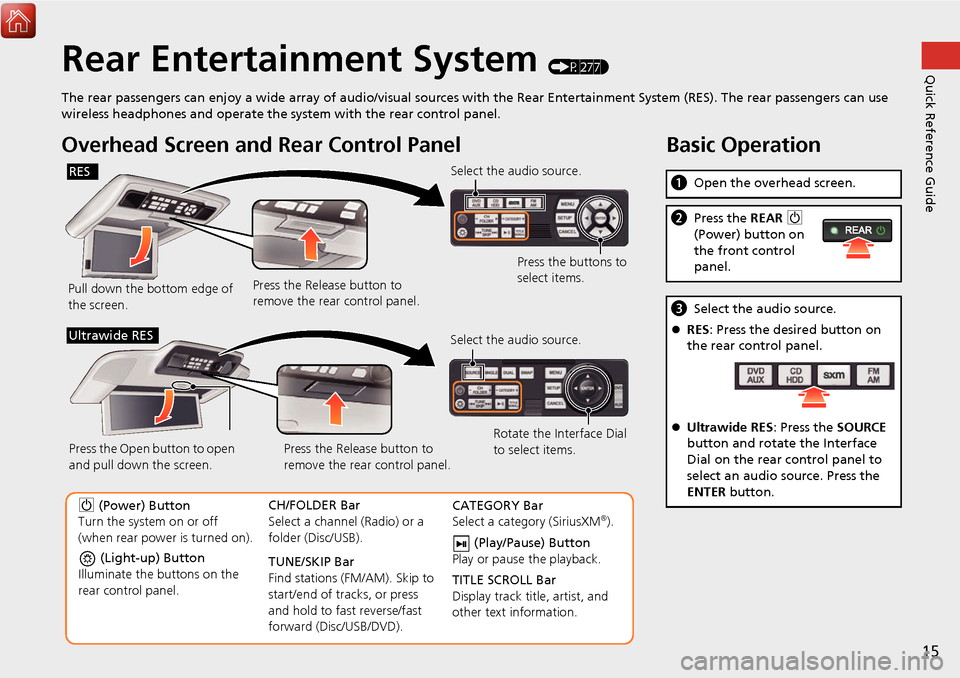
The rear passengers can enjoy a wide array of audio/visual sources with the Rear Entertainment System (RES). The rear passengers can use
wireless headphones and operate the system with the rear control panel.
Overhead Screen and Rear Control Panel
Pull down the bottom edge of
the screen. Select the audio source.
Press the buttons to
select items.
Press the Release button to
remove the rear control panel.
RES
(Light-up) Button
Illuminate the buttons on the
rear control panel.
9 (Power) Button
Turn the system on or off
(when rear power is turned on). CH/FOLDER Bar
Select a channel (Radio) or a
folder (Disc/USB).
TUNE/SKIP Bar
Find stations (FM/AM). Skip to
start/end of tracks, or press
and hold to fast reverse/fast
forward (Disc/USB/DVD).CATEGORY Bar
Select a category (SiriusXM®).
(Play/Pause) Button
Play or pause the playback.
TITLE SCROLL Bar
Display track title, artist, and
other text information.
Select the audio source.
Rotate the Interface Dial
to select items.
Press the Release button to
remove the rear control panel.
Press the Open button to open
and pull down the screen.
Ultrawide RES
Basic Operation
a
Open the overhead screen.
bPress the REAR 9
(Power) button on
the front control
panel.
c Select the audio source.
RES : Press the desired button on
the rear control panel.
Ultrawide RES : Press the SOURCE
button and rotate the Interface
Dial on the rear control panel to
select an audio source. Press the
ENTER button.
Page 143 of 369
142
Audio
Audio System
About Your Audio System
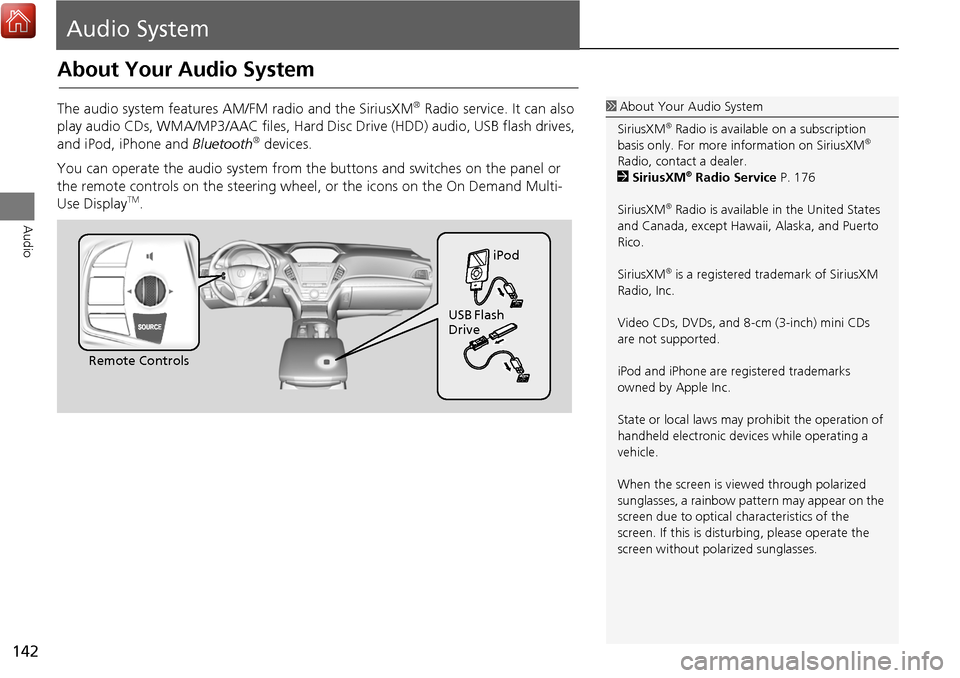
The audio system features AM/FM radio and the SiriusXM® Radio service. It can also
play audio CDs, WMA/MP3/AAC fi les, Hard Disc Drive (HDD) audio, USB flash drives,
and iPod, iPhone and Bluetooth
® devices.
You can operate the audio system from the buttons and switches on the panel or
the remote controls on the steering wheel, or the icons on the On Demand Multi-
Use Display
TM.
1 About Your Audio System
SiriusXM
® Radio is available on a subscription
basis only. For more information on SiriusXM®
Radio, contact a dealer.
2 SiriusXM
® Radio Service P. 176
SiriusXM
® Radio is available in the United States
and Canada, except Hawa ii, Alaska, and Puerto
Rico.
SiriusXM
® is a registered trademark of SiriusXM
Radio, Inc.
Video CDs, DVDs, and 8-cm (3-inch) mini CDs
are not supported.
iPod and iPhone are registered trademarks
owned by Apple Inc.
State or local laws may prohibit the operation of
handheld electronic devices while operating a
vehicle.
When the screen is vi ewed through polarized
sunglasses, a rainbow pattern may appear on the
screen due to optical characteristics of the
screen. If this is distur bing, please operate the
screen without polarized sunglasses.
Remote Controls iPod
USB Flash
Drive
Page 152 of 369
151
Audio Settings
Audio
•Update Gracenote Album Info (CD or HDD mode): Updates the Gracenote®
Album Info (Gracenote® Media Database) from CD or from USB.
2
Updating Gracenote® Album Info P. 194
• Delete All HDD Data (HDD mode): Resets all the menu and customized settings,
and delete all music data on the HDD.
• Bluetooth Device List: Displays the Bluetooth
® device list.
• Connect Bluetooth Audio Device (Bluetooth
® Audio or Aha™ mode):
Connects, disconnects or pairs a Bluetooth® Audio device to HFL.
• DVD Auto Play (DVD mode): Turns the auto play feature on or off.
• Audio Language (DVD mode): Selects a language for the audio that is available
on the DVD.
• Subtitle Language (DVD mode): Selects a language for the subtitle that is
available on the DVD.
• Menu Language (DVD mode): Selects a language for the DVD menu that is
available on the DVD.
• Dynamic Range (DVD mode): Sets whether to control the range of the loud and
low sounds.
• Source Select Popup: Selects whether the list of selectable audio sources comes
on when the AUDIO button is pressed.
• Cover Art (CD (MP3/WMA/AAC), iPod , USB or Aha™ mode): Turns on and off
the cover art display.
• Default: Cancels/Resets all customized it ems in the Audio Settings group as
default.
Page 278 of 369
277
Rear Entertainment System
Rear seat passengers can enjoy a completely separate entertainment
source than front passengers, including movies, games, and other audio choices.
Rear Entertainment System..................278
Auxiliary Console Panel .........................278
HDMI
® Input Jack
(Ultrawide RES only) ............................279
Playable Discs ........................................280
Rear Control Panel Operation ...............281
Selecting the Audio Source ...................281
Rear DVD Menu ....................................282
Screen and Surround Settings ...............285
DVD Initial Settings (RES only) ...............288
Dual Screen Mode
(Ultrawide RES only) ............................289
Replacing the Batteries ..........................291 Front Control Panel Operation
............ 292
Selecting the Audio Source using front
control panel ...................................... 292
Rear System Setup ............................... 293
Setting the DVD Menu ......................... 294
Wireless Headphones ........................... 296
Using the Wireless Headphones ........... 296
Changing the Sound Source
(Ultrawide RES only) ........................... 297
Replacing the Batteries ......................... 298
Page 281 of 369
280
Rear Entertainment SystemPlayable Discs
Rear Entertainment System
Playable Discs
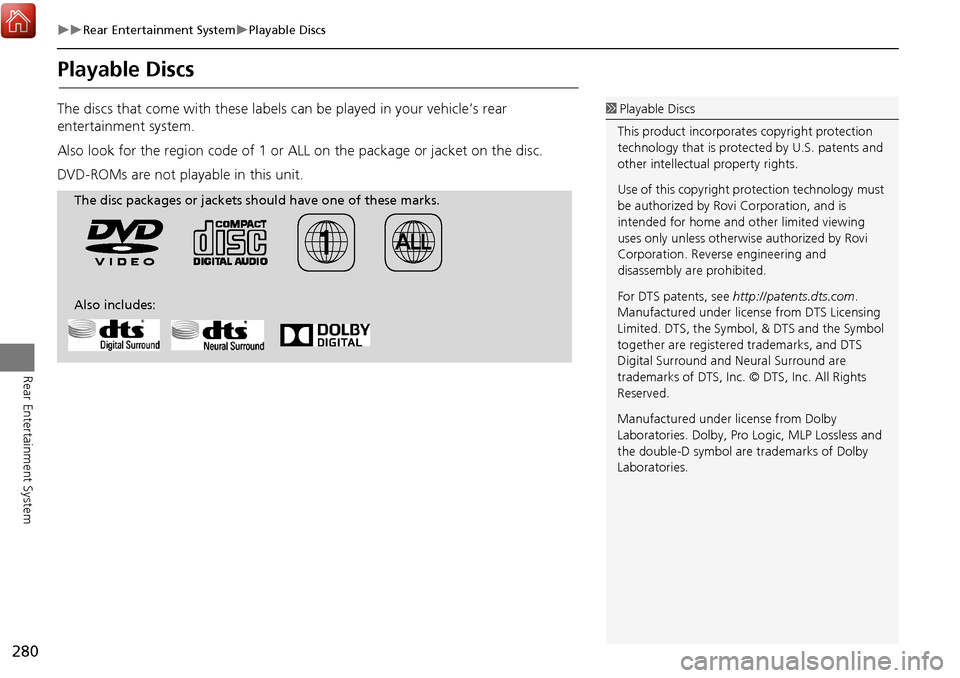
The discs that come with these labels can be played in your vehicle’s rear
entertainment system.
Also look for the region code of 1 or ALL on the package or jacket on the disc.
DVD-ROMs are not playable in this unit. 1 Playable Discs
This product incorporates copyright protection
technology that is protected by U.S. patents and
other intellectual property rights.
Use of this copyright pr otection technology must
be authorized by Rovi Corporation, and is
intended for home and other limited viewing
uses only unless otherwise authorized by Rovi
Corporation. Reverse engineering and
disassembly are prohibited.
For DTS patents, see http://patents.dts.com .
Manufactured under licens e from DTS Licensing
Limited. DTS, the Symbol, & DTS and the Symbol
together are registered trademarks, and DTS
Digital Surround and Neural Surround are
trademarks of DTS, Inc. © DTS, Inc. All Rights
Reserved.
Manufactured under license from Dolby
Laboratories. Dolby, Pro Logic, MLP Lossless and
the double-D symbol are trademarks of Dolby
Laboratories.
The disc packages or jackets should have one of these marks.
Also includes:
Page 283 of 369
282
Rear Control Panel OperationRear DVD Menu
Rear Entertainment System
Rear DVD Menu
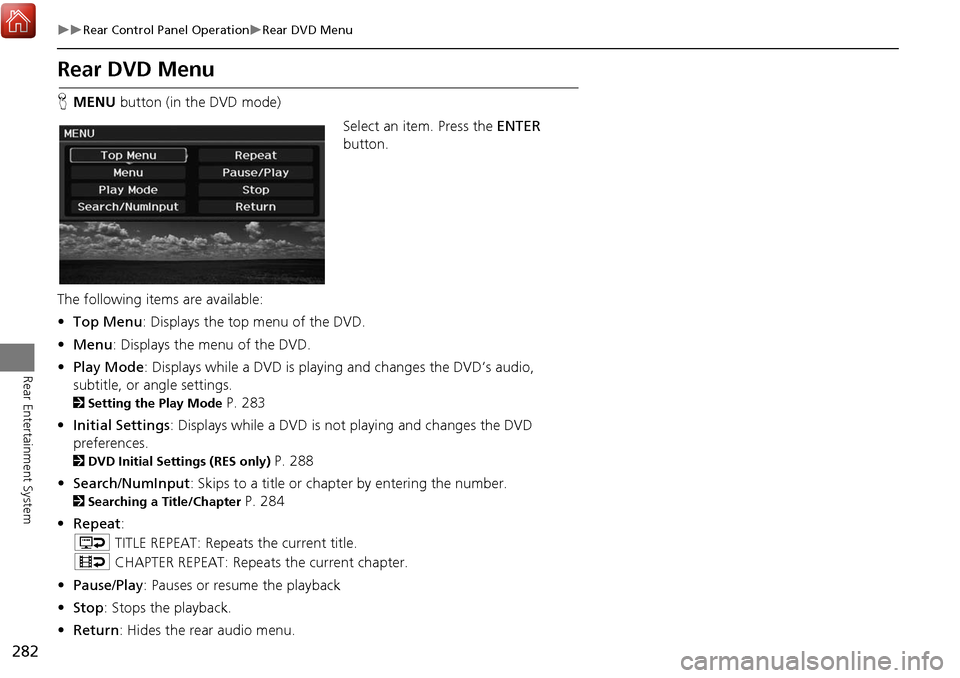
HMENU button (in the DVD mode)
Select an item. Press the ENTER
button.
The following item s are available:
• Top Menu : Displays the top menu of the DVD.
• Menu : Displays the menu of the DVD.
• Play Mode: Displays while a DVD is playing and changes the DVD’s audio,
subtitle, or angle settings.
2 Setting the Play Mode P. 283
• Initial Settings : Displays while a DVD is not playing and changes the DVD
preferences.
2 DVD Initial Settings (RES only) P. 288
• Search/NumInput : Skips to a title or chapter by entering the number.
2Searching a Title/Chapter P. 284
• Repeat :
o TITLE REPEAT: Repeats the current title.
p CHAPTER REPEAT: Repeats the current chapter.
• Pause/Play : Pauses or resume the playback
• Stop : Stops the playback.
• Return : Hides the rear audio menu.
Page 284 of 369
283
Rear Control Panel OperationRear DVD Menu
Rear Entertainment System
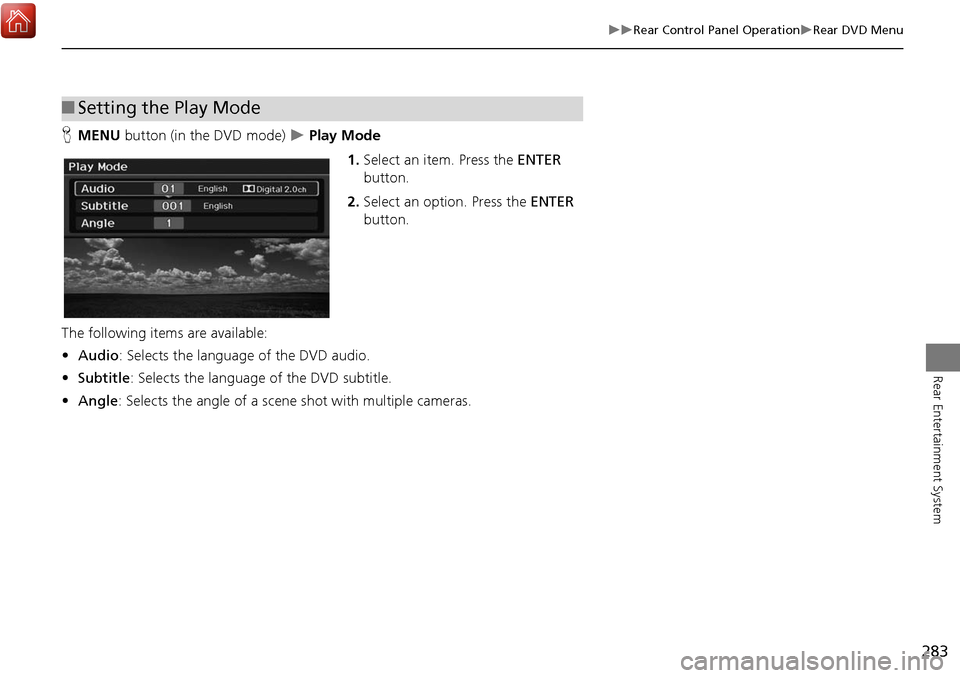
HMENU button (in the DVD mode) Play Mode
1.Select an item. Press the ENTER
button.
2. Select an option. Press the ENTER
button.
The following items are available:
• Audio : Selects the language of the DVD audio.
• Subtitle : Selects the language of the DVD subtitle.
• Angle : Selects the angle of a scene shot with multiple cameras.
■Setting the Play Mode
Page 285 of 369
284
Rear Control Panel OperationRear DVD Menu
Rear Entertainment System
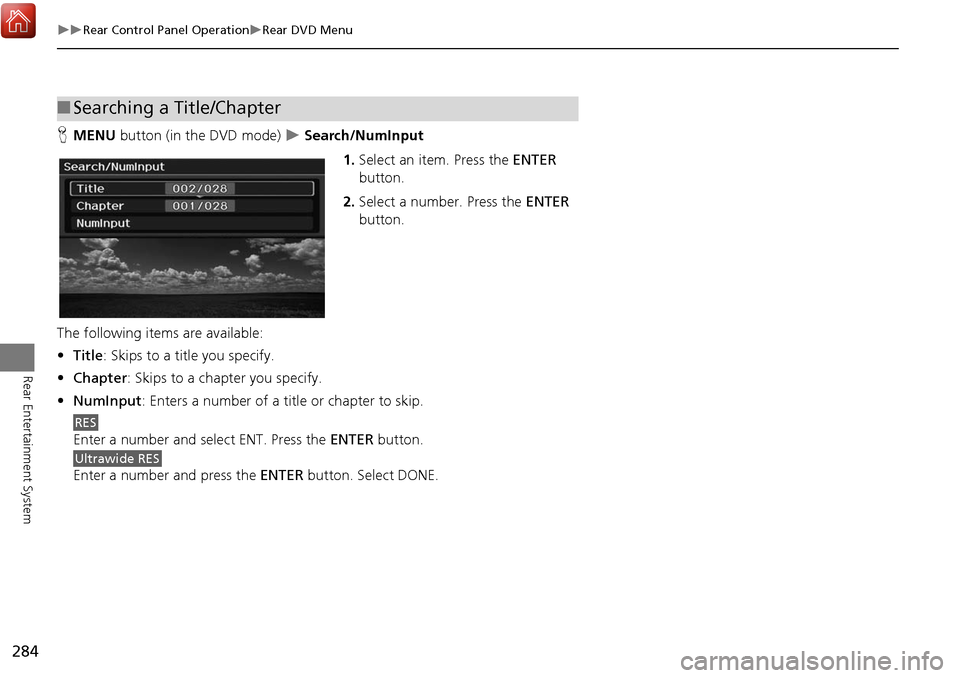
HMENU button (in the DVD mode) Search/NumInput
1.Select an item. Press the ENTER
button.
2. Select a number. Press the ENTER
button.
The following item s are available:
• Title : Skips to a title you specify.
• Chapter : Skips to a chap ter you specify.
• NumInput : Enters a number of a title or chapter to skip.
Enter a number and select ENT. Press the ENTER button.
Enter a number and press the ENTER button. Select DONE.
■Searching a Title/Chapter
RES
Ultrawide RES
Page 286 of 369
285
Rear Control Panel OperationScreen and Surround Settings
Rear Entertainment System
Screen and Surround Settings
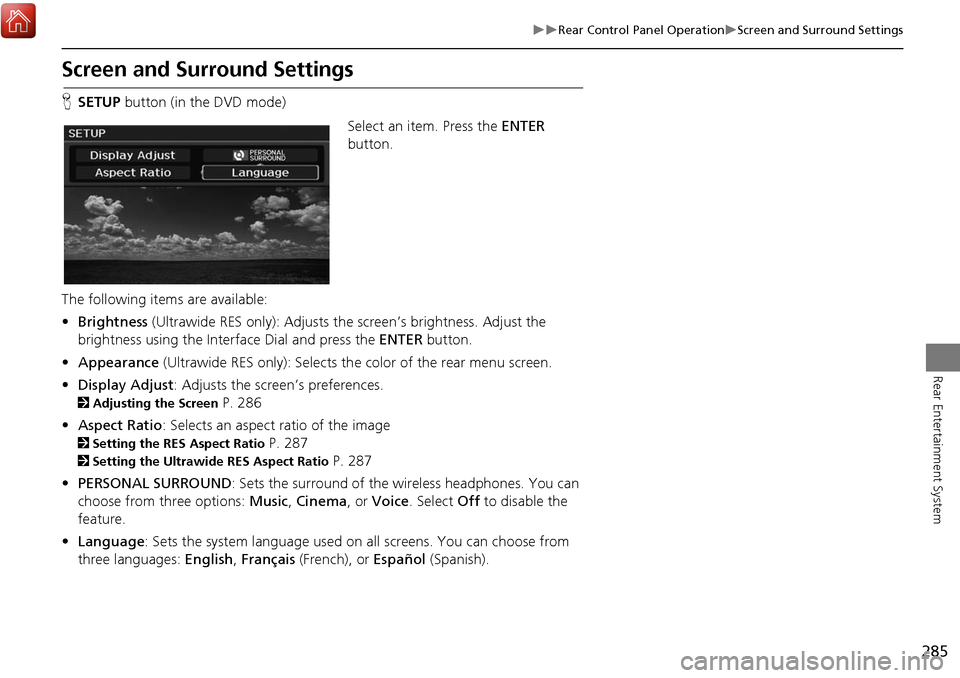
HSETUP button (in the DVD mode)
Select an item. Press the ENTER
button.
The following items are available:
• Brightness (Ultrawide RES only): Adjusts the screen’s brightness. Adjust the
brightness using the Interface Dial and press the ENTER button.
• Appearance (Ultrawide RES only): Selects th e color of the rear menu screen.
• Display Adjust : Adjusts the screen’s preferences.
2Adjusting the Screen P. 286
• Aspect Ratio: Selects an aspect ratio of the image
2 Setting the RES Aspect Ratio P. 287
2Setting the Ultrawide RES Aspect Ratio P. 287
• PERSONAL SURROUND : Sets the surround of the wireless headphones. You can
choose from three options: Music, Cinema , or Voice . Select Off to disable the
feature.
• Language : Sets the system language used on all screens. You can choose from
three languages: English, Français (French), or Español (Spanish).
Page 287 of 369
286
Rear Control Panel OperationScreen and Surround Settings
Rear Entertainment System
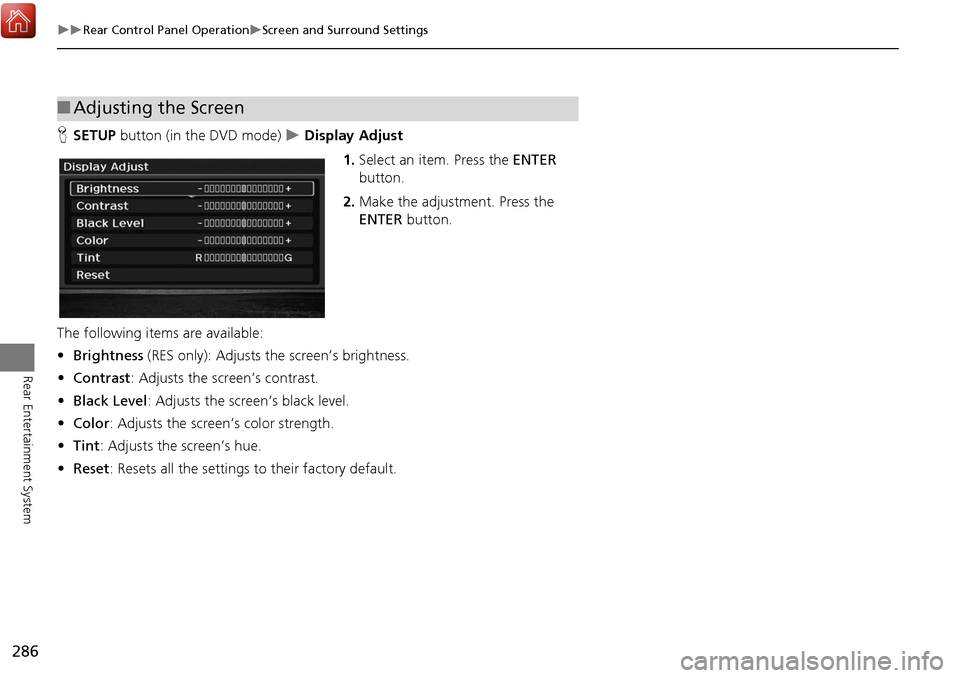
HSETUP button (in the DVD mode) Display Adjust
1.Select an item. Press the ENTER
button.
2. Make the adjustment. Press the
ENTER button.
The following item s are available:
• Brightness (RES only): Adjusts the screen’s brightness.
• Contrast : Adjusts the screen’s contrast.
• Black Level : Adjusts the screen’s black level.
• Color : Adjusts the screen’s color strength.
• Tint : Adjusts the screen’s hue.
• Reset: Resets all the settings to their factory default.
■Adjusting the Screen