wheel Acura MDX 2017 Owners Manual
[x] Cancel search | Manufacturer: ACURA, Model Year: 2017, Model line: MDX, Model: Acura MDX 2017Pages: 581, PDF Size: 32.65 MB
Page 446 of 581
445Continued
Driving
Parking Your Vehicle
When Stopped
1.Depress the brake pedal firmly.
2. With the brake pedal depressed, press th e electric parking brake switch slowly,
but fully.
3. Change the gear position to
(P.
4. Turn off the engine.
The electric parking brake indicato r goes off in about 15 seconds.
1Parking Your Vehicle
Do not park your vehicle near flammable objects,
such as dry grass, oil, or timber.
Heat from the exhaust can cause a fire.
1 When Stopped
NOTICE
The following can dama ge the transmission:
•Depressing the accelerator and brake pedals
simultaneously.
•Changing into ( P before the vehicle stops
completely.
In extremely cold temper atures, the parking brake
may freeze up if applied. If such temperatures are
expected, do not apply the parking brake but, if
parking on a slope, either turn the front wheels so
they will contact the curb if the vehicle rolls down the
slope or block the wheels to keep the vehicle from
moving. If you do not take either precaution, the
vehicle may roll unexpect edly, leading to a crash.
17 ACURA MDX-31TZ56300.book 445 ページ 2016年5月13日 金曜日 午後7時46分
Page 456 of 581
455
Driving
Multi-View Rear Camera*
About Your Multi-View Rear Camera
See the Navigation System Manual.
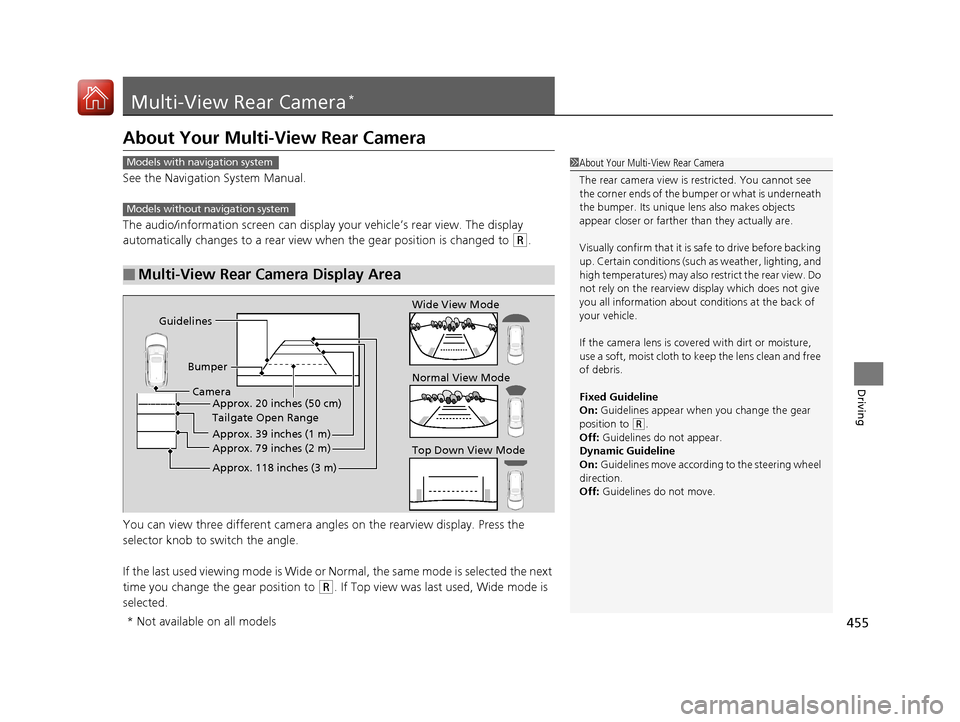
The audio/information screen can display your vehicle’s rear view. The display
automatically changes to a rear view when the gear position is changed to
(R.
You can view three differen t camera angles on the rearview display. Press the
selector knob to switch the angle.
If the last used viewing mode is Wide or Normal, the same mode is selected the next
time you change the gear position to
(R. If Top view was last used, Wide mode is
selected.
■Multi-View Rear Camera Display Area
1 About Your Multi-View Rear Camera
The rear camera view is restricted. You cannot see
the corner ends of the bum per or what is underneath
the bumper. Its unique le ns also makes objects
appear closer or farther than they actually are.
Visually confirm that it is safe to drive before backing
up. Certain conditions (such as weather, lighting, and
high temperatures) may also re strict the rear view. Do
not rely on the rearview display which does not give
you all information about conditions at the back of
your vehicle.
If the camera lens is cove red with dirt or moisture,
use a soft, moist cloth to keep the lens clean and free
of debris.
Fixed Guideline
On: Guidelines appear when you change the gear
position to
( R.
Off: Guidelines do not appear.
Dynamic Guideline
On: Guidelines move according to the steering wheel
direction.
Off: Guidelines do not move.
Models with navigation system
Models without navigation system
Guidelines
BumperCamera Approx. 20 inches (50 cm)
Tailgate Open Range
Approx. 39 inches (1 m)
Approx. 79 inches (2 m)
Approx. 118 inches (3 m)
Wide View Mode
Normal View Mode
Top Down View Mode
* Not available on all models
17 ACURA MDX-31TZ56300.book 455 ページ 2016年5月13日 金曜日 午後7時46分
Page 462 of 581
461
Maintenance
This chapter discusses basic maintenance.
Before Performing MaintenanceInspection and Maintenance ............ 462
Safety When Performing Maintenance ..463
Parts and Fluids Used in Maintenance Service...464Maintenance MinderTM..................... 465
Maintenance Under the Hood
Maintenance Items Under the Hood .. 469
Opening the Hood ........................... 470
Engine Compartment Cover ............. 471
Recommended Engine Oil ................ 472
Oil Check ......................................... 473
Adding Engine Oil ............................ 474
Changing the Engine Oil and Oil Filter ...475 Engine Coolant ................................ 477
Transmission Fluid ............................ 479
Brake Fluid ....................................... 480
Refilling Window Washer Fluid......... 480
Replacing Light Bulbs ....................... 481Checking and Maintaining Wiper Blades... 486Checking and Maintaining Tires
Checking Tires ................................. 490
Tire and Loading Information Label .. 491
Tire Labeling .................................... 491
DOT Tire Quality Grading (U.S. Vehicles).. 493Wear Indicators................................ 495
Tire Service Life ................................ 495 Tire and Wheel Replacement ........... 496
Tire Rotation .................................... 497
Winter Tires ..................................... 498
Battery ............................................... 499
Remote Transmitter Care Replacing the Button Battery ........... 501
Remote Control and Wireless Headphone Care
*........................... 503Climate Control System Maintenance.. 505Cleaning Interior Care .................................... 506
Exterior Care.................................... 508
Accessories and Modifications ........ 511
* Not available on all models
17 ACURA MDX-31TZ56300.book 461 ページ 2016年5月13日 金曜日 午後7時46分
Page 466 of 581

465Continued
Maintenance
Maintenance MinderTM
If the engine oil life is less than 15%, you will see the Maintenance Minder messages
appear the multi-informatio n display (MID) every time you set the power mode to
ON. The messages notify you when to change the engine oil, or when to bring your
vehicle to a dealer for indicated maintenance services.
To Use Maintenance MinderTM
Maintenance items, which should be serviced at the same time that you replace the
engine oil, app ear on the MID.
You can view them on the engine oil life screen at any time.
1. Set the power mode to ON.
2. Roll the multi-function steering-wheel contro ls until the engine oil life appears on
the MID.
■Displaying the Maintenance Minder Information1 Displaying the Maintena nce Minder Information
Based on the engine ope rating conditions, the
remaining engine oi l life is calculated and displayed
as a percentage.
There is a list of maintena nce main and sub items you
can view on the MID. 2 Maintenance Service Items P. 467
Displayed Engine Oil
Life (%)Calculated Engine Oil Life (%)
100 100 to 91
9090 to 81
80 80 to 71
7070 to 61
60 60 to 51
5050 to 41
40 40 to 31
3030 to 21
20 20 to 16
1515 to 11
10 10 to 6
55 to 1
00
Remaining Engine Oil Life
Maintenance Service Items
Multi-function
Steering-wheel
Controls
17 ACURA MDX-31TZ56300.book 465 ページ 2016年5月13日 金曜日 午後7時46分
Page 467 of 581
466
uuMaintenance MinderTMuTo Use Maintenance MinderTM
Maintenance
The system message indicator ( ) comes on along with the Maintenance Minder message.
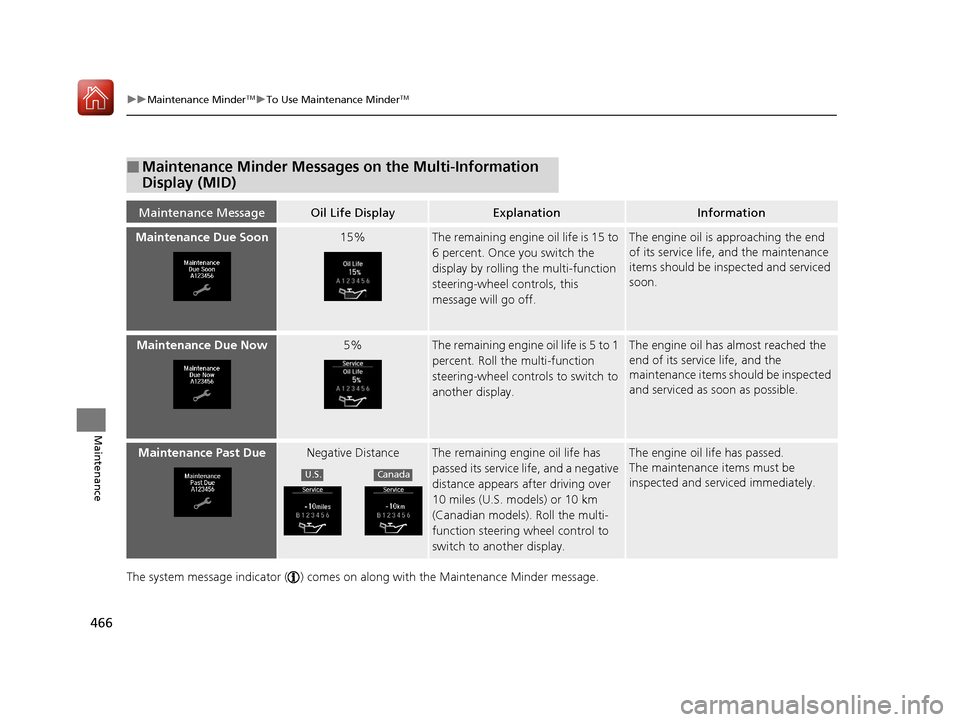
■Maintenance Minder Messages on the Multi-Information
Display (MID)
Maintenance MessageOil Life DisplayExplanationInformation
Maintenance Due Soon15%The remaining engine oil life is 15 to
6 percent. Once you switch the
display by rolling the multi-function
steering-wheel controls, this
message will go off.The engine oil is approaching the end
of its service life, and the maintenance
items should be inspected and serviced
soon.
Maintenance Due Now5%The remaining engine oil life is 5 to 1
percent. Roll the multi-function
steering-wheel controls to switch to
another display.The engine oil has almost reached the
end of its service life, and the
maintenance items should be inspected
and serviced as soon as possible.
Maintenance Past DueNegative DistanceThe remaining engi ne oil life has
passed its service life, and a negative
distance appears after driving over
10 miles (U.S. models) or 10 km
(Canadian models). Roll the multi-
function steering wheel control to
switch to another display.The engine oil life has passed.
The maintenance items must be
inspected and serviced immediately.
U.S.Canada
17 ACURA MDX-31TZ56300.book 466 ページ 2016年5月13日 金曜日 午後7時46分
Page 469 of 581
uuMaintenance MinderTMuTo Use Maintenance MinderTM
468
Maintenance
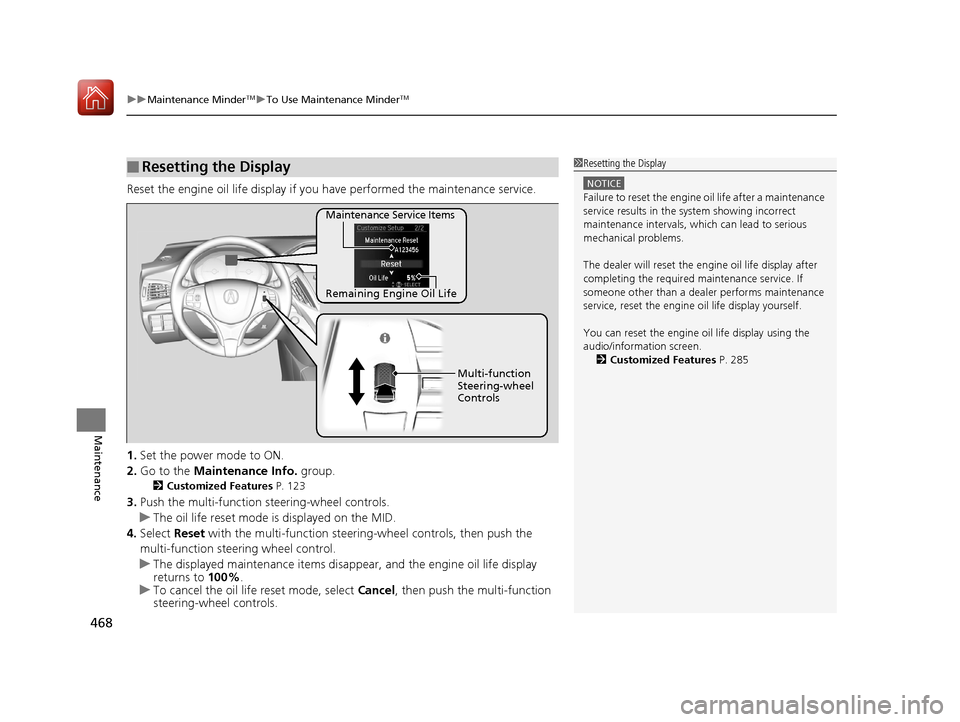
Reset the engine oil life display if you have performed the maintenance service.
1. Set the power mode to ON.
2. Go to the Maintenance Info. group.
2Customized Features P. 123
3.Push the multi-function steering-wheel controls.
u The oil life reset mode is displayed on the MID.
4. Select Reset with the multi-function steeri ng-wheel controls, then push the
multi-function steering wheel control.
u The displayed maintenance items disappea r, and the engine oil life display
returns to 100%.
u To cancel the oil life reset mode, select Cancel, then push the multi-function
steering-wheel controls.
■Resetting the Display1 Resetting the Display
NOTICE
Failure to reset the engine oil life after a maintenance
service results in the sy stem showing incorrect
maintenance intervals, which can lead to serious
mechanical problems.
The dealer will reset the en gine oil life display after
completing the required ma intenance service. If
someone other than a deal er performs maintenance
service, reset the engine oil life display yourself.
You can reset the engine oi l life display using the
audio/information screen. 2 Customized Features P. 285
Remaining Engine Oil Life Maintenance Service Items
Multi-function
Steering-wheel
Controls
17 ACURA MDX-31TZ56300.book 468 ページ 2016年5月13日 金曜日 午後7時46分
Page 491 of 581
490
Maintenance
Checking and Maintaining Tires
Checking Tires
To safely operate your vehicle, your tires must be of the proper type and size, in
good condition with adequate tread, and properly inflated.
■Inflation guidelines
Properly inflated tires provide the best combination of handlin g, tread life, and comfort.
Refer to the driver’s doorjamb label or spec ifications page for the specified pressure.
Underinflated tires wear unevenly, adversely affect handling and fuel economy, and
are more likely to fail from overheating.
Overinflated tires make your vehicle ride harshly, are more prone to road hazards,
and wear unevenly.
Every day before you drive, look at each of the tires. If one looks lower than the
others, check the pressure with a tire gauge.
At least once a month or before long trips, use a gauge to measure the pressure in
all tires, including the spare
*. Even tires in good condition can lose 1–2 psi (10–20
kPa, 0.1–0.2 kgf/cm2) per month.
■Inspection guidelines
Every time you check inflation, also examine the tires and valve stems.
Look for:
• Bumps or bulges on the side or in the tread . Replace the tire if you find any cuts,
splits, or cracks in the si de of the tire. Replace it if you see fabric or cord.
• Remove any foreign objects and inspect for air leaks.
• Uneven tread wear. Have a deal er check the wheel alignment.
• Excessive tread wear.
2 Wear Indicators P. 495
•Cracks or other damage around valve stem.
1Checking Tires
Measure the air pressure when tires are cold. This
means the vehicle has been parked for at least three
hours, or driven less than 1 mile (1.6 km). If
necessary, add or releas e air until the specified
pressure is reached.
If checked when hot, tire pressure can be as much as
4–6 psi (30–40 kPa, 0.3–0.4 kgf/cm
2) higher than if
checked when cold.
Have a dealer check the tires if you feel a consistent
vibration while driving. Ne w tires and any that have
been removed and reinst alled should be properly
balanced.
3WARNING
Using tires that are excessively worn or
improperly inflated can cause a crash in
which you can be seriously hurt or killed.
Follow all instruction s in this owner’s
manual regarding ti re inflation and
maintenance.
* Not available on all models
17 ACURA MDX-31TZ56300.book 490 ページ 2016年5月13日 金曜日 午後7時46分
Page 495 of 581
uuChecking and Maintaining Tires uDOT Tire Quality Grading (U.S. Vehicles)
494
Maintenance
The traction grades, from highest to lowest, are AA, A, B, and C.
Those grades represent the tire’s ability to stop on wet pavement
as measured under controlled conditions on specified
government test surfaces of asphalt and concrete. A tire marked
C may have poor traction performance.
The temperature grades are A (the highest), B, and C,
representing the tire’s resistance to the generation of heat and its
ability to dissipate h eat when tested under controlled conditions
on a specified indoor laboratory test wheel. Sustained high
temperature can cause the material of the tire to degenerate and
reduce tire life, and excessive temp erature can lead to sudden tire
failure. The grade C corresponds to a level of performance which
all passenger car tires must meet under the Federal Motor Vehicle
Safety Standard No. 109. Grades B and A represent higher levels
of performance on the laboratory test wheel than the minimum
required by law.
■Traction
■Temperature
1 Traction
Warning: The traction grade
assigned to this tire is based on
straight-ahead braking traction tests,
and does not include acceleration,
cornering, hydroplaning, or peak
traction characteristics.
1Temperature
Warning: The temperature grade for
this tire is establishe d for a tire that is
properly inflated and not
overloaded. Excessive speed,
underinflation, or excessive loading,
either separately or in combination,
can cause heat buildup and possible
tire failure.
17 ACURA MDX-31TZ56300.book 494 ページ 2016年5月13日 金曜日 午後7時46分
Page 497 of 581
496
uuChecking and Maintaining Tires uTire and Wheel Replacement
Maintenance
Tire and Wheel Replacement
Replace your tires with radials of the sa me size, load range, speed rating, and
maximum cold tire pressure ra ting (as shown on the tire’s sidewall). Using tires of a
different size or construction can cause the Vehicle Stab ility Assist (VSA®) and
SH-AWD ®
* systems as well as ABS to work incorrectly.
It is best to replace all four tires at the same time. If that isn’t possible, replace the
front or rear tires in pairs.
If you replace a wheel, only use TPMS sp ecified wheels approved for your vehicle.
Make sure that the wheel’s specifications match those of the original wheels.
1 Tire and Wheel Replacement
3WARNING
Installing improper tires on your vehicle can
affect handling and stability. This can cause
a crash in which you can be seriously hurt or
killed.
Always use the size and type of tires
recommended in this owner’s manual.
* Not available on all models
17 ACURA MDX-31TZ56300.book 496 ページ 2016年5月13日 金曜日 午後7時46分
Page 499 of 581
498
uuChecking and Maintaining Tires uWinter Tires
Maintenance
Winter Tires
If driving on snowy or frozen roads, mount all season marked M+S tires, snow tires,
or tire chains; reduce speed; and maintain sufficient distance be tween vehicles when
driving.
Be particularly careful when operating the steering wheel or brakes to prevent
skidding.
Use tire chains, snow tires, or all season ti res when necessary or according to the law.
When mounting, refer to the following points.
For winter tires:
• Select the size and load ranges that are the same as the original tires.
• Mount the tires to all four wheels.
For tire chains:
• Install them on the front tires only.
• Because your vehicle has limited tire clearance, we strongly recommend using the
chains listed below:
• Follow the chain manufacturer’s instruction when installing. Mount them as
tightly as you can.
• Check that the chains do not to uch the brake lines or suspension.
• Drive slowly.
Cable-type: SCC Cable Chain Super Z LT - ZT735
1Winter Tires
NOTICE
Traction devices that are th e wrong size or improperly
installed can damage your vehicle’s brake lines,
suspension, body, and wheels. Stop driving if they are
hitting any part of the vehicle.
When tire chains are mounted, follow the chain
manufacturer’s instructi ons regarding vehicle
operational limits.
If your vehicle is equipped with summer tires, be
aware that these tires are not designed for winter
driving conditions. For more information, contact a
dealer.
3WARNING
Using the wrong chains, or not properly
installing chains, can damage the brake
lines and cause a crash in which you can be
seriously injured or killed.
Follow all instruction s in this owner’s
manual regarding the selection and use of
tire chains.
17 ACURA MDX-31TZ56300.book 498 ページ 2016年5月13日 金曜日 午後7時46分