Starting cr Acura MDX 2017 Owner's Guide
[x] Cancel search | Manufacturer: ACURA, Model Year: 2017, Model line: MDX, Model: Acura MDX 2017Pages: 581, PDF Size: 32.65 MB
Page 384 of 581
Continued383
uuWhen Driving uAuto Idle Stop*
Driving
The vehicle stops with the gear position in (D and the brake pedal depressed.
■Auto idle stop does not activate when:
• The driver’s seat belt is not fastened.
• The engine coolant temperature is low or high.
• The transmission fluid temperature is low or high.
• The vehicle comes to a stop again befo re the vehicle speed reaches 3 mph (5
km/h) after the engine starts.
• Stopped on a steep incline.
• A gear position other than
(D.
• The engine is started with the hood open.
u Turn off the engine. Close the hood before you restart the engine to activate
Auto Idle Stop.
• The battery charge is low.
• The internal temperature of the ba ttery is 14°F (−10°C). or less.
• The climate control system is in use, and the outside temperature is below −4°F
(−20°C) or over 104°F (40°C).
• The climate control system temperature is set to the Hi or Lo.
• is ON (indicator on).
• When the rear fan is set to maximum speed.
u Auto Idle Stop may not activate under other conditions when the rear climate
control system is in use.
■Auto Idle Stop Activates When:1 Auto Idle Stop Activates When:
When ACC with LSF is in operation, the vehicle stops
without depressing the br ake pedal and Auto Idle
Stop may activate.
Do not open the hood while the Auto Idle Stop
function is activated. If the hood is opened, the
engine will not re start automatically.
In this case, restart the engine with the ENGINE
START/STOP button. 2 Starting the Engine P. 367
Pressing the ENGINE START/STOP button changes
the power mode to ACCESSORY even while Auto Idle
Stop is in operation. Once in ACCESSORY, the engine
no longer restarts automatica lly. Follow the standard
procedure to start the engine.
2 Starting the Engine P. 367
17 ACURA MDX-31TZ56300.book 383 ページ 2016年5月13日 金曜日 午後7時46分
Page 387 of 581
386
uuWhen Driving uAuto Idle Stop*
Driving
■The engine restarts even if the automa tic brake hold system is activated
when:
• The automatic brake hold sy stem is canceled and the electric parking brake is
applied automatically.
The automatic brake hold system has a problem.
Briefly keeps the brakes applied after releas ing the brake pedal to restart the engine.
This can keep your vehicle from unexpectedly moving while on an incline.
■Starting Assist Brake Function
17 ACURA MDX-31TZ56300.book 386 ページ 2016年5月13日 金曜日 午後7時46分
Page 420 of 581

419
uuWhen Driving uVehicle Stability Assist (VSA ®), aka Electronic Stability Control (ESC), System
Driving
This button is on the driver side control panel.
To partially disable VSA ® functionality/
features, press and hold it until you hear a
beep.
The traction control stop s fully functioning,
allowing the wheels to spin more freely at low
speed. The VSA ® OFF indicator will also come
on.
To restore VSA ® functionality/features, press
the (VSA ® OFF) button until you hear a
beep.
VSA ® is turned on every time you start the
engine, even if you turned it off the last time
you drove the vehicle.
■VSA ® On and Off1 Vehicle Stability Assist (VSA ®), aka Electronic Stability Control
(ESC), System
With the button pressed, your vehicle will have
normal braking and corn ering ability, but VSA®
traction and stability enhancement becomes less
effective.
In certain unusual conditions when your vehicle gets
stuck in shallow mud or fr esh snow, it may be easier
to free it with the VSA ® temporarily switched off.
When the button is pressed, the traction control
function becomes less effective. This allows for the
wheels to spin more freely at low speed. You should
only attempt to free your vehicle with the VSA ® off if
you are not able to free it when the VSA ® is on.
Immediately after freeing your vehicle, be sure to
switch VSA ® on again. We do not recommend driving
your vehicle with the VSA ® system switched off.
You may hear a motor sound coming from the
engine compartment while system checks are being
performed immediately after starting the engine or
while driving. This is normal.
VSA ® OFF Indicator
17 ACURA MDX-31TZ56300.book 419 ページ 2016年5月13日 金曜日 午後7時46分
Page 429 of 581
428
Driving
Braking
Brake System
Use the parking brake to keep the vehicle stationary when parked. You can
manually apply and release, or automatically release it.
■Manual operations
Use the electric parking brake switch to apply or release the brake. Manually
releasing the parking brake using the switch helps your vehicle start slowly and
smoothly when facing down hill on steep hills.
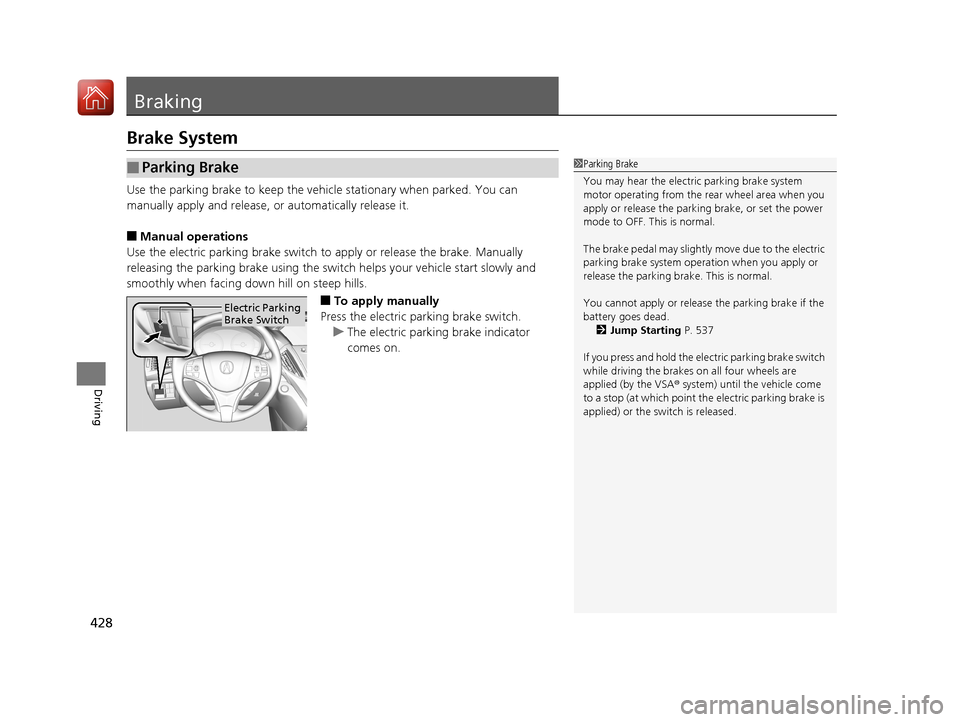
■To apply manually
Press the electric parking brake switch. u The electric parking brake indicator
comes on.
■Parking Brake1Parking Brake
You may hear the electric parking brake system
motor operating from the re ar wheel area when you
apply or release the parki ng brake, or set the power
mode to OFF. This is normal.
The brake pedal may slightly move due to the electric
parking brake system opera tion when you apply or
release the parking br ake. This is normal.
You cannot apply or release the parking brake if the
battery goes dead. 2 Jump Starting P. 537
If you press and hold the el ectric parking brake switch
while driving the brakes on all four wheels are
applied (by the VSA ® system) until the vehicle come
to a stop (at which point the electric parking brake is
applied) or the sw itch is released.
Electric Parking
Brake Switch
17 ACURA MDX-31TZ56300.book 428 ページ 2016年5月13日 金曜日 午後7時46分
Page 431 of 581

uuBraking uBrake System
430
Driving
■To release automatically
Depressing the accelerator pedal releases the parking brake.
Use the accelerator pedal to release the brake when you are starting the vehicle
facing uphill, or in a traffic jam.
Gently depress the accelerator pedal.
When on a hill, it may require more
accelerator input to release.u The electric parking brake indicator goes
off.
You can release the parki ng brake automatically when:
• You are wearing the driver’s seat belt.
• The engine is running.
• The transmission is not in
(P or (N.
1Parking Brake
If the parking brake cannot be released
automatically, release it manually.
The parking brake cannot be released automatically
while the following indicators are on:
•Malfunction indicator lamp
•Transmission indicator
The parking brake may not be released automatically
while the following indicators are on:
•Electric parking brak e system indicator
•VSA® system indicator
•ABS indicator•Supplemental restraint system indicatorAccelerator Pedal
17 ACURA MDX-31TZ56300.book 430 ページ 2016年5月13日 金曜日 午後7時46分
Page 435 of 581
434
uuBraking uAnti-lock Brake System (ABS)
Driving
Anti-lock Brake System (ABS)
Helps prevent the wheels from locking up, an d helps you retain steering control by
pumping the brakes rapidly, much faster than you.
The electronic brake distribution (EBD) system, which is part of the ABS, also
balances the front-to-rear braking distri bution according to vehicle loading.
You should never pump the brake pedal. Let the ABS work for you by always
keeping firm, steady pressure on the brake pe dal. This is sometimes referred to as
“stomp and steer.”
■ABS operation
The brake pedal may pulsate slightly when the ABS is working. Keep holding the
pedal firmly down. On dry pavement, you will need to press on the brake pedal very
hard before the ABS activates. However, you may feel the ABS activate immediately
if you are trying to stop on snow or ice.
When the vehicle speed goes unde r 6 mph (10 km/h), the ABS stops.
■ABS1Anti-lock Brake System (ABS)
NOTICE
The ABS may not function correctly if you use an
incorrect tire type and size.
When the ABS indicator comes on while driving,
there may be a problem with the system.
While normal braking is not affected, there is a
possibility of the ABS not operating. Have the vehicle
checked by a dealer immediately.
The ABS does not reduce the ti me or distance it takes
to stop the vehicle. It only helps with steering control
during hard braking.
In the following cases, yo ur vehicle may need more
stopping distance than a vehicle without the ABS:
•When driving on rough road surfaces, including
when driving on uneven surf aces, such as gravel or
snow.
•When tire chains are installed.
You may hear a motor sound coming from the
engine compartment while system checks are being
performed immediately after starting the engine or
while driving. This is normal.
17 ACURA MDX-31TZ56300.book 434 ページ 2016年5月13日 金曜日 午後7時46分
Page 483 of 581
482
uuReplacing Light Bulbs uBrake Light and Rear Turn Signal Light Bulbs
Maintenance
Brake Light and Rear Tu rn Signal Light Bulbs
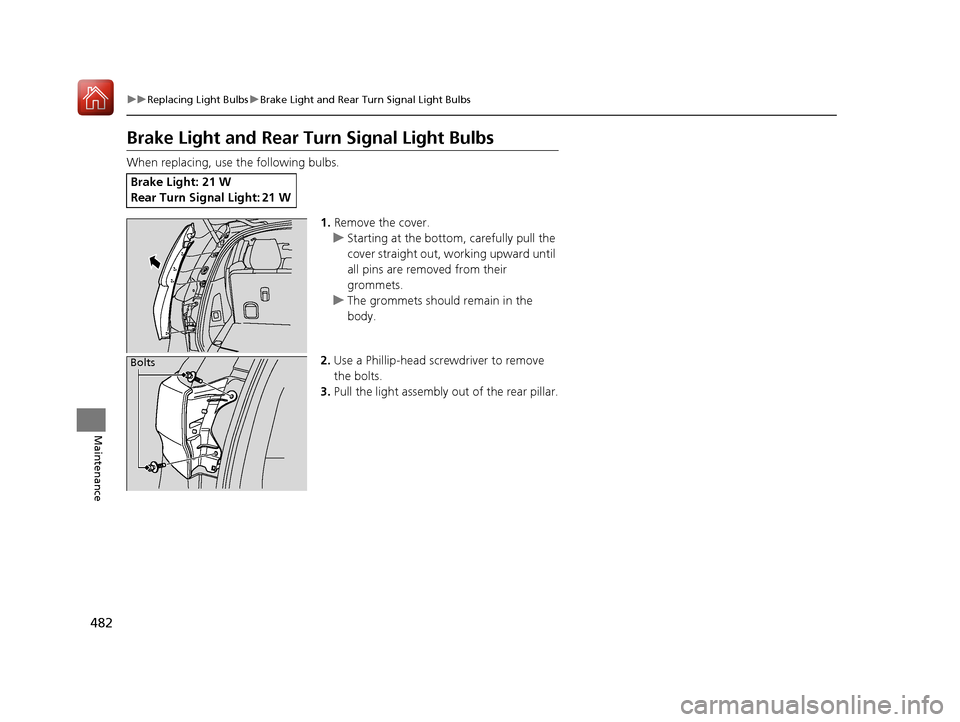
When replacing, use the following bulbs.
1.Remove the cover.
u Starting at the bottom, carefully pull the
cover straight out, working upward until
all pins are removed from their
grommets.
u The grommets should remain in the
body.
2. Use a Phillip-head scre wdriver to remove
the bolts.
3. Pull the light assembly out of the rear pillar.
Brake Light: 21 W
Rear Turn Signal Light: 21 W
Bolts
17 ACURA MDX-31TZ56300.book 482 ページ 2016年5月13日 金曜日 午後7時46分
Page 514 of 581
513
Handling the Unexpected
This chapter explains how to handle unexpected troubles.
ToolsTypes of Tools .................................. 514
If a Tire Goes Flat Changing a Flat Tire
*....................... 515
Temporarily Repair ing a Flat Tire*..... 522
Engine Does Not Start Checking the Engine ........................ 534
If the Keyless Access Remote Battery is Weak ............................................. 535
Emergency Engine Stop ................... 536
Jump Starting .................................... 537 Overheating
How to Handle Overheating............. 539
Indicator, Coming On/Blinking
If the Low Oil Pressure Indicator Comes On ... 541
If the Charging System Indicator Comes On ................................................. 541
If the Malfunction Indicator Lamp Comes On or Blinks ................................... 542
If the Brake System Indicator (Red) Comes On ................................................... 543
If the Speed-Sensitive Electric Power Steering
(EPS) System Indicator Comes On........... 543
If the Low Tire Pressure/TPMS Indicator Comes On or Blinks ....................... 545
If the Transmission I ndicator Blinks along
with the Warning Message ............ 545
Fuses Fuse Locations ................................. 546
Inspecting and Changing Fuses ........ 553
Emergency Towing ........................... 554
When You Cannot Unlock the Fuel Fill Door.. 555
When You Cannot Open the Tailgate.. 556
Refueling........................................... 557
Refueling From a Portable Fuel Container.. 557
* Not available on all models
17 ACURA MDX-31TZ56300.book 513 ページ 2016年5月13日 金曜日 午後7時46分
Page 535 of 581
534
Handling the Unexpected
Engine Does Not Start
Checking the Engine
If the engine does not start, check the starter.
Starter conditionChecklist
Starter doesn’t turn or turns
over slowly.
The battery may be dead. Check
each of the items on the right and
respond accordingly.Check for a message on the MID.
●If the To Start, Hold Remote Near Start Button message appears
2If the Keyless Access Remote Battery is Weak P. 535
uMake sure the keyless access remo te is in its operating range.
2ENGINE START/STOP Button Operating Range P. 163
Check the brightness of the interior lights.
Turn on the interior lights and check the brightness.
●If the interior lights are dim or do not come on at all
2Battery P. 499●If the interior lights come on normally 2 Fuses P. 546
The starter turns over normally
but the engine doesn’t start.
There may be a problem with the
fuse. Check each of the items on
the right and resp ond accordingly. Review the engine start procedure.
Follow its instructions, and try to start the engine again.
2
Starting the Engine P. 367
Check the immobilizer system indicator.
When the immobilizer system indicator is blinking, the engine cannot be started.
2Immobilizer System P. 157
Check the fuel level.
There should be enough fuel in the tank.
2 Fuel Gauge P. 116
Check the fuse.
Check all fuses, or have the vehicle checked by a dealer.
2Inspecting and Changing Fuses P. 553
If the problem continues:
2Emergency Towing P. 554
1Checking the Engine
If you must start the vehi cle immediately, use an
assisting vehicle to jump start it.
2 Jump Starting P. 537
17 ACURA MDX-31TZ56300.book 534 ページ 2016年5月13日 金曜日 午後7時46分
Page 538 of 581
537Continued
Handling the Unexpected
Jump Starting
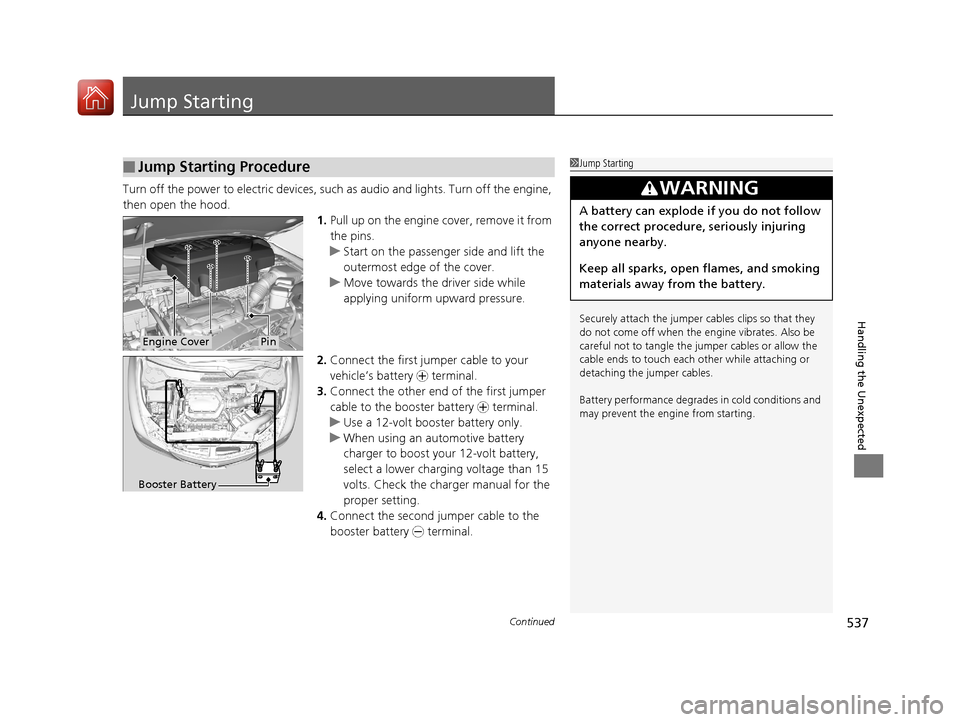
Turn off the power to electric devices, such as audio and lights. Turn off the engine,
then open the hood. 1.Pull up on the engine cover, remove it from
the pins.
u Start on the passenger side and lift the
outermost edge of the cover.
u Move towards the driver side while
applying uniform upward pressure.
2. Connect the first jumper cable to your
vehicle’s battery + terminal.
3. Connect the other end of the first jumper
cable to the booster battery + terminal.
u Use a 12-volt booster battery only.
u When using an automotive battery
charger to boost your 12-volt battery,
select a lower charging voltage than 15
volts. Check the ch arger manual for the
proper setting.
4. Connect the second jumper cable to the
booster battery - terminal.
■Jump Starting Procedure1Jump Starting
Securely attach the jumper cables clips so that they
do not come off when the e ngine vibrates. Also be
careful not to tangle the ju mper cables or allow the
cable ends to touch each other while attaching or
detaching the jumper cables.
Battery performance degrades in cold conditions and
may prevent the engi ne from starting.
3WARNING
A battery can explode if you do not follow
the correct procedure, seriously injuring
anyone nearby.
Keep all sparks, open flames, and smoking
materials away from the battery.
Engine CoverPin
Booster Battery
17 ACURA MDX-31TZ56300.book 537 ページ 2016年5月13日 金曜日 午後7時46分