instrument panel Acura MDX 2017 Owner's Guide
[x] Cancel search | Manufacturer: ACURA, Model Year: 2017, Model line: MDX, Model: Acura MDX 2017Pages: 581, PDF Size: 32.65 MB
Page 89 of 581
88
uuIndicators u
Instrument Panel
IndicatorNameOn/BlinkingExplanationMessage
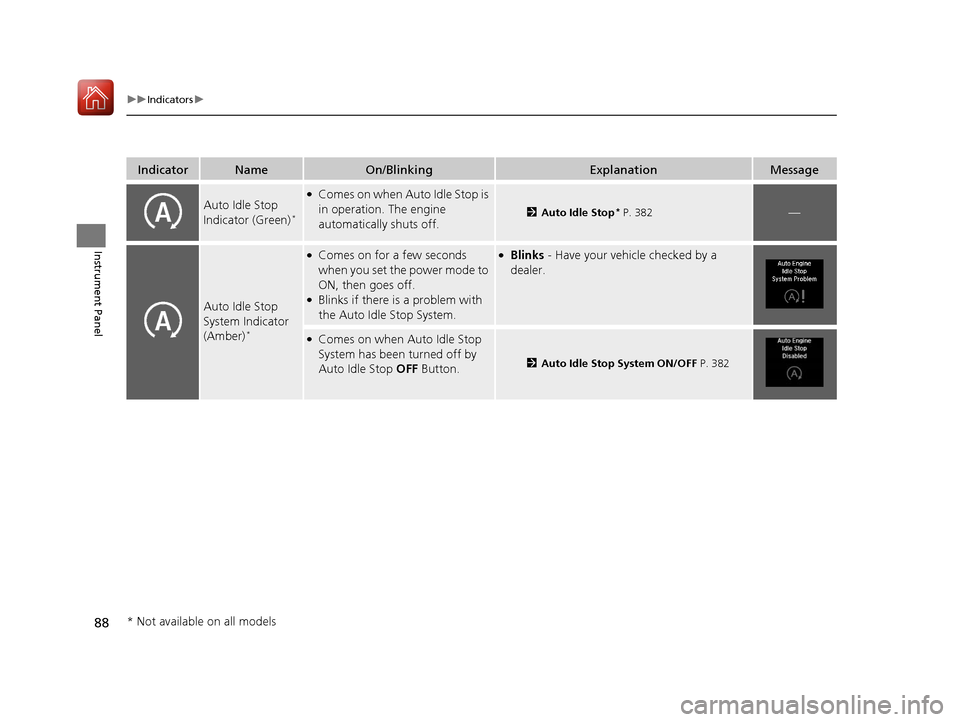
Auto Idle Stop
Indicator (Green)*
●Comes on when Auto Idle Stop is
in operation. The engine
automatically shuts off.
2Auto Idle Stop* P. 382—
Auto Idle Stop
System Indicator
(Amber)
*
●Comes on for a few seconds
when you set the power mode to
ON, then goes off.
●Blinks if there is a problem with
the Auto Idle Stop System.
●Blinks - Have your vehicle checked by a
dealer.
●Comes on when Auto Idle Stop
System has been turned off by
Auto Idle Stop OFF Button.
2Auto Idle Stop System ON/OFF P. 382
* Not available on all models
17 ACURA MDX-31TZ56300.book 88 ページ 2016年5月13日 金曜日 午後7時46分
Page 90 of 581
89
uuIndicators u
Continued
Instrument Panel
IndicatorNameOn/BlinkingExplanationMessage
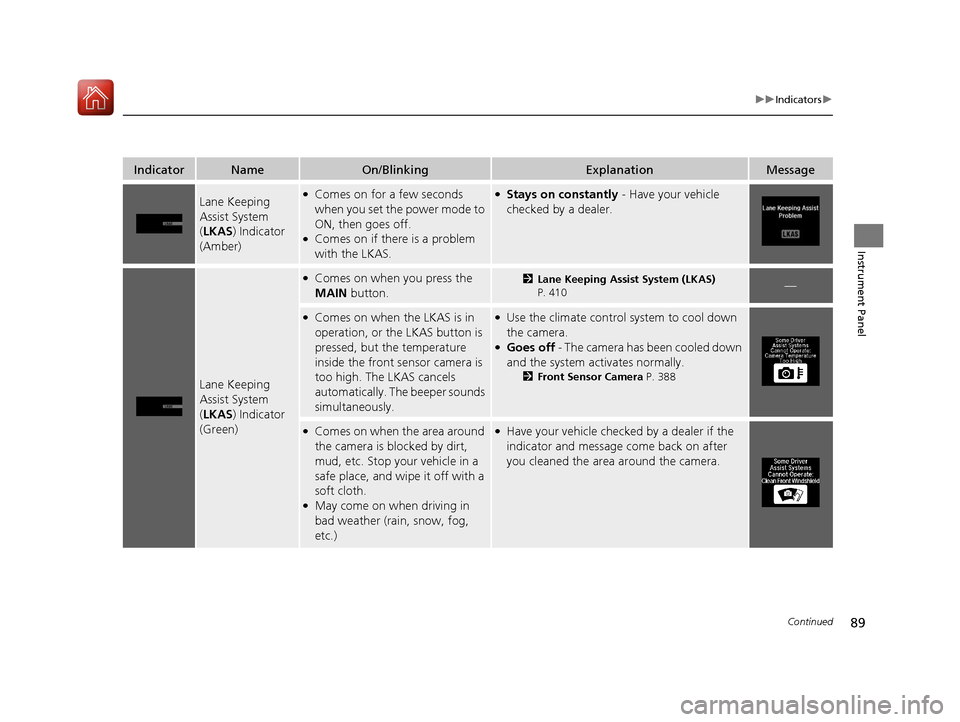
Lane Keeping
Assist System
(LKAS ) Indicator
(Amber)●Comes on for a few seconds
when you set the power mode to
ON, then goes off.
●Comes on if there is a problem
with the LKAS.
●Stays on constantly - Have your vehicle
checked by a dealer.
Lane Keeping
Assist System
( LKAS ) Indicator
(Green)
●Comes on when you press the
MAIN button.2Lane Keeping Assist System (LKAS)
P. 410—
●Comes on when the LKAS is in
operation, or the LKAS button is
pressed, but the temperature
inside the front sensor camera is
too high. The LKAS cancels
automatically. The beeper sounds
simultaneously.●Use the climate control system to cool down
the camera.
●Goes off - The camera has been cooled down
and the system activates normally.
2 Front Sensor Camera P. 388
●Comes on when the area around
the camera is blocked by dirt,
mud, etc. Stop your vehicle in a
safe place, and wipe it off with a
soft cloth.
●May come on when driving in
bad weather (rain, snow, fog,
etc.)
●Have your vehicle checke d by a dealer if the
indicator and message come back on after
you cleaned the area around the camera.
17 ACURA MDX-31TZ56300.book 89 ページ 2016年5月13日 金曜日 午後7時46分
Page 91 of 581
90
uuIndicators u
Instrument Panel
IndicatorNameOn/BlinkingExplanationMessage
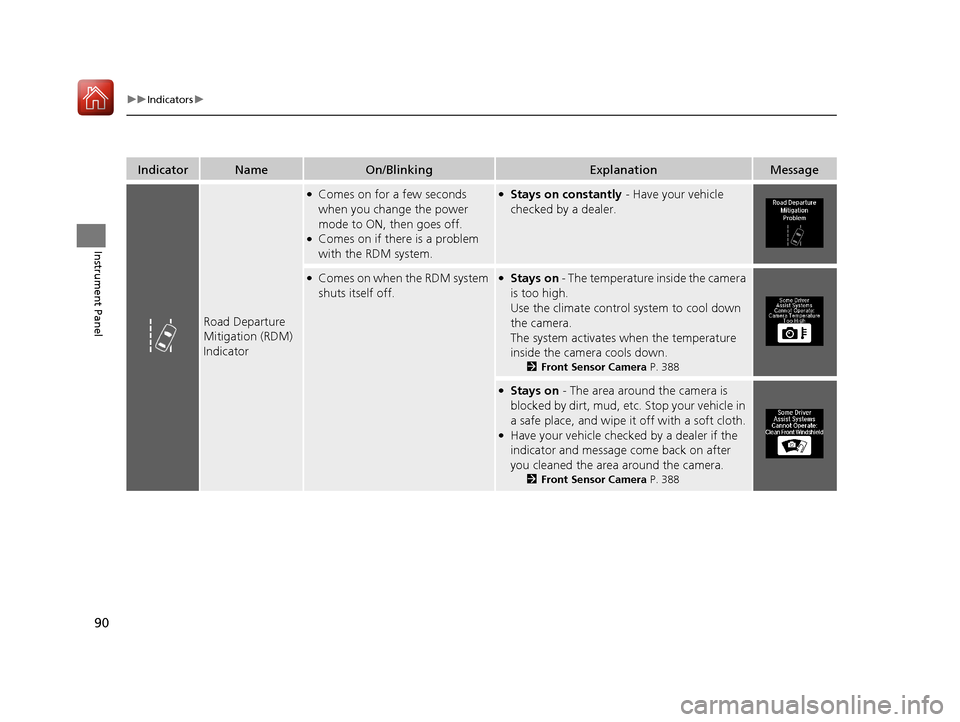
Road Departure
Mitigation (RDM)
Indicator
●Comes on for a few seconds
when you change the power
mode to ON, then goes off.
●Comes on if there is a problem
with the RDM system.
●Stays on constantly - Have your vehicle
checked by a dealer.
●Comes on when the RDM system
shuts itself off.●Stays on - The temperature inside the camera
is too high.
Use the climate control system to cool down
the camera.
The system activates when the temperature
inside the camera cools down.
2 Front Sensor Camera P. 388
●Stays on - The area around the camera is
blocked by dirt, mud, etc. Stop your vehicle in
a safe place, and wipe it off with a soft cloth.
●Have your vehicle checked by a dealer if the
indicator and message come back on after
you cleaned the area around the camera.
2Front Sensor Camera P. 388
17 ACURA MDX-31TZ56300.book 90 ページ 2016年5月13日 金曜日 午後7時46分
Page 92 of 581
91
uuIndicators u
Continued
Instrument Panel
IndicatorNameOn/BlinkingExplanationMessage
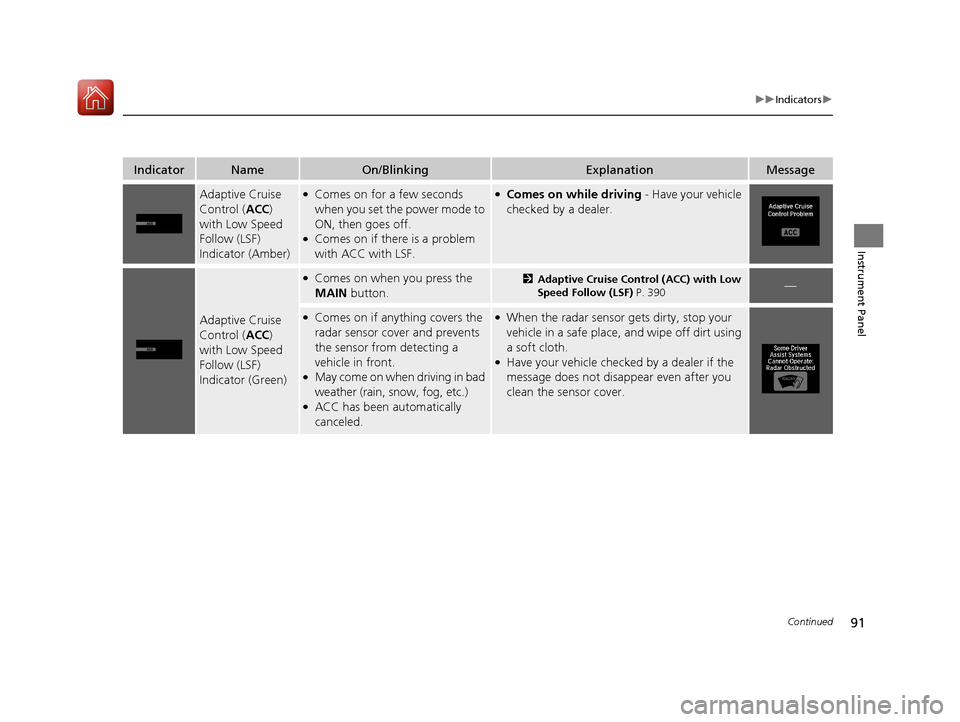
Adaptive Cruise
Control (ACC)
with Low Speed
Follow (LSF)
Indicator (Amber)●Comes on for a few seconds
when you set the power mode to
ON, then goes off.
●Comes on if there is a problem
with ACC with LSF.
●Comes on while driving - Have your vehicle
checked by a dealer.
Adaptive Cruise
Control ( ACC)
with Low Speed
Follow (LSF)
Indicator (Green)
●Comes on when you press the
MAIN button.2Adaptive Cruise Control (ACC) with Low
Speed Follow (LSF) P. 390—
●Comes on if anything covers the
radar sensor cover and prevents
the sensor from detecting a
vehicle in front.
●May come on when driving in bad
weather (rain, s now, fog, etc.)
●ACC has been automatically
canceled.
●When the radar sensor gets dirty, stop your
vehicle in a safe place, and wipe off dirt using
a soft cloth.
●Have your vehicle checke d by a dealer if the
message does not disappear even after you
clean the sensor cover.
17 ACURA MDX-31TZ56300.book 91 ページ 2016年5月13日 金曜日 午後7時46分
Page 93 of 581
92
uuIndicators u
Instrument Panel
IndicatorNameOn/BlinkingExplanationMessage
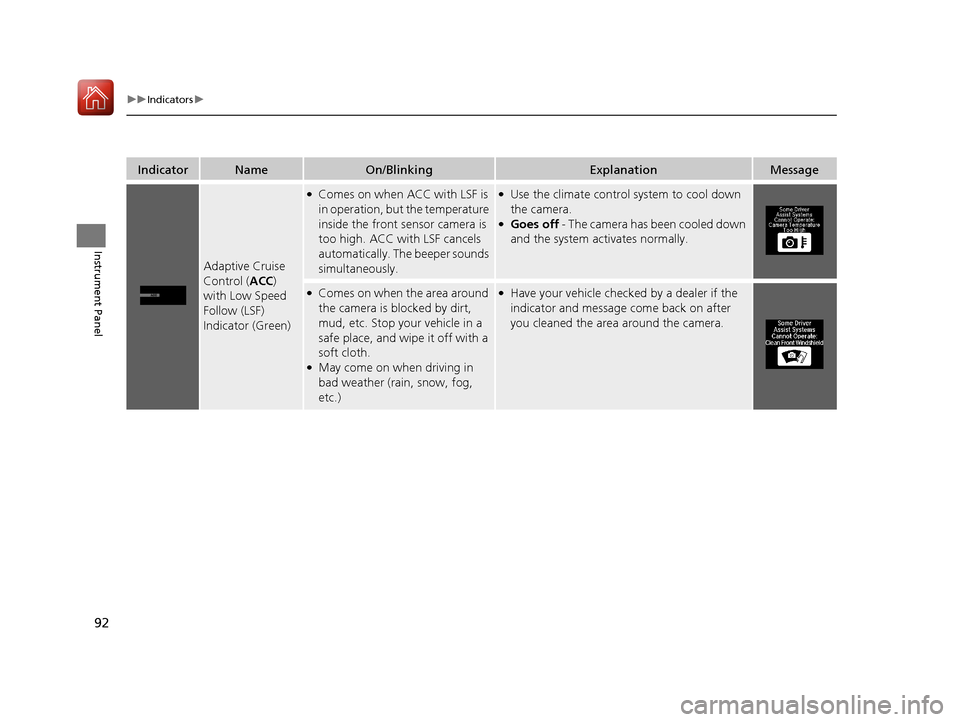
Adaptive Cruise
Control (ACC)
with Low Speed
Follow (LSF)
Indicator (Green)
●Comes on when ACC with LSF is
in operation, but the temperature
inside the front sensor camera is
too high. ACC with LSF cancels
automatically. The beeper sounds
simultaneously.●Use the climate control system to cool down
the camera.
●Goes off - The camera has been cooled down
and the system activates normally.
●Comes on when the area around
the camera is blocked by dirt,
mud, etc. Stop your vehicle in a
safe place, and wipe it off with a
soft cloth.
●May come on when driving in
bad weather (rain, snow, fog,
etc.)
●Have your vehicle checked by a dealer if the
indicator and message come back on after
you cleaned the area around the camera.
17 ACURA MDX-31TZ56300.book 92 ページ 2016年5月13日 金曜日 午後7時46分
Page 94 of 581

93
uuIndicators u
Continued
Instrument Panel
IndicatorNameOn/BlinkingExplanationMessage
Collision
Mitigation Braking
System
TM
(CMBSTM)
Indicator
●Comes on for a few seconds
when you change the power
mode to ON, then goes off.
●Comes on when you deactivate
the CMBSTM. A multi-information
display message appears for five
seconds.
●Comes on if there is a problem
with the CMBSTM.
●Stays on constantly without the CMBSTM
off - Have your vehicle checked by a dealer.
2Collision Mitigation Braking SystemTM
(CMBSTM) P. 436
17 ACURA MDX-31TZ56300.book 93 ページ 2016年5月13日 金曜日 午後7時46分
Page 95 of 581
94
uuIndicators u
Instrument Panel
IndicatorNameOn/BlinkingExplanationMessage
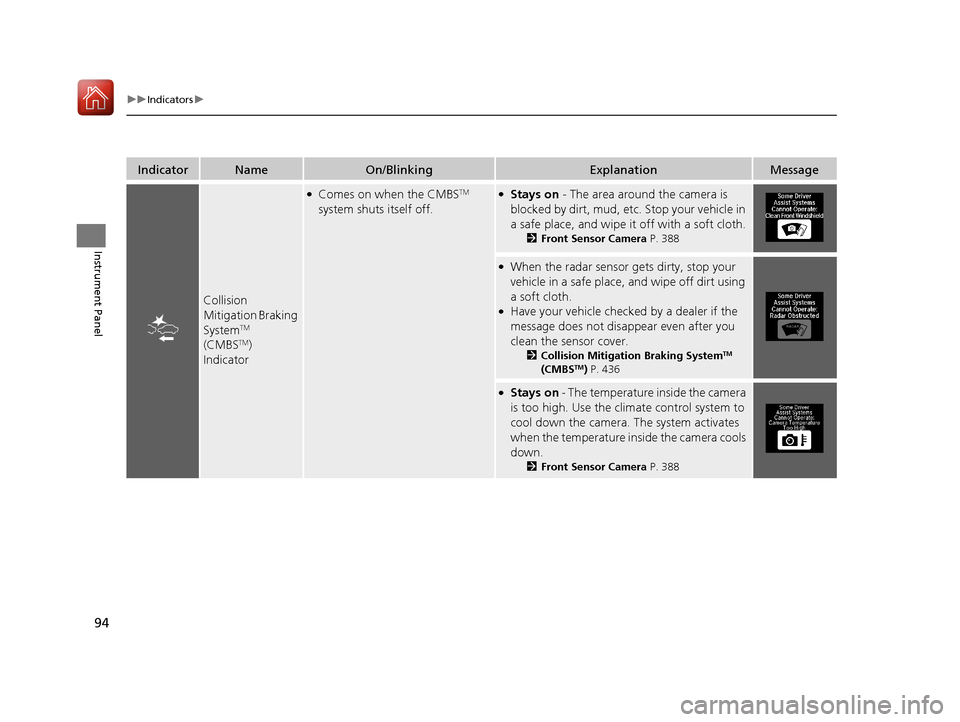
Collision
Mitigation Braking
System
TM
(CMBSTM)
Indicator
●Comes on when the CMBSTM
system shuts itself off.●Stays on - The area around the camera is
blocked by dirt, mud, etc. Stop your vehicle in
a safe place, and wipe it off with a soft cloth.
2Front Sensor Camera P. 388
●When the radar sensor gets dirty, stop your
vehicle in a safe place, and wipe off dirt using
a soft cloth.
●Have your vehicle checked by a dealer if the
message does not disappear even after you
clean the sensor cover.
2 Collision Mitigation Braking SystemTM
(CMBSTM) P. 436
●Stays on - The temperature inside the camera
is too high. Use the climate control system to
cool down the camera. The system activates
when the temperature inside the camera cools
down.
2 Front Sensor Camera P. 388
17 ACURA MDX-31TZ56300.book 94 ページ 2016年5月13日 金曜日 午後7時46分
Page 96 of 581

95
uuIndicators u
Instrument Panel
IndicatorNameOn/BlinkingExplanationMessage
Blind spot
information (BSI)
Indicator
●Comes on for a few seconds
when you set the power mode to
ON, then goes off.
●Stays on while BSI is turned off.
—
●Comes on when mud, snow, or
ice accumulates in the vicinity of
sensor.●Comes on while driving - Remove the
obstacle in the vicinity of sensor.
2 Blind spot information (BSI) System*
P. 421
●Comes on if there is a problem
with the system.●Comes on while driving - Have your vehicle
checked by a dealer.
Models with BSI
* Not available on all models
17 ACURA MDX-31TZ56300.book 95 ページ 2016年5月13日 金曜日 午後7時46分
Page 97 of 581
96
uuIndicators uMulti-Information Display (MID) Warning and Information Messages
Instrument Panel
Multi-Information Display (MID) Warning and Information Messages
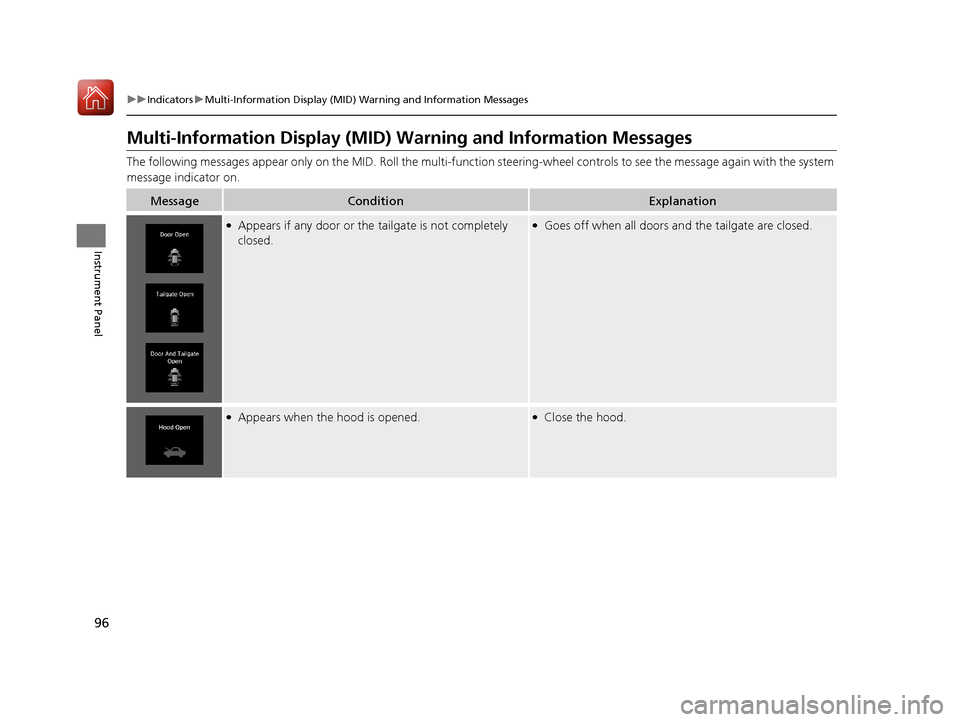
The following messages appear only on the MID. Roll the multi-function steering-wheel controls to see the message again with the system
message indicator on.
MessageConditionExplanation
●Appears if any door or the tailgate is not completely
closed.●Goes off when all doors an d the tailgate are closed.
●Appears when the hood is opened.●Close the hood.
17 ACURA MDX-31TZ56300.book 96 ページ 2016年5月13日 金曜日 午後7時46分
Page 98 of 581
97
uuIndicators uMulti-Information Display (MID) Warning and Information Messages
Continued
Instrument Panel
MessageConditionExplanation
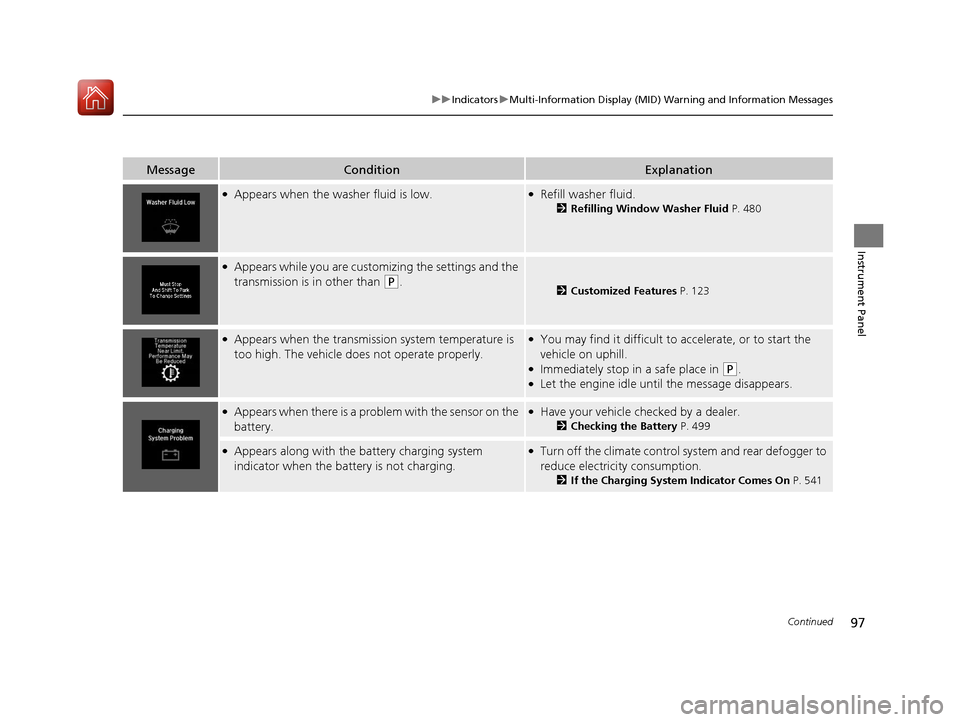
●Appears when the wa sher fluid is low.●Refill washer fluid.
2Refilling Window Washer Fluid P. 480
●Appears while you are customizing the settings and the
transmission is in other than
(P.2 Customized Features P. 123
●Appears when the transmission system temperature is
too high. The vehicle does not operate properly.●You may find it difficult to accelerate, or to start the
vehicle on uphill.
●Immediately stop in a safe place in (P.●Let the engine idle until the message disappears.
●Appears when there is a problem with the sensor on the
battery.●Have your vehicle checked by a dealer.
2Checking the Battery P. 499
●Appears along with the battery charging system
indicator when the batte ry is not charging.●Turn off the climate control system and rear defogger to
reduce electricity consumption.
2If the Charging System Indicator Comes On P. 541
17 ACURA MDX-31TZ56300.book 97 ページ 2016年5月13日 金曜日 午後7時46分