Phone Acura MDX 2017 Workshop Manual
[x] Cancel search | Manufacturer: ACURA, Model Year: 2017, Model line: MDX, Model: Acura MDX 2017Pages: 581, PDF Size: 32.65 MB
Page 338 of 581

Continued337
uuBluetooth ® HandsFreeLink ®u HFL Menus
Features
The following options are available during a call.
Mute : Mute your voice.
Transfer: Transfer a call from HFL to your phone.
Touch Tones : Send numbers during a call. This is useful when you call a menu-
driven phone system.
The available options are shown on the Phone
screen.
Rotate to select one of the available
options, then press . u The mute icon appears when Mute is
selected. Select Mute again to turn it off.
■Options During a Call1Options During a Call
Touch Tones: Available on some phones.
You can select the icons on the On Demand Multi-
Use Display
TM.
Mute Icon
17 ACURA MDX-31TZ56300.book 337 ページ 2016年5月13日 金曜日 午後7時46分
Page 339 of 581
uuBluetooth ® HandsFreeLink ®u HFL Menus
338
Features
HFL can display newly received text and e-ma il messages as well as 20 of the most
recently received messages on a linked ce ll phone. Each received message can be
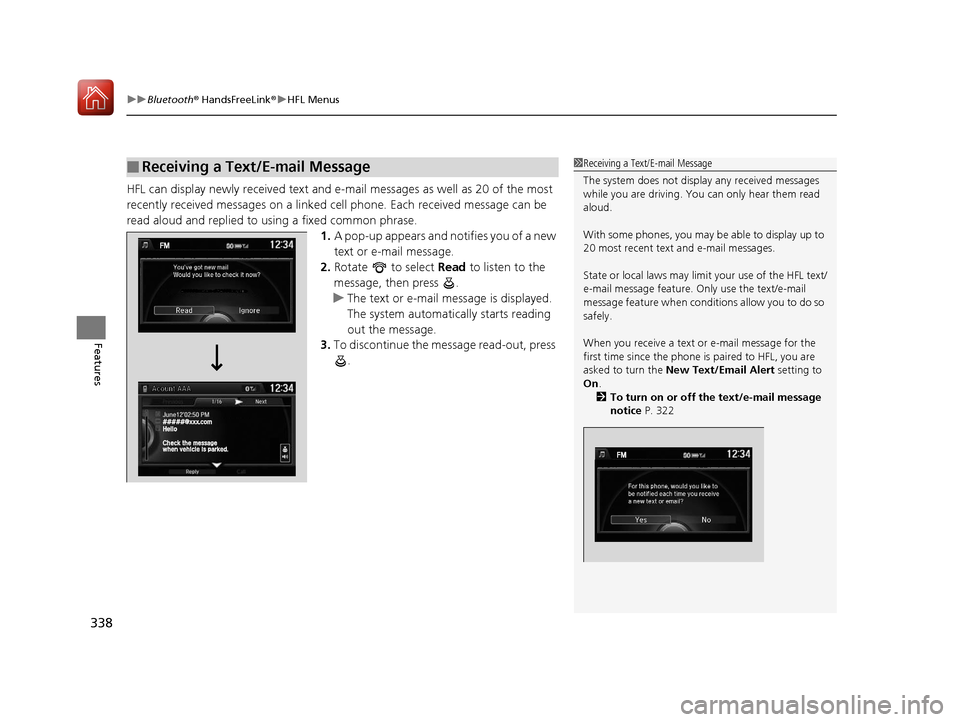
read aloud and replied to using a fixed common phrase. 1.A pop-up appears and notifies you of a new
text or e-mail message.
2. Rotate to select Read to listen to the
message, then press .
u The text or e-mail message is displayed.
The system automatically starts reading
out the message.
3. To discontinue the message read-out, press
.
■Receiving a Text/E-mail Message1Receiving a Text/E-mail Message
The system does not display any received messages
while you are driving. You can only hear them read
aloud.
With some phones, you may be able to display up to
20 most recent text and e-mail messages.
State or local laws may limit your use of the HFL text/
e-mail message feature. Only use the text/e-mail
message feature when conditions allow you to do so
safely.
When you receive a text or e-mail message for the
first time since the phone is paired to HFL, you are
asked to turn the New Text/Email Alert setting to
On .
2 To turn on or off the text/e-mail message
notice P. 322
17 ACURA MDX-31TZ56300.book 338 ページ 2016年5月13日 金曜日 午後7時46分
Page 340 of 581

Continued339
uuBluetooth ® HandsFreeLink ®u HFL Menus
Features
If a paired phone has text message or mail accounts, you can select one of them to
be active and receive notifications. 1.Press the SETTINGS button.
2. Rotate to select Phone Settings, then
press .
u Repeat the procedure to select Select
Account .
3. Rotate to select Text Messages or an
e-mail message account you want, then
press .
■Selecting a Mail Account1 Selecting a Mail Account
You can also select a mail account from the folder list
screen or the message list screen.
Move to select Select Account , then press .
You can only receive notif ications from one text
message or mail a ccount at a time.
17 ACURA MDX-31TZ56300.book 339 ページ 2016年5月13日 金曜日 午後7時46分
Page 341 of 581

uuBluetooth ® HandsFreeLink ®u HFL Menus
340
Features
■Displaying text messages
1. Press the PHONE button.
2. Press the MENU button.
3. Rotate to select Text/Email, then press
.
u Select account if necessary.
4. Rotate to select a message, then press
.
u The text message is displayed. The
system automatically starts reading the
message aloud.
■Displaying Messages1Displaying Messages
The icon appears next to an unread message.
If you delete a message on the phone, the message
will also be dele ted from the system. If you send a
message from the system, the message goes to your
phone’s outbox.
To see the previous or ne xt message, move or
on the text message screen.
Message List
Text Message
17 ACURA MDX-31TZ56300.book 340 ページ 2016年5月13日 金曜日 午後7時46分
Page 342 of 581

Continued341
uuBluetooth ® HandsFreeLink ®u HFL Menus
Features
■Displaying e-mail messages
1. Press the PHONE button.
2. Press the MENU button.
3. Rotate to select Text/Email , then press
.
4. Rotate to select a folder, then press .
5. Rotate to select a message, then press
.
u The e-mail message is displayed. The
system automatically starts reading the
message aloud.1Displaying e-mail messages
Received text and e-mail messages may appear in the
message list screen at the same time. In this case, text
messages are titled No subject.Folder List
Message List
E-mail Message
17 ACURA MDX-31TZ56300.book 341 ページ 2016年5月13日 金曜日 午後7時46分
Page 462 of 581
461
Maintenance
This chapter discusses basic maintenance.
Before Performing MaintenanceInspection and Maintenance ............ 462
Safety When Performing Maintenance ..463
Parts and Fluids Used in Maintenance Service...464Maintenance MinderTM..................... 465
Maintenance Under the Hood
Maintenance Items Under the Hood .. 469
Opening the Hood ........................... 470
Engine Compartment Cover ............. 471
Recommended Engine Oil ................ 472
Oil Check ......................................... 473
Adding Engine Oil ............................ 474
Changing the Engine Oil and Oil Filter ...475 Engine Coolant ................................ 477
Transmission Fluid ............................ 479
Brake Fluid ....................................... 480
Refilling Window Washer Fluid......... 480
Replacing Light Bulbs ....................... 481Checking and Maintaining Wiper Blades... 486Checking and Maintaining Tires
Checking Tires ................................. 490
Tire and Loading Information Label .. 491
Tire Labeling .................................... 491
DOT Tire Quality Grading (U.S. Vehicles).. 493Wear Indicators................................ 495
Tire Service Life ................................ 495 Tire and Wheel Replacement ........... 496
Tire Rotation .................................... 497
Winter Tires ..................................... 498
Battery ............................................... 499
Remote Transmitter Care Replacing the Button Battery ........... 501
Remote Control and Wireless Headphone Care
*........................... 503Climate Control System Maintenance.. 505Cleaning Interior Care .................................... 506
Exterior Care.................................... 508
Accessories and Modifications ........ 511
* Not available on all models
17 ACURA MDX-31TZ56300.book 461 ページ 2016年5月13日 金曜日 午後7時46分
Page 504 of 581
503Continued
Maintenance
Remote Control and Wireless Headphone Care*
Replacing the Battery
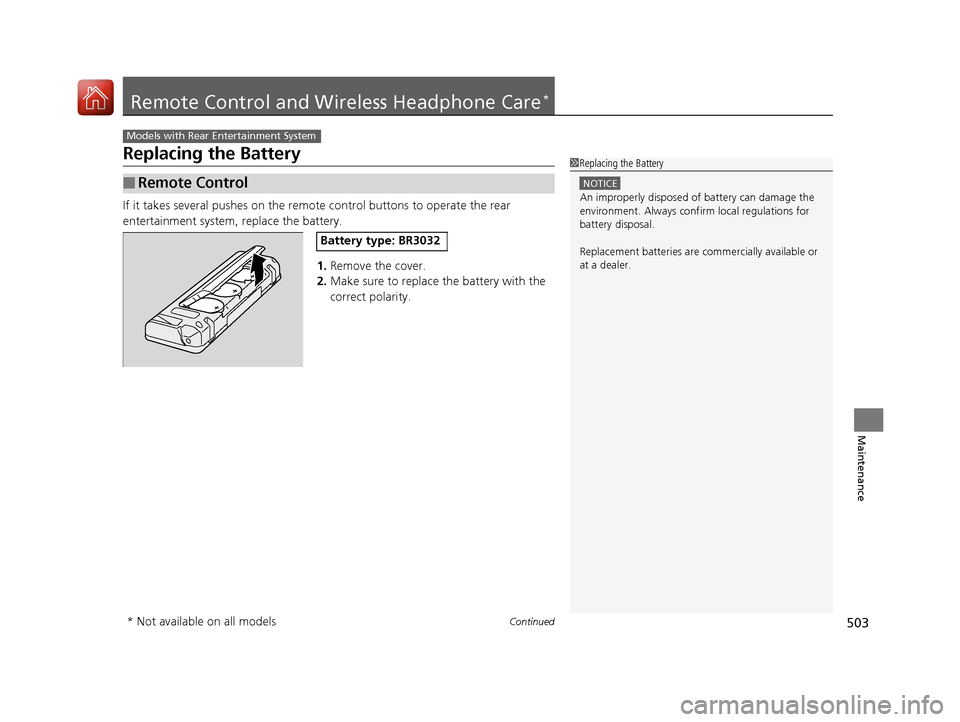
If it takes several pushes on the remo te control buttons to operate the rear
entertainment system, replace the battery.
1.Remove the cover.
2. Make sure to replace the battery with the
correct polarity.
■Remote Control
Models with Rear Entertainment System
1Replacing the Battery
NOTICE
An improperly disposed of battery can damage the
environment. Always conf irm local regulations for
battery disposal.
Replacement batteries are commercially available or
at a dealer.
Battery type: BR3032
* Not available on all models
17 ACURA MDX-31TZ56300.book 503 ページ 2016年5月13日 金曜日 午後7時46分
Page 505 of 581
504
uuRemote Control and Wireless Headphone Care*uReplacing the Battery
Maintenance
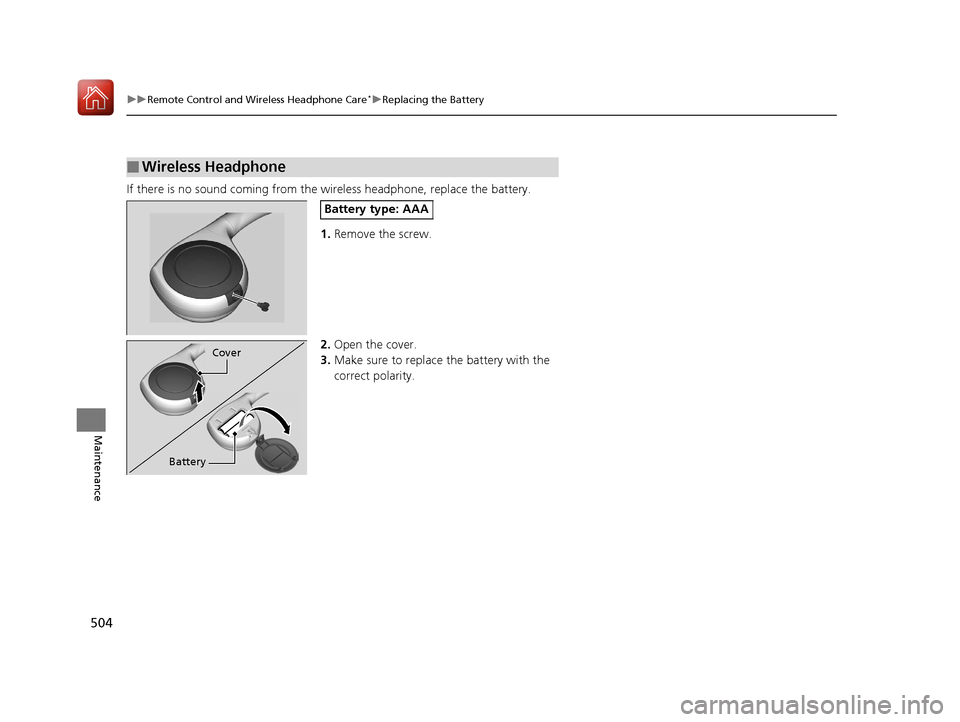
If there is no sound coming from th e wireless headphone, replace the battery.
1. Remove the screw.
2. Open the cover.
3. Make sure to replace the battery with the
correct polarity.
■Wireless Headphone
Battery type: AAA
Cover
Battery
17 ACURA MDX-31TZ56300.book 504 ページ 2016年5月13日 金曜日 午後7時46分
Page 570 of 581
569
Information
Authorized Manuals
■Service Express
For electronic copies of service publications, you can purchase a subscription to
Service Express. Visit www.techinfo.honda.com for pricing and options.
■For U.S. Owners
Manuals can be purchased from Helm Incorporated. You can order a manual by
phone at (800) 782-4356 (credit card orders only), or online at www.helminc.com.
■For Canadian Owners
Please contact a dealer to order any manuals that you may require.
17 ACURA MDX-31TZ56300.book 569 ページ 2016年5月13日 金曜日 午後7時46分
Page 571 of 581
570
Information
Client Service Information
Acura dealership personnel are trained professionals who should be able to deal
with any problems you may encounter with your vehicle. If, however, you are faced
with a problem that they cannot resolve to your satisfaction, contact Acura Client
Relations/Services.
U.S. Owners
American Honda Motor Co., Inc.
Acura Client Relations
Mail Stop 500-2N-7E
1919 Torrance Blvd.
Torrance, CA 90501-2746
Tel: (800) 382-2238 Canadian Owners
Honda Canada Inc.
Acura Client Services
180 Honda Boulevard
Markham, ON
L6C 0H9
Tel: 1-888-9-ACURA-9
Fax: 1-877-939-0909
E-mail: [email protected]
In Puerto Rico and the U.S. Virgin
Islands
Bella International
P.O. Box 190816
San Juan, PR 00919-0816
Tel: (787) 620-75461 Client Service Information
When you call or write, pl ease give us the following
information:
•Vehicle Identification Number
2Vehicle Identification Number (VIN),
Engine Number, and Transmission
Number P. 562
•Date of purchase•Odometer reading of your vehicle
•Your name, address, and telephone number
•A detailed description of the problem•Name of the dealer who sold the vehicle to you
17 ACURA MDX-31TZ56300.book 570 ページ 2016年5月13日 金曜日 午後7時46分