seat Acura MDX 2017 Workshop Manual
[x] Cancel search | Manufacturer: ACURA, Model Year: 2017, Model line: MDX, Model: Acura MDX 2017Pages: 581, PDF Size: 32.65 MB
Page 103 of 581
102
uuIndicators uMulti-Information Display (MID) Warning and Information Messages
Instrument Panel
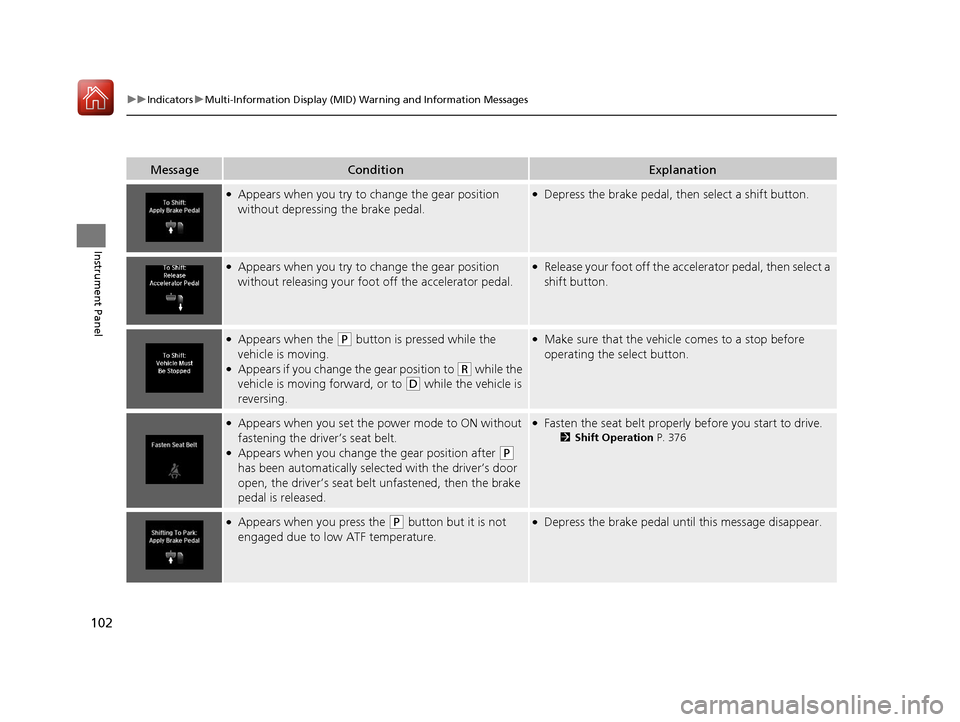
MessageConditionExplanation
●Appears when you try to ch ange the gear position
without depressing the brake pedal.●Depress the brake pedal, then select a shift button.
●Appears when you try to ch ange the gear position
without releasing your foot off the accelerator pedal.●Release your foot off the accelerator pedal, then select a
shift button.
●Appears when the (P button is pressed while the
vehicle is moving.
●Appears if you change the gear position to (R while the
vehicle is moving forward, or to
(D while the vehicle is
reversing.
●Make sure that the vehicle comes to a stop before
operating the select button.
●Appears when you set the po wer mode to ON without
fastening the driver’s seat belt.
●Appears when you change the gear position after (P
has been automatically select ed with the driver’s door
open, the driver’s seat belt unfastened, then the brake
pedal is released.
●Fasten the seat belt properly before you start to drive.
2 Shift Operation P. 376
●Appears when you press the (P button but it is not
engaged due to low ATF temperature.●Depress the brake pedal until this message disappear.
17 ACURA MDX-31TZ56300.book 102 ページ 2016年5月13日 金曜日 午後7時46分
Page 105 of 581

104
uuIndicators uMulti-Information Display (MID) Warning and Information Messages
Instrument Panel
MessageConditionExplanation
●Appears if the automatic br ake hold is automatically
canceled while it is in operation.●Immediately depress the brake pedal.
●Appears when the automati c brake hold system is
turned off.
2 Automatic Brake Hold P. 432
●Appears when the automatic brake hold button is
pressed without wearing the driver’s seat belt.●Fasten the driver’s seat belt.
2Automatic Brake Hold P. 432
●Appears when the automatic brake hold button is
pressed without depressing the brake pedal while the
automatic brake hold is in operation.●Press the automatic brake hold button with the brake
pedal depressed.
2Automatic Brake Hold P. 432
●Appears when the parking brake is applied
automatically while it is in operation.
2Automatic Brake Hold P. 432
2 Parking Brake P. 428
17 ACURA MDX-31TZ56300.book 104 ページ 2016年5月13日 金曜日 午後7時46分
Page 109 of 581
108
uuIndicators uMulti-Information Display (MID) Warning and Information Messages
Instrument Panel
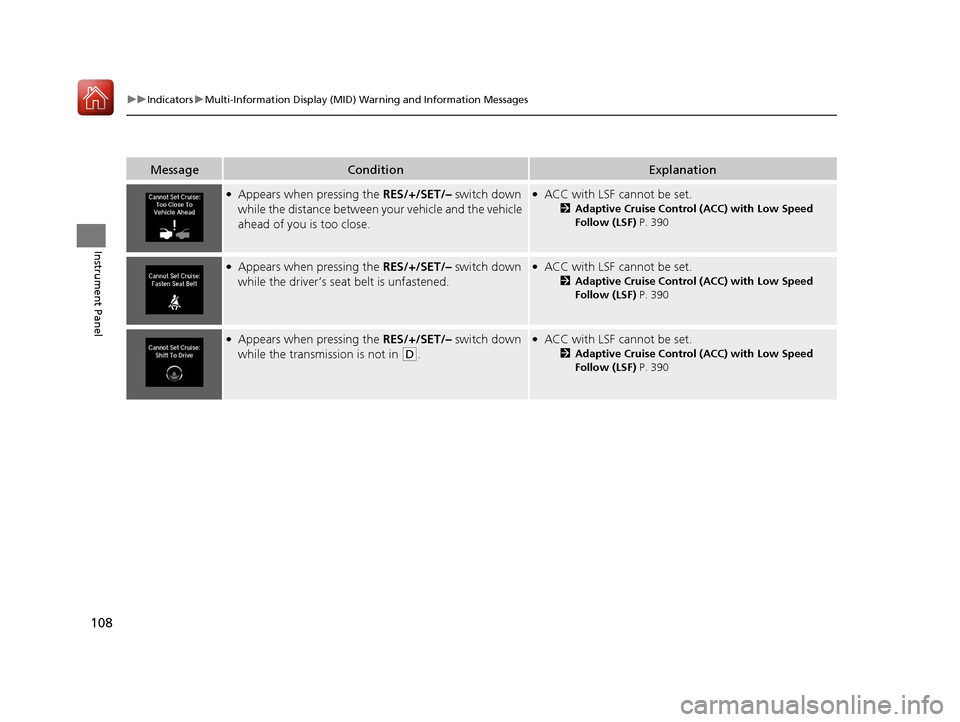
MessageConditionExplanation
●Appears when pressing the RES/+/SET/– switch down
while the distance between y our vehicle and the vehicle
ahead of you is too close.●ACC with LSF cannot be set.
2 Adaptive Cruise Control (ACC) with Low Speed
Follow (LSF) P. 390
●Appears when pressing the RES/+/SET/– switch down
while the driver’s seat belt is unfastened.●ACC with LSF cannot be set.
2 Adaptive Cruise Control (ACC) with Low Speed
Follow (LSF) P. 390
●Appears when pressing the RES/+/SET/– switch down
while the transmission is not in
(D.
●ACC with LSF cannot be set.
2 Adaptive Cruise Control (ACC) with Low Speed
Follow (LSF) P. 390
17 ACURA MDX-31TZ56300.book 108 ページ 2016年5月13日 金曜日 午後7時46分
Page 129 of 581
128
uuGauges and Multi-Information Display (MID) uMID
Instrument Panel
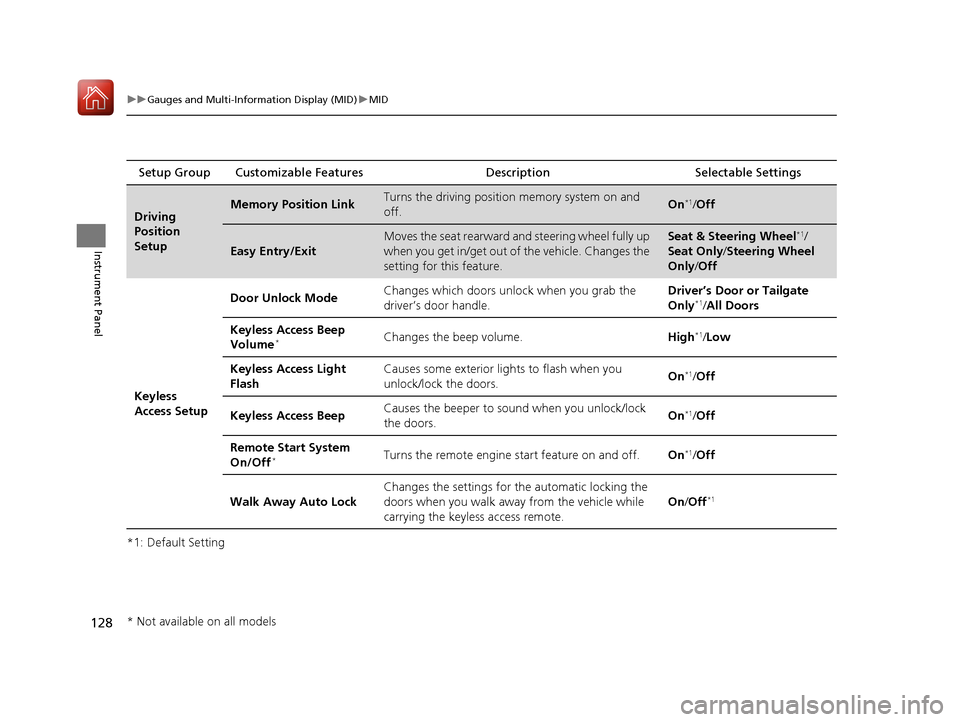
*1: Default SettingSetup Group Customizable Features
Description Selectable Settings
Driving
Position
SetupMemory Position LinkTurns the driving position memory system on and
off.On*1/Off
Easy Entry/Exit
Moves the seat rearward and steering wheel fully up
when you get in/get out of the vehicle. Changes the
setting for this feature.Seat & Steering Wheel*1/
Seat Only /Steering Wheel
Only /Off
Keyless
Access Setup Door Unlock Mode
Changes which doors unlock when you grab the
driver’s door handle. Driver’s Door or Tailgate
Only
*1/
All Doors
Keyless Access Beep
Volume
*Changes the beep volume. High*1/Low
Keyless Access Light
Flash Causes some exterior li
ghts to flash when you
unlock/lock the doors. On
*1/
Off
Keyless Access Beep Causes the beeper to sound when you unlock/lock
the doors. On
*1/
Off
Remote Start System
On/Off
*Turns the remote engine start feature on and off. On*1/Off
Walk Away Auto Lock Changes the settings for the automatic locking the
doors when you walk away from the vehicle while
carrying the keyless
access remote. On
/Off
*1
* Not available on all models
17 ACURA MDX-31TZ56300.book 128 ページ 2016年5月13日 金曜日 午後7時46分
Page 134 of 581
133
Controls
This chapter explains how to operate the various controls necessary for driving.
Clock.................................................. 134
Locking and Unlocking the Doors Key Types and Functions .................. 135
Low Keyless Access Remote Signal Strength ......................................... 137
Locking/Unlocking the Doors from the
Outside .......................................... 138
Locking/Unlocking the Doors from the Inside ............................................. 146
Childproof Door Locks ..................... 148
Auto Door Locking/Unlocking .......... 149
Opening and Closing the Tailgate ... 150
Security System Immobilizer System .......................... 157
Security System Alarm ...................... 157 Opening and Closing the Windows
... 160
Opening and Closing the Moonroof .. 162
Operating the Switches Around the
Steering Wheel ENGINE START/STOP Button............. 163
Turn Signals ..................................... 166
Light Switches.................................. 167
Fog Lights
*...................................... 170
Daytime Running Lights ................... 170
Auto High-Beam .............................. 171
Wipers and Washers ........................ 174
Brightness Control ........................... 178
Rear Defogger/Heated Door Mirror Button.. 179Driving Position Memory System ...... 180
Adjusting the Steering Wheel........... 182 Adjusting the Mirrors
Interior Rearview Mirror ................... 183
Power Door Mirrors ......................... 184
Adjusting the Seats Front Seats ...................................... 186
Second Row Seats ........................... 188
Third Row Seats ............................... 197
Armrest ........................................... 198
Interior Lights/Interior Convenience Items
Interior Lights .................................. 200
Interior Convenience Items .............. 202
Climate Control System
Using Automatic Climate Control .... 213
Rear Climate Control System ........... 221
Automatic Climate Control Sensors ... 225
* Not available on all models
17 ACURA MDX-31TZ56300.book 133 ページ 2016年5月13日 金曜日 午後7時46分
Page 148 of 581
Continued147
uuLocking and Unlocking the Doors uLocking/Unlocking the Doors from the Inside
Controls
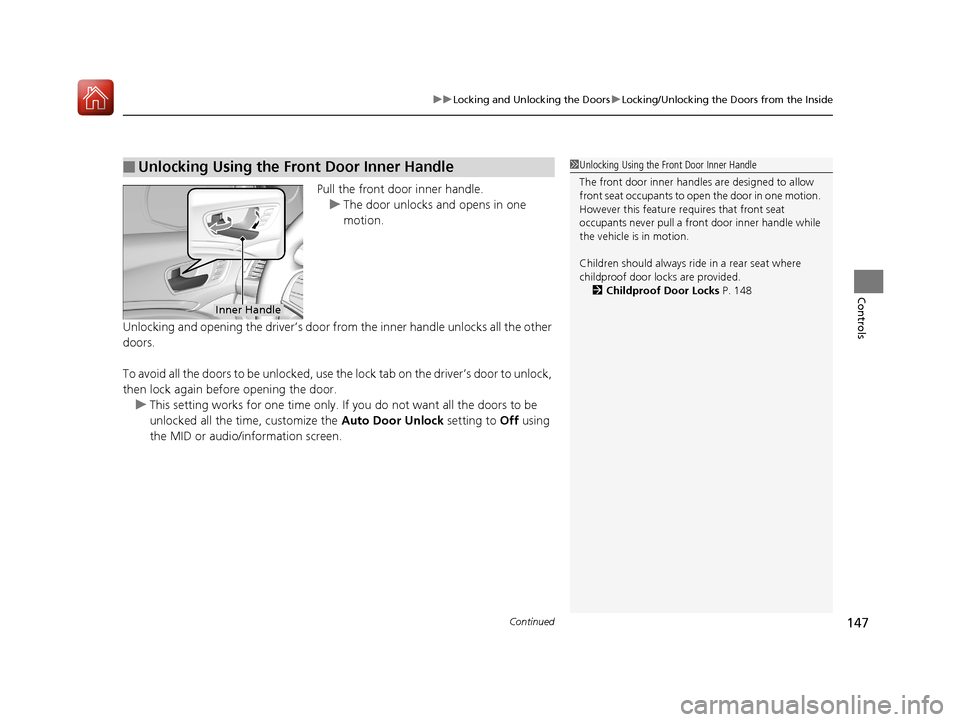
Pull the front door inner handle.
u The door unlocks and opens in one
motion.
Unlocking and opening the driver’s door from the inner handle unlocks all the other
doors.
To avoid all the doors to be unlocked, use the lock tab on the driver’s door to unlock,
then lock again before opening the door. u This setting works for one time only. If you do not want all the doors to be
unlocked all the time, customize the Auto Door Unlock setting to Off using
the MID or audio/information screen.
■Unlocking Using the Front Door Inner Handle1 Unlocking Using the Front Door Inner Handle
The front door inne r handles are designed to allow
front seat occupants to open the door in one motion.
However this feature requires that front seat
occupants never pull a front door inner handle while
the vehicle is in motion.
Children should always ride in a rear seat where
childproof door locks are provided.
2 Childproof Door Locks P. 148
Inner Handle
17 ACURA MDX-31TZ56300.book 147 ページ 2016年5月13日 金曜日 午後7時46分
Page 161 of 581
160
Controls
Opening and Closing the Windows
Opening/Closing the Power Windows
The power windows can be opened and closed when the power mode is in ON,
using the switches on the doors.
The driver’s side switches can be used to open and close all the windows. The power
window lock button on the driver’s side must be switched off (not pushed in,
indicator off) to open and close the windows from anyw here other than the driver’s
seat.
When the power window lock button is pu shed in, the indicator comes on and you
can only operate the driver’s window. Turn the power window lock button on if a
child is in the vehicle.
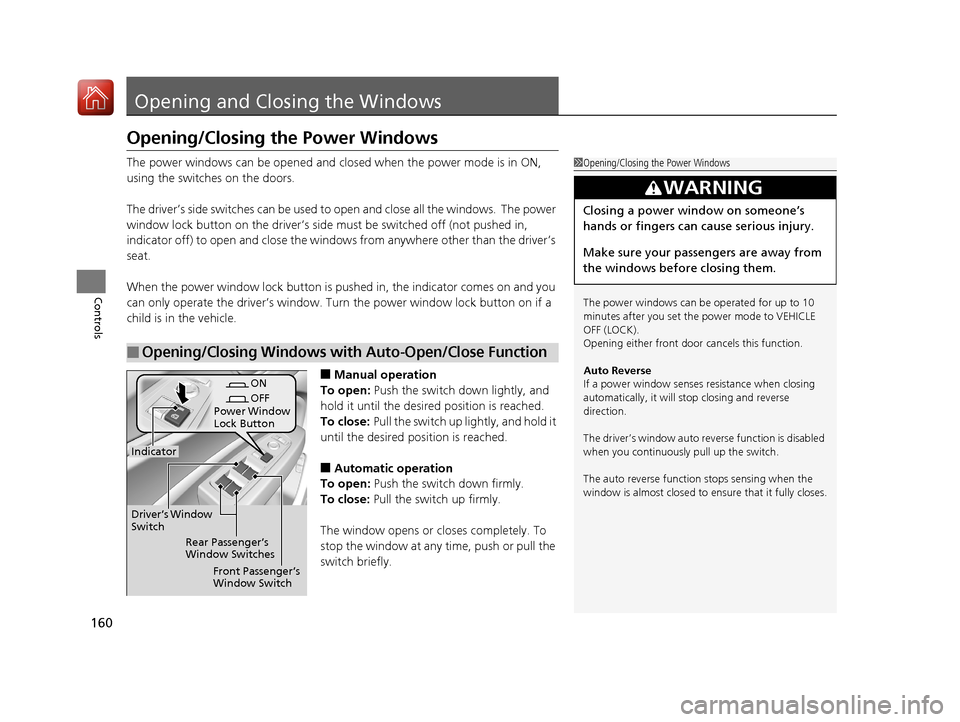
■Manual operation
To open: Push the switch down lightly, and
hold it until the desired position is reached.
To close: Pull the switch up lightly, and hold it
until the desired position is reached.
■Automatic operation
To open: Push the switch down firmly.
To close: Pull the switch up firmly.
The window opens or cl oses completely. To
stop the window at any time, push or pull the
switch briefly.
■Opening/Closing Windows with Auto-Open/Close Function
1 Opening/Closing the Power Windows
The power windows can be operated for up to 10
minutes after you set the power mode to VEHICLE
OFF (LOCK).
Opening either front door cancels this function.
Auto Reverse
If a power window senses resistance when closing
automatically, it will stop closing and reverse
direction.
The driver’s window auto re verse function is disabled
when you continuously pull up the switch.
The auto reverse function stops sensing when the
window is almost closed to en sure that it fully closes.
3WARNING
Closing a power window on someone’s
hands or fingers can cause serious injury.
Make sure your passengers are away from
the windows before closing them.
ON
OFF
Power Window
Lock Button
Rear Passenger’s
Window Switches
Front Passenger’s
Window Switch
Driver’s Window
Switch
Indicator
17 ACURA MDX-31TZ56300.book 160 ページ 2016年5月13日 金曜日 午後7時46分
Page 181 of 581
180
uuOperating the Switches Around the Steering Wheel uDriving Position Memory System
Controls
Driving Position Memory System
You can store two driver’s seat (except fo r power lumbar), steering wheel and door
mirror positions with the driving position memory system.
When you unlock and open th e driver’s door with a remote transmitter, or keyless
access system, the seat and door mirrors adjust automatically to one of the two
preset positions.
The steering wheel will move to the stored position when you set the power mode
to ACCESSORY.
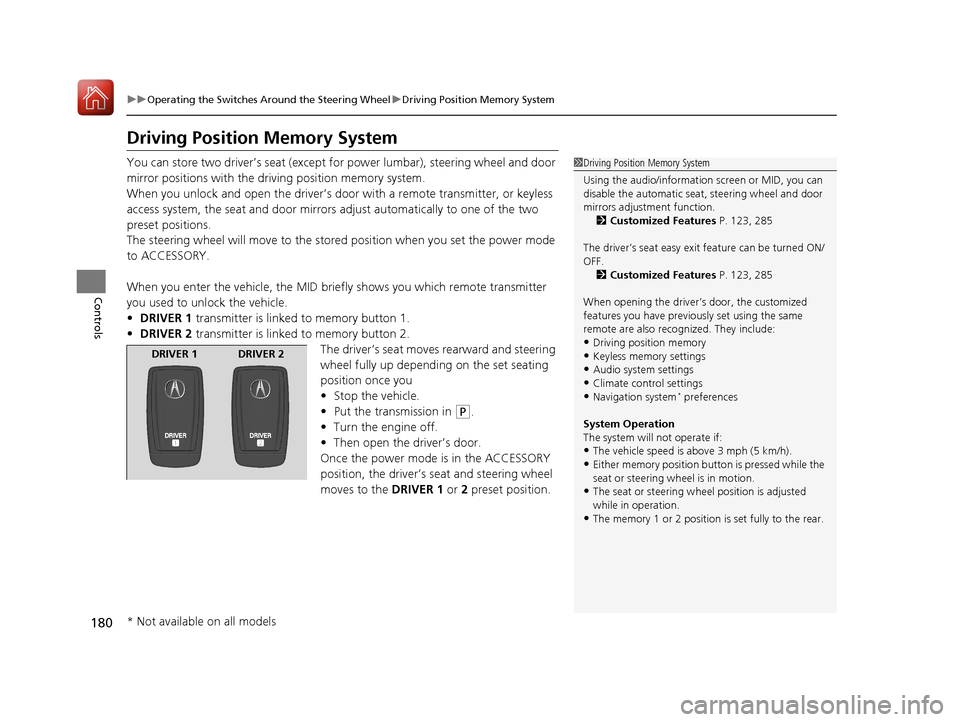
When you enter the vehicle, the MID brie fly shows you which remote transmitter
you used to unlock the vehicle.
• DRIVER 1 transmitter is linked to memory button 1.
• DRIVER 2 transmitter is linked to memory button 2.
The driver’s seat moves rearward and steering
wheel fully up depending on the set seating
position once you
•Stop the vehicle.
• Put the transmission in
(P.
• Turn the engine off.
• Then open the driver’s door.
Once the power mode is in the ACCESSORY
position, the driver’s seat and steering wheel
moves to the DRIVER 1 or 2 preset position.
1Driving Position Memory System
Using the audio/information screen or MID, you can
disable the automatic seat, steering wheel and door
mirrors adjustment function. 2 Customized Features P. 123, 285
The driver’s seat easy exit feature can be turned ON/
OFF. 2 Customized Features P. 123, 285
When opening the driver’s door, the customized
features you have previously set using the same
remote are also rec ognized. They include:
•Driving position memory
•Keyless memory settings
•Audio system settings•Climate control settings
•Navigation system* preferences
System Operation
The system will not operate if:
•The vehicle speed is above 3 mph (5 km/h).•Either memory position button is pressed while the
seat or steering wheel is in motion.
•The seat or steering wheel position is adjusted
while in operation.
•The memory 1 or 2 position is set fully to the rear.
DRIVER 1 DRIVER 2
* Not available on all models
17 ACURA MDX-31TZ56300.book 180 ページ 2016年5月13日 金曜日 午後7時46分
Page 182 of 581
181
uuOperating the Switches Around the Steering Wheel uDriving Position Memory System
Controls
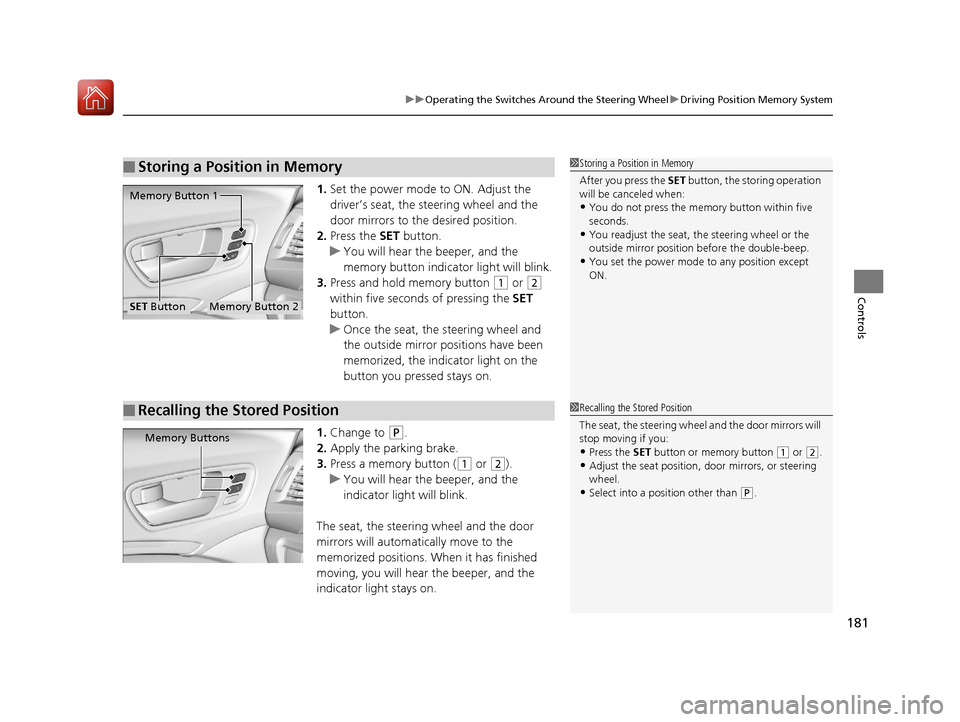
1. Set the power mode to ON. Adjust the
driver’s seat, the steering wheel and the
door mirrors to the desired position.
2. Press the SET button.
u You will hear the beeper, and the
memory button indicator light will blink.
3. Press and hold memory button
(1 or (2
within five seconds of pressing the SET
button.
u Once the seat, the steering wheel and
the outside mirror positions have been
memorized, the indicator light on the
button you pressed stays on.
1. Change to
(P.
2. Apply the parking brake.
3. Press a memory button (
(1 or (2).
u You will hear the beeper, and the
indicator light will blink.
The seat, the steering wheel and the door
mirrors will automatically move to the
memorized positions. When it has finished
moving, you will hear the beeper, and the
indicator light stays on.
■Storing a Position in Memory1 Storing a Position in Memory
After you press the SET button, the storing operation
will be canceled when:
•You do not press the memory button within five
seconds.
•You readjust the seat, the steering wheel or the
outside mirror position before the double-beep.
•You set the power mode to any position except
ON.
Memory Button 1
Memory Button 2SET Button
■Recalling the Stored Position1 Recalling the Stored Position
The seat, the steering wheel and the door mirrors will
stop moving if you:
•Press the SET button or memory button (1 or (2.
•Adjust the seat position, door mirrors, or steering
wheel.
•Select into a position other than ( P.
Memory Buttons
17 ACURA MDX-31TZ56300.book 181 ページ 2016年5月13日 金曜日 午後7時46分
Page 184 of 581
183
Controls
Adjusting the Mirrors
Interior Rearview Mirror
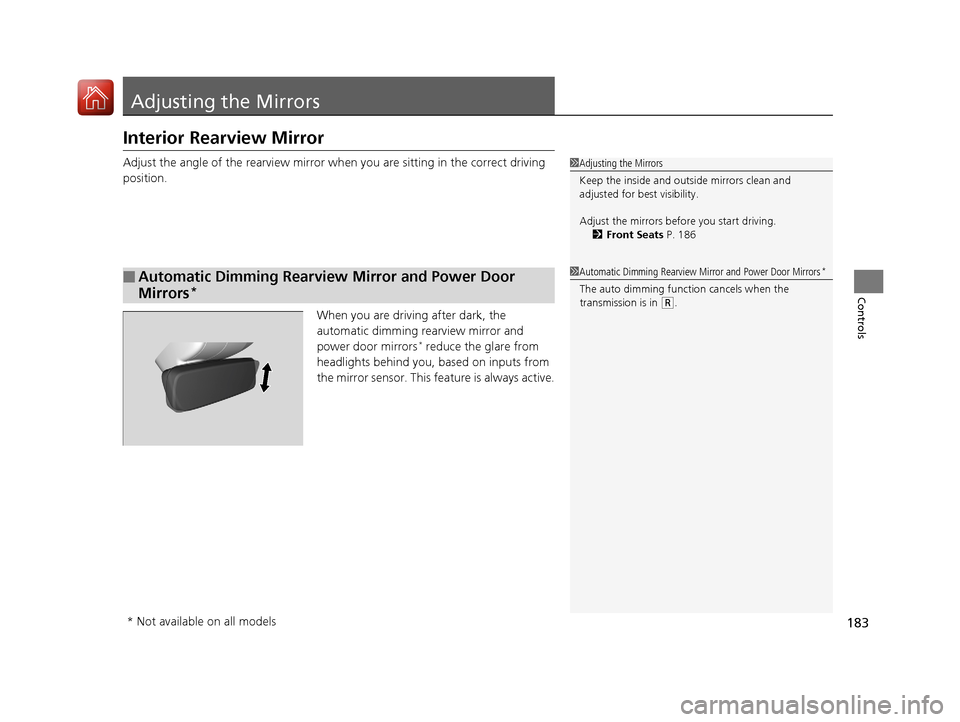
Adjust the angle of the rearview mirror when you are sitting in the correct driving
position.
When you are driving after dark, the
automatic dimming rearview mirror and
power door mirrors
* reduce the glare from
headlights behind you, based on inputs from
the mirror sensor. This feature is always active.
■Automatic Dimming Rearview Mirror and Power Door
Mirrors
*
1 Adjusting the Mirrors
Keep the inside and out side mirrors clean and
adjusted for best visibility.
Adjust the mirrors befo re you start driving.
2 Front Seats P. 186
1Automatic Dimming Rearview Mirror and Power Door Mirrors*
The auto dimming function cancels when the
transmission is in
(R.
* Not available on all models
17 ACURA MDX-31TZ56300.book 183 ページ 2016年5月13日 金曜日 午後7時46分