Select Park Acura MDX 2017 Owner's Manual
[x] Cancel search | Manufacturer: ACURA, Model Year: 2017, Model line: MDX, Model: Acura MDX 2017Pages: 581, PDF Size: 32.65 MB
Page 12 of 581
11
Quick Reference Guide
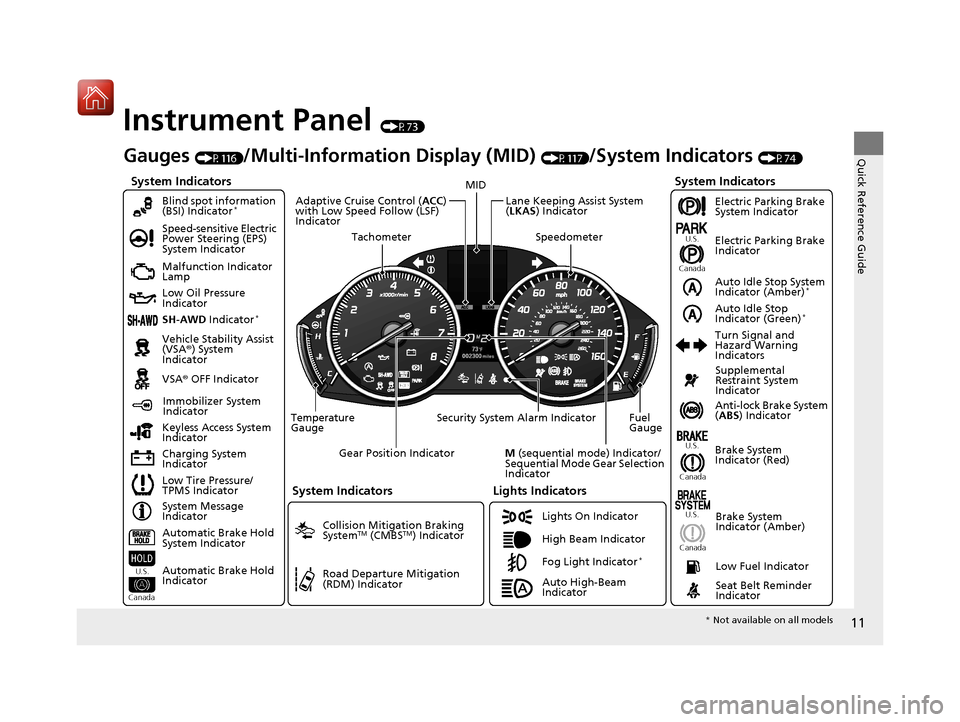
Instrument Panel (P73)
System Indicators
Malfunction Indicator
Lamp
Low Oil Pressure
Indicator
Charging System
IndicatorAnti-lock Brake System
(
ABS ) Indicator
Vehicle Stability Assist
(VSA®
) System
Indicator
VSA ® OFF Indicator
Speed-sensitive Electric
Power Steering (EPS)
System Indicator
Lights Indicators
Lights On Indicator
High Beam Indicator
Immobilizer System
Indicator
Seat Belt Reminder
Indicator
System Indicators
System Message
Indicator Brake System
Indicator (Red)Supplemental
Restraint System
Indicator
Low Fuel Indicator
Gauges (P116)/Multi-Information Display (MID) (P117)/System Indicators (P74)
Low Tire Pressure/
TPMS Indicator Turn Signal and
Hazard Warning
Indicators
Keyless Access System
Indicator
Temperature
Gauge Security System Alarm Indicator Fuel
Gauge
Tachometer
MID
Speedometer
Gear Position Indicator
M (sequential mode) Indicator/
Sequential Mode Gear Selection
Indicator
Brake System
Indicator (Amber)
SH-AWD Indicator*
Blind spot information
(BSI) Indicator*
System Indicators
Collision Mitigation Braking
SystemTM (CMBSTM) Indicator
Road Departure Mitigation
(RDM) Indicator
Lane Keeping Assist System
(LKAS ) Indicator
Adaptive Cruise Control (
ACC)
with Low Speed Follow (LSF)
Indicator
U.S.
Canada U.S.
Canada
Fog Light Indicator*
Auto Idle Stop System
Indicator (Amber)*
Auto Idle Stop
Indicator (Green)*
Automatic Brake Hold
System Indicator
Automatic Brake Hold
Indicator
U.S.
Canada
Electric Parking Brake
System Indicator
Electric Parking Brake
Indicator
U.S.
Canada
Auto High-Beam
Indicator
* Not available on all models
17 ACURA MDX-31TZ56300.book 11 ページ 2016年5月13日 金曜日 午後7時46分
Page 19 of 581
18
Quick Reference Guide
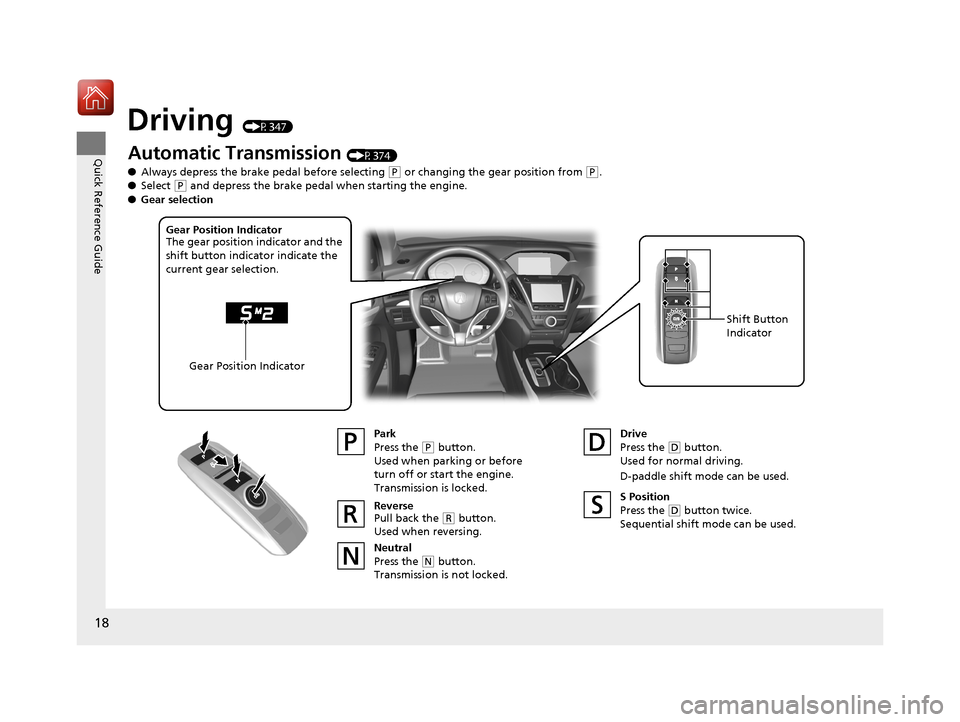
Driving (P347)
Automatic Transmission (P374)
● Always depress the brake pedal before selecting
(P or changing the gear position from (P.
● Select
(P and depress the brake pedal when starting the engine.
Park
Press the
(P button.
Used when parking or before
turn off or start the engine.
Transmission is locked.
Reverse
Pull back the
( R button.
Used when reversing.
Neutral
Press the
( N button.
Transmission is not locked. Drive
Press the
(
D button.
Used for normal driving.
D-paddle shift mode can be used.
Gear Position Indicator
The gear position indicator and the
shift button indicator indicate the
current gear selection.
Gear Position Indicator Shift Button
Indicator
●
Gear selection
S Position
Press the (D button twice.
Sequential shift mode can be used.
17 ACURA MDX-31TZ56300.book 18 ページ 2016年5月13日 金曜日 午後7時46分
Page 26 of 581
25
Quick Reference Guide
Depressing the accelerator
pedal does not release the
parking brake
automatically. Why?●Fasten the driver’s seat belt.
●Check if the transmission is in (P or (N. If so, select any other
position.
Why does the gear position
automatically change to
(P
when I open the driver’s
door to check for parking
space lines when
reversing?
●Fasten the driver’s seat belt.
●Close the driver’s door and manually change the gear
position. u
When opening the driver’s door (P377)
Why do I hear a screeching
sound when I apply the
brake pedal?The brake pads may need to be replaced. Have your vehicle
inspected by a dealer.
Unleaded gasoline with a
Pump Octane Number
(PON) of 91 or higher is
recommended.
Is it possible to use
unleaded gasoline with a
Pump Octane Number
(PON) of 87 or lower on
this vehicle?Unleaded gasoline with a Pump Octane Number (PON) of 91 or
higher is recommended.
Use of lower octane gasoline can cause occasional metallic
knocking noise in the engine and will result in decreased engine
performance.
Use of gasoline with a pump octane less than 87 can lead to
engine damage.
* Not available on all models
17 ACURA MDX-31TZ56300.book 25 ページ 2016年5月13日 金曜日 午後7時46分
Page 72 of 581
71
Safe Driving
Exhaust Gas Hazard
Carbon Monoxide Gas
The engine exhaust from this vehicle contains carbon monoxide, a colorless,
odorless, and highly toxic gas. As long as you properly maintain your vehicle, carbon
monoxide gas will not get into the interior.
■Have the exhaust system in spected for leaks whenever
• The exhaust system is ma king an unusual noise.
• The exhaust system may have been damaged.
• The vehicle is raised for an oil change.
When you operate a vehicle with the tailga te open, airflow can pull exhaust gas into
the interior and create a hazardous conditio n. If you must drive with the tailgate
open, open all the windows and set the climate control system as shown below.
1. Select the fresh air mode.
2. Select the mode.
3. Set the fan speed to high.
4. Set the temperature control to a comfortable setting.
Adjust the climate control system in the same manner if you sit in your parked
vehicle with the engine running.
1 Carbon Monoxide Gas
An enclosed area such as a garage can quickly fill up
with carbon monoxide gas.
Do not run the engine with the garage door closed.
Even when the garage door is open, drive out of the
garage immediately afte r starting the engine.
3WARNING
Carbon monoxide gas is toxic.
Breathing it can cause unconsciousness and
even kill you.
Avoid any enclosed areas or activities that
expose you to carbon monoxide.
17 ACURA MDX-31TZ56300.book 71 ページ 2016年5月13日 金曜日 午後7時46分
Page 81 of 581
80
uuIndicators u
Instrument Panel
IndicatorNameOn/BlinkingExplanationMessage
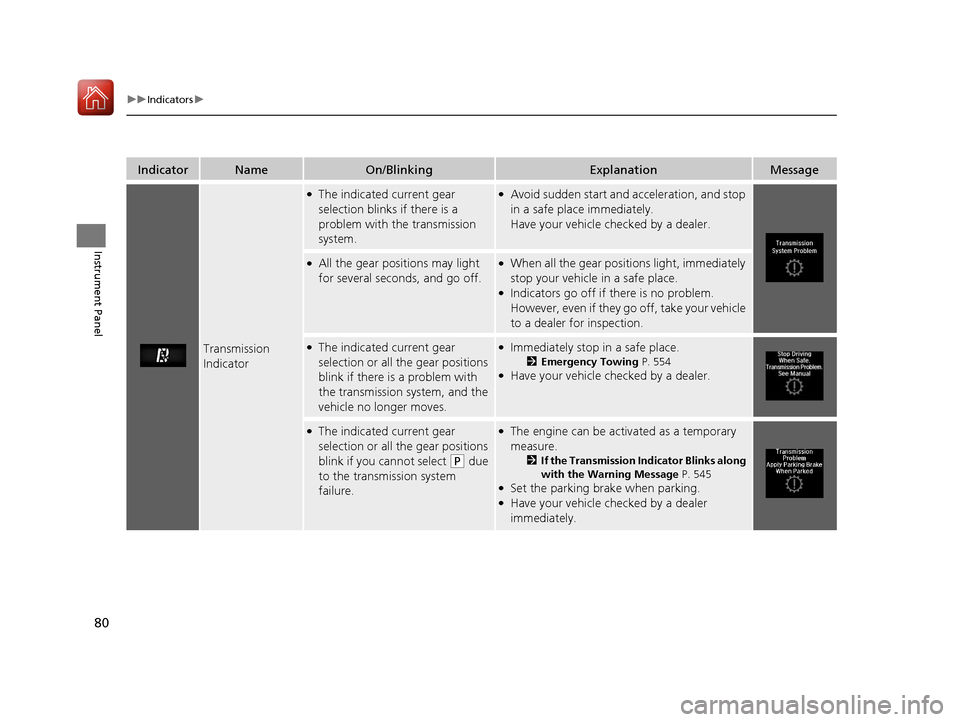
Transmission
Indicator
●The indicated current gear
selection blinks if there is a
problem with the transmission
system.●Avoid sudden start and acceleration, and stop
in a safe place immediately.
Have your vehicle checked by a dealer.
●All the gear positions may light
for several seconds, and go off.●When all the gear positions light, immediately
stop your vehicle in a safe place.
●Indicators go off if there is no problem.
However, even if they go off, take your vehicle
to a dealer for inspection.
●The indicated current gear
selection or all the gear positions
blink if there is a problem with
the transmission system, and the
vehicle no longer moves.●Immediately stop in a safe place.
2Emergency Towing P. 554●Have your vehicle checked by a dealer.
●The indicated current gear
selection or all the gear positions
blink if you cannot select
(P due
to the transmission system
failure.
●The engine can be activated as a temporary
measure.
2 If the Transmission Indicator Blinks along
with the Warning Message P. 545
●Set the parking brake when parking.●Have your vehicle checked by a dealer
immediately.
17 ACURA MDX-31TZ56300.book 80 ページ 2016年5月13日 金曜日 午後7時46分
Page 102 of 581
101
uuIndicators uMulti-Information Display (MID) Warning and Information Messages
Continued
Instrument Panel
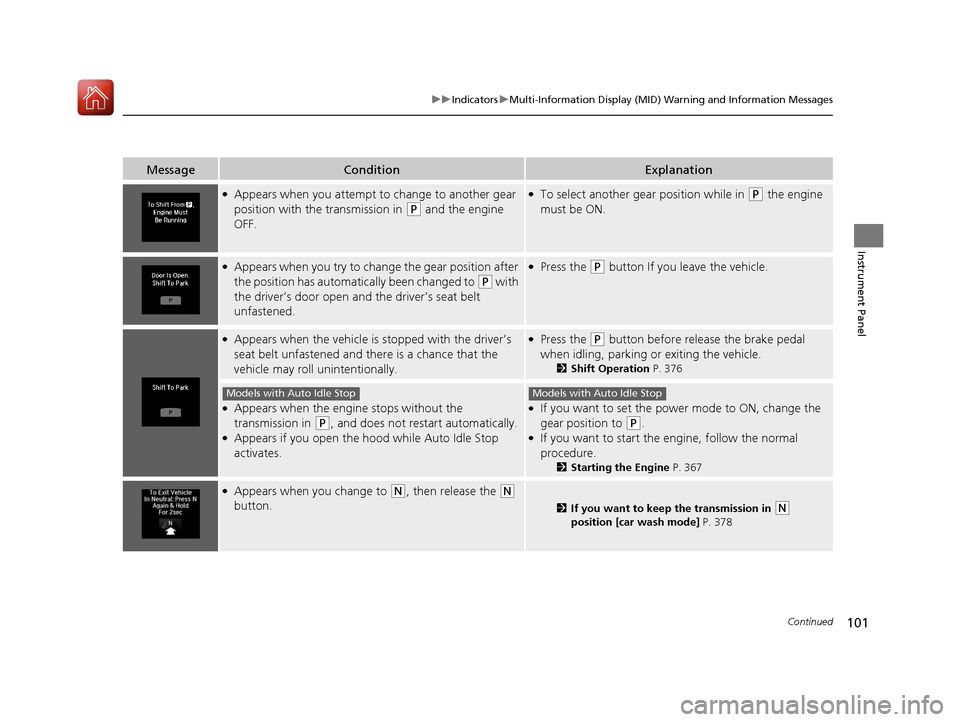
MessageConditionExplanation
●Appears when you attempt to change to another gear
position with the transmission in
(P and the engine
OFF.
●To select another gear position while in (P the engine
must be ON.
●Appears when you try to change the gear position after
the position has automatically been changed to
(P with
the driver’s door open and the driver’s seat belt
unfastened.
●Press the (P button If you leave the vehicle.
●Appears when the vehicle is stopped with the driver’s
seat belt unfastened and there is a chance that the
vehicle may roll unintentionally.●Press the (P button before release the brake pedal
when idling, parking or exiting the vehicle.
2 Shift Operation P. 376
●Appears when the engine stops without the
transmission in
(P, and does not restart automatically.●Appears if you open the hood while Auto Idle Stop
activates.
●If you want to set the power mode to ON, change the
gear position to
(P.●If you want to start the engine, follow the normal
procedure.
2Starting the Engine P. 367
●Appears when you change to (N, then release the (N
button.
2 If you want to keep the transmission in (N
position [car wash mode] P. 378
Models with Auto Idle StopModels with Auto Idle Stop
17 ACURA MDX-31TZ56300.book 101 ページ 2016年5月13日 金曜日 午後7時46分
Page 130 of 581
129
uuGauges and Multi-Info rmation Display (MID)uMID
Continued
Instrument Panel
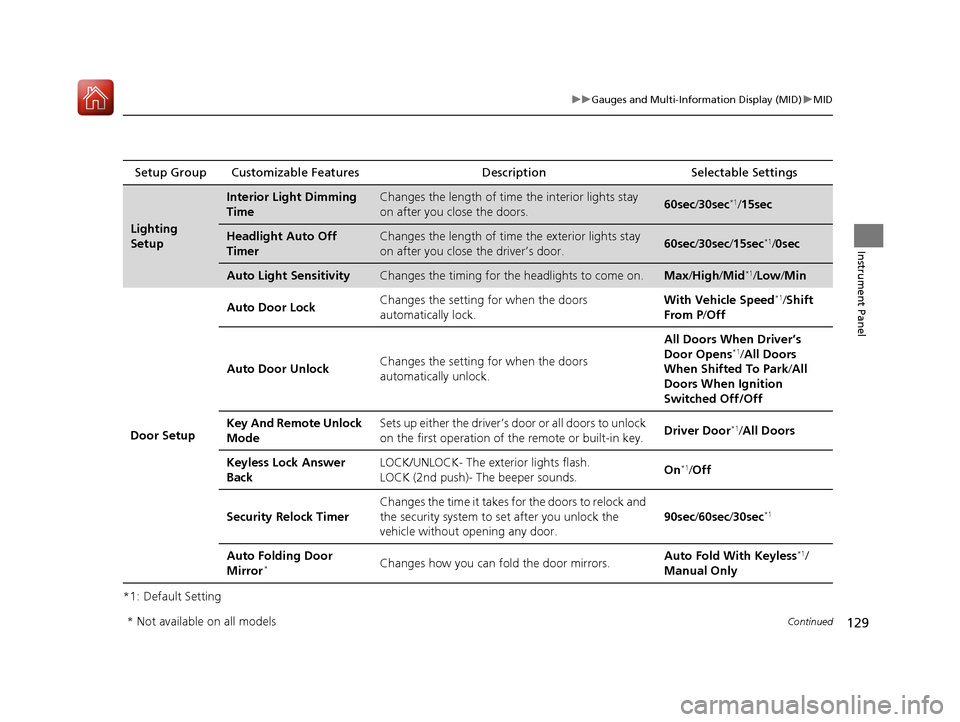
*1: Default SettingSetup Group Customizable Features
Description Selectable Settings
Lighting
Setup
Interior Light Dimming
TimeChanges the length of time the interior lights stay
on after you close the doors.60sec /30sec*1/15sec
Headlight Auto Off
TimerChanges the length of time the exterior lights stay
on after you close the driver’s door.60sec /30sec /15sec*1/0sec
Auto Light SensitivityChanges the timing for the headlights to come on.Max/High /Mid*1/Low/ Min
Door Setup Auto Door Lock
Changes the setting
for when the doors
automatically lock. With Vehicle Speed
*1/
Shift
From P /Off
Auto Door Unlock Changes the setting
for when the doors
automatically unlock. All Doors When Driver’s
Door Opens
*1/
All Doors
When Shifted To Park /All
Doors When Ignition
Switched Off/Off
Key And Remote Unlock
Mode Sets up either the driver’s door or all doors to unlock
on the first operation of the remote or built-in key.
Driver Door
*1/
All Doors
Keyless Lock Answer
Back LOCK/UNLOCK- The exterior lights flash.
LOCK (2nd push)- The beeper sounds.
On
*1/
Off
Security Relock Timer Changes the time it takes for the doors to relock and
the security system to set after you unlock the
vehicle without opening any door.
90sec
/60sec /30sec
*1
Auto Folding Door
Mirror*Changes how you can fold the door mirrors. Auto Fold With Keyless*1/
Manual Only
* Not available on all models
17 ACURA MDX-31TZ56300.book 129 ページ 2016年5月13日 金曜日 午後7時46分
Page 174 of 581
173
uuOperating the Switches Around the Steering Wheel uAuto High-Beam
Controls
■To manually cancel th e system temporarily
You can cancel the operation when you ma nually change the headlights to high
beams. Push the lever forward until you hear a click, or lightly pull the lever towards
you to flash high beams. The auto high-beam indicator goes off.
If you want the auto high-beam operation to resume at once, pull the lever towards
you.
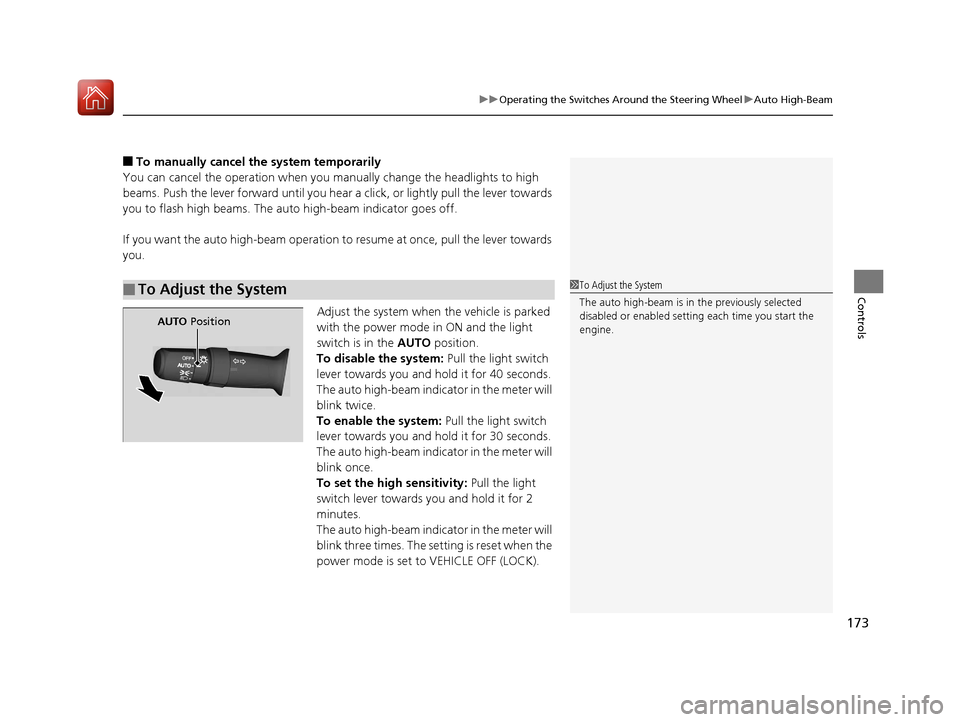
Adjust the system when the vehicle is parked
with the power mode in ON and the light
switch is in the AUTO position.
To disable the system: Pull the light switch
lever towards you and hold it for 40 seconds.
The auto high-beam indica tor in the meter will
blink twice.
To enable the system: Pull the light switch
lever towards you and hold it for 30 seconds.
The auto high-beam indica tor in the meter will
blink once.
To set the high sensitivity: Pull the light
switch lever towards you and hold it for 2
minutes.
The auto high-beam indica tor in the meter will
blink three times. The se tting is reset when the
power mode is set to VEHICLE OFF (LOCK).
■To Adjust the System1 To Adjust the System
The auto high-beam is in the previously selected
disabled or enabled setti ng each time you start the
engine.
AUTO Position
17 ACURA MDX-31TZ56300.book 173 ページ 2016年5月13日 金曜日 午後7時46分
Page 182 of 581
181
uuOperating the Switches Around the Steering Wheel uDriving Position Memory System
Controls
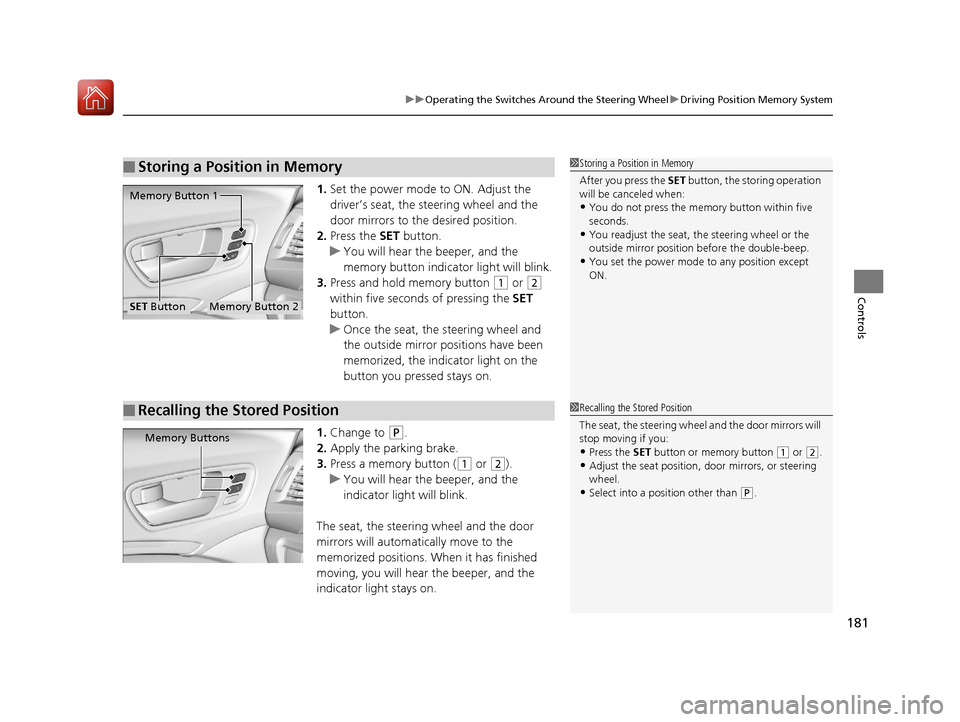
1. Set the power mode to ON. Adjust the
driver’s seat, the steering wheel and the
door mirrors to the desired position.
2. Press the SET button.
u You will hear the beeper, and the
memory button indicator light will blink.
3. Press and hold memory button
(1 or (2
within five seconds of pressing the SET
button.
u Once the seat, the steering wheel and
the outside mirror positions have been
memorized, the indicator light on the
button you pressed stays on.
1. Change to
(P.
2. Apply the parking brake.
3. Press a memory button (
(1 or (2).
u You will hear the beeper, and the
indicator light will blink.
The seat, the steering wheel and the door
mirrors will automatically move to the
memorized positions. When it has finished
moving, you will hear the beeper, and the
indicator light stays on.
■Storing a Position in Memory1 Storing a Position in Memory
After you press the SET button, the storing operation
will be canceled when:
•You do not press the memory button within five
seconds.
•You readjust the seat, the steering wheel or the
outside mirror position before the double-beep.
•You set the power mode to any position except
ON.
Memory Button 1
Memory Button 2SET Button
■Recalling the Stored Position1 Recalling the Stored Position
The seat, the steering wheel and the door mirrors will
stop moving if you:
•Press the SET button or memory button (1 or (2.
•Adjust the seat position, door mirrors, or steering
wheel.
•Select into a position other than ( P.
Memory Buttons
17 ACURA MDX-31TZ56300.book 181 ページ 2016年5月13日 金曜日 午後7時46分
Page 299 of 581
298
uuCustomized Features u
Features
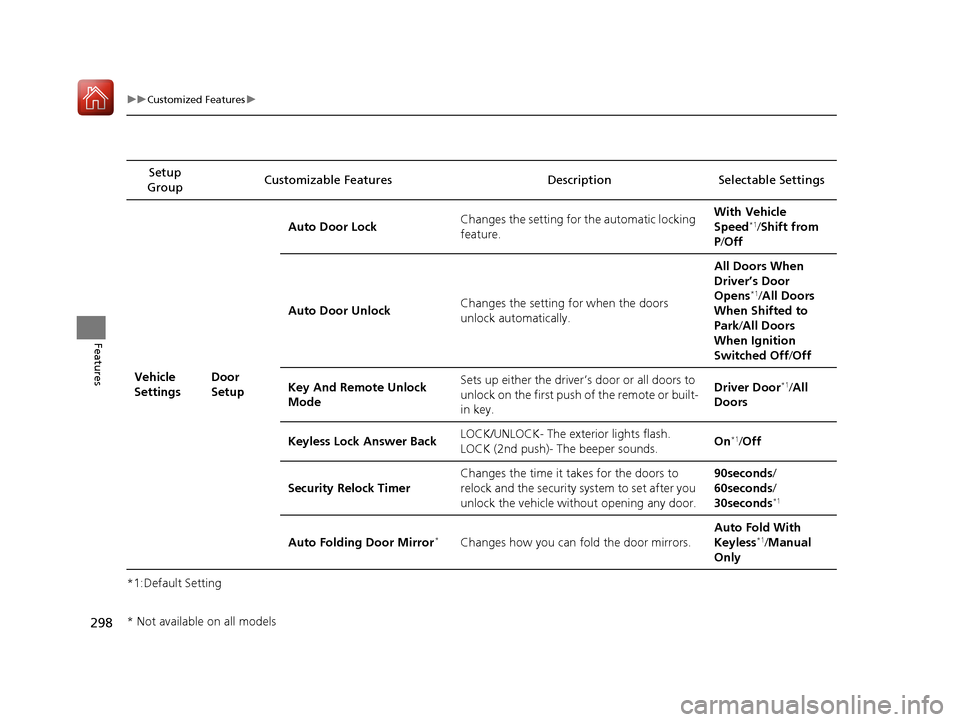
*1:Default SettingSetup
Group Customizable Features Description Selectable Settings
Vehicle
Settings Door
SetupAuto Door Lock
Changes the setting for the automatic locking
feature. With Vehicle
Speed
*1/
Shift from
P /Off
Auto Door Unlock Changes the setting
for when the doors
unlock automatically. All Doors When
Driver’s Door
Opens
*1/
All Doors
When Shifted to
Park /All Doors
When Ignition
Switched Off /Off
Key And Remote Unlock
Mode Sets up either the driver’s
door or all doors to
unlock on the first push of the remote or built-
in key. Driver Door
*1/
All
Doors
Keyless Lock Answer Back LOCK/UNLOCK- The exterior lights flash.
LOCK (2nd push)- The beeper sounds.
On
*1/
Off
Security Relock Timer Changes the time it takes for the doors to
relock and the security system to set after you
unlock the vehicle without opening any door. 90seconds/
60seconds/
30seconds
*1
Auto Folding Door Mirror*Changes how you can fold the door mirrors.
Auto Fold
With
Keyless*1/ Manual
Only
* Not available on all models
17 ACURA MDX-31TZ56300.book 298 ページ 2016年5月13日 金曜日 午後7時46分