wheel Acura MDX 2018 Owners Manual
[x] Cancel search | Manufacturer: ACURA, Model Year: 2018, Model line: MDX, Model: Acura MDX 2018Pages: 697, PDF Size: 38.45 MB
Page 538 of 697

Continued537
uuBraking uCollision Mitigation Braking SystemTM (CMBSTM)
Driving
■When the system activates
At system’s earliest collision alert st age, you can change the distance (Long/
Normal /Short ) between vehicles at which alerts will come on through MID setting
options.
2 List of customizable options P. 129
■Vibration alert on the steering wheel
When a potential coll ision to an oncoming detected vehicle is determined, the
system alerts you with rapid vibration on th e steering wheel, in addition to visual and
audible alerts.
u Take appropriate action to prevent a col lision (apply the brakes, operate the
steering wheel, etc.).
1 When the system activates
The camera in the CMBS
TM is also designed to detect
pedestrians.
However, this pedestrian detection feature may not
activate or may not detect a pedestrian in front of
your vehicle under certain conditions.
Refer to the ones indicating the pedestrian detection
limitations from the list. 2 CMBS
TM Conditions and Limitations P. 540
The head-up warning
* uses a lens located at the front
end of the dashboard.
Do not cover the lens or spill any liquid on it.
Lens
The system provides visual, audible and tactile alerts of a possible collision,
and stops if the collision is avoided.
u Take appropriate action to prevent a collision (apply the brakes, change
lanes, etc.)
Beep
Head-up
Warning
Lights
*
Visual Alerts
Audible Alert
Tactile Alert
1 Vibration alert on the steering wheel
Vibration alert function is disabled when the electric
power steering (EPS) system indicator comes on. 2 Speed-sensitive Electric Power Steering
(EPS) System Indicator P. 88
* Not available on all models
18 ACURA MDX-31TZ56400.book 537 ページ 2017年8月23日 水曜日 午後4時1分
Page 539 of 697

538
uuBraking uCollision Mitigation Braking SystemTM (CMBSTM)
Driving
The system has three alert stages for a possible collision. However, depending on circumstances, the CMBSTM may not go through all of
the stages before initiating the last stage.
■Collision Alert Stages
Distance between vehicles
CMBSTM
The sensors detect a vehicleAudible & Visual WARNINGSSteering WheelBraking
Stage one
There is a risk of a
collision with the
vehicle ahead of you.
When in Long, visual and audible
alerts come on at a longer
distance from a vehicle ahead
than in Normal setting, and in
Short, at a shorter distance than
in Normal .In case of an
oncoming vehicle
detected, rapid
vibration is
provided.
—
Stage two
The risk of a collision
has increased, time to
respond is reduced.
Visual and audible alerts.—
Lightly
applied
Stage three
The CMBSTM
determines that a
collision is
unavoidable.
Forcefully
applied
Your Vehicle Vehicle
Ahead
Normal
Short
Long
Your
Vehicle Vehicle
Ahead
Your
VehicleVehicle
Ahead
18 ACURA MDX-31TZ56400.book 538 ページ 2017年8月23日 水曜日 午後4時1分
Page 542 of 697
541
uuBraking uCollision Mitigation Braking SystemTM (CMBSTM)
Continued
Driving
■Vehicle conditions
• Headlight lenses are dirty or the h eadlights are not properly adjusted.
• The outside of the windshield is blocked by dirt, mud, leaves, wet snow, etc.
• The inside of the windshield is fogged.
• An abnormal tire or wheel condition (wro ng sized, varied size or construction,
improperly inflated, compact spare tire
*, etc.).
• When tire chains are installed.
• The vehicle is tilted due to a heavy load or suspension modifications.
• The camera temperature gets too high.
• Driving with the parking brake applied.
• When the radar sensor in the front grille gets dirty.
* Not available on all models
18 ACURA MDX-31TZ56400.book 541 ページ 2017年8月23日 水曜日 午後4時1分
Page 546 of 697
545Continued
Driving
Parking Your Vehicle
When Stopped
1.Depress the brake pedal firmly.
2. With the brake pedal depressed, press th e electric parking brake switch slowly,
but fully.
3. Change the gear position to
(P.
4. Turn off the engine.
The electric parking brake indicato r goes off in about 15 seconds.
1Parking Your Vehicle
Do not park your vehicle near flammable objects,
such as dry grass, oil, or timber.
Heat from the exhaust can cause a fire.
1 When Stopped
NOTICE
The following can dama ge the transmission:
•Depressing the accelerator and brake pedals
simultaneously.
•Holding the vehicle in place when facing uphill by
depressing the accelerator pedal.
•Changing into ( P before the vehicle stops
completely.
In extremely cold temper atures, the parking brake
may freeze up if applied. If such temperatures are
expected, do not apply the parking brake but, if
parking on a slope, either turn the front wheels so
they will contact the curb if the vehicle rolls down the
slope or block the wheels to keep the vehicle from
moving. If you do not take either precaution, the
vehicle may roll unexpect edly, leading to a crash.
18 ACURA MDX-31TZ56400.book 545 ページ 2017年8月23日 水曜日 午後4時1分
Page 557 of 697
556
Driving
Multi-View Rear Camera*
About Your Multi-View Rear Camera
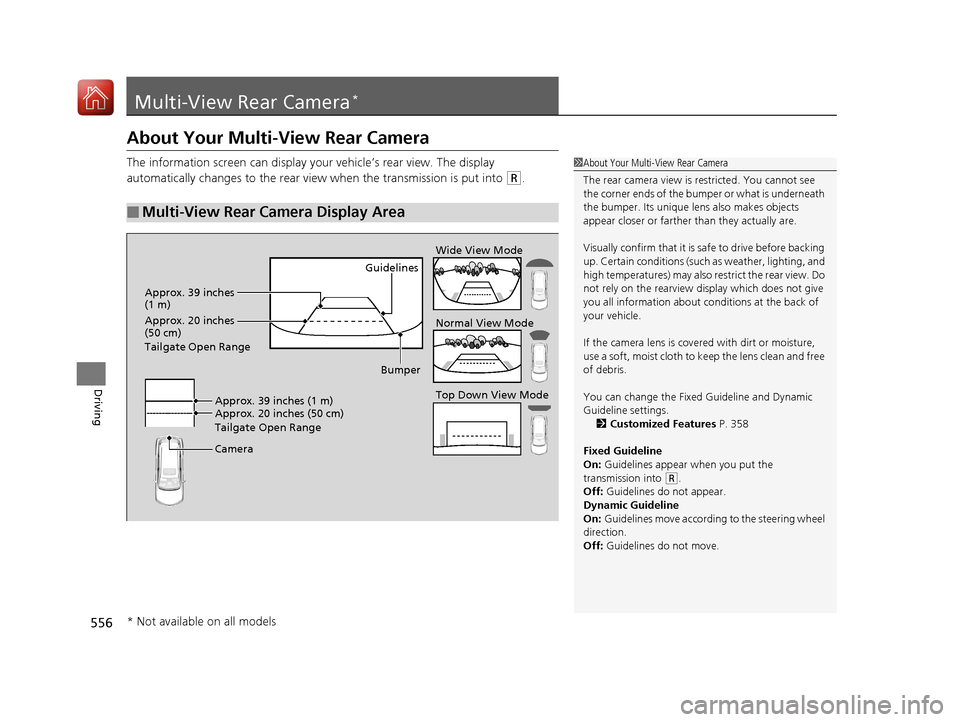
The information screen can display your vehicle’s rear view. The display
automatically changes to the rear view when the transmission is put into
(R.
■Multi-View Rear Camera Display Area
1About Your Multi-View Rear Camera
The rear camera view is restricted. You cannot see
the corner ends of the bum per or what is underneath
the bumper. Its unique le ns also makes objects
appear closer or farther than they actually are.
Visually confirm that it is safe to drive before backing
up. Certain conditions (such as weather, lighting, and
high temperatures) may also re strict the rear view. Do
not rely on the rearview display which does not give
you all information about conditions at the back of
your vehicle.
If the camera lens is cove red with dirt or moisture,
use a soft, moist cloth to keep the lens clean and free
of debris.
You can change the Fixed Guideline and Dynamic
Guideline settings. 2 Customized Features P. 358
Fixed Guideline
On: Guidelines appear when you put the
transmission into
( R.
Off: Guidelines do not appear.
Dynamic Guideline
On: Guidelines move according to the steering wheel
direction.
Off: Guidelines do not move.
Guidelines
Bumper
Camera Approx. 20 inches (50 cm)
Tailgate Open Range Approx. 39 inches (1 m) Wide View Mode
Normal View Mode
Top Down View Mode
Approx. 39 inches
(1 m)
Approx. 20 inches
(50 cm)
Tailgate Open Range
* Not available on all models
18 ACURA MDX-31TZ56400.book 556 ページ 2017年8月23日 水曜日 午後4時1分
Page 562 of 697
561
uuSurround View Camera System*uDisplaying an Image From the Surround View Cameras
Driving
Following can be displayed when the system is on.
Guide lines : Help you to get a sense of a dist ance between your vehicle and the
rear surroundings. The distance may appear differently than the actual distance.
Projection lines : Indicate vehicle direction while th e steering wheel is in the current
position.
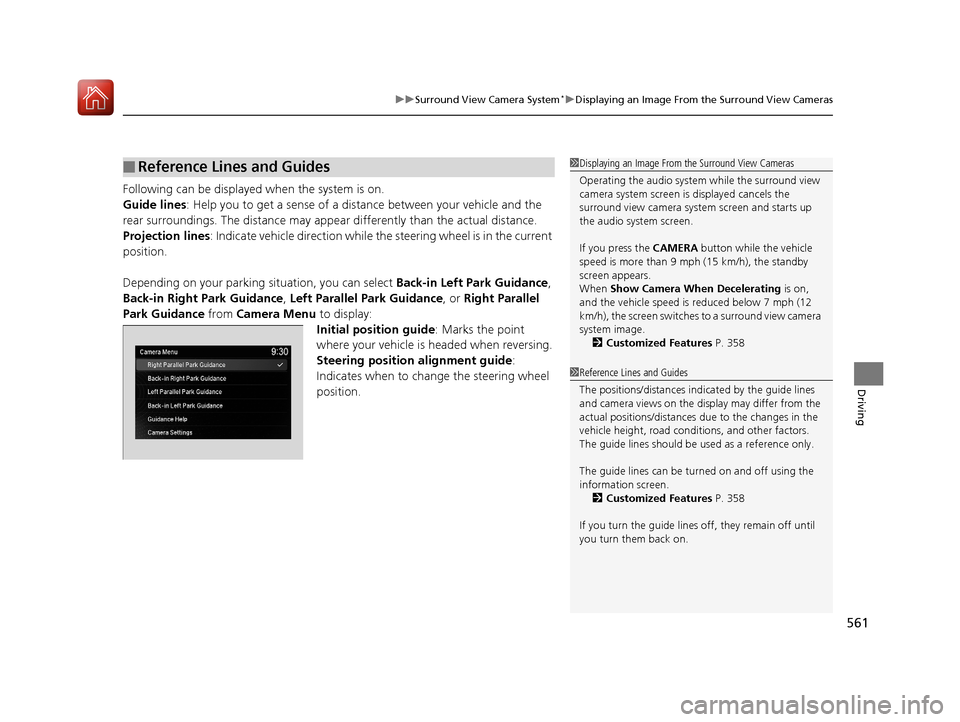
Depending on your parking situation, you can select Back-in Left Park Guidance,
Back-in Right Park Guidance , Left Parallel Park Guidance, or Right Parallel
Park Guidance from Camera Menu to display:
Initial position guide : Marks the point
where your vehicle is headed when reversing.
Steering position alignment guide :
Indicates when to change the steering wheel
position.
■Reference Lines and Guides1 Displaying an Image From the Surround View Cameras
Operating the audio system while the surround view
camera system screen is displayed cancels the
surround view camera system screen and starts up
the audio system screen.
If you press the CAMERA button while the vehicle
speed is more than 9 mph (15 km/h), the standby
screen appears.
When Show Camera When Decelerating is on,
and the vehicle speed is reduced below 7 mph (12
km/h), the screen switches to a surround view camera
system image. 2 Customized Features P. 358
1Reference Lines and Guides
The positions/distances indi cated by the guide lines
and camera views on the display may differ from the
actual positions/distances due to the changes in the
vehicle height, road conditions, and other factors.
The guide lines should be used as a reference only.
The guide lines can be tu rned on and off using the
information screen. 2 Customized Features P. 358
If you turn the guide lines off, they remain off until
you turn them back on.
18 ACURA MDX-31TZ56400.book 561 ページ 2017年8月23日 水曜日 午後4時1分
Page 563 of 697
562
uuSurround View Camera System*uWhen Parking Your Vehicle
Driving
When Parking Your Vehicle
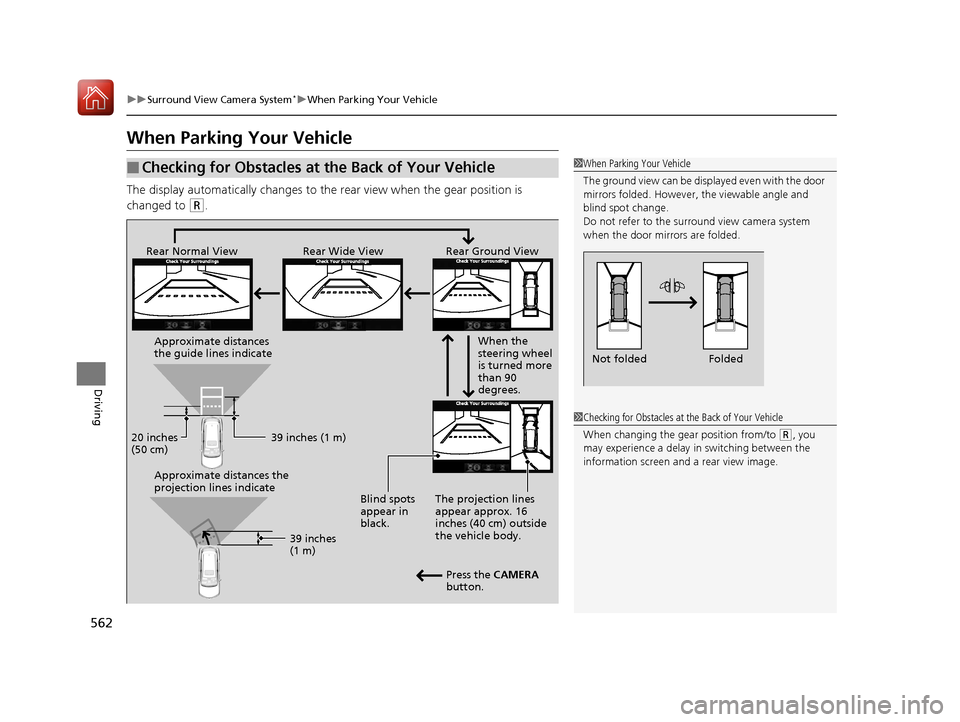
The display automatically changes to the rear view when the gear position is
changed to
(R.
■Checking for Obstacles at the Back of Your Vehicle1 When Parking Your Vehicle
The ground view can be disp layed even with the door
mirrors folded. However, the viewable angle and
blind spot change.
Do not refer to the surround view camera system
when the door mirrors are folded.
Folded
Not folded
Rear Wide View
Rear Normal View Rear Ground View
When the
steering wheel
is turned more
than 90
degrees.
The projection lines
appear approx. 16
inches (40 cm) outside
the vehicle body.
Blind spots
appear in
black.
Press the CAMERA
button.
Approximate distances
the guide lines indicate
Approximate distances the
projection lines indicate
39 inches (1 m)
20 inches
(50 cm)
39 inches
(1 m)
1Checking for Obstacles at the Back of Your Vehicle
When changing the gear position from/to
(R, you
may experience a delay in switching between the
information screen and a rear view image.
18 ACURA MDX-31TZ56400.book 562 ページ 2017年8月23日 水曜日 午後4時1分
Page 564 of 697
Continued563
uuSurround View Camera System*uWhen Parking Your Vehicle
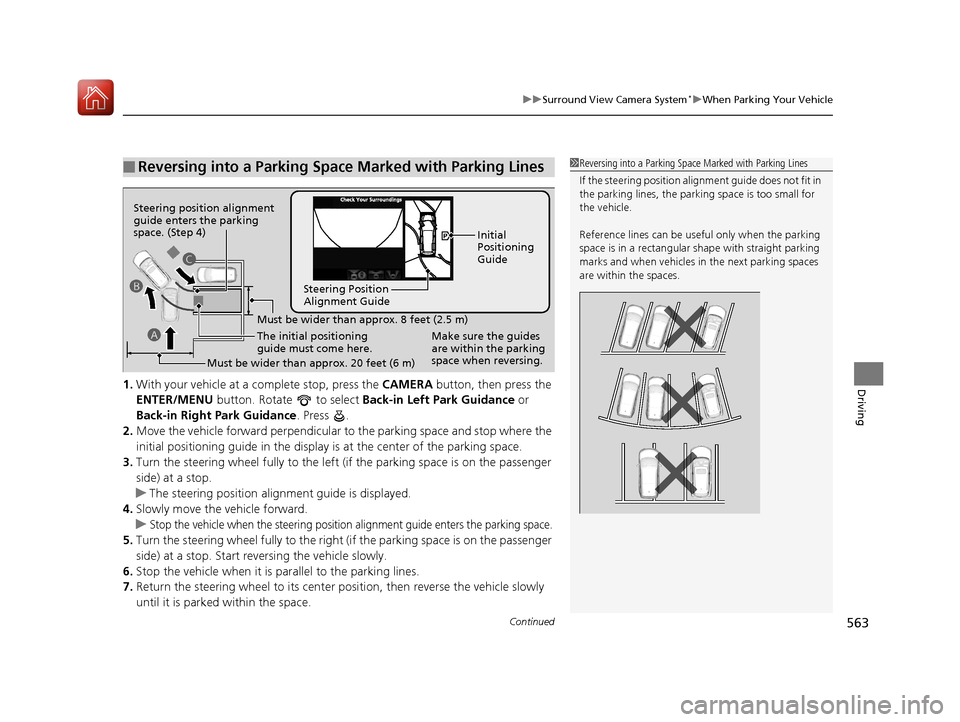
Driving1. With your vehicle at a complete stop, press the CAMERA button, then press the
ENTER/MENU button. Rotate to select Back-in Left Park Guidance or
Back-in Right Park Guidance . Press .
2. Move the vehicle forward perpendicular to the parking space and stop where the
initial positioning guide in the display is at the center of the parking space.
3. Turn the steering wheel fully to the left (if the parking space is on the passenger
side) at a stop.
u The steering position alig nment guide is displayed.
4. Slowly move the vehicle forward.
u
Stop the vehicle when the steering position alignment guide enters the parking space.
5. Turn the steering wheel fully to the right (if the parking space is on the passenger
side) at a stop. Start reversing the vehicle slowly.
6. Stop the vehicle when it is parallel to the parking lines.
7. Return the steering wheel to its center pos ition, then reverse the vehicle slowly
until it is parked within the space.
■Reversing into a Parking Space Marked with Parking Lines1 Reversing into a Parking Space Marked with Parking Lines
If the steering position ali gnment guide does not fit in
the parking lines, the parking space is too small for
the vehicle.
Reference lines can be usef ul only when the parking
space is in a rectangular shape with straight parking
marks and when vehicles in the next parking spaces
are within the spaces.
Must be wider than approx. 8 feet (2.5 m)
The initial positioning
guide must come here.
Must be wider than approx. 20 feet (6 m) Make sure the guides
are within the parking
space when reversing.Initial
Positioning
Guide
Steering Position
Alignment Guide
A
B
C
Steering position alignment
guide enters the parking
space. (Step 4)
18 ACURA MDX-31TZ56400.book 563 ページ 2017年8月23日 水曜日 午後4時1分
Page 565 of 697
uuSurround View Camera System*uWhen Parking Your Vehicle
564
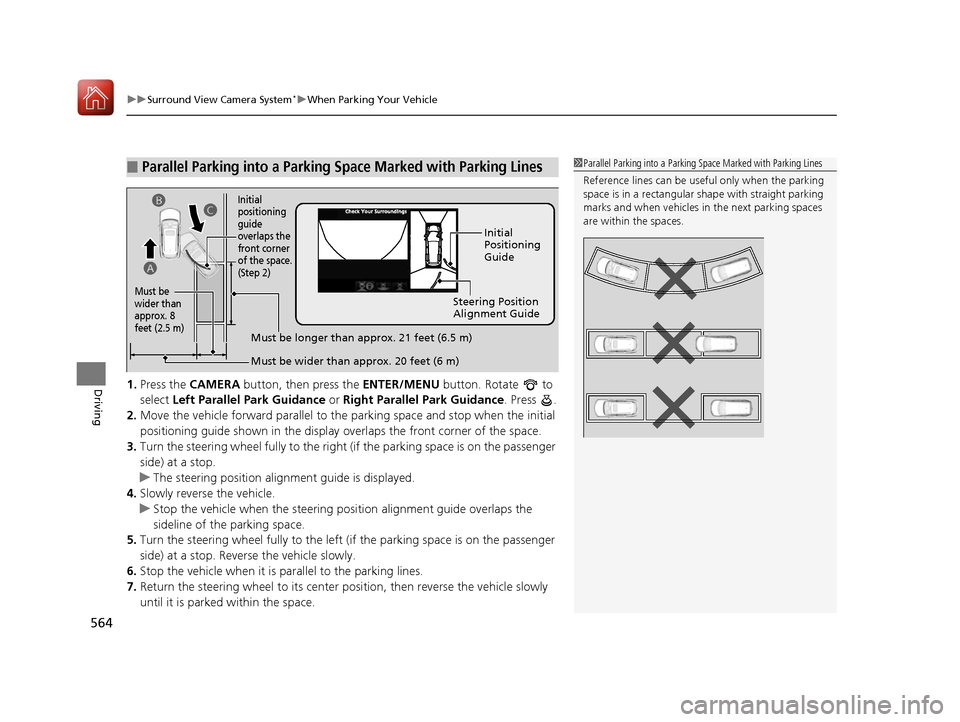
Driving1. Press the CAMERA button, then press the ENTER/MENU button. Rotate to
select Left Parallel Park Guidance or Right Parallel Park Guidance . Press .
2. Move the vehicle forward parallel to the parking space and stop when the initial
positioning guide shown in the display overlaps the front corner of the space.
3. Turn the steering wheel fully to the right (if the parking space is on the passenger
side) at a stop.
u The steering position alignment guide is displayed.
4. Slowly reverse the vehicle.
u Stop the vehicle when the steering po sition alignment guide overlaps the
sideline of the parking space.
5. Turn the steering wheel fully to the left (if the parking space is on the passenger
side) at a stop. Reverse the vehicle slowly.
6. Stop the vehicle when it is parallel to the parking lines.
7. Return the steering wheel to its center po sition, then reverse the vehicle slowly
until it is parked within the space.
■Parallel Parking into a Parking Space Marked with Parking Lines1Parallel Parking into a Parking Space Marked with Parking Lines
Reference lines can be usef ul only when the parking
space is in a rectangular shape with straight parking
marks and when vehicles in the next parking spaces
are within the spaces.
Initial
Positioning
Guide
Steering Position
Alignment Guide
Must be wider than approx. 20 feet (6 m)
Must be
wider than
approx. 8
feet (2.5 m)
Must be longer than approx. 21 feet (6.5 m)
A B
C
Initial
positioning
guide
overlaps the
front corner
of the space.
(Step 2)
18 ACURA MDX-31TZ56400.book 564 ページ 2017年8月23日 水曜日 午後4時1分
Page 566 of 697
Continued565
uuSurround View Camera System*uWhen Parking Your Vehicle
Driving
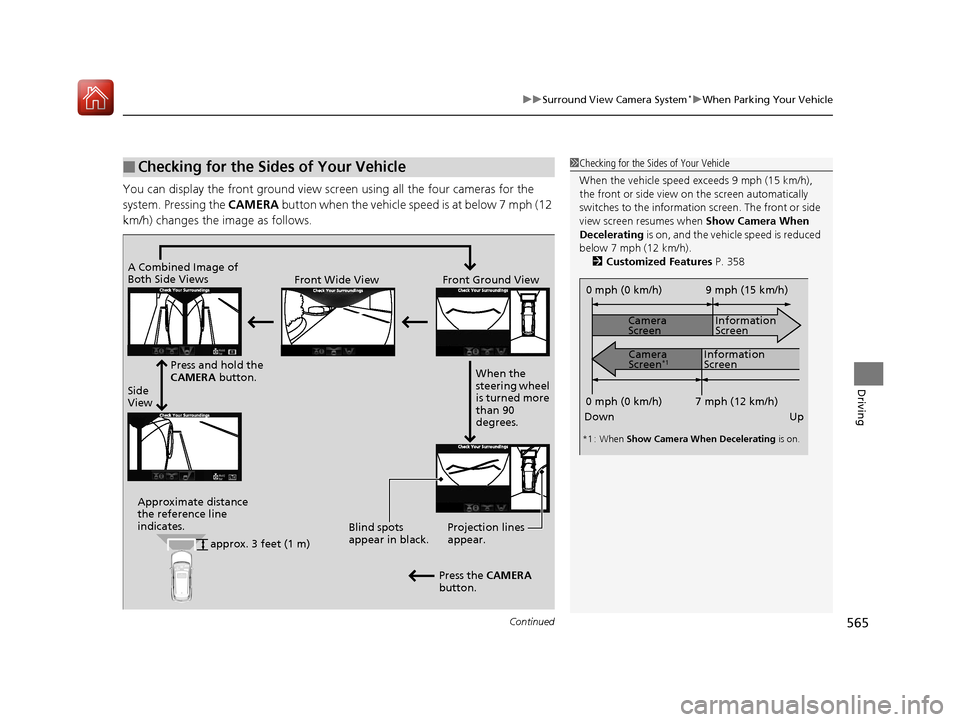
You can display the front ground view screen using all the four cameras for the
system. Pressing the CAMERA button when the vehicle speed is at below 7 mph (12
km/h) changes the image as follows.
■Checking for the Sides of Your Vehicle1 Checking for the Sides of Your Vehicle
When the vehicle speed exceeds 9 mph (15 km/h),
the front or side view on the screen automatically
switches to the information screen. The front or side
view screen resumes when Show Camera When
Decelerating is on, and the vehicle speed is reduced
below 7 mph (12 km/h). 2 Customized Features P. 358
0 mph (0 km/h)
Down Up Camera
Screen
Camera
Screen
*1
Information
Screen
Information
Screen 9 mph (15 km/h)
7 mph (12 km/h)
0 mph (0 km/h)
*1 : When Show Camera When Decelerating is on.
Side
ViewFront Wide View Front Ground View
Press and hold the
CAMERA button.
A Combined Image of
Both Side Views
Approximate distance
the reference line
indicates. Blind spots
appear in black.Projection lines
appear.
Press the CAMERA
button. When the
steering wheel
is turned more
than 90
degrees.
approx. 3 feet (1 m)
18 ACURA MDX-31TZ56400.book 565 ページ 2017年8月23日 水曜日 午後4時1分