change wheel Acura MDX 2018 User Guide
[x] Cancel search | Manufacturer: ACURA, Model Year: 2018, Model line: MDX, Model: Acura MDX 2018Pages: 697, PDF Size: 38.45 MB
Page 178 of 697
177
uuOperating the Switches Around the Steering Wheel uAuto High-Beam
Continued
Controls
Auto High-Beam
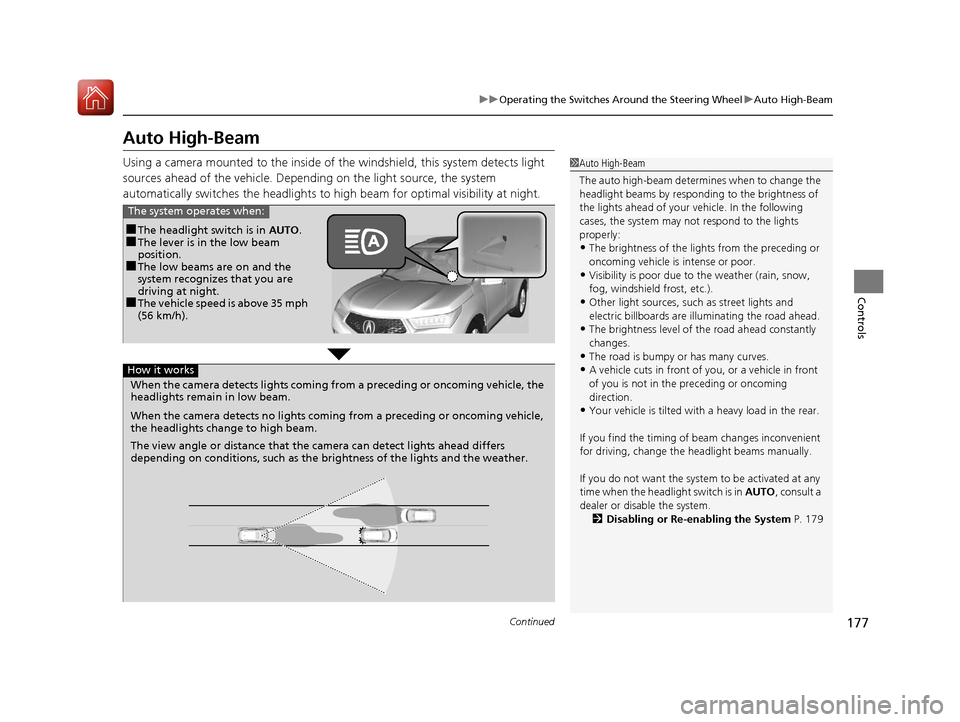
Using a camera mounted to the inside of the windshield, this system detects light
sources ahead of the vehicle. Depending on the light source, the system
automatically switches the headlights to hi gh beam for optimal visibility at night.1Auto High-Beam
The auto high-beam determines when to change the
headlight beams by responding to the brightness of
the lights ahead of your vehicle. In the following
cases, the system may not respond to the lights
properly:
•The brightness of the lights from the preceding or
oncoming vehicle is intense or poor.
•Visibility is poor due to the weather (rain, snow,
fog, windshield frost, etc.).
•Other light sources, such as street lights and
electric billboards are illuminating the road ahead.
•The brightness level of th e road ahead constantly
changes.
•The road is bumpy or has many curves.
•A vehicle cuts in front of you, or a vehicle in front
of you is not in the preceding or oncoming
direction.
•Your vehicle is tilted with a heavy load in the rear.
If you find the timing of beam changes inconvenient
for driving, change the headlight beams manually.
If you do not want the system to be activated at any
time when the headlight switch is in AUTO , consult a
dealer or disable the system. 2 Disabling or Re-enabling the System P. 179
■The headlight switch is in AUTO.■The lever is in the low beam
position.
■The low beams are on and the
system recognizes that you are
driving at night.
■The vehicle speed is above 35 mph
(56 km/h).
The system operates when:
When the camera detects lig hts coming from a preceding or oncoming vehicle, the
headlights remain in low beam.
When the camera detects no lights coming from a preceding or oncoming vehicle,
the headlights change to high beam.
The view angle or distance that the camera can detect lights ahead differs
depending on conditions, such as the brightness of the lights and the weather.
How it works
18 ACURA MDX-31TZ56400.book 177 ページ 2017年8月23日 水曜日 午後4時1分
Page 181 of 697

180
uuOperating the Switches Around the Steering Wheel uWipers and Washers
Controls
Wipers and Washers
The windshield wipers and washers can be
used when the power mode is in ON.
■MIST
The wipers run at high speed until you release
the lever.
■Wiper switch (OFF, INT*1/AUTO*2, LO,
HI)
Move the lever up or down to change the
wiper settings.
■Adjusting wiper operation*
Turn the adjustment ri ng to adjust wiper
operation.
■Washer
Sprays while you pull the lever toward you.
When you release the lever for more than one
second, the spray stops, the wipers sweep two
or three more times to clear the windshield,
then stop.
*1: Models with manual intermittent operation
*2: Models with automati c intermittent operation
■Windshield Wipers/Washers1Wipers and Washers
NOTICE
Do not use the wipers when the windshield is dry.
The windshield will get sc ratched, or the rubber
blades will get damaged.
Turn the washers off if no washer fluid comes out.
The pump may get damaged.
The wiper motor may stop motor operation
temporarily to prevent an overload. Wiper operation
will return to normal within a few minutes, once the
circuit has returned to normal.
If the vehicle speeds up while the wipers are
operating intermittently, the length of the wipe
interval shortens.
When the vehicle speeds up, the wiper operation’s
shortest delay setting ( ) and the LO setting become
the same.
NOTICE
In cold weather, the blades may freeze to the
windshield.
Operating the wipers in th is condition may damage
the wipers. Use the defrost er or heated windshield
*
to warm the windshield, then turn the wipers on.
Models without automatic intermittent wipers
Intermittent Time
Adjustment Ring
MIST
INT
*1/AUTO*2
OFF
LO: Low speed wipe
HI: High speed wipe Pull to
use
washer.
Lower speed, fewer sweeps
Higher speed, more sweeps
* Not available on all models
18 ACURA MDX-31TZ56400.book 180 ページ 2017年8月23日 水曜日 午後4時1分
Page 183 of 697

182
uuOperating the Switches Around the Steering Wheel uWipers and Washers
Controls
The rear wiper and washer can be used when
the power mode is in ON.
■Wiper switch (OFF, INT, ON)
Change the wiper switch setting according to
the amount of rain.
■Washer ( )
Sprays while you rotate the switch to this
position.
Hold it to activate the wiper and to spray the
washer. Once released, it stops operating
after a few more sweeps.
■Operating in reverse
When you select the transmission to
(R with the windshield wipers activated, the
rear wiper operates automatically as follows even if its switch is off.
■Rear Wiper/Washer
INT : Intermittent
OFF ON : Continuous wipe
Washer
Windshield Wiper Operation Rear Wiper Operation
IntermittentIntermittent
Low speed wipe
High speed wipe Continuous
18 ACURA MDX-31TZ56400.book 182 ページ 2017年8月23日 水曜日 午後4時1分
Page 185 of 697

184
uuOperating the Switches Around the Steering Wheel uBrightness Control
Controls
Brightness Control
When the power mode is in ON, you can use
the
(+ or (- button to adjust instrument
panel brightness.
Brighten: Press the
(+ button.
Dim: Press the
(- button.
You will hear a beep when the brightness
reaches minimum or maximum. Several
seconds after adjusting the brightness, you
will be returned to the previous display.
■Brightness level indicator
The brightness level is shown on the MID
while you are adjusting it.
1 Brightness Control
Instrument panel brightne ss varies, depending on
whether the exterior lights are on or off. The
instrument panel dims to reduce glare when they are
on.
When it is bright out side and the headlight
integration with the wi per is activated, the
instrument panel bri ghtness does not change.
To cancel the reduced in strument panel brightness
when the exterior lights are on, press the
( + button
until the brightness display is up to max, the beeper
sounds.
The brightness can be set differently for when the
exterior lights are on, and when they are off.
( + Button
(- Button
18 ACURA MDX-31TZ56400.book 184 ページ 2017年8月23日 水曜日 午後4時1分
Page 238 of 697
237
uuAudio System uAudio Remote Controls
Continued
Features
Audio Remote Controls
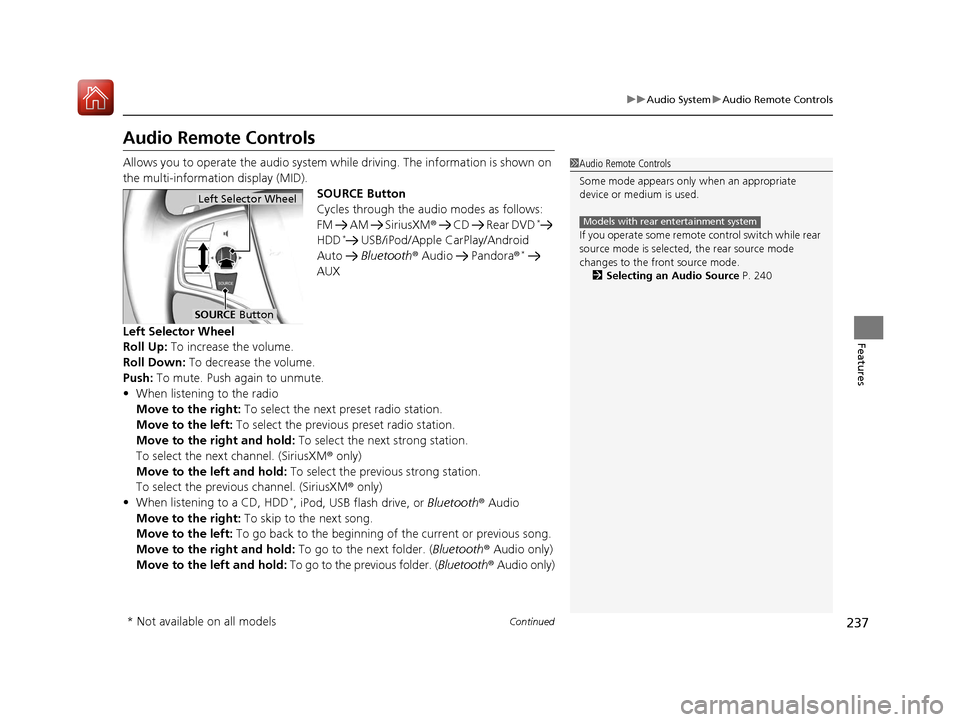
Allows you to operate the audio system wh ile driving. The information is shown on
the multi-information display (MID). SOURCE Button
Cycles through the audio modes as follows:
FM AM SiriusXM® CD Rear DVD
*
HDD* USB/iPod/Apple CarPlay/Android
Auto Bluetooth ® Audio Pandora ®*
AUX
Left Selector Wheel
Roll Up: To increase the volume.
Roll Down: To decrease the volume.
Push: To mute. Push again to unmute.
• When listening to the radio
Move to the right: To select the next preset radio station.
Move to the left: To select the previous preset radio station.
Move to the right and hold: To select the next strong station.
To select the next channel. (SiriusXM ® only)
Move to the left and hold: To select the previous strong station.
To select the previous channel. (SiriusXM ® only)
• When listening to a CD, HDD
*, iPod, USB flash drive, or Bluetooth ® Audio
Move to the right: To skip to the next song.
Move to the left: To go back to the beginning of the current or previous song.
Move to the right and hold: To go to the next folder. (Bluetooth® Audio only)
Move to the left and hold: To go to the previous folder. ( Bluetooth® Audio only)
1Audio Remote Controls
Some mode appears only when an appropriate
device or medium is used.
If you operate some remote control switch while rear
source mode is selected, the rear source mode
changes to the front source mode.
2 Selecting an Audio Source P. 240
Models with rear entertainment system
Left Selector Wheel
SOURCE Button
* Not available on all models
18 ACURA MDX-31TZ56400.book 237 ページ 2017年8月23日 水曜日 午後4時1分
Page 299 of 697
298
uuAudio System Basic Operation uSiri Eyes Free
Features
Siri Eyes Free
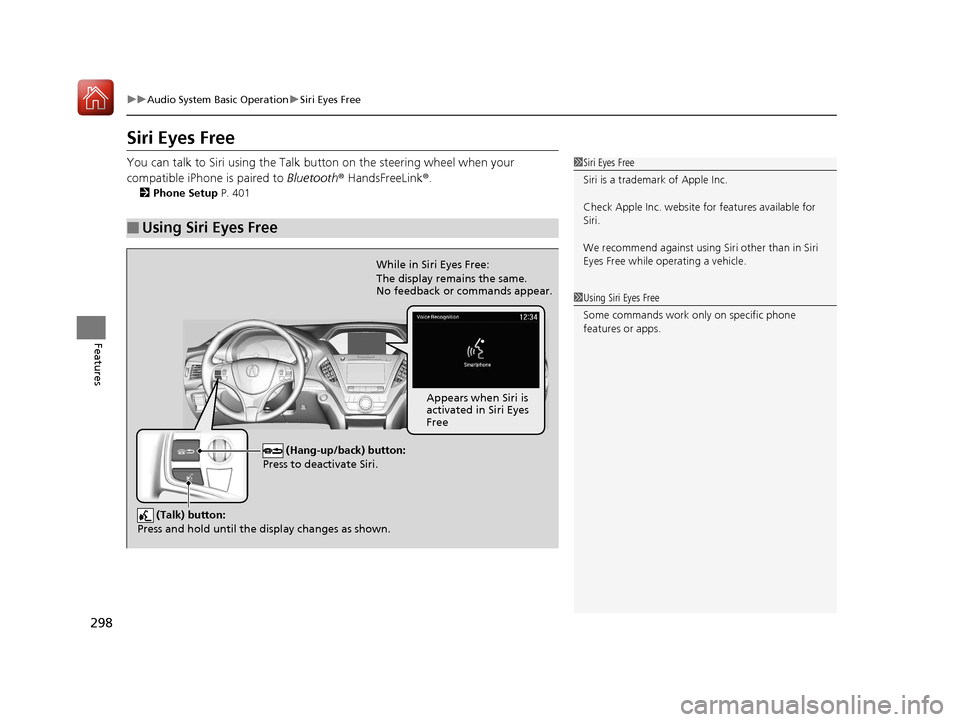
You can talk to Siri using the Talk bu tton on the steering wheel when your
compatible iPhone is paired to Bluetooth® HandsFreeLink ®.
2Phone Setup P. 401
■Using Siri Eyes Free
1Siri Eyes Free
Siri is a trademark of Apple Inc.
Check Apple Inc. website for features available for
Siri.
We recommend against using Si ri other than in Siri
Eyes Free while operating a vehicle.
1 Using Siri Eyes Free
Some commands work only on specific phone
features or apps.
(Hang-up/back) button:
Press to deactivate Siri.
(Talk) button:
Press and hold until the display changes as shown.
While in Siri Eyes Free:
The display remains the same.
No feedback or commands appear.
Appears when Siri is
activated in Siri Eyes
Free
18 ACURA MDX-31TZ56400.book 298 ページ 2017年8月23日 水曜日 午後4時1分
Page 373 of 697

372
uuCustomized Features u
Features
*1:Default SettingSetup
Group Customizable Features Descri
ption Selectable Settings
Vehicle
Settings
Driving
Position
Memory Position LinkTurns the driving position memory system on and
off.On*1/Off
Easy Entry/Exit
Moves the seat fully rearward and steering wheel
fully up when you get in/get out of the vehicle.
Changes the setting for this feature.Seat & Steering
Wheel*1/Seat Only /
Steering Wheel
Only /Off
Keyless
Access
Door Unlock ModeChanges which doors unlock when you grab the
driver’s door handle.Driver’s Door or
Tailgate Only*1/All
Doors
Keyless Access Light
FlashCauses some exterior lights to flash when you
unlock/lock the doors.On*1/ Off
Keyless Access BeepCauses the beeper to sound when you unlock/
lock the doors.On*1/Off
Remote Start System
On/Off*Turns the remote engine start feature on and off.On*1/Off
Walk Away Auto Lock
Changes the settings for the automatic locking
the doors when you walk away from the vehicle
while carrying the keyless access remote.
On /Off*1
* Not available on all models
18 ACURA MDX-31TZ56400.book 372 ページ 2017年8月23日 水曜日 午後4時1分
Page 394 of 697
393Continued
Features
Bluetooth® HandsFreeLink ®
Bluetooth® HandsFreeLink ® (HFL) allows you to place and receive phone calls using
your vehicle’s audio system, without handling your cell phone.
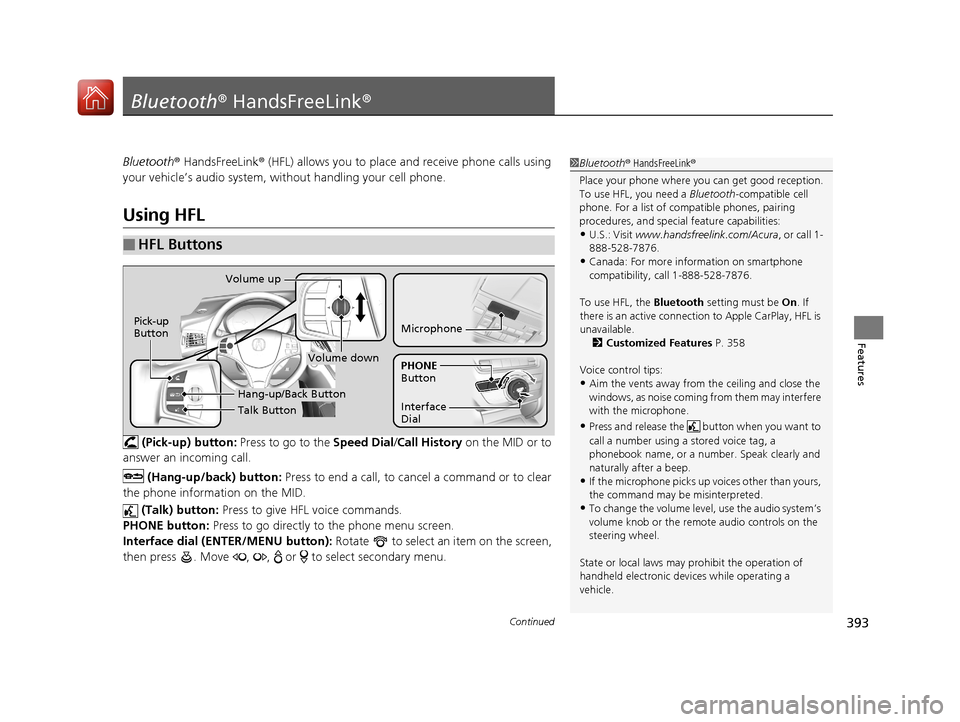
Using HFL
(Pick-up) button: Press to go to the Speed Dial/Call History on the MID or to
answer an incoming call.
(Hang-up/back) button: Press to end a call, to ca ncel a command or to clear
the phone information on the MID.
(Talk) button: Press to give HFL voice commands.
PHONE button: Press to go directly to the phone menu screen.
Interface dial (E NTER/MENU button): Rotate to select an item on the screen,
then press . Move , , or to select secondary menu.
■HFL Buttons
1 Bluetooth ® HandsFreeLink ®
Place your phone where y ou can get good reception.
To use HFL, you need a Bluetooth-compatible cell
phone. For a list of compatible phones, pairing
procedures, and special feature capabilities:
•U.S.: Visit www.handsfreelink.com/Acura , or call 1-
888-528-7876.
•Canada: For more info rmation on smartphone
compatibility, call 1-888-528-7876.
To use HFL, the Bluetooth setting must be On. If
there is an active connecti on to Apple CarPlay, HFL is
unavailable. 2 Customized Features P. 358
Voice control tips:
•Aim the vents away from the ceiling and close the
windows, as noise coming fr om them may interfere
with the microphone.
•Press and release the but ton when you want to
call a number using a stored voice tag, a
phonebook name, or a numbe r. Speak clearly and
naturally after a beep.
•If the microphone picks up vo ices other than yours,
the command may be misinterpreted.
•To change the volume level, use the audio system’s
volume knob or the remote audio controls on the
steering wheel.
State or local laws may pr ohibit the operation of
handheld electronic devi ces while operating a
vehicle.
Talk Button
Volume up
Microphone
Hang-up/Back Button
Pick-up
Button
Volume down
Interface
Dial PHONE
Button
18 ACURA MDX-31TZ56400.book 393 ページ 2017年8月23日 水曜日 午後4時1分
Page 471 of 697
470
uuWhen Driving uPrecautions While Driving
Driving
Precautions While Driving
Utility vehicles have a significantly higher rollover rate than other types of vehicles.
To prevent rollovers or loss of control:
• Take corners at slower speeds than yo u would with a passenger vehicle.
• Avoid sharp turns and abrupt maneuvers whenever possible.
• Do not modify your vehicle in any way that you would raise the center of gravity.
• Do not carry heavy cargo on the roof.
Never carry more than 165 lbs (75 kg) of cargo on the roof rack (Acura accessory).
Avoid driving in deep water and on flooded roads. This can damage the engine or
driveline, or cause elec trical component failure.
If there is a strong impact with something under the vehicle, stop in a safe location.
Check the underside of the vehicle for damage or any fluid leaks.
■Driving Guidelines for Your Utility Vehicle
■In Rain
■Other Precautions
1 Precautions While Driving
NOTICE
Do not change the gear position while pressing the
accelerator pedal. You could damage the
transmission.
NOTICE
If you repeatedly turn the steering wheel at an
extremely low speed, or hold the steering wheel in
the full left or right position for a while, the system
heats up. The system goes into a protective mode,
and limits its performa nce. The steering wheel
becomes harder and harder to operate. Once the
system cools down, the EPS system is restored.
Repeated operation under these conditions can
eventually damage the system.
If the power mode is set to ACCESSORY while
driving, the engine will shut down and all steering
and brake power assist functi ons will stop, making it
difficult to control the vehicle.
Do not change the gear position to
( N, as you will
lose engine braking (and acceleration) performance.
During the first 600 miles (1,000 km) of operation,
avoid sudden acceleration or full throttle operation so
as not to damage the engine or powertrain.
Avoid hard braking for the first 200 miles (300 km).
You should also follow this when the brake pads are
replaced.
18 ACURA MDX-31TZ56400.book 470 ページ 2017年8月23日 水曜日 午後4時1分
Page 479 of 697

478
uuWhen Driving uShifting
Driving
Use the paddle shifters to change betwee n 1st and 9th gears without releasing your
hands from the steering wheel. The transmiss ion will switch to the sequential mode.
■When the transmission is in (D:
The vehicle will go into the sequential mo de momentarily, and the sequential mode
gear selection indicator will come on.
Once you start traveling at a constant sp eed, the sequential mode will automatically
switch off, and the sequential mode gear selection indicator will go off.
Hold the
(+ paddle shifter for two seconds or push the button to return to
normal drive.
■When the transmission is in (S
The vehicle will go into th e sequential mode, and the M (sequential mode) indicator
and sequential mode gear selection indicator will come on.
If the vehicle speed increases and the engi ne speed reaches near the tachometer’s
red zone, the transmission automatica lly shifts up to the next gear.
You can cancel this mode by holding the
(+ paddle shifter for two seconds or push
the button. When the se quential mode is canceled, the sequential mode
indicator and sequential mode gear selection indicator will turn off.
■Sequential Mode
D/S
D/S
18 ACURA MDX-31TZ56400.book 478 ページ 2017年8月23日 水曜日 午後4時1分