Acc Acura MDX 2018 Owner's Manual
[x] Cancel search | Manufacturer: ACURA, Model Year: 2018, Model line: MDX, Model: Acura MDX 2018Pages: 697, PDF Size: 38.45 MB
Page 662 of 697
661
uuFuses uFuse Locations
Continued
Handling the Unexpected
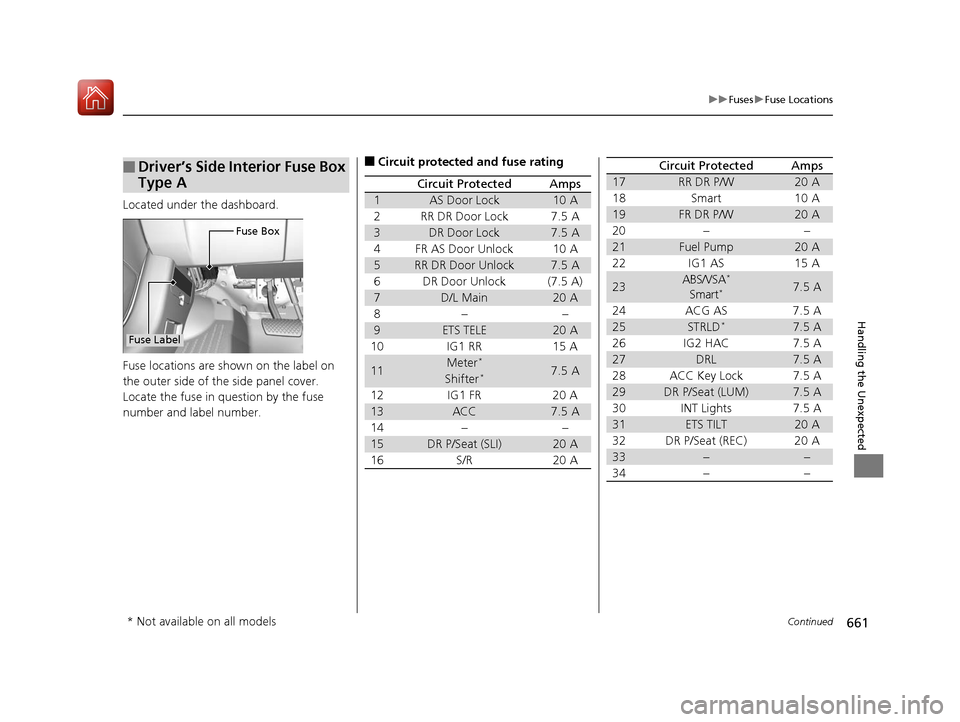
Located under the dashboard.
Fuse locations are shown on the label on
the outer side of the side panel cover.
Locate the fuse in question by the fuse
number and label number.
■Driver’s Side Interior Fuse Box
Type A
Fuse Box
Fuse Label
■Circuit protected and fuse rating
Circuit ProtectedAmps
1AS Door Lock10 A
2RR DR Door Lock7.5 A
3DR Door Lock7.5 A
4FR AS Door Unlock10 A
5RR DR Door Unlock7.5 A
6DR Door Unlock(7.5 A)
7D/L Main20 A
8−−
9ETS TELE20 A
10 IG1 RR 15 A
11Meter*7.5 AShifter*
12 IG1 FR 20 A
13ACC7.5 A
14 − −
15DR P/Seat (SLI)20 A
16 S/R 20 A
17RR DR P/W20 A
18 Smart 10 A
19FR DR P/W20 A
20 − −
21Fuel Pump20 A
22 IG1 AS 15 A
23ABS/VSA*
Smart*7.5 A
24 ACG AS 7.5 A
25STRLD*7.5 A
26 IG2 HAC 7.5 A
27DRL7.5 A
28 ACC Key Lock 7.5 A
29DR P/Seat (LUM)7.5 A
30 INT Lights 7.5 A
31ETS TILT20 A
32 DR P/Seat (REC) 20 A
33−−
34−−
Circuit ProtectedAmps
* Not available on all models
18 ACURA MDX-31TZ56400.book 661 ページ 2017年8月23日 水曜日 午後4時1分
Page 664 of 697
663
uuFuses uFuse Locations
Continued
Handling the Unexpected
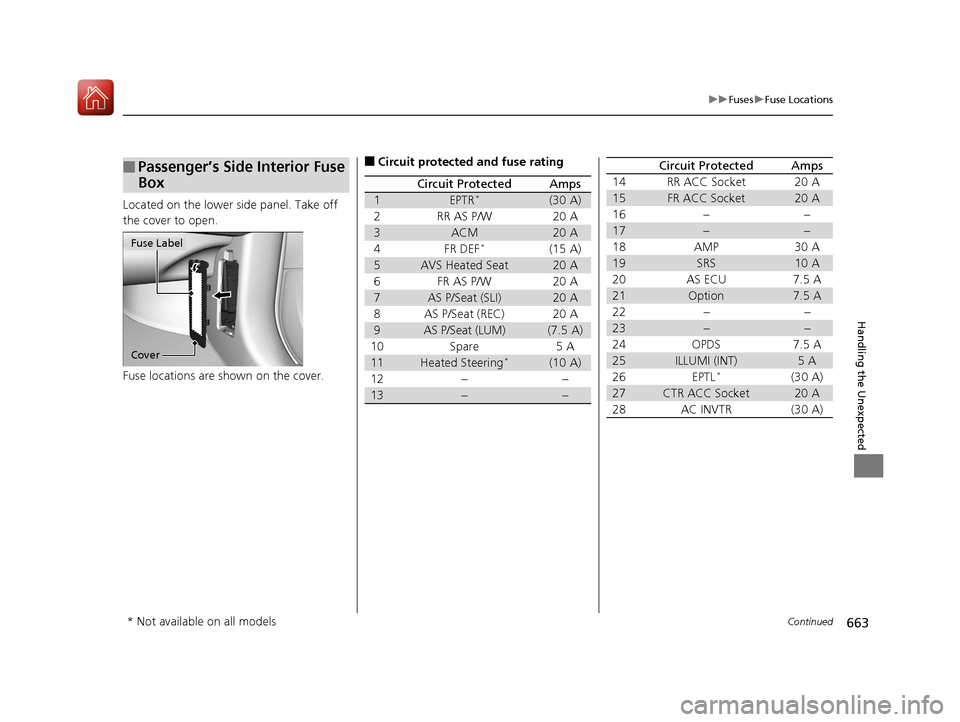
Located on the lower side panel. Take off
the cover to open.
Fuse locations are shown on the cover.
■Passenger’s Side Interior Fuse
Box
Cover
Fuse Label
■Circuit protected and fuse rating
Circuit ProtectedAmps
1EPTR*(30 A)
2RR AS P/W20 A
3ACM20 A
4FR DEF*(15 A)
5AVS Heated Seat20 A
6FR AS P/W20 A
7AS P/Seat (SLI)20 A
8AS P/Seat (REC)20 A
9AS P/Seat (LUM)(7.5 A)
10Spare5 A
11Heated Steering*(10 A)
12−−
13−−
14RR ACC Socket20 A
15FR ACC Socket20 A
16−−
17−−
18AMP30 A
19SRS10 A
20AS ECU7.5 A
21Option7.5 A
22−−
23−−
24OPDS7.5 A
25ILLUMI (INT)5 A
26EPTL*(30 A)
27CTR ACC Socket20 A
28AC INVTR(30 A)
Circuit ProtectedAmps
* Not available on all models
18 ACURA MDX-31TZ56400.book 663 ページ 2017年8月23日 水曜日 午後4時1分
Page 666 of 697
665
uuFuses uInspecting and Changing Fuses
Handling the Unexpected
Inspecting and Changing Fuses
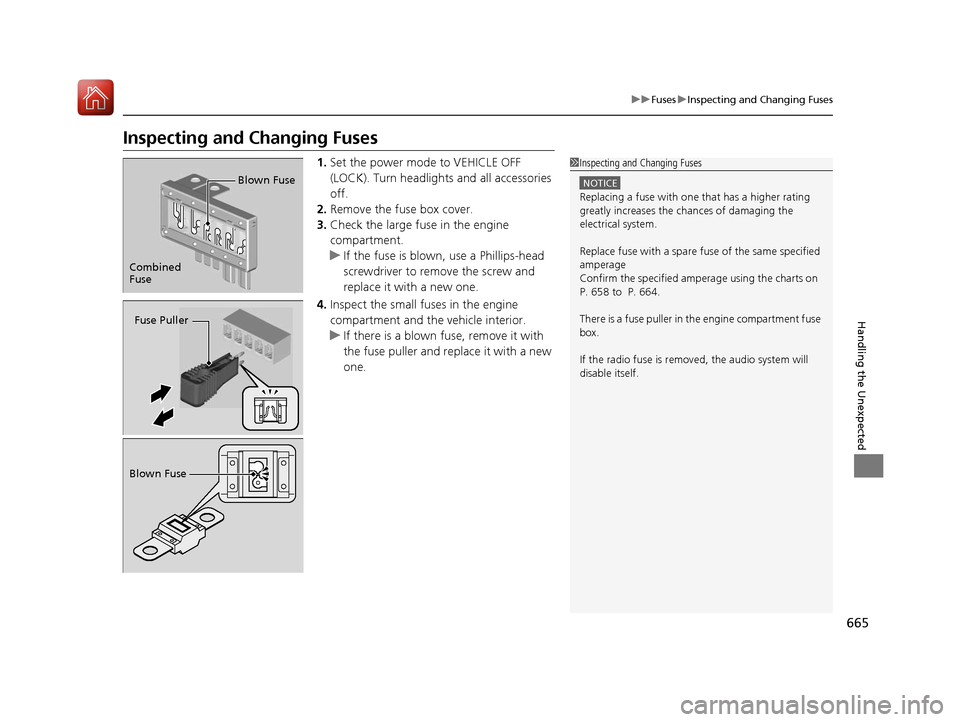
1. Set the power mode to VEHICLE OFF
(LOCK). Turn headlights and all accessories
off.
2. Remove the fuse box cover.
3. Check the large fuse in the engine
compartment.
u If the fuse is blown, use a Phillips-head
screwdriver to remove the screw and
replace it with a new one.
4. Inspect the small fu ses in the engine
compartment and the vehicle interior.
u If there is a blown fuse, remove it with
the fuse puller and replace it with a new
one.1Inspecting and Changing Fuses
NOTICE
Replacing a fuse with on e that has a higher rating
greatly increases the chances of damaging the
electrical system.
Replace fuse with a spare fuse of the same specified
amperage
Confirm the specified amperage using the charts on
P. 658 to P. 664.
There is a fuse puller in the engine compartment fuse
box.
If the radio fuse is remove d, the audio system will
disable itself.
Combined
Fuse Blown Fuse
Fuse Puller
Blown Fuse
18 ACURA MDX-31TZ56400.book 665 ページ 2017年8月23日 水曜日 午後4時1分
Page 667 of 697

666
Handling the Unexpected
Emergency Towing
Call a professional towing service if you need to tow your vehicle.
■Flat bed equipment
The operator loads your vehicle on the back of a truck.
This is the best way to transport your vehicle.
■Wheel lift equipment
The tow truck uses two pivoti ng arms that go under the front tires and lift them off
the ground. The rear tires remain on the ground. This is an acceptable way to
tow your vehicle.
1 Emergency Towing
NOTICE
Trying to lift or tow your vehicle by the bumpers will
cause serious damage. The bumpers are not designed
to support the vehicle’s weight.
NOTICE
Improper towing such as towing behind a
motorhome or other motor vehicle can damage the
transmission.
Never tow your vehicle with just a rope or chain.
It is very dangerous, since ropes or chains may shift
from side to side or break.
All models
2WD models
18 ACURA MDX-31TZ56400.book 666 ページ 2017年8月23日 水曜日 午後4時1分
Page 676 of 697
675Continued
Information
Devices that Emit Radio Waves
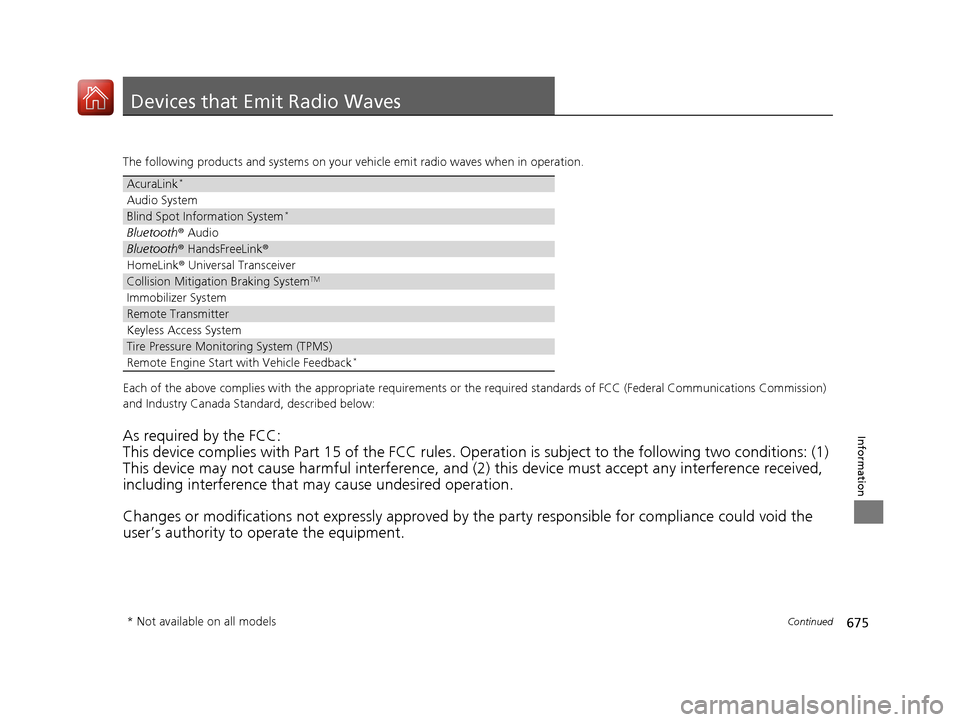
The following products and systems on your vehicle emit radio waves when in operation.
Each of the above complies with the appropriate requirements or the required standards of FCC (Federal Communications Commissio n)
and Industry Canada Standard, described below:
As required by the FCC:
This device complies with Part 15 of the FCC rules. Operation is subject to the following two conditions: (1)
This device may not cause harmful interference, and (2) this device must accept any interference received,
including interference that may cause undesired operation.
Changes or modifications not expres sly approved by the party responsible for compliance could void the
user’s authority to operate the equipment.
AcuraLink*
Audio System
Blind Spot Information System*
Bluetooth ® Audio
Bluetooth® HandsFreeLink ®
HomeLink® Universal Transceiver
Collision Mitigati on Braking SystemTM
Immobilizer System
Remote Transmitter
Keyless Access System
Tire Pressure Monitoring System (TPMS)
Remote Engine Start with Vehicle Feedback*
* Not available on all models
18 ACURA MDX-31TZ56400.book 675 ページ 2017年8月23日 水曜日 午後4時1分
Page 677 of 697

676
uuDevices that Emit Radio Waves u
Information
This device complies with Industry Canada licence-exempt RSS standard(s). Operation is subject to the following two conditions: (1) this
device may not cause interference, and (2) this device must accept any interference, including interference that may cause undesired
operation of the device.
High-power radars are allocated as primary users (i.e. prio rity users) of the bands 5250-5350 MHz and 5650-5850 MHz.
These radars could cause interference and/or damage to LE-LAN devices.
18 ACURA MDX-31TZ56400.book 676 ページ 2017年8月23日 水曜日 午後4時1分
Page 679 of 697

678
Information
Emissions Testing
Testing of Readiness Codes
Your vehicle has readiness code as part of the onboard self diagnostic system.
Some states use these codes for testing to verify whether your vehicle’s emissions
components are working properly.
The codes may not be read properly if testin g is performed just after the battery has
gone dead or been disconnected.
To check if they are set, set the power mo de to ON, without starting the engine. The
malfunction indicator lamp will come on for several seconds. If it then goes off, the
readiness codes are set. If it blinks five times, the readiness codes are not set.
If you are required to have your vehicle te sted before the readiness codes are ready,
prepare the vehicle for retesting by doing the following:
1. Fill the gas tank to approximately 3/4 full.
2. Park the vehicle and leave the engine off for 6 hours or more.
3. Make sure the ambient temperature is between 40°F and 95°F (4°C and 35°C).
4. Start the engine without touching the accelerator pedal, and let it idle for 20
seconds.
5. Keep the vehicle in
(P. Increase the engine speed to 2,000 rpm, and hold it there
for about 3 minutes.
6. Let the engine idle with your foot off the accelerator for 20 seconds.
1Testing of Readiness Codes
The readiness codes are erased when the battery is
disconnected, and set again only after several days of
driving under a variety of conditions.
If a testing facility determines that the readiness
codes are not set, you may be requested to return at
a later date to complete the test.
If the testing facility determines the readiness codes
are still not set, see a dealer.
18 ACURA MDX-31TZ56400.book 678 ページ 2017年8月23日 水曜日 午後4時1分
Page 680 of 697
679
uuEmissions Testing uTesting of Readiness Codes
Information
7. Select a nearby, lightly traveled major hi ghway where you can maintain a speed
of 50 to 60 mph (80 to 97 km/h) for at least 20 minutes. Drive on the highway in
(D. Do not use cruise control. When traffi c allows, drive for 90 seconds without
moving the accelerator pedal. (V ehicle speed may vary slightly; this is okay.) If you
cannot do this for a continuous 90 seconds because of traffic conditions, drive for
at least 30 seconds, then repeat it two more times (for a total of 90 seconds).
8. Drive in city or suburban traffic for at l east 10 minutes. When traffic conditions
allow, let the vehicle coast for several se conds without using the accelerator pedal
or the brake pedal.
9. Park the vehicle and leave the engine off for 30 minutes.
18 ACURA MDX-31TZ56400.book 679 ページ 2017年8月23日 水曜日 午後4時1分
Page 681 of 697

680
Information
Warranty Coverages
■U.S. Owners
Your new vehicle is covered by these warranties:
New Vehicle Limited Warranty – covers your new vehicle, except for the
emissions control systems and accessori es, against defects in materials and
workmanship.
Emissions Control Systems Defects Warranty and Emissions Performance
Warranty – these two warranties cover your ve hicle’s emissions control systems.
Time, mileage, and coverage are conditiona l. Please read your warranty booklet for
exact information.
Seat Belt Limited Warranty – a seat belt that fails to function properly is covered
by a limited warranty. Please read your warranty booklet for details.
Rust Perforation Limited Warranty – all exterior body panels are covered against
rusting from the inside out for the specified time period, regardless of mileage.
Accessory Limited Warranty – Acura accessories are covered under this warranty.
Time and mileage limits depend on the type of accessory and other factors. Please
read your warranty booklet for details.
Replacement Parts Limited Warranty – covers all Acura replacement parts
against defects in materials and workmanship.
18 ACURA MDX-31TZ56400.book 680 ページ 2017年8月23日 水曜日 午後4時1分
Page 686 of 697

685
uuClient Service Information u
Continued
Information
Gracenote reserves all rights in Gracenote
Data, the Gracenote Software, and the
Gracenote Servers, including all ownership
rights. Under no circumstances will
Gracenote become liable for any payment
to you for any information that you provide.
You agree that Gracenote, Inc. may enforce
its rights under this Agreement against you
directly in its own name.
The Gracenote service uses a unique
identifier to track queries for statistical
purposes. The purpose of a randomly
assigned numeric identi fier is to allow the
Gracenote service to count queries without
knowing anything about who you are. For
more information, see the web page for the
Gracenote Privacy Policy for the Gracenote
service.
The Gracenote Software and each item of
Gracenote Data are licensed to you “AS IS.”
Gracenote makes no representations or
warranties, express or implied, regarding
the accuracy of any Gracenote Data from in
the Gracenote Servers. Gracenote reserves
the right to delete data from the Gracenote
Servers or to change data categories for any cause that Gracenote deems sufficient. No
warranty is made that the Gracenote
Software or Gracenote Servers are error-
free or that functioning of Gracenote
Software or Gracenote Servers will be
uninterrupted.
Gracenote is not obligated to provide you
with new enhanced or additional data types
or categories that Gracenote may provide in
the future and is free to discontinue its
services at any time.
GRACENOTE DISCLAIMS ALL WARRANTIES
EXPRESS OR IMPLIED, INCLUDING, BUT
NOT LIMITED TO, IMPL
IED WARRANTIES OF
MERCHANTABILITY, FITNESS FOR A
PARTICULAR PURPOSE, TITLE, AND
NONINFRINGEMENT. GRACENOTE DOES
NOT WARRANT THE RESULTS THAT WILL BE
OBTAINED BY YOUR USE OF THE
GRACENOTE SOFTWARE OR ANY
GRACENOTE SERVER. IN NO CASE WILL
GRACENOTE BE LIABLE FOR ANY
CONSEQUENTIAL OR INCIDENTAL
DAMAGES OR FOR ANY LOST PROFITS OR
LOST REVENUES.
© Gracenote 2009
18 ACURA MDX-31TZ56400.book 685 ページ 2017年8月23日 水曜日 午後4時1分