automatic transmission Acura MDX 2018 Owner's Guide
[x] Cancel search | Manufacturer: ACURA, Model Year: 2018, Model line: MDX, Model: Acura MDX 2018Pages: 697, PDF Size: 38.45 MB
Page 472 of 697

471
uuWhen Driving uAutomatic Transmission
Driving
Automatic Transmission
The engine runs at a higher id le speed and creeping increases.
Keep the brake pedal firmly depressed when stopped.
Quickly depressing the accelerator peda l while driving uphill may cause the
transmission to drop to a lower gear, unex pectedly increasing vehicle speed. Depress
the accelerator pedal carefully, especi ally on slippery roads and curves.
■Creeping
■Kickdown
1Driving Guidelines for Your Utility Vehicle
Failure to operate your vehicle correctly might result
in a crash or a rollover. 2 Important Handling Information P. 30
2 Precautions While Driving P. 470
18 ACURA MDX-31TZ56400.book 471 ページ 2017年8月23日 水曜日 午後4時1分
Page 473 of 697

472
uuWhen Driving uShifting
Driving
Shifting
Change the gear position in acco rdance with your driving needs.
■Shift button positions
1Shifting
To prevent malfunc tion and unintended
engagement:
•Do not spill any liquids on or around shift buttons.
•Do not place or drop any objects on or around shift
buttons.
•Do not let passengers or ch ildren operate the shift
buttons.
The beeper sounds and the message appears on the
MID when you depress the accelerator pedal with the
gear position in
( N.
Change the gear position to
( D or (R with the brake
pedal depressed.
When shifting gears in extremely low temperatures
(−22°F/−30°C), there may be a short delay before the
shift is indicated in the di splay. Always confirm you
are in the correct gear before driving.
3WARNING
The vehicle can roll aw ay if left unattended
without confirming that Park is engaged.
A vehicle that rolls away could cause a crash
resulting in serious injury or death.
Always keep your foot on the brake pedal
until you have confirmed that
( P is shown
on the gear position Indicator.
Park
Used when parking, before turning off or
starting the engine
Reverse
Used when reversing
Neutral
Transmission is not locked
Drive
Used for:
●Normal driving (gears change between 1st
and 9th automatically)
●Temporarily driving in the sequential
mode
Drive (S)
Used for:
●Automatically changing gears between 1st
and 7th (7th gear is used only at high
speed)
●Driving in the sequential mode
18 ACURA MDX-31TZ56400.book 472 ページ 2017年8月23日 水曜日 午後4時1分
Page 476 of 697

Continued475
uuWhen Driving uShifting
Driving
In freezing or sub-freezing conditions, the gear selection response may be slow.
Always depress the brake pedal before changing the gear position to
(P, and
confirm that
(P is shown on the gear position in dicator before releasing the brake.
■When opening the driver’s door
If you open the driver’s door under the following conditions, the gear position
automatically changes to
(P.
• The vehicle is in stationary with the engi ne running, or moving at 1 mph (2 km/h)
or slower.
• The transmission is in other than
(P.
• You have unfastened the driver side seat belt.
u If you manually change the gear position from
(P with the brake pedal
depressed, the gear position will automatically return to
(P once you release
the brake pedal.
■When turning off the power mode
If you turn the engine off wh ile the vehicle is stationary, and the transmission is in
other than
(P, the gear position au tomatically changes to (P.
1When opening the driver’s door
While the system is designed to automatically change
the gear position to
(P under the described
conditions, in the interest of safety you should always
select
( P before opening the driver’s door.
Make sure to park the vehicle in a safe place.
2 When Stopped P. 545
If you want to drive the ve hicle after the gear position
has automatically changed to
( P under the described
conditions, close the door, fasten the seat belt,
depress the brake pedal, then change the gear
position.
If you leave the vehicle, tu rn off the engine and lock
the doors.
18 ACURA MDX-31TZ56400.book 475 ページ 2017年8月23日 水曜日 午後4時1分
Page 477 of 697
![Acura MDX 2018 Owners Guide uuWhen Driving uShifting
476
Driving
■If you want to keep the transmission in (N position [car wash mode]
With the engine running:
1. Press and hold the brake pedal.
2. Select
(N, then release the](/img/32/9712/w960_9712-476.png "Acura MDX 2018 Owners Guide uuWhen Driving uShifting
476
Driving
■If you want to keep the transmission in (N position [car wash mode]
With the engine running:
1. Press and hold the brake pedal.
2. Select
(N, then release the")
uuWhen Driving uShifting
476
Driving
■If you want to keep the transmission in (N position [car wash mode]
With the engine running:
1. Press and hold the brake pedal.
2. Select
(N, then release the button to display (N (Neutral) hold mode on the MID.
3. Press and hold
(N again for two seconds.
u This puts the vehicle in car wash mode which must be used when your vehicle
is pulled through a conveyor type automatic car wash where you or an
attendant do not remain in the vehicle.
If the ENGINE STOP/START button is pressed
after car wash mode has been activated, the
power mode will change to ACCESSORY and
a message will be displayed on the multi-
information display.u The gear position remains in
(N with the
power mode in ACCESSORY for 15
minutes, then, it automatically changes
to
(P and the power mode changes to
OFF.
u Manually changing to
(P cancels
ACCESSORY mode. The
(P indicator
comes on and the power mode changes
to OFF. You must always shift to
(P
when car wash mode is no longer
needed.
1 If you want to keep the transmission in (N position [car wash
mode]
The transmission may not stay in
(N position while
the following indicators ar e on or when the message
below appears:
•Malfunction indicator lamp
•Transmission system indicator
•Charging system indicator•The Charging System Problem message on the
MID.
18 ACURA MDX-31TZ56400.book 476 ページ 2017年8月23日 水曜日 午後4時1分
Page 479 of 697

478
uuWhen Driving uShifting
Driving
Use the paddle shifters to change betwee n 1st and 9th gears without releasing your
hands from the steering wheel. The transmiss ion will switch to the sequential mode.
■When the transmission is in (D:
The vehicle will go into the sequential mo de momentarily, and the sequential mode
gear selection indicator will come on.
Once you start traveling at a constant sp eed, the sequential mode will automatically
switch off, and the sequential mode gear selection indicator will go off.
Hold the
(+ paddle shifter for two seconds or push the button to return to
normal drive.
■When the transmission is in (S
The vehicle will go into th e sequential mode, and the M (sequential mode) indicator
and sequential mode gear selection indicator will come on.
If the vehicle speed increases and the engi ne speed reaches near the tachometer’s
red zone, the transmission automatica lly shifts up to the next gear.
You can cancel this mode by holding the
(+ paddle shifter for two seconds or push
the button. When the se quential mode is canceled, the sequential mode
indicator and sequential mode gear selection indicator will turn off.
■Sequential Mode
D/S
D/S
18 ACURA MDX-31TZ56400.book 478 ページ 2017年8月23日 水曜日 午後4時1分
Page 483 of 697
uuWhen Driving uAuto Idle Stop*
482
Driving
The vehicle stops with the gear position in (D and the brake pedal depressed.
■Auto Idle Stop does not activate when:
• The driver’s seat belt is not fastened.
• The engine coolant temperature is low or high.
• The transmission fluid temperature is low or high.
• The vehicle comes to a stop again befo re the vehicle speed reaches 3 mph (5
km/h) after the engine starts.
• Stopped on a steep incline.
• The transmission is in a position other than
(D.
• The Auto Idle Stop OFF button is pressed.
• The engine is started with the hood open.
u Turn off the engine. Close the hood before you restart the engine to activate
Auto Idle Stop.
• The battery charge is low.
• The internal temperature of the ba ttery is 14°F (−10°C). or less.
• The climate control system is in use, an d the outside temperature is below −4°F
(−20°C) or over 104°F (40°C).
• The climate control system temperature is set to the Hi or Lo .
• is ON (indicator on).
• When the rear fan is set to maximum speed.
u Auto Idle Stop may not ac tivate under other conditions when the rear climate
control system is in use.
■Auto Idle Stop Activates When:1 Auto Idle Stop Activates When:
When ACC with LSF is in operation, the vehicle stops
without depressing the br ake pedal and Auto Idle
Stop may activate.
Do not open the hood while the Auto Idle Stop
function is activated. If the hood is opened, the
engine will not re start automatically.
In this case, restart the engine with the ENGINE
START/STOP button. 2 Starting the Engine P. 465
Pressing the ENGINE START/STOP button changes
the power mode to ACCESSORY even while Auto Idle
Stop is in operation. Once in ACCESSORY, the engine
no longer restarts automatica lly. Follow the standard
procedure to start the engine.
2 Starting the Engine P. 465
18 ACURA MDX-31TZ56400.book 482 ページ 2017年8月23日 水曜日 午後4時1分
Page 485 of 697

uuWhen Driving uAuto Idle Stop*
484
Driving
• The brake pedal is released (without the automatic brake hold system activated).
• The accelerator pedal is depressed (with the automatic brake hold system
activated).
2 Automatic Brake Hold P. 532
■The engine restarts even if the brake pedal is depressed*1 when:
• The Auto Idle Stop OFF button is pressed.
• The steering wheel is operated.
• The transmission is change to
(R or (S, or when it is change from (N to (D.
• The pressure on the brake pedal is redu ced and the vehicle starts moving while
stopped on an incline.
• The pressure on the brake pedal is repeated ly applied and released slightly during
a stop.
• The battery charge becomes low.
• The accelerator pedal is depressed.
• The driver’s seat belt is unlatched.
• is ON (indicator on).
• The climate control system is in us e, and the difference between the set
temperature and actual interior temperature becomes significant.
• The climate control system is bein g used to dehumidify the interior.
• The vehicle ahead of you starts again when your vehicle stops automatically with
ACC with LSF.
■The Engine Automatically Restarts When:1 The Engine Automatically Restarts When:
•If you are using an elec tronic device during Auto
Idle Stop, the device may temporarily be turned off
when the engine restarts.
1 The engine restarts even if the brake pedal is depressed*1 when:
*1: With the automatic brake hold system activated,
you can release the brake pe dal during Auto Idle Stop
is in operation.
18 ACURA MDX-31TZ56400.book 484 ページ 2017年8月23日 水曜日 午後4時1分
Page 531 of 697

uuBraking uBrake System
530
Driving
■To release automatically
Depressing the accelerator pedal releases the parking brake.
Use the accelerator pedal to release the brake when you are starting the vehicle
facing uphill, or in a traffic jam.
Gently depress the accelerator pedal.
When on a hill, it may require more
accelerator input to release.u The electric parking brake indicator goes
off.
You can release the parki ng brake automatically when:
• You are wearing the driver’s seat belt.
• The engine is running.
• The transmission is not in
(P or (N.
1Parking Brake
If the parking brake cannot be released
automatically, release it manually.
The parking brake cannot be released automatically
while the following indicators are on:
•Malfunction indicator lamp
•Transmission system indicator
The parking brake may not be released automatically
while the following indicators are on:
•Electric parking brak e system indicator
•VSA® system indicator
•ABS indicator•Supplemental restraint system indicatorAccelerator Pedal
18 ACURA MDX-31TZ56400.book 530 ページ 2017年8月23日 水曜日 午後4時1分
Page 533 of 697
uuBraking uBrake System
532
Driving
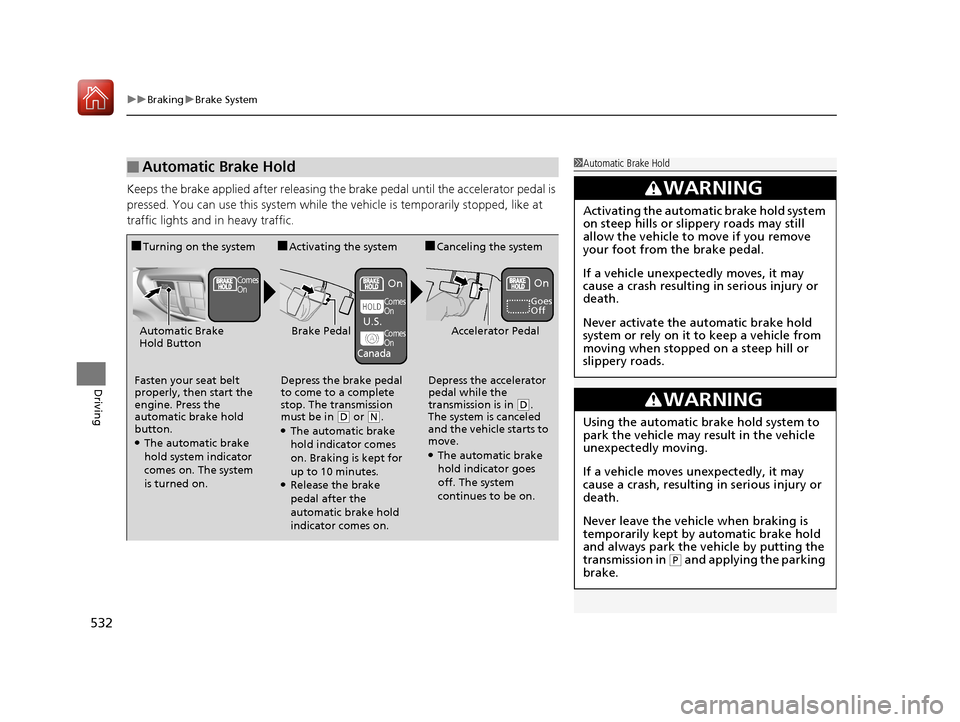
Keeps the brake applied after releasing the br ake pedal until the accelerator pedal is
pressed. You can use this system while th e vehicle is temporarily stopped, like at
traffic lights and in heavy traffic.
■Automatic Brake Hold1 Automatic Brake Hold
3WARNING
Activating the automatic brake hold system
on steep hills or slippery roads may still
allow the vehicle to move if you remove
your foot from the brake pedal.
If a vehicle unexpectedly moves, it may
cause a crash resulting in serious injury or
death.
Never activate the automatic brake hold
system or rely on it to keep a vehicle from
moving when stopped on a steep hill or
slippery roads.
3WARNING
Using the automatic brake hold system to
park the vehicle may result in the vehicle
unexpectedly moving.
If a vehicle moves unexpectedly, it may
cause a crash, resulting in serious injury or
death.
Never leave the vehicle when braking is
temporarily kept by automatic brake hold
and always park the vehicle by putting the
transmission in
( P and applying the parking
brake.
■Turning on the system
Fasten your seat belt
properly, then start the
engine. Press the
automatic brake hold
button.
●The automatic brake
hold system indicator
comes on. The system
is turned on.
■Activating the system
Depress the brake pedal
to come to a complete
stop. The transmission
must be in
( D or (N.●The automatic brake
hold indicator comes
on. Braking is kept for
up to 10 minutes.
●Release the brake
pedal after the
automatic brake hold
indicator comes on.
■Canceling the system
Depress the accelerator
pedal while the
transmission is in
( D.
The system is canceled
and the vehicle starts to
move.
●The automatic brake
hold indicator goes
off. The system
continues to be on.
Accelerator PedalBrake PedalAutomatic Brake
Hold Button
Goes
Off
Comes
OnOn On
Comes
On
Comes
On
U.S.
Canada
18 ACURA MDX-31TZ56400.book 532 ページ 2017年8月23日 水曜日 午後4時1分
Page 557 of 697
556
Driving
Multi-View Rear Camera*
About Your Multi-View Rear Camera
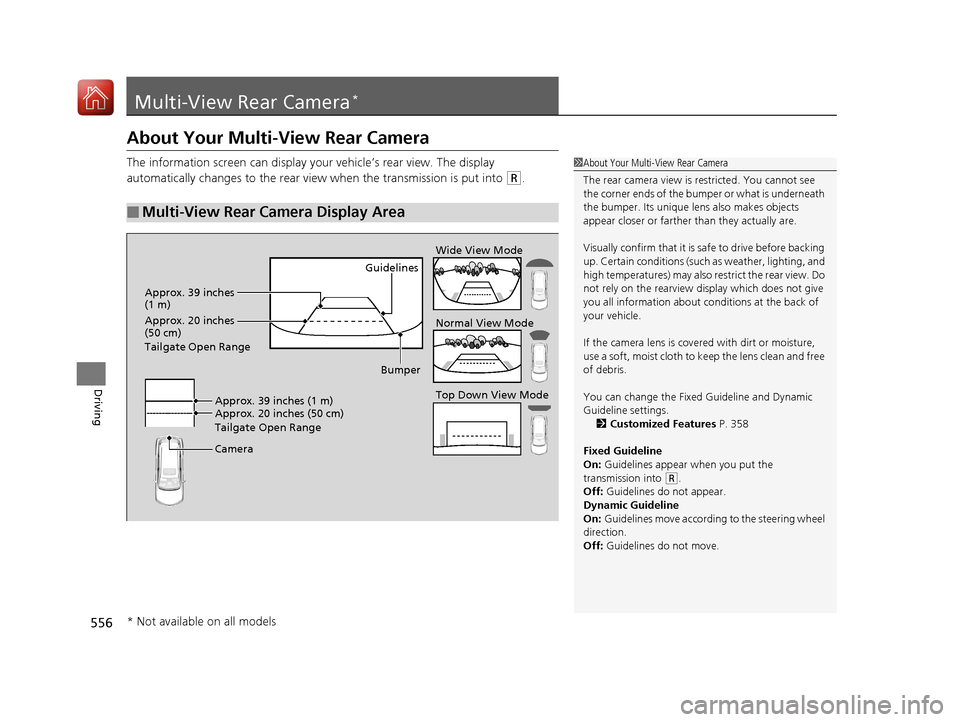
The information screen can display your vehicle’s rear view. The display
automatically changes to the rear view when the transmission is put into
(R.
■Multi-View Rear Camera Display Area
1About Your Multi-View Rear Camera
The rear camera view is restricted. You cannot see
the corner ends of the bum per or what is underneath
the bumper. Its unique le ns also makes objects
appear closer or farther than they actually are.
Visually confirm that it is safe to drive before backing
up. Certain conditions (such as weather, lighting, and
high temperatures) may also re strict the rear view. Do
not rely on the rearview display which does not give
you all information about conditions at the back of
your vehicle.
If the camera lens is cove red with dirt or moisture,
use a soft, moist cloth to keep the lens clean and free
of debris.
You can change the Fixed Guideline and Dynamic
Guideline settings. 2 Customized Features P. 358
Fixed Guideline
On: Guidelines appear when you put the
transmission into
( R.
Off: Guidelines do not appear.
Dynamic Guideline
On: Guidelines move according to the steering wheel
direction.
Off: Guidelines do not move.
Guidelines
Bumper
Camera Approx. 20 inches (50 cm)
Tailgate Open Range Approx. 39 inches (1 m) Wide View Mode
Normal View Mode
Top Down View Mode
Approx. 39 inches
(1 m)
Approx. 20 inches
(50 cm)
Tailgate Open Range
* Not available on all models
18 ACURA MDX-31TZ56400.book 556 ページ 2017年8月23日 水曜日 午後4時1分