security Acura MDX 2018 Owner's Guide
[x] Cancel search | Manufacturer: ACURA, Model Year: 2018, Model line: MDX, Model: Acura MDX 2018Pages: 697, PDF Size: 38.45 MB
Page 366 of 697
365
uuCustomized Features u
Continued
Features
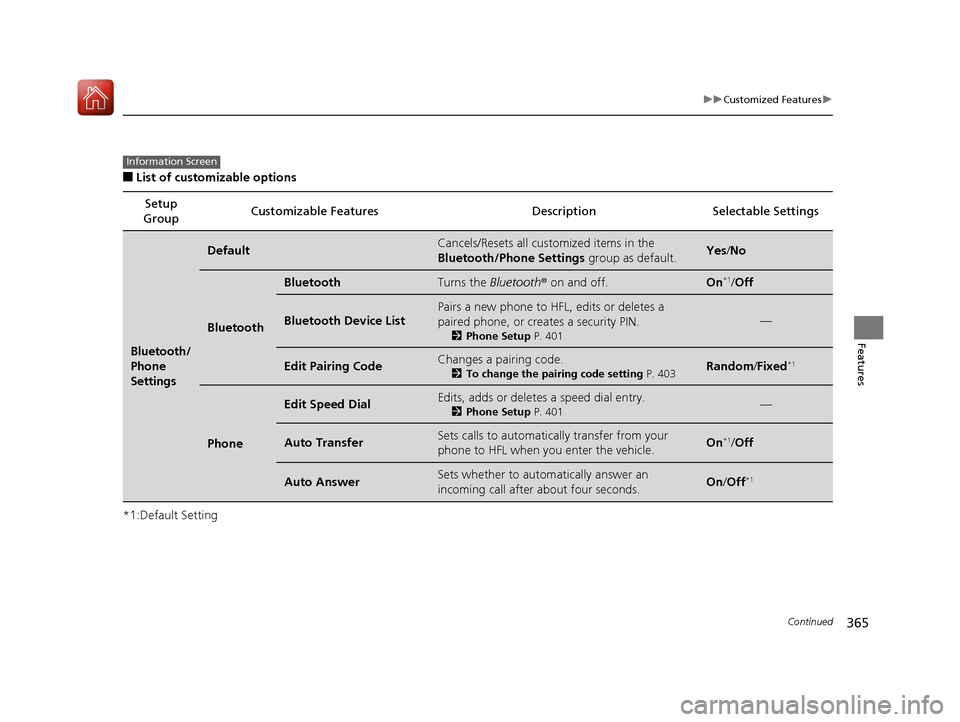
■List of customizable options
*1:Default Setting Setup
Group Customizable Features Description Selectable Settings
Bluetooth/
Phone
Settings
DefaultCancels/Resets all customized items in the
Bluetooth/Phone Settings
group as default.Yes/No
Bluetooth
BluetoothTurns the Bluetooth ® on and off.On*1/Off
Bluetooth Device List
Pairs a new phone to HFL, edits or deletes a
paired phone, or creates a security PIN.
2 Phone Setup P. 401
—
Edit Pairing CodeChanges a pairing code.
2To change the pairing code setting P. 403Random/Fixed*1
Phone
Edit Speed DialEdits, adds or deletes a speed dial entry.
2 Phone Setup P. 401—
Auto TransferSets calls to automatically transfer from your
phone to HFL when you enter the vehicle.On*1/Off
Auto AnswerSets whether to automatically answer an
incoming call after about four seconds.On /Off*1
Information Screen
18 ACURA MDX-31TZ56400.book 365 ページ 2017年8月23日 水曜日 午後4時1分
Page 375 of 697
374
uuCustomized Features u
Features
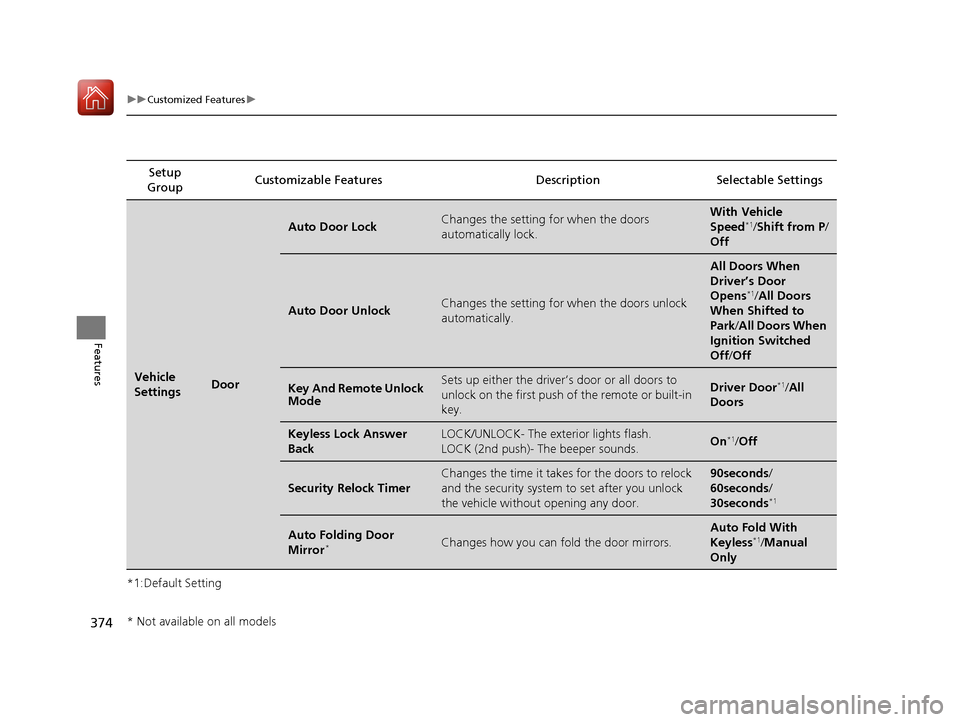
*1:Default SettingSetup
Group Customizable Features Descri
ption Selectable Settings
Vehicle
SettingsDoor
Auto Door LockChanges the setting for when the doors
automatically lock.With Vehicle
Speed*1/Shift from P /
Off
Auto Door UnlockChanges the setting for when the doors unlock
automatically.
All Doors When
Driver’s Door
Opens
*1/ All Doors
When Shifted to
Park /All Doors When
Ignition Switched
Off /Off
Key And Remote Unlock
ModeSets up either the driver’s door or all doors to
unlock on the first push of the remote or built-in
key.Driver Door*1/All
Doors
Keyless Lock Answer
BackLOCK/UNLOCK- The exte rior lights flash.
LOCK (2nd push)- The beeper sounds.On*1/ Off
Security Relock Timer
Changes the time it takes for the doors to relock
and the security system to set after you unlock
the vehicle without opening any door.90seconds/
60seconds/
30seconds
*1
Auto Folding Door
Mirror*Changes how you can fold the door mirrors.
Auto Fold With
Keyless*1/Manual
Only
* Not available on all models
18 ACURA MDX-31TZ56400.book 374 ページ 2017年8月23日 水曜日 午後4時1分
Page 391 of 697
390
Features
HomeLink® Universal Transceiver
The HomeLink ® Universal Transceiver can be pr ogrammed to operate up to three
remote controlled devices around your home, such as garage doors, lighting, or
home security systems.
Refer to the safety information that came wi th your garage door opener to test that
the safety features are functioning properly. If you do not have the safety
information, contact the manufacturer.
Before programming HomeLink, make sure that people and objects are out of the
way of the garage or gate to prevent potential injury or damage.
When programming a garage door opener, park just outside the garage door’s
path.
■Important Safety Precautions
1 HomeLink ® Universal Transceiver
Before programming HomeLi nk to operate a garage
door opener, confirm that the opener has an external
entrapment protection system, such as an “electronic
eye,” or other safety and reverse stop features. If it
does not, HomeLink may not be able to operate it.
18 ACURA MDX-31TZ56400.book 390 ページ 2017年8月23日 水曜日 午後4時1分
Page 397 of 697

396
uuBluetooth ® HandsFreeLink ®u HFL Menus
Features
HFL Menus
The power mode must be in ACCESSORY or ON to use HFL.
■Bluetooth/Phone Settings screen
1.Press the SETTINGS button.
2. Rotate to select Bluetooth/Phone
Settings , then press .
1HFL Menus
To use HFL, you must first pair your Bluetooth-
compatible cell phone to th e system while the vehicle
is parked.
Some functions are limited while driving. A message
appears on the screen when the vehicle is moving
and the operation is canceled.
Bluetooth
Replace This Device
Turns the Bluetooth ® on and off.Bluetooth
Edit PIN Create a security PIN for a paired phone.
Replace a previously paired phone with a
new phone.
Delete This DeviceDelete a previously paired phone.
Connect to AudioConnect a phone to use the Bluetooth®
audio and smartphone function.
Connect to PhoneConnect a phone to use the HFL.
Disconnect Disconnect a paired phone from the
system.
Connect Both Connect the device to use the all
functions of Bluetooth® connection.
Cancel/Reset all customized items in the
Bluetooth/Phone Settings group as default.
Default
(Existing
entry list)
Bluetooth
Device List Edit Device Name*Edit the user name of a paired phone.
* Not available on all models
18 ACURA MDX-31TZ56400.book 396 ページ 2017年8月23日 水曜日 午後4時1分
Page 405 of 697
uuBluetooth ® HandsFreeLink ®u HFL Menus
404
Features
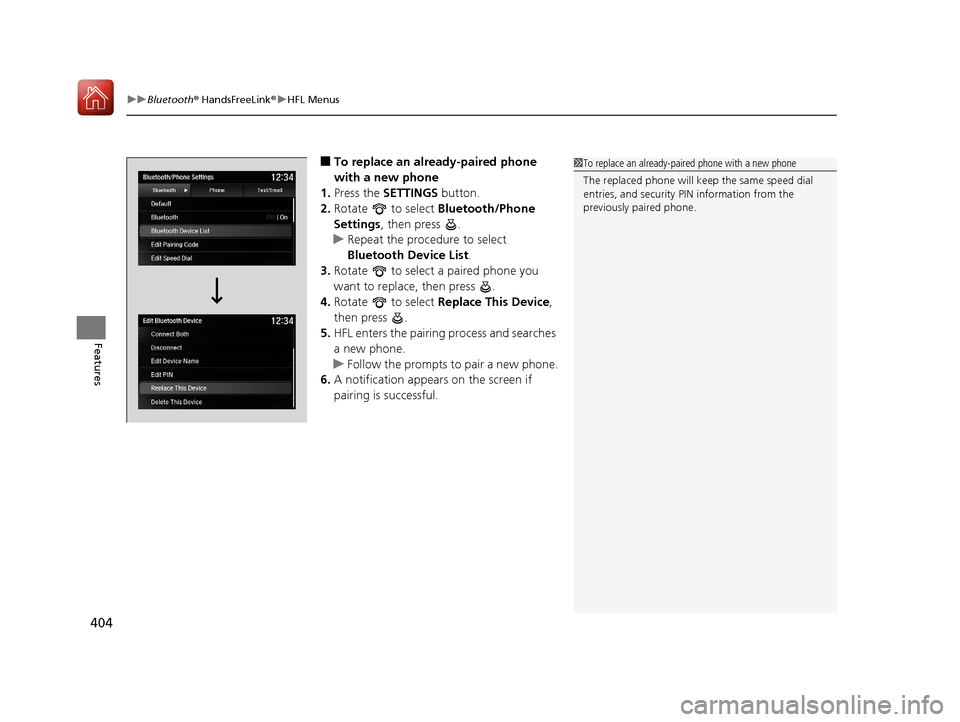
■To replace an already-paired phone
with a new phone
1. Press the SETTINGS button.
2. Rotate to select Bluetooth/Phone
Settings , then press .
u Repeat the procedure to select
Bluetooth Device List.
3. Rotate to select a paired phone you
want to replace, then press .
4. Rotate to select Replace This Device,
then press .
5. HFL enters the pairing process and searches
a new phone.
u Follow the prompts to pair a new phone.
6. A notification appears on the screen if
pairing is successful.1To replace an already-pair ed phone with a new phone
The replaced phone will keep the same speed dial
entries, and security PIN information from the
previously paired phone.
18 ACURA MDX-31TZ56400.book 404 ページ 2017年8月23日 水曜日 午後4時1分
Page 409 of 697
uuBluetooth ® HandsFreeLink ®u HFL Menus
408
Features
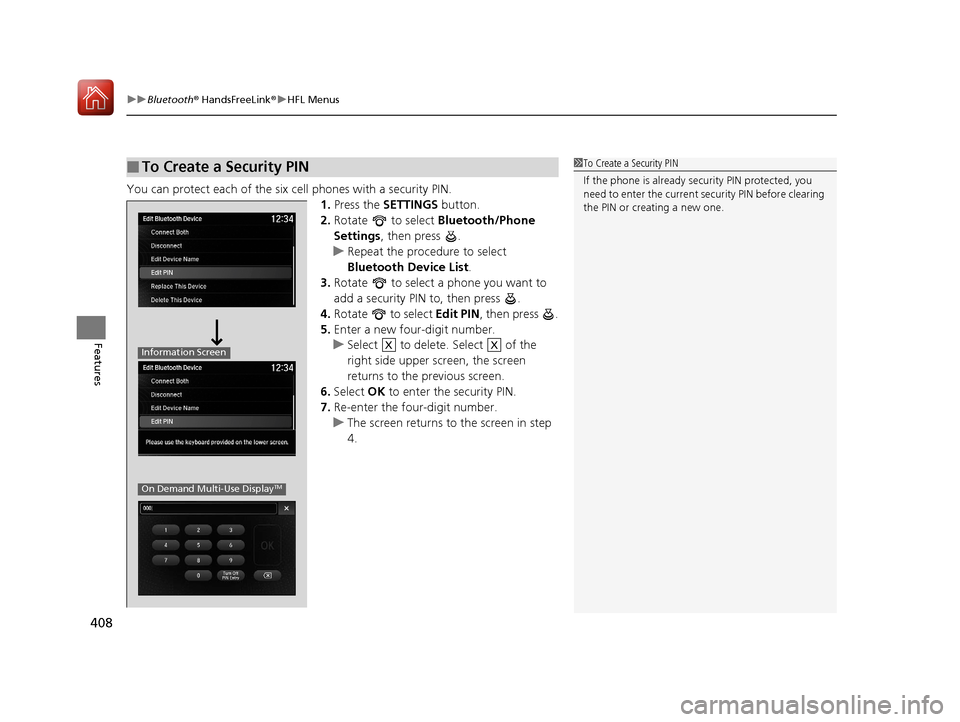
You can protect each of the six cell phones with a security PIN.
1.Press the SETTINGS button.
2. Rotate to select Bluetooth/Phone
Settings , then press .
u Repeat the procedure to select
Bluetooth Device List.
3. Rotate to select a phone you want to
add a security PIN to, then press .
4. Rotate to select Edit PIN, then press .
5. Enter a new four-digit number.
u Select to delete. Select of the
right side upper screen, the screen
returns to the previous screen.
6. Select OK to enter the security PIN.
7. Re-enter the four-digit number.
u The screen returns to the screen in step
4.
■To Create a Security PIN1 To Create a Security PIN
If the phone is already secu rity PIN protected, you
need to enter the current security PIN before clearing
the PIN or creating a new one.
Information Screen
On Demand Multi-Use DisplayTM
XX
18 ACURA MDX-31TZ56400.book 408 ページ 2017年8月23日 水曜日 午後4時1分
Page 436 of 697

435Continued
Features
AcuraLink®*
Is a subscription-based service that provid es convenient features such as voice
communication in case of emergency, online security, one-on-one operator
assistance, and the transmission of importa nt messages regarding your vehicle’s
status.
For information on traffic rero uting and traffic information updates, provided by the
AcuraLink server, see the Navigation System Manual.
■Automatic collis ion notification
If your vehicle’s airbags deploy or if the unit
detects that the vehicle is severely impacted,
your vehicle will automatically attempt to
connect to the AcuraLink operator. Once
connected, information about your vehicle, its
positioning, and its condition will be sent to
the operator; you also can speak to the
operator when connected.
■In Case of Emergency
1AcuraLink ®*
AcuraLink also provides services you can operate
from the Internet or your smartphone.
To subscribe to AcuraLink, or to get more
information about all of its features, contact an Acura
dealer, or visit owners.acura.com (U.S.) or
www.acura.ca/owners/acuralink (Canada).
Canadian models
1In Case of Emergency
Your vehicle may not be able to connect to the operator
if the battery level is low, the line is disconnected, or you
do not have adequate cellular coverage.
You cannot use emergency services when:
•You travel outside the AcuraLink service coverage
areas.
•There is a problem with the connecting devices,
such as the ASSIST button, microphone, speakers,
or the unit itself.
•You are not subscribed to the service or your
subscription is no longer valid.
You cannot operate othe r navigation or phone
related functions using the screens while talking to
the operator.
Only the operator can terminate the connection to
your vehicle.
1 Automatic collision notification
If the unit fails to connect to the operator, it
repeatedly tries until it succeeds.
Information screen
On Demand Multi-Use DisplayTM
When connected to the AcuraLink
operator:
* Not available on all models
18 ACURA MDX-31TZ56400.book 435 ページ 2017年8月23日 水曜日 午後4時1分
Page 438 of 697

Continued437
uuAcuraLink ®*u
Features
Your subscribed telematics service prov ider can track your vehicle’s location,
remotely lock or unlock doors, and help you find your vehicle.
To use these features, you n eed your user ID and personal identification number
(PIN).
■Stolen vehicle tracking
This feature searches and tracks down your vehicle position even if it is on the move.
If you believe that your vehicle has been stolen, contact the police as well as the
provider.
■Remote door lock/unlock
The provider can remotely lock or unlock doors upon your request.
■Vehicle finder
This feature is convenient to use when trying to locate your vehicle in large areas,
such as a crowded parking lot. If you cannot locate your vehicle after using the
remote transmitter’s answerback function, you can contact the provider which can
then flash your vehicle’s exterior lights and sound the horn.
■Security ala rm notification
If the security system in your vehicle detects an abnormal condition, such as
someone tampering with the lock on your vehicle, the provider notifies you by your
preferred method.
■Security Features1 Security Features
The contact information of your provider, your user
ID and PIN will be given when you subscribe to
AcuraLink. If you forget any of the above, contact a
dealer, or visit owners.acura.com (U.S.) or
www.acura.ca/owners/acuralink (Canada).
You can also activate the remote door lock/unlock
and vehicle finder features from the Internet or using
your smartphone app. As k a dealer, or visit
owners.acura.com (U.S.) or www.acura.ca/owners/
acuralink (Canada) for details.
1Vehicle finder
The lights will stop flas hing and horn will stop
sounding under the foll owing conditions:
•When 30 seconds have elapsed.
•You unlock the doors using the remote transmitter.•You unlock the doors using the keyless access
system.
•You unlock the doors using the built-in key.
•The power mode is set to ACCESSORY or ON.
18 ACURA MDX-31TZ56400.book 437 ページ 2017年8月23日 水曜日 午後4時1分
Page 469 of 697
uuWhen Driving uStarting the Engine
468
Driving
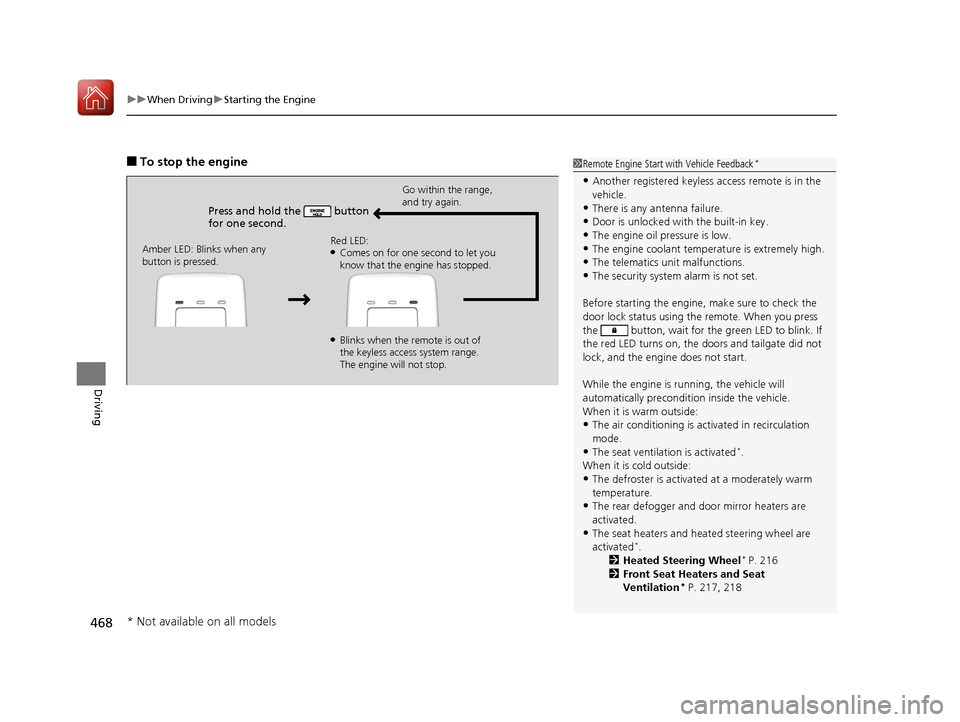
■To stop the engine
Press and hold the button
for one second.
Go within the range,
and try again.
Amber LED: Blinks when any
button is pressed. Red LED:
●Comes on for one second to let you
know that the engine has stopped.
●Blinks when the remote is out of
the keyless access system range.
The engine will not stop.
1
Remote Engine Start with Vehicle Feedback*
•Another registered keyless access remote is in the
vehicle.
•There is any antenna failure.
•Door is unlocked with the built-in key.
•The engine oil pressure is low.•The engine coolant temper ature is extremely high.
•The telematics unit malfunctions.
•The security system alarm is not set.
Before starting the engine, make sure to check the
door lock status using the remote. When you press
the button, wait for the green LED to blink. If
the red LED turns on, the doors and tailgate did not
lock, and the engine does not start.
While the engine is running, the vehicle will
automatically preconditi on inside the vehicle.
When it is warm outside:
•The air conditioning is acti vated in recirculation
mode.
•The seat ventilation is activated*.
When it is cold outside:
•The defroster is activated at a moderately warm
temperature.
•The rear defogger and door mirror heaters are
activated.
•The seat heaters and heated steering wheel are
activated*.
2 Heated Steering Wheel* P. 216
2 Front Seat Heaters and Seat
Ventilation
* P. 217, 218
* Not available on all models
18 ACURA MDX-31TZ56400.book 468 ページ 2017年8月23日 水曜日 午後4時1分
Page 688 of 697
Index
687
Index
Index
A
AAC................................................... 268, 293
ABS (Anti-lock Brake System) .................. 534
AC Power Outlet ...................................... 214
Accessories and Modifications ................ 623
Accessory Power Sockets ......................... 213
AcuraLink ................................................. 435
Adaptive Cruise Control (ACC) with Low
Speed Follow (LSF) ................................. 489
Indicator ................................................... 95
Additives
Coolant .................................................. 589
Engine Oil ............................................... 584
Washer ................................................... 592
Additives, Engine Oil ............................... 584
Adjusting Armrest .................................................. 204
Front Seats.............................................. 192
Head Restraints ....................... 198, 200, 201
Headlights .............................................. 593
Mirrors.................................................... 189
Rear Seats ............................................... 203
Steering Wheel ....................................... 188
Temperature ........................................... 122
Agile Handling Assist ............................... 519
Air Conditioning System (Climate Control System) .................................................... 219
Changing the Mode................................ 222
Defrosting the Windshield and Windows .............................................. 225
Dust and Pollen Filter .............................. 617 Rear Climate Control System ................... 226
Sensors .................................................... 230
Synchronized Mode ................................. 223
Using Automatic Climate Control ............ 219
Air Pressure ....................................... 603, 673
Airbags ........................................................ 41
Advanced Airbags ..................................... 47
After a Collision ......................................... 45
Airbag Care ............................................... 55
Driver’s Knee Airbag .................................. 48
Event Data Recorder .................................... 0
Front Airbags (SRS) .................................... 44
Indicator .............................................. 53, 86
Passenger Front Airbag Off Indicator ......... 54
Sensors ...................................................... 41
Side Airbags .............................................. 50
Side Curtain Airbags .................................. 52
AM/FM Radio ............................................ 254
Android Auto ............................................ 303
Anti-lock Brake System (ABS) .................. 534
Indicator .................................................... 86
Apple CarPlay ........................................... 299
Armrest ..................................................... 204
Audio Remote Controls ............................ 237
Audio System ............................................ 232
Adjusting the Sound ................................ 249
Auxiliary Input Jack .................................. 236
Error Messages ........................................ 308
General Information ................................ 316
HDD ........................................................ 271
Internet Radio .......................................... 291 iPhone............................................. 291, 318
iPod ........................................................ 284
MP3/WMA/AAC .............................. 268, 293
Reactivating ............................................ 236
Recommended CDs ................................. 317
Recommended Devices............................ 318
Remote Controls ..................................... 237
Security Code .......................................... 236
Theft Protection ...................................... 236
USB Flash Drives ...................................... 318
USB Port.................................................. 233
Authorized Manuals ................................ 682
Auto Door Locking/Unlocking ................. 154
Customize ....................................... 132, 374
Auto High-Beam ....................................... 177
Indicator.................................................... 86
Auto Idle Stop .......................................... 480
OFF Button .............................................. 481
Auto Idle Stop Indicator (Green) ............... 92
Auto Idle Stop System Indicator (Amber) ..................................................... 92
Automatic Brake Hold ............................. 532
Indicator.................................................. 532
Automatic Brake Hold System Indicator.................................................. 532
Automatic Folding Door Mirror ..............
191
Automatic Intermittent Wipers ............... 181
Automatic Lighting ................
.................. 174
18 ACURA MDX-31TZ56400.book 687 ページ 2017年8月23日 水曜日 午後4時1分