radio Acura MDX 2018 Owner's Guide
[x] Cancel search | Manufacturer: ACURA, Model Year: 2018, Model line: MDX, Model: Acura MDX 2018Pages: 697, PDF Size: 38.45 MB
Page 384 of 697

383
uuCustomized Features u
Continued
FeaturesSync Display Brightness
Brightness
Contrast
Black Level
Beep
Keyboard
Screen Settings
RES Settings*Rear Control
Rear Speaker
Single/Dual Screen Mode*
HD Radio Mode*Other
Cover Art
DVD Auto PlayDVD*
Audio Language
Subtitle Language
Menu Language
Dynamic Range
* Not available on all models
18 ACURA MDX-31TZ56400.book 383 ページ 2017年8月23日 水曜日 午後4時1分
Page 387 of 697
386
uuCustomized Features u
Features
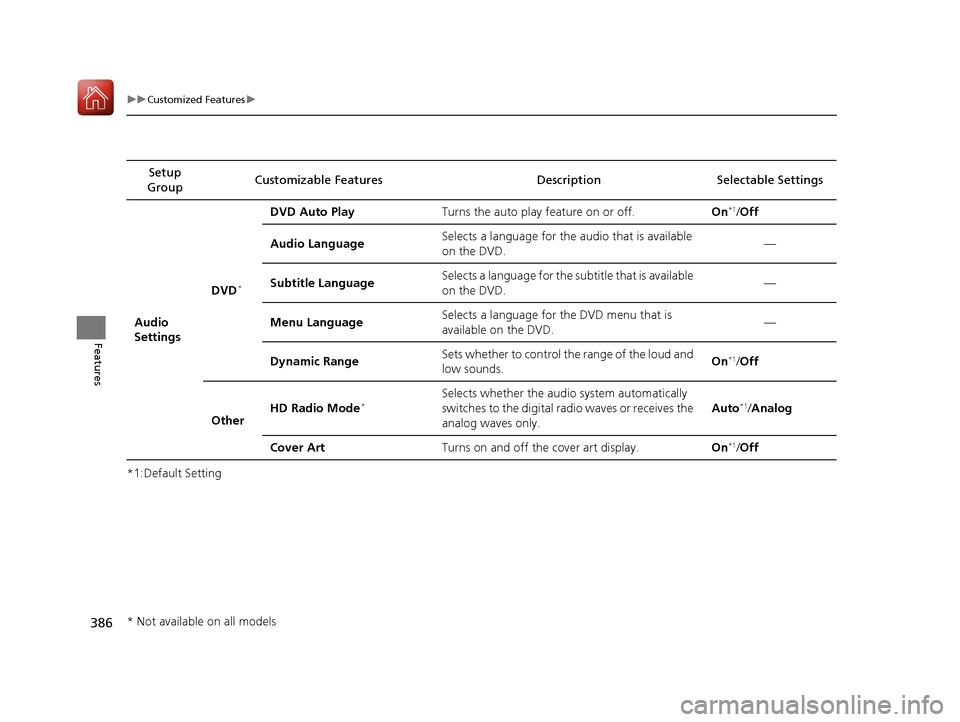
*1:Default SettingSetup
Group Customizable Features Descri
ption Selectable Settings
Audio
Settings
DVD*
DVD Auto PlayTurns the auto play feature on or off.On*1/Off
Audio Language
Selects a language for the audio that is available
on the DVD.—
Subtitle Language
Selects a language for the subtitle that is available
on the DVD.—
Menu Language
Selects a language for the DVD menu that is
available on the DVD.—
Dynamic Range
Sets whether to control the range of the loud and
low sounds.On*1/ Off
Other HD Radio Mode
*Selects whether the audio system automatically
switches to the digital radio waves or receives the
analog waves only. Auto*1/
Analog
Cover Art Turns on and off the cover art display. On
*1/Off
* Not available on all models
18 ACURA MDX-31TZ56400.book 386 ページ 2017年8月23日 水曜日 午後4時1分
Page 466 of 697
465Continued
Driving
When Driving
Starting the Engine
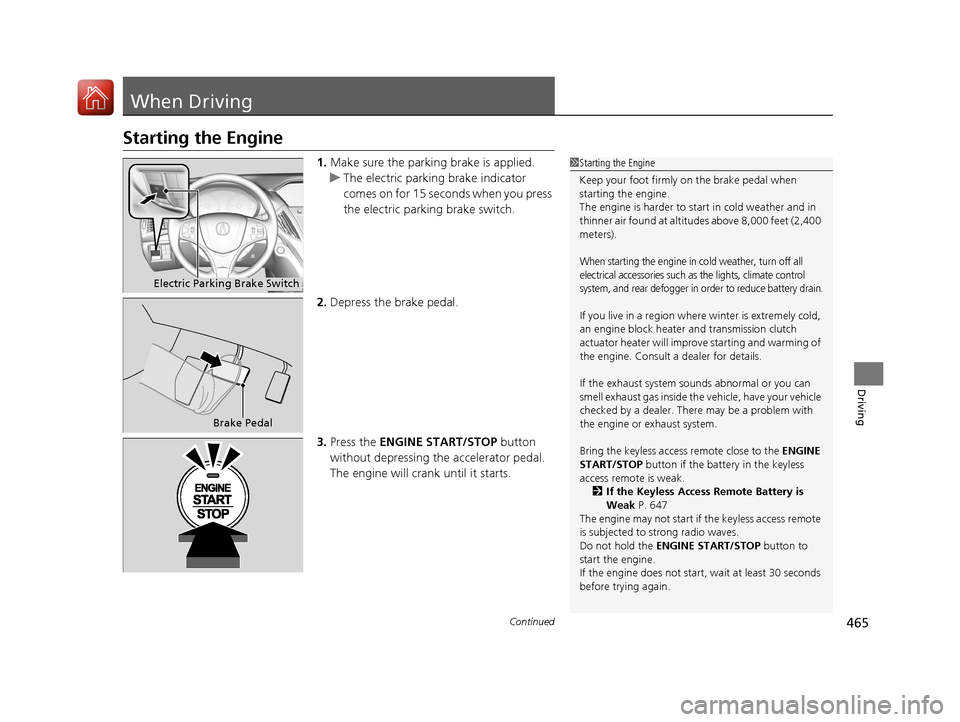
1.Make sure the parkin g brake is applied.
u The electric parking brake indicator
comes on for 15 seconds when you press
the electric parking brake switch.
2. Depress the brake pedal.
3. Press the ENGINE START/STOP button
without depressing the accelerator pedal.
The engine will crank until it starts.1 Starting the Engine
Keep your foot firmly on the brake pedal when
starting the engine.
The engine is harder to st art in cold weather and in
thinner air found at altitudes above 8,000 feet (2,400
meters).
When starting the engine in cold weather, turn off all
electrical accessories such as the lights, climate control
system, and rear defogger in order to reduce battery drain.
If you live in a region where winter is extremely cold,
an engine block heater and transmission clutch
actuator heater will impr ove starting and warming of
the engine. Consult a dealer for details.
If the exhaust system sounds abnormal or you can
smell exhaust gas inside the vehicle, have your vehicle
checked by a dealer. There may be a problem with
the engine or exhaust system.
Bring the keyless access remote close to the ENGINE
START/STOP button if the batte ry in the keyless
access remote is weak.
2 If the Keyless Access Remote Battery is
Weak P. 647
The engine may not start if the keyless access remote
is subjected to strong radio waves.
Do not hold the ENGINE START/STOP button to
start the engine.
If the engine does not start, wait at least 30 seconds
before trying again.
Electric Parking Brake Switch
Brake Pedal
18 ACURA MDX-31TZ56400.book 465 ページ 2017年8月23日 水曜日 午後4時1分
Page 523 of 697

uuWhen Driving uBlind spot information (BSI) System*
522
Driving
1Blind spot inform ation (BSI) System*
BSI may be adversel y affected when:•Objects (guard rails, poles, trees, etc,.) are
detected.
•An object that does not re flect radio waves well,
such as a motorcycle, is in the alert zone.
•Driving on a curved road.
•A vehicle is moving from a far lane to the adjacent
lane.
•The system picks up external electrical interference.
•The rear bumper or the sensors have been
improperly repaired or the rear bumper has been
deformed.
•The orientation of the sensors has been changed.•In bad weather (Heavy rain, snow, and fog).
For proper BSI use:
•Always keep the rear bumper corner area clean.
•Do not cover the rear bumper corner area with
labels or sticke rs of any kind.
•Take your vehicle to a dealer if you need the rear
bumper corner area or th e radar sensors to be
repaired, or the rear bumper corner area is strongly
impacted.
* Not available on all models
18 ACURA MDX-31TZ56400.book 522 ページ 2017年8月23日 水曜日 午後4時1分
Page 553 of 697
uuParking Your Vehicle uCross Traffic Monitor*
552
Driving
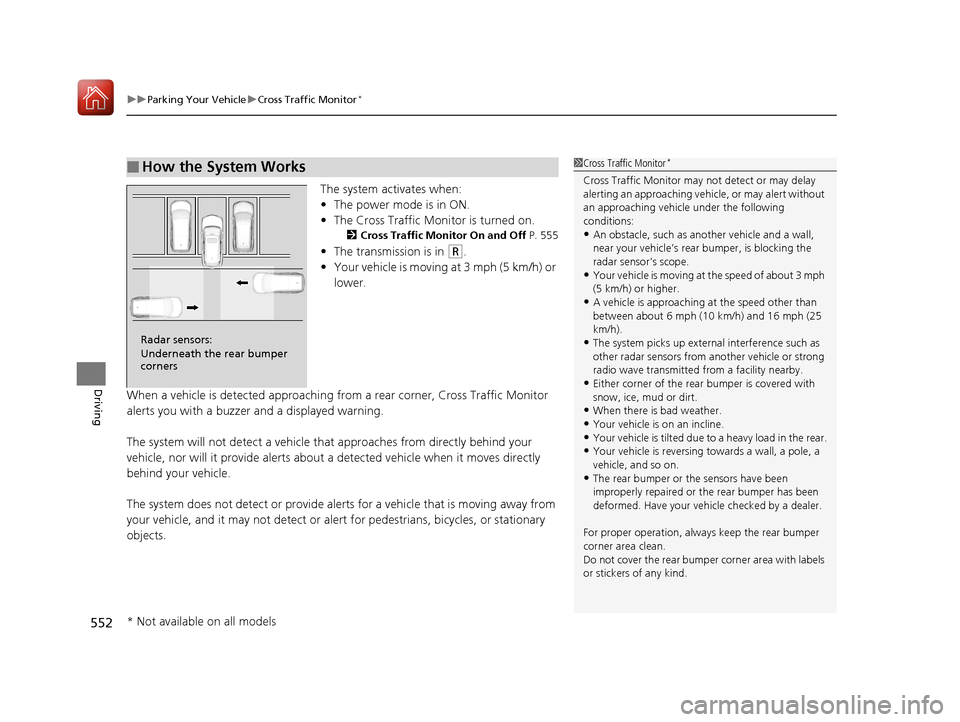
The system activates when:
• The power mode is in ON.
• The Cross Traffic Monitor is turned on.
2 Cross Traffic Monitor On and Off P. 555
•The transmission is in (R.
• Your vehicle is moving at 3 mph (5 km/h) or
lower.
When a vehicle is detected approaching from a rear corner, Cross Traffic Monitor
alerts you with a buzzer and a displayed warning.
The system will not detect a vehicle that approaches from directly behind your
vehicle, nor will it provide alerts about a detected vehicle when it moves directly
behind your vehicle.
The system does not detect or provide aler ts for a vehicle that is moving away from
your vehicle, and it may not detect or ale rt for pedestrians, bicycles, or stationary
objects.
■How the System Works1 Cross Traffic Monitor*
Cross Traffic Monitor may not detect or may delay
alerting an approaching vehi cle, or may alert without
an approaching vehicle under the following
conditions:
•An obstacle, such as a nother vehicle and a wall,
near your vehicle’s rear bumper, is blocking the
radar sensor’s scope.
•Your vehicle is moving at the speed of about 3 mph
(5 km/h) or higher.
•A vehicle is approaching at the speed other than
between about 6 mph (10 km/h) and 16 mph (25
km/h).
•The system picks up external interference such as
other radar sensors from an other vehicle or strong
radio wave transmitted fr om a facility nearby.
•Either corner of the rear bumper is covered with
snow, ice, mud or dirt.
•When there is bad weather.
•Your vehicle is on an incline.
•Your vehicle is tilt ed due to a heavy load in the rear.•Your vehicle is reversing towards a wall, a pole, a
vehicle, and so on.
•The rear bumper or the sensors have been
improperly repaired or the rear bumper has been
deformed. Have your vehi cle checked by a dealer.
For proper operation, always keep the rear bumper
corner area clean.
Do not cover the rear bumper corner area with labels
or stickers of any kind.
Radar sensors:
Underneath the rear bumper
corners
* Not available on all models
18 ACURA MDX-31TZ56400.book 552 ページ 2017年8月23日 水曜日 午後4時1分
Page 659 of 697
658
Handling the Unexpected
Fuses
Fuse Locations
If any electrical devices are not working, set
the power mode to VEHICLE OFF (LOCK)
and check to see if any applicable fuse is
blown.
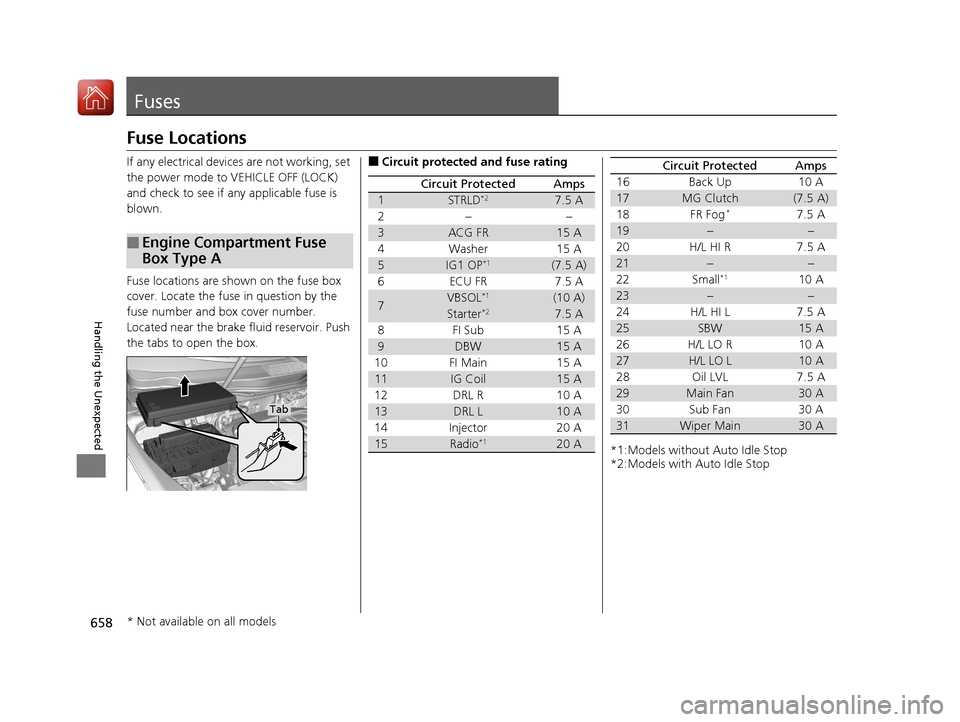
Fuse locations are shown on the fuse box
cover. Locate the fuse in question by the
fuse number and box cover number.
Located near the brake fluid reservoir. Push
the tabs to open the box.
■Engine Compartment Fuse
Box Type A
Tab
■Circuit protected and fuse rating
Circuit ProtectedAmps
1STRLD*27.5 A
2−−
3ACG FR15 A
4 Washer 15 A
5IG1 OP*1(7.5 A)
6 ECU FR 7.5 A
7VBSOL*1(10 A)
Starter*27.5 A
8FI Sub 15A
9DBW15 A
10 FI Main 15 A
11IG Coil15 A
12 DRL R 10 A
13DRL L10 A
14 Injector 20 A
15Radio*120 A*1:Models without Auto Idle Stop
*2:Models with Auto Idle Stop 16 Back Up 10 A
17MG Clutch(7.5 A)
18 FR Fog*7.5 A
19−−
20 H/L HI R 7.5 A
21−−
22 Small*110 A
23−−
24 H/L HI L 7.5 A
25SBW15 A
26 H/L LO R 10 A
27H/L LO L10 A
28 Oil LVL 7.5 A
29Main Fan30 A
30 Sub Fan 30 A
31Wiper Main30 A
Circuit ProtectedAmps
* Not available on all models
18 ACURA MDX-31TZ56400.book 658 ページ 2017年8月23日 水曜日 午後4時1分
Page 666 of 697
665
uuFuses uInspecting and Changing Fuses
Handling the Unexpected
Inspecting and Changing Fuses
1. Set the power mode to VEHICLE OFF
(LOCK). Turn headlights and all accessories
off.
2. Remove the fuse box cover.
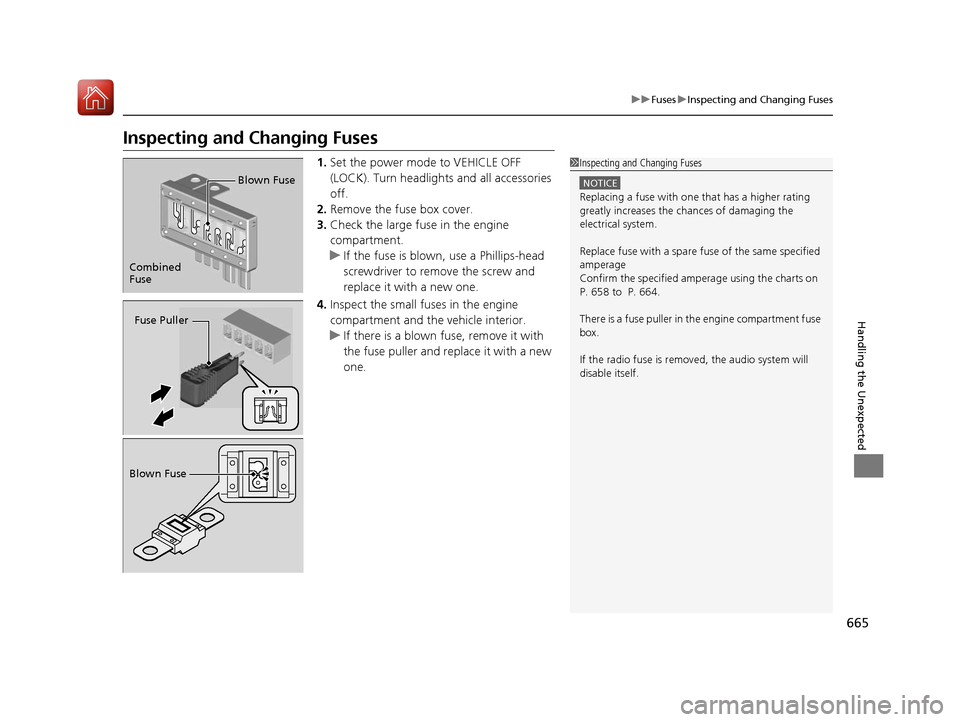
3. Check the large fuse in the engine
compartment.
u If the fuse is blown, use a Phillips-head
screwdriver to remove the screw and
replace it with a new one.
4. Inspect the small fu ses in the engine
compartment and the vehicle interior.
u If there is a blown fuse, remove it with
the fuse puller and replace it with a new
one.1Inspecting and Changing Fuses
NOTICE
Replacing a fuse with on e that has a higher rating
greatly increases the chances of damaging the
electrical system.
Replace fuse with a spare fuse of the same specified
amperage
Confirm the specified amperage using the charts on
P. 658 to P. 664.
There is a fuse puller in the engine compartment fuse
box.
If the radio fuse is remove d, the audio system will
disable itself.
Combined
Fuse Blown Fuse
Fuse Puller
Blown Fuse
18 ACURA MDX-31TZ56400.book 665 ページ 2017年8月23日 水曜日 午後4時1分
Page 672 of 697

671
Information
This chapter includes your vehicle’s specifications, locations of identification numbers, and other
information required by regulation.
Specifications.................................... 672
Identification Numbers Vehicle Identification Number (VIN), Engine Number, and Transmission
Number ......................................... 674
Devices that Emit Radio Waves ....... 675
Reporting Safety Defects ................. 677Emissions Testing
Testing of Readiness Codes.............. 678
Warranty Coverages ........................ 680
Authorized Manuals ......................... 682
Client Service Information ............... 683
18 ACURA MDX-31TZ56400.book 671 ページ 2017年8月23日 水曜日 午後4時1分
Page 676 of 697
675Continued
Information
Devices that Emit Radio Waves
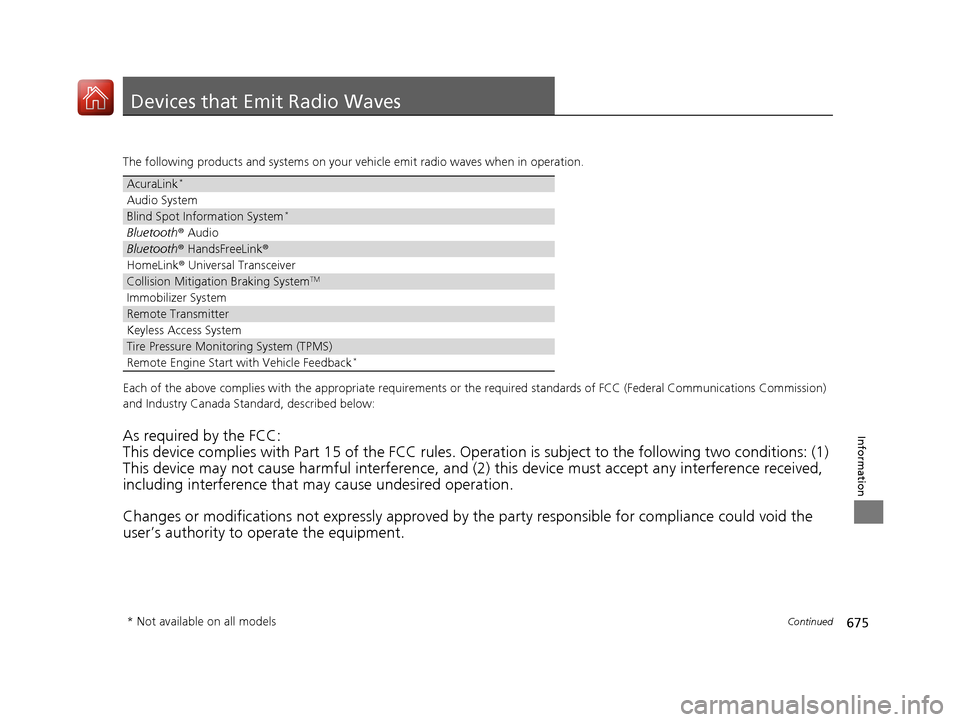
The following products and systems on your vehicle emit radio waves when in operation.
Each of the above complies with the appropriate requirements or the required standards of FCC (Federal Communications Commissio n)
and Industry Canada Standard, described below:
As required by the FCC:
This device complies with Part 15 of the FCC rules. Operation is subject to the following two conditions: (1)
This device may not cause harmful interference, and (2) this device must accept any interference received,
including interference that may cause undesired operation.
Changes or modifications not expres sly approved by the party responsible for compliance could void the
user’s authority to operate the equipment.
AcuraLink*
Audio System
Blind Spot Information System*
Bluetooth ® Audio
Bluetooth® HandsFreeLink ®
HomeLink® Universal Transceiver
Collision Mitigati on Braking SystemTM
Immobilizer System
Remote Transmitter
Keyless Access System
Tire Pressure Monitoring System (TPMS)
Remote Engine Start with Vehicle Feedback*
* Not available on all models
18 ACURA MDX-31TZ56400.book 675 ページ 2017年8月23日 水曜日 午後4時1分
Page 677 of 697

676
uuDevices that Emit Radio Waves u
Information
This device complies with Industry Canada licence-exempt RSS standard(s). Operation is subject to the following two conditions: (1) this
device may not cause interference, and (2) this device must accept any interference, including interference that may cause undesired
operation of the device.
High-power radars are allocated as primary users (i.e. prio rity users) of the bands 5250-5350 MHz and 5650-5850 MHz.
These radars could cause interference and/or damage to LE-LAN devices.
18 ACURA MDX-31TZ56400.book 676 ページ 2017年8月23日 水曜日 午後4時1分