park assist Acura MDX 2018 Owner's Manual
[x] Cancel search | Manufacturer: ACURA, Model Year: 2018, Model line: MDX, Model: Acura MDX 2018Pages: 697, PDF Size: 38.45 MB
Page 5 of 697
4
Quick Reference Guide
Quick Reference Guide
Visual Index
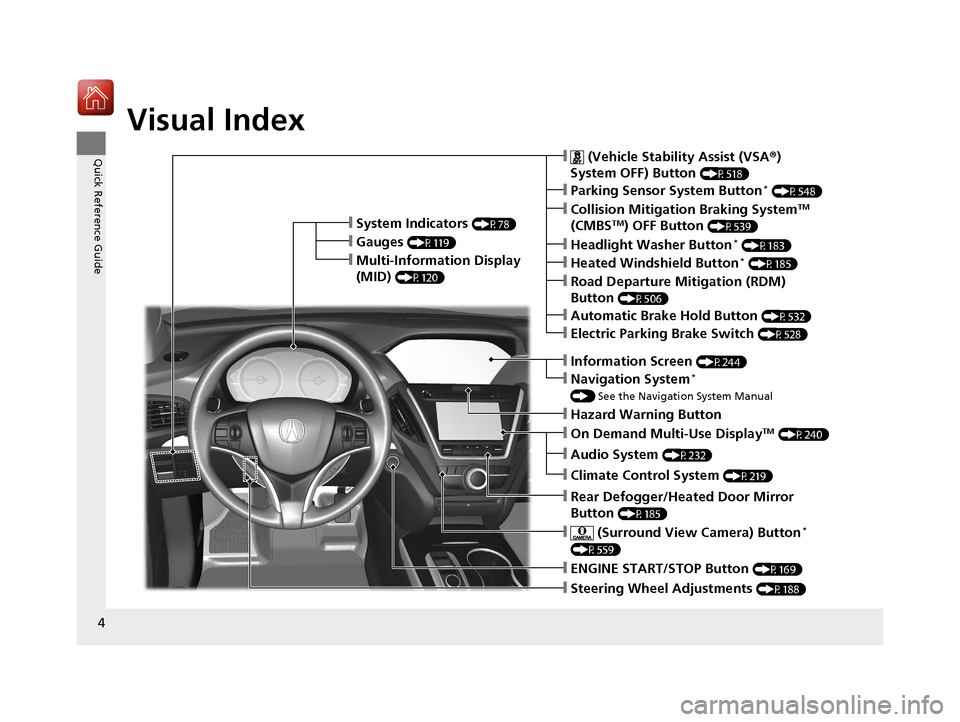
❙Steering Wheel Adjustments (P188)
❙ENGINE START/STOP Button (P169)
❙Navigation System*
() See the Navigation System Manual
❙Information Screen (P244)
❙Hazard Warning Button
❙On Demand Multi-Use DisplayTM (P240)
❙Audio System (P232)
❙System Indicators (P78)
❙Gauges (P119)
❙Multi-Information Display
(MID)
(P120)
❙Climate Control System (P219)
❙Rear Defogger/Heated Door Mirror
Button
(P185)
❙ (Surround View Camera) Button*
(P559)
❙ (Vehicle Stability Assist (VSA ®)
System OFF) Button
(P518)
❙Parking Sensor System Button* (P548)
❙Collision Mitigation Braking SystemTM
(CMBSTM) OFF Button (P539)
❙Headlight Washer Button* (P183)
❙Heated Windshield Button* (P185)
❙Electric Parking Brake Switch (P528)
❙Road Departure Mitigation (RDM)
Button
(P506)
❙Automatic Brake Hold Button (P532)
18 ACURA MDX-31TZ56400.book 4 ページ 2017年8月23日 水曜日 午後4時1分
Page 12 of 697
11
Quick Reference Guide
Instrument Panel (P77)
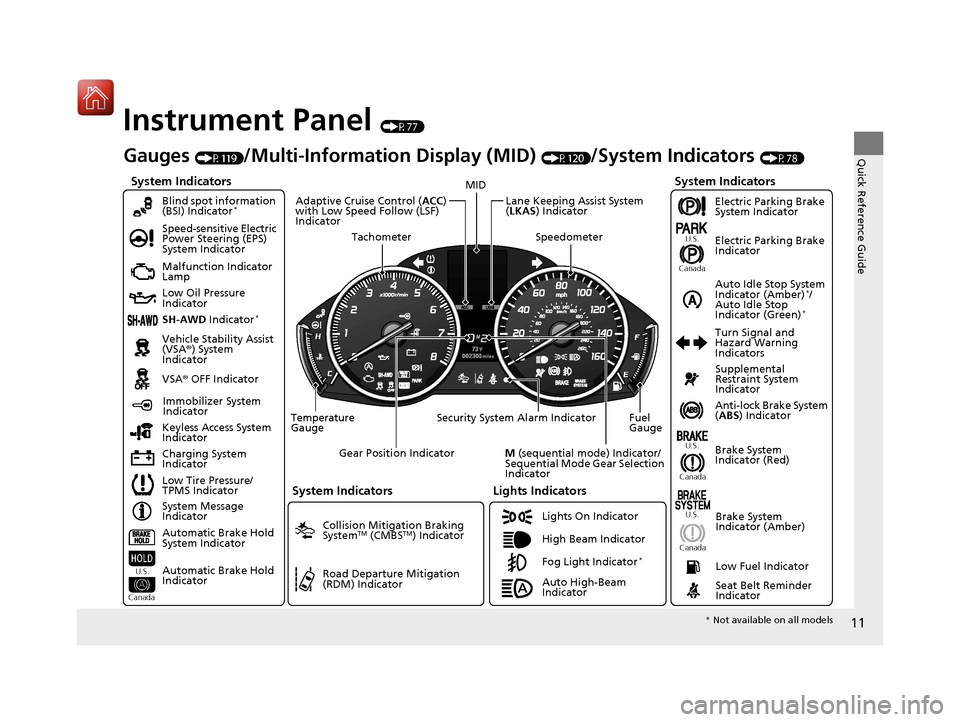
System Indicators
Malfunction Indicator
Lamp
Low Oil Pressure
Indicator
Charging System
IndicatorAnti-lock Brake System
(
ABS ) Indicator
Vehicle Stability Assist
(VSA®
) System
Indicator
VSA ® OFF Indicator
Speed-sensitive Electric
Power Steering (EPS)
System Indicator
Lights Indicators
Lights On Indicator
High Beam Indicator
Immobilizer System
Indicator
Seat Belt Reminder
Indicator
System Indicators
System Message
Indicator Brake System
Indicator (Red)Supplemental
Restraint System
Indicator
Low Fuel Indicator
Gauges (P119)/Multi-Information Display (MID) (P120)/System Indicators (P78)
Low Tire Pressure/
TPMS Indicator Turn Signal and
Hazard Warning
Indicators
Keyless Access System
Indicator
Temperature
Gauge Security System Alarm Indicator Fuel
Gauge
Tachometer
MID
Speedometer
Gear Position Indicator
M (sequential mode) Indicator/
Sequential Mode Gear Selection
Indicator
Brake System
Indicator (Amber)
SH-AWD Indicator*
Blind spot information
(BSI) Indicator*
System Indicators
Collision Mitigation Braking
SystemTM (CMBSTM) Indicator
Road Departure Mitigation
(RDM) Indicator
Lane Keeping Assist System
(LKAS ) Indicator
Adaptive Cruise Control (
ACC)
with Low Speed Follow (LSF)
Indicator
U.S.
Canada U.S.
Canada
Fog Light Indicator*
Auto Idle Stop System
Indicator (Amber)*/
Auto Idle Stop
Indicator (Green)
*
Automatic Brake Hold
System Indicator
Automatic Brake Hold
Indicator
U.S.
Canada
Electric Parking Brake
System Indicator
Electric Parking Brake
Indicator
U.S.
Canada
Auto High-Beam
Indicator
* Not available on all models
18 ACURA MDX-31TZ56400.book 11 ページ 2017年8月23日 水曜日 午後4時1分
Page 179 of 697
uuOperating the Switches Around the Steering Wheel uAuto High-Beam
178
Controls
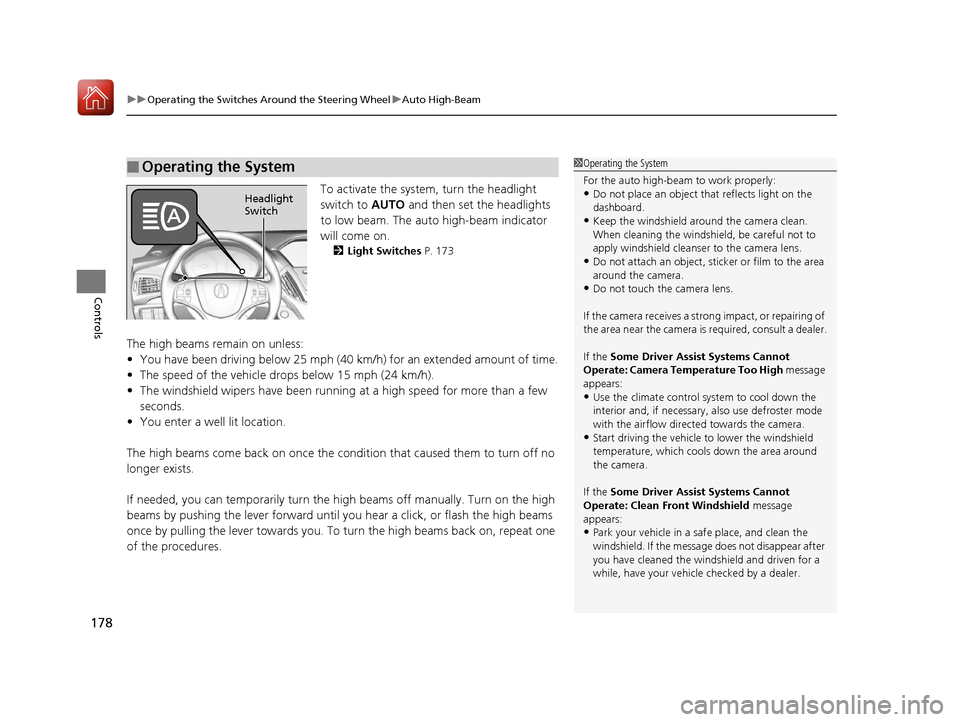
To activate the system, turn the headlight
switch to AUTO and then set the headlights
to low beam. The auto high-beam indicator
will come on.
2 Light Switches P. 173
The high beams remain on unless:
•You have been driving below 25 mph (40 km/h) for an extended amount of time.
• The speed of the vehicle drops below 15 mph (24 km/h).
• The windshield wipers have been running at a high speed for more than a few
seconds.
• You enter a well lit location.
The high beams come back on once the condition that caused them to turn off no
longer exists.
If needed, you can temporarily turn the high beams off manually. Turn on the high
beams by pushing the lever forward until yo u hear a click, or flash the high beams
once by pulling the lever towards you. To turn the high beams back on, repeat one
of the procedures.
■Operating the System1 Operating the System
For the auto high-beam to work properly:
•Do not place an object that reflects light on the
dashboard.
•Keep the windshield around the camera clean.
When cleaning the windshield, be careful not to
apply windshield cleanser to the camera lens.
•Do not attach an object, sticker or film to the area
around the camera.
•Do not touch the camera lens.
If the camera receives a st rong impact, or repairing of
the area near the camera is required, consult a dealer.
If the Some Driver Assist Systems Cannot
Operate: Camera Temperature Too High message
appears:
•Use the climate control system to cool down the
interior and, if necessary, also use defroster mode
with the airflow directed towards the camera.
•Start driving the vehicle to lower the windshield
temperature, which cool s down the area around
the camera.
If the Some Driver Assist Systems Cannot
Operate: Clean Front Windshield message
appears:
•Park your vehicle in a sa fe place, and clean the
windshield. If the message does not disappear after
you have cleaned the winds hield and driven for a
while, have your vehicle checked by a dealer.
Headlight
Switch
18 ACURA MDX-31TZ56400.book 178 ページ 2017年8月23日 水曜日 午後4時1分
Page 437 of 697
uuAcuraLink ®*u
436
Features
■Manual operator connection
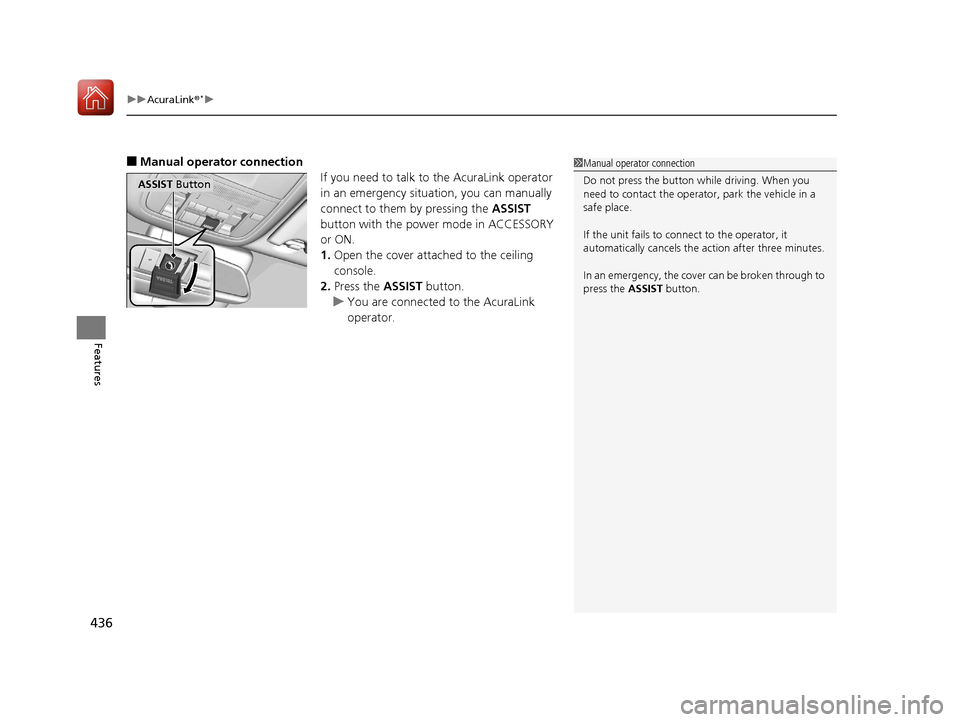
If you need to talk to the AcuraLink operator
in an emergency situation, you can manually
connect to them by pressing the ASSIST
button with the power mode in ACCESSORY
or ON.
1. Open the cover attached to the ceiling
console.
2. Press the ASSIST button.
u You are connected to the AcuraLink
operator.1Manual operator connection
Do not press the button while driving. When you
need to contact the operato r, park the vehicle in a
safe place.
If the unit fails to connect to the operator, it
automatically cancels the action after three minutes.
In an emergency, the cover can be broken through to
press the ASSIST button.
ASSIST Button
18 ACURA MDX-31TZ56400.book 436 ページ 2017年8月23日 水曜日 午後4時1分
Page 446 of 697
445
Driving
This chapter discusses driving and refueling.
Before Driving................................... 446
Towing a Trailer ................................ 452
Off-Highway Driving Guidelines ..... 463
When Driving Starting the Engine .......................... 465
Automatic Transmission ................... 471
Shifting ............................................ 472
Auto Idle Stop
*................................ 480
Integrated Dynamics System............. 486
Front Sensor Camera ....................... 487
Adaptive Cruise Control (ACC) with Low
Speed Follow (LSF) ............................. 489
Road Departure Mi tigation (RDM)
System ........................................ 504
Lane Keeping Assist System (LKAS) .. 509Vehicle Stability Assist (VSA ®), aka Electronic
Stability Control (ESC), System ............. 517
Agile Handling Assist ....................... 519
Blind spot inform ation (BSI) System*.... 520
Super Handling-All Wheel DriveTM (SH-
AWD® )*......................................... 523
Tire Pressure Monitoring System (TPMS)
with Tire Fill Assist .......................... 524
Tire Pressure Monitoring System (TPMS) - Required Federal Explanation ......... 526
Braking Brake System ................................... 528
Anti-lock Brake System (ABS) ........... 534 Brake Assist System ......................... 535
Collision Mitigation Braking System
TM
(CMBSTM) ....................................... 536
Parking Your Vehicle When Stopped ................................ 545
Parking Sensor System
*................... 547
Cross Traffic Monitor*..................... 551
Multi-View Rear Camera*................ 556
Surround View Camera System*..... 558
Refueling Fuel Information .............................. 568
How to Refuel ................................. 569
Fuel Economy and CO
2 Emissions .... 571
* Not available on all models
18 ACURA MDX-31TZ56400.book 445 ページ 2017年8月23日 水曜日 午後4時1分
Page 470 of 697

469
uuWhen Driving uStarting the Engine
Driving
1. Depress the brake pedal and press the ENGINE START/STOP button
simultaneously.
2. Keeping your right foot on the brake pedal, press the
(D button. Select (R when
reversing.
3. With the parking brake applied, release the brake pedal and gently depress the
accelerator pedal.
u Make sure the electric parkin g brake indicator goes off.
2Parking Brake P. 528
2 If the Transmission System Indicator Blinks along with the Warning Message
P. 657
■Hill start assist system
Hill start assist keeps the brake engaged br iefly to help prevent the vehicle from
rolling on inclines as you move your foot from the brake pedal to the accelerator.
Change the gear position to
(D or (S when facing uphill, or (R when facing
downhill, then release the brake pedal.
The brakes remain engaged briefly as you release the brake pedal.
■Starting to Drive1 Starting to Drive
The engine stops when the gear position is changed
from
( P before the ENGINE START/STOP button is
pressed. Follow the step 1 when starting to drive.
You can also release the parking brake by pulling the
electric parking brake sw itch while depressing the
brake pedal.
When facing downhill, you can start your vehicle
more smoothly by manually releasing it with the
electric parking brake switch than by releasing it with
the accelerator pedal.
When the engine was started using the two-way keyless
access remote*When the engine was started using the two-way keyless access remote*
When the engine was started in any case
1 Hill start assist system
Hill start assist may not prevent the vehicle from
rolling downhill on a very steep or slippe ry slope, and
will not operate on small inclines.
Hill start assist is not a replacement for the parking
brake.
Hill start assist will operate even when VSA ® is
switched off.
* Not available on all models
18 ACURA MDX-31TZ56400.book 469 ページ 2017年8月23日 水曜日 午後4時1分
Page 486 of 697

485
uuWhen Driving uAuto Idle Stop*
Driving
■The engine restarts even if the automatic brake hold system is activated
when:
• The automatic brake hold system is canc eled and the electric parking brake is
applied automatically.
The automatic brake hold system has a problem.
Briefly keeps the brake applied after releasin g the brake pedal to restart the engine.
This can keep your vehicle from unexpe ctedly moving while on an incline.
■Starting Assist Brake Function
18 ACURA MDX-31TZ56400.book 485 ページ 2017年8月23日 水曜日 午後4時1分
Page 489 of 697

uuWhen Driving uFront Sensor Camera
488
Driving
1Front Sensor Camera
If the Some Driver Assist Systems Cannot
Operate: Camera Temperature Too High message
appears:
•Use the climate control system to cool down the
interior and, if necessary, also use defroster mode
with the airflow directed towards the camera.
•Start driving the vehicle to lower the windshield
temperature, which cool s down the area around
the camera.
If the Some Driver Assist Systems Cannot
Operate: Clean Front Windshield message
appears:
•Park your vehicle in a sa fe place, and clean the
windshield. If the message does not disappear after
you have cleaned the winds hield and driven for a
while, have your vehicle checked by a dealer.
18 ACURA MDX-31TZ56400.book 488 ページ 2017年8月23日 水曜日 午後4時1分
Page 491 of 697

uuWhen Driving uAdaptive Cruise Control (ACC) with Low Speed Follow (LSF)
490
Driving
■How to activate the system1Adaptive Cruise Control (ACC) with Low Speed Follow (LSF)
When the MAIN button is pressed, both ACC with
LSF and the Lane Keeping Assist System (LKAS) are
either turned on or off.
ACC with LSF may not work properly under certain
conditions. 2 ACC with LSF Conditions and Limitations
P. 495
When not using ACC with LSF: Turn off adaptive
cruise by pressing the MAIN button. This also will
turn off the Lane Keeping Assist System (LKAS).
Do not use ACC with LSF under the following
conditions.
•On roads with heavy traf fic or while driving in
continuous stop and go traffic.
•On roads with sharp turns.
•On roads with steep downhill sections, as the set
vehicle speed can be exceeded by coasting. In such
cases, ACC with LSF will not apply the brakes to
maintain the set speed.
•On roads with toll collection facilities or other
objects between lanes of traffic, or in parking
areas, or faci lities with driv e through access.
■Press the MAIN button on
the steering wheel. ACC
(green) is on in the
instrument panel.
ACC with LSF is ready to
use.
18 ACURA MDX-31TZ56400.book 490 ページ 2017年8月23日 水曜日 午後4時1分
Page 502 of 697
Continued501
uuWhen Driving uAdaptive Cruise Control (ACC) with Low Speed Follow (LSF)
Driving
■Automatic ca ncellation
The beeper sounds and a message appear s on the MID when ACC with LSF is
automatically canceled. Any of these co nditions may cause the ACC with LSF to
automatically cancel:
• Bad weather (rain, fog, snow, etc.)
• When the radar sensor in the front grille gets dirty.
• The vehicle ahead of yo u cannot be detected.
• An abnormal tire condition is de tected, or the tires are skidding.
• Driving on a mountainous road, or driving off road for extended periods.
• Abrupt steering wheel movement.
• When the ABS, VSA ® or CMBS
TM is activated.
• When the ABS or VSA ® system indicator comes on.
• When the vehicle is stopped on a very steep slope.
• When you manually apply the parking brake.
• When the detected vehicle within the AC C with LSF range is too close to your
vehicle.
• When a detected vehicle goes out of the ACC with LSF range while your vehicle
is stationary.
• The camera behind the rearview mirror, or the area around the camera, including
the windshield, gets dirty.
The ACC with LSF automatic cancellation ca n be also triggered by the following
causes. In these cases, th e electric parking brake will be automatically applied.
• The driver’s seat belt is unfastened when the vehicle is stationary.
• The vehicle stops for more than 10 minutes.
• The engine is turned off.
• When trailer stability assist is activated.
2 Trailer Stability Assist P. 460
1Automatic cancellation
Even though ACC with LSF has been automatically
canceled, you can still resu me the prior set speed.
Wait until the condition that caused ACC with LSF to
cancel improves, then press the RES/+/SET/– switch
up.
18 ACURA MDX-31TZ56400.book 501 ページ 2017年8月23日 水曜日 午後4時1分