lock Acura MDX 2019 Owners Manual
[x] Cancel search | Manufacturer: ACURA, Model Year: 2019, Model line: MDX, Model: Acura MDX 2019Pages: 701, PDF Size: 38.75 MB
Page 365 of 701
364
uuCustomized Features u
Features
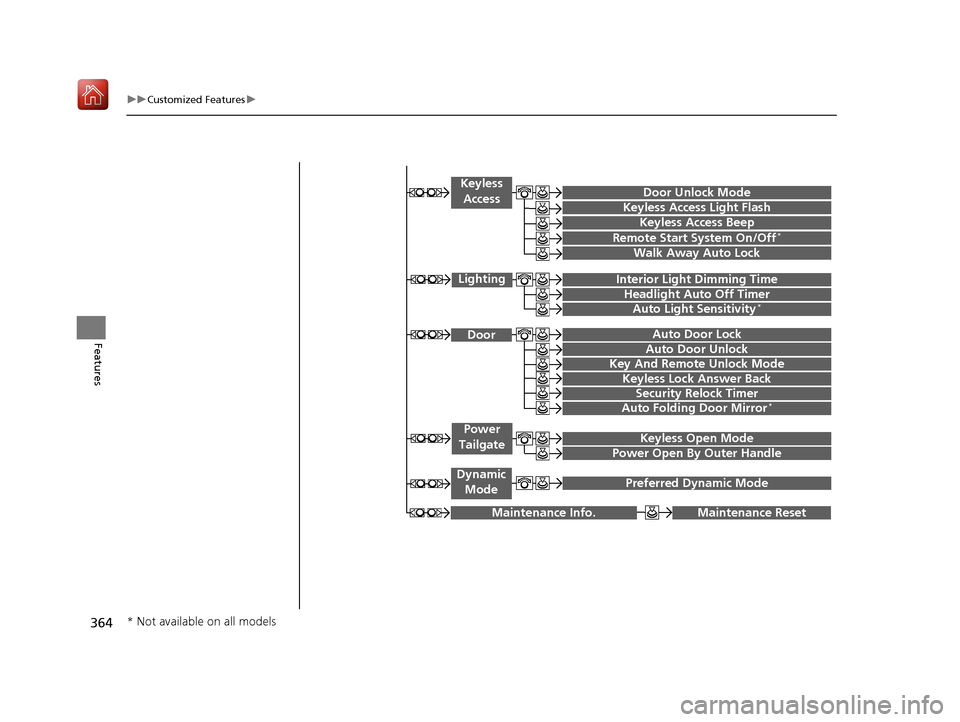
Maintenance ResetMaintenance Info.
Preferred Dynamic ModeDynamic
Mode
Key And Remote Unlock Mode
Keyless Lock Answer Back
Security Relock Timer
Auto Door Lock
Auto Door Unlock Door
Auto Folding Door Mirror*
Door Unlock Mode
Keyless Access Beep
Interior Light Dimming Time
Headlight Auto Off Timer
Auto Light Sensitivity*
Remote Start System On/Off*
Walk Away Auto Lock
Lighting
Keyless
Access
Keyless Access Light Flash
Keyless Open Mode
Power Open By Outer Handle
Power
Tailgate
* Not available on all models
19 ACURA MDX-31TZ56510.book 364 ページ 2018年12月11日 火曜日 午後4時47分
Page 366 of 701
365
uuCustomized Features u
Continued
Features
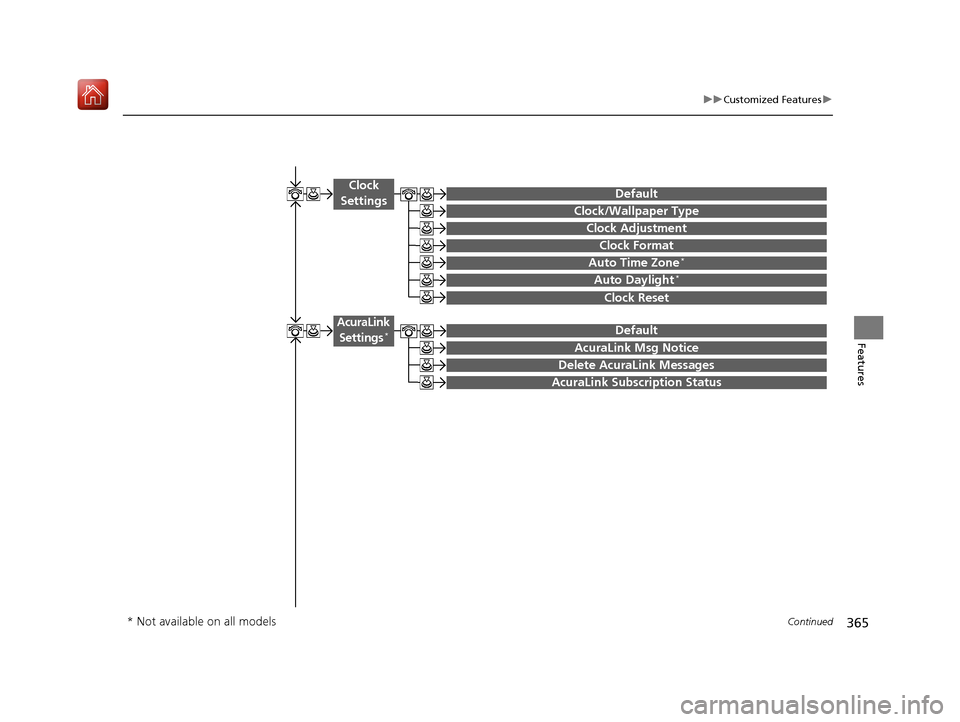
Auto Time Zone*
Clock/Wallpaper Type
Clock Adjustment
Clock
Settings
Clock Format
Default
Auto Daylight*
Clock Reset
AcuraLink Msg Notice
Delete AcuraLink Messages
AcuraLink Settings*
AcuraLink Subscription Status
Default
* Not available on all models
19 ACURA MDX-31TZ56510.book 365 ページ 2018年12月11日 火曜日 午後4時47分
Page 367 of 701
366
uuCustomized Features u
Features
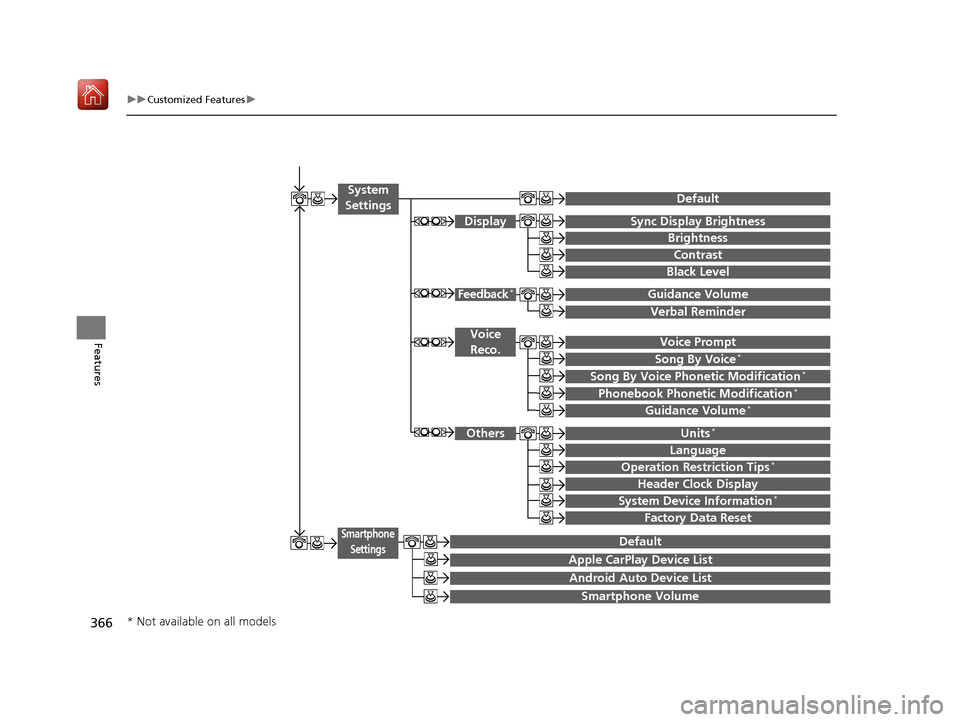
Voice Prompt
Brightness
Contrast
Black Level
Default
Display
System
Settings
Voice Reco.
Sync Display Brightness
System Device Information*Header Clock Display
Language
Operation Restriction Tips*
Others
Default
Apple CarPlay Device List
Android Auto Device List
Smartphone
Settings
Smartphone Volume
Factory Data Reset
Units*
Song By Voice*
Song By Voice Phonetic Modification*
Phonebook Phonetic Modification*
Guidance Volume*
Feedback*Guidance Volume
Verbal Reminder
* Not available on all models
19 ACURA MDX-31TZ56510.book 366 ページ 2018年12月11日 火曜日 午後4時47分
Page 375 of 701
374
uuCustomized Features u
Features
*1:Default SettingSetup
Group Customizable Features Desc
ription Selectable Settings
Vehicle
Settings
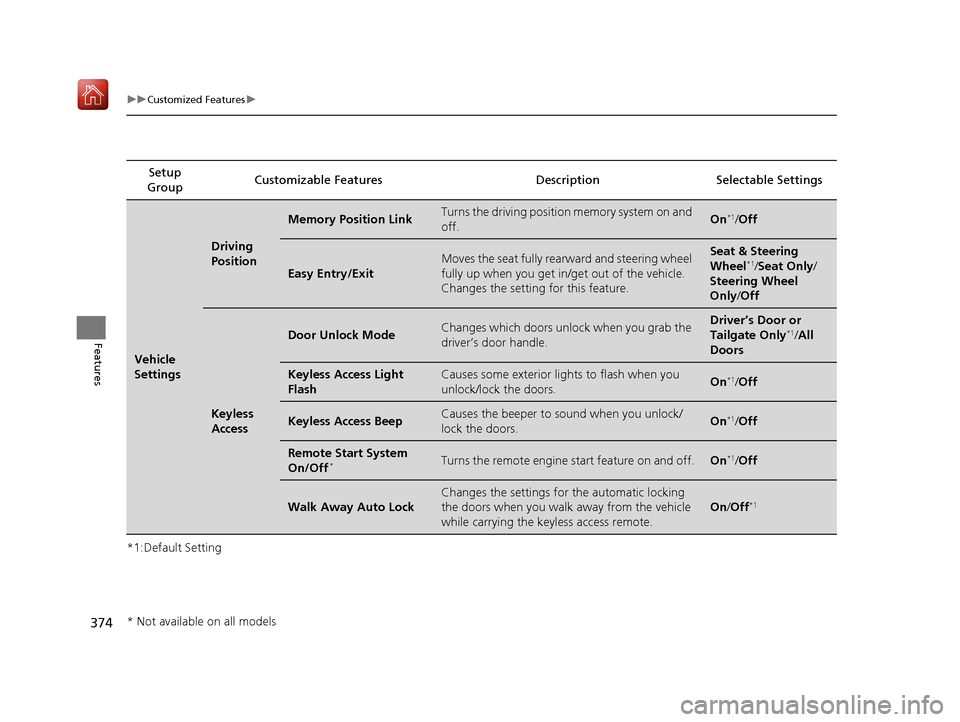
Driving
Position
Memory Position LinkTurns the driving position memory system on and
off.On*1/Off
Easy Entry/Exit
Moves the seat fully rearward and steering wheel
fully up when you get in/get out of the vehicle.
Changes the setting for this feature.Seat & Steering
Wheel*1/Seat Only /
Steering Wheel
Only /Off
Keyless
Access
Door Unlock ModeChanges which doors unlock when you grab the
driver’s door handle.Driver’s Door or
Tailgate Only*1/All
Doors
Keyless Access Light
FlashCauses some exterior li ghts to flash when you
unlock/lock the doors.On*1/ Off
Keyless Access BeepCauses the beeper to sound when you unlock/
lock the doors.On*1/Off
Remote Start System
On/Off*Turns the remote engine start feature on and off.On*1/Off
Walk Away Auto Lock
Changes the settings for the automatic locking
the doors when you walk away from the vehicle
while carrying the keyless access remote.
On /Off*1
* Not available on all models
19 ACURA MDX-31TZ56510.book 374 ページ 2018年12月11日 火曜日 午後4時47分
Page 377 of 701

376
uuCustomized Features u
Features
*1:Default SettingSetup
Group Customizable Features Desc
ription Selectable Settings
Vehicle
SettingsDoor
Auto Door LockChanges the setting for when the doors
automatically lock.With Vehicle
Speed*1/Shift from P /
Off
Auto Door UnlockChanges the setting for when the doors unlock
automatically.
All Doors When
Driver’s Door
Opens
*1/ All Doors
When Shifted to
Park/ All Doors When
Ignition Switched
Off /Off
Key And Remote Unlock
ModeSets up either the driver’s door or all doors to
unlock on the first push of the remote or built-in
key.Driver Door*1/All
Doors
Keyless Lock Answer
BackLOCK/UNLOCK- The exterior lights flash.
LOCK (2nd push)- The beeper sounds.On*1/ Off
Security Relock Timer
Changes the time it takes for the doors to relock
and the security system to set after you unlock
the vehicle without opening any door.90seconds /
60seconds /
30seconds
*1
Auto Folding Door
Mirror*Changes how you can fold the door mirrors.
Auto Fold With
Keyless*1/ Manual
Only
* Not available on all models
19 ACURA MDX-31TZ56510.book 376 ページ 2018年12月11日 火曜日 午後4時47分
Page 378 of 701
377
uuCustomized Features u
Continued
Features
*1:Default SettingSetup
Group Customizable Features Desc
ription Selectable Settings
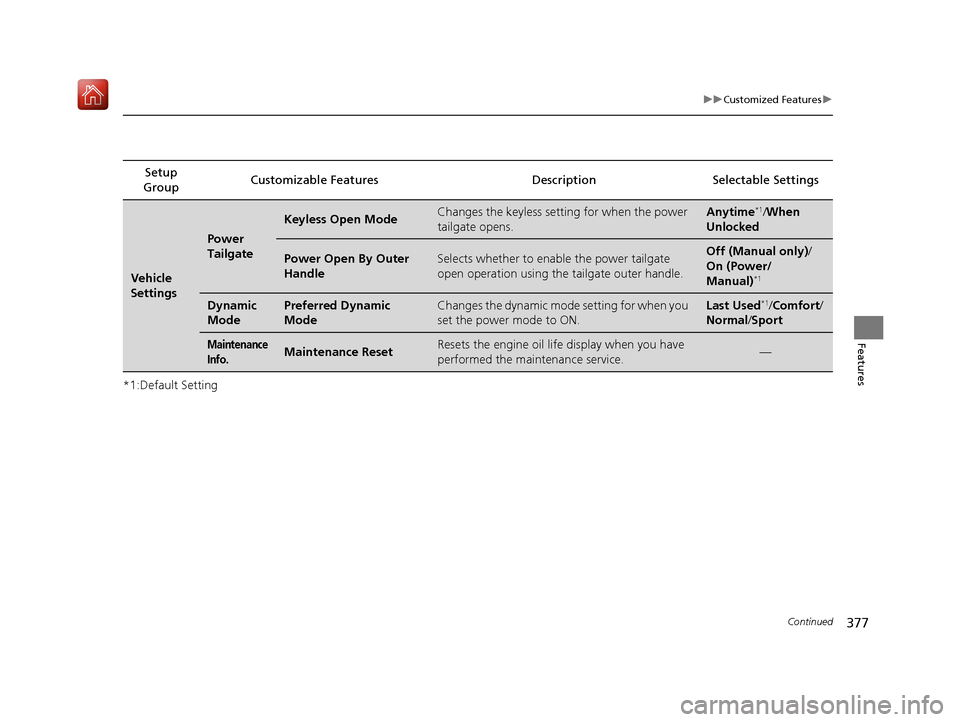
Vehicle
Settings
Power
Tailgate
Keyless Open ModeChanges the keyless setting for when the power
tailgate opens.Anytime*1/When
Unlocked
Power Open By Outer
HandleSelects whether to enable the power tailgate
open operation using the tailgate outer handle.Off (Manual only) /
On (Power/
Manual)
*1
Dynamic
ModePreferred Dynamic
ModeChanges the dynamic mode setting for when you
set the power mode to ON.Last Used*1/ Comfort/
Normal /Sport
Maintenance
Info.Maintenance ResetResets the engine oil life display when you have
performed the maintenance service.—
19 ACURA MDX-31TZ56510.book 377 ページ 2018年12月11日 火曜日 午後4時47分
Page 379 of 701
378
uuCustomized Features u
Features
*1:Default SettingSetup
Group Customizable Features Desc
ription Selectable Settings
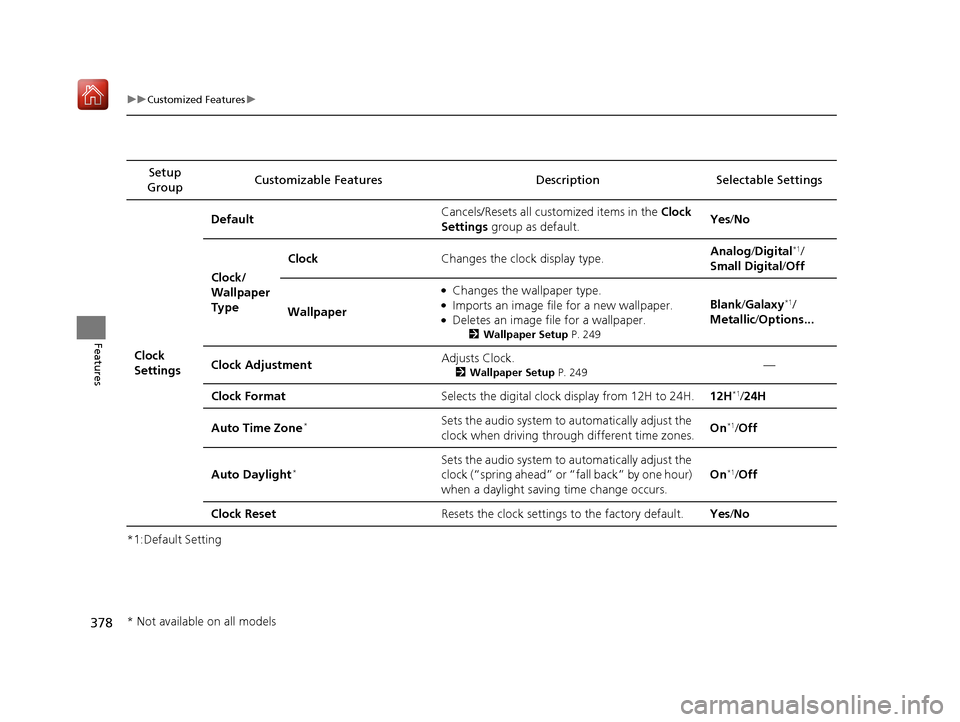
Clock
Settings Default
Cancels/Resets all cust
omized items in the Clock
Settings group as default. Yes
/No
Clock/
Wallpaper
Type Clock
Changes the clock display type. Analog
/Digital
*1/
Small Digital /Off
Wallpaper
●Changes the wallpaper type.●Imports an image file for a new wallpaper.●Deletes an image file for a wallpaper.
2 Wallpaper Setup P. 249
Blank/Galaxy*1/
Metallic /Options...
Clock Adjustment Adjusts Clock.
2
Wallpaper Setup P. 249—
Clock Format Selects the digital clock display from 12H to 24H. 12H
*1/24H
Auto Time Zone
*Sets the audio system to automatically adjust the
clock when driving through different time zones. On*1/
Off
Auto Daylight
*Sets the audio system to automatically adjust the
clock (“spring ahead” or “fall back” by one hour)
when a daylight saving time change occurs. On*1/
Off
Clock Reset Resets the clock settings to the factory default. Yes/No
* Not available on all models
19 ACURA MDX-31TZ56510.book 378 ページ 2018年12月11日 火曜日 午後4時47分
Page 383 of 701
382
uuCustomized Features u
Features
*1:Default SettingSetup
Group Customizable Features Desc
ription Selectable Settings
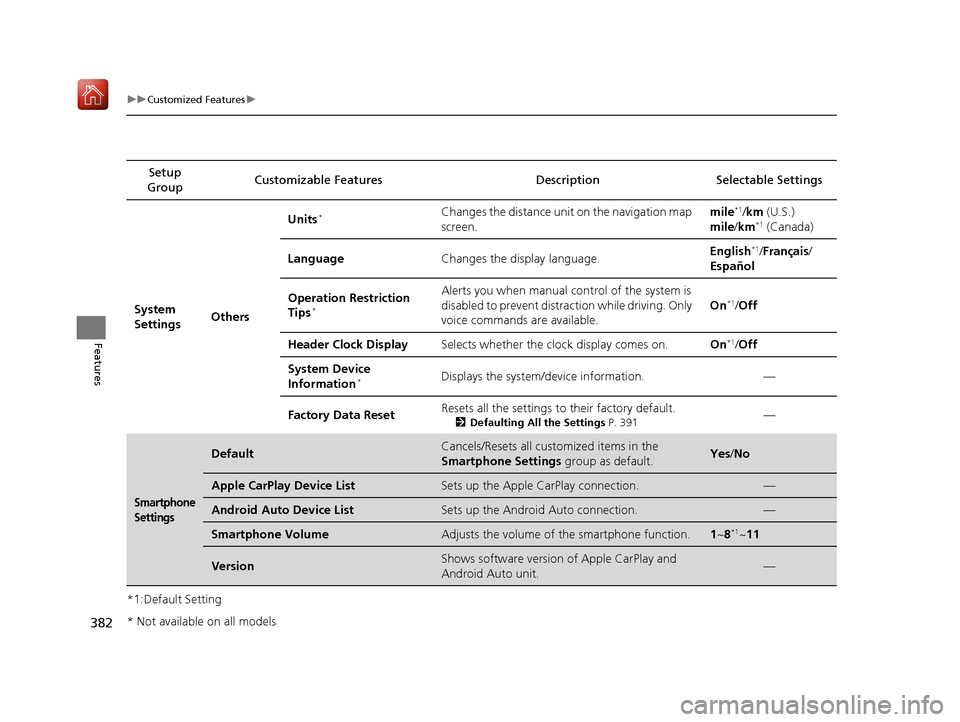
System
Settings OthersUnits
*Changes the distance unit on the navigation map
screen.
mile*1/
km (U.S.)
mile /km*1 (Canada)
Language Changes the display language. English
*1/
Français /
Español
Operation Restriction
Tips
*
Alerts you when manual control of the system is
disabled to prevent distraction while driving. Only
voice commands are available. On*1/
Off
Header Clock Display Selects whether the clock display comes on. On
*1/Off
System Device
Information
*Displays the system/device information. —
Factory Data Reset Resets all the settings to their factory default.
2
Defaulting All the Settings P. 391—
Smartphone
Settings
DefaultCancels/Resets all customized items in the
Smartphone Settings group as default.Yes/No
Apple CarPlay Device ListSets up the Apple CarPlay connection.—
Android Auto Device ListSets up the Android Auto connection.—
Smartphone VolumeAdjusts the volume of the smartphone function.1 ~8*1~11
VersionShows software version of Apple CarPlay and
Android Auto unit.—
* Not available on all models
19 ACURA MDX-31TZ56510.book 382 ページ 2018年12月11日 火曜日 午後4時47分
Page 440 of 701

Continued439
uuAcuraLink ®*u
Features
Your subscribed telematics service prov ider can track your vehicle’s location,
remotely lock or unlock doors, and help you find your vehicle.
To use these features, you n eed your user ID and personal identification number
(PIN).
■Stolen vehicle tracking
This feature searches and tracks down your vehicle position even if it is on the move.
If you believe that your vehicle has been stolen, contact the police as well as the
provider.
■Remote door lock/unlock
The provider can remotely lock or unlock doors upon your request.
■Vehicle finder
This feature is convenient to use when trying to locate your vehicle in large areas,
such as a crowded parking lot. If you cannot locate your vehicle after using the
remote transmitter’s answerback function, you can contact the provider which can
then flash your vehicle’s exterior lights and sound the horn.
■Security ala rm notification
If the security system in your vehicle detects an abnormal condition, such as
someone tampering with the lock on your vehicle, the provider notifies you by your
preferred method.
■Security Features1 Security Features
The contact information of your provider, your user
ID and PIN will be given when you subscribe to
AcuraLink. If you forget any of the above, contact a
dealer, or visit owners.acura.com (U.S.) or
www.acura.ca/owners/acuralink (Canada).
You can also activate the remote door lock/unlock
and vehicle finder features from the Internet or using
your smartphone app. As k a dealer, or visit
owners.acura.com (U.S.) or www.acura.ca/owners/
acuralink (Canada) for details.
1Vehicle finder
The lights will stop flas hing and horn will stop
sounding under the foll owing conditions:
•When 30 seconds have elapsed.
•You unlock the doors using the remote transmitter.•You unlock the doors using the keyless access
system.
•You unlock the doors using the built-in key.•The power mode is set to ACCESSORY or ON.
19 ACURA MDX-31TZ56510.book 439 ページ 2018年12月11日 火曜日 午後4時47分
Page 448 of 701
447
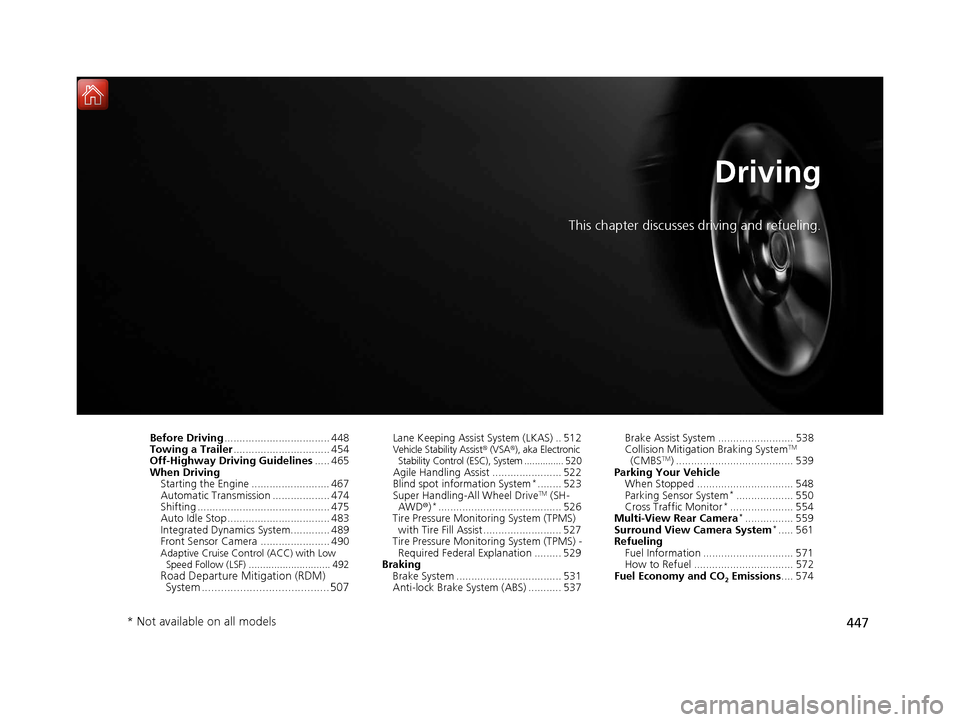
Driving
This chapter discusses driving and refueling.
Before Driving................................... 448
Towing a Trailer ................................ 454
Off-Highway Driving Guidelines ..... 465
When Driving Starting the Engine .......................... 467
Automatic Transmission ................... 474
Shifting ............................................ 475
Auto Idle Stop .................................. 483
Integrated Dynamics System............. 489
Front Sensor Camera ....................... 490
Adaptive Cruise Control (ACC) with Low
Speed Follow (LSF) ............................. 492
Road Departure Mi tigation (RDM)
System ........................................ 507
Lane Keeping Assist System (LKAS) .. 512Vehicle Stability Assist® (VSA®), aka Electronic
Stability Control (ESC), System ............... 520
Agile Handling Assist ....................... 522
Blind spot information System*........ 523
Super Handling-All Wheel DriveTM (SH-
AWD® )*......................................... 526
Tire Pressure Monitoring System (TPMS)
with Tire Fill Assist .......................... 527
Tire Pressure Monitoring System (TPMS) - Required Federal Explanation ......... 529
Braking Brake System ................................... 531
Anti-lock Brake System (ABS) ........... 537 Brake Assist System ......................... 538
Collision Mitigation Braking System
TM
(CMBSTM) ....................................... 539
Parking Your Vehicle When Stopped ................................ 548
Parking Sensor System
*................... 550
Cross Traffic Monitor*..................... 554
Multi-View Rear Camera*................ 559
Surround View Camera System*..... 561
Refueling Fuel Information .............................. 571
How to Refuel ................................. 572
Fuel Economy and CO
2 Emissions .... 574
* Not available on all models
19 ACURA MDX-31TZ56510.book 447 ページ 2018年12月11日 火曜日 午後4時47分