USB Acura MDX 2019 User Guide
[x] Cancel search | Manufacturer: ACURA, Model Year: 2019, Model line: MDX, Model: Acura MDX 2019Pages: 701, PDF Size: 38.75 MB
Page 250 of 701
Continued249
uuAudio System Basic Operation uInformation Screen
Features
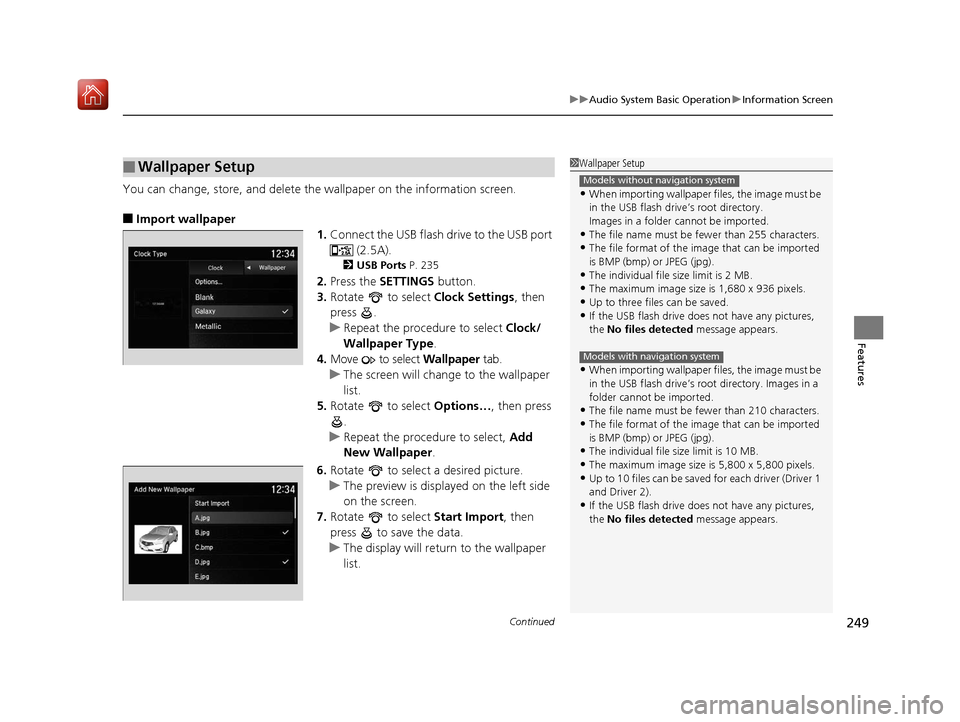
You can change, store, and delete the wallpaper on the information screen.
■Import wallpaper
1.Connect the USB flash drive to the USB port
(2.5A).
2USB Ports P. 235
2.Press the SETTINGS button.
3. Rotate to select Clock Settings, then
press .
u Repeat the procedure to select Clock/
Wallpaper Type .
4. Move to select Wallpaper tab.
u The screen will change to the wallpaper
list.
5. Rotate to select Options…, then press
.
u Repeat the procedure to select, Add
New Wallpaper .
6. Rotate to select a desired picture.
u The preview is displayed on the left side
on the screen.
7. Rotate to select Start Import, then
press to save the data.
u The display will return to the wallpaper
list.
■Wallpaper Setup1Wallpaper Setup
•When importing wallpaper files, the image must be
in the USB flash drive’s root directory.
Images in a folder cannot be imported.
•The file name must be fewer than 255 characters.
•The file format of the im age that can be imported
is BMP (bmp) or JPEG (jpg).
•The individual file size limit is 2 MB.
•The maximum image size is 1,680 x 936 pixels.
•Up to three files can be saved.•If the USB flash drive doe s not have any pictures,
the No files detected message appears.
•When importing wallpaper files, the image must be
in the USB flash drive’s root directory. Images in a
folder cannot be imported.
•The file name must be fewer than 210 characters.
•The file format of the im age that can be imported
is BMP (bmp) or JPEG (jpg).
•The individual file size limit is 10 MB.
•The maximum image size is 5,800 x 5,800 pixels.
•Up to 10 files can be saved for each driver (Driver 1
and Driver 2).
•If the USB flash drive doe s not have any pictures,
the No files detected message appears.
Models without navigation system
Models with navigation system
19 ACURA MDX-31TZ56510.book 249 ページ 2018年12月11日 火曜日 午後4時47分
Page 285 of 701
uuAudio System Basic Operation uPlaying Hard Disk Drive (HDD) Audio
284
Features
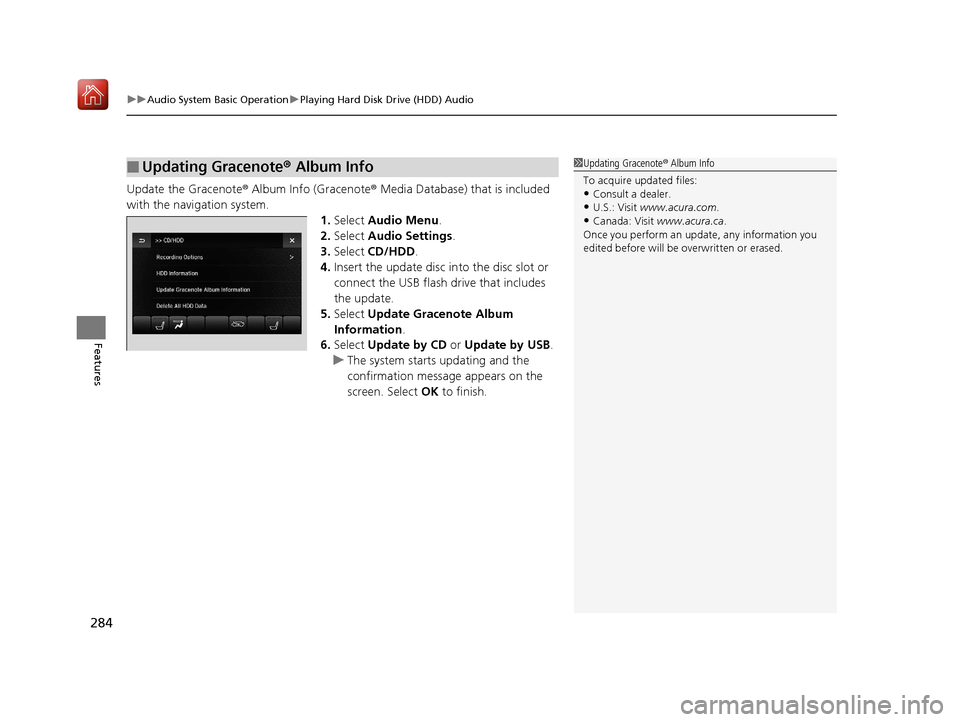
Update the Gracenote ® Album Info (Gracenote ® Media Database) that is included
with the navigation system. 1.Select Audio Menu .
2. Select Audio Settings .
3. Select CD/HDD .
4. Insert the update disc in to the disc slot or
connect the USB flash drive that includes
the update.
5. Select Update Gracenote Album
Information .
6. Select Update by CD or Update by USB.
u The system starts updating and the
confirmation message appears on the
screen. Select OK to finish.
■Updating Gracenote® Album Info1Updating Gracenote ® Album Info
To acquire updated files:
•Consult a dealer.
•U.S.: Visit www.acura.com .
•Canada: Visit www.acura.ca .
Once you perform an update, any information you
edited before will be overwritten or erased.
19 ACURA MDX-31TZ56510.book 284 ページ 2018年12月11日 火曜日 午後4時47分
Page 287 of 701
286
uuAudio System Basic Operation uPlaying an iPod
Features
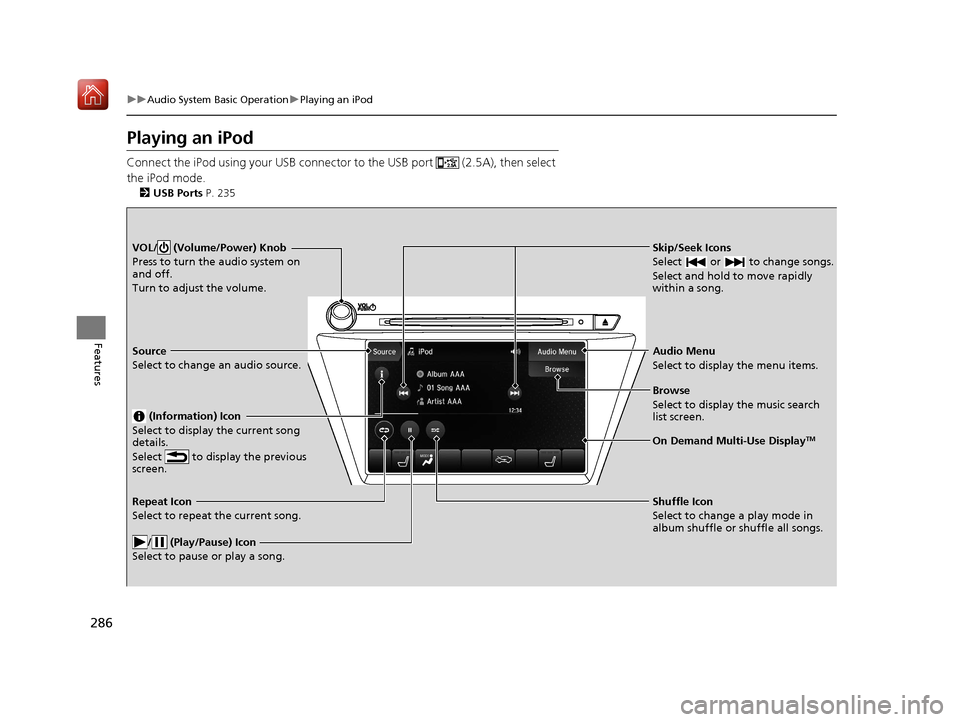
Playing an iPod
Connect the iPod using your USB connector to the USB port (2.5A), then select
the iPod mode.
2 USB Ports P. 235
Skip/Seek Icons
Select or to change songs.
Select and hold to move rapidly
within a song.VOL/ (Volume/Power) Knob
Press to turn the audio system on
and off.
Turn to adjust the volume.
Audio Menu
Select to display the menu items.
Source
Select to change an audio source.
(Information) Icon
Select to display the current song
details.
Select to display the previous
screen.
Browse
Select to display the music search
list screen.
On Demand Multi-Use DisplayTM
Repeat Icon
Select to repeat the current song.
/ (Play/Pause) Icon
Select to pause or play a song.Shuffle Icon
Select to change a play mode in
album shuffle or shuffle all songs.
19 ACURA MDX-31TZ56510.book 286 ページ 2018年12月11日 火曜日 午後4時47分
Page 288 of 701
Continued287
uuAudio System Basic Operation uPlaying an iPod
Features
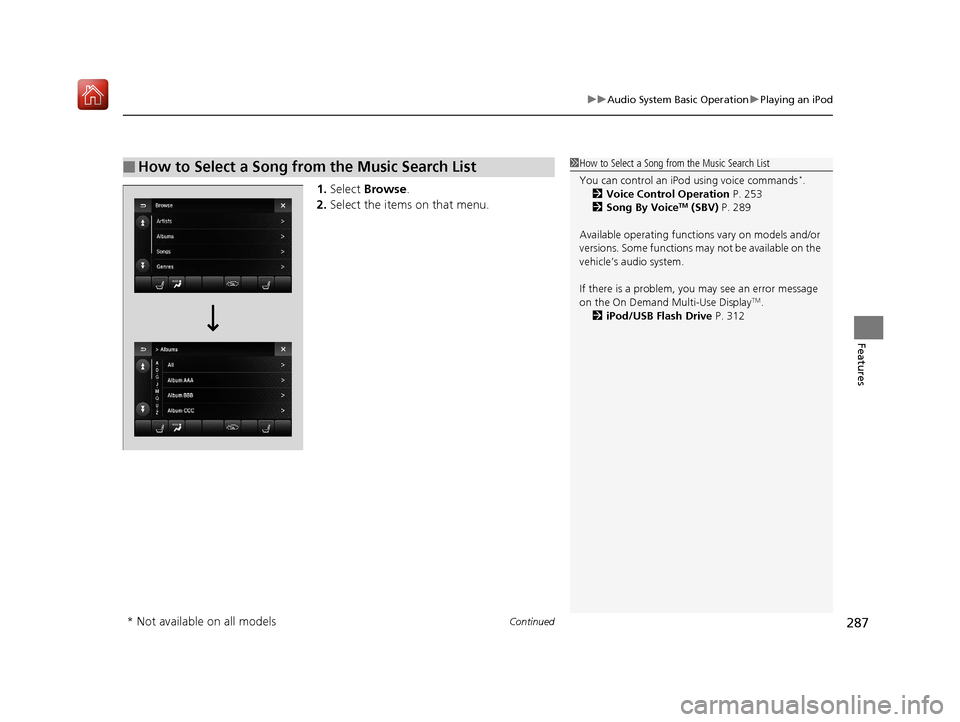
1. Select Browse .
2. Select the items on that menu.
■How to Select a Song from the Music Search List1How to Select a Song from the Music Search List
You can control an iPod using voice commands
*.
2 Voice Control Operation P. 253
2 Song By Voice
TM (SBV) P. 289
Available operating function s vary on models and/or
versions. Some functions ma y not be available on the
vehicle’s audio system.
If there is a problem, you may see an error message
on the On Demand Multi-Use Display
TM.
2 iPod/USB Flash Drive P. 312
* Not available on all models
19 ACURA MDX-31TZ56510.book 287 ページ 2018年12月11日 火曜日 午後4時47分
Page 294 of 701
293
uuAudio System Basic Operation uPlaying Pandora ®*1
Continued
Features
Playing Pandora ®*1
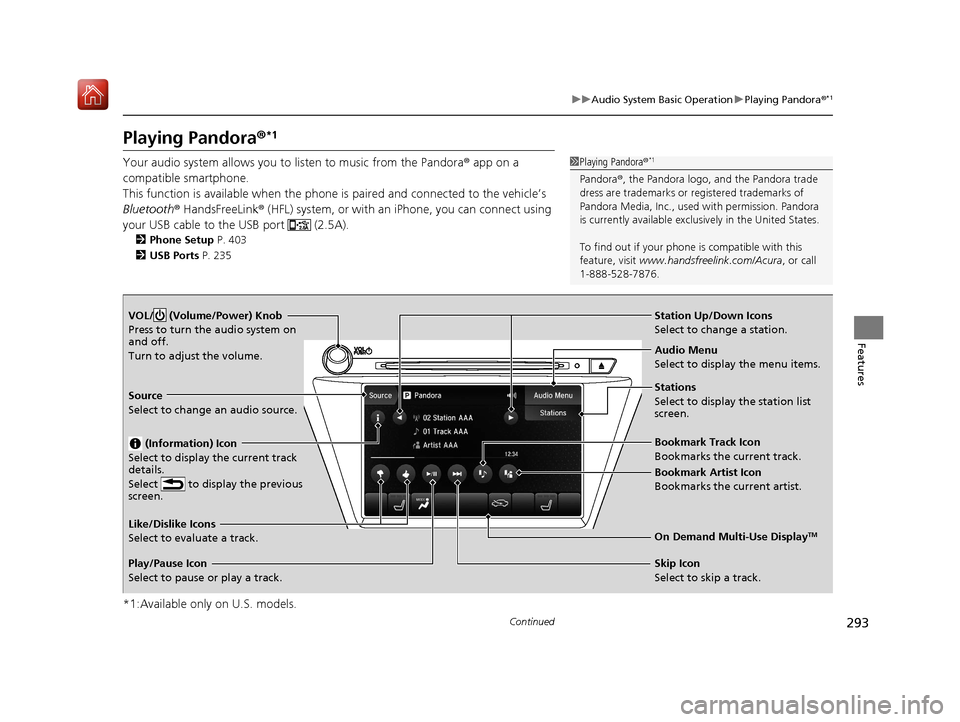
Your audio system allows you to listen to music from the Pandora ® app on a
compatible smartphone.
This function is available when the phone is paired an d connected to the vehicle’s
Bluetooth ® HandsFreeLink ® (HFL) system, or with an iPhone, you can connect using
your USB cable to the USB port (2.5A).
2 Phone Setup P. 403
2 USB Ports P. 235
*1:Available only on U.S. models.
1Playing Pandora ®*1
Pandora®, the Pandora logo, and the Pandora trade
dress are trademarks or registered trademarks of
Pandora Media, Inc., used with permission. Pandora
is currently available exclusively in the United States.
To find out if your phone is compatible with this
feature, visit www.handsfreelink.com/Acura , or call
1-888-528-7876.
VOL/ (Volume/Power) Knob
Press to turn the audio system on
and off.
Turn to adjust the volume.
Audio Menu
Select to display the menu items.
Source
Select to change an audio source.
(Information) Icon
Select to display the current track
details.
Select to display the previous
screen.
Stations
Select to display the station list
screen.
On Demand Multi-Use DisplayTMLike/Dislike Icons
Select to evaluate a track.
Skip Icon
Select to skip a track.
Play/Pause Icon
Select to pause or play a track.Station Up/Down Icons
Select to change a station.
Bookmark Track Icon
Bookmarks the current track.
Bookmark Artist Icon
Bookmarks the current artist.
19 ACURA MDX-31TZ56510.book 293 ページ 2018年12月11日 火曜日 午後4時47分
Page 295 of 701
uuAudio System Basic Operation uPlaying Pandora ®*1
294
Features
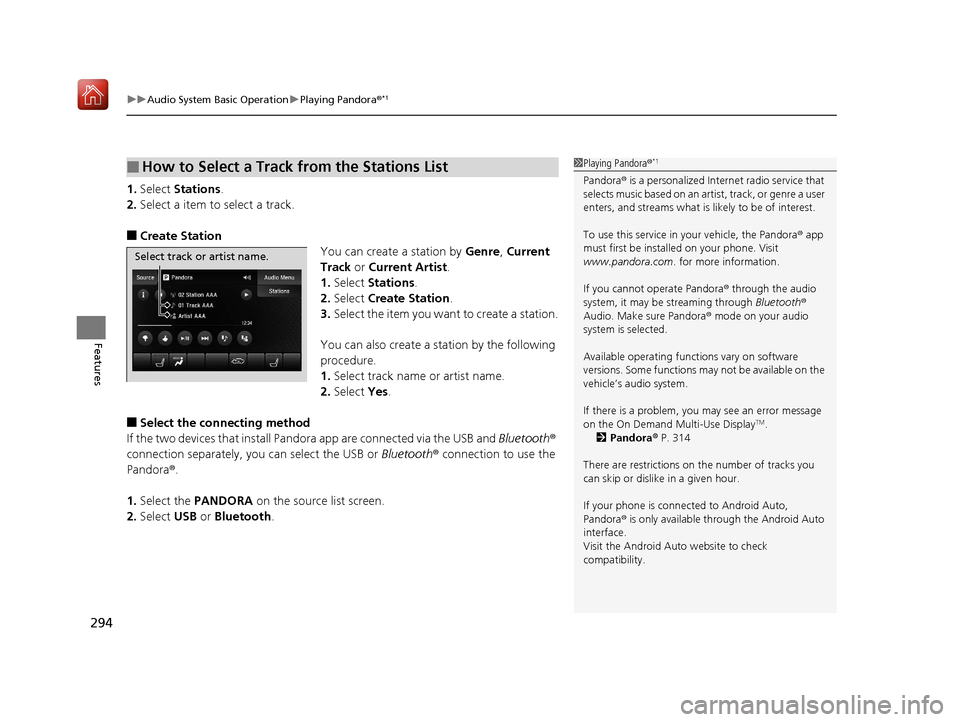
1.Select Stations .
2. Select a item to select a track.
■Create Station
You can create a station by Genre, Current
Track or Current Artist .
1. Select Stations .
2. Select Create Station .
3. Select the item you want to create a station.
You can also create a st ation by the following
procedure.
1. Select track name or artist name.
2. Select Yes.
■Select the connecting method
If the two devices that install Pan dora app are connected via the USB and Bluetooth ®
connection separately, you can select the USB or Bluetooth® connection to use the
Pandora ®.
1. Select the PANDORA on the source list screen.
2. Select USB or Bluetooth .
■How to Select a Track from the Stations List1Playing Pandora ®*1
Pandora® is a personalized Internet radio service that
selects music based on an arti st, track, or genre a user
enters, and streams what is likely to be of interest.
To use this service in your vehicle, the Pandora ® app
must first be installed on your phone. Visit
www.pandora.com . for more information.
If you cannot operate Pandora ® through the audio
system, it may be streaming through Bluetooth®
Audio. Make sure Pandora ® mode on your audio
system is selected.
Available operating functi ons vary on software
versions. Some functions ma y not be available on the
vehicle’s audio system.
If there is a problem, you may see an error message
on the On Demand Multi-Use Display
TM.
2 Pandora ® P. 314
There are restrictions on the number of tracks you
can skip or dislike in a given hour.
If your phone is connec ted to Android Auto,
Pandora ® is only available through the Android Auto
interface.
Visit the Android Auto website to check
compatibility.
Select track or artist name.
19 ACURA MDX-31TZ56510.book 294 ページ 2018年12月11日 火曜日 午後4時47分
Page 296 of 701
295
uuAudio System Basic Operation uPlaying a USB Flash Drive
Continued
Features
Playing a USB Flash Drive
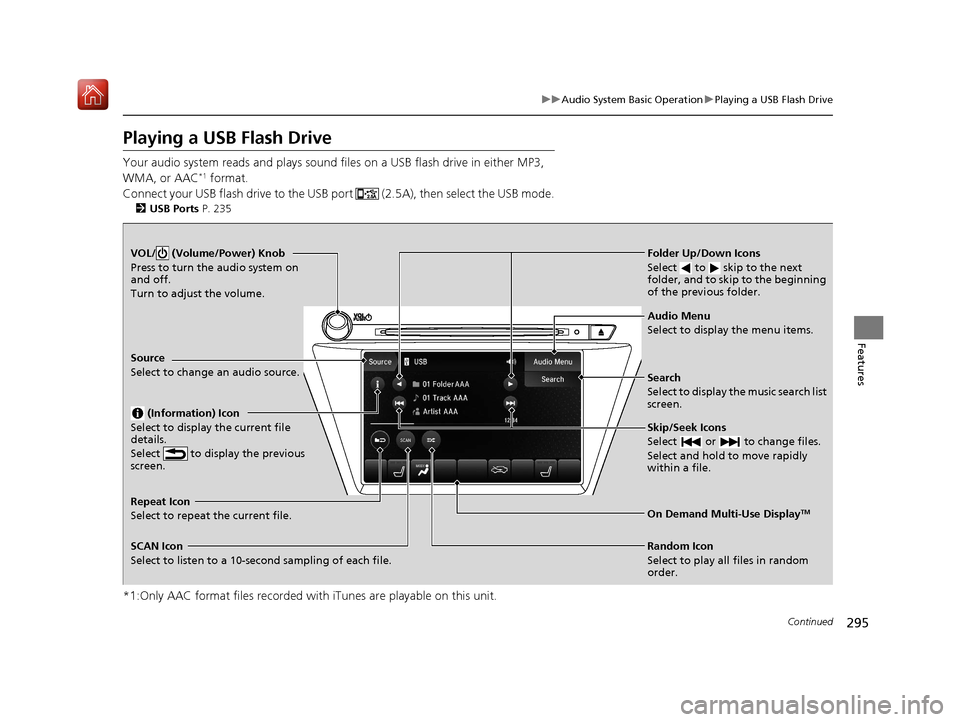
Your audio system reads and plays sound files on a USB flash drive in either MP3,
WMA, or AAC*1 format.
Connect your USB flash drive to the USB port (2.5A), then select the USB mode.
2 USB Ports P. 235
*1:Only AAC format files recorded with iTunes are playable on this unit.
VOL/ (Volume/Power) Knob
Press to turn the audio system on
and off.
Turn to adjust the volume.
Skip/Seek Icons
Select or to change files.
Select and hold to move rapidly
within a file.
Audio Menu
Select to display the menu items.
Source
Select to change an audio source.
(Information) Icon
Select to display the current file
details.
Select to display the previous
screen.
Search
Select to display the music search list
screen.
Folder Up/Down Icons
Select to skip to the next
folder, and to skip to the beginning
of the previous folder.
On Demand Multi-Use DisplayTMRepeat Icon
Select to repeat the current file.
SCAN Icon
Select to listen to a 10-second sampling of each file. Random Icon
Select to play all files in random
order.
19 ACURA MDX-31TZ56510.book 295 ページ 2018年12月11日 火曜日 午後4時47分
Page 297 of 701
uuAudio System Basic Operation uPlaying a USB Flash Drive
296
Features
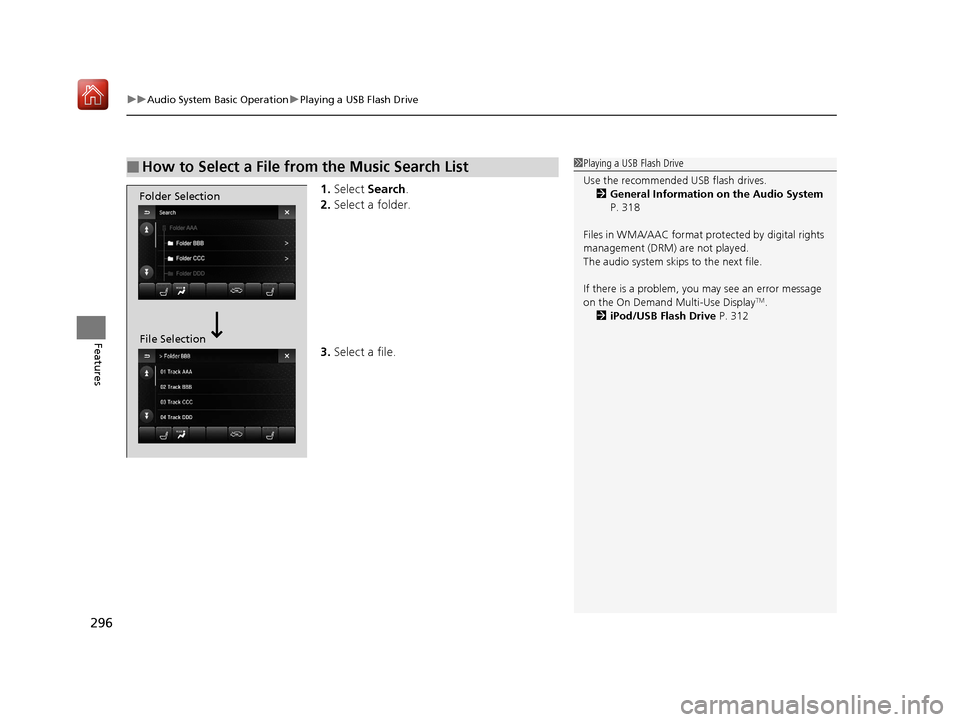
1. Select Search .
2. Select a folder.
3. Select a file.
■How to Select a File from the Music Search List1Playing a USB Flash Drive
Use the recommended USB flash drives.
2 General Information on the Audio System
P. 318
Files in WMA/AAC format protected by digital rights
management (DRM) are not played.
The audio system skips to the next file.
If there is a problem, you may see an error message
on the On Demand Multi-Use Display
TM.
2 iPod/USB Flash Drive P. 312
Folder Selection
File Selection
19 ACURA MDX-31TZ56510.book 296 ページ 2018年12月11日 火曜日 午後4時47分
Page 298 of 701
297
uuAudio System Basic Operation uPlaying a USB Flash Drive
Features
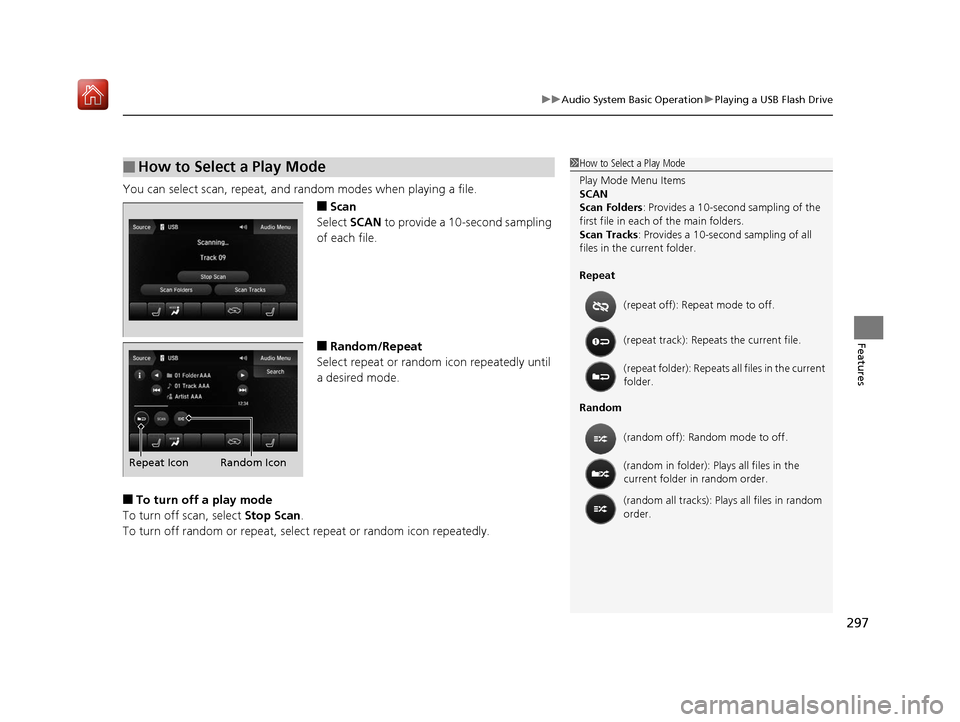
You can select scan, repeat, and random modes when playing a file.
■Scan
Select SCAN to provide a 10-second sampling
of each file.
■Random/Repeat
Select repeat or random icon repeatedly until
a desired mode.
■To turn off a play mode
To turn off scan, select Stop Scan.
To turn off random or repeat, select repeat or random icon repeatedly.
■How to Select a Play Mode1 How to Select a Play Mode
Play Mode Menu Items
SCAN
Scan Folders : Provides a 10-second sampling of the
first file in each of the main folders.
Scan Tracks: Provides a 10-second sampling of all
files in the current folder.
Repeat
Random (repeat off): Repe
at mode to off.
(repeat track): Repeats the current file.
(repeat folder): Repeats all files in the current
folder.
(random off): Random mode to off.
(random in folder): Plays all files in the
current folder in random order.
(random all tracks): Play s all files in random
order.
Random Icon
Repeat Icon
19 ACURA MDX-31TZ56510.book 297 ページ 2018年12月11日 火曜日 午後4時47分
Page 302 of 701

301
uuAudio System Basic Operation uApple CarPlay
Continued
Features
Apple CarPlay
If you connect an Apple CarPlay-compatible iPhone to the system via the 2.5A USB
port ( ), you can use the information screen, instead of the iPhone display, to
make a phone call, listen to music, view maps (navigation), and access messages.
2USB Ports P. 235
*1:The operation methods may differ from your connected iPhone.
■Apple CarPlay Menu
1Apple CarPlay
Only iPhone 5 or newer versi ons with iOS 8.4 or later
are compatible with Apple CarPlay.
Park in a safe place before connecting your iPhone to
Apple CarPlay and when launching any compatible
apps.
To use Apple CarPlay, connect the USB cable to the
2.5A USB port ( ). 2 USB Ports P. 235
To directly access the Appl e CarPlay phone function,
press the PHONE button. While connected to Apple
CarPlay, calls are only made through Apple CarPlay. If
you want to make a call with Bluetooth®
HandsFreeLink ®, turn Apple CarPlay OFF or detach
the USB cable from your iPhone.
2 Setting Up Apple CarPlay P. 303
When your iPhone is connected to Apple CarPlay, it is
not possible to use the Bluetooth® Audio or
Bluetooth ® HandsFreeLink ®. However, other
previously paired phones can stream audio via
Bluetooth ® while Apple CarPlay is connected.
2 Phone Setup P. 403
For details on c ountries and regions where Apple
CarPlay is available, as well as information pertaining
to function, refer to the Apple homepage.
Go back to the previous
screen of this audio system.
Information Screen
Apple CarPlay menu screen
Go back to the Apple CarPlay menu screen
SMARTPHONE Button
Press to display the Apple CarPlay menu screen.
Interface Dial ( ENTER/MENU Button)
*1
Move the interface dial to select the item.
Press to enter the item.
BACK Button*1
Press to go back to the previous display.
19 ACURA MDX-31TZ56510.book 301 ページ 2018年12月11日 火曜日 午後4時47分