parking Acura MDX 2019 User Guide
[x] Cancel search | Manufacturer: ACURA, Model Year: 2019, Model line: MDX, Model: Acura MDX 2019Pages: 701, PDF Size: 38.75 MB
Page 109 of 701
108
uuIndicators uMulti-Information Display (MID) Warning and Information Messages
Instrument Panel
MessageConditionExplanation
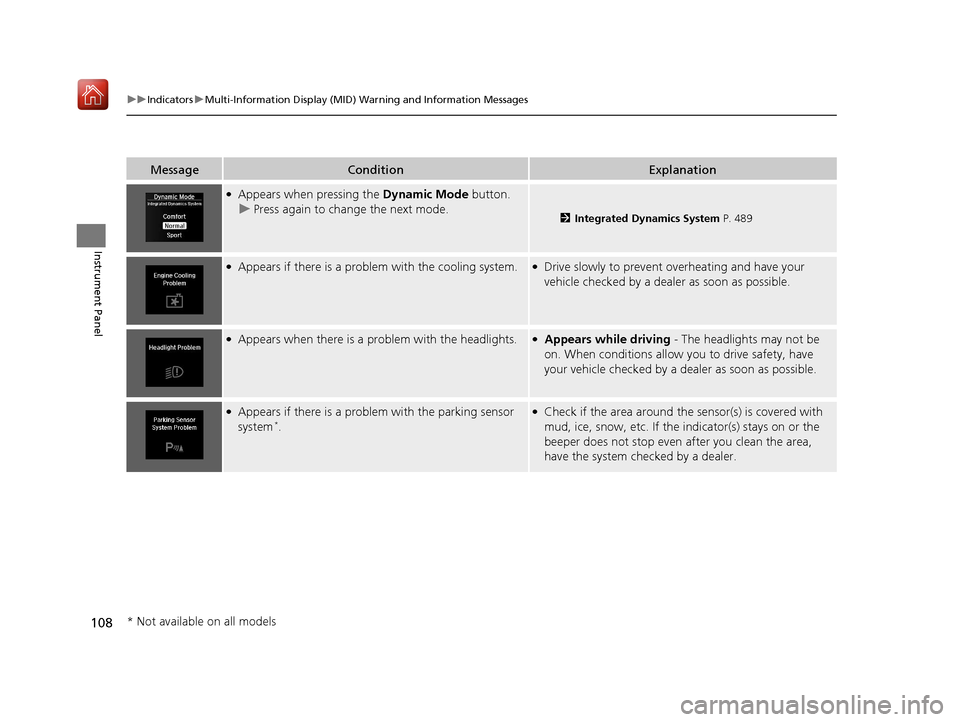
●Appears when pressing the Dynamic Mode button.
u Press again to change the next mode.
2 Integrated Dynamics System P. 489
●Appears if there is a problem with the cooling system.●Drive slowly to prevent overheating and have your
vehicle checked by a dealer as soon as possible.
●Appears when there is a problem with the headlights.●Appears while driving - The headlights may not be
on. When conditions allow you to drive safety, have
your vehicle checked by a d ealer as soon as possible.
●Appears if there is a problem with the parking sensor
system*.
●Check if the area around the sensor(s) is covered with
mud, ice, snow, etc. If the indicator(s) stays on or the
beeper does not stop even after you clean the area,
have the system checked by a dealer.
* Not available on all models
19 ACURA MDX-31TZ56510.book 108 ページ 2018年12月11日 火曜日 午後4時47分
Page 110 of 701
109
uuIndicators uMulti-Information Display (MID) Warning and Information Messages
Continued
Instrument Panel
MessageConditionExplanation
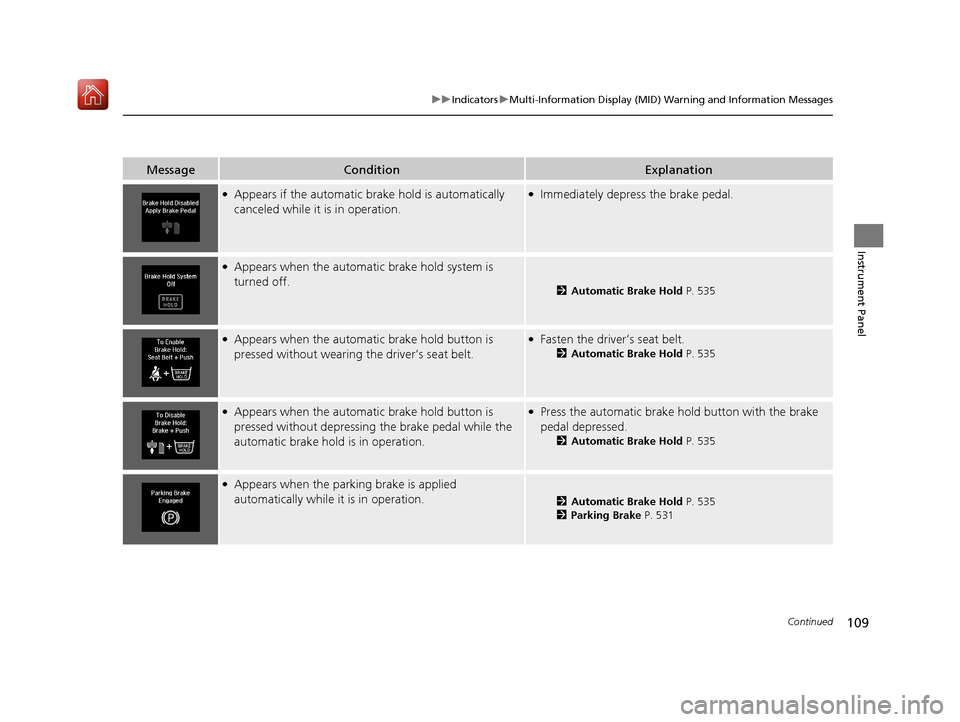
●Appears if the automatic br ake hold is automatically
canceled while it is in operation.●Immediately depress the brake pedal.
●Appears when the automatic brake hold system is
turned off.
2 Automatic Brake Hold P. 535
●Appears when the automatic brake hold button is
pressed without wearing the driver’s seat belt.●Fasten the driver’s seat belt.
2Automatic Brake Hold P. 535
●Appears when the automatic brake hold button is
pressed without depressing the brake pedal while the
automatic brake hold is in operation.●Press the automatic brake hold button with the brake
pedal depressed.
2 Automatic Brake Hold P. 535
●Appears when the parking brake is applied
automatically while it is in operation.
2Automatic Brake Hold P. 535
2 Parking Brake P. 531
19 ACURA MDX-31TZ56510.book 109 ページ 2018年12月11日 火曜日 午後4時47分
Page 114 of 701
113
uuIndicators uMulti-Information Display (MID) Warning and Information Messages
Continued
Instrument Panel
MessageConditionExplanation
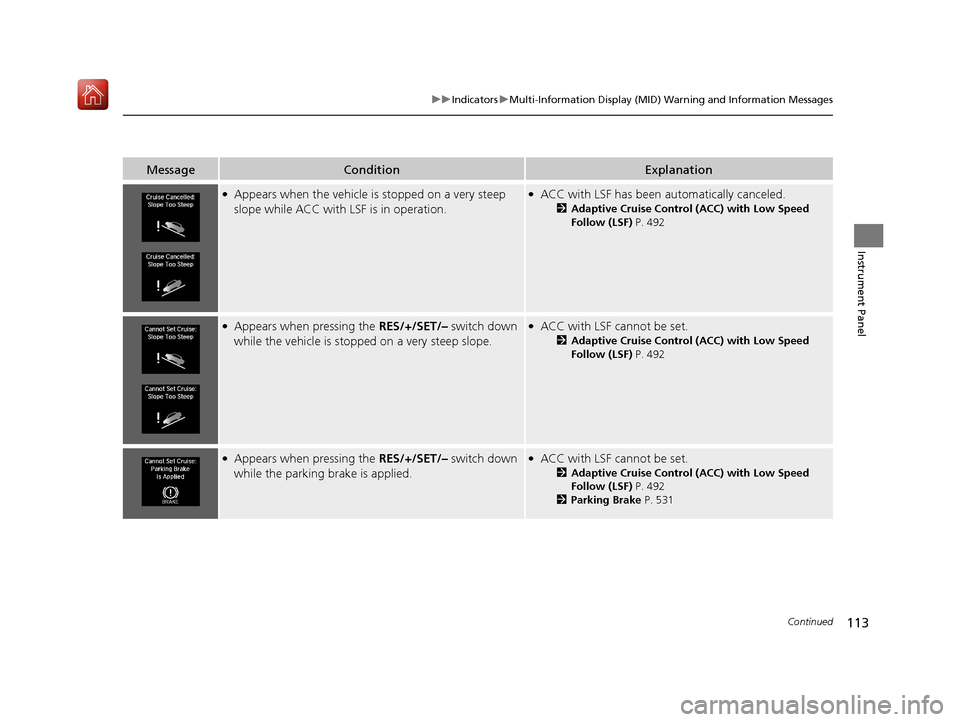
●Appears when the vehicle is stopped on a very steep
slope while ACC with LSF is in operation.●ACC with LSF has been automatically canceled.
2 Adaptive Cruise Control (ACC) with Low Speed
Follow (LSF) P. 492
●Appears when pressing the RES/+/SET/– switch down
while the vehicle is stoppe d on a very steep slope.●ACC with LSF cannot be set.
2Adaptive Cruise Control (ACC) with Low Speed
Follow (LSF) P. 492
●Appears when pressing the RES/+/SET/– switch down
while the parking brake is applied.●ACC with LSF cannot be set.
2Adaptive Cruise Control (ACC) with Low Speed
Follow (LSF) P. 492
2 Parking Brake P. 531
19 ACURA MDX-31TZ56510.book 113 ページ 2018年12月11日 火曜日 午後4時47分
Page 174 of 701
173
uuOperating the Switches Around the Steering Wheel uLight Switches
Continued
Controls
Light Switches
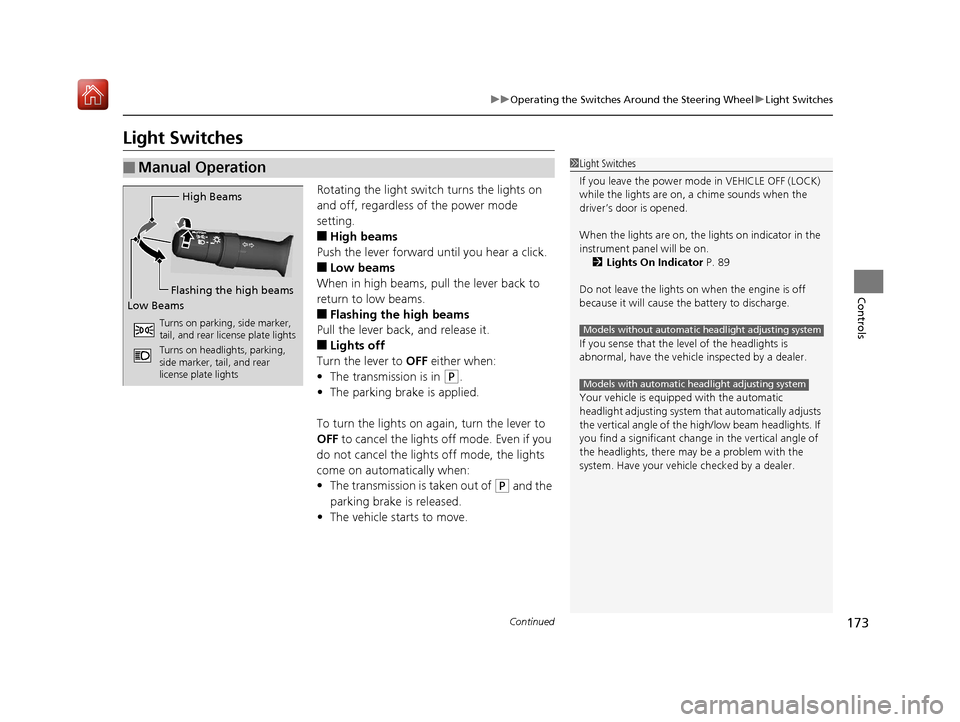
Rotating the light switch turns the lights on
and off, regardless of the power mode
setting.
■High beams
Push the lever forward until you hear a click.
■Low beams
When in high beams, pull the lever back to
return to low beams.
■Flashing the high beams
Pull the lever back, and release it.
■Lights off
Turn the lever to OFF either when:
• The transmission is in
(P.
• The parking brake is applied.
To turn the light s on again, turn the lever to
OFF to cancel the lights off mode. Even if you
do not cancel the lights off mode, the lights
come on automatically when:
• The transmission is taken out of
(P and the
parking brake is released.
• The vehicle starts to move.
■Manual Operation1Light Switches
If you leave the power mode in VEHICLE OFF (LOCK)
while the lights are on, a chime sounds when the
driver’s door is opened.
When the lights are on, the lights on indicator in the
instrument pane l will be on.
2 Lights On Indicator P. 89
Do not leave the lights on when the engine is off
because it will cause the battery to discharge.
If you sense that the le vel of the headlights is
abnormal, have the vehicl e inspected by a dealer.
Your vehicle is equipped with the automatic
headlight adjusting system that automatically adjusts
the vertical angle of the high/low beam headlights. If
you find a significant change in the vertical angle of
the headlights, there may be a problem with the
system. Have your vehicle checked by a dealer.
Models without automatic headlight adjusting system
Models with automatic headlight adjusting system
High Beams
Flashing the high beams
Low Beams
Turns on parking, side marker,
tail, and rear license plate lights
Turns on headlights, parking,
side marker, tail, and rear
license plate lights
19 ACURA MDX-31TZ56510.book 173 ページ 2018年12月11日 火曜日 午後4時47分
Page 175 of 701
uuOperating the Switches Around the Steering Wheel uLight Switches
174
Controls
Automatic lighting control can be used when
the power mode is in ON.
When the light switch is in AUTO, the
headlights and other exterior lights will switch
on and off automatica lly depending on the
ambient brightness.
u You can change the au to light sensitivity
setting.
2 Customized Features P. 126, 360
The headlights comes on when you unlock a
door in dark areas with the headlight switch in
AUTO.
u Once you lock the door, the headlights
will go off.
■Automatic Operation (automatic lighting control)1Automatic Operation (aut omatic lighting control)
We recommend that you tu rn on the lights manually
when driving at night, in a dense fog, or in dark areas
such as long tunnels or parking facilities.
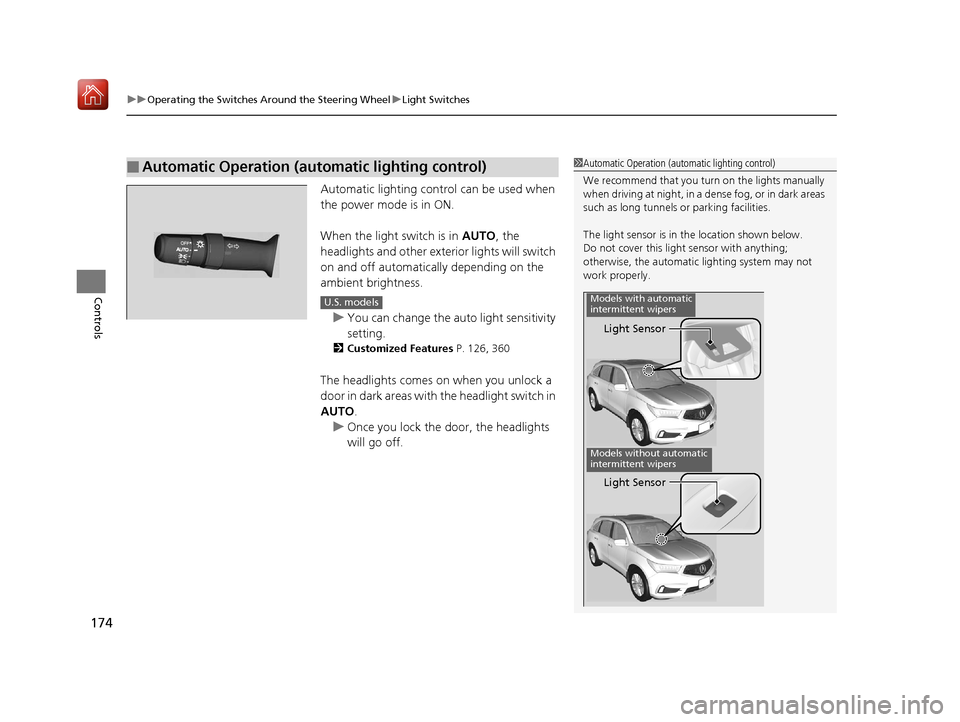
The light sensor is in the location shown below.
Do not cover this light sensor with anything;
otherwise, the automatic lighting system may not
work properly.
Light Sensor
Models with automatic
intermittent wipers
Models without automatic
intermittent wipers
Light Sensor
U.S. models
19 ACURA MDX-31TZ56510.book 174 ページ 2018年12月11日 火曜日 午後4時47分
Page 177 of 701
176
uuOperating the Switches Around the Steering Wheel uFog Lights*
Controls
Fog Lights*
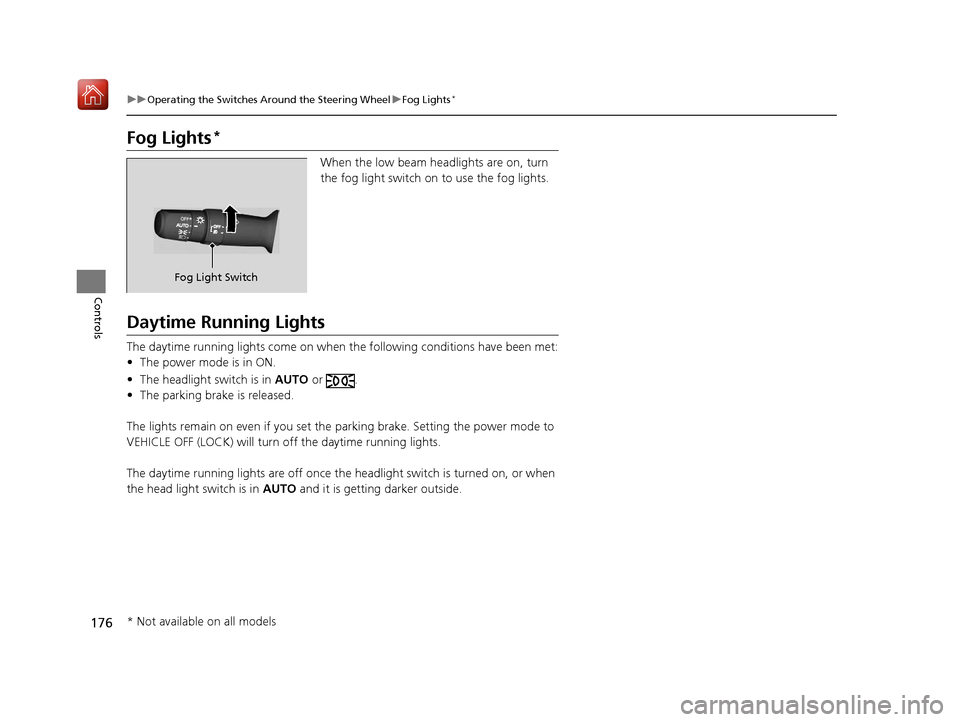
When the low beam headlights are on, turn
the fog light switch on to use the fog lights.
Daytime Running Lights
The daytime running lights come on when the following conditions have been met:
• The power mode is in ON.
• The headlight switch is in AUTO or .
• The parking brake is released.
The lights remain on even if you set the parking brake. Setting the power mode to
VEHICLE OFF (LOCK) will turn off the daytime running lights.
The daytime running lights are off once the headlight switch is turned on, or when
the head light switch is in AUTO and it is getting darker outside.
Fog Light Switch
* Not available on all models
19 ACURA MDX-31TZ56510.book 176 ページ 2018年12月11日 火曜日 午後4時47分
Page 188 of 701

187
uuOperating the Switches Around the Steering Wheel uDriving Position Memory System
Controls
1. Set the power mode to ON. Adjust the
driver’s seat, the steering wheel and the
door mirrors to the desired position.
2. Press the SET button.
u You will hear the beeper, and the
memory button indicator light will blink.
3. Press and hold memory button
(1 or (2
within five seconds of pressing the SET
button.
u Once the seat, the steering wheel and
the outside mirror positions have been
memorized, the indicator light on the
button you pressed stays on and you will
hear the double-beep.
1. Put the transmission into
(P.
2. Apply the parking brake.
3. Press a memory button (
(1 or (2).
u You will hear the beeper, and the
indicator light will blink.
The seat, the steering wheel and the door
mirrors will automatically move to the
memorized positions. When it has finished
moving, you will hear the beeper, and the
indicator light stays on.
■Storing a Position in Memory1 Storing a Position in Memory
After you press the SET button, the storing operation
will be canceled when:
•You do not press the memory button within five
seconds.
•You readjust the seat, the steering wheel or the
outside mirror position before the double-beep.
•You set the power mode to any position except
ON.
Memory Button 1
Memory Button 2SET Button
■Recalling the Stored Position1 Recalling the Stored Position
The seat, the steering wheel and the door mirrors will
stop moving if you:
•Press the SET button or memory button (1 or (2.
•Adjust the seat position, door mirrors, or steering
wheel.
•Put the transmission into a position other than ( P.
Memory Buttons
19 ACURA MDX-31TZ56510.book 187 ページ 2018年12月11日 火曜日 午後4時47分
Page 363 of 701
362
uuCustomized Features u
Features
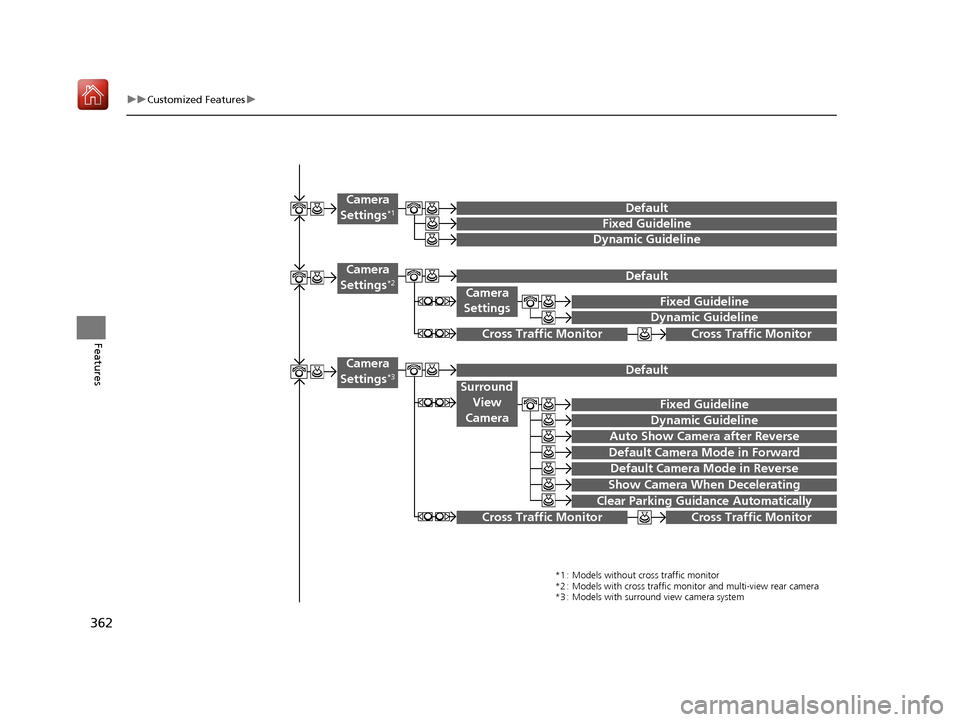
Camera
SettingsFixed Guideline
Dynamic Guideline
Fixed Guideline
Dynamic Guideline
Camera
Settings*1Default
*1 : Models without cross traffic monitor
*2 : Models with cross traffic monitor and multi-view rear camera
*3 : Models with surround view camera system
Default Camera
Settings*2
Surround View
Camera
Auto Show Camera after Reverse
Default Camera Mode in Forward
Default Camera
Settings*3
Default Camera Mode in Reverse
Show Camera When Decelerating
Clear Parking Guidance Automatically
Fixed Guideline
Dynamic Guideline
Cross Traffic Monitor
Cross Traffic MonitorCross Traffic Monitor
Cross Traffic Monitor
19 ACURA MDX-31TZ56510.book 362 ページ 2018年12月11日 火曜日 午後4時47分
Page 372 of 701
371
uuCustomized Features u
Continued
Features
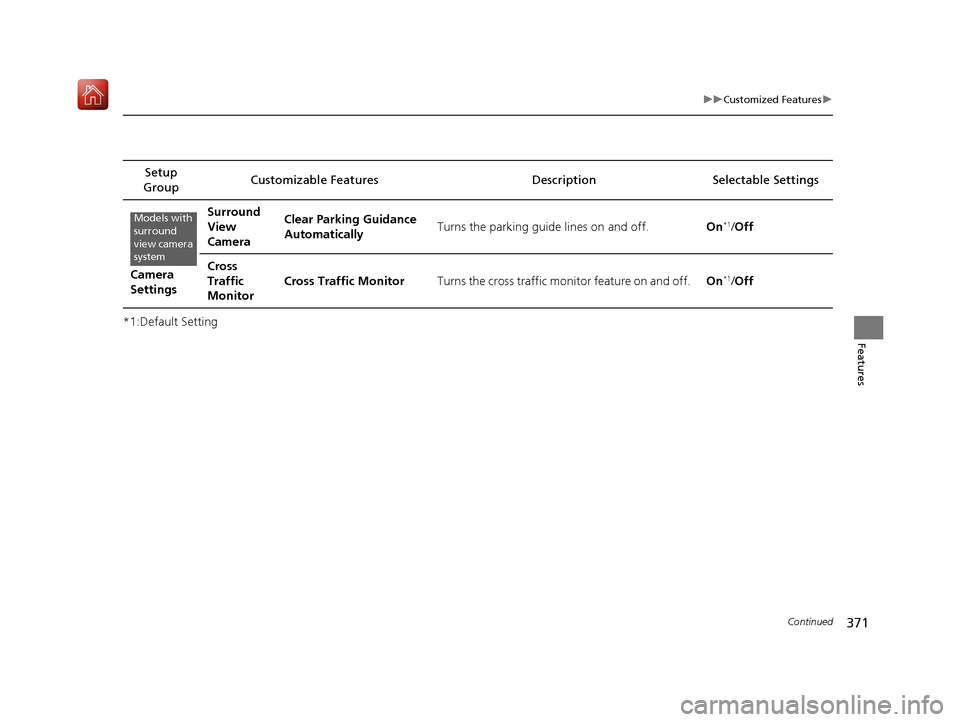
*1:Default SettingSetup
Group Customizable Features Desc
ription Selectable Settings
Camera
Settings Surround
View
Camera
Clear Parking Guidance
Automatically
Turns the parking guide lines on and off.
On
*1/Off
Cross
Traffic
Monitor Cross Traffic Monitor
Turns the cross traffic monitor feature on and off. On
*1/Off
Models with
surround
view camera
system
19 ACURA MDX-31TZ56510.book 371 ページ 2018年12月11日 火曜日 午後4時47分
Page 440 of 701

Continued439
uuAcuraLink ®*u
Features
Your subscribed telematics service prov ider can track your vehicle’s location,
remotely lock or unlock doors, and help you find your vehicle.
To use these features, you n eed your user ID and personal identification number
(PIN).
■Stolen vehicle tracking
This feature searches and tracks down your vehicle position even if it is on the move.
If you believe that your vehicle has been stolen, contact the police as well as the
provider.
■Remote door lock/unlock
The provider can remotely lock or unlock doors upon your request.
■Vehicle finder
This feature is convenient to use when trying to locate your vehicle in large areas,
such as a crowded parking lot. If you cannot locate your vehicle after using the
remote transmitter’s answerback function, you can contact the provider which can
then flash your vehicle’s exterior lights and sound the horn.
■Security ala rm notification
If the security system in your vehicle detects an abnormal condition, such as
someone tampering with the lock on your vehicle, the provider notifies you by your
preferred method.
■Security Features1 Security Features
The contact information of your provider, your user
ID and PIN will be given when you subscribe to
AcuraLink. If you forget any of the above, contact a
dealer, or visit owners.acura.com (U.S.) or
www.acura.ca/owners/acuralink (Canada).
You can also activate the remote door lock/unlock
and vehicle finder features from the Internet or using
your smartphone app. As k a dealer, or visit
owners.acura.com (U.S.) or www.acura.ca/owners/
acuralink (Canada) for details.
1Vehicle finder
The lights will stop flas hing and horn will stop
sounding under the foll owing conditions:
•When 30 seconds have elapsed.
•You unlock the doors using the remote transmitter.•You unlock the doors using the keyless access
system.
•You unlock the doors using the built-in key.•The power mode is set to ACCESSORY or ON.
19 ACURA MDX-31TZ56510.book 439 ページ 2018年12月11日 火曜日 午後4時47分