brake light Acura MDX 2019 Owner's Guide
[x] Cancel search | Manufacturer: ACURA, Model Year: 2019, Model line: MDX, Model: Acura MDX 2019Pages: 701, PDF Size: 38.75 MB
Page 488 of 701

Continued487
uuWhen Driving uAuto Idle Stop
Driving
• The brake pedal is released (without the automatic brake hold system activated).
• The accelerator pedal is depressed (with the automatic brake hold system
activated).
2 Automatic Brake Hold P. 535
■The engine restarts even if the brake pedal is depressed*1 when:
• The Auto Idle Stop OFF button is pressed.
• A steering wheel is operated.
• The transmission is put into
(R or (S, or when it is set from (N to (D.
u If you put the tra nsmission into
(P after the Auto Idle Stop activates, the Auto
Idle Stop continues to operate. In this case, the engine restarts when you
change the gear position other than
(P. When changing the gear position, the
brake pedal must be firmly depressed.
• The pressure on the brake pedal is reduced and the vehicle starts moving while
stopped on an incline.
• The pressure on the brake pedal is repeat edly applied and released slightly during
a stop.
• The battery charge becomes low.
• The accelerator pedal is depressed.
• The driver’s seat belt is unlatched.
• is ON (indicator on).
• The climate control system is in use, and the difference between the set
temperature and actual interior temperature becomes significant.
• The climate control system is being used to dehumidify the interior.
• The vehicle ahead of you starts again when your vehicle stops automatically with
ACC with LSF.
■The Engine Automatically Restarts When:1 The Engine Automatically Restarts When:
If you are using an electroni c device during Auto Idle
Stop, the device may tempor arily be turned off when
the engine restarts.
1 The engine restarts even if the brake pedal is depressed*1 when:
*1: With the automatic brake hold system activated,
you can release the brake pe dal during Auto Idle Stop
is in operation.
If the automatic brake hold system has been turned
off, or if there is a problem with the system, the
engine will restart automatically when you release
the brake pedal.
2 Automatic Brake Hold P. 535
19 ACURA MDX-31TZ56510.book 487 ページ 2018年12月11日 火曜日 午後4時47分
Page 493 of 701
492
uuWhen Driving uAdaptive Cruise Control (ACC) with Low Speed Follow (LSF)
Driving
Adaptive Cruise Control (ACC) with Low Speed
Follow (LSF)
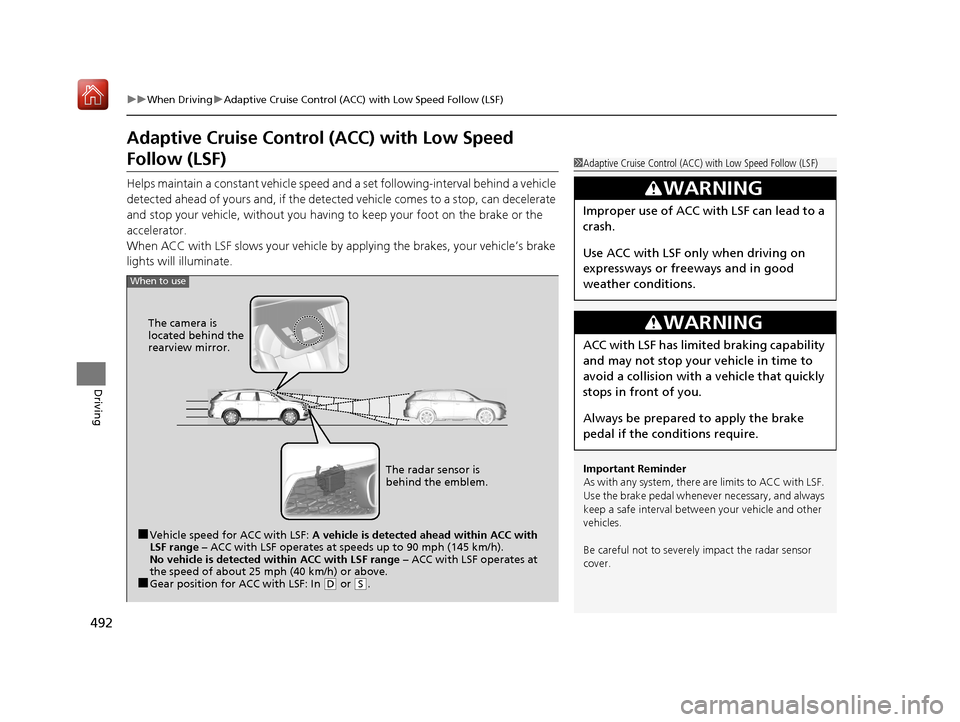
Helps maintain a constant vehicle speed an d a set following-interval behind a vehicle
detected ahead of yours and, if the detect ed vehicle comes to a stop, can decelerate
and stop your vehicle, without you having to keep your foot on the brake or the
accelerator.
When ACC with LSF slows your vehicle by applying the brakes, your vehicle’s brake
lights will illuminate.
1 Adaptive Cruise Control (ACC) with Low Speed Follow (LSF)
Important Reminder
As with any system, there are limits to ACC with LSF.
Use the brake pedal whenever necessary, and always
keep a safe interval between your vehicle and other
vehicles.
Be careful not to severely impact the radar sensor
cover.
3WARNING
Improper use of ACC wi th LSF can lead to a
crash.
Use ACC with LSF only when driving on
expressways or freeways and in good
weather conditions.
3WARNING
ACC with LSF has limite d braking capability
and may not stop your vehicle in time to
avoid a collision with a vehicle that quickly
stops in front of you.
Always be prepared to apply the brake
pedal if the conditions require.
When to use
■Vehicle speed for ACC with LSF: A vehicle is detected ahead within ACC with
LSF range – ACC with LSF operates at speeds up to 90 mph (145 km/h).
No vehicle is detected within ACC with LSF range – ACC with LSF operates at
the speed of about 25 mph (40 km/h) or above.
■Gear position for ACC with LSF: In ( D or (S. The radar sensor is
behind the emblem.
The camera is
located behind the
rearview mirror.
19 ACURA MDX-31TZ56510.book 492 ページ 2018年12月11日 火曜日 午後4時47分
Page 496 of 701
Continued495
uuWhen Driving uAdaptive Cruise Control (ACC) with Low Speed Follow (LSF)
Driving
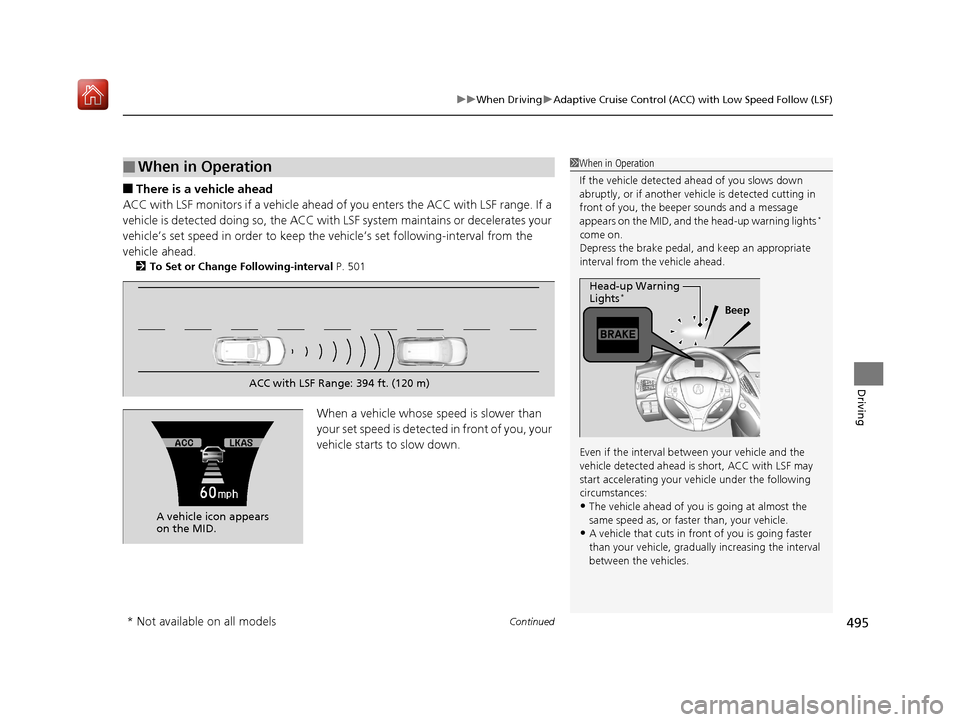
■There is a vehicle ahead
ACC with LSF monitors if a vehicle ahead of you enters the ACC with LSF range. If a
vehicle is detected doing so, the ACC with LSF system maintains or decelerates your
vehicle’s set speed in order to keep the ve hicle’s set following-interval from the
vehicle ahead.
2 To Set or Change Following-interval P. 501
When a vehicle whose speed is slower than
your set speed is detected in front of you, your
vehicle starts to slow down.
■When in Operation1When in Operation
If the vehicle detected ahead of you slows down
abruptly, or if a nother vehicle is de tected cutting in
front of you, the beep er sounds and a message
appears on the MID, and the head-up warning lights
*
come on.
Depress the brake pedal, and keep an appropriate
interval from the vehicle ahead.
Even if the interval betw een your vehicle and the
vehicle detected ahead is short, ACC with LSF may
start accelerating your vehicle under the following
circumstances:
•The vehicle ahead of you is going at almost the
same speed as, or faster than, your vehicle.
•A vehicle that cuts in front of you is going faster
than your vehicle, gradua lly increasing the interval
between the vehicles.
Beep
Head-up Warning
Lights
*
ACC with LSF Range: 394 ft. (120 m)
A vehicle icon appears
on the MID.
* Not available on all models
19 ACURA MDX-31TZ56510.book 495 ページ 2018年12月11日 火曜日 午後4時47分
Page 497 of 701
uuWhen Driving uAdaptive Cruise Control (ACC) with Low Speed Follow (LSF)
496
Driving
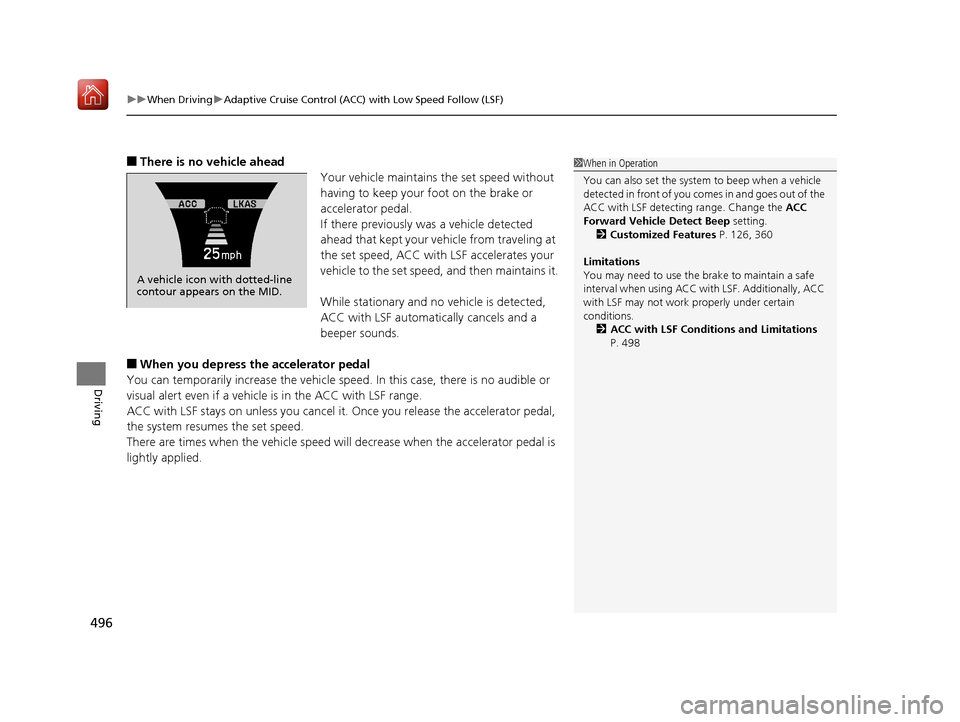
■There is no vehicle ahead
Your vehicle maintains the set speed without
having to keep your foot on the brake or
accelerator pedal.
If there previously was a vehicle detected
ahead that kept your vehicle from traveling at
the set speed, ACC with LSF accelerates your
vehicle to the set speed, and then maintains it.
While stationary and no vehicle is detected,
ACC with LSF automatically cancels and a
beeper sounds.
■When you depress the accelerator pedal
You can temporarily increase th e vehicle speed. In this case, there is no audible or
visual alert even if a vehicle is in the ACC with LSF range.
ACC with LSF stays on unless you cancel it. Once you release the accelerator pedal,
the system resumes the set speed.
There are times when the vehicle speed will decrease when the accelerator pedal is
lightly applied.
A vehicle icon with dotted-line
contour appears on the MID.
1 When in Operation
You can also set the system to beep when a vehicle
detected in front of you co mes in and goes out of the
ACC with LSF detecting range. Change the ACC
Forward Vehicle Detect Beep setting.
2 Customized Features P. 126, 360
Limitations
You may need to use the brake to maintain a safe
interval when using ACC wi th LSF. Additionally, ACC
with LSF may not work properly under certain
conditions. 2 ACC with LSF Conditions and Limitations
P. 498
19 ACURA MDX-31TZ56510.book 496 ページ 2018年12月11日 火曜日 午後4時47分
Page 499 of 701
uuWhen Driving uAdaptive Cruise Control (ACC) with Low Speed Follow (LSF)
498
Driving
The system may automatically shut off and the ACC indicator will come on under
certain conditions. Some examples of th ese conditions are listed below. Other
conditions may reduce some of the ACC functions.
2 Front Sensor Camera P. 490
■Environmental conditions
Driving in bad weather (r ain, fog, snow, etc.).
■Roadway conditions
Driving on a snowy or wet roadway (obscure d lane marking, vehicle tracks, reflected
lights, road spray, high contrast).
■Vehicle conditions
• The outside of the windshie ld is blocked by dirt, mud, leaves, wet snow, etc.
• An abnormal tire or wheel condition (Wrong sized, varied size or construction,
improperly inflated, compact spare tire
*, etc.).
• The camera temperature gets too high.
• The parking brake is applied.
• When the front grille is dirty.
• The vehicle is tilted due to a heav y load or suspension modifications.
• When tire chains are installed.
■ACC with LSF Conditions and Limitations1ACC with LSF Conditions and Limitations
The radar sensor for ACC with LSF is shared with the
Collision Mitigati on Braking System
TM (CMBSTM).
2 Collision Mitigation Braking SystemTM
(CMBSTM) P. 539
You can read about handling information for the
camera equipped with this system. 2 Front Sensor Camera P. 490
Always keep the radar sensor cover clean.
Never use chemical solvents or polishing powder for
cleaning the sensor cover. Clean it with water or a
mild detergent.
Do not put a sticker on the radar sensor cover or
replace the radar sensor cover.
* Not available on all models
19 ACURA MDX-31TZ56510.book 498 ページ 2018年12月11日 火曜日 午後4時47分
Page 509 of 701
uuWhen Driving uRoad Departure Mitigation (RDM) System
508
Driving
The system cancels assisting operations when you turn th e steering wheel to avoid
crossing over detected lane markings.
If the system operates several times without detecting driver response, the system
beeps to alert you.
The system becomes ready to start sear ching for lane markings when all the
following conditions are met:
• The vehicle is traveling between about 45 and 90 mph (72 and 145 km/h).
• The vehicle is on a straight or slightly curved road.
• The turn signals are off.
• The brake pedal is not depressed.
• The wipers are not in continuous operation.
• The vehicle is not accelerating or braking, and the steering wheel is not being
turned.
• The system makes a determination that the driver is not actively accelerating,
braking or steering.
■How the System Activates1How the System Activates
The RDM system may automa tically shut off and the
indicator comes and stays on.
2 Indicators P. 94
RDM system function can be impacted when the
vehicle is:
•Not driven within a traffic lane.
•Driven on the inside edge of a curve, or outside of
a lane.
•Driven in a narrow lane.
19 ACURA MDX-31TZ56510.book 508 ページ 2018年12月11日 火曜日 午後4時47分
Page 515 of 701

uuWhen Driving uLane Keeping Assist System (LKAS)
514
Driving
The system can be used when the following conditions are met.
• The lane in which you are driving has dete ctable lane markers on both sides, and
your vehicle is in the center of the lane.
• The vehicle speed is between 45 and 90 mph (72 and 145 km/h).
• You are driving on a straight or slightly curved road.
• The turn signals are off.
• The brake pedal is not depressed.
• The wipers are not in continuous operation.
■How to activate the system
1.Press the MAIN button.
u The LKAS is on in the MID.
The system is ready to use.
2. Press the LKAS button.
u Lane outlines appear on the MID.
The system is activated.
■When the System can be Used1When the System can be Used
If the vehicle drifts toward ei th e r l ef t o r r ight lane line
due to the system applying torque, turn off the LKAS
and have your vehicle checked by a dealer.
MAIN Button
LKAS Button
19 ACURA MDX-31TZ56510.book 514 ページ 2018年12月11日 火曜日 午後4時47分
Page 523 of 701
522
uuWhen Driving uAgile Handling Assist
Driving
Agile Handling Assist
Lightly brakes each of the front and rear wheels, as needed, when you turn the
steering wheel, and helps support the vehi cle’s stability and performance during
cornering.1 Agile Handling Assist
The agile handling assist cannot enhance stability in
all driving situations. You still need to drive and
corner at speeds appropriate for the conditions and
always leave a sufficient margin of safety.
When the VSA ® system indicator comes on and stays
on while driving, the agil e handling assist does not
activate.
You may hear a sound coming from the engine
compartment while the agile handling assist is
activated. This is normal.
19 ACURA MDX-31TZ56510.book 522 ページ 2018年12月11日 火曜日 午後4時47分
Page 532 of 701
531Continued
Driving
Braking
Brake System
Use the parking brake to keep the vehicle stationary when parked. When the
parking brake is applied, you can manu ally or automatically release it.
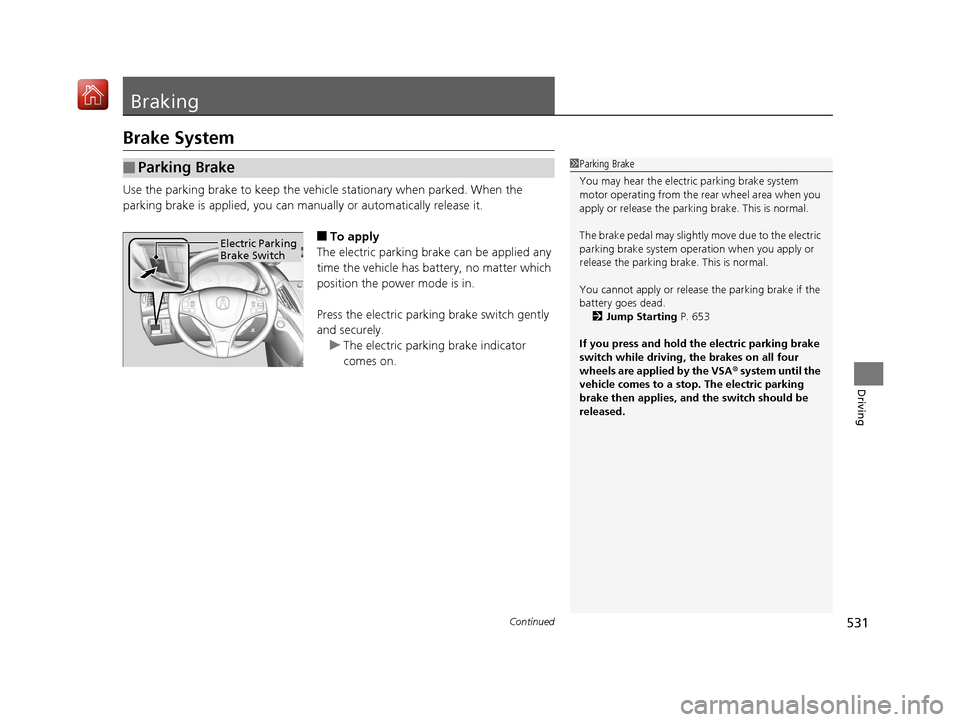
■To apply
The electric parking brake can be applied any
time the vehicle has battery, no matter which
position the power mode is in.
Press the electric parking brake switch gently
and securely. u The electric parking brake indicator
comes on.
■Parking Brake1Parking Brake
You may hear the electric parking brake system
motor operating from the re ar wheel area when you
apply or release the parki ng brake. This is normal.
The brake pedal may slightly move due to the electric
parking brake system opera tion when you apply or
release the parking br ake. This is normal.
You cannot apply or release the parking brake if the
battery goes dead.
2 Jump Starting P. 653
If you press and hold the electric parking brake
switch while driving, the brakes on all four
wheels are applied by the VSA ® system until the
vehicle comes to a stop. The electric parking
brake then applies, and the switch should be
released.
Electric Parking
Brake Switch
19 ACURA MDX-31TZ56510.book 531 ページ 2018年12月11日 火曜日 午後4時47分
Page 535 of 701
uuBraking uBrake System
534
Driving
Your vehicle is equipped with disc brakes at all four wheels. A vacuum power assist
helps reduce the effort needed on the brake pedal. The brake assist system increases
the stopping force when you depress th e brake pedal hard in an emergency
situation. The anti-lock brake system (ABS ) helps you retain steering control when
braking very hard.
2 Brake Assist System P. 538
2 Anti-lock Brake System (ABS) P. 537
■Foot Brake1Foot Brake
Check the brakes after driving through deep water,
or if there is a buildup of road surface water. If
necessary, dry the brakes by lightly depressing the
pedal several times.
If you hear a continuous me tallic friction sound when
applying the brakes, this is caused by the brake wear
indicator rubbing on the brake rotor and indicates
that the brake pads need to be replaced. Have the
vehicle checked by a deal er. If you hear only an
occasional squeak or squeal when you initially apply
the brake pedal, this may be normal and caused by
high frequency vibration of the brake pads against
the rotating brake disc.
Constantly using the brak e pedal while going down a
long hill builds up heat, which reduces the brake
effectiveness. Apply engine braking by taking your
foot off the accelerator pe dal and downshifting to a
lower gear.
Do not rest your foot on the brake pedal while
driving, as it will lightly apply the brakes and cause
them to lose effectiveness over time and reduce pad
life. It will also conf use drivers behind you.
19 ACURA MDX-31TZ56510.book 534 ページ 2018年12月11日 火曜日 午後4時47分