Aps Acura MDX 2020 User Guide
[x] Cancel search | Manufacturer: ACURA, Model Year: 2020, Model line: MDX, Model: Acura MDX 2020Pages: 701, PDF Size: 38.91 MB
Page 306 of 701
305
uuAudio System Basic Operation uAndroid Auto
Continued
Features
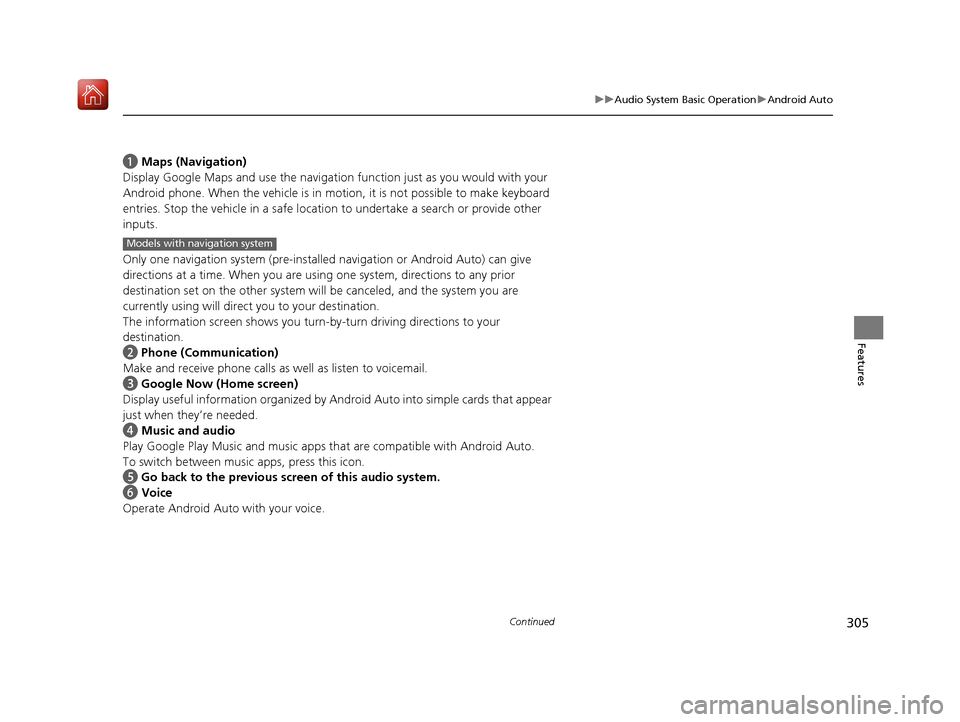
a Maps (Navigation)
Display Google Maps and use the navigation function just as you would with your
Android phone. When the vehicle is in motion, it is not possible to make keyboard
entries. Stop the vehicle in a safe locati on to undertake a search or provide other
inputs.
Only one navigation system (pre-installed navigation or Android Auto) can give
directions at a time. When you are using one system, directions to any prior
destination set on the other system will be canceled, and the system you are
currently using will direct you to your destination.
The information screen s hows you turn-by-turn driving directions to your
destination.
b Phone (Communication)
Make and receive phone calls as well as listen to voicemail.
c Google Now (Home screen)
Display useful information organized by Android Auto into simple cards that appear
just when they’re needed.
d Music and audio
Play Google Play Music an d music apps that are compatible with Android Auto.
To switch between music apps, press this icon.
e Go back to the previous screen of this audio system.
f Voice
Operate Android Auto with your voice.
Models with navigation system
20 ACURA MDX-31TZ56600.book 305 ページ 2019年4月24日 水曜日 午後5時44分
Page 325 of 701
324
uuGeneral Information on the Audio System uHonda App License Agreement
Features
2. Potential Map Inaccuracy and Route Safety. Maps used by this system may be inaccurate because of changes in roads, traffic controls,
routing, or driving conditions. Always use good judgment and co mmon sense when following suggested routes. Do not follow the route
suggestions if doing so would result in an un safe or illegal driving maneuver, if you would be placed in an unsafe situation, o r if you would
be directed into an area that you consider unsafe. Do not rely on any navigation features included in the system to route you t o emergency
services. Not all emergency services such as police, fire stations, hospitals, or clin ics are likely to be contained in the map database for such
navigation features. Ask local authorities or an emergency services operator for such locations and routes. The driver is ultimately
responsible for the safe operation of the ve hicle and therefore, must evaluate whether it is safe to follow the suggested directions. Any
navigation features are provided only as an aid. Make your driving decisions based on your obser vations of local conditions and existing
traffic regulations. Navigation features are not a substitute for your personal judgmen t. Any route suggestions made by the SOFTWARE or
SERVICES should never replace any local traffic regulations or yo ur personal judgment or knowledge of safe driving practices.
3. Speech Recognition:
You acknowledge and understand that HONDA and PROVIDERS may reco rd, retain, and use voices commands
when you use the speech recognit ion components of the SOFTWARE or SERVICES. You and all VEHICLE operators and passengers (a)
consent to the recording and retention of voice commands in support of providing speech recognition components and (b) release HONDA
and PROVIDERS from all claims, liabilities, an d losses that may result from any use of such recorded voice commands. Recognitio n errors
are inherent in speech recognition. It is your responsibility to monitor any speech recognition functions included in the system and address
any errors. Neither HONDA nor PROVIDERS will be liable for any damages arising out of errors in the speech recognition process.
4. Distraction Hazards.
Navigation features may require manua l (non-verbal) input or setup. Attempting to perform such set-up or insert
data while driving can seriously distract your attention and could cause a crash or other serious consequences; the ability to undertake such
interactions may also be limited by state or local law, which la ws you are responsible to know and follow. Even occasional shor t scans of
the screen may be hazardous if your attention has been diverted away from your driving at a critical time. Pull over and stop the vehicle in
a safe and legal manner before attempting to access a function of the system requiring prolonged attention. Do not raise the vo lume
excessively. Keep the volume at a level wh ere you can still hear outside traffic and em ergency signals while driving. Driving while unable
to hear these sounds could result in a crash.
20 ACURA MDX-31TZ56600.book 324 ページ 2019年4月24日 水曜日 午後5時44分
Page 372 of 701
371
uuCustomized Features u
Continued
Features
*1:Default SettingSetup
Group Customizable Features Desc
ription Selectable Settings
Vehicle
SettingsMeter
Language SelectionChanges the displayed language on the MID.English*1/Français /
Español
Adjust Outside Temp.
DisplayAdjusts the temperature reading by a few
degrees.
-5°F ~ ±0°F*1 ~ +5°F
(U.S.)
-3°C ~ ±0°C
*1 ~ +3°C
(Canada)
“Trip A” Reset Timing
Changes the setting of how to reset trip meter A,
average fuel economy A, average speed A, and
elapsed time A.When Refueled /IGN
Off /Manually Reset*1
“Trip B” Reset Timing
Changes the setting of how to reset trip meter B,
average fuel economy B, average speed B, and
elapsed time B.When Refueled /IGN
Off /Manually Reset*1
Reverse Alert ToneCauses the beeper to sound once when the
transmission is put into
(R.On*1/ Off
Auto Engine Idle Stop
Guidance ScreensSelects whether the Auto Idle Stop display comes
on.On /Off*1
Turn by Turn Display*Selects whether the turn-by-turn display comes
on during the route guidance.On*1/Off
* Not available on all models
20 ACURA MDX-31TZ56600.book 371 ページ 2019年4月24日 水曜日 午後5時44分
Page 438 of 701
Continued437
uuAcuraLink ®*u
Features
Your subscribed telematics service prov ider can track your vehicle’s location,
remotely lock or unlock doors, and help you find your vehicle.
To use these features, you n eed your user ID and personal identification number
(PIN).
■Stolen vehicle tracking
This feature searches and tracks down your vehicle position even if it is on the move.
If you believe that your vehicle has been stolen, contact the police as well as the
provider.
■Remote door lock/unlock
The provider can remotely lock or unlock doors upon your request.
■Vehicle finder
This feature is convenient to use when trying to locate your vehicle in large areas,
such as a crowded parking lot. If you cannot locate your vehicle after using the
remote transmitter’s answerback function, you can contact the provider which can
then flash your vehicle’s exterior lights and sound the horn.
■Security alarm notification
If the security system in your vehicle detects an abnormal condition, such as
someone tampering with the lock on your vehicle, the provider notifies you by your
preferred method.
■Security Features1 Security Features
The contact information of your provider, your user
ID and PIN will be given when you subscribe to
AcuraLink. If you forget any of the above, contact a
dealer, or visit owners.acura.com (U.S.) or
www.acura.ca/owners/acuralink (Canada).
You can also activate the remote door lock/unlock
and vehicle finder features from the Internet or using
your smartphone app. As k a dealer, or visit
owners.acura.com (U.S.) or www.acura.ca/owners/
acuralink (Canada) for details.
1Vehicle finder
The lights will stop flas hing and horn will stop
sounding under the foll owing conditions:
•When 30 seconds have elapsed.
•You unlock the doors using the remote transmitter.•You unlock the doors using the keyless access
system.
•You unlock the doors using the built-in key.•The power mode is set to ACCESSORY or ON.
20 ACURA MDX-31TZ56600.book 437 ページ 2019年4月24日 水曜日 午後5時44分
Page 566 of 701

Continued565
uuSurround View Camera System*uUsing the Surround View Camera System
Driving1. Press the CAMERA button, then press the ENTER/MENU button. Rotate to
select Left Parallel Park Guidance or Right Parallel Park Guidance . Press .
2. Move the vehicle forward parallel to the parking space and stop when the initial
positioning guide shown in the display overlaps the front corner of the space.
3. Turn the steering wheel fully to the right (if the parking space is on the passenger
side) at a stop.
u The steering position alig nment guide is displayed.
4. Slowly reverse the vehicle.
u Stop the vehicle when the steering position alignment guide overlaps the
sideline of the parking space.
5. Turn the steering wheel fully to the left (if the parking space is on the passenger
side) at a stop. Revers e the vehicle slowly.
6. Stop the vehicle when it is parallel to the parking lines.
7. Return the steering wheel to its center pos ition, then reverse the vehicle slowly
until it is parked within the space.
■Parallel Parking into a Parking Space Marked with Parking Lines1Parallel Parking into a Parking Space Marked with Parking Lines
Reference lines can be usef ul only when the parking
space is in a rectangular shape with straight parking
marks and when vehicles in the next parking spaces
are within the spaces.
Initial
Positioning
Guide
Steering Position
Alignment Guide
Must be wider than approx. 20 feet (6 m)
Must be
wider than
approx. 8
feet (2.5 m)
Must be longer than approx. 21 feet (6.5 m)
A B
C
Initial
positioning
guide
overlaps the
front corner
of the space.
(Step 2)
20 ACURA MDX-31TZ56600.book 565 ページ 2019年4月24日 水曜日 午後5時44分
Page 693 of 701
692
Index
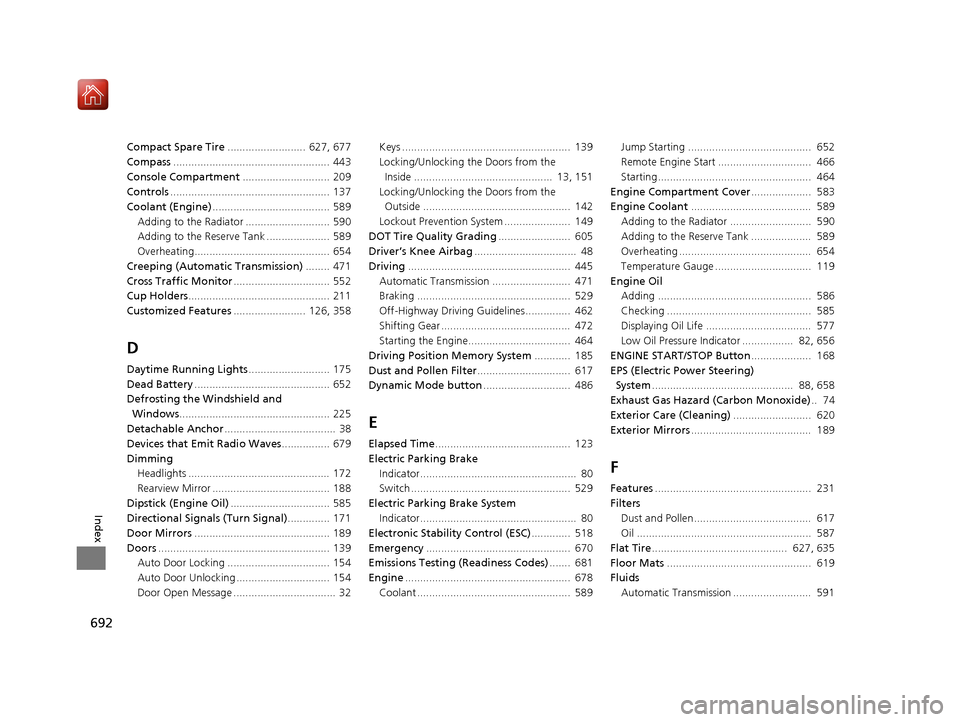
Compact Spare Tire.......................... 627, 677
Compass .................................................... 443
Console Compartment ............................. 209
Controls ..................................................... 137
Coolant (Engine) ....................................... 589
Adding to the Radiator ............................ 590
Adding to the Reserve Tank ..................... 589
Overheating............................................. 654
Creeping (Automatic Transmission) ........ 471
Cross Traffic Monitor ................................ 552
Cup Holders ............................................... 211
Customized Features ........................ 126, 358
D
Daytime Running Lights ........................... 175
Dead Battery ............................................. 652
Defrosting the Windshield and
Windows .................................................. 225
Detachable Anchor ..................................... 38
Devices that Emit Radio Waves ................ 679
Dimming Headlights ............................................... 172
Rearview Mirror ....................................... 188
Dipstick (Engine Oil) ................................. 585
Directional Signals (Turn Signal) .............. 171
Door Mirrors ............................................. 189
Doors ......................................................... 139
Auto Door Locking .................................. 154
Auto Door Unlocking ............................... 154
Door Open Message .................................. 32 Keys ........................................................ 139
Locking/Unlocking the Doors from the
Inside .............................................. 13, 151
Locking/Unlocking the Doors from the Outside ................................................. 142
Lockout Prevention System ...................... 149
DOT Tire Quality Grading ........................ 605
Driver’s Knee Airbag .................................. 48
Driving ...................................................... 445
Automatic Transmission .......................... 471
Braking ................................................... 529
Off-Highway Driving Guidelines............... 462
Shifting Gear ........................................... 472
Starting the Engine.................................. 464
Driving Position Memory System ............ 185
Dust and Pollen Filter ............................... 617
Dynamic Mode button ............................. 486
E
Elapsed Time............................................. 123
Electric Parking Brake Indicator.................................................... 80
Switch ..................................................... 529
Electric Parking Brake System Indicator.................................................... 80
Electronic Stability Control (ESC) ............. 518
Emergency ................................................ 670
Emissions Testing (Readiness Codes) ....... 681
Engine ....................................................... 678
Coolant ................................................... 589 Jump Starting ......................................... 652
Remote Engine Start ............................... 466
Starting................................................... 464
Engine Compartment Cover .................... 583
Engine Coolant ........................................ 589
Adding to the Radiator ........................... 590
Adding to the Reserve Tank .................... 589
Overheating ............................................ 654
Temperature Gauge ................................ 119
Engine Oil Adding ................................................... 586
Checking ................................................ 585
Displaying Oil Life ................................... 577
Low Oil Pressure Indicator ................. 82, 656
ENGINE START/STOP Button .................... 168
EPS (Electric Power Steering) System ............................................... 88, 658
Exhaust Gas Hazard (Carbon Monoxide) .. 74
Exterior Care (Cleaning) .......................... 620
Exterior Mirrors ........................................ 189
F
Features.................................................... 231
Filters Dust and Pollen....................................... 617
Oil .......................................................... 587
Flat Tire ............................................. 627, 635
Floor Mats ................................................ 619
Fluids
Automatic Transmission .......................... 591
20 ACURA MDX-31TZ56600.book 692 ページ 2019年4月24日 水曜日 午後5時44分