carplay Acura MDX 2020 User Guide
[x] Cancel search | Manufacturer: ACURA, Model Year: 2020, Model line: MDX, Model: Acura MDX 2020Pages: 701, PDF Size: 38.91 MB
Page 302 of 701
Continued301
uuAudio System Basic Operation uApple CarPlay
Features
After you have connected your iPhone to the system via the 2.5A USB port ( ),
use the following procedure to set up Apple CarPlay. Use of Apple CarPlay will result
in the transmission of certain user and vehi cle information (such as vehicle location,
speed, and status) to your iPhone to enha nce the Apple CarPlay experience. You will
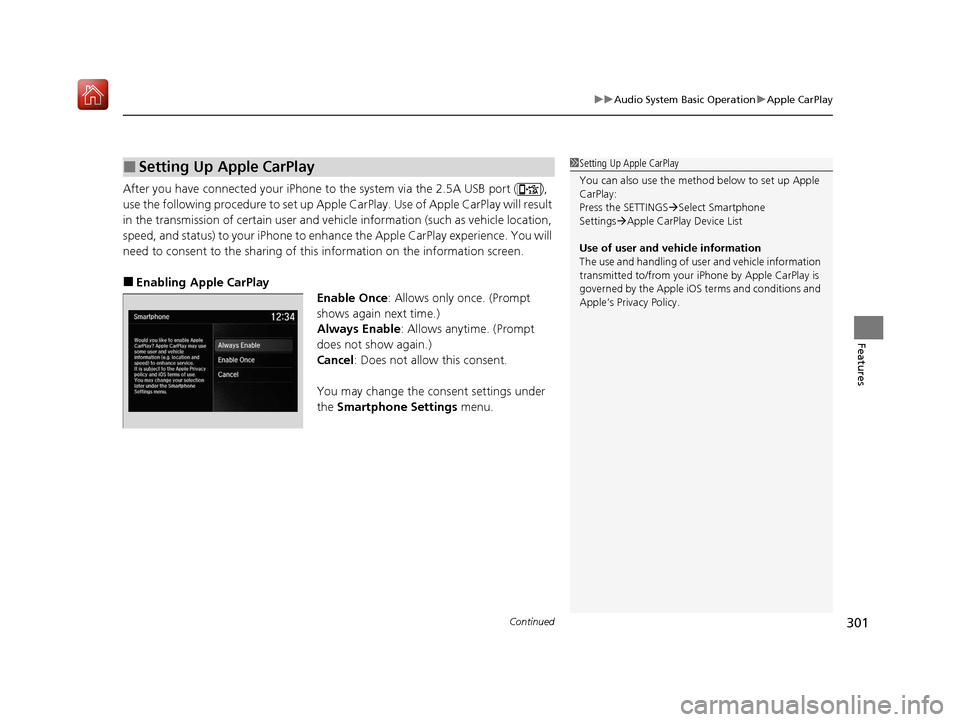
need to consent to the sharing of this information on the information screen.
■Enabling Apple CarPlay
Enable Once: Allows only once. (Prompt
shows again next time.)
Always Enable: Allows anytime. (Prompt
does not show again.)
Cancel : Does not allow this consent.
You may change the consent settings under
the Smartphone Settings menu.
■Setting Up Apple CarPlay1Setting Up Apple CarPlay
You can also use the method below to set up Apple
CarPlay:
Press the SETTINGS Select Smartphone
Settings Apple CarPlay Device List
Use of user and vehicle information
The use and handling of user and vehicle information
transmitted to/from your iP hone by Apple CarPlay is
governed by the Apple iOS terms and conditions and
Apple’s Privacy Policy.
20 ACURA MDX-31TZ56600.book 301 ページ 2019年4月24日 水曜日 午後5時44分
Page 303 of 701
uuAudio System Basic Operation uApple CarPlay
302
Features
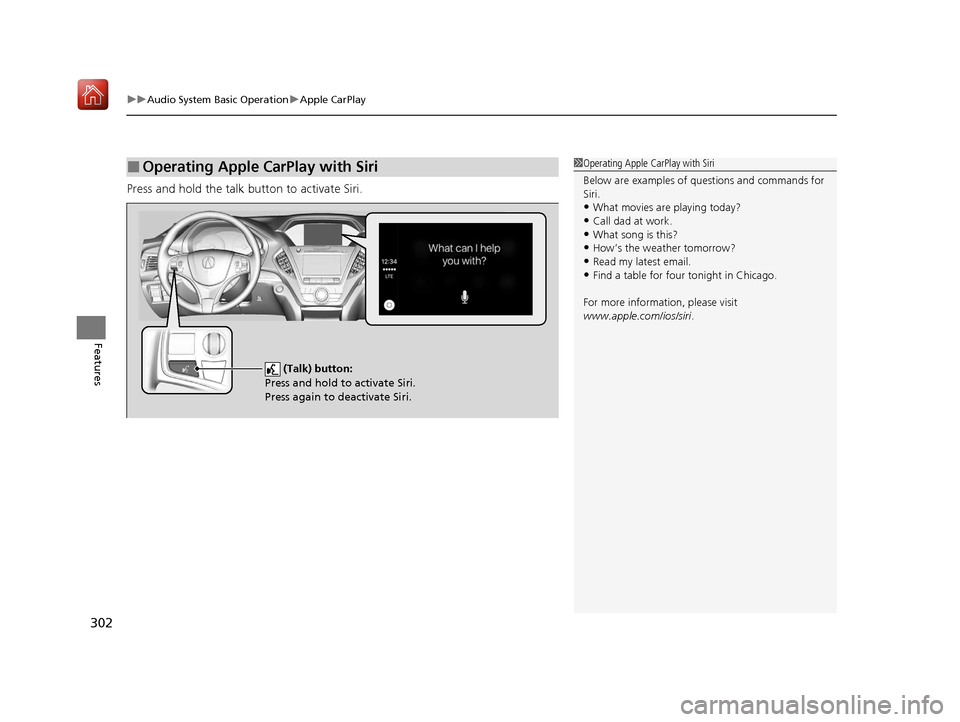
Press and hold the talk button to activate Siri.
■Operating Apple CarPlay with Siri1Operating Apple CarPlay with Siri
Below are examples of questions and commands for
Siri.
•What movies are playing today?
•Call dad at work.•What song is this?
•How’s the weather tomorrow?
•Read my latest email.•Find a table for four tonight in Chicago.
For more information, please visit
www.apple.com/ios/siri .
(Talk) button:
Press and hold to activate Siri.
Press again to deactivate Siri.
20 ACURA MDX-31TZ56600.book 302 ページ 2019年4月24日 水曜日 午後5時44分
Page 315 of 701
314
uuAudio Error Messages uApple CarPlay/Android Auto
Features
Apple CarPlay/Android Auto
If an error occurs while using the Apple CarPlay or Android Auto, you may see the
following error messages. If you cannot clear the error message, contact a dealer.
Error MessageSolution
A charging error has occurred with the connected device.
When safe, please check the compatibility of the device and
USB cable. Please see your ow ner's manual for more details.
This USB device is incompatib le. Please see your owner's
manual for more details.
Appears when an incompatible device is connected. Disconnect
the device. Then turn the audio system off, and turn it again. Do
not reconnect the device that caused the error.
Unable to start Appl e CarPlay. When safe, please confirm the
USB connection.Appears when Apple CarPlay or A ndroid Auto fails to recognize
your device.
Check if your device is compatib le with Apple CarPlay or Android
Auto, or the latest version of the app is installed on your device.
Unable to start Andr oid Auto. When safe, please confirm the
USB connection.
Unable to start Appl e CarPlay. When safe, please try again.Appears when Apple CarPlay or A ndroid Auto fails to recognize
your device.
Reconnect your device and try again.
Unable to start Android Auto. When safe, please try again.
Unable to start Apple CarPlay with your device. Your device is
connected in digital audio mode.Appears when your connected device is incompatible with Apple
CarPlay.
Check if your device is compatible with Apple CarPlay.
Information Screen
On Demand Multi-Use DisplayTM
20 ACURA MDX-31TZ56600.book 314 ページ 2019年4月24日 水曜日 午後5時44分
Page 316 of 701

315
uuAudio Error Messages uApple CarPlay/Android Auto
Features
Error MessageSolution
This device is not compatible with Android Auto.
Appears when your connected de vice is incompatible with
Android Auto.
Check if your device is compatible with Android Auto or the latest
version of the app is installed on your device.
Please update to the latest version of Android Auto.Appears when your version of the Android Auto is not supported.
Update Android Auto to the latest version.
Connection failed. Please confirm Bluetooth connection
status and try again.Appears when Bluetooth® connection is failed.
Check the Bluetooth ® connection of this audio system and your
connected device.
20 ACURA MDX-31TZ56600.book 315 ページ 2019年4月24日 水曜日 午後5時44分
Page 332 of 701

331
uuGeneral Information on the Audio System uLegal Information on Apple CarPlay/Android Auto
Continued
Features
Legal Information on Appl e CarPlay/Android Auto
USE OF APPLE CARPLAY IS SUBJECT TO YOUR AGREEMENT TO THE CARPLAY TERMS OF USE, WHICH ARE INCLUDED AS PART OF THE
APPLE iOS TERMS OF USE. IN SUMMARY, THE CARPLAY TERMS OF USE DISCLAIM APPLE AND ITS SERVICE PROVIDERS’ LIABILITY IF THE
SERVICES FAIL TO PERFORM CORRECTLY OR ARE DISCONTINUED, STRICTLY LIMIT APPLE AND ITS SERVICE PROVIDERS’ OTHER
LIABILITIES, DESCRIBE THE KINDS OF USER INFORMATION (INCLUDING, FOR EXAMPL E, VEHICLE LOCATION, VEHICLE SPEED, AND
VEHICLE STATUS) BEING GATHERED AND STORED BY APPLE AND IT S SERVICE PROVIDERS, AND DISCLOSE CERTAIN POSSIBLE RISKS
ASSOCIATED WITH THE USE OF CARPLAY, INCLUDING THE POTENTIAL FOR DRIVER DISTRACTION. SEE APPLE’S PRIVACY POLICY FOR
DETAILS REGARDING APPLE'S USE AND HANDL ING OF DATA UPLOADED BY CARPLAY.
USE OF ANDROID AUTO IS SUBJECT TO YOUR AGREEMENT TO THE ANDROID AUTO TERMS OF USE WHICH MUST BE AGREED TO WHEN\
THE ANDROID AUTO APPLICATION IS DOWNLOADED TO YOUR ANDR OID PHONE. IN SUMMARY, THE ANDROID AUTO TERMS OF USE
DISCLAIM GOOGLE AND ITS SERVICE PROVIDERS’ LIABILITY IF THE SERVICES FAIL TO PERFORM CORRECTLY OR ARE DISCONTINUED,
STRICTLY LIMIT GOOGLE AND ITS SERVICE PROV IDERS’ OTHER LIABILITIES, DESCRIBE THE KINDS OF USER INFORMATION (INCLUDING,
FOR EXAMPLE, VEHICLE LOCATION, VEHI CLE SPEED, AND VEHICLE STATUS) BEING GATHERED AND STORED BY GOOGLE AND ITS
SERVICE PROVIDERS, AND DISCLOSE CERTAIN POSSIBLE RISKS ASSOCIATED WITH THE USE OF ANDROID AUTO, INCLUDING THE
POTENTIAL FOR DRIVER DISTRACTION. SEE GOOGLE’S PRIVACY PO LICY FOR DETAILS REGARDING GOOGLE’S USE AND HANDLING OF
DATA UPLOADED BY ANDROID AUTO.
■OWNER’S MANUAL LICENSE/LIABILITY STATEMENTS
20 ACURA MDX-31TZ56600.book 331 ページ 2019年4月24日 水曜日 午後5時44分
Page 333 of 701

332
uuGeneral Information on the Audio System uLegal Information on Apple CarPlay/Android Auto
Features
YOU EXPRESSLY ACKNOWLEDGE AND AGREE THAT USE OF APPLE CARPLAY OR ANDROID AUTO (“THE APPLICATIONS”) IS AT YOUR
SOLE RISK AND THAT THE ENTIRE RISK AS TO SATISFACTORY QUALITY, PERFORMANCE, ACCURACY AND EFFORT IS WITH YOU TO THE
MAXIMUM EXTENT PERMITTED BY APPLICABLE LAW, AND THAT TH E APPLICATIONS AND INFORMATION ON THE APPLICATIONS IS
PROVIDED “AS IS” AND “AS AVAILABLE,” WITH ALL FAULTS AND WITHOUT WARRANTY OF ANY KIND, AND HONDA HEREBY
DISCLAIMS ALL WARRANTIES AND CONDITIONS WITH RESPECT TO TH E APPLICATIONS AND INFORMATION ON THE APPLICATIONS,
EITHER EXPRESS, IMPLIED OR STATUTORY, INCLUDING, BUT NOT LIMITED TO, TH E IMPLIED WARRANTIES AND/OR CONDITIONS OF
MERCHANTABILITY, SATISFACTORY QUALITY, FITNESS FOR A PART ICULAR PURPOSE, ACCURACY, QUIET ENJOYMENT, AND NON-
INFRINGEMENT OF THIRD PARTY RIGHTS. NO ORAL OR WRI TTEN INFORMATION OR ADVICE GIVEN BY HONDA OR AN AUTHORIZED
REPRESENTATIVE SHALL CREATE A WARRANT Y. AS EXAMPLES, AND WITHOUT LIMITATION, HONDA DISCLAIMS ANY WARRANTY
REGARDING THE ACCURACY OF DATA PROVIDED BY THE APPL ICATIONS, SUCH AS THE ACCURACY OF DIRECTIONS, ESTIMATED
TRAVEL TIME, SPEED LIMITS, ROAD CONDITIONS, NEWS, WEATHER, TRAFFIC, OR OTHER CONTENT PROVIDED BY APPLE, GOOGLE, THEIR
AFFILIATES, OR THIRD PARTY PROVIDERS; HONDA DOES NOT GUARANTEE AGAINST LOSS OF APPLICATION DATA, WHICH MAY BE LOST
AT ANY TIME; HONDA DOES NOT GUARANTEE THAT THE APPLICATION S OR ANY SERVICES PROVIDED THROUGH THEM WILL BE
PROVIDED AT ALL TIMES OR THAT ANY OR ALL SERVICES WILL BE AVAILABLE AT ANY PA RTICULAR TIME OR LOCATION. FOR EXAMPLE,
SERVICES MAY BE SUSPENDED OR INTERRUPTED WITHOUT NOTICE FOR REPAIR, MAINTENANCE, SECURITY FIXES, UPDATES, ETC.,
SERVICES MAY BE UNAVAILABLE IN YOUR AREA OR LOCATION, ETC. IN ADDITION, YOU UNDERSTAND THAT CHANGES IN THIRD PARTY
TECHNOLOGY OR GOVERNMENT REGULATION MAY RENDER THE SERVICES AND/OR APPLICATIONS OBSOLETE AND/OR UNUSABLE.
TO THE EXTENT NOT PROHIBITED BY LAW, IN NO EVENT SHALL HONDA OR ITS AFFILIATES BE LIABLE FOR PERSONAL INJURY, OR ANY
INCIDENTAL, SPECIAL, INDIRECT OR CONSEQUENTIAL DAMAG ES WHATSOEVER, INCLUDING, WITHOUT LIMITATION, DAMAGES FOR
LOSS OF PROFITS, CORRUPTION OR LOSS OF DATA, FAILURE TO TRANSMIT OR RECEIV E ANY DATA, BUSINESS INTERRUPTION OR ANY
OTHER COMMERCIAL DAMAGES OR LOSSES, ARISING OUT OF OR RELATE D TO THE APPLICATIONS OR YOUR USE OF OR INABILITY TO
USE THE APPLICATIONS OR INFORMATION ON THE APPLICATIONS, HOWEVER CAUSED, REGARDLESS OF THE THEORY OF LIABILITY
(CONTRACT, TORT OR OTHERWISE) AND EVEN IF HONDA WERE AD VISED OF THE POSSIBILITY OF SUCH DAMAGES. SOME STATES AND
JURISDICTIONS DISALLOW THE EXCLUSION OR LIMITATION OF LI ABILITY FOR DAMAGES, SO THESE LIMITATIONS AND EXCLUSIONS MAY
NOT APPLY TO YOU. IN NO EVENT SHALL HONDA’S TOTAL LIABILIT Y TO YOU FOR ALL DAMAGES (OTHER THAN AS MAY BE REQUIRED
BY APPLICABLE LAW IN CASES INVOLVING PERSONAL INJURY) EXC EED THE AMOUNT OF FIVE DOLLARS ($5.00). THE FOREGOING
LIMITATIONS WILL APPLY EVEN IF THE ABOVE STA TED REMEDY FAILS OF ITS ESSENTIAL PURPOSE.
■DISCLAIMER OF WARRANTIES; LIMITATION ON LIABILITY
20 ACURA MDX-31TZ56600.book 332 ページ 2019年4月24日 水曜日 午後5時44分
Page 365 of 701
364
uuCustomized Features u
Features
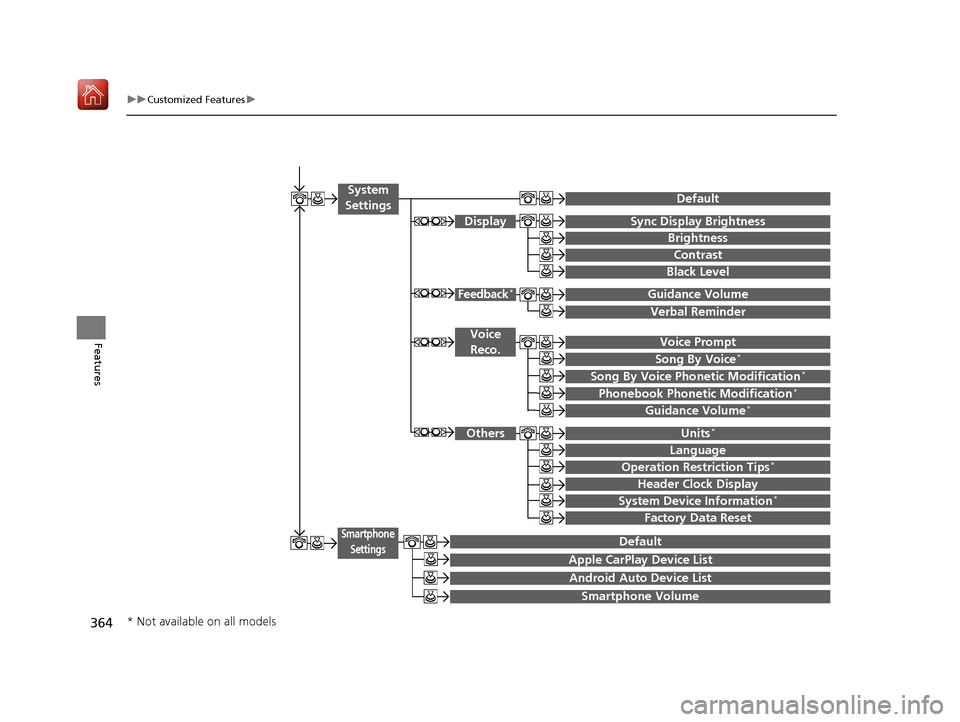
Voice Prompt
Brightness
Contrast
Black Level
Default
Display
System
Settings
Voice Reco.
Sync Display Brightness
System Device Information*Header Clock Display
Language
Operation Restriction Tips*
Others
Default
Apple CarPlay Device List
Android Auto Device List
Smartphone
Settings
Smartphone Volume
Factory Data Reset
Units*
Song By Voice*
Song By Voice Phonetic Modification*
Phonebook Phonet ic Modification*
Guidance Volume*
Feedback*Guidance Volume
Verbal Reminder
* Not available on all models
20 ACURA MDX-31TZ56600.book 364 ページ 2019年4月24日 水曜日 午後5時44分
Page 381 of 701
380
uuCustomized Features u
Features
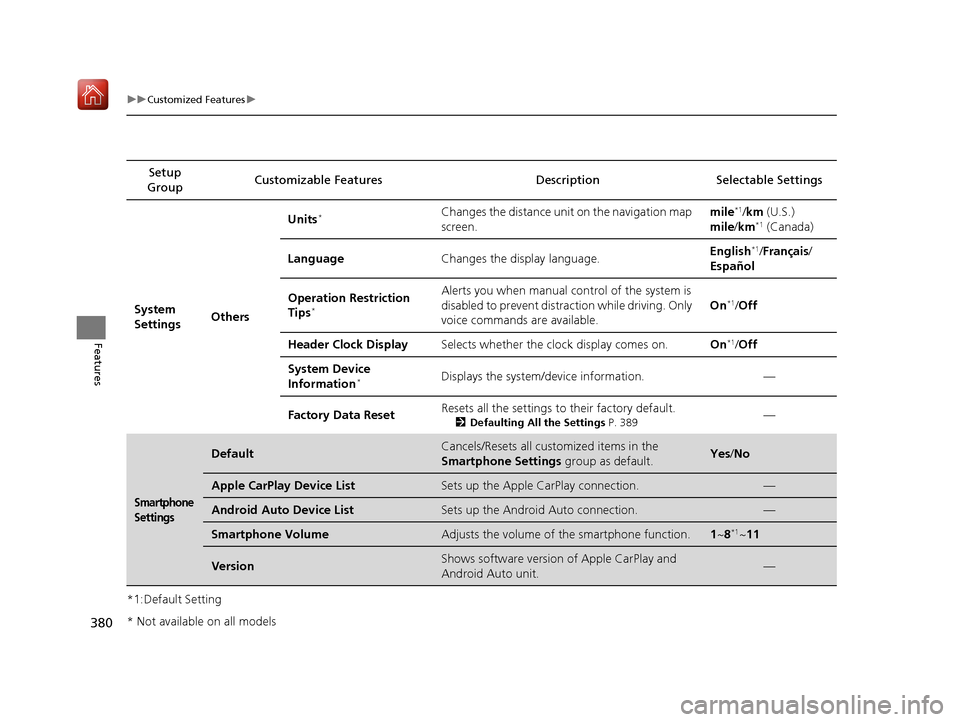
*1:Default SettingSetup
Group Customizable Features Desc
ription Selectable Settings
System
Settings OthersUnits
*Changes the distance unit on the navigation map
screen.
mile*1/
km (U.S.)
mile /km*1 (Canada)
Language Changes the display language. English
*1/
Français /
Español
Operation Restriction
Tips
*
Alerts you when manual control of the system is
disabled to prevent distraction while driving. Only
voice commands are available. On*1/
Off
Header Clock Display Selects whether the clock display comes on. On
*1/Off
System Device
Information
*Displays the system/device information. —
Factory Data Reset Resets all the settings to their factory default.
2
Defaulting All the Settings P. 389—
Smartphone
Settings
DefaultCancels/Resets all customized items in the
Smartphone Settings group as default.Yes/No
Apple CarPlay Device ListSets up the Apple CarPlay connection.—
Android Auto Device ListSets up the Android Auto connection.—
Smartphone VolumeAdjusts the volume of the smartphone function.1 ~8*1~11
VersionShows software version of Apple CarPlay and
Android Auto unit.—
* Not available on all models
20 ACURA MDX-31TZ56600.book 380 ページ 2019年4月24日 水曜日 午後5時44分
Page 394 of 701

393Continued
Features
Bluetooth® HandsFreeLink ®
Bluetooth® HandsFreeLink ® (HFL) allows you to place and receive phone calls using
your vehicle’s audio system, without handling your cell phone.
Using HFL
(Pick-up) button: Press to go to the Speed Dial/Call History on the MID or to
answer an incoming call.
(Hang-up/back) button: Press to end a call, to ca ncel a command or to clear
the phone information on the MID.
(Talk) button: Press to give HFL voice commands.
PHONE button: Press to go directly to the phone menu screen.
Interface dial (E NTER/MENU button): Rotate to select an item on the screen,
then press . Move , , or to select secondary menu.
■HFL Buttons
1 Bluetooth ® HandsFreeLink ®
Place your phone where y ou can get good reception.
To use HFL, you need a Bluetooth-compatible cell
phone. For a list of compatible phones, pairing
procedures, and special feature capabilities:
•U.S.: Visit www.handsfreelink.com/Acura , or call 1-
888-528-7876.
•Canada: For more info rmation on smartphone
compatibility, call 1-855-490-7351.
To use HFL, the Bluetooth setting must be On. If
there is an active connecti on to Apple CarPlay, HFL is
unavailable. 2 Customized Features P. 358
Voice control tips:
•Aim the vents away from the ceiling and close the
windows, as noise coming from them may interfere
with the microphone.
•Press and release the but ton when you want to
call a number using a stored voice tag, a
phonebook name, or a numbe r. Speak clearly and
naturally after a beep.
•If the microphone picks up vo ices other than yours,
the command may be misinterpreted.
State or local laws may prohibit the operation of
handheld electronic devi ces while operating a
vehicle.
Talk Button
Volume up
Microphone
Hang-up/Back Button
Pick-up
Button
Volume down
Interface
Dial PHONE
Button
20 ACURA MDX-31TZ56600.book 393 ページ 2019年4月24日 水曜日 午後5時44分
Page 402 of 701
Continued401
uuBluetooth ® HandsFreeLink ®u HFL Menus
Features
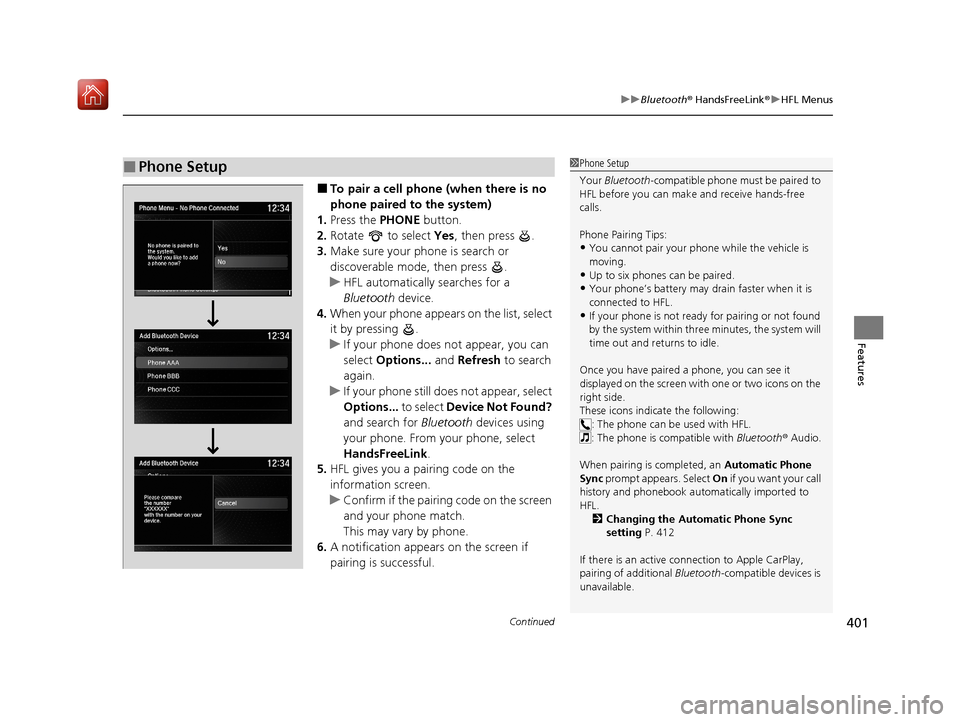
■To pair a cell phone (when there is no
phone paired to the system)
1. Press the PHONE button.
2. Rotate to select Yes, then press .
3. Make sure your phone is search or
discoverable mode, then press .
u HFL automatically searches for a
Bluetooth device.
4. When your phone appears on the list, select
it by pressing .
u If your phone does not appear, you can
select Options... and Refresh to search
again.
u If your phone still does not appear, select
Options... to select Device Not Found?
and search for Bluetooth devices using
your phone. From your phone, select
HandsFreeLink .
5. HFL gives you a pairing code on the
information screen.
u Confirm if the pairing code on the screen
and your phone match.
This may vary by phone.
6. A notification appears on the screen if
pairing is successful.
■Phone Setup1Phone Setup
Your Bluetooth -compatible phone must be paired to
HFL before you can make and receive hands-free
calls.
Phone Pairing Tips:
•You cannot pair your phone while the vehicle is
moving.
•Up to six phones can be paired.
•Your phone’s battery may dr ain faster when it is
connected to HFL.
•If your phone is not ready for pairing or not found
by the system within three minutes, the system will
time out and returns to idle.
Once you have paired a phone, you can see it
displayed on the screen with one or two icons on the
right side.
These icons indicate the following: : The phone can be used with HFL.
: The phone is compatible with Bluetooth ® Audio.
When pairing is completed, an Automatic Phone
Sync prompt appears. Select On if you want your call
history and phonebook au tomatically imported to
HFL. 2 Changing the Automatic Phone Sync
setting P. 412
If there is an active c onnection to Apple CarPlay,
pairing of additional Bluetooth-compatible devices is
unavailable.
20 ACURA MDX-31TZ56600.book 401 ページ 2019年4月24日 水曜日 午後5時44分