hood open Acura MDX 2020 User Guide
[x] Cancel search | Manufacturer: ACURA, Model Year: 2020, Model line: MDX, Model: Acura MDX 2020Pages: 701, PDF Size: 38.91 MB
Page 483 of 701
uuWhen Driving uAuto Idle Stop
482
Driving
The vehicle stops with the gear position in (D and the brake pedal depressed.
When you put the transmission into
(P, the Auto Idle Stop continues to operate,
even if the brake pedal is released. u If you change the gear position, th e engine may automatically restarts.
■Auto Idle Stop does not activate when:
• The Auto Idle Stop OFF button is pressed.
• The driver’s seat belt is not fastened.
• The engine coolant temperature is low or high.
• The transmission fluid temperature is low or high.
• The vehicle comes to a stop again befo re the vehicle speed reaches 3 mph (5
km/h) after the engine starts.
• Stopped on a steep incline.
• The transmission is in a position other than
(D.
• The engine is started with the hood open.
u Turn off the engine. Close the hood before you restart the engine to activate
Auto Idle Stop.
• The battery charge is low.
• The internal temperature of the ba ttery is 14°F (−10°C). or less.
• The climate control system is in use, an d the outside temperature is below −4°F
(−20°C) or over 104°F (40°C).
• The climate control system is in use, and the temperature is set to the Hi or Lo.
• is ON (indicator on).
• When the rear fan is set to maximum speed.
u Auto Idle Stop may not ac tivate under other conditions when the rear climate
control system is in use.
■Auto Idle Stop Activates When:1 Auto Idle Stop Activates When:
Do not open the hood while the Auto Idle Stop
function is activated. If the hood is opened, the
engine will not re start automatically.
In this case, restart the engine with the ENGINE
START/STOP button.
2 Starting the Engine P. 464
When ACC with Low Speed Follow is in operation,
the vehicle stops without de pressing the brake pedal
and Auto Idle Stop may activate.
Pressing the ENGINE START/STOP button changes
the power mode to ACCESSORY even while Auto Idle
Stop is in operation. Once in ACCESSORY, the engine
no longer restarts automatica lly. Follow the standard
procedure to start the engine.
2 Starting the Engine P. 464
20 ACURA MDX-31TZ56600.book 482 ページ 2019年4月24日 水曜日 午後5時44分
Page 574 of 701
573
Maintenance
This chapter discusses basic maintenance.
Before Performing MaintenanceInspection and Maintenance ............ 574
Safety When Performing Maintenance ..575
Parts and Fluids Used in Maintenance Service...576Maintenance MinderTM..................... 577
Maintenance Under the Hood
Maintenance Items Under the Hood .. 581
Opening the Hood ........................... 582
Engine Compartment Cover ............. 583
Recommended Engine Oil ................ 584
Oil Check ......................................... 585
Adding Engine Oil ............................ 586
Changing the Engine Oil and Oil Filter ...587 Engine Coolant ................................ 589
Transmission Fluid ............................ 591
Brake Fluid ....................................... 592
Refilling Window Washer Fluid......... 592
Replacing Light Bulbs ....................... 593Checking and Maintaining Wiper Blades... 598Checking and Maintaining Tires
Checking Tires ................................. 602
Tire and Loading Information Label .. 603
Tire Labeling .................................... 603
DOT Tire Quality Grading (U.S. Vehicles).. 605Wear Indicators................................ 607
Tire Service Life ................................ 607 Tire and Wheel Replacement ........... 608
Tire Rotation .................................... 609
Winter Tires ..................................... 610
Battery ............................................... 611
Remote Transmitter Care Replacing the Button Battery ........... 613
Remote Control and Wireless Headphone Care
*........................... 615Climate Control System Maintenance.. 617Cleaning Interior Care .................................... 618
Exterior Care.................................... 620
Accessories and Modifications ........ 623
* Not available on all models
20 ACURA MDX-31TZ56600.book 573 ページ 2019年4月24日 水曜日 午後5時44分
Page 576 of 701
575
uuBefore Performing Maintenance uSafety When Performing Maintenance
Maintenance
Safety When Performing Maintenance
Some of the most important safety precau tions are given here. However, we cannot
warn you of every conceivable hazard that can arise in performing maintenance.
Only you can decide whether you should perform a given task.
• To reduce the possibility of fire or explos ion, keep cigarettes, sparks, and flames
away from the battery and all fuel related parts.
• Never leave rags, towels, or other flammable objects under the hood.
u Heat from the engine and exhaust can ignite them, causing a fire.
• To clean parts, use a co mmercially available degreaser or parts cleaner, not
gasoline.
• Wear eye protection and prot ective clothing when working with the battery or
compressed air.
• Engine exhaust contains carbon monoxide, which is poisonous and can kill you.
u Only operate the engine if th ere is sufficient ventilation.
• The vehicle must be in a stationary condition.
u Make sure your vehicle is parked on le vel ground, the parking brake is set, and
the engine is off.
• Be aware that hot parts can burn you.
u Make sure to let the engine and exhaust system cool thoroughly before
touching vehicle parts.
• Be aware that moving parts can injure you.
u Do not start the engine unless instruct ed, and keep your hands and limbs away
from moving parts.
u Do not open the hood while the Auto Idle Stop function
* is activated.
■Maintenance Safety
■Vehicle Safety
1Safety When Performing Maintenance
3WARNING
Improperly maintaining this vehicle or
failing to correct a pr oblem before driving
can cause a crash in which you can be
seriously hurt or killed.
Always follow the inspection and
maintenance recommendations according
to the schedules in this owner’s manual.
3WARNING
Failure to properly follow maintenance
instructions and prec autions can cause you
to be seriously hurt or killed.
Always follow the procedures and
precautions in this owner’s manual.
* Not available on all models
20 ACURA MDX-31TZ56600.book 575 ページ 2019年4月24日 水曜日 午後5時44分
Page 583 of 701
582
uuMaintenance Under the Hood uOpening the Hood
Maintenance
Opening the Hood
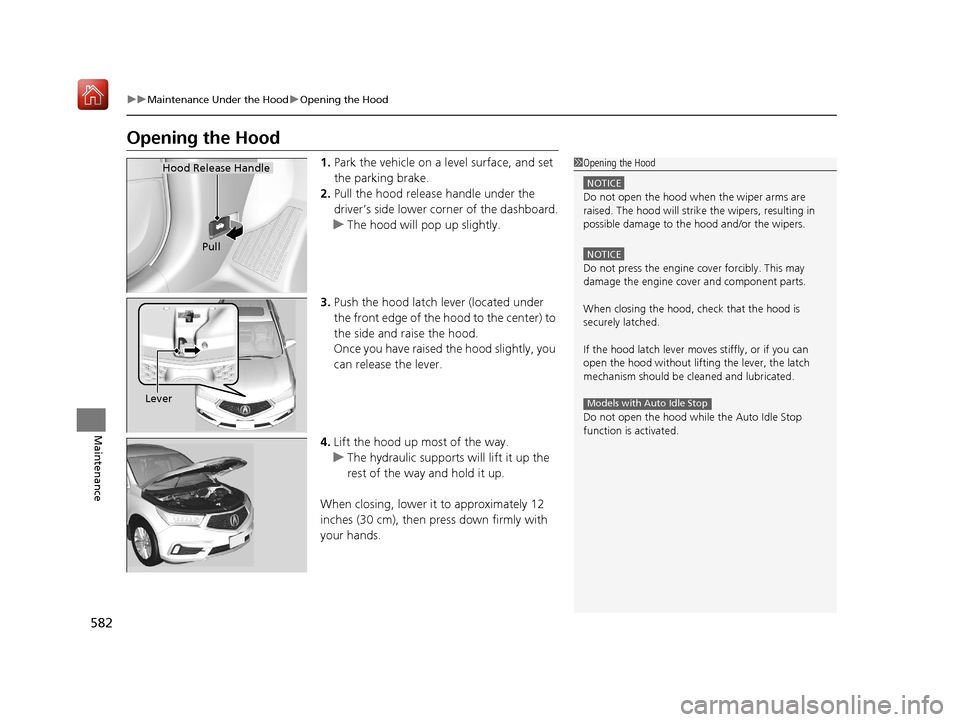
1. Park the vehicle on a level surface, and set
the parking brake.
2. Pull the hood release handle under the
driver’s side lower co rner of the dashboard.
u The hood will pop up slightly.
3. Push the hood latch lever (located under
the front edge of the hood to the center) to
the side and raise the hood.
Once you have raised the hood slightly, you
can release the lever.
4. Lift the hood up most of the way.
u The hydraulic supports will lift it up the
rest of the way and hold it up.
When closing, lower it to approximately 12
inches (30 cm), then pr ess down firmly with
your hands.1 Opening the Hood
NOTICE
Do not open the hood when the wiper arms are
raised. The hood will strike the wipers, resulting in
possible damage to the hood and/or the wipers.
NOTICE
Do not press the engine cover forcibly. This may
damage the engine cover and component parts.
When closing the hood, check that the hood is
securely latched.
If the hood latch lever moves stiffly, or if you can
open the hood without lifti ng the lever, the latch
mechanism should be cl eaned and lubricated.
Do not open the hood while the Auto Idle Stop
function is activated.
Models with Auto Idle Stop
Hood Release Handle
Pull
Lever
20 ACURA MDX-31TZ56600.book 582 ページ 2019年4月24日 水曜日 午後5時44分
Page 588 of 701
587
uuMaintenance Under the Hood uChanging the Engine Oil and Oil Filter
Continued
Maintenance
Changing the Engine Oil and Oil Filter
You must change the engine oil and oil fi lter regularly in order to maintain the
engine’s lubrication. The engine may be damaged if they are not changed regularly.
Change the oil and filter in accordance with the maintenance message on the multi-
information display. 1.Run the engine until it reaches normal
operating temperature, and then turn the
engine off.
2. Open the hood and remove the engine oil
fill cap.
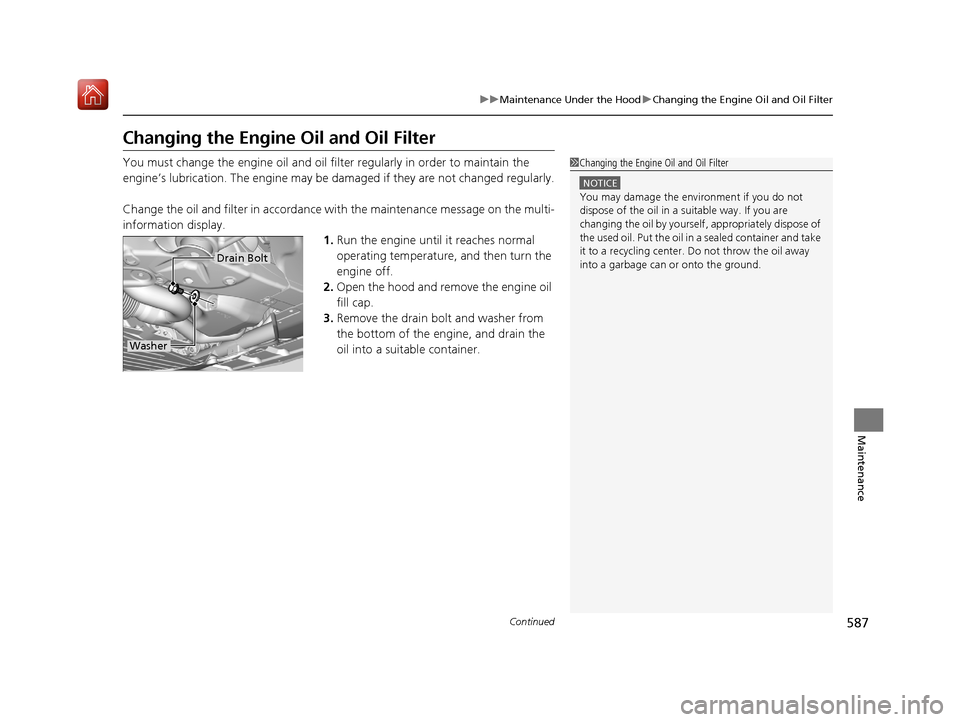
3. Remove the drain bolt and washer from
the bottom of the engine, and drain the
oil into a suitable container.1Changing the Engine Oil and Oil Filter
NOTICE
You may damage the environment if you do not
dispose of the oil in a suitable way. If you are
changing the oil by yourself , appropriately dispose of
the used oil. Put the oil in a sealed container and take
it to a recycling center. Do not throw the oil away
into a garbage can or onto the ground.
Drain Bolt
Washer
20 ACURA MDX-31TZ56600.book 587 ページ 2019年4月24日 水曜日 午後5時44分
Page 653 of 701
652
Handling the Unexpected
Jump Starting
Turn off the power to electric devices, such as audio and lights. Turn off the engine,
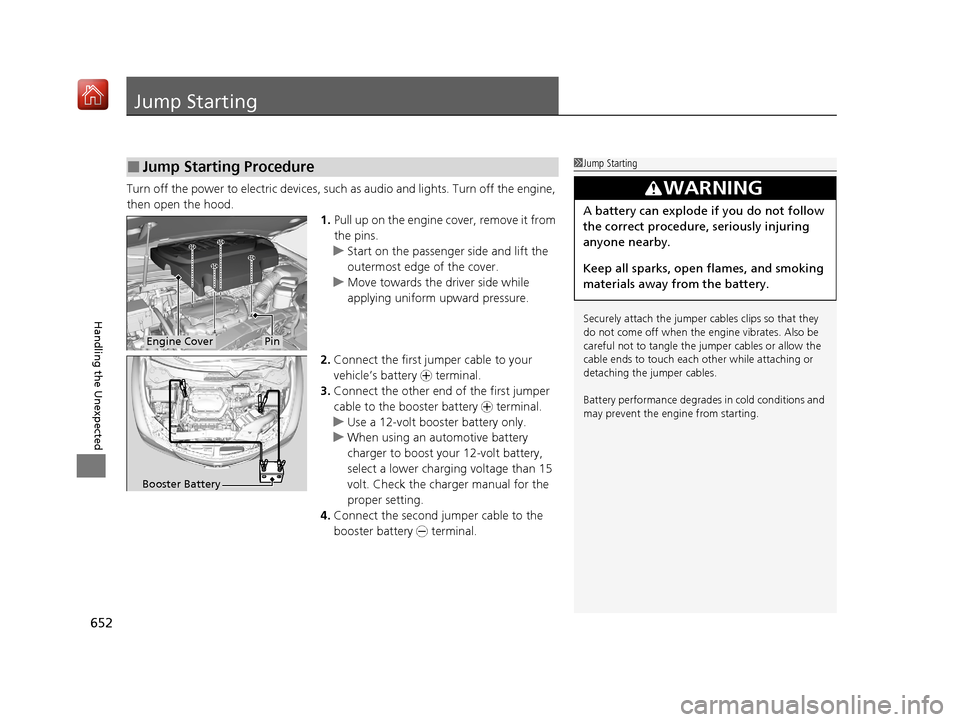
then open the hood. 1.Pull up on the engine cover, remove it from
the pins.
u Start on the passenger side and lift the
outermost edge of the cover.
u Move towards the driver side while
applying uniform upward pressure.
2. Connect the first jump er cable to your
vehicle’s battery + terminal.
3. Connect the other end of the first jumper
cable to the booster battery + terminal.
u Use a 12-volt booster battery only.
u When using an automotive battery
charger to boost your 12-volt battery,
select a lower charging voltage than 15
volt. Check the charger manual for the
proper setting.
4. Connect the second jumper cable to the
booster battery - terminal.
■Jump Starting Procedure1Jump Starting
Securely attach the jumper cables clips so that they
do not come off when the e ngine vibrates. Also be
careful not to tangle the ju mper cables or allow the
cable ends to touch each other while attaching or
detaching the jumper cables.
Battery performance degrades in cold conditions and
may prevent the engi ne from starting.
3WARNING
A battery can explode if you do not follow
the correct procedure, seriously injuring
anyone nearby.
Keep all sparks, open flames, and smoking
materials away from the battery.
Engine CoverPin
Booster Battery
20 ACURA MDX-31TZ56600.book 652 ページ 2019年4月24日 水曜日 午後5時44分
Page 655 of 701
654
Handling the Unexpected
Overheating
How to Handle Overheating
Overheating symptoms are as follows:
•The temperature gauge needle is at th e mark or the engine suddenly loses
power.
• The Stop Driving When Safe. Engine Temperature Too Hot message appears
on the multi-information display (MID).
• Steam or spray comes out of the engine compartment.
■First thing to do
1. Immediately park the vehicle in a safe place.
2. Turn off all accessories and turn on the hazard warning lights.
u No steam or spray present: Keep the engine running and open the hood.
u Steam or spray is present: Turn off the engine and wait until it subsides.
Then, open the hood.
1 How to Handle Overheating
NOTICE
Continuing to drive with the temperature gauge
needle at the mark may damage the engine.
Continuing to drive with the Stop Driving When
Safe. Engine Temperature Too Hot message on
the multi-information display may damage the
engine.
3WARNING
Steam and spray from an overheated
engine can seri ously scald you.
Do not open the hood if steam is coming
out.
H
H
20 ACURA MDX-31TZ56600.book 654 ページ 2019年4月24日 水曜日 午後5時44分
Page 657 of 701
656
Handling the Unexpected
Indicator, Coming On/Blinking
If the Low Oil Pressure Indicator Comes On
■Reasons for the indicator to come on
Comes on when the engine oil pressure is low.
■What to do as soon as the indicator comes on
1. Immediately park the vehicle on level ground in a safe place.
2. If necessary, turn the ha zard warning lights on.
■What to do after parking the vehicle
1. Stop the engine and let it sit for approximately three minutes.
2. Open the hood and check the oil level.
2 Oil Check P. 585
3.Start the engine and check th e low oil pressure indicator.
u The indicator goes off: Start driving again.
u The indicator does not go off with in 10 seconds: Immediately stop
the engine and contact a dealer for repairs.
If the Charging System Indicator Comes On
■Reasons for the indicator to come on
Comes on when the battery is not being charged.
■What to do when the indicator comes on
Turn off the climate con trol system, rear defogger, and other electrical
systems, and immediately contact a dealer for repairs.
1 If the Low Oil Pressure Indicator Comes On
NOTICE
Running the engine with low oil pressure can cause
serious mechanical damage almost immediately.
1If the Charging System Indicator Comes On
If you need to stop temporarily, do not turn off the
engine. Restarting the engi ne may rapidly discharge
the battery.
20 ACURA MDX-31TZ56600.book 656 ページ 2019年4月24日 水曜日 午後5時44分
Page 696 of 701
695
Index
Interior.................................................... 206
Light Switches......................................... 172
Lights On Indicator.................................... 89
Turn Signals ............................................ 171
Load Limits ............................................... 449
Locking/Unlocking ................................... 139
Auto Door Locking/Unlocking ................. 154
Childproof Door Locks ............................ 153
From Inside ............................................. 151
From Outside .......................................... 142
Keys........................................................ 139
Using a Key............................................. 148
Lockout Prevention System ..................... 149
Low Battery Charge ................................. 656
Low Fuel Indicator ..................................... 85
Low Oil Pressure Indicator ................. 82, 656
Lower Anchors ..................................... 61, 68
Lubricant Specifications Chart ................ 677
Luggage (Maximum Load Limit) ............. 449
Lumbar Support ....................................... 192
M
Maintenance............................................ 573
Battery .................................................... 611
Brake Fluid .............................................. 592
Cleaning ................................................. 618
Climate Control System .......................... 617
Coolant .................................................. 589
Maintenance Minder
TM............................ 577
Oil .......................................................... 585 Precautions .............................................. 574
Radiator .................................................. 590
Remote Control ....................................... 615
Remote Transmitter ......................... 613, 614
Replacing Light Bulbs ............................... 593
Safety ...................................................... 575
Service Items ........................................... 579
Tires ........................................................ 602
Transmission Fluid ................................... 591
Under the Hood ...................................... 581
Wireless Headphone ................................ 616
Malfunction Indicator Lamp .............. 82, 657
Map Lights ................................................ 207
Maximum Load Limit ............................... 449
Meters, Gauges ......................................... 119
MID (Multi-information Display) ............. 120
Mirrors ....................................................... 188
Adjusting ................................................. 188
Door........................................................ 189
Exterior .................................................... 189
Interior Rearview ..................................... 188
Modifications (and Accessories) .............. 623
Moonroof .................................................. 167
MP3 ................................................... 268, 293
Multi-function Steering-wheel
Controls ................................................... 120
Multi-Information Display (MID) ............. 120
Multi-View Rear Camera .......................... 557
N
Numbers (Identification).......................... 678
O
Odometer................................................. 121
Off-Highway Driving Guidelines ............. 462
Oil (Engine) Adding .................................................... 586
Checking................................................. 585
Displaying Oil Life .................................... 577
Low Oil Pressure Indicator ................. 82, 656
On Demand Multi-Use Display
TM............. 240
Open Source Licenses ............................... 333
Opening/Closing Hood....................................................... 582
Moonroof ............................................... 167
Power Windows ...................................... 165
Tailgate ................................................... 155
Operating the Switches Around the Steering Wheel ....................................... 168
Outside Temperature Display .................. 122
Overhead Screen ...................................... 338
Overheating .............................................. 654
P
Paddle Shifters (Sequential Mode) .......... 479
Pandora ®................................................. 291
Panic Mode ............................................... 164
Parking ...................................................... 546
20 ACURA MDX-31TZ56600.book 695 ページ 2019年4月24日 水曜日 午後5時44分