Adjust headlight Acura MDX 2020 Owner's Manual
[x] Cancel search | Manufacturer: ACURA, Model Year: 2020, Model line: MDX, Model: Acura MDX 2020Pages: 701, PDF Size: 38.91 MB
Page 5 of 701
4
Quick Reference Guide
Quick Reference Guide
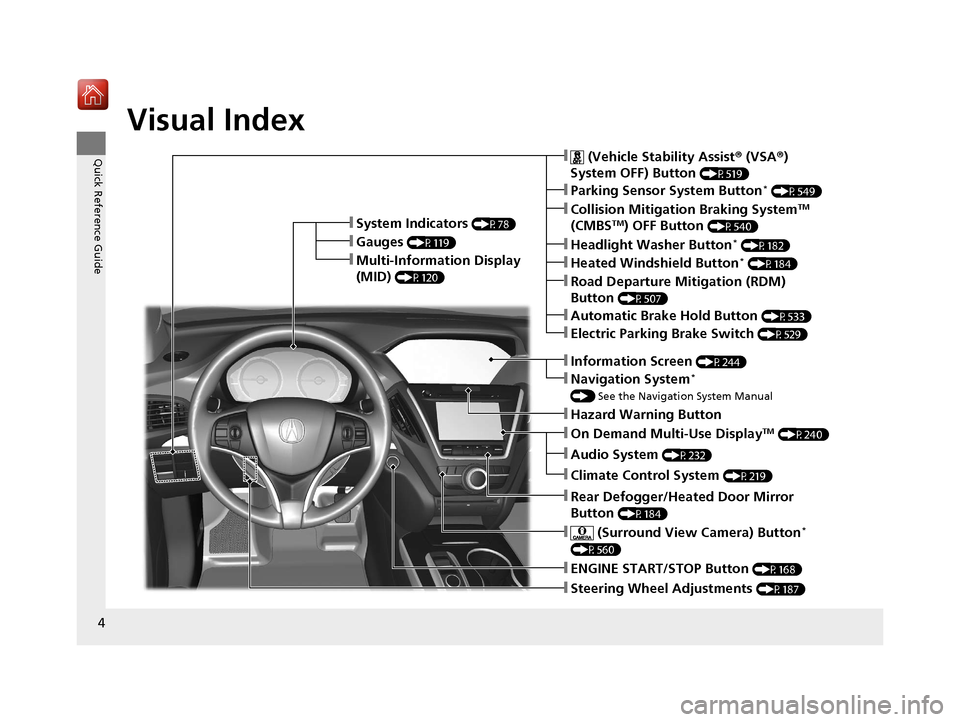
Visual Index
❚Steering Wheel Adjustments (P187)
❚ENGINE START/STOP Button (P168)
❚Navigation System*
() See the Navigation System Manual
❚Information Screen (P244)
❚Hazard Warning Button
❚On Demand Multi-Use DisplayTM (P240)
❚Audio System (P232)
❚System Indicators (P78)
❚Gauges (P119)
❚Multi-Information Display
(MID)
(P120)
❚Climate Control System (P219)
❚Rear Defogger/Heated Door Mirror
Button
(P184)
❚ (Surround View Camera) Button*
(P560)
❚ (Vehicle Stability Assist ® (VSA ®)
System OFF) Button
(P519)
❚Parking Sensor System Button* (P549)
❚Collision Mitigation Braking SystemTM
(CMBSTM) OFF Button (P540)
❚Headlight Washer Button* (P182)
❚Heated Windshield Button* (P184)
❚Electric Parking Brake Switch (P529)
❚Road Departure Mitigation (RDM)
Button
(P507)
❚Automatic Brake Hold Button (P533)
20 ACURA MDX-31TZ56600.book 4 ページ 2019年4月24日 水曜日 午後5時44分
Page 173 of 701
172
uuOperating the Switches Around the Steering Wheel uLight Switches
Controls
Light Switches
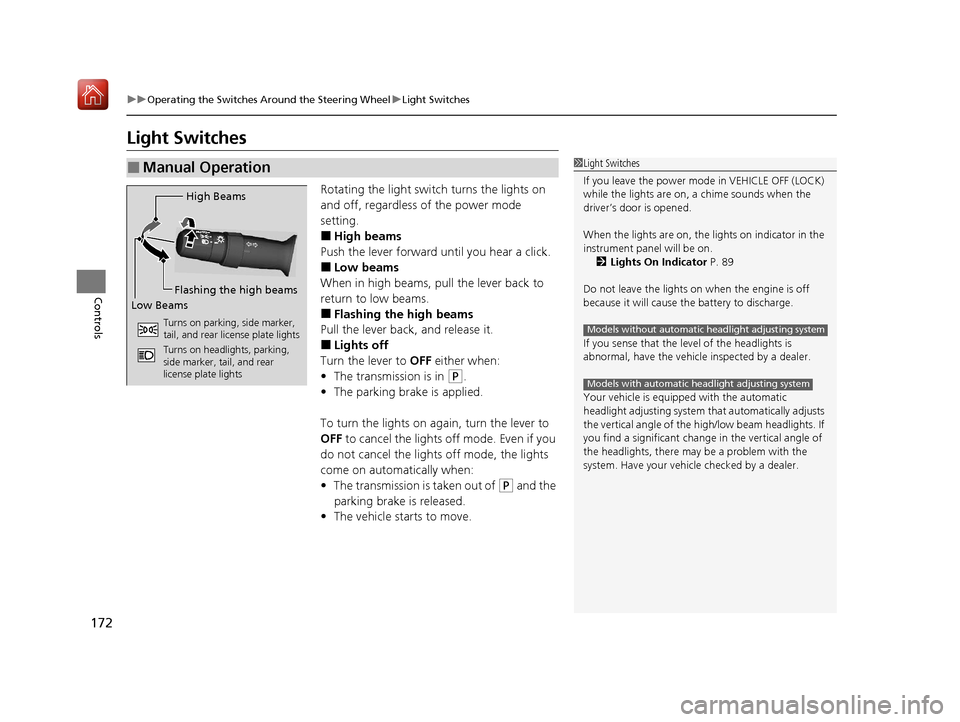
Rotating the light switch turns the lights on
and off, regardless of the power mode
setting.
■High beams
Push the lever forward until you hear a click.
■Low beams
When in high beams, pull the lever back to
return to low beams.
■Flashing the high beams
Pull the lever back, and release it.
■Lights off
Turn the lever to OFF either when:
• The transmission is in
(P.
• The parking brake is applied.
To turn the lights on ag ain, turn the lever to
OFF to cancel the lights off mode. Even if you
do not cancel the lights off mode, the lights
come on automatically when:
• The transmission is taken out of
(P and the
parking brake is released.
• The vehicle starts to move.
■Manual Operation1Light Switches
If you leave the power mode in VEHICLE OFF (LOCK)
while the lights are on, a chime sounds when the
driver’s door is opened.
When the lights are on, the lights on indicator in the
instrument pane l will be on.
2 Lights On Indicator P. 89
Do not leave the lights on when the engine is off
because it will cause the battery to discharge.
If you sense that the le vel of the headlights is
abnormal, have the vehicl e inspected by a dealer.
Your vehicle is equipped with the automatic
headlight adjusting system that automatically adjusts
the vertical angle of the high/low beam headlights. If
you find a significant change in the vertical angle of
the headlights, there may be a problem with the
system. Have your vehicle checked by a dealer.
Models without automatic headlight adjusting system
Models with automatic headlight adjusting system
High Beams
Flashing the high beams
Low Beams
Turns on parking, side marker,
tail, and rear license plate lights
Turns on headlights, parking,
side marker, tail, and rear
license plate lights
20 ACURA MDX-31TZ56600.book 172 ページ 2019年4月24日 水曜日 午後5時44分
Page 175 of 701
uuOperating the Switches Around the Steering Wheel uLight Switches
174
Controls
The headlights automatically come on when the wipers are used several times within
a certain number of intervals wi th the headlight switch in AUTO.
The headlights automatically go off a few minutes later if the wipers are stopped.
The headlights, all other exterior lights, an d the instrument panel lights turn off 15
seconds after you set the power mode to VE HICLE OFF (LOCK), take the remote with
you, and close th e driver’s door.
If you set the power mode to VEHICLE OFF (LOCK) with the headlight switch on, but
do not open the door, the lights turn off after 10 minutes (3 minutes, if the switch
is in the AUTO position).
The lights turn on again when you unlock or open the driver’s door. If you unlock
the door, but do not open it within 15 seconds, the lights go off. If you open the
driver’s door, you will hear a lights on reminder chime.
■Headlight Integration with Wiper
■Automatic Lighting Off Feature
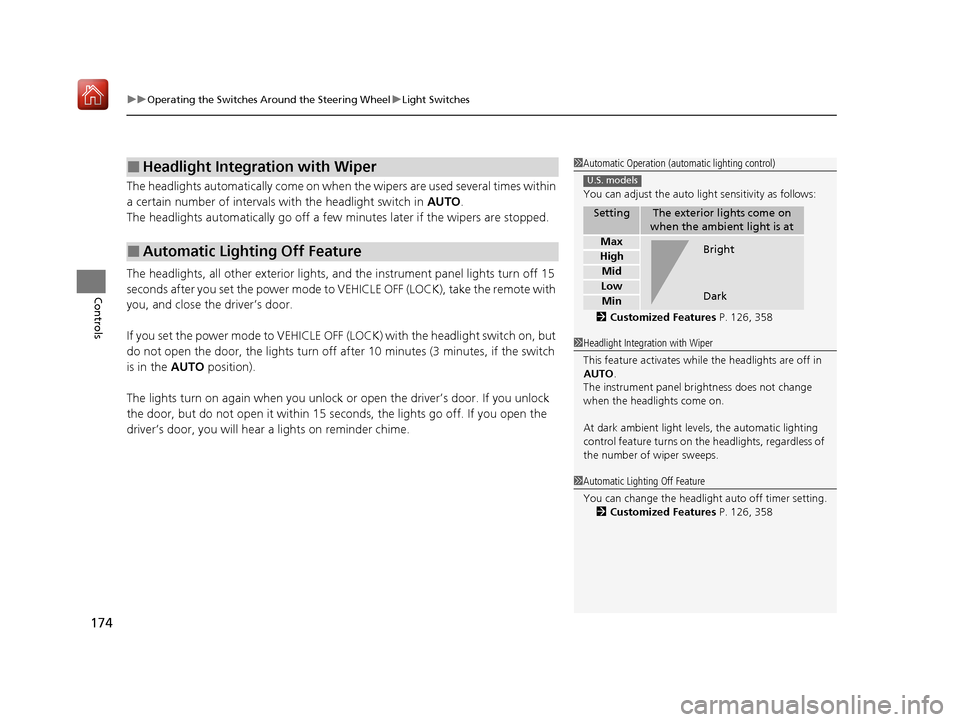
1Automatic Operation (aut omatic lighting control)
You can adjust the auto li ght sensitivity as follows:
2 Customized Features P. 126, 358
SettingThe exterior lights come on
when the ambient light is at
Max
High
Mid
Low
Min
U.S. models
Bright
Dark
1 Headlight Integration with Wiper
This feature activates while the headlights are off in
AUTO .
The instrument panel br ightness does not change
when the headlights come on.
At dark ambient light levels, the automatic lighting
control feature turns on the headlights, regardless of
the number of wiper sweeps.
1 Automatic Lighting Off Feature
You can change the headlight auto off timer setting.
2 Customized Features P. 126, 358
20 ACURA MDX-31TZ56600.book 174 ページ 2019年4月24日 水曜日 午後5時44分
Page 189 of 701
188
Controls
Adjusting the Mirrors
Interior Rearview Mirror
Adjust the angle of the rearview mirror when you are sitting in the correct driving
position.
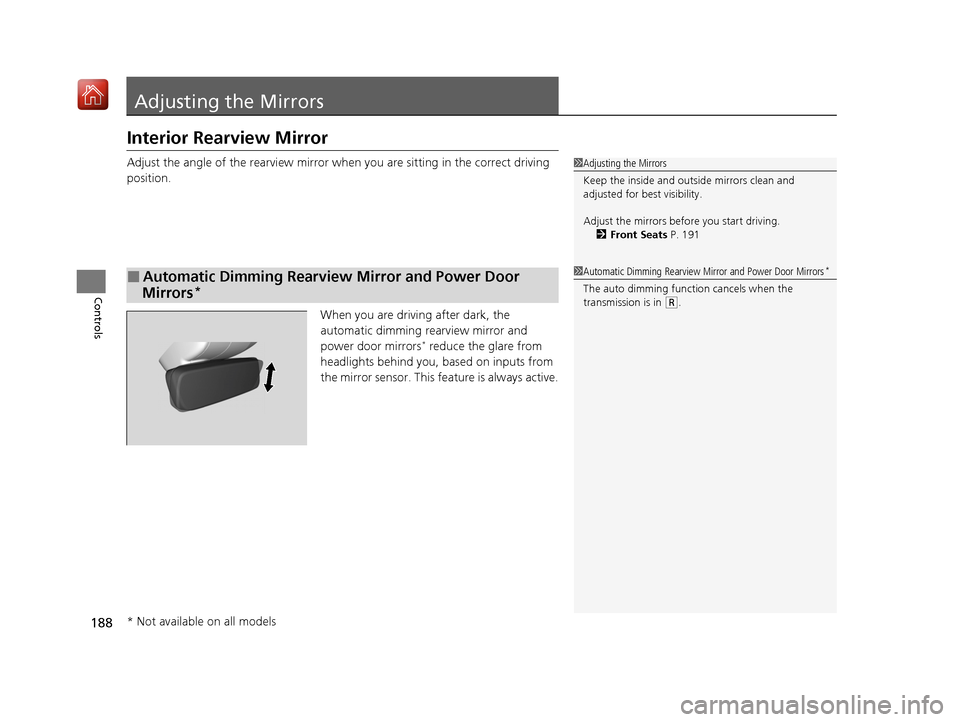
When you are driving after dark, the
automatic dimming rearview mirror and
power door mirrors
* reduce the glare from
headlights behind you, based on inputs from
the mirror sensor. This feature is always active.
■Automatic Dimming Rearview Mirror and Power Door
Mirrors*
1 Adjusting the Mirrors
Keep the inside and out side mirrors clean and
adjusted for best visibility.
Adjust the mirrors befo re you start driving.
2 Front Seats P. 191
1Automatic Dimming Rearview Mirror and Power Door Mirrors*
The auto dimming function cancels when the
transmission is in
(R.
* Not available on all models
20 ACURA MDX-31TZ56600.book 188 ページ 2019年4月24日 水曜日 午後5時44分
Page 448 of 701
Continued447
uuBefore Driving uDriving Preparation
Driving
• Store or secure all items on board properly.
u Carrying too much cargo, or improperly storing it, can affect your vehicle’s
handling, stability, sto pping distance, and tires, and make it unsafe.
2Maximum Load Limit P. 449
•Do not pile items higher than the seat height.
u They can block your view and may be thrown forward in the event of sudden
braking.
• Do not place anything in the front seat footwells. Make sure to secure the floor
mat.
u An object or unsecured floor mat can in terfere with your brake and accelerator
pedal operation while driving.
• If you have any animals on board, do not let them move around in the vehicle.
u They may interfere with driv ing and a crash could occur.
• Securely close and lock al l doors and the tailgate.
2Locking/Unlocking the Doors from the Inside P. 151
•Adjust your seating position properly.
u Adjust the head restraint, too.
2Adjusting the Seats P. 191
2 Adjusting the Front and Second Row Outer Head Restraint Positions P. 198
•Adjust the mirrors and steering wheel properly.
u Adjust them while sitting in the proper driving position.
2 Adjusting the Steering Wheel P. 187
2 Adjusting the Mirrors P. 188
■Interior Checks1Interior Checks
The headlight aim is set by the factory, and does not
need to be adjusted. Howeve r, if you regularly carry
heavy items in the cargo area or tow a trailer, have
the aiming readjusted at a dealer or by a qualified
technician.
Your vehicle is equipped with the automatic
headlight adjusting system that automatically adjusts
the vertical angle of the low beam headlights.
Models with automatic headlight adjusting system
20 ACURA MDX-31TZ56600.book 447 ページ 2019年4月24日 水曜日 午後5時44分
Page 510 of 701
509
uuWhen Driving uRoad Departure Mitigation (RDM) System
Driving
■Roadway conditions
• Driving on a snowy or wet roadway (obs cured lane marking, vehicle tracks,
reflected lights, road spray, high contrast).
• Driving on a road with temporary lane markings.
• Faint, multiple, or varied lane markings are visible on the roadway due to road
repairs or old lane markings.
• The roadway has merging, split, or crossing lines (e.g., such as at an intersection
or crosswalk).
• The lane markings are extremel y narrow, wide, or changing.
• The vehicle in front of you is driving near the lane lines.
• The road is hilly or the vehicle is approaching the crest of a hill.
• Driving on rough or unpaved roads, or over bumpy surfaces.
• When objects on the road (curb, guard rail, pylons, etc.) are recognized as white
lines (or yellow lines).
• Driving on roads with double lines.
■Vehicle conditions
• Headlight lenses are dirty or the h eadlights are not properly adjusted.
• The outside of the windshield is streaked or blocked by dirt, mud, leaves, wet
snow, etc.
• The inside of the windshield is fogged.
• The camera temperature gets too high.
• An abnormal tire or wheel condition (wro ng sized, varied size or construction,
improperly inflated, compact spare tire
*, etc.).
• The vehicle is tilted due to a heavy load or suspension modifications.
• When tire chains are installed.
• The vehicle is towing a trailer.
* Not available on all models
20 ACURA MDX-31TZ56600.book 509 ページ 2019年4月24日 水曜日 午後5時44分
Page 518 of 701
517
uuWhen Driving uLane Keeping Assist System (LKAS)
Driving
■Roadway conditions
• Driving on a snowy or wet roadway (obs cured lane marking, vehicle tracks,
reflected lights, road spray, high contrast).
• Driving on a road with temporary lane markings.
• Faint, multiple, or varied lane markings are visible on the roadway due to road
repairs or old lane markings.
• The roadway has merging, split, or crossing lines (e.g., such as at an intersection
or crosswalk).
• The lane markings are extremel y narrow, wide, or changing.
• The vehicle in front of you is driving near the lane lines.
• The road is hilly or the vehicle is approaching the crest of a hill.
• Driving on rough or unpaved roads, or over bumpy surfaces.
• When objects on the road (curb, guard rail, pylons, etc.) are recognized as white
lines (or yellow lines).
• Driving on roads with double lines.
■Vehicle conditions
• Headlight lenses are dirty or the h eadlights are not properly adjusted.
• The outside of the windshield is streaked or blocked by dirt, mud, leaves, wet
snow, etc.
• The inside of the windshield is fogged.
• The camera temperature gets too high.
• An abnormal tire or wheel condition (wro ng sized, varied size or construction,
improperly inflated, compact spare tire
*, etc.).
• The vehicle is tilted due to a heavy load or suspension modifications.
• The vehicle is towing a trailer.
* Not available on all models
20 ACURA MDX-31TZ56600.book 517 ページ 2019年4月24日 水曜日 午後5時44分
Page 543 of 701
542
uuBraking uCollision Mitigation Braking SystemTM (CMBSTM)
Driving
■Vehicle conditions
• Headlight lenses are dirty or the headlights are not properly adjusted.
• The outside of the windshie ld is blocked by dirt, mud, leaves, wet snow, etc.
• The inside of the windshield is fogged.
• An abnormal tire or wheel condition (wrong sized, varied size or construction,
improperly inflated, compact spare tire
*, etc.).
• When tire chains are installed.
• The vehicle is tilted due to a heav y load or suspension modifications.
• The camera temperature gets too high.
• Driving with the parking brake applied.
• When the radar sensor behind the emblem gets dirty.
• The vehicle is towing a trailer.
* Not available on all models
20 ACURA MDX-31TZ56600.book 542 ページ 2019年4月24日 水曜日 午後5時44分
Page 594 of 701
593
Maintenance
Replacing Light Bulbs
Headlights
Headlights are LED type. Have an authorized Acura dealer inspect and replace the
light assembly.
Front Turn Signal/Parking, Daytime Running and
Front Side Marker Lights
Front turn signal/parking, daytime running and front side marker lights are LED type.
Have an authorized Acura dealer in spect and replace the light assembly.
Fog Lights*
Fog lights are LED type. Have an authoriz ed Acura dealer inspect and replace the
light assembly.
Side Turn Signal/Emer gency Indicator Lights
Door mirror side turn lights are LED type. Have an authorized Acura dealer inspect
and replace the light assembly.
1 Headlights
The headlight aim is set by the factory, and does not
need to be adjusted. Howeve r, if you regularly carry
heavy items in the cargo area or tow a trailer, have
the aiming readjusted at a dealer or by a qualified
technician.
* Not available on all models
20 ACURA MDX-31TZ56600.book 593 ページ 2019年4月24日 水曜日 午後5時44分
Page 691 of 701
Index
690
Index
Index
A
AAC.................................................... 268, 293
ABS (Anti-lock Brake System) ................... 535
AC Power Outlet ....................................... 214
Accessories and Modifications ................. 623
Accessory Power Sockets .......................... 213
AcuraLink .................................................. 435
Adaptive Cruise Control (ACC) with Low
Speed Follow ........................................... 489
Indicator .................................................... 95
Additives
Coolant ................................................... 589
Washer .................................................... 592
Adjusting
Armrest ................................................... 204
Front Seats .............................................. 191
Head Restraints........................ 198, 200, 201
Headlights ............................................... 593
Mirrors .................................................... 188
Rear Seats................................................ 203
Steering Wheel ........................................ 187
Temperature ............................................ 122
Agile Handling Assist ................................ 520
Air Conditioning System (Climate Control System) .................................................... 219
Changing the Mode ................................ 222
Defrosting the Windshield and Windows ............................................... 225
Dust and Pollen Filter ............................... 617
Rear Climate Control System ................... 226
Sensors .................................................... 230 Synchronized Mode................................. 223
Using Automatic Climate Control ............ 219
Air Pressure ....................................... 603, 677
Airbags ........................................................ 41
Advanced Airbags ..................................... 47
After a Collision ........................................ 45
Airbag Care............................................... 55
Driver’s Knee Airbag.................................. 48
Event Data Recorder .................................... 0
Front Airbags (SRS) .................................... 44
Indicator.............................................. 53, 86
Passenger Front Airbag Off Indicator ......... 54
Sensors ..................................................... 41
Side Airbags .............................................. 50
Side Curtain Airbags.................................. 52
AM/FM Radio ............................................ 254
Android Auto ........................................... 303
Anti-lock Brake System (ABS) .................. 535
Indicator.................................................... 86
Apple CarPlay ........................................... 299
Armrest ..................................................... 204
Audio Remote Controls ........................... 237
Audio System ............................................ 232
Adjusting the Sound................................ 249
Auxiliary Input Jack.................................. 236
Error Messages ........................................ 308
General Information ................................ 316
HDD ........................................................ 271
iPhone............................................. 291, 318
iPod ........................................................ 284
MP3/WMA/AAC .............................. 268, 293 Pandora
®.............................................. 291
Reactivating ............................................ 236
Recommended CDs ................................ 317
Recommended Devices ........................... 318
Remote Controls ..................................... 237
Security Code ......................................... 236
Theft Protection ...................................... 236
USB Flash Drives...................................... 318
USB Port ................................................. 233
Authorized Manuals ................................ 685
Auto Door Locking/Unlocking ................ 154
Customize ...................................... 132, 374
Auto High-Beam ...................................... 176
Indicator ................................................... 86
Auto Idle Stop .......................................... 480
OFF Button ............................................. 481
Auto Idle Stop Indicator (Green) .............. 92
Auto Idle Stop System Indicator (Amber) ..................................................... 92
Automatic Brake Hold ............................. 533
Indicator ................................................. 533
Automatic Brake Hold System
Indicator ................................................. 533
Automatic Folding Door Mirror .............. 190
Aut omatic Intermittent W
ipers .............. 180
Automatic Lighting .................................. 173
Automatic Transmission .......................... 471
Creeping................................................. 471
Fluid ....................................................... 591
Kickdown ............................................... 471
Operating the Shift Button ...................... 474
20 ACURA MDX-31TZ56600.book 690 ページ 2019年4月24日 水曜日 午後5時44分