arm rest Acura MDX 2020 Owner's Manual
[x] Cancel search | Manufacturer: ACURA, Model Year: 2020, Model line: MDX, Model: Acura MDX 2020Pages: 701, PDF Size: 38.91 MB
Page 12 of 701
11
Quick Reference Guide
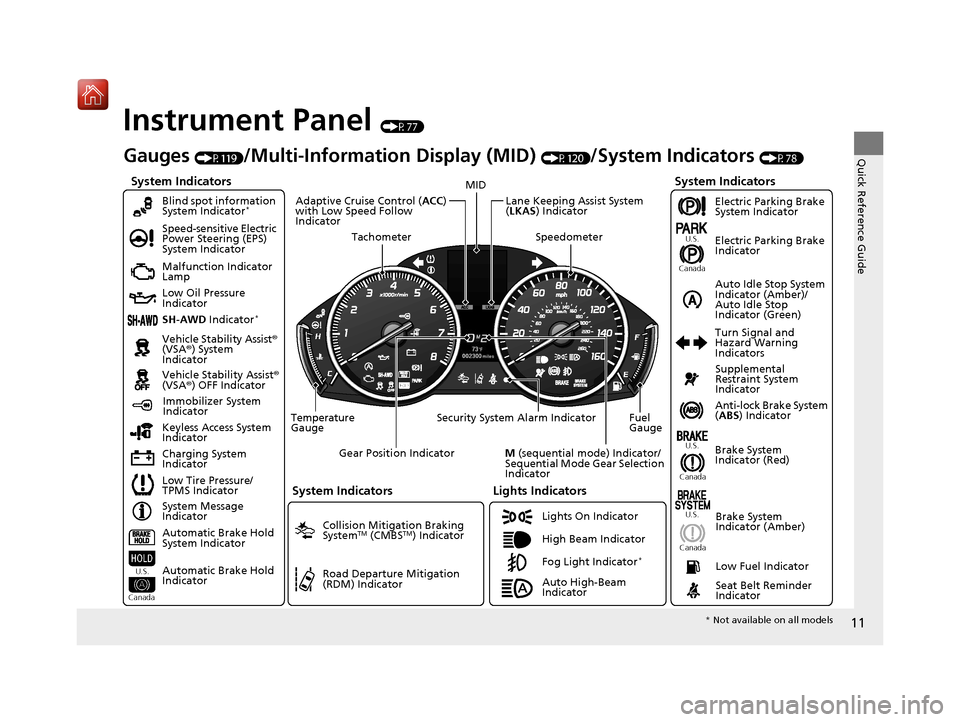
Instrument Panel (P77)
System Indicators
Malfunction Indicator
Lamp
Low Oil Pressure
Indicator
Charging System
IndicatorAnti-lock Brake System
(
ABS ) Indicator
Vehicle Stability Assist
®
(VSA® ) System
Indicator
Vehicle Stability Assist ®
(VSA® ) OFF Indicator
Speed-sensitive Electric
Power Steering (EPS)
System Indicator
Lights Indicators
Lights On Indicator
High Beam Indicator
Immobilizer System
Indicator
Seat Belt Reminder
Indicator
System Indicators
System Message
Indicator Brake System
Indicator (Red)Supplemental
Restraint System
Indicator
Low Fuel Indicator
Gauges (P119)/Multi-Information Display (MID) (P120)/System Indicators (P78)
Low Tire Pressure/
TPMS Indicator Turn Signal and
Hazard Warning
Indicators
Keyless Access System
Indicator
Temperature
Gauge Security System Alarm Indicator Fuel
Gauge
Tachometer
MID
Speedometer
Gear Position Indicator
M (sequential mode) Indicator/
Sequential Mode Gear Selection
Indicator
Brake System
Indicator (Amber)
SH-AWD Indicator*
Blind spot information
System Indicator*
System Indicators
Collision Mitigation Braking
SystemTM (CMBSTM) Indicator
Road Departure Mitigation
(RDM) Indicator
Lane Keeping Assist System
(LKAS ) Indicator
Adaptive Cruise Control (
ACC)
with Low Speed Follow
Indicator
U.S.
Canada U.S.
Canada
Fog Light Indicator*
Auto Idle Stop System
Indicator (Amber)/
Auto Idle Stop
Indicator (Green)
Automatic Brake Hold
System Indicator
Automatic Brake Hold
Indicator
U.S.
Canada
Electric Parking Brake
System Indicator
Electric Parking Brake
Indicator
U.S.
Canada
Auto High-Beam
Indicator
* Not available on all models
20 ACURA MDX-31TZ56600.book 11 ページ 2019年4月24日 水曜日 午後5時44分
Page 45 of 701
44
uuAirbags uTypes of Airbags
Safe Driving
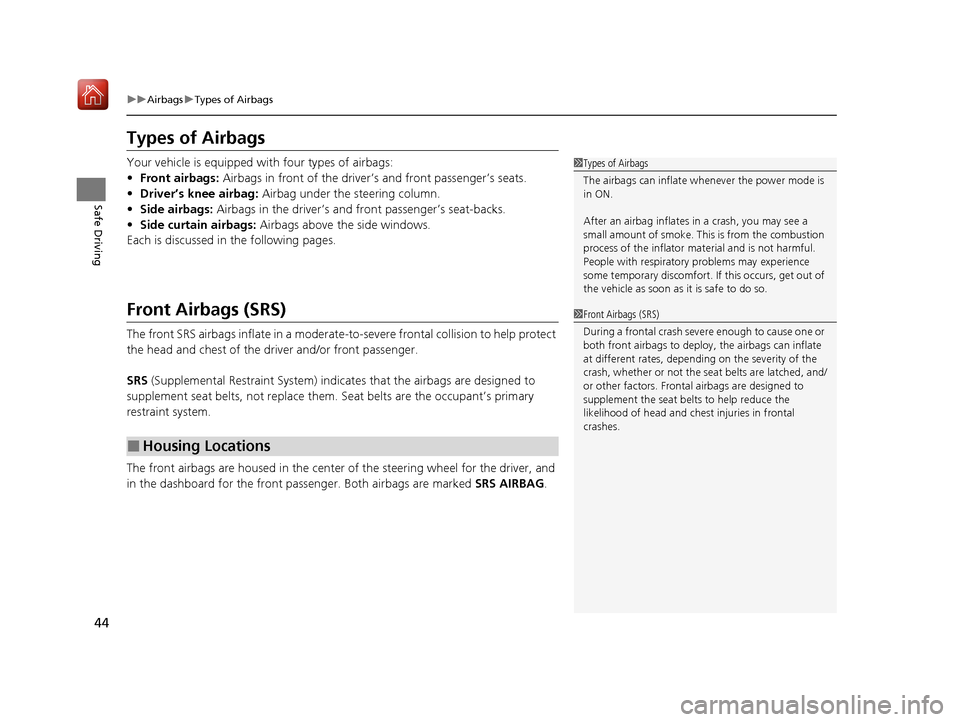
Types of Airbags
Your vehicle is equipped with four types of airbags:
• Front airbags: Airbags in front of the driver’s and front passenger’s seats.
• Driver’s knee airbag: Airbag under the steering column.
• Side airbags: Airbags in the driver’s and front passenger’s seat-backs.
• Side curtain airbags: Airbags above the side windows.
Each is discussed in the following pages.
Front Airbags (SRS)
The front SRS airbags inflate in a moderate-to -severe frontal collision to help protect
the head and chest of the driver and/or front passenger.
SRS (Supplemental Restraint System) indicates that the airbags are designed to
supplement seat belts, not replace them. Seat belts are the occupant’s primary
restraint system.
The front airbags are housed in the center of the steering wheel for the driver, and
in the dashboard for the front pass enger. Both airbags are marked SRS AIRBAG.
■Housing Locations
1Types of Airbags
The airbags can inflate whenever the power mode is
in ON.
After an airbag inflates in a crash, you may see a
small amount of smoke. This is from the combustion
process of the infl ator material and is not harmful.
People with respiratory pr oblems may experience
some temporary discomfort. If this occurs, get out of
the vehicle as soon as it is safe to do so.
1 Front Airbags (SRS)
During a frontal crash severe enough to cause one or
both front airbags to deploy, the airbags can inflate
at different rates, dependi ng on the severity of the
crash, whether or not the se at belts are latched, and/
or other factors. Frontal airbags are designed to
supplement the seat belts to help reduce the
likelihood of head and chest injuries in frontal
crashes.
20 ACURA MDX-31TZ56600.book 44 ページ 2019年4月24日 水曜日 午後5時44分
Page 138 of 701
137
Controls
This chapter explains how to operate the various controls necessary for driving.
Clock.................................................. 138
Locking and Unlocking the Doors Key Types and Functions .................. 139
Low Keyless Access Remote Signal Strength ......................................... 141
Locking/Unlocking the Doors from the
Outside .......................................... 142
Locking/Unlocking the Doors from the Inside ............................................. 151
Childproof Door Locks ..................... 153
Auto Door Locking/Unlocking .......... 154
Tailgate .............................................. 155
Security System Immobilizer System .......................... 162
Security System Alarm ...................... 162 Opening and Closing the Windows
... 165
Moonroof .......................................... 167
Operating the Switches Around the
Steering Wheel ENGINE START/STOP Button............. 168
Turn Signals ..................................... 171
Light Switches.................................. 172
Fog Lights
*...................................... 175
Daytime Running Lights ................... 175
Auto High-Beam .............................. 176
Wipers and Washers ........................ 179
Brightness Control ........................... 183
Rear Defogger/Heated Door Mirror Button ... 184Driving Position Memory System ...... 185
Adjusting the Steering Wheel........... 187 Adjusting the Mirrors
Interior Rearview Mirror ................... 188
Power Door Mirrors ......................... 189
Adjusting the Seats Front Seats ...................................... 191
Second Row Seats ........................... 194
Third Row Seats ............................... 203
Armrest ........................................... 204
Interior Lights/Interior Convenience Items
Interior Lights .................................. 206
Interior Convenience Items .............. 208
Climate Control System
Using Automatic Climate Control .... 219
Rear Climate Control System ........... 226
Automatic Climate Control Sensors ... 230
* Not available on all models
20 ACURA MDX-31TZ56600.book 137 ページ 2019年4月24日 水曜日 午後5時44分
Page 198 of 701
197
uuAdjusting the Seats uSecond Row Seats
Controls
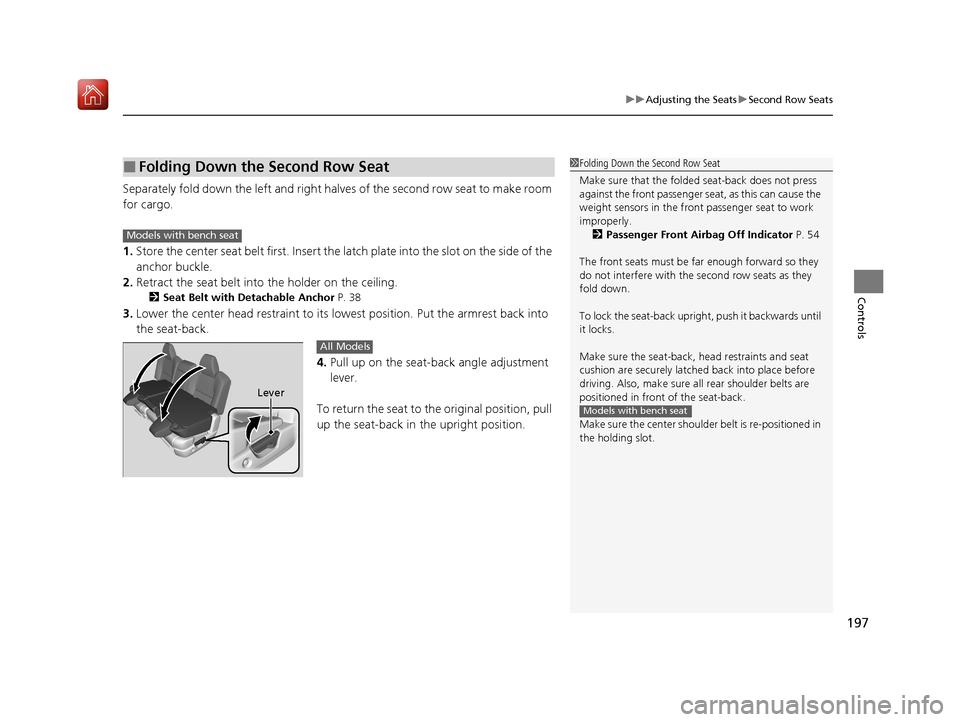
Separately fold down the left and right ha lves of the second row seat to make room
for cargo.
1. Store the center seat belt first. Insert the la tch plate into the slot on the side of the
anchor buckle.
2. Retract the seat belt into the holder on the ceiling.
2 Seat Belt with Detachable Anchor P. 38
3.Lower the center head restraint to its lo west position. Put the armrest back into
the seat-back.
4.Pull up on the seat-back angle adjustment
lever.
To return the seat to th e original position, pull
up the seat-back in the upright position.
■Folding Down the Second Row Seat1 Folding Down the Second Row Seat
Make sure that the folded seat-back does not press
against the front passenger seat, as this can cause the
weight sensors in the front passenger seat to work
improperly. 2 Passenger Front Airbag Off Indicator P. 54
The front seats must be far enough forward so they
do not interfere with the second row seats as they
fold down.
To lock the seat-back upri ght, push it backwards until
it locks.
Make sure the seat-back, head restraints and seat
cushion are securely latche d back into place before
driving. Also, make sure all rear shoulder belts are
positioned in front of the seat-back.
Make sure the center shoulde r belt is re-positioned in
the holding slot.
Models with bench seat
Models with bench seat
Lever
All Models
20 ACURA MDX-31TZ56600.book 197 ページ 2019年4月24日 水曜日 午後5時44分
Page 205 of 701

204
uuAdjusting the Seats uArmrest
Controls
Armrest
The console lid can be used as an armrest.
To adjust:
Slide the armrest to a desired position.
■Using the Front Seat Armrest
20 ACURA MDX-31TZ56600.book 204 ページ 2019年4月24日 水曜日 午後5時44分
Page 206 of 701

205
uuAdjusting the Seats uArmrest
Controls
Pull down the armrest in the center backrest.
The console lid can be used as an armrest.
To adjust:
Slide the armrest to a desired position.
Pull down the armrest.
■Using the Rear Seat Armrest
Models with bench seat
Models with rear console compartment
Models with captain seatModels without rear console
compartment
20 ACURA MDX-31TZ56600.book 205 ページ 2019年4月24日 水曜日 午後5時44分
Page 213 of 701
212
uuInterior Lights/Interior Convenience Items uInterior Convenience Items
Controls
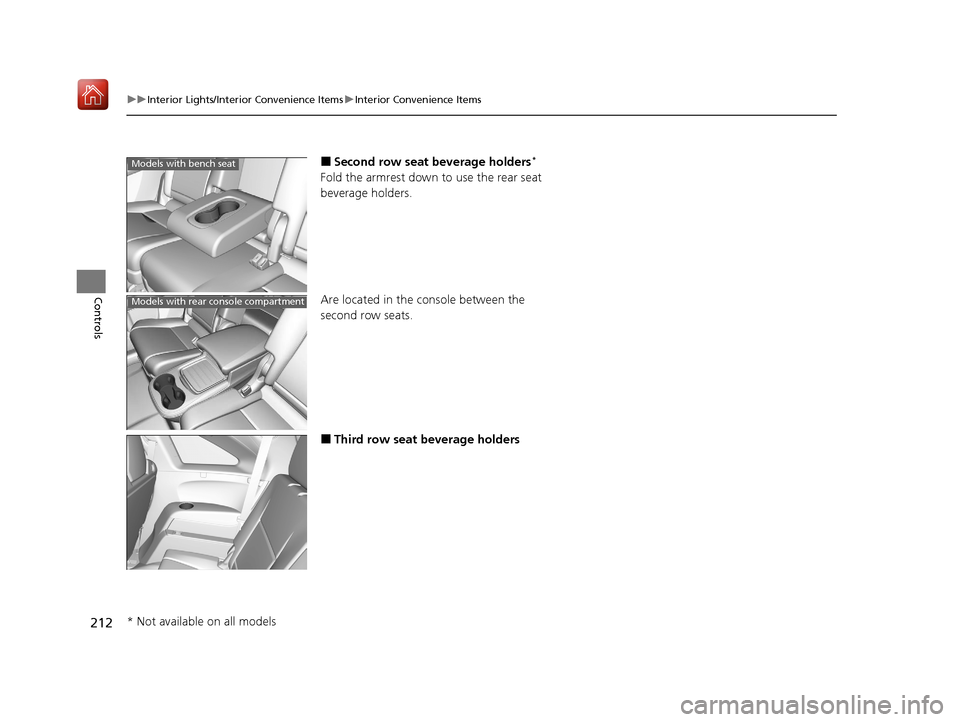
■Second row seat beverage holders*
Fold the armrest down to use the rear seat
beverage holders.
Are located in the console between the
second row seats.
■Third row seat beverage holders
Models with bench seat
Models with rear console compartment
* Not available on all models
20 ACURA MDX-31TZ56600.book 212 ページ 2019年4月24日 水曜日 午後5時44分
Page 222 of 701

Continued221
uuClimate Control System uUsing Automatic Climate Control
Controls
1. Select the driver’s or passenger’s side
temperature control icon.
2. Change the temperature setting from the
following:
Temperature bar: Select a point where your
desired temperature setting is.
Farther to the left is for a lower, and to the
right for a higher setting.
(+/(-: To raise or lower the temperature
setting one degree at a time.
While you select and hold
(+/(-, the
temperature decreases or increases.
Max Cool: To rapidly cool down the interior.
u The A/C indicator comes on. The setting
returns to the previously selected value
when you select it again.
Max Heat: To rapidly warm up the interior.
u The A/C indicator goes off. The setting
returns to the previously selected value
when you select it again.
■Changing the Interior Temperature Setting1 Using Automatic Climate Control
If you select the Max Cool or Max Heat during Auto
Idle Stop, the engine restarts automatically.
The side you selected.
Temperature Bar
20 ACURA MDX-31TZ56600.book 221 ページ 2019年4月24日 水曜日 午後5時44分
Page 583 of 701
582
uuMaintenance Under the Hood uOpening the Hood
Maintenance
Opening the Hood
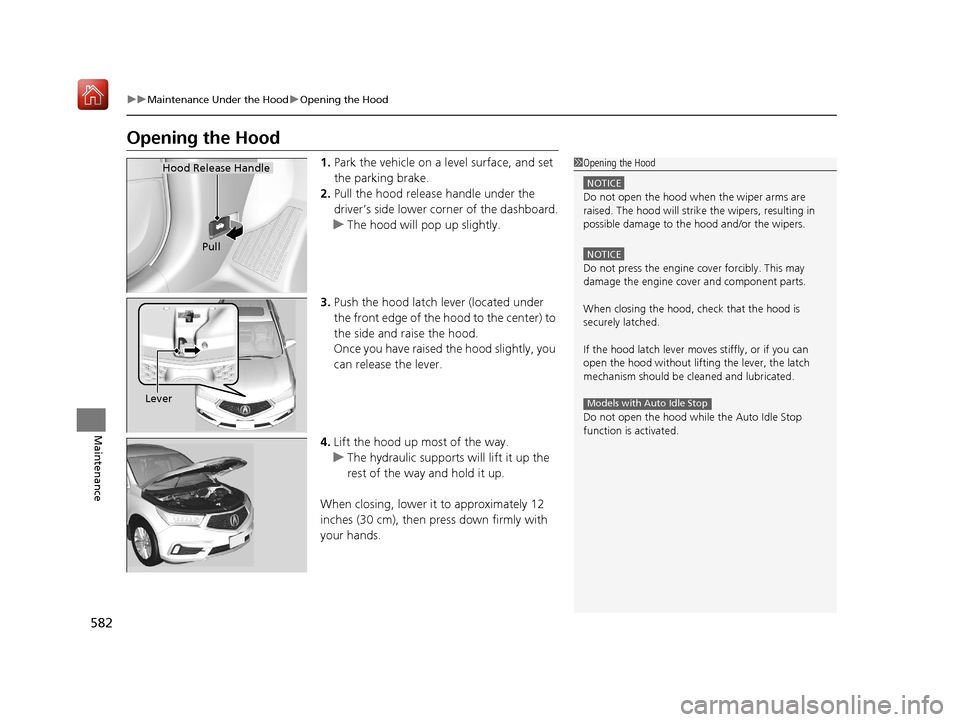
1. Park the vehicle on a level surface, and set
the parking brake.
2. Pull the hood release handle under the
driver’s side lower co rner of the dashboard.
u The hood will pop up slightly.
3. Push the hood latch lever (located under
the front edge of the hood to the center) to
the side and raise the hood.
Once you have raised the hood slightly, you
can release the lever.
4. Lift the hood up most of the way.
u The hydraulic supports will lift it up the
rest of the way and hold it up.
When closing, lower it to approximately 12
inches (30 cm), then pr ess down firmly with
your hands.1 Opening the Hood
NOTICE
Do not open the hood when the wiper arms are
raised. The hood will strike the wipers, resulting in
possible damage to the hood and/or the wipers.
NOTICE
Do not press the engine cover forcibly. This may
damage the engine cover and component parts.
When closing the hood, check that the hood is
securely latched.
If the hood latch lever moves stiffly, or if you can
open the hood without lifti ng the lever, the latch
mechanism should be cl eaned and lubricated.
Do not open the hood while the Auto Idle Stop
function is activated.
Models with Auto Idle Stop
Hood Release Handle
Pull
Lever
20 ACURA MDX-31TZ56600.book 582 ページ 2019年4月24日 水曜日 午後5時44分
Page 691 of 701
Index
690
Index
Index
A
AAC.................................................... 268, 293
ABS (Anti-lock Brake System) ................... 535
AC Power Outlet ....................................... 214
Accessories and Modifications ................. 623
Accessory Power Sockets .......................... 213
AcuraLink .................................................. 435
Adaptive Cruise Control (ACC) with Low
Speed Follow ........................................... 489
Indicator .................................................... 95
Additives
Coolant ................................................... 589
Washer .................................................... 592
Adjusting
Armrest ................................................... 204
Front Seats .............................................. 191
Head Restraints........................ 198, 200, 201
Headlights ............................................... 593
Mirrors .................................................... 188
Rear Seats................................................ 203
Steering Wheel ........................................ 187
Temperature ............................................ 122
Agile Handling Assist ................................ 520
Air Conditioning System (Climate Control System) .................................................... 219
Changing the Mode ................................ 222
Defrosting the Windshield and Windows ............................................... 225
Dust and Pollen Filter ............................... 617
Rear Climate Control System ................... 226
Sensors .................................................... 230 Synchronized Mode................................. 223
Using Automatic Climate Control ............ 219
Air Pressure ....................................... 603, 677
Airbags ........................................................ 41
Advanced Airbags ..................................... 47
After a Collision ........................................ 45
Airbag Care............................................... 55
Driver’s Knee Airbag.................................. 48
Event Data Recorder .................................... 0
Front Airbags (SRS) .................................... 44
Indicator.............................................. 53, 86
Passenger Front Airbag Off Indicator ......... 54
Sensors ..................................................... 41
Side Airbags .............................................. 50
Side Curtain Airbags.................................. 52
AM/FM Radio ............................................ 254
Android Auto ........................................... 303
Anti-lock Brake System (ABS) .................. 535
Indicator.................................................... 86
Apple CarPlay ........................................... 299
Armrest ..................................................... 204
Audio Remote Controls ........................... 237
Audio System ............................................ 232
Adjusting the Sound................................ 249
Auxiliary Input Jack.................................. 236
Error Messages ........................................ 308
General Information ................................ 316
HDD ........................................................ 271
iPhone............................................. 291, 318
iPod ........................................................ 284
MP3/WMA/AAC .............................. 268, 293 Pandora
®.............................................. 291
Reactivating ............................................ 236
Recommended CDs ................................ 317
Recommended Devices ........................... 318
Remote Controls ..................................... 237
Security Code ......................................... 236
Theft Protection ...................................... 236
USB Flash Drives...................................... 318
USB Port ................................................. 233
Authorized Manuals ................................ 685
Auto Door Locking/Unlocking ................ 154
Customize ...................................... 132, 374
Auto High-Beam ...................................... 176
Indicator ................................................... 86
Auto Idle Stop .......................................... 480
OFF Button ............................................. 481
Auto Idle Stop Indicator (Green) .............. 92
Auto Idle Stop System Indicator (Amber) ..................................................... 92
Automatic Brake Hold ............................. 533
Indicator ................................................. 533
Automatic Brake Hold System
Indicator ................................................. 533
Automatic Folding Door Mirror .............. 190
Aut omatic Intermittent W
ipers .............. 180
Automatic Lighting .................................. 173
Automatic Transmission .......................... 471
Creeping................................................. 471
Fluid ....................................................... 591
Kickdown ............................................... 471
Operating the Shift Button ...................... 474
20 ACURA MDX-31TZ56600.book 690 ページ 2019年4月24日 水曜日 午後5時44分