Brake ACURA MDX 2022 Workshop Manual
[x] Cancel search | Manufacturer: ACURA, Model Year: 2022, Model line: MDX, Model: ACURA MDX 2022Pages: 712, PDF Size: 22.65 MB
Page 464 of 712

463
uuWhen Driving uVehicle Stability AssistTM (VSA ®), aka Electronic Stability Control (ESC), System
Continued
Driving
Vehicle Stability AssistTM (VSA ®), aka Electronic
Stability Control (ESC), System
VSA ® helps to stabilize the vehicle during corn ering if the vehicle turns more or less
than what was intended. It also assists in maintaining traction on slippery surfaces.
It does so by regulating engine outp ut and selectively applying the brakes.
When VSA ® activates, you may notice that the
engine does not respond to the accelerator.
You may also notice some noise from the
hydraulic brake system. You will also see the
indicator blink.
■VSA ® Operation
1 Vehicle Stability AssistTM (VSA® ), aka Electronic Stability Control
(ESC), System
The VSA ® may not function properl y if tire type and
size are mixed. Make sure to use the same size and
type of tire, and the air pressures as specified.
When the VSA ® system indicator comes on and stays
on while driving, there may be a problem with the
system. While this may not interfere with normal
driving, have your vehi cle checked by a dealer
immediately.
VSA ® cannot enhance stability in all driving situations
and does not control the entire braking system. You
still need to drive and corner at speeds appropriate
for the conditions and alwa ys leave a sufficient
margin of safety.
The main function of the VSA ® system is generally
known as Electronic Stability Control (ESC). The
system also includes a traction control function.
The vehicle stability assist
TM (VSA ®) system, adaptive
cruise control (ACC) with low speed follow, safety
support and low tire pressu re/TPMS indicators may
come on in amber along with a message in the driver
information interface when you set the power mode
to ON after reconnecting the battery.
Drive a short distance at more than 12 mph (20 km/h).
Each indicator should go off. If any do not, have your
vehicle checked by a dealer.
VSA ® System
Indicator
22 ACURA MDX-31TYA6000_02.book 463 ページ 2020年11月5日 木曜日 午前11時39分
Page 466 of 712

465
uuWhen Driving uAgile Handling Assist
Driving
Agile Handling Assist
Lightly brakes each of the front and rear wheels, as needed, when you turn the
steering wheel, and helps support the vehi cle’s stability and performance during
cornering.1 Agile Handling Assist
The agile handling assist ca nnot enhance stability in
all driving situations. You still need to drive and
corner at speeds appropriate for the conditions and
always leave a sufficient margin of safety.
When the VSA ® system indicator comes on and stays
on while driving, the agil e handling assist does not
activate.
You may hear a sound coming from the engine
compartment while the agile handling assist is
activated. This is normal.
22 ACURA MDX-31TYA6000_02.book 465 ページ 2020年11月5日 木曜日 午前11時39分
Page 467 of 712

466
uuWhen Driving uSuper Handling-All Wheel DriveTM (SH-AWD ®)*
Driving
Super Handling-All Wheel DriveTM (SH-AWD® )*
The system controls and transfers varying amounts of engine torque to each wheel
in accordance with the driving conditions.
SH-AWD ® helps to enhance driving stability, and lets you handle situations like
sli ppe r y sur f a c es , suc h a s o n w e t, i cy , o r sno wy r oa ds , b e tt e r t ha n wh e n dr iv ing wi t h
two wheel drive. However, the system do es not help to enhance braking. Be
precautious about the following:
• It is still your responsibility to drive safely when you steer, accelerate, and apply
brakes.
• Leave a sufficient margin when braking on slippery surfaces.1Super Handling-All Wheel DriveTM (SH-AWD ®)*
The SH-AWD ® system may not function properly if
tire type and size are mixed.
Make sure to use the same size and type of tire, and
the air pressures as specified. 2 Tire and Wheel Replacement P. 621
Do not continuously spin the front tires of your
vehicle. Continuously spinning the front tires can
cause damage to the transmission and SH-AWD ®
unit.
If AWD temperature too hot. Do not drive. Idle
engine to allow system to cool . message appears
on the driver information in terface while driving, it
indicates the differential te mperature is too high. If
this happens, pull to the side of the road when it is
safe, change the shift position to
( P, and idle the
engine until the indicator goes out.
* Not available on all models
22 ACURA MDX-31TYA6000_02.book 466 ページ 2020年11月5日 木曜日 午前11時39分
Page 480 of 712

479
uuAcuraWatchTMuCollision Mitigation Braking SystemTM (CMBSTM)
Continued
Driving
Collision Mitigation Braking SystemTM (CMBSTM)
Can assist you when there is a possibility of your vehicle colliding with a vehicle or a
pedestrian detected in front of yours. The CMBSTM is designed to alert you when the
potential for a collision is determined, as well as to reduce your vehicle speed to help
minimize collision severity when a collision is deemed unavoidable.
1 Collision Mitigation Braking SystemTM (CMBSTM)
For directions on the prop er handling of the radar
sensor, refer to the following page. 2 Radar Sensor P. 549
You can read about handling information for the
camera equipped with this system. 2 Front Sensor Camera P. 547
Important Safety Reminder
The CMBS
TM is designed to reduce the severity of an
unavoidable collision. It do es not prevent a collision
nor stop the vehicle automati cally. It is still your
responsibility to operate the brake pedal and steering
wheel appropriately acco rding to the driving
conditions.
The CMBS
TM may not activate or may not detect a
vehicle in front of y our vehicle under certain
conditions: 2 CMBS
TM Conditions and Limitations P. 484
The CMBS
TM is not activated for about 15 seconds
after the power system is turned on.
22 ACURA MDX-31TYA6000_02.book 479 ページ 2020年11月5日 木曜日 午前11時39分
Page 481 of 712

uuAcuraWatchTMuCollision Mitigation Braking SystemTM (CMBSTM)
480
Driving
■How the System Works1How the System Works
When the CMBS
TM activates, it may automatically
apply the brake. It will be canceled when your vehicle
stops or a potential coll ision is not determined.
The system starts monitoring the roadway ah ead when your vehicle speed is about
3 mph (5 km/h) and there is a vehicle in front of you. The radar sensor is
behind the emblem.
The CMBS
TM activates when:●The speed difference between your vehicle and a vehicle or pedestrian
detected in front of you becomes about 3 mph (5 km/h) and over with a chance
of a collision.
●Your vehicle speed is about 62 mph (100 km/h) or less and the system
determines there is a chance of a collision with:
- Vehicles detected in front of you that are stationary, oncoming, or traveling
in your same direction.
- A pedestrian who is detected in front of you.
●Your vehicle speed is above 62 mph (100 km/h), and the system determines
there is a chance of a collision with a vehicle detected in front of you traveling
in your same direction. The camera is
located behind the
rearview mirror.
22 ACURA MDX-31TYA6000_02.book 480 ページ 2020年11月5日 木曜日 午前11時39分
Page 482 of 712

Continued481
uuAcuraWatchTMuCollision Mitigation Braking SystemTM (CMBSTM)
Driving
■When the system activates
You can change the distance ( Long/Normal /Short ) between vehicles at which the
system’s earliest collision alert will come on through driver information interface
setting options.
2 List of customizable options P. 353
1When the system activates
The camera in the CMBS
TM is also designed to detect
pedestrians.
However, this pedestrian detection feature may not
activate or may not detect a pedestrian in front of
your vehicle under certain conditions.
Refer to the ones indicating the pedestrian detection
limitations from the list. 2 CMBS
TM Conditions and Limitations P. 484
The head-up warning
* uses a lens located at the front
end of the dashboard.
Do not cover the lens or spill any liquid on it.
Lens
The system provides visual and audible alerts of a possible collision, and stops
if the collision is avoided.
u Take appropriate action to prevent a collision (apply the brakes, change
lanes, etc.)
Beep
Head-up
Warning
Lights
*
Visual Alerts
Audible Alert
* Not available on all models
22 ACURA MDX-31TYA6000_02.book 481 ページ 2020年11月5日 木曜日 午前11時39分
Page 486 of 712

485
uuAcuraWatchTMuCollision Mitigation Braking SystemTM (CMBSTM)
Continued
Driving
■Vehicle conditions
• Headlight lenses are dirty or the h eadlights are not properly adjusted.
• The outside of the windshield is blocked by dirt, mud, leaves, wet snow, etc.
• The inside of the windshield is fogged.
• An abnormal tire or wheel condition (wro ng size, varied size or construction,
improperly inflated, compact spare tire
*, etc.).
• When tire chains are installed.
• The vehicle is tilted due to a heavy load or suspension modifications.
• The camera temperature gets too high.
• Driving with the parking brake applied.
• When the radar sensor behind the emblem gets dirty.
• The vehicle is towing a trailer.
* Not available on all models
22 ACURA MDX-31TYA6000_02.book 485 ページ 2020年11月5日 木曜日 午前11時39分
Page 487 of 712

486
uuAcuraWatchTMuCollision Mitigation Braking SystemTM (CMBSTM)
Driving
■Detection limitations
• A vehicle or pedestrian suddenly crosses in front of you.
• The distance between your vehicle and the vehicle or pedestrian ahead of you is
too short.
• A vehicle cuts in front of you at a slow speed, and it brakes suddenly.
• When you accelerate rapidly and approach the vehicle or pedestrian ahead of you
at high speed.
• The vehicle ahead of you is a motorcycle, bicycle, mobility scooter or other small
vehicle.
• When there are animals in front of your vehicle.
• When you drive on a curved, winding or undulating road that makes it difficult for
the sensor to properly detect a vehicle in front of you.
• The speed difference between your vehicle an d a vehicle or pedestrian in front of
you is significantly large.
• An oncoming vehicle suddenly comes in front of you.
• Another vehicle suddenly comes in front of you at an intersection, etc.
• Your vehicle abruptly crosses over in front of an oncoming vehicle.
• When driving through a narrow iron bridge.
• When the lead vehicle suddenly slows down.
22 ACURA MDX-31TYA6000_02.book 486 ページ 2020年11月5日 木曜日 午前11時39分
Page 492 of 712
Continued491
uuAcuraWatchTMuLow Speed Braking Control*
Driving
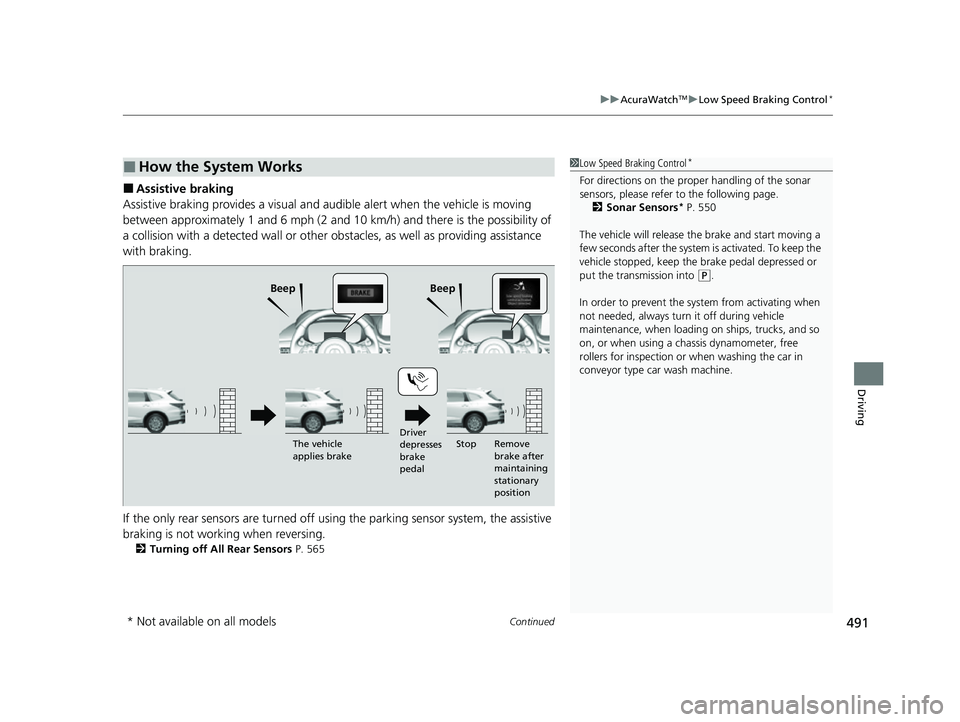
■Assistive braking
Assistive braking provides a visual and audible alert when the vehicle is moving
between approximately 1 and 6 mph (2 and 10 km/h) and there is the possibility of
a collision with a detected wall or other ob stacles, as well as providing assistance
with braking.
If the only rear sensors are turned off usi ng the parking sensor system, the assistive
braking is not working when reversing.
2 Turning off All Rear Sensors P. 565
■How the System Works1Low Speed Braking Control*
For directions on the prop er handling of the sonar
sensors, please refer to the following page.
2 Sonar Sensors
* P. 550
The vehicle will release the brake and start moving a
few seconds after the system is activated. To keep the
vehicle stopped, keep the brake pedal depressed or
put the transmission into
( P.
In order to prevent the sy stem from activating when
not needed, always turn it off during vehicle
maintenance, when loading on ships, trucks, and so
on, or when using a chassis dynamometer, free
rollers for inspection or when washing the car in
conveyor type car wash machine.Beep Beep
Driver
depresses
brake
pedalRemove
brake after
maintaining
stationary
position
The vehicle
applies brake
Stop
* Not available on all models
22 ACURA MDX-31TYA6000_02.book 491 ページ 2020年11月5日 木曜日 午前11時39分
Page 495 of 712

uuAcuraWatchTMuLow Speed Braking Control*
494
Driving
Conditions for assistive driving power suppression.
• When the accelerator is no longer depressed.
• When the accelerator is depresse d for approximately four seconds.
• When the brake pedal is depressed.
• When the steering wheel is tu rned and a collision avoided.
Conditions for assistive braking cancellation.
• A certain amount of time ha s passed since activation.
The system may not operate correct ly in the following conditions:
■Examples of obstacles the sonar sensor cannot detect
• Obstacles that do not refl ect sound waves well, such as people, snow, cloth,
sponges, etc.
• Thin obstacles such as fences, bicycles, sign posts, etc.
• Short or small obstacles.
• Obstacles immediately in front of the bumper.
• Moving objects or obstacles that suddenly enter the road.
• Obstacles that are not pe rpendicular to the ground.
■Conditions for Cancellation
■Low Speed Braking Control System Conditions and
Limitations
1 Conditions for Cancellation
After Low Speed Braking Control has activated once,
it will not activate again for the same obstacle.
They can be activated again after driving for a certain
distance after last activation.
Low Speed Braking Control ac tivates separately when
moving forward and reversing. (For example, if it
activates when moving forwar d, it can be activated
again immediately if reversing.)
However, if assistive braking has been activated, in
order to activate assistiv e driving power suppression
again, it is necessary to drive for a certain distance to
reset the system.
22 ACURA MDX-31TYA6000_02.book 494 ページ 2020年11月5日 木曜日 午前11時39分